Bigger is always better, right? While you may not realize it, there's a science behind choosing the right TV sizes for your viewing area. You want it to be large enough to make out all the fine details in your favorite movies, shows, or games, but not so large that it becomes uncomfortable and you can't see all the action without turning your head. In this guide, we'll show you how to calculate the best TV size for your viewing distance, the science behind it, and give you a few quick recommendations to help you find the best TV for your needs.
| Size | Width | Height | Area |
|---|---|---|---|
| 32" | 27.9" 70.9 cm |
15.7" 39.9 cm |
438 in² 0.283 m² |
| 40" | 34.9" 88.6 cm |
19.6" 49.8 cm |
684 in² 0.441 m² |
| 43" | 37.5" 95.3 cm |
21.1" 53.6 cm |
791 in² 0.511 m² |
| 50" | 43.6" 110.7 cm |
24.5" 62.2 cm |
1068 in² 0.689 m² |
| 55" | 47.9" 121.7 cm |
27" 68.6 cm |
1293 in² 0.835 m² |
| 60" | 52.3" 132.8 cm |
29.4" 74.7 cm |
1538 in² 0.992 m² |
| 65" | 56.7" 144 cm |
31.9" 81 cm |
1809 in² 1.166 m² |
| 70" | 61" 154.9 cm |
34.3" 87.1 cm |
2092 in² 1.349 m² |
| 75" | 65.4" 166.1 cm |
36.8" 93.5 cm |
2407 in² 1.553 m² |
| 80" | 69.7" 177 cm |
39.2" 99.6 cm |
2732 in² 1.763 m² |
| 85" | 74.1" 188.2 cm |
41.7" 105.9 cm |
3090 in² 1.993 m² |
| 98" | 85.4" 216.9 cm |
48" 121.9 cm |
4099 in² 2.644 m² |
| 100" | 87.2" 221.5 cm |
49" 124.5 cm |
4273 in² 2.758 m² |
| 110" | 95.9" 243.6 cm |
53.9" 136.9 cm |
5169 in² 3.335 m² |
| 115" | 100.2" 254.5 cm |
56.4" 143.3 cm |
5651 in² 3.647 m² |
Best 65-Inch TV
Best Upper Mid-Range 65-Inch TV
How To Use Our TV Size To Distance Calculator
The tool above lets you quickly find the best setup for your room, and you can do that in one of two ways. If you have a fixed seating arrangement, you can adjust the distance slider to set the distance between the couch and the TV. The tool will automatically adjust the size toolbar and the table next to it to recommend an appropriate TV size for you. If your seating area is a bit more flexible and you already have an idea of a TV size you would like, you can adjust the size bar instead, and it'll show you the recommended viewing distance.
This tool gives you a good starting point, but it's not a perfect solution for everyone. The recommended size for a specific viewing distance should be seen as the smallest TV we'd recommend that you can comfortably use in that space, and not necessarily the perfect size for everyone. Other factors play an important part in choosing the right TV for your space, including the width of the space, the height available for a TV (so you don't end up featured on /r/TVTooHigh), and even the width of your cabinet.
The table to the right of the tool itself also gives you the approximate width, height, and area of the screen. It's important to note that these are just approximate measurements, as they vary slightly between screen types, and they don't include the thickness of the bezels. Always check the full dimensions listed on the manufacturer's website before making a buying decision.
The Science Behind Our TV Size And Distance Calculator
While you might be tempted to simply buy the biggest size you can afford (or that fits on your wall), there's a science behind choosing the ideal size for your viewing conditions. The two key factors to consider when choosing the size of your next TV are the field of view, which is dictated by the size of the TV and the viewing distance, and the resolution.
A TV's resolution used to be an important consideration, but it's not as important today. While there are still a few smaller 1080p TVs, that format doesn't really exist in large displays anymore, for good reason. Newer 4k models deliver a much sharper picture, with more details in your favorite scenes and other improvements to picture quality that come with 4k, like HDR. There are also a handful of 8k TVs released each year, but you really shouldn't buy one, as there's essentially no 8k content available. So that leaves pretty much everyone with just one choice of resolution: 4k.
Field Of View
 |
 |
Choosing the right TV for your room is all about the field of view. You want the TV to fill enough of your vision to make out fine details, but not too much, as it'll quickly become uncomfortable. Take the example of the 43-inch Sony X800E above. The 20° field of view shown in the image on the left is clearly too far. Fine details in most scenes are too small; it doesn't deliver an immersive cinematic experience, and gaming is very difficult, as UI elements and text are nearly impossible to read.
Now, look at the image on the right, which shows the same TV but moved a bit closer so it fills up a 30° field of view. It's much easier to make out fine details in the image, which in turn delivers a more immersive movie-watching experience. This also results in a more comfortable gaming experience, as the UI elements mentioned above are easier to see without filling up too much of your field of view, so you don't have to constantly look around to see what's going on.
Recommended FOV
The Society of Motion Picture and Television Engineers (SMPTE) recommends sitting at a distance where the screen fills up a minimum of 30° of your field of vision for a good experience with mixed usage. That's a good baseline that works well for most setups, but depending on your specific needs and how you plan on using the TV, you might want to go even closer. A 40° field of view is the recommended distance for a more immersive cinematic experience, and it's also fantastic for more immersive story-driven games.
Maximum FOV
If you want the absolutely most immersive viewing experience possible, then the SMPTE recommends an oddly specific maximum field of view of 62°. This sets the bounds for the absolute largest size you would comfortably want to get for a fixed viewing distance, as any closer and you would be constantly turning your head to take in all of the details. This provides an extremely immersive gaming experience and an IMAX-style viewing experience for watching movies, but you wouldn't want to go any closer or larger than this. To put this distance in perspective, a 62° field of view would be roughly equivalent to standing at an arm's length from a standard interior door.
| Screen Size | Recommended Mixed Usage Distance (30°) | Recommended Cinema Distance (40°) | Recommended Immersive Distance (62°) |
|---|---|---|---|
| 32" | 4'4" (1.32m) | 3'2" (0.97m) | 1'11" (0.58m) |
| 40" | 5'5" (1.65m) | 4'0" (1.22m) | 2'5" (0.73m) |
| 43" | 5'10" (1.78m) | 4'4" (1.31m) | 2'7" (0.79m) |
| 48" | 6'6" (1.98m) | 4'9" (1.46m) | 2'10" (0.88m) |
| 50" | 6'9" (2.07m) | 5'0" (1.52m) | 3'0" (0.91m) |
| 55" | 7'5" (2.27m) | 5'6" (1.67m) | 3'4" (1.00m) |
| 65" | 8'10" (2.69m) | 6'6" (1.98m) | 3'11" (1.20m) |
| 70" | 9'6" (2.89m) | 7'0" (2.13m) | 4'3" (1.29m) |
| 75" | 10'2" (3.10m) | 7'6" (2.28m) | 4'7" (1.38m) |
| 77" | 10'5" (3.18m) | 7'8" (2.34m) | 4'8" (1.42m) |
| 83" | 11'3" (3.43m) | 8'3" (2.53m) | 5'0" (1.53m) |
| 85" | 11'6" (3.51m) | 8'6" (2.59m) | 5'2" (1.57m) |
| 98" | 13'3" (4.05m) | 9'9" (2.98m) | 5'11" (1.81m) |
| 110" | 14'11" (4.55m) | 11'0" (3.35m) | 6'8" (2.03m) |
| 115" | 15'7" (4.75m) | 11'6" (3.50m) | 6'11" (2.10m) |
Above, you can see how those fields of view translate to different viewing distances for the most common TV sizes. Comparing the different fields of view, you can see just how wide the range of acceptable TV sizes can be for a given viewing distance. If your couch is 7 feet from the TV, for example, then you could go with anywhere from a 50-inch TV up to a 115-inch model, depending on how immersive a viewing experience you want. A 40° field of view is generally the safest way to go, and it strikes a comfortable balance between immersiveness and comfort.

Finding the right size for your specific situation is usually a balancing act. You want to choose a TV that will fill up somewhere between 30° and 40° of your field of view. The area between the orange and the blue lines in the graph above shows the approximate Goldilocks zone for TV sizes between 20 and 100 inches.
If you're still undecided, a good trick is to map out the shape of the TV on the wall with painter's tape. This will give you a good idea of how a TV will look when mounted on the wall, and if you map out different sizes at once, you can easily compare them. The website Display Wars can also help you compare the sizes of different display options.
Additional Information
Now, you shouldn't buy a TV just because of its size and the field of view it'll fill in your seating arrangement. There are other things you should consider when choosing which size of TV to buy.
Source Quality

Just because you buy a 4k TV doesn't mean everything you're watching will have a 4k resolution or will even look good on a 4k TV. Almost all streaming services offer a wide selection of 4k content if you have the right plan, but you'll still see some artifacts due to the compression algorithm. Artifacts can appear in multiple forms, like noise, blur, or a pixelated image. Some artifacts may even be visible from farther away.
Size vs. Performance
With prices dropping on larger TVs, one question often arises: whether you should prioritize size over performance. Let's say you can get either the 65-inch LG G5 OLED or the 77-inch LG C5 OLED. Should you get the larger but slightly worse C5 or get a smaller but better G5? The answer isn't so straightforward. As we explained above, getting the right size for your viewing situation is important. Much like Goldilocks trying to find the right bed, it's important to choose a TV that fits your viewing environment and get the best quality TV within your budget.
Now, other factors go into choosing the right TV size for your room, and it's not the end of the world if you get something slightly bigger or slightly smaller than the ideal. For example, if you know you're moving in a year and you'll have a much bigger room to deal with, it's fine to get a larger TV now and have it ready to go for the new house. You're not going to break your neck by looking around to take in each shot, and unlike what your mother may have told you when you were little, you won't go blind by sitting too close to the TV (VR users are in for a rough time if that were true).
The situation becomes even more complex when you consider ultra-large TVs (>98 inches). As prices come down, these extremely large TVs are becoming increasingly accessible to the average consumer. These TVs don't necessarily fit the size-to-distance curve; instead, they're all about creating the most immersive viewing experience possible. At this size, you could also consider a projector as an alternative to a large TV. The math for projectors is a bit different and depends on other aspects like the throw ratio and type of projector, so check out our projector throw distance calculator for some tips to help you find the right projector for your needs.
Angular Resolution
Angular resolution is the point at which the eye can 'resolve' or distinguish individual details in an image. Experts suggest that someone with 20/20 vision (or 6/6 using the metric system) can distinguish details that are 1/60th of a degree apart. Our ability to resolve details is determined not only by visual acuity but also by distance. At a certain distance, depending on your eyesight, your eyes won't be able to distinguish every detail. So, if you sit too far, your eyes won't be able to resolve the image, but if you sit too close, that image will appear pixelated. For lower resolutions, you have to sit a bit further than preferred to not notice the pixels, while 4k resolutions and higher give you more freedom.
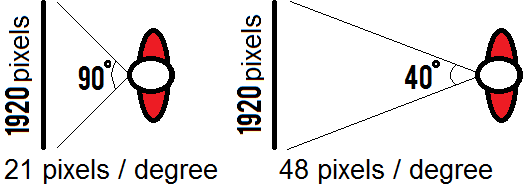
For instance, sitting close to a 1080p TV can look almost like watching through a screen door because you can see the individual pixels, even if it's playing a high-quality 1080p HD movie. Increasing your distance to the TV also increases the density of details, producing a better image. Since 4k TVs have such a large density of pixels, it's much more difficult for this issue to arise. You need to be quite close to a fairly large TV for the pixels to be noticeably distracting.
With 8k TVs, that density increases further, making it even harder to notice flaws with the resolution unless you're sitting extremely close. However, this also decreases the point at which the perceived difference in picture quality becomes noticeable. Because the pixels are more densely packed with an 8k resolution, you need to sit closer to actually resolve those details. For that reason, 8k only really makes sense if you want a big screen and plan to sit close to it. Learn more about the difference between 4k and 8k.
Everyone's eyesight is a little different, so visual acuity isn't the best way to find the right distance. As mentioned above, most TVs on the market have a 4k resolution, so this usually shouldn't factor into your buying decision. You should instead use it to figure out the closest you can sit to a TV without hitting its resolution limitation.
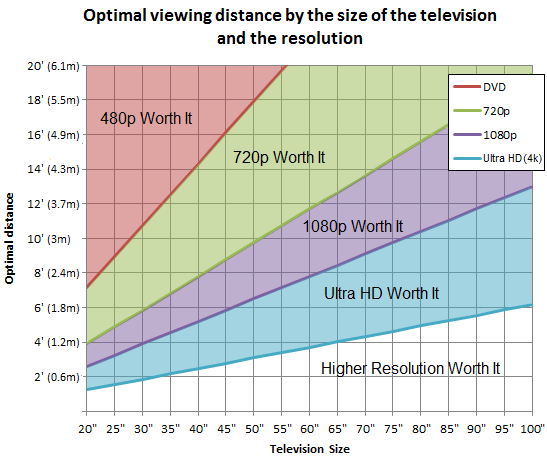
This chart shows the point at which an upgrade in resolution becomes worth it, depending on the size and distance to the TV. Each line represents the optimal viewing distance for each resolution. Still, any TV that falls within the range of that color will be suitable for noticing a difference in picture quality. For example, if you have a 65-inch TV, the viewing distance at which the eye can actually process the details of 4k content is about 4 feet. However, any distance between 4 and about 8.5 feet will be enough to appreciate the difference between 4k and 1080p on a 65-inch TV. If you go too far, the image will look identical to 1080p HD.
The chart suggests that 4k UHD may not be worth the upgrade at a certain point, if you're sitting more than 7 feet away and have a 55-inch TV, for instance. Really, though, this chart is just a guide, and as 4k TVs are the absolute standard, the question of whether it's worth it is a moot point. While your eyes may be unable to tell the difference at a certain point, your next TV will likely be a 4k TV anyway. Knowing the optimal viewing distance for the resolution can help you determine a living room setup that takes full advantage of your TV's resolution. Still, since angular resolution is almost a non-issue with UHD content, we recommend using our calculator tool at the top of the page, which is based on the optimal field of vision.
TV Sizes Chart
Bezels are so thin now on most TVs that the approximate width and height of any given TV is roughly the same for each size class. So, if you're trying to plan how a TV will look on your wall, here are the approximate TV dimensions by size:
| Screen Size | Approximate Width | Approximate Height | Area |
|---|---|---|---|
| 32" | 27.9" 70.9 cm |
15.7" 39.9 cm |
438 in² 0.283 m² |
| 40" | 34.9" 88.6 cm |
19.6" 49.8 cm |
684 in² 0.441 m² |
| 43" | 37.5" 95.3 cm |
21.1" 53.6 cm |
791 in² 0.511 m² |
| 48" | 41.8" 106.1 cm |
23.5" 59.7 cm |
985 in² 0.635 m² |
| 50" | 43.6" 110.7 cm |
24.5" 62.2 cm |
1068 in² 0.689 m² |
| 55" | 47.9" 121.7 cm |
27" 68.6 cm |
1293 in² 0.835 m² |
| 65" | 56.7" 144 cm |
31.9" 81 cm |
1809 in² 1.166 m² |
| 70" | 61" 154.9 cm |
34.3" 87.1 cm |
2092 in² 1.349 m² |
| 75" | 65.4" 166.1 cm |
36.8" 93.5 cm |
2407 in² 1.553 m² |
| 77" | 67.1" 170.4 cm |
37.8" 95.9 cm |
2533 in² 1.634 m² |
| 83" | 72.3" 183.7 cm |
40.7" 103.4 cm |
2944 in² 1.899 m² |
| 85" | 74.1" 188.2 cm |
41.7" 105.9 cm |
3090 in² 1.993 m² |
| 98" | 85.4" 217 cm |
48.1" 122 cm |
4103 in² 2.647 m² |
| 110" | 95.9" 243.5 cm |
53.9" 137 cm |
5170 in² 3.336 m² |
| 115" | 100" 254.6 cm |
56.4" 143 cm |
5651 in² 3.646 m² |
These TV measurements aren't exact, but they're close enough that you can use them to compare the approximate measurements of each size to help you decide which TV size you should buy.
Conclusion
We recommend a field of vision of about 30 degrees for mixed usage. To easily find out what size you should buy, you can divide your TV viewing distance (in inches) by 1.6 (or use our TV size calculator above), which roughly equals a 30-degree angle. If the best size is outside your budget, just get the biggest TV you can afford. After all, these are guidelines, and since most TVs nowadays are 4k, you can't really go wrong with the size that works for you, especially since picture quality also depends a lot on the content and viewing conditions. Ideally, you would optimize your TV's capacity by getting one large enough for you to notice all the visual detail that 4k has to offer. Ultimately, you should watch however feels most comfortable to you, whatever the size and distance may be.