
If you're not a big fan of ultra-wide monitors, but you want something bigger than a 16:9 32-inch display to play video games, you might be considering a new TV to pair with your PC. Fortunately, many modern TVs have a dedicated gaming picture mode that disables any unnecessary processing to provide the lowest latency possible, and offers advanced gaming features like HDMI 2.1 bandwidth, 4k at high refresh rates, and VRR. On top of that, many TVs (especially OLEDs) offer fast response times that provide clear motion. Even though a TV has all those features, it doesn't automatically mean it also offers good image quality, which is still the most important factor if you want your games to look the best they can. Through our rigorous testing procedure, we're able to see which TVs offer the best combination of gaming features and image quality, depending on your budget and needs.
Below are our recommendations for the best TVs to use as a PC monitor. This article mostly focuses on the gaming performance of TVs available in the 42-inch to 48-inch size range, as most people will find anything larger than that too big for monitor usage. Check out our picks for the best gaming TVs if you want a larger TV to pair with your PC. If you're more concerned about all-around performance, see our picks for the best TVs, or take a look at the best monitors if you're still considering one of those instead of a TV. You can also vote on which TVs you want us to buy and test. To learn more about this year's new TVs, check out our 2026 TV lineup page.

We buy and test dozens of TVs yearly, taking an objective, data-driven approach to deliver results you can trust. Our testing process is complex, with hundreds of individual tests that take over a week to complete. Most of our tests use specially designed test patterns that mimic real content, but we also use the same sources you have at home to ensure our results match the real-world experience. We use two main tools for our testing: a Colorimetry Research CR-100 colorimeter and a CR-250 spectroradiometer.
-
Best TV Monitor
 Prime Day Deal: Buying the LG C6 OLED? RTINGS members get an extra discount at our partner retailer - 55" for $1,499.99, 65" for $1,849.99, or 77" for $2,599.99. Join now to get the member price.GamingBright RoomMixed UsageHome TheaterSportsGame Mode ResponsivenessBrightnessBlack LevelColorProcessing (In Development)Resolution:4kNative Refresh Rate:165HzScreen Finish:GlossyPanel Type:OLEDSub-Type:WOLEDDolby Vision:YesSee all our test resultsSizes:42" 48" 55" 65"
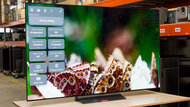
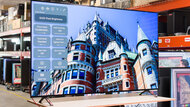
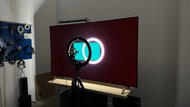
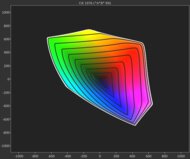
The best TV for PC monitor usage is the LG C6 OLED 2026, which is one of the few higher-end TVs on the market available in a 42-inch model. It offers a solid combination of gaming features and picture quality, making it great for PC gamers. The TV has an impressive combination of inky blacks, vibrant colors, and very good brightness, so it looks great regardless of the game you're playing. The TV does a great job overcoming glare from indirect light sources, like overhead lights. However, it struggles a bit with reducing the intensity of direct reflections, which isn't ideal if you have a lamp behind you that's directly facing the screen. Fortunately, blacks stay very deep in a well-lit room, so you don't have to trade in very much image quality when you have your lights on.
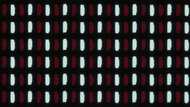
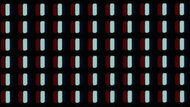
The TV has four HDMI 2.1 ports and offers up to 4k @ 165Hz, so you can really push your frame rate if you have a powerful PC. It's compatible with HDMI Forum VRR, FreeSync, and G-SYNC, so you get a tear-free gaming experience regardless of the GPU you own. Response times are nearly instantaneous, so motion is crystal clear, even in fast-paced games. Chroma 4:4:4 signals are displayed properly, which helps with text clarity. However, the text still isn't perfectly clear due to the TV's RWBG subpixel layout, so it's not a great choice if you're doing text-critical work daily.
-
Best Mid-Range Monitor TV
GamingBright RoomMixed UsageHome TheaterSportsGame Mode ResponsivenessBrightnessBlack LevelColorProcessing (In Development)Resolution:4kNative Refresh Rate:120HzScreen Finish:GlossyPanel Type:OLEDSub-Type:WOLEDDolby Vision:YesSee all our test resultsSizes:48" 55" 65" 77" 83"The best TV to use as a monitor in the mid-range category is the LG B5 OLED. It isn't available in a 42-inch size like the LG C6 OLED 2026, but if you're okay with a 48-inch model, it's a great choice. Colors aren't quite as vibrant as they are on the C6, but they don't look muted at all, so colors still pop in games. It's also not as bright as the C6, so the image looks less punchy, but it doesn't look dim in dark or moderately lit rooms. However, it's not bright enough to overcome glare in well-lit rooms, especially if you have lights directly facing the screen. Fortunately, it displays the same inky blacks as the C6, and those blacks remain deep when you have some lights on.
It doesn't support 165Hz, but it still has four HDMI 2.1 ports capable of 4k @ 120Hz. Like the C6, it supports FreeSync, HDMI Forum VRR, and G-SYNC, so it delivers nearly tear-free gaming with all modern GPUs. Pixel response times are nearly instantaneous, so fast motion is nice and clear. Chroma 4:4:4 signals are displayed properly, which is essential for good text clarity, but since the TV doesn't use a traditional RGB subpixel layout, text isn't as clear as it could be.
-
Best Budget Monitor TV
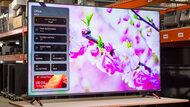
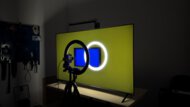
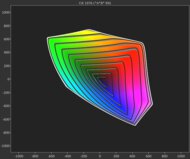
GamingBright RoomMixed UsageHome TheaterSportsGame Mode ResponsivenessBrightnessBlack LevelColorProcessing (In Development)Resolution:4kNative Refresh Rate:60HzScreen Finish:GlossyPanel Type:LCDSub-Type:IPSDolby Vision:YesSee all our test resultsSizes:43" 50" 55" 65" 75" 85"The Walmart-exclusive Vizio Mini LED Quantum 4k is a decent budget option if you just want something cheap for casual use or to use as a second monitor. Colors aren't as rich or saturated as on the LG B5 OLED, but they're vibrant enough that the image doesn't look muted. The TV has local dimming to help deepen blacks, so they avoid looking like charcoal. However, they aren't nearly as deep as on an OLED like the B5, so the image lacks depth, and there's a visible glow around bright lights in otherwise dark scenes. Fortunately, the TV is a bit brighter than the B5, so the image doesn't look dim and has some punch to it. However, its poor reflection handling means it's still best suited for dark and moderately lit rooms.
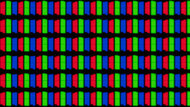
It doesn't have any HDMI 2.1 ports, and you're limited to 4k @ 60Hz. However, you can play games at 120Hz in 1080p, which is nice for a TV this cheap. It still supports all three types of VRR to reduce screen tearing. However, there's still visible screen tearing when your frame rate hovers around 55Hz, and it's best to handshake at 120Hz if you want VRR to work as it should. Unfortunately, its slower pixel transitions lead to more visible motion blur, which holds back its performance in fast-paced games. One advantage this TV has over the OLED options above is that it uses an RGB subpixel layout. When you combine that with the TV's ability to properly display chroma 4:4:4 signals, you get incredibly clear text.



Notable Mentions
-
Samsung QN42S90HAEXZA:
The 42-inch Samsung S90H OLED is an alternative to the LG C6 OLED 2026 and has most of the same features. The Samsung's biggest advantage is its matte coating, which makes it more suitable for bright rooms than the LG. However, the LG is a bit brighter and more versatile thanks to its superior image processing.
See our review
Recent Updates
Jun 25, 2026:
We replaced the LG C5 OLED with the LG C6 OLED 2026 since the newer model is the better option, and removed the Samsung QN90F because it's no longer available. We added the Vizio Mini LED Quantum 4k to a new 'Best Budget Monitor TV' category to give more options. Finally, we replaced the Samsung S90F OLED with the Samsung S90H OLED in the Notable Mentions.
Apr 13, 2026:
We revised the introduction and some other text throughout the article for clarity.
Jan 15, 2026:
We confirmed the accuracy and availability of our current picks.
Oct 23, 2025:
We revamped the article to specifically focus on TVs available in 42-48" sizes, since anything larger than that is typically too big to use as a monitor. The LG C5 OLED is now our top pick instead of the Samsung S95F OLED, the LG B5 OLED retains its spot as the 'Best Mid-Range' option, and the Samsung QN90F has been added as the 'Best Mini LED' pick. The TCL QM7K and the TCL QM6K have been dropped from the article, since they're only available in larger sizes. Finally, we refreshed the Notable Mentions section.
Sep 05, 2025:
We dropped the 'Best Monitor TV For PC Gaming' section since we reworked the article to mostly focus on gaming performance. Our new top pick, the Samsung S95F OLED, technically replaced the Samsung S90D OLED. We also replaced the Hisense U8N with the LG B5 OLED, the Hisense U7N with the TCL QM7K, and the TCL Q651G with the TCL QM6K. Furthermore, we dropped the 'Best Cheap Monitor TV' section since no cheap TV on the market is really suitable for use as a PC monitor. Finally, we updated the Notable Mentions section and updated some other text throughout the article for clarity.
All Reviews
Our recommendations above are what we think is currently the best TV to use as a monitor for most people in each price range. We factor in the price (a cheaper TV wins over a pricier one if the difference isn't worth it), feedback from our visitors, and availability (no TVs that are difficult to find or almost out of stock everywhere).
If you would like to do the work of choosing yourself, here is a list of recent TVs that are suitable to use as a PC monitor. Be careful not to get too caught up in the details. While no TV is perfect, most TVs are great enough to please almost everyone, and the differences are often not noticeable unless you really look for them. If you're still unsure whether a TV or monitor is best for you, check out our article on PC Monitors vs TVs.