
Our Verdict
The Samsung JS9500 SUHD TV is a great TV overall. It has a wider color gamut and a good full array local dimming backlight. It is very good for video games, due to its low response time and input lag. Unfortunately, the colors lose saturation at an angle and the gray uniformity is sub-par.
- Wider color gamut
- Low motion blur and input lag
- Bright and doesn't reflect a lot of light
- Poor gray uniformity
- Limited viewing angle
Check Price

We buy and test dozens of TVs yearly, taking an objective, data-driven approach to deliver results you can trust. Our testing process is complex, with hundreds of individual tests that take over a week to complete. Most of our tests use specially designed test patterns that mimic real content, but we also use the same sources you have at home to ensure our results match the real-world experience. We use two main tools for our testing: a Colorimetry Research CR-100 colorimeter and a CR-250 spectroradiometer.
Test Results
Older Test Bench: We tested this product using an older TV test methodology before a major update. Some of the test results below aren't directly comparable with other TVs. Learn more
for pictures & test results

The Samsung JS9500 looks and feels like a high-end TV. It is quite heavy and thick, due to its full array local dimming backlight. The stand, too, is quite stable, given the weight of the TV.


Turning on the local dimming didn't change our contrast ratio measurement at all (we measure it on a checkboard pattern). The native contrast on this TV is only average.

Given the same HDR footage, the difference between how well two TVs display HDR content is based on how wide of a dynamic contrast range they can display. To test this, we display a 2% white window and put the backlight and local dimming to the max. We then measure how bright that rectangle is.
We measured 726.7 cd/m2 on the Samsung UN65JS9500, which is quite bright. You can see a big blooming area around it though, but at least the edges of the screen are completely turned off.
Of course, this test is far from perfect. When the HDR format gets standardized in a few months, we will update the review with a more meaningful test.
for pictures & test results

Unfortunately, the gray uniformity isn't very good. You can see a few darker spots and edges. Curved TVs tend to have worse uniformity than their flat equivalent.
for videos & test results

Like all VA panels, the colors are not the same when you sit at an angle. You will need to watch in front to appreciate this TV's picture quality.
Update 01/06/2017: We have changed the methodology of testing. Since this is an old TV which we don't have anymore, we extrapolated the results from 2016 TVs.
for pictures & test results

The black uniformity is average. Turning on the local dimming feature helps a little bit to hide this issue, but you can still see some clouding in some dark scenes.


for pictures & test results

This TV doesn't have any problem upscaling lower-resolution content, DVDs looks good and not too soft.
for pictures & test results

Cable content looks also very good and is not too soft either.
for pictures & test results

The 1080p upscaling is good. It looks the same as on the cheaper 4k Samsung TVs.

for pictures & test results

Selecting 'Native' as the color space increases the gamut quite noticeably. It is still far from the full Rec. 2020, though.
for pictures & test results

for pictures & test results

The glossy screen does a great job at reducing reflected ambient light. However, direct lights are more defined, and also have a rainbow glare around them.
It can get very bright. It is great for a bright room - unless you have a window right in front of the TV. The reflection will be quite defined, which is distracting.
for pictures & test results
The 3D is good. A little bit of crosstalk, but nothing noticeable during normal scenes.




Watching movies over a Blu-ray player in 24p has no judder, but you might see some when watching movies over a 60p or 60i source, because it can't always do the reverse 3:2 pulldown (sometimes it works, but not always). 'Auto Motion Plus' gets rid of this, but it comes with the soap opera effect.


In game mode, the input lag is very low. PC mode has a higher input lag of 56.6 ms, which is a bit unfortunate if you want chroma 4:4:4.
It doesn't support 1080p @ 120fps, which is a bit of a shame, considering this is Samsung's best TV. To get 4k @ 60Hz @ 4:4:4, you must enable both PC mode and UHD Color.
for pictures & test results

The One Connect box is quite big. It also has a fan inside, which produces a little bit of noise.
for pictures & test results

There are only two connections on the TV: the AC power and the One Connect. Everything must go through the One Connect box.
for pictures & test results

The low-end cut off is excellent for a TV, and it gets loud too. However, the frequency response suffers at higher volumes, most likely due to pumping.
for pictures & test results

The distortion is good at very low listening levels, but it becomes significant as the volume increases.
Major Apps Available
for pictures & test results

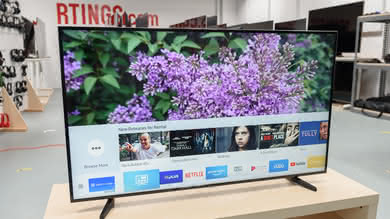
Samsung's smart platform is really good, and the included remote is likewise pretty great. It includes voice and motion controls, so navigation is pretty simple.
Unique to Samsung's and Sony's smart offerings is the 'Playstation Now' game streaming feature. If you connect a DualShock 4 controller to this TV, you'll be able to subscribe to a game streaming service that offers old PlayStation games, playable directly from your TV.
for pictures & test results

The included remote, which doubles as a cursor pointer, is useful for navigating the smart features. The only downside is the lack of number pad directly on it.


