
Our Verdict
The Samsung JU7100 has great picture quality, assuming you don't sit at an angle. It is better than last year's Samsung 4k TVs for gaming, thanks to the lower input lag. Upscaling works better than the competition, so you don't need to worry about 1080p content looking soft on this TV.
- Great gaming TV. Very low input lag and minimal motion blur.
- Great picture quality in both dark and bright rooms.
- Loss of color saturation at an angle.
Check Price

We buy and test dozens of TVs yearly, taking an objective, data-driven approach to deliver results you can trust. Our testing process is complex, with hundreds of individual tests that take over a week to complete. Most of our tests use specially designed test patterns that mimic real content, but we also use the same sources you have at home to ensure our results match the real-world experience. We use two main tools for our testing: a Colorimetry Research CR-100 colorimeter and a CR-250 spectroradiometer.
Test Results
Older Test Bench: We tested this product using an older TV test methodology before a major update. Some of the test results below aren't directly comparable with other TVs. Learn more
for pictures & test results

The bezel looks great on the Samsung JU7100, but the borders are slightly thicker than most 2014 models. They also slant towards the screen a little bit.
The stand is very stable, but it doesn't swivel.


The contrast ratio is average. It's a little bit sub-par when compared to some other VA panels, but unless they are side to side, you won't really notice the difference between blacks of 0.032 cd/m2 and 0.020 cd/m2.
for videos & test results

The local dimming feature is not effective. In this video, 'Smart LED' was set to high. You can see that the backlight adjusts for the moving dot, but it affects only about 50% of the screen at a time.
for pictures & test results

The gray uniformity isn't great, but it's better than most of the TVs we have reviewed. The DSE is relatively minimal.
for videos & test results

All Samsung TVs lose color saturation when viewed at an angle. You can still see the picture, but it is nowhere near as good as when seen from directly in-axis.
Update 01/06/2017: We have changed the methodology of testing. Since this is an old TV which we don't have anymore, we extrapolated the results from 2016 TVs.
for pictures & test results

The uniformity of a black frame is sub-par on this TV. There is faint clouding on the left side that covers a large portion of the screen.


for pictures & test results

For lower resolutions like DVDs, 'Digital Clean View' set to high does a great job of reducing compression artifacts and increasing the amount of detail, without softening the picture.
for pictures & test results

Cable TV can also benefit from turning on 'Digital Clean View'.
for pictures & test results

Upscaled 1080p looks nearly as sharp as with native 1080p, which is great. In comparison, the Vizio P 2015 looks a lot softer/blurrier.


for pictures & test results

for pictures & test results

The Samsung JU7100 reflects very little ambient light due to its glossy screen, which is great for improving the perceived contrast ratio when a few lights are on. However, this type of finish has two downsides: direct light sources (like bulbs) get a rainbow around their reflection, and the eye tends to focus instead on reflected objects because they are well-defined. Therefore, this TV is ideal when you have the lights either overhead or behind the TV - not facing the TV.
It can get bright enough for a bright room. You're able to see the picture even through the reflection of the window we use for tests.
for pictures & test results
No noticeable crosstalk with 3D content. The JU7100 doesn't come with 3D glasses included.




Movies don't have any judder when you are watching via a Blu-ray player at 24p. Via 60p or 60i though (like when playing on a PC computer), it can't reliably do the reverse 3:2 pulldown. You can turn on 'Auto Motion Plus' to fix it, but at the cost of the soap opera effect.


In game mode, this TV can achieve a low 26.1ms, which makes it a good gaming TV. In PC mode, the input lag is 44.3 ms.
4k @ 60 fps worked at chroma 4:4:4. You need to turn on 'UHD Color' and also set the input to PC. If it doesn't work for you, try changing your cable. It didn't work with our Monoprice 18 Gbps 15ft Redmere cable, but it worked with a cheap 3 ft one.

for pictures & test results

The TV comes with a One Connect Mini box. That's the only HDMI inputs it has, which means more clutter near your TV.
for pictures & test results

Good low-end cut off and loudness. The frequency response however, is rather poor. There may be some pumping at higher volumes.
for pictures & test results

Low distortion level at comfortable listening volumes with a slight increase as the volume increases.
Major Apps Available
for pictures & test results

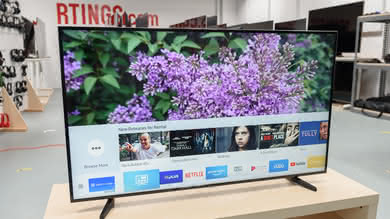
The included smart features work really well. The app selection is pretty good, and the remote has the handy motion and voice control features, so navigation and search are pretty smooth.
The HDMI inputs are all on the OneConnect Mini box, which may not be ideal for mounting purposes. The included cable that is used to connect the box to the TV is 7' long.
