
Our Verdict
Good TV for a wide range of usage. When viewed from directly in front the picture quality is good, but it degrades rapidly at an angle. It has little motion blur which is great for sports, video games or PC use. Input lag is also good.
- Good picture quality, especially dark scenes
- Little motion blur
- When viewed at an angle image deteriorates rapidly
- Local dimming doesn't work well
Average for watching movies in a dark room. Picture quality is good, but local dimming doesn't work well to improve dark scene performance. Lower quality content such as DVDs or 1080p blurays look good.
Slightly better than average for watching TV in a bright room. When viewed from in front the picture quality is good, but degrades rapidly when viewed at an angle. Deals with reflections well and can get bright enough to combat most glare. Inbuilt apps work well for streaming or casual watching. Upscaling of low quality content such as cable TV is good.
Good for watching sports. Motion handling is great, but some dirty screen effect is visible when watching sports. Picture quality is good, but degrades rapidly when viewed at an angle.
Great for video games. Fast paced motion is handled well due to the great response time. Picture quality is good and input lag is great.
Slightly below average HDR performance. Can't get very bright highlights or display a wider range of colors. Local dimming doesn't work well to improve dark scene performance. Picture quality is good.
Good for HDR gaming. Input lag in HDR is good enough for most people. Picture quality is good. Unfortunately doesn't support a wider color gamut or display bright highlights.
Good PC monitor. Supports a wide range of resolutions, and supports chroma subsampling at 4k for clear text. Picture quality is good when viewed from in front, but degrades at a slight angle. Motion handling is great, but input lag is slightly higher than ideal.
Check Price
Differences Between Sizes And Variants
We tested the 50" (50H8C). For the most part, we expect our review to be valid for the 55" (55H8C). The newer 65" model (65H8C) has an edge lit backlight as opposed to the full array backlight of the 50" and 55" models, but we still expect it to perform similarly.
If someone comes across a different type of panel or if their Hisense H8C doesn't correspond to our review, let us know and we will update the review.
| Size | Model |
| 50" | 50H8C |
| 55" | 55H8C |
| 65" | 65H8C |
Popular TV Comparisons

The Hisense H8C is a budget TV with an impressive array of features. Depending on your use there may be another similarly priced TV which out performs it, but the Hisense H8C is a good choice for it's versatility. Keep this in mind when viewing our recommendations below.
The Hisense H8C is a better TV than the TCL US5800. It has deeper blacks, higher peak brightness, better reflection handling, better motion handling, HDR compatibility, and slightly better built-in speakers. On the other hand, the TCL uses Roku's smart interface which has a wide array of apps and is easy-to-use.

We buy and test dozens of TVs yearly, taking an objective, data-driven approach to deliver results you can trust. Our testing process is complex, with hundreds of individual tests that take over a week to complete. Most of our tests use specially designed test patterns that mimic real content, but we also use the same sources you have at home to ensure our results match the real-world experience. We use two main tools for our testing: a Colorimetry Research CR-100 colorimeter and a CR-250 spectroradiometer.
Test Results
Older Test Bench: This product has been tested using an older TV test methodology, before amajor update. Some of the test results below aren't directly comparable with other TVs. Learn more
for pictures & test results

The design is basic, but there are a couple of nice touches which help it to stand out from other budget TVs. The whole TV is plastic, but the bottom of the TV and the legs have a slightly nicer finish. The borders are quite thin and look good.
for pictures & test results

The stand is quite wide. It is very basic but has a nice finish on the plastic.
Footprint of the 50" TV stand: 9.6" x 36.9"
for pictures & test results

The back of the TV features a textured finish. Half of the inputs are on the back, and half on the side. This means that some of them may be difficult to access if wall mounted.
for pictures & test results

The borders are quite thin, and made of plastic. They don't look bad, but won't stand out.
for pictures & test results

The TV has an average thickness. It is slightly wider at the bottom, and will stick out a bit if wall mounted.
for pictures & test results

The contrast ratio is great, and results in good dark scene performance even in a blacked out room.
for videos & test results

Although the H8C features a full-array backlight, it doesn't have many zones and takes a while to turn regions on and off. We recommend disabling it, as it is not very effective.
A red tint can be seen preceding the white square or circle, this is due to the fact that the red sub-pixel having a different response time than the green and blue one. It is the first time that we noticed a difference big enough that we could see it on our test video.
Like the HDR peak brightness, the SDR peak brightness is bellow average. The local dimming dimmed the small highlight, but this is less problematic for regular content than HDR. Overall, the peak brightness is a bit less high than what the TV can reach while in HDR mode, but should be enough to enjoy normal content in a dark room environment.
The peak brightness is slightly below average. We do this test local dimming enabled, and we find that the small windows are dimmed. As such, highlights don't stand out very much but the whole screen can get quite bright which is good to counter ambient light.
for pictures & test results

for pictures & test results

The gray uniformity is slightly below average. Some vertical bands which are slightly warmer are visible, and all four corners are very dark. Sports or other scenes where there is panning over uniform surfaces will result in a visible dirty screen effect.
for videos & test results

Even at a slight angle, the picture quality of the H8C degrades very rapidly. This is an issue for anyone who doesn't sit directly in front of the TV.
Update: We have changed the methodology of testing. Since this is an old TV which we don't have anymore, we extrapolated the results.
for pictures & test results

The black uniformity is great. On our test picture, both sides are slightly brighter than the center, but this is due to the very narrow viewing angle. Despite that, it is an impressive result for a budget TV and it will help to provide great dark scene performance.
for pictures & test results

The TV accepts a 10 bit input, and displays it smoothly. There are some tints visible in the grayscale, but overall a good result without any banding.
for pictures & test results

for pictures & test results

for pictures & test results

Prior to calibration, the results are very good. The colors are slightly oversaturated, and the gamma doesn't follow our target 2.2 curve but for most people this should not be an issue.
for pictures & test results

for pictures & test results

for pictures & test results

The H8C includes similar calibration functions as most other TVs. Using the 2 point and 10 point calibration we were able to very accurately fix the issues in the white balance. The colors were still a little bit oversaturated, but this is still a very good result. You can find our calibration settings here.
for pictures & test results

The upscaling of low quality content such as DVDs is quite good. Details are preserved well, and sharp lines appear smooth.
for pictures & test results

720p content looks quite good. The image is a little soft, and so some small details are lost.
for pictures & test results

Higher quality sources such as blurays look sharp and crisp.
for pictures & test results

Images at the native 4k resolution appear sharp.
for pictures & test results

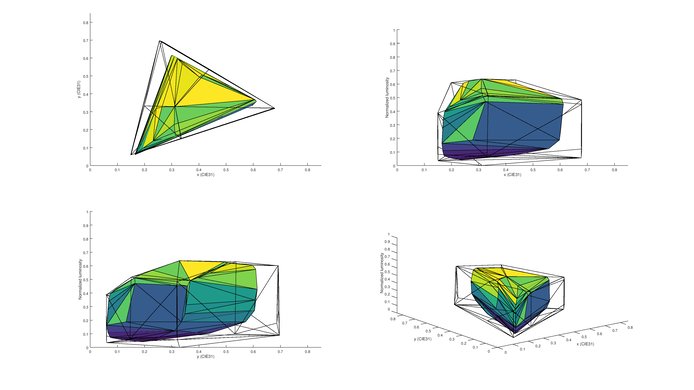
The TV does not support a wide color gamut. This is only enough for SDR content in the Rec. 709 color space.
Update 10/14/2016: We have retested the color gamut with the latest HDR firmware.
for pictures & test results
for pictures & test results
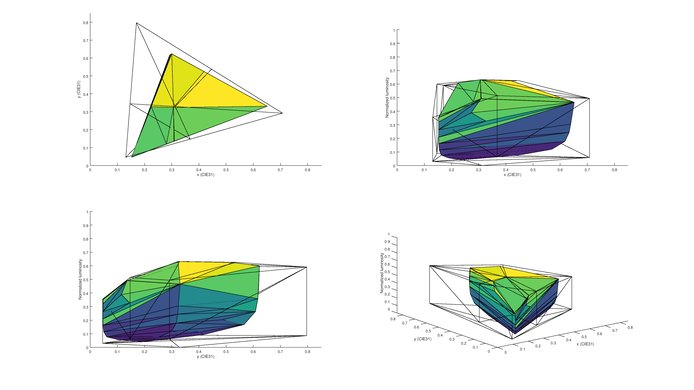
The color volume of both the DCI-P3 and Rec. 2020 color space isn't very good. Unlikely to see much improvement over an SDR TV.
for pictures & test results

The Hisense H8C does not present any image retention, even on the first picture of our image retention test. This is pretty good and is in line with other VA TVs that we have tested. This is good news for gamer or people that may use this TV as a PC monitor.


for pictures & test results

The pixels appear very similar to those found in the Sharp UB30U we reviewed last year.
for pictures & test results

for pictures & test results

The response time is great, which results in very good motion performance. Only a very short trail can be seen following the test logo. To dim, the backlight uses PWM to flicker at 500Hz. This is not very noticeable due to the high frequency, but can be seen very slightly in the small duplications following the logo.

The Hisense H8C isn't able to play movies smoothly from any source. Most people do not notice judder, and so this will not be an issue.
for pictures & test results

The H8C is able to interpolate 30fs content up to the native refresh rate of 60Hz. It is not able to interpolate content faster than this.
With an 1080p resolution, the input lag is great, and for most people shouldn't be a problem. Even with motion interpolation enabled the input lag is quite low which is good.
When tested with a 4k resolution, the input lag was not stable and was cycling from 51.0ms to 67.3ms.
For 4k @ 60Hz support, it is necessary to use HDMI3 or HDMI4 (labelled 4k @ 60Hz). The H8C has a native refresh rate of 60Hz, so does not support 120Hz. For PC, use the 'Game' picture mode. The input lag is 32.1ms.
Update 10/04/2016: With the newest firmware version, the H8C now supports chroma subsampling at 4k. To display it properly, use the 'Game' picture mode.


To enable 5.1 passthrough, set 'Digital Audio Out' to 'Raw'.
Update 10/04/2016: With the newest firmware update, the TV now supports HDR10.
for pictures & test results

Average response. Frequency response is decent, but at maximum volume there is pumping and compression present. However, low-end cutoff and maximum loudness is poor, even for a TV. This TV doesn't produce much bass and doesn't get very loud either.
for pictures & test results

Average distortion response. The overall harmonic distortion response is decent at all volume, even though there is progressive rise in distortion as the volume increases.
for pictures & test results

The TV comes preloaded with some of the most popular apps, such as Netflix, Amazon Video, VUDU and YouTube. It also provides access to the Opera TV Store to download additional apps.
for pictures & test results

The H8C features the Opera TV platform. It is very easy to use, and allows downloading of apps from the Opera TV Store. It feels quite responsive, but does occasionally have issues with browsing menus which requires a TV restart to fix. It is not as stable as some of the other platforms such as Android TV or LG's WebOS. It is able to play photos or videos directly off a USB drive.
for pictures & test results

The TV controls are located behind the left side of the TV. They are quite easy to use, but may be more difficult to access if wall mounted.
for pictures & test results

The remote is basic, but provides quick access to some of the most popular apps. It is quite simple to use.
