
Our Verdict
Good TV for a mixed usage. It isn't bad at anything. It will work in any kind of rooms since it is versatile. It is especially good for video games and sports.
- Low input lag
- Great blacks and contrast ratio
- Reflects more lights than average
- Average gray uniformity
- Judder is present in movies
Average for watching movies in the dark. It has a good contrast ratio, but it lacks local dimming to make the blacks even darker. It also has a small judder when watching movies.
Above average for TV shows in a bright room. The screen can get brighter than average, but it reflects a bit more lights than most TVs. It upscales lower resolution content well.
Good for watching sports. However, the screen is not very uniform, which results in a bit of dirty screen effect on playing fields.
Great for video games. Very low input lag of lag, and not too much motion blur.
Although the KU6300 support HDR10 input, it does not really benefit from it, since it does not support a wide color gamut and it cannot really get highlight very bright.
Good for HDR gaming. Picture quality is good. Supports HDR10 but can't really benefit from it due to lack of local dimming and no support for wide color gamut. Input lag is low even in HDR mode. Motion blur is good.
Works well to use as a PC monitor. It supports a wide range of resolution, even 4k @ 60Hz @ 4:4:4, and the input lag is very good.
Check Price
Differences Between Sizes And Variants
We tested the 55" (UN55KU6300) version FA01. For the most part, we expect our review to be valid for the other sizes of this model.
The KU6270 and KU6290 are variants of the KU6300. We expect them to have the same picture quality as the KU6300 reviewed. The only major differences are that the KU6270 and KU6290 lack Bluetooth connectivity and include a remote that looks identical to the KU6300 remote but lacks the features that use Bluetooth, such as pairing and Universal Remote Control.
Update 2017/05/12: The KU6270 does not have component/composite video inputs, but the KU6290 does.
If someone comes across a different type of panel or if their Samsung KU6300 doesn't correspond to our review, let us know and we will update the review.
| Size | Model | US | UK | Warehouse | Warehouse long |
| 40" | UN40KU6300 | UN40KU6300FXZA | UE40KU6000 | UN40KU630D | UN40KU630DFXZA |
| 43" | UN43KU6300 | UN43KU6300FXZA | UE43KU6000 | UN43KU630D | UN43KU630DFXZA |
| 50" | UN50KU6300 | UN50KU6300FXZA | UE50KU6000 | UN50KU630D | UN50KU630DFXZA |
| 55" | UN55KU6300 | UN55KU6300FXZA | UE55KU6000 | UN55KU630D | UN55KU630DFXZA |
| 60" | UN60KU6300 | UN60KU6300FXZA | UE60KU6000 | UN60KU630D | UN60KU630DFXZA |
| 65" | UN65KU6300 | UN65KU6300FXZA | UE65KU6000 | UN65KU630D | UN65KU630DFXZA |
| 70" | UN70KU6300 | UN70KU6300FXZA | N/A | UN70KU630D | UN70KU630DFXZA |
Popular TV Comparisons

The Samsung KU6300 has fierce competition in the budget range. It is a good choice if you want an affordable versatile TV.

We buy and test dozens of TVs yearly, taking an objective, data-driven approach to deliver results you can trust. Our testing process is complex, with hundreds of individual tests that take over a week to complete. Most of our tests use specially designed test patterns that mimic real content, but we also use the same sources you have at home to ensure our results match the real-world experience. We use two main tools for our testing: a Colorimetry Research CR-100 colorimeter and a CR-250 spectroradiometer.
Test Results
Older Test Bench: We tested this product using an older TV test methodology before a major update. Some of the test results below aren't directly comparable with other TVs. Learn more

for pictures & test results

The stand is quite stable, but has a large footprint.
Footprint of the 55" TV stand: 33.1" x 12.6"
for pictures & test results

The backing of the Samsung TV has a nice plastic design to it. The ports, which are located on the side, will be helpful when needing to have access to them while the TV is wall mounted.
for pictures & test results

The borders are made up of reflective plastic that will attract finger prints easily.
for pictures & test results

The thickness of the KU6300 is about the same as last year's model Samsung JU6500.
for pictures & test results

The blacks are deep on the Samsung KU6300, which offers a high contrast ratio and a better picture quality.
for videos & test results

There is no local dimming option on this TV, so the blacks cannot get darker.
The SDR peak brightness is average and almost the same as when watching HDR content, which is good for people watching mostly standard TV content, which lack HDR for the moment.
The TV achieves a pretty average peak brightness when maxed out, and HDR is on. When an image is displayed throughout the entire screen, it stays bright, which is great.
Update 02/08/2016: Under the latest firmware, the 'CE dimming' is stronger than before and the peak brightness of the 2% and 10% windows is now less than what we measured when we first did the original review.


for videos & test results

for pictures & test results
for pictures & test results
for pictures & test results
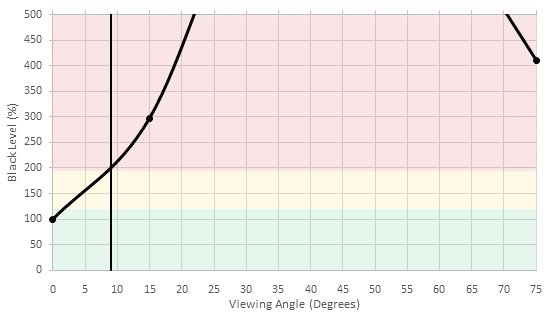
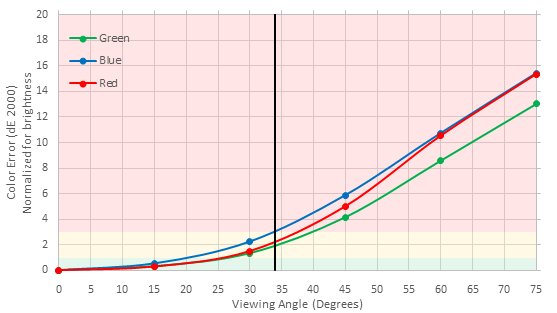
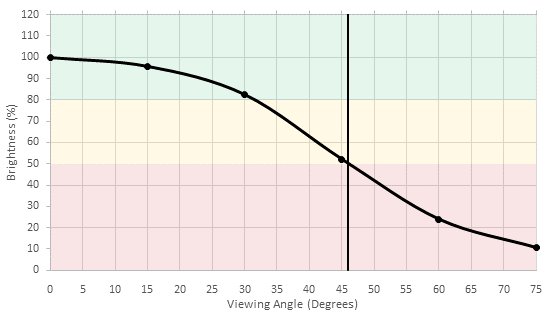
Just like the Samsung KS Series, it has an viewing angle of 20 degrees, this is to be expected from a VA panel. At an angle, colors will shift and blacks will become less deep.
for pictures & test results

Our unit has an almost perfect black uniformity. No clouding or flash lighting can be seen.
for pictures & test results

The Samsung KU6300 can display our gradient test image fairly well. On our test picture, the gradation is smooth overall in the light shades with some small anomalies in the darker shades, especially in the green color. But it should not be an issue in regular content.
Update 10/26/2016: Our original test was showing 8 bit gradations due to incorrect drivers on our system. After some correction to our test apparatus, we have retested the color depth and found that it is able to display a 10 bit gradient smoothly.


for pictures & test results

Standard definition TV is upscaled well without any problems.
for pictures & test results

720p content also looks good when displayed on the KU6300.
for pictures & test results

Blu-rays looks sharp and crisp when upscaled.
for pictures & test results

4k UHD Blu-rays look good and very sharp on the KU6300.
for pictures & test results

for pictures & test results

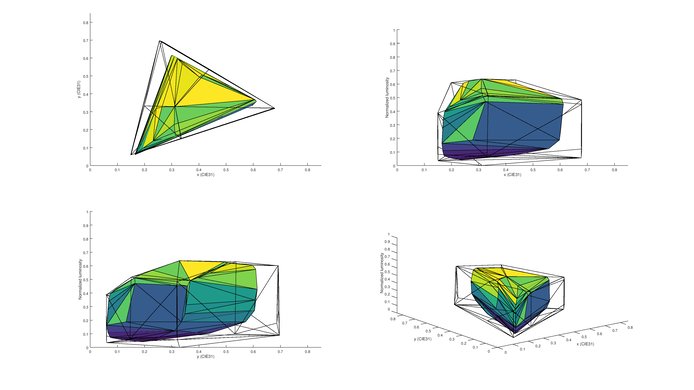
The range of colors the Samsung TV can display is only good enough for Rec. 709 content. Sending an HDR signal or settings the color space to native will not give you a wider color gamut.
for pictures & test results
for pictures & test results
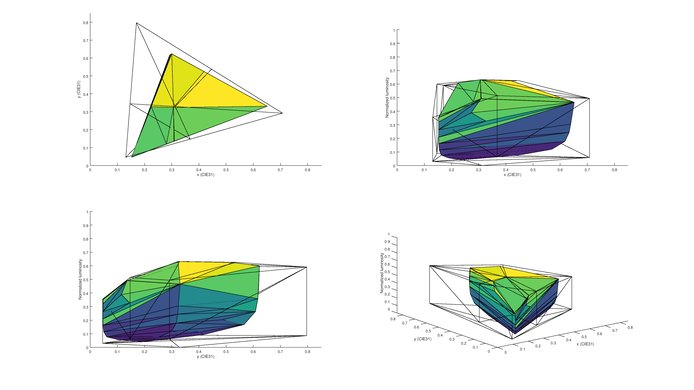
The KU6300 can't display a wide range of colors and so can't reproduce much of the P3 or 2020 color volume.
for pictures & test results

No image retention could be notice at all after running our test. Even on the first test picture, right after the 10 minutes exposure to the burn-in image, nothing was found after our computer analysis, which is great. This is in line with others VA TVs results and is good for people looking for a good TV for video games, to use as a PC monitors and for shop or office that need to display a lot of static contents.
for pictures & test results

for pictures & test results

This Samsung TV is worst than average when it comes to handling reflections, especially in a bright room environment. This is a bit surprising because it reflects more lights than even the cheaper Samsung TVs from last year.

for pictures & test results

for pictures & test results

The motion blur is good, but not great. The response time is favorable, and the trail that is behind the logo has an average length that is faint. It does have PWM flickering, but it only occurs when the back light is below 10 out of 20.
for pictures & test results

for pictures & test results

for pictures & test results

The KU6300 is able to flicker the backlight at 60Hz, which helps to clear up motion blur due to eye tracking. Unfortunately as with other Samsung TVs this isn't available in the 'Game' picture mode.
Even 24p sources have little judder. In fact, judder is present on all sources for movies.
for pictures & test results

Enabling 'Action Motion Plus' to 'Auto' will allow 30fps content become smoother, this cannot be said about 60fps content. Even though they advertise that it has '120Hz Motion Rate', this is a 60Hz TV.
Excellent for fast pace competitive gaming, it will definitely give you an advantage over other gamers. 'Game' mode has to be selected from the 'Special viewing modes' under the 'Picture' menu to get the lowest input lag.
Almost all the resolutions that we have tested are supported on this TV, the only exception was 1080p@120Hz, but that was to be expected for a Samsung TV. For sharper text 4:4:4 you must set the input type to 'PC'. For 4K@60Hz@4:4:4 you must enable UHD mode. This is only possible on HDMI1.

for pictures & test results

Decent frequency response. The low-end cutoff and the responses at 75dB and 85dB are good. However, maximum loudness and frequency response at maximum volume are subpar, since pumping and compression will be present.
for pictures & test results

Poor performance. The overall amount of harmonic distortion at 75dB is quite low. However, there is a significant rise in the harmonic distortion at higher volumes, which negatively affects the sound quality.
for pictures & test results

Just like the Samsung KS Series, all the popular applications such as Youtube, Amazon and Netflix are available.
for pictures & test results

Just like the Samsung KS Series, it includes the new Tizen 2016 platform, with some minor differences. In terms of the applications, the KU6300 has less pre-loaded application than the KS Series, this shouldn’t be a problem though since you can download them from the menu either way. The performance slacks, as menus would freeze often for a lengthy duration, and the remote would flash and disconnect because of it.
When a new device is detected (such as when a computer is woken from sleep while plugged into an HDMI port) the TV automatically switches to this device. This may be an annoyance if you are watching other content at the time.
Unfortunately, Samsung's entry level 4k TV features ads. Much like other Tizen-based sets, they cannot be disabled.
for pictures & test results

The TV control can be found behind the television on the right side.
for pictures & test results

The remote is very similar to the Samsung KS series with some differences. The back of the remote has a reflective plastic that will easily track finger prints, unlike the Samsung KS Series gray reflective plastic, the buttons protrude out rather than being inwards and the volume up and down, as well as the channel up and down buttons are black rather than chrome. The remote also weighs less than the KS Series remote and lacks the microphone option.
for pictures & test results

- Manual
- Remote
- Batteries
- Power Cable
- Component In adapter
- Composite In adapter


