
Our Verdict
Average TV for a range of usage. Performs much better in a bright room, where reflections are dealt with well and dark scene issues are less obvious. Picture quality is average, even when viewed at an angle.
- Picture quality remains when viewed at an angle
- Smart platform is featured and intuitive
- Upscaling of low quality content is good
- Uses less accurate RGBW pixel structure
- Blacks appear gray in dark rooms
- Uniformity is below average
Bad in a dark room. Picture quality is average, and blacks appear gray. Uniformity issues are more obvious. No local dimming features.
Above average for watching TV in a bright living room. Picture quality is average even when viewed from the side. When watching non-HDR content the screen doesn't get bright enough to effectively deal with glare. Smart interface is great for casual watching or viewing pictures, and upscaling of low quality TV is great.
Good sports performance. Picture quality is average, even when viewed at an angle. Little motion blur, which is good. Some issues with the uniformity but only a little bit of the dirty screen effect is present.
Good for video games. Picture quality is average. Motion blur and input lag are good, and should not be an issue for most people.
Even if the LG UH6100 supports HDR10, it is missing the wide color gamut, the high peak brightness and the local dimming. The overall picture quality is average, but the lack of features results in an average HDR performance. When watching in a dark room, the blacks appear gray.
Supports HDR10 format, but is unable to benefit due to lack of wide color gamut and low peak brightness. Picture quality is average, but blacks look gray.
Works well as a PC monitor. Picture quality is average, but chroma 4:4:4 support means text appears clear. Due to the pixel structure, some straight lines appear jagged as can be seen here. Response time and motion blur is low which is good.
Check Price
Differences Between Sizes And Variants
We tested the 43" (43UH6100). For the most part, we expect our review to be valid for the 49" (49UH6100).
If someone comes across a different type of panel or if their LG UH6100 doesn't correspond to our review, let us know and we will update the review.
| Size | Model | Warehouse |
| 43" | 43UH6100 | 43UH610A |
| 49" | 49UH6100 | 49UH610A |
Popular TV Comparisons

The LG UH6100 offers an average picture quality, but at a low price. For watching TV shows in a bright room it may be a good pick, but for most people the recommendations below provide better performance.

We buy and test dozens of TVs yearly, taking an objective, data-driven approach to deliver results you can trust. Our testing process is complex, with hundreds of individual tests that take over a week to complete. Most of our tests use specially designed test patterns that mimic real content, but we also use the same sources you have at home to ensure our results match the real-world experience. We use two main tools for our testing: a Colorimetry Research CR-100 colorimeter and a CR-250 spectroradiometer.
Test Results
Older Test Bench: This product has been tested using an older TV test methodology, before amajor update. Some of the test results below aren't directly comparable with other TVs. Learn more

for pictures & test results

The stand is almost as wide as the TV, and made of plastic but is quite study.
Footprint of the 43" TV stand: 8.5" x 29.3"
for pictures & test results

If wall mounted, many of the inputs become inaccessible.
for pictures & test results

Borders are an average thickness, and made of plastic.
for pictures & test results

UH6100 is of an average thickness. It will stick out a bit if wall mounted.
for pictures & test results

The contrast ratio is average for the UH6100. The blacks are not very deep but that is not the worse that we have seen for an IPS panel. This is going to be a problem if you always watch TV in a dark room, but for a well light room, it shouldn't be a problem.
for videos & test results

Update:There are reports of a local dimming feature appearing temporarily in the menus, this is a bug and will most likely be fixed soon. We were not able to reproduce it.
The SDR peak brightness is bad and is about 100 cd/m² less than what the TV can reach when in HDR mode, which is not very bright, especially when set in a bright room.
When sending an HDR signal, the overall peak brightness is average but quite good for a mid-range TV. It has around the same brightness as the Samsung KU6300. At around 400 cd/m² it is still decent for highlights bigger than 50% and is bright enough to watch in a bright room without problems, but it won't make HDR look as good as on higher end TVs that can get small highlights more bright.
for pictures & test results

The gray uniformity is pretty bad for a LED TV. You can see on our test picture that the corners are a lot darker and there is also half of the screen that has a bit of a pink hue. This will result in a dirty screen effect when watching some content like sport, where you often have big panning shots or in video games where the background is a uniform color. Note that the gray uniformity issues are more obvious when you watch the TV from the side.
for videos & test results

The viewing angle is above average, but not the best we have seen for an IPS panel. When viewed from the side, the color tends to remain the same, but loses intensity.
Update: We have changed the methodology of testing. Since this is an old TV which we don't have anymore, we extrapolated the results.
for pictures & test results

The black uniformity is really bad for the LG UH6100. There is some major clouding leaving only the side of the screen really black. This is one of the worst TVs we have tested for the black uniformity yet in 2016.
for pictures & test results

The color gradient is pretty good for an 8 bit panel. There are not any banding issues that we can see from our gradient pattern. The only little imperfections that you can see when looking at the picture are more related to the gray uniformity.
Update 09/30/2016: Our original test was showing an incorrect color depth of 8 bit due to some incorrect drivers on our system, but after some correction to our test apparatus, we tested again the color depth and we can confirm that the LG UH6100 does in fact have an 10 bit panel.


for pictures & test results

Upscaled DVDs or other 480p content looks very good on the UH6100. The image looks sharp and not too much detail is lost.
for pictures & test results

Cable TV or high quality streaming content also looks very good once upscaled. You can still make out a lot of small details.
for pictures & test results

Blu-rays and 1080p video look very sharp and no problem at all can be noticed.

for pictures & test results

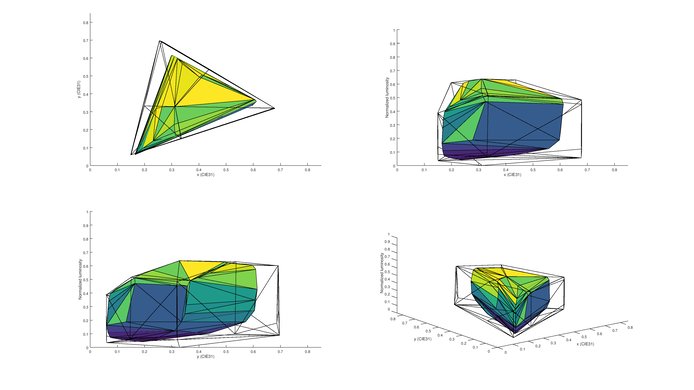
Although there is an option to enable an 'Extended' color gamut, it is only enough for rec 709 content. Even though it accepts a HDR signal, the colors will not benefit from it.
for pictures & test results
for pictures & test results
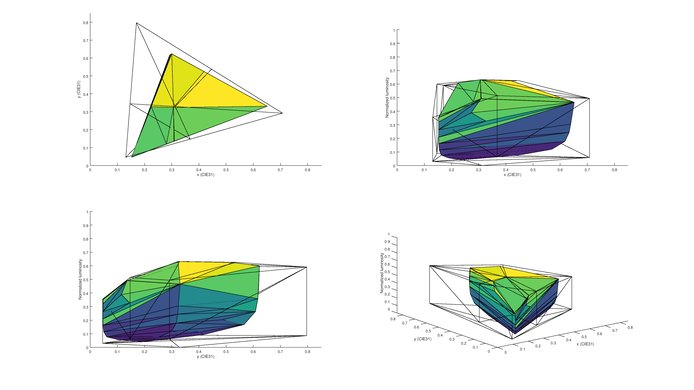
The UH6100 can’t produce saturated colors to improve HDR content. At low luminosities the range of colors is poor.
for pictures & test results



for pictures & test results

Uses the less accurate RGBW 4k panel. This replaces some of the sub pixels with a white pixel.



24p content as movies from Blu-rays, DVDs and from streaming apps like Netflix will play without judder with the 'Realcinema' option turned-on. Movies playing on a cable/satellite box do have some judder issues, but this is not noticeable to most people. Even with the 'TruMotion' option set to 'User' and with 'De-Judder' set to max (introducing the soap opera effect), judder was still present.
for pictures & test results

The UH6100 has a 60Hz panel, and so can only interpolate up to 30Hz content. To do this, set 'Trumotion' to 'User' and increase the 'De-Judder' slider. This does not completely remove judder, however.
1080p input lag is quite good for the LG UH6100. For casual gamers out there, with only 39.7 ms of input lag, the UH6100 should be a good choice. Change the input icon to 'Game Console' and select the 'Game' picture mode for lowest input lag.
Update 01/10/2017: The UH6100 just got a new update (04.30.82) that added a new 'HDR Game' mode and it greatly upgraded the performance of this TV. Note that input lag under gamer mode with a 1080p and 4k resolution was also reduce under 20ms.
Change the input icon to 'PC' to enable chroma 4:4:4. With this enabled, input lag is 71.9 ms. 4k @ 60Hz requires 'HDMI Ultra HD Deep Color' to be enabled, in 'General' settings. Text is not as clear due to the alternate pixel structure as can be seen here. This is penalized in the '4k Resolution' section of the review.


for pictures & test results

Average performance. The frequency response is below average, and there will be pumping and compression present at louder volumes. However, the maximum loudness and low-end cut off are quite decent for a TV.
for pictures & test results

Poor harmonic distortion performance. Although there is not a dramatic jump in distortion as the volume is increased, the overall amount of harmonic distortion is elevated at all levels.
for pictures & test results

WebOS 3.0 might not have as many apps as other smart OS, like Android TV OS, but all the most popular apps are available, including YouTube, Netflix and Amazon Video. In general, WebOS apps offer a good stability.
for pictures & test results

The WebOS Smart interface is one of the best you can find on Smart TVs and the iteration on the LG UH6100 is very good. The interface looks great and is easy to navigate, with plenty of content and apps to chose from. The interface feels fast and without hiccups. From the smart platform, you can easily switch from live TV to any connected device like your computer, Blu-ray player or even browse your pictures and videos collection on a USB flash drive.
for pictures & test results

Controls are located below the logo on the front of the TV. This is easy to access when wall mounted.


for pictures & test results

- Remote
- Batteries
- Cable management strap
- Manual