Our Verdict
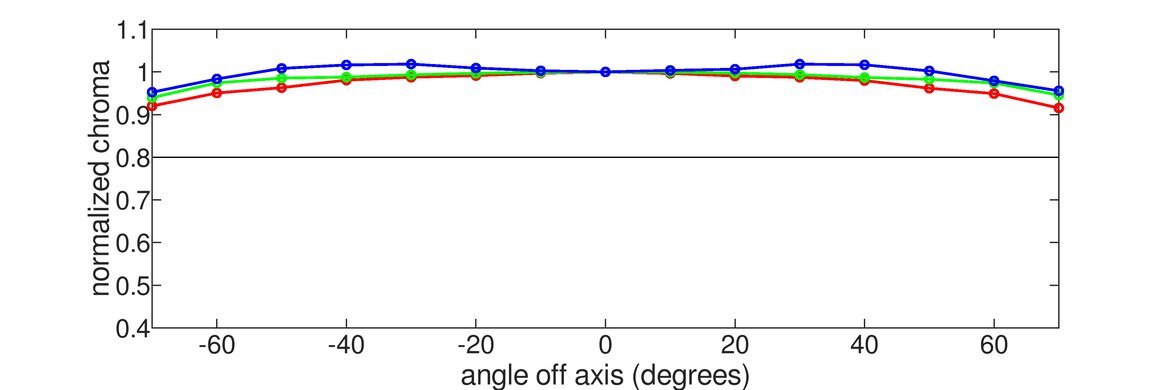
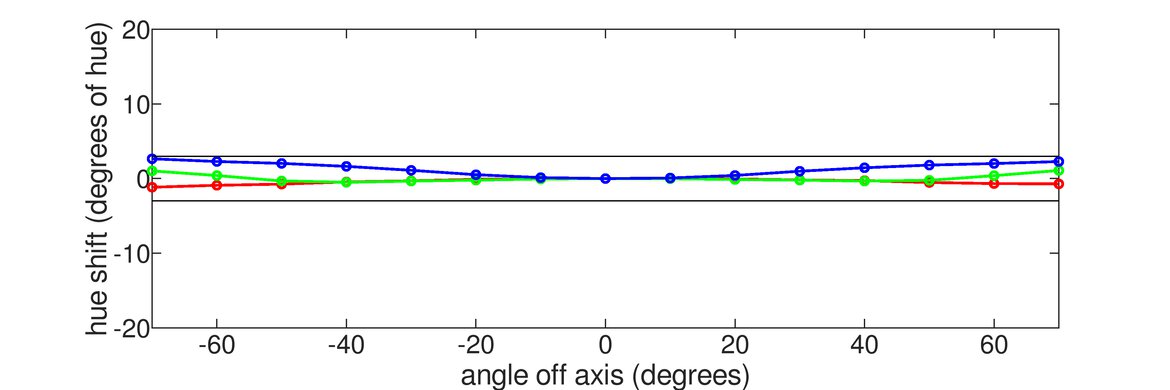
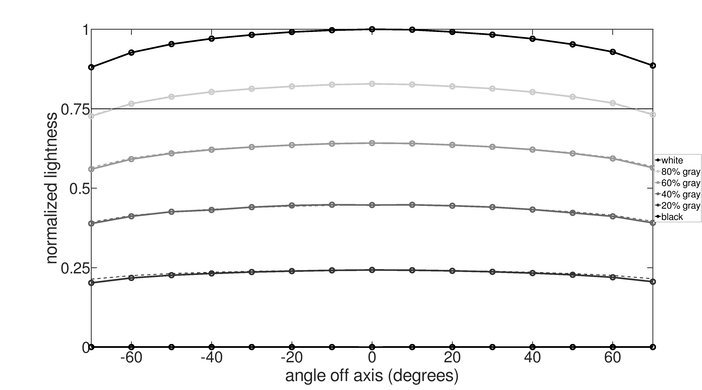
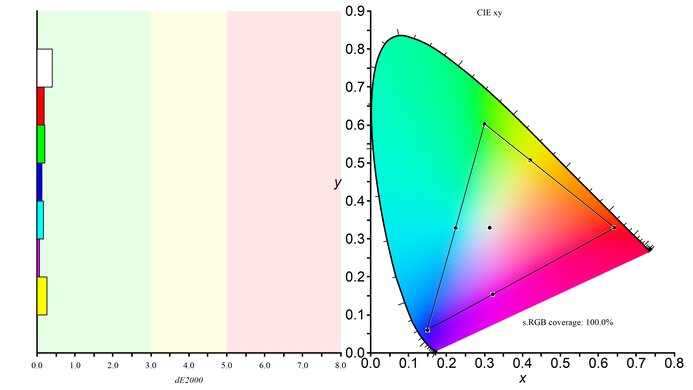
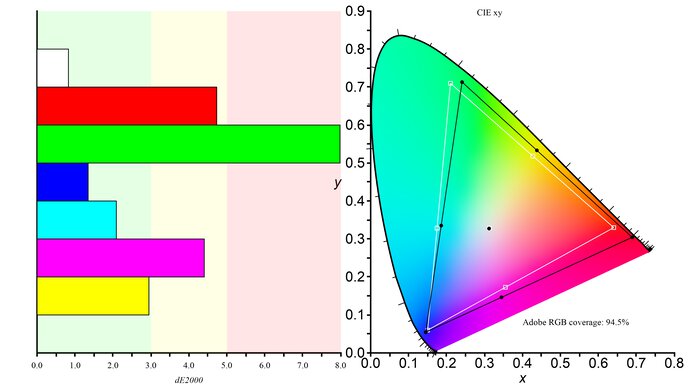
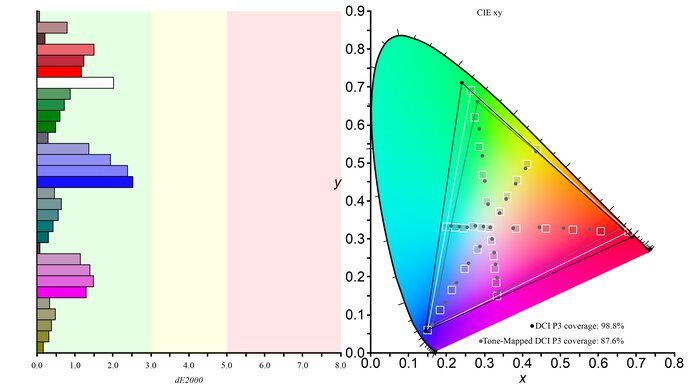
The LG 27UK650-W is a good monitor and will please you in most usages. It has wide viewing angles and the large screen gives you more space to work on. Also, the high resolution allows you to see small details. The monitor has HDR support but it fails to display a wide color gamut.
- Excellent resolution and size allow for multitasking.
- Input lag is very low.
- Wide viewing angles.
- Lacking HDR performance.
- No local dimming support.
The 27UK650-W is a very good monitor for office use. The 27 inch screen offers plenty of space for multitasking, and the 4k resolution allows you to see images clearly. It has great viewing angles, so the image will appear accurate when viewed from the side. Unfortunately, it has disappointing ergonomics, and you'll need to move the entire monitor if you want to adjust your screen to the side.
Good monitor for gaming. The 27UK650-W has an excellent low input lag and a fast response time. It comes equipped with FreeSync variable refresh rate technology to help reduce tearing in games, but it doesn't include a black frame insertion feature to reduce motion blur.
The LG 27UK650-W is a good monitor for multimedia usage. Its high resolution and large size give you more than enough screen space and will display small details. It can get very bright so you can enjoy streaming in brighter rooms, but you should avoid very dark rooms as the mediocre contrast makes blacks appear gray. Finally, it has great viewing angles, which are good if multiple people are watching.
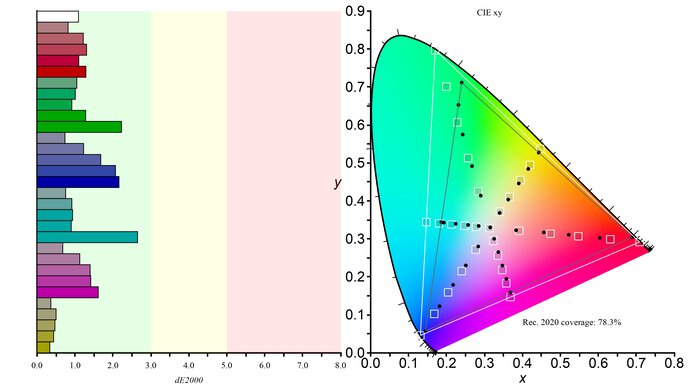
This is a very good monitor for media creation. The large screen and high resolution make it easy to open multiple windows. It has very accurate and vivid colors, but the Adobe RGB color space coverage is limited, and this might affect those who want to use it for photo editing.
Decent monitor for HDR gaming. The 27UK650-W can't display a wide color gamut and fails to bring out highlights. On the upside, it has a very low input lag and fast-moving images look clear. Unfortunately, the contrast ratio makes blacks look gray and the 60Hz refresh rate might disappoint some hardcore gamers.
Changelog
- Updated Jan 20, 2021: For consistency, we've changed the swivel adjustment from N/A to 'No'. The score remains unchanged.
- Updated Feb 17, 2020: Converted to Test Bench 1.1.
- Updated Jan 17, 2019: We tested the monitor's compatibility with NVIDIA's new FreeSync driver. See our full investigation into NVIDIA's FreeSync Drivers here.
- Updated Aug 17, 2018: Review published.
Check Price
Differences Between Sizes And Variants
We tested the white variant of the 27 inch model (27UK650-W). The model we reviewed was manufactured in April 2018 and you can see the label here.
In some regions, LG sells the 27UK600 instead of the 27UK650. We don't know for sure what differences there are, but it appears to offer very similar performance to the 27UK650, but with a fixed stand that can only tilt.
If someone comes across a different type of panel or if their 27UK650 doesn't correspond to our review, let us know and we will update the review. Note that some tests such as the gray uniformity may vary between individual units.
| Model | Size | Refresh rate | Notes |
|---|---|---|---|
| 24UD58-B | 24" | 60Hz | |
| 27UD58-B | 27" | 60Hz | |
| 27UD68P-B | 27" | 60Hz | Black variant |
| 27UD68P-W | 27" | 60Hz | White variant |
| 27UK650-W | 27" | 60Hz | White variant |
| 27UK600-W | 27" | 60Hz | White variant |
Popular Monitor Comparisons

The LG 27UK650 is a 4K monitor with an IPS screen and FreeSync support, and one of the best 4k monitors we've tested so far. See also our recommendations for the best monitors for dual setup, the best gaming monitors and the best 4k HDR monitors.
Overall, the ASUS ROG Swift PG279QZ and the LG 27UK650-W are very similar, but the PG279QZ is a much better gaming monitor. The PG279QZ has a faster refresh rate, resulting in much clearer motion, and it has an optional black frame insertion feature to further clear up any blur. The LG 27UK650-W, on the other hand, has a higher native resolution and is slightly better for multitasking.
Overall, the Dell S2721QS is a bit better than the LG 27UK650-W. The Dell has better ergonomics, wider viewing angles, and better reflection handling. On the other hand, the LG has better out-of-the-box color accuracy.
The LG 32UL500-W and the LG 27UK650-W are both 4k monitors with a 60Hz panel, but the 32UL500-W has a 32-inch VA panel while the 27UK650-W has a 27-inch IPS panel. The 27UK650-W is better overall because it has wide viewing angles, better ergonomics, and gets much brighter to combat glare. It also has a better response time if you want to game. However, the 32UL500-W provides more screen real estate, and content creators might prefer its wider Adobe RGB and DCI P3 coverage.
The LG 27GN950-B is slightly better overall than the LG 27UK650-W, mainly due to the extra gaming features. The 27GN950-B has a max 144Hz refresh rate, gets brighter, has a much quicker response time, and has a lower input lag. However, the 27UK650-W delivers clearer text and has better reflection handling.

We buy and test more than 30 monitors each year, all of which we purchase ourselves, without cherry-picked units or samples. We put a lot into each unbiased, straight-to-the-point review, and there's a whole process from purchasing to publishing, involving multiple teams and people. We do more than just use the monitor for a week; we use specialized, custom tools to measure various aspects and deliver objective, data-driven results. We also consider multiple factors before making any recommendations, including the monitor's cost, its performance compared to the competition, and whether it's easy to find.
Test Results
for pictures & test results


for pictures & test results







for videos & test results

for pictures & test results

for pictures & test results

for pictures & test results

for videos & test results

for pictures & test results
for pictures & test results
for pictures & test results











for pictures & test results