
Our Verdict
Great TV for a range of usage. Picture quality is excellent and fast motion is well defined. Blacks can get very deep. Extremely bright highlights and deals with reflections well.
- Movies and HDR look great.
- Very bright which is good to handle reflections.
- Low input lag which is great for playing video games.
- Picture deteriorates at an angle.
Excellent TV for movies. Performs great in dark scenes. Great contrast results in deep blacks. Plays all content smoothly.
Great for TV in a bright room. Excellent picture quality. Bright and deals with reflections well. Unfortunately picture deteriorates when viewed from the side.
Great for sports. Very good motion handling. Good uniformity for sports fields.
Excels for video games. Very low input lag and very good motion handling for fast paced games. Great picture quality.
Very good HDR. Highlights get very bright. Wide color gamut. Excellent picture quality.
Great for playing HDR games since game mode works even in HDR and it has a low 4k @ 60Hz + HDR input of lag 21.1 ms. It has a wide color gamut and 10 bit panel.
Great PC monitor. Low motion blur. Very good input lag. Clearly displays a wide range of resolutions.
Check Price
Differences Between Sizes And Variants
We tested the 55" (UN55KS8000) version FA01. It is also available with version AA02. For the most part, we expect our review to be valid for the other sizes.
We've received a report that the 60" (UN60KS8000) has version EA01, with a narrower viewing angle. The 60" also has a different bezel that is thicker.
We also receive information about the 65" model (UN65KS8000), it seem there is also the version FA01 and AA02.
If someone comes across a different type of panel or if their Samsung KS8000 doesn't correspond to our review, let us know and we will update the review.
| Size | Model | US | Canada | UK | Warehouse | Wharehouse long |
| 49" | UN49KS8000 | UN49KS8000FXZA | UN49KS8000FXZC | UE49KS7000 | UN49KS800D | UN49KS800DFXZA |
| 55" | UN55KS8000 | UN55KS8000FXZA | UN55KS8000FXZC | UE55KS7000 | UN55KS800D | UN55KS800DFXZA |
| 60" | UN60KS8000 | UN60KS8000FXZA | UN60KS8000FXZC | UE60KS7000 | UN60KS800D | UN60KS800DFXZA |
| 65" | UN65KS8000 | UN65KS8000FXZA | UN65KS8000FXZC | N/A | UN65KS800D | UN65KS800DFXZA |
Popular TV Comparisons

The Samsung KS8000 is the best buy for a TV in this price range if you want to use it for multiple usage. Not a lot of other TVs can compete with its high picture quality, number of features and asking price. See our recommendations for the best TVs and the best smart TVs.
These two TVs were tested on different test benches, and the results aren't directly comparable. The Samsung NU8000 is a much newer TV that supports some of the latest gaming features like FreeSync VRR and low input lag with motion interpolation. The Samsung KS8000 has a higher contrast ratio and can deliver deep blacks to improve dark room performance. The two TVs have a similar picture quality and can get similarly bright. Both have a wide color gamut, so HDR content looks equally good.

We buy and test dozens of TVs yearly, taking an objective, data-driven approach to deliver results you can trust. Our testing process is complex, with hundreds of individual tests that take over a week to complete. Most of our tests use specially designed test patterns that mimic real content, but we also use the same sources you have at home to ensure our results match the real-world experience. We use two main tools for our testing: a Colorimetry Research CR-100 colorimeter and a CR-250 spectroradiometer.
Test Results
Older Test Bench: This product has been tested using an older TV test methodology, before amajor update. Some of the test results below aren't directly comparable with other TVs. Learn more
for pictures & test results

The look of the Samsung KS8000 is particularly good. Its design is simple yet high-end. From the chrome finish to its glossy back, this TV leaves an impression. When viewed directly from the side, its thinnest is striking. Its shiny stand also look good but its footprint is a little wide.
for pictures & test results

The stand of the Samsung KS8000 is simple and boast a chrome metallic finish. Assembly for these two stands were just a one step job, needing no screws or tools.
Footprint of the 55" TV stand: 44.1" x 9.1"
On the 65" TV, an alternate middle position can be used for the stands where the two feet are about 39" apart.
On the 60" TV, an alternate middle position can also be use for the stand.
for pictures & test results

The Samsung KS8000 has a black reflecting plastic backing, that is prone to both dust and scratches.
Remove the plastic stoppers to expose the mounting points. Bolt sleeves are included in the box for mounting.
The back panel of the TV is attached by glue, which is reported by some readers to become unstuck over time. This does not affect the picture quality of the TV.

for pictures & test results

At an 90 degree angle, the TV looks extremely thin.
for pictures & test results

Very deep blacks and remarkable native contrast ratio results in a rich picture quality. The contrast is very similar to the Samsung KS9500.
for videos & test results

The Samsung KS8000 wasn't able to brighten the little dot in our video that much. When local dimming is activated, it produces blooming around bright highlights, on a big vertical column. Still, for regular movie watching and especially HDR content, local dimming ('Smart LED') is worth it for the deeper blacks it produce and the very bright highlights. Blooming is more noticeable at an angle.
The KS8000 has a very good SDR peak brightness. It is a bit less bright than when in HDR mode, but it is still one of the brightest TV tested in 2016.
Like for other TVs, we use the local dimming setting ('Smart LED') that brighten the 2% window the most, in that case 'High'. The peak brightness of small highlights is very high at 1472 cd/m². On a static image, the maximum brightness drops to around 500 cd/m². For the best HDR experience, leave 'Smart LED' to 'High'.
Update: Updated with sustained brightness and remeasured the peak brightness (which is now even closer to the KS9000).
for pictures & test results

for pictures & test results

The left and right edges of the screen are darker and the top and bottom edges are slightly brighter. That said, there is no obvious banding problems which result in a minimum of the 'dirty screen effect' (DSE). Compared to most TVs, this is good.
for videos & test results

for pictures & test results
for pictures & test results
for pictures & test results
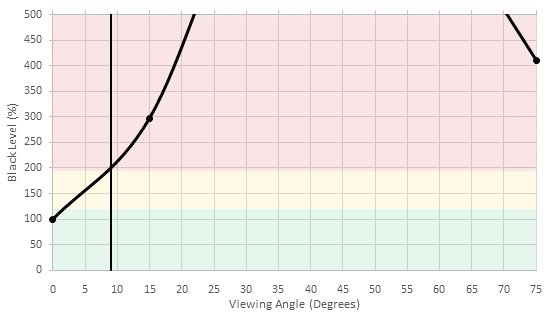
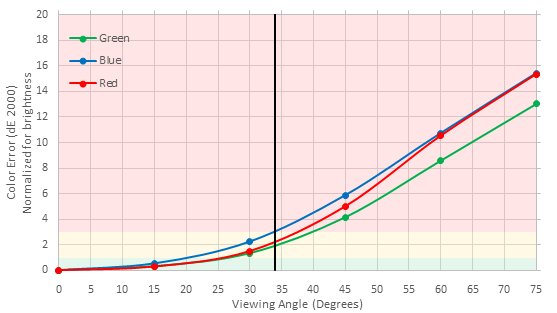
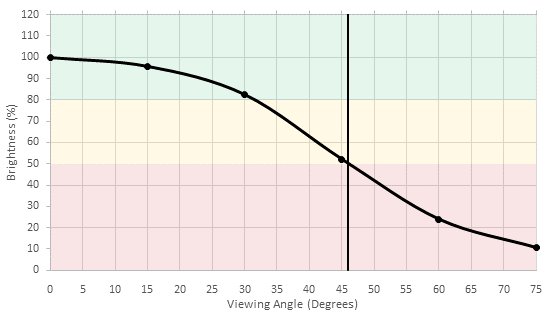
Viewing angle is a notable downside of this TV but we have seen worse. Still, from an angle, the blacks aren't as deep and the colors change.
for pictures & test results

While displaying a completely black picture, the KS8000 doesn't exhibit any obvious issues. Some very faint clouding spots but as a whole the screen looks uniform.
for pictures & test results

Very smooth color gradations. Very minor inconsistencies in reds prevent the Samsung KS8000 from getting a perfect score. In regular content though, this won't be noticeable.


for pictures & test results

for pictures & test results

for pictures & test results

Near perfect post calibration results. As with other Samsung TVs, calibration was easy to achieve. Both white balance and color has very low dE. Gamma sit correctly at 2.2. Our calibration settings can be found here.
for pictures & test results

The Samsung KS8000 does a great job with every resolutions it supports, even the low ones like for DVDs and SD channels looks good.
for pictures & test results

Cable TV is also looking very good on the KS8000.
for pictures & test results

1080p content like Blu-rays looks great and well detailed.
for pictures & test results

4k looks superb on this TV, like on the rest of Samsung SUHD line of TVs.


for pictures & test results
for pictures & test results
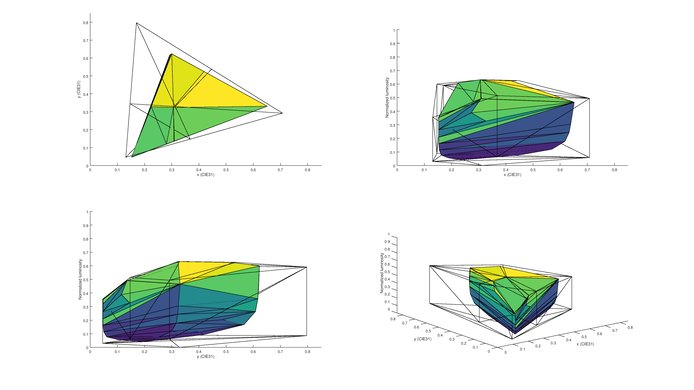
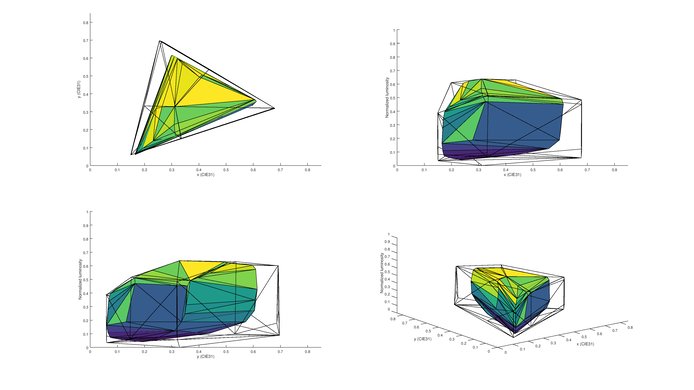
The Samsung KS8000 is one of the 2016 top performers in color volume and produces very saturated colors at high luminosity levels. Unfortunately, at low luminosity levels the colors can't get very saturated.
for pictures & test results

Like many other VA TVs, the Samsung KS8000 does not present any image retention at all. Even right after the 10 minutes burn-in scene, no faint image can be seen from any of the colored logos. This is a very good result and should please any gamers of PC users.



for pictures & test results

for pictures & test results

This isn't the fastest response time we've seen but it won't be a problem in most cases. The trail behind our logo has an average length but is faint enough not to be an issue in regular content.
for pictures & test results

for pictures & test results

for pictures & test results

The KS8000 uses PWM to dim the backlight, which results in some duplications following the logo. It is possible to reduce the flicker frequency to 60Hz which helps to clear up motion, but this isn't possible when in the 'Game' special viewing mode.
24p sources is always judder-free no matter the TV settings. To remove judder from 60p and 60i sources, set 'Auto Motion Plus' to 'Custom' and both sliders to 0. This won't add the soap opera effect (SOE).
for pictures & test results

for pictures & test results

Since this TV is 120Hz, 'Auto Motion Plus' can be used on 30Hz and 60Hz signals. This will add the soap opera effect (SOE). Low custom values will work well to smooth out motion with a minimum of the soap opera effect.
Great, even for competitive gaming. Not to say that this TV will make anyone's skills improve but those who like to have every little advantages on their side will enjoy that low of an input lag. The overall experience feels very responsive even for the games that requires very fast reflexes. To get that low input lag, 'Game' mode has to be enabled. When sending and HDR signal under game mode at an 1080p resolution, the input lag is 22.6ms.
Update 04/21/2017: Some users are reporting a bug with game mode which causes an infrequent and temporary (1-2 seconds) separation of colors.
Most of the tested inputs works except for 120Hz. To ge 4k @ 60Hz @ 4:4:4, 'HDMI UHD Color' has to be enabled from the picture menu. For other resolution, labeling the HDMI input to 'PC' will do the trick. Input lag in PC mode is 37.8 ms.

for pictures & test results

Inputs are located on the required One Connect box.
The TV supports 5.1 passthrough for Dolby Digital and DTS, but it is necessary to select the correct audio type in the sound settings, since it doesn't change automatically.
for pictures & test results

Decent frequency response, especially for a TV. The low-end cutoff of 85Hz and maximum loudness of 92dB are good. However, there will be noticeable pumping and compression under heavy load.
for pictures & test results

Subpar results. The overall amount of harmonic distortion is rather high, but at the same time, there is not a big jump at higher SPLs and distortion remains relatively constant.
for pictures & test results

Most popular apps (YouTube, Amazon, Netflix,...) are available and the whole selection is good.
for pictures & test results

The Samsung KS8000 smart platform isn't the best but offers a good experience. Navigating through the different menus and launching apps feels responsive. Most popular apps are available.
When a new device is detected (such as when a computer is woken from sleep while plugged into an HDMI port) the TV automatically switches to this device. This may be an annoyance if you are watching other content at the time.
for pictures & test results

Unfortunately, there are ads on this TV. There is also no way to completely disable them.
for pictures & test results

A button located underneath the bottom right of the TV can be used for basic operations like changing volume, inputs and turning the TV on and off. This button can be operated in a setup where the TV is wall-mounted.
for pictures & test results

The remote is simple and comfortable, making it easy to navigate through the Tizen interface. It can be used with voice command but not as a pointer which could have been handy for text input.
for pictures & test results

- Remote
- Batteries
- Wall mount spacers/adapters
- Mini One Connect box with cable
- Manuals