Notice: Your browser is not supported or outdated so some features of the site might not be available.

ASUS VG248QE  Monitor Review

Review updated Feb 12, 2018 at 03:16pm
Retest Sep 23, 2020 at 04:13pm
Tested using Methodology v1.1 
ASUS VG248QE
7.1
Mixed Usage 
7.1
Office 
7.9
Gaming 
6.7
Multimedia 
6.8
Media Creation 
5.3
HDR Gaming 
 0
The Asus VG248QE is a good 144 Hz LCD monitor with a 1080p resolution and a slew of gaming-oriented features. It has very low input lag, and its high refresh rate and low motion blur make for very fluid and responsive gaming. However, its very narrow viewing angle and ordinary picture quality make it less suitable in office environments or for those that watch a lot of movies in a dark room.

Our Verdict

7.1
Mixed Usage 

The Asus VG248QE is a decent monitor overall. It does particularly well with gaming usages due to the excellent motion handling, and its good brightness means it won't look dim even in well-lit rooms. Unfortunately, its mediocre picture quality and very narrow viewing angles make it a bit less versatile.

Pros
  • Excellent motion
  • 144 Hz refresh rate is great for gaming
Cons
  • Very restrictive viewing angle
  • Mediocre picture quality
7.1
Office 

Average monitor for a productivity-oriented usage. The stand provides many adjustments, making it easy to set up on almost any desk. However, its limited size and resolution reduce the virtual working space available, and its narrow viewing angle makes rotating the monitor to share with co-workers a requirement.

7.9
Gaming 

The Asus VG248QE is a great LED monitor for gaming. Its high refresh rate, backlight flicker feature and low input lag make for a very responsive and immersive experience. It lacks modern features like G-Sync, but most gamers will still be pleased by the excellent motion this monitor produces. Unfortunately, the picture quality is only mediocre and even the sides of the monitor look washed out when viewed from up close.

6.7
Multimedia 

Ordinary monitor for a multimedia usage. The Asus VG248QE's low contrast means that movies and videos won't look particularly good, and the lack of a 4k resolution and HDR related features further reduces its flexibility. The picture quality is mediocre and the low native contrast ratio results in a washed out image in a dark room.

6.8
Media Creation 

Average monitor for creating a variety of media. The Asus VG248QE comes decently color accurate out of the box, but it cannot reproduce wider color gamuts often used in modern media. Its narrow viewing angle also causes some issues as even slight head movements can cause a shift in the picture that is undesirable for more critical work. The low contrast ratio results in a washed out image in a dark room and the image loses accuracy when viewed from an angle or from up close.

5.3
HDR Gaming 

The monitor does not support HDR. Unfortunately, this is reserved only for much more expensive gaming monitors such as the Samsung CHG70.

  • 7.1
    Mixed Usage
  • 7.1
    Office
  • 7.9
    Gaming
  • 6.7
    Multimedia
  • 6.8
    Media Creation
  • 5.3
    HDR Gaming
  • Changelog

    1.  Updated Sep 23, 2020: Discovered flicker changes according to refresh rate.
    2.  Updated Jul 24, 2020: Converted to Test Bench 1.1.
    3.  Updated Oct 23, 2018: We have corrected a mistake in the vertical viewing angle score.
    4.  Updated Nov 10, 2017: Review published.

    Differences Between Sizes And Variants

    We tested the 24" (VG248QE) which is the only size of this monitor available.  There are other variants within the Asus gaming range which differ in design, size, and refresh rate. Only the VG248QE supports lightboost (BFI).

    Model Size Refresh rate Notes
    VG248QE 24" 144Hz Lightboost support
    VG245H 24" 75Hz FreeSync support
    VG278Q 27" 144Hz FreeSync support
    VG275Q 25" 75Hz FreeSync support


    Popular Monitor Comparisons

    Comparison picture

    Left: BenQ ZOWIE XL2540. Middle: ASUS VG248QE. Right: ASUS PB277Q
    Unlike our other photographs, this picture wasn't taken under a controlled environment, so do not draw conclusions from it.

    While the ASUS VG248QE is great for gaming due to the high refresh rate and little motion blur, there are newer monitors which may be a better pick depending on your usage. See our recommendations for the best gaming monitors under $200, the best 144Hz monitors, and the best monitors under $200. See also our recommendations for the best mice and the best keyboards.

    ASUS VG245H

    The ASUS VG248QE is marginally better than the ASUS VG245H. The VG248QE has a higher refresh rate, which is great for gaming. The VG245H has a slightly more versatile stand, and it supports FreeSync VRR. There is also a difference in ports; the VG245H has two HDMI 1.4 ports, whereas the VG248QE has 1 HDMI 1.4 port and one DisplayPort 1.2 port, which could be a factor depending on the devices you wish to connect.

    ASUS VG248QG

    The ASUS VG248QG is an updated version of the ASUS VG248QE with a few extra features. The VG248QG has a higher 165Hz refresh rate compared to 144Hz on the VG248QE, and it has VRR support, which the VG248QE doesn't have. The VG248QG also has much better ergonomics with a wider swivel range, and you can rotate the screen into portrait mode in either direction. They each have fantastic motion handling, but the VG248QG has a flicker-free backlight at all brightness levels. Picture quality is about the same between each, and while the VG248QE has better out-of-the-box accuracy, this may vary between units.

    BenQ ZOWIE XL2411P

    The ASUS VG248QE and the BenQ ZOWIE XL2411P are very similar overall. the BenQ has a more versatile black frame insertion feature that is supported over a wider range of refresh rates, but the ASUS has a faster response time.

    BenQ ZOWIE XL2540

    The BenQ ZOWIE XL2540 is better than the ASUS VG248QE. The XL2540 has a faster refresh rate, great for gaming, although not all computers will be able to benefit fully from this. The BenQ also supports FreeSync VRR. The Zowie also has a slightly better stand with a wider range of motion for adjustments.

    Show more 
    How We Test Monitors
    How We Test Monitors

    We buy and test more than 30 monitors each year, with units that we buy completely on our own, without any cherry-picked units or samples. We put a lot into each unbiased, straight-to-the-point review, and there's a whole process from purchasing to publishing, involving multiple teams and people. We do more than just use the monitor for a week; we use specialized and custom tools to measure various aspects with objective data-based results. We also consider multiple factors before making any recommendations, including the monitor's cost, its performance against the competition, and whether or not it's easy to find.

    Test Results

    perceptual testing image
    Sort:
    RATINGS
    Category:
    All
    Design
    Style
    Size24"
    CurvedNo
    Curve RadiusNot Curved
    Weight (without stand)
    7.7 lbs (3.5 kg)
    Weight (with stand)
    12.1 lbs (5.5 kg)
    Stand
    Width
    9.1" (23.1 cm)
    Depth
    9.1" (23.1 cm)

    The stand of the Asus VG248QE has a small circular footprint and actually rotates with the monitor as it turns. It supports the monitor well and has a clip for cable management at the back of the stand.

    7.4
    Ergonomics
    Height Adjustment
    4.3" (10.9 cm)
    Switch Portrait/LandscapeYes, Clockwise
    Swivel Range-45° to 45°
    Tilt Range-15° to 5°

    The ergonomics of this monitor are good, and it is easy to find a comfortable viewing position. The stand allows the screen to pivot, tilt rotate with 4.3" of height adjustment.

    Back
    Wall MountVESA 100x100

    The rear of the monitor looks quite good, with a reflective plastic coating. Unfortunately, it readily picks up any fingerprints.

    Borders
    Borders
    0.7" (1.8 cm)

    The borders are quite thick and do pick up fingerprints easily due to their glossy plastic finish.

    Thickness
    Thickness (with stand)
    6.5" (16.5 cm)
    Thickness (without stand)
    2.4" (6.1 cm)

    The ASUS VG248QE has an average thickness when viewed from the side. The stand has quite a small footprint and can be placed close to a wall, which is good. To attach a VESA mount, remove the sticky plastic covers and unscrew the stand.

    7.0
    Build Quality

    The build quality of this monitor is decent. Everything feels quite well put together. However, the exterior is all glossy plastic and nothing really feels high-end.

    Picture Quality
    5.3
    Contrast
    Native Contrast
    686 : 1
    Contrast With Local Dimming
    N/A

    Update 12/19/2017: It was discovered that the monitor's contrast ratio decreases at higher refresh rates. The contrast ratio at the monitor's native refresh rate of 144Hz is lower than the 60Hz contrast ratio that was initially measured, so the score has been updated with the 144Hz measurements. The 144Hz contrast ratio is actually quite poor; even in a bright room the picture will look slightly washed out, and in a dim room it will be even more noticeable. It's unknown why the monitor does this, we've never seen another monitor or TV do this before.

    The ASUS VG248QE has a below-average contrast ratio, and when set in a dark room blacks tend to look grayish, giving a washed-out look to multimedia content with dark scenes. However, this washed-out look is less visible when the monitor is used in a well-lit room, as the ambient light of the room raises the perceivable black level of the monitor. Overall this contrast ratio is similar to other monitors also using a TN panel for their screen.

    0.0
    Local Dimming
    Local Dimming
    No
    Backlight
    Direct

    This ASUS monitor does not have a local dimming feature. The video is for reference only.

    8.0
    SDR Peak Brightness
    SDR Real Scene
    362 cd/m²
    SDR Peak 2% Window
    372 cd/m²
    SDR Peak 10% Window
    374 cd/m²
    SDR Peak 25% Window
    369 cd/m²
    SDR Peak 50% Window
    365 cd/m²
    SDR Peak 100% Window
    362 cd/m²
    SDR Sustained 2% Window
    367 cd/m²
    SDR Sustained 10% Window
    372 cd/m²
    SDR Sustained 25% Window
    367 cd/m²
    SDR Sustained 50% Window
    363 cd/m²
    SDR Sustained 100% Window
    360 cd/m²
    SDR ABL
    0.002

    Very good overall brightness. The Asus VG248QE gets quite bright across its entire screen, and it can maintain its brightness over a long period of time without any dimming.

    0.0
    HDR Peak Brightness
    HDR Real Scene
    N/A
    HDR Peak 2% Window
    N/A
    HDR Peak 10% Window
    N/A
    HDR Peak 25% Window
    N/A
    HDR Peak 50% Window
    N/A
    HDR Peak 100% Window
    N/A
    HDR Sustained 2% Window
    N/A
    HDR Sustained 10% Window
    N/A
    HDR Sustained 25% Window
    N/A
    HDR Sustained 50% Window
    N/A
    HDR Sustained 100% Window
    N/A
    HDR ABL
    N/A

    HDR is not supported.

    6.3
    Horizontal Viewing Angle
    Color Washout From Left
    27°
    Color Washout From Right
    32°
    Color Shift From Left
    33°
    Color Shift From Right
    32°
    Brightness Loss From Left
    42°
    Brightness Loss From Right
    45°
    Black Level Raise From Left
    27°
    Black Level Raise From Right
    33°
    Gamma Shift From Left
    28°
    Gamma Shift From Right
    28°

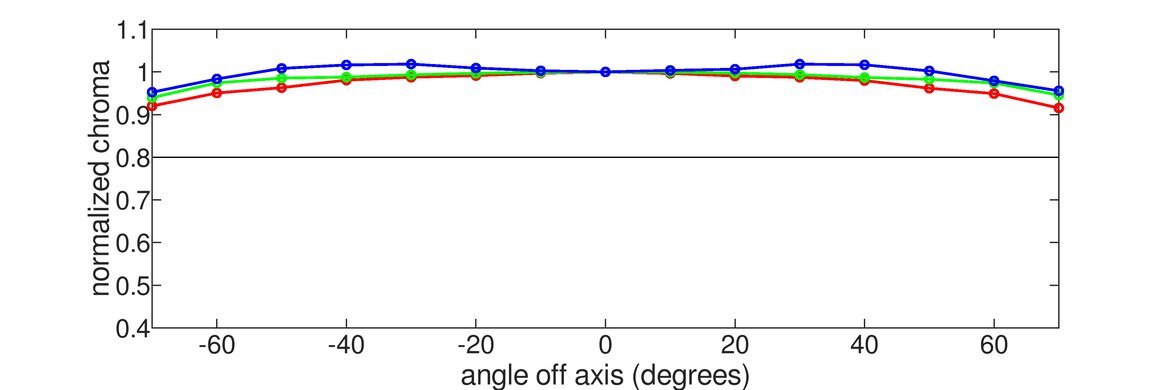
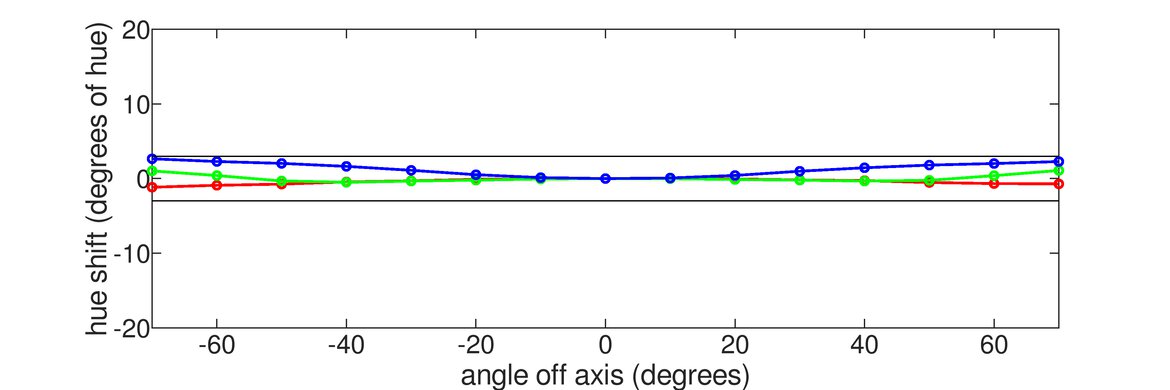
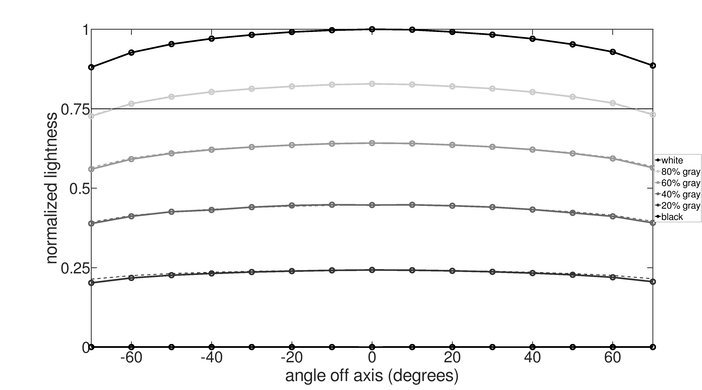
    Poor horizontal viewing angle. While the Asus VG248QE maintains its brightness decently at an angle, its rapidly shifting colors render it less than adequate for sharing with people to the sides. Thanks to its smaller size, however, it is not extreme enough to be the cause of uniformity issues from a standard viewing position.

    5.0
    Vertical Viewing Angle
    Color Washout From Below
    13°
    Color Washout From Above
    46°
    Color Shift From Below
    20°
    Color Shift From Above
    70°
    Brightness Loss From Below
    26°
    Brightness Loss From Above
    36°
    Black Level Raise From Below
    23°
    Black Level Raise From Above
    33°
    Gamma Shift From Below
    Gamma Shift From Above

    Update 10/23/2018: We have corrected a mistake in the vertical brightness chart that was negatively affecting the viewing angle score.

    The Asus VG248QE monitor has a bad vertical viewing angle. When looking up to the screen, colors shift to a negative tone and darken significantly. It is a little better from above, where colors are better maintained, but it does lose contrast significantly. When viewed directly in front, the poor vertical viewing angle can sometimes cause the bottom edge of the screen to have a very slight tinge.

    7.7
    Gray Uniformity
    50% Std. Dev.
    6.667%
    50% DSE
    0.117%
    5% Std. Dev.
    1.328%
    5% DSE
    0.070%

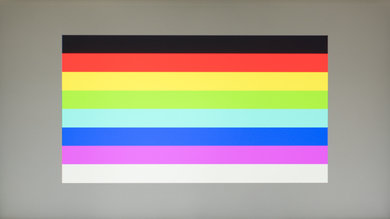
    The gray uniformity of the Asus VG248QE is very good. On the 50% gray test picture, the image appears uniform, so dark or bright areas shouldn't be an issue when watching content or scrolling web pages. The top portion of the image is darker, but this is only due to the narrow viewing angle of the display (when viewed from above or below the colors shift).

    Looking at the 5% gray uniformity test picture, no particular issues are visible. This means that when viewing dark scenes in a dark room, the image is uniform, which is good.

    5.5
    Black Uniformity
    Native Std. Dev.
    2.361%
    Std. Dev. w/ L.D.
    N/A

    The black uniformity is disappointing on the Asus VG248QE. At 5.5 it is a bit inferior to the AGON AG271QX, which has a similar type of panel used in its construction (TN panel). Some backlight bleed is visible near the edges, and also each side near the center of the screen looks a bit darker than the center, but overall, it is still not bad when compared to other monitors we have tested, IPS one especially.

    8.8
    Pre Calibration
    Picture Mode
    Standard
    Luminance
    323 cd/m²
    Luminance Settings
    90
    Contrast Setting
    80
    RGB Controls
    Normal Color Temperature
    Gamma Setting
    No Gamma Setting
    Color Temperature
    6,663 K
    White Balance dE
    1.49
    Color dE
    1.71
    Gamma
    2.15

    The ASUS VG248QE monitor has a great accuracy out of the box. From all the picture mode available, the mode with the best accuracy was the 'Standard' picture mode, with the 'Normal' color temperature. If you find the 'Normal' color temperature too warm or too cold, you can change the color temperature to either 'Warm' or 'Cool'. You will still have a reasonable accuracy if you stay on the 'Standard' picture mode, but note that all other picture modes, have a much worse accuracy.

    9.4
    Post Calibration
    Picture Mode
    Standard
    Luminance
    100 cd/m²
    Luminance Settings
    11
    Contrast Setting
    78
    RGB Controls
    94-89-100
    Gamma Setting
    No Gamma Setting
    Color Temperature
    6,540 K
    White Balance dE
    0.67
    Color dE
    0.95
    Gamma
    2.20

    After calibration, which was done on the 'Standard' picture mode and the 'User' color temperature ('User' color temperature gives you the full control over the RGB values), the accuracy of this ASUS monitor is excellent.

    Both the white balance dE and the color dE are under 1, which is excellent as almost nobody could notice the inaccuracy at this level. The color temperature is also very close to our 6500k target, which is great. Finally, the gamma is on our 2.2 target, even though the gamma curve slightly diverges from our target curve, but it's still pretty good and does not really cause any issues.

    You can download our ICC profile calibration here.

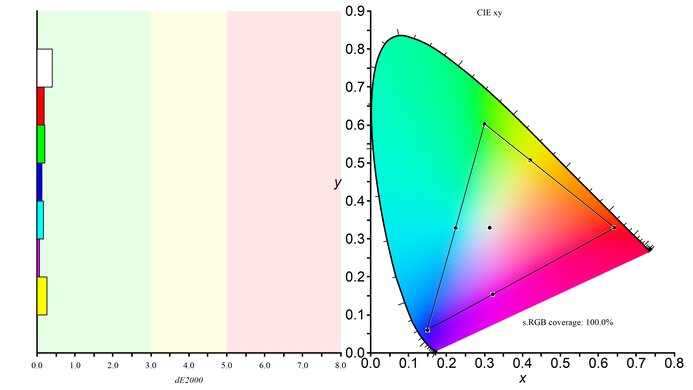
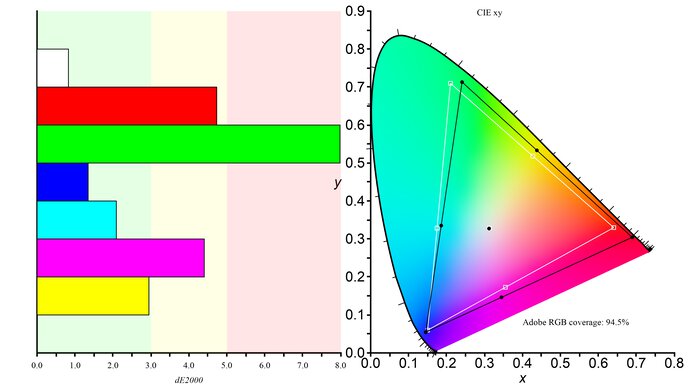
    8.5
    SDR Color Gamut
    sRGB xy
    98.9%
    Adobe RGB xy
    70.7%
    sRGB Picture Mode
    Standard
    Adobe RGB Picture Mode
    Standard

    This Asus monitor does an excellent job of reproducing the s.RGB color gamut that is most commonly used. Its coverage will be sufficient for all but the most critical color work. However, those interested in the more professionally oriented Adobe RGB color space will be disappointed by its performance.

    7.9
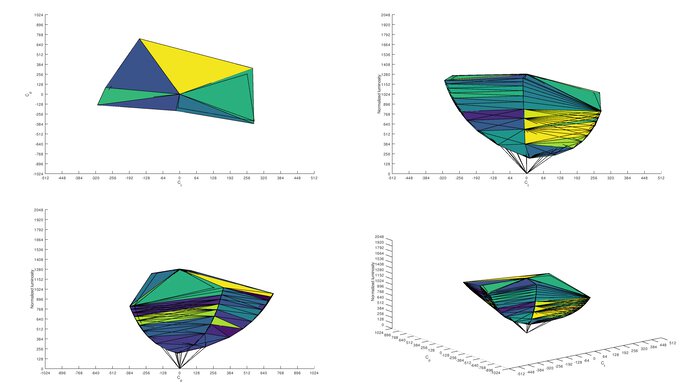
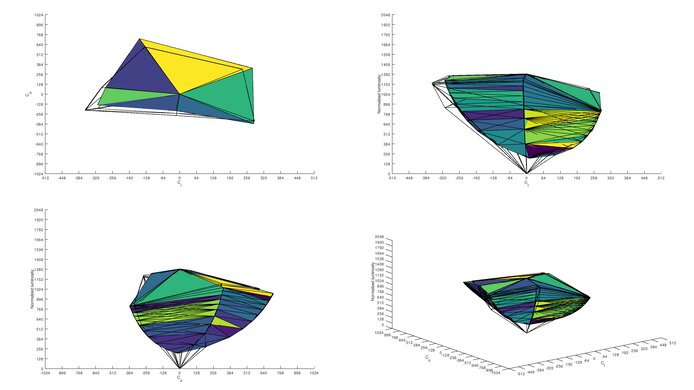
    SDR Color Volume
    sRGB In ICtCp
    88.4%
    Adobe RGB In ICtCp
    70.0%
    sRGB Picture Mode
    Standard
    Adobe RGB Picture Mode
    Standard

    Good SDR color volume. The monitor covers the majority of the standard RGB color volume, but it has difficulty reproducing darker tone due to its low contrast ratio. Its Adobe RGB coverage, however, is too low to serve as a benefit.

    0.0
    HDR Color Gamut
    Wide Color Gamut
    No
    DCI P3 xy
    N/A
    Rec. 2020 xy
    N/A
    DCI P3 Picture Mode
    No HDR
    Rec. 2020 Picture Mode
    No HDR

    HDR is not supported.

    0.0
    HDR Color Volume
    DCI-P3 In ICtCp
    N/A
    Rec. 2020 In ICtCp
    N/A
    DCI P3 Picture Mode
    No HDR
    Rec. 2020 Picture Mode
    No HDR

    HDR is not supported.

    10
    Image Retention
    IR After 0 Min Recovery
    0.00%
    IR After 2 Min Recovery
    0.00%
    IR After 4 Min Recovery
    0.00%
    IR After 6 Min Recovery
    0.00%
    IR After 8 Min Recovery
    0.00%
    IR After 10 Min Recovery
    0.00%

    Perfect result for the ASUS VG248 on our image retention test as no sign of image retention is visible.

    8.0
    Gradient
    Color Depth
    8 Bit

    The Asus VG248QE is very good when displaying our gradient test image. Besides the 8-bit banding resulting of the limitation of this monitor, some little color issues can be noticed in the darker grayscale and the green and blue, but this is not enough to cause significant banding while looking at regular content and overall is a very good result.

    10
    Color Bleed
    Pixel Row Error
    0.000%
    Pixel Column Error
    0.001%

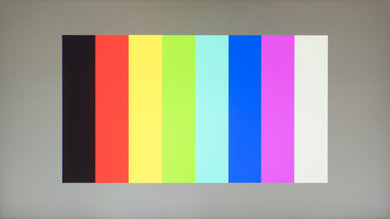
    The Asus VG248QE has no issues with color bleed. A minor amount appears when uniform vertical bands are shown on screen, but it should be completely imperceptible in actual use.

    7.8
    Reflections
    Screen Finish
    Matte
    Total Reflections
    5.4%
    Indirect Reflections
    4.2%
    Calculated Direct Reflections
    1.2%

    The reflection handling of this Asus VG248QE monitor is good. The light matte finish diffuses reflections across the screen, increasing the size of direct reflections but reducing their intensity. It should be fine for most rooms but may be an issue in a very bright room.

    7.0
    Text Clarity
    Pixel Type
    TN
    Sub-Pixel Layout
    RGB
    Motion
    9.6
    Response Time @ Max Refresh Rate
    Best Overdrive Setting
    60
    Rise / Fall Time
    2.5 ms
    Total Response Time
    6.9 ms
    Overshoot Error
    3.3%
    Dark Rise / Fall Time
    1.4 ms
    Dark Total Response Time
    6.5 ms
    Dark Overshoot Error
    7.6%

    Trace Free Off
    Trace Free 40
    Trace Free 60
    Trace Free 80
    Trace Free 100

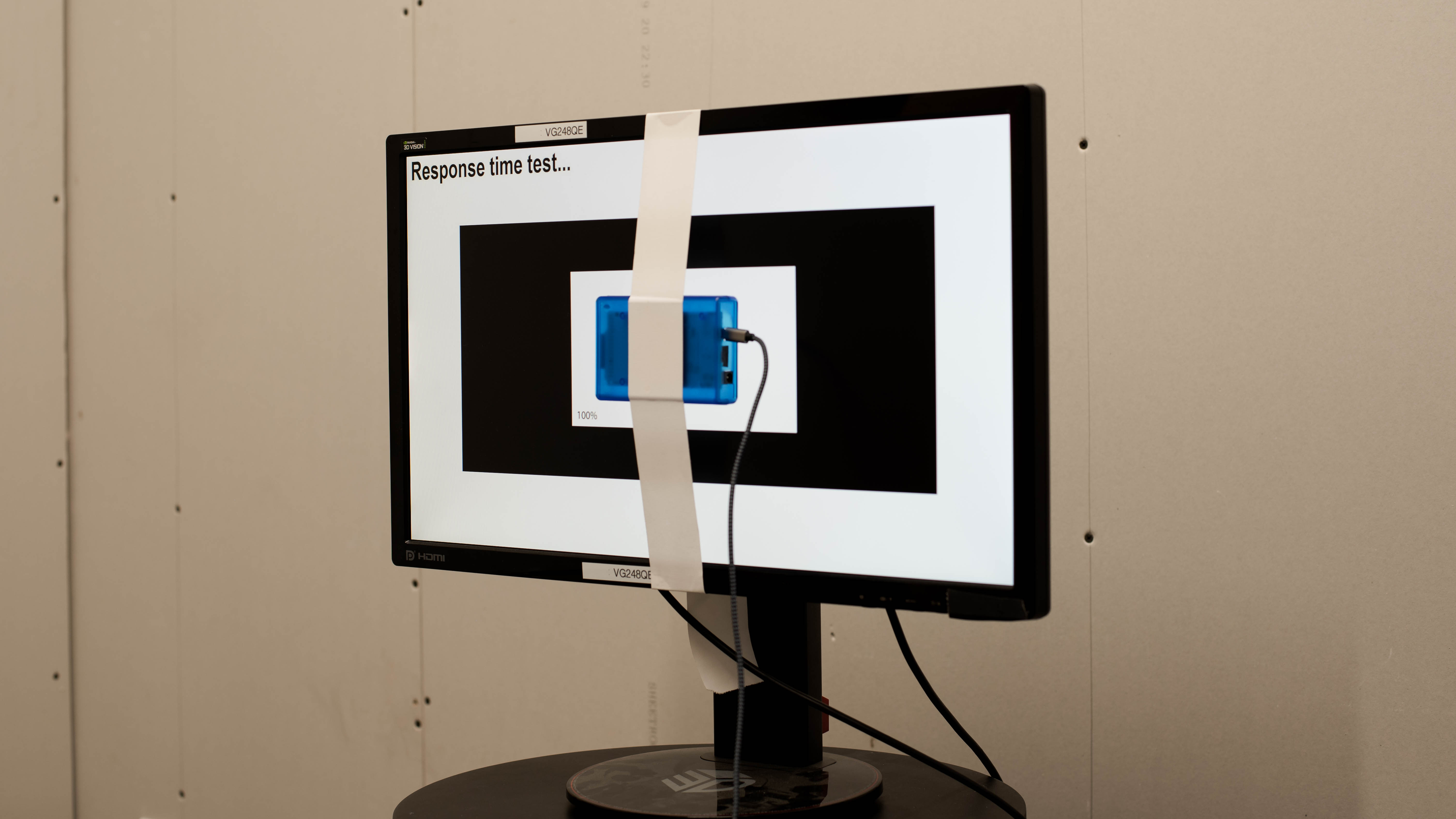
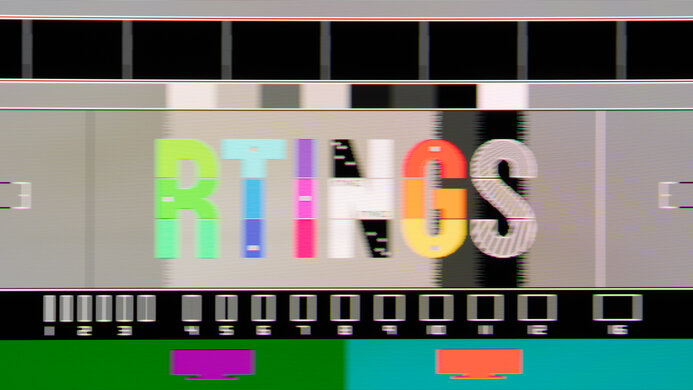
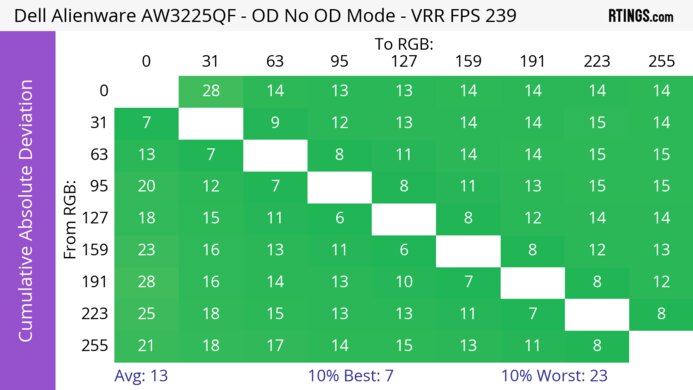
    Outstanding response time, good enough for even the most intense motion sequences. When following objects in games or even scrolling web pages almost no trail is visible which is great. Almost all the blur in the photo is due to persistence (caused by moving past a static frame, rather than response time) which is excellent due to the lack of smearing. The 'Trace Free 60' option is the most balanced; the '80' option is also good but it adds more overshoot and its 80% transition is only 0.2 ms faster.

    9.0
    Response Time @ 60Hz
    Best Overdrive Setting
    60
    Rise / Fall Time
    3.2 ms
    Total Response Time
    13 ms
    Overshoot Error
    2.3%
    Dark Rise / Fall Time
    1.7 ms
    Dark Total Response Time
    12.8 ms
    Dark Overshoot Error
    4.3%
    8.8
    Image Flicker
    Flicker-FreeNo
    PWM Dimming Frequency
    833 Hz

    Update 09/23/2020: We discovered the way the flicker frequency increases or decreases according to the monitor's refresh rate. It flickers at about 6 times the refresh rate.

    Update 12/19/2017: It was discovered that when BFI (LightBoost) is enabled the monitor's contrast ratio decreases significantly, from 744:1 to 319:1 at 120 Hz. This means that the picture will look significantly more washed out when BFI is enabled, but motion will look more clear. There are ways to minimize the washed-out look, explained in detail in the BlurBusters.com LightBoost FAQ article. Also with BFI enabled the maximum brightness becomes 169 cd/m², much lower than the monitor's normal 362 cd/m² brightness, but this is as expected for BFI flicker.

    The Asus VG248QE monitor uses PWM to dim the backlight, so it is not flicker-free but the frequency of the flicker is extremely high and will be unnoticeable by almost anyone, even those sensitive to flicker which is great. However, it was discovered that it flickers at about 6 times the refresh rate (60Hz refresh rate results in 357Hz flicker, 144Hz rate is 857Hz flicker). Changing the backlight doesn't change the flicker frequency, but rather the screen's refresh rate changes it, but most people shouldn't notice this.

    While the monitor does have a black frame insertion feature that adds flicker to clear up motion, it's only activated when the monitor is in 3D mode (using NVIDIA's 3D Lightboost technology). A third party software hack is needed to activate BFI for normal usage, however, the implementation is now quite mature and stable. BlurBusters.com has an excellent article on activating BFI on a Lightboost monitor.

    This flicker works well to reduce persistence blur, and should be enabled for fast-paced content for the clearest image (when playing video games). It does reduce the brightness of the display though.

    6.9
    Black Frame Insertion (BFI)
    Black Frame Insertion (BFI)
    Yes
    BFI Maximum Frequency
    120 Hz
    BFI Minimum Frequency
    100 Hz
    7.4
    Refresh Rate
    Variable Refresh Rate
    No VRR
    Native
    144 Hz
    Max Refresh Rate
    144 Hz
    Variable Refresh Rate
    No
    FreeSync
    No
    G-SYNC
    No
    VRR Maximum
    N/A
    VRR Minimum
    No VRR
    VRR Supported ConnectorsNo VRR

    The Asus VG248QE has a native refresh rate of 144 Hz, which is great for all usages but especially gaming. Unfortunately it lacks a variable refresh rate implementation like FreeSync, so gamers will have to deal with VSync or tearing. However, the updated version of it, the ASUS VG248QG, has a higher refresh rate and VRR support.

    When using the HDMI ports the maximum official resolution is 1080p @ 60 Hz, though we were able to reach 1080p @ 86 Hz by using a custom resolution with standard timings.

    Inputs
    9.4
    Input Lag
    Native Resolution
    5.1 ms
    Native Resolution @ 60Hz
    9.9 ms
    Variable Refresh Rate
    N/A
    Variable Refresh Rate @ 60Hz
    N/A
    10 Bit HDR
    N/A
    Black Frame Insertion (BFI)
    9.6 ms

    BFI frequency tested: 120 Hz

    Incredibly low input lag, good enough for even the most competitive gamers and eSports players. The input lag with BFI (Lightboost) enabled is a little higher but is still very low. While the monitor does support non-native resolutions, none of these resolutions are available at the native 144 Hz refresh rate.

    7.1
    Resolution And Size
    Native Resolution1920 x 1080
    Aspect Ratio16:9
    Megapixels2.1 MP
    Pixel Density
    92 PPI
    Screen Diagonal24.0"
    Screen Area246 in²

    The Asus VG248QE monitor only has a very common 1080p resolution and 24" size. It should be good enough for most usages, but some people may find themselves wishing for more screen area and a higher resolution. If you're after a larger screen but enjoy the 1080p resolution then check out the Asus VG279Q.

    Inputs

    All of the inputs are on the back of the monitor.

    Total Inputs
    DisplayPort1 (DP 1.2)
    Mini DisplayPortNo
    HDMI1 (HDMI 1.4)
    DVI1 (DVI-D, dual link)
    VGANo
    DisplayPort OutNo
    USBNo
    USB CNo
    Analog Audio Out 3.5mm1
    Microphone In 3.5mmNo
    Digital Optical Audio OutNo
    Analog Audio Out RCANo
    Power SupplyInternal

    There is also an Analog Audio In 3.5mm port, which can be used to feed the headphone jack when not using audio input from DisplayPort or HDMI.

    When using the HDMI ports, the maximum official resolution is 1080p @ 60 Hz; by using a custom resolution we were able to display 1080p @ 86 Hz using standard timings, indicating that the port has more bandwidth than HDMI 1.2.

    Features
    Additional Features
    RGB Illumination
    No
    Speakers
    Yes
    HDR10No
    Multiple Input Display
    No

    The Asus VG248QE is an older monitor from the days of NVIDIA's 3D Vision push, which since stagnated. As such, the monitor has NVIDIA's Lightboost technology, which makes the backlight flicker in time with 3D shutter glasses when the monitor is in 3D mode, effectively 'boosting' the brightness of the screen when using shutter glasses. However, in order to synchronize the shutter glasses you need NVIDIA's 3D Vision kit, which is expensive. Lightboost can also be used as BFI during normal usage, as explained in the Image Flicker section.

    The monitor also has two special gaming features: 'Aimpoint', which is a crosshair overlay on the screen for games that don't have a crosshair; and a transluscent countdown timer which is placed in one of the corners of the screen.

    On-Screen Display (OSD)
    Controls

    On the bottom right corner of the monitor are a series of downward facing buttons for controlling the OSD, and the light up power button. The way the buttons are mapped to OSD commands can be a little annoying; for example, the Menu button closes the Brightness menu but acts as the select button in the main menu, which makes learning the buttons by muscle memory more difficult.

    In The Box

    • Manual and drivers
    • Power cable
    • DVI Cable
    • 3.5mm aux cable

    Recommended Articles

    Best Monitors For Gaming

    Comments

    1. Product

    ASUS VG248QE: Main Discussion

    Let us know why you want us to review the product here, or encourage others to vote for this product. Comments transferred from merged discussions are also included.

    PreviewBack to editorFormat guide
    No comments yet, refresh to see new ones