
Our Verdict
Great TV overall. The LG C7 has great picture quality with almost every usage. Its blacks and motion blur are as good as it gets. Movie performance is exceptional, and gaming is as good as it gets.
- Perfect blacks produce an infinite contrast ratio
- Virtually no motion blur, fast moving content is very clear
- Picture quality is retained, even at steep angles
- Temporary retention can happen when static images stay on screen too long
- Brightness levels vary depending on content being played (ABL)
Outstanding Movie performance. The LG C7 has an infinite contrast ratio thanks to its pure and uniform blacks. It is a thing to behold in a pitch black room.
The C7 is great for TV shows. It gets sufficiently bright and deals with reflections well. It can also be enjoyed from every side, so wider living rooms aren't a problem. News or weather broadcast might see icons retained for a few minutes, but nothing major.
Sports look very good on the LG C7, mostly thanks to its great motion. Fast moving objects and players show no trail, so they appear very fluid. The uniformity is also quite good, but it can show some minor banding in specific areas.
Superb gaming TV. It handles very fast motion exceptionally well, and input lag is amongst the lowest available making games feel fluid and responsive.
Superb HDR movies performance. The C7 has excellent picture quality and can cover a fairly large color volume. It's also capable of lighting up small highlights quite bright, which is important for HDR.
Impressive HDR gaming capability. The standard gaming experience translates well to HDR, and using that feature only brings benefits.
Great TV to use as a PC monitor. It has low input lag and motion blur, and an excellent viewing angle. It also supports a 120hz input, which is an excellent feature for PC gaming.
Changelog
- Updated Mar 12, 2018: Converted to Test Bench 1.2.
- Updated Sep 20, 2017: Tested 1080p @ 120 Hz input lag using our new input lag tool.
- Updated Aug 14, 2017: webOS update 3.6 fixed the PC mode HDR issue, so 4:4:4 color is now properly displayed as 4:4:4. The other issues with HDR in PC mode have not been fixed.
- Updated Aug 10, 2017: Converted to Test Bench 1.1.
Check Price
Differences Between Sizes And Variants
We tested the 55" (OLED55C7P). For the most part, we expect our review to be valid for the 65" (OLED65C7P).
The B7 (OLED55B7P, OLED65B7P) is a warehouse exclusive model in the USA and is also available in Canada but we expect it to have the same performance, with a slightly different design.
If someone comes across a different type of panel or if their LG OLED 55C7P doesn't correspond to our review, let us know and we will update the review. Note that some tests such as the gray uniformity may vary between individual units.
| Size | US Model | EU Model |
| 55" | OLED55C7P | OLED55C7V |
| 65" | OLED65C7P | OLED65C7V |
Popular TV Comparisons

The LG OLED C7 is one of the best TVs available today and its picture quality cannot be matched, but it's a very minor improvement over last year's models. See our recommendations for the best TVs.
The LG C2 OLED is much better than the older LG C7 OLED. There's not much difference in picture quality: they both display deep, uniform blacks in a dark room with no blooming around bright objects. The C2 is a lot brighter, especially in HDR, so bright highlights stand out much better. The C2 also has more advanced gaming features, including variable refresh rate support to reduce screen-tearing.
The LG C9 OLED is a bit better than the LG C7 OLED. The two TVs were tested under different test benches, but some comparisons can still be made. The C9 has wider viewing angles and lower input lag, and is more future-proof thanks to its input ports. The C9 has 4 HDMI 2.1 inputs, which, for the moment, doesn't add much, if anything at all. When HDMI 2.1 sources become available, the C9 should support a 4k @ 120Hz input, even at full chroma. The C9 also supports eARC and supports the HDMI 2.1 variable refresh rate technology, which is currently only supported by the Xbox One.
The performance of the LG B7/B7A OLED and LG C7 OLED is nearly identical. There are no major differences other than the design. The LG C7 and the B7P variant have a 2.2 speaker setup, which can internally decode Dolby Atmos sound. The B7A variant only has a 2.0 speaker setup and can't decode Dolby Atmos internally, although the C7 and all B7 models can output Atmos to an external receiver.
If you are a movie fan, then go with the LG C7 OLED, whereas if you use your TV as a PC monitor or watch the news with static banners for prolonged periods of time, go with the Sony X930E. The LG C7 has perfect blacks that are great for movies and HDR content in dark rooms. The LG C7 also has a slightly better response time and somewhat better input lag, so you can enjoy playing video games. Finally, the LG C7 has better viewing angles for those sitting on the side and better gray uniformity for those sports fans. The Sony X930E is a better choice if you worry too much about the permanent burn-in.

We buy and test dozens of TVs yearly, taking an objective, data-driven approach to deliver results you can trust. Our testing process is complex, with hundreds of individual tests that take over a week to complete. Most of our tests use specially designed test patterns that mimic real content, but we also use the same sources you have at home to ensure our results match the real-world experience. We use two main tools for our testing: a Colorimetry Research CR-100 colorimeter and a CR-250 spectroradiometer.
Test Results
Older Test Bench: This product has been tested using an older TV test methodology, before amajor update. Some of the test results below aren't directly comparable with other TVs. Learn more
for pictures & test results

The design of the C7P is great, and stands out in any room. It has a similar style to the LG OLEDs of 2016, but with a different stand and some minor aesthetic improvements. Unlike the 2016 models, there are no curved options available in 2017. The top third of the screen is extremely thin, even compared to the relatively thin LG B6 2016.
for pictures & test results

The stand is quite different from the 2016 OLED models, with a brushed metallic finish. It supports the TV well and feels sturdy, but is also small enough to fit on most tables.
Footprint of the 55" TV stand: 8.7" x 22.7"
for pictures & test results

The rear of the TV is similar to the B6 2016. There is a removable cable management hook for guiding cables, but it isn't as good as the cable management on some other TVs such as the X930E. The controls are located on the rear of the TV similar to the E6. If wall-mounted, some of the inputs may be difficult to access.
for pictures & test results

The borders of the TV are very thin, and look great.
for pictures & test results

The top of the TV is exceptionally thin when viewed at an angle, even compared to the 2016 OLEDs such as the B6 2016. The max thickness measurement is taken at the thicker body of the TV, but it is still very thin. The cable management hook can be removed to sit flush against a wall.
for pictures & test results
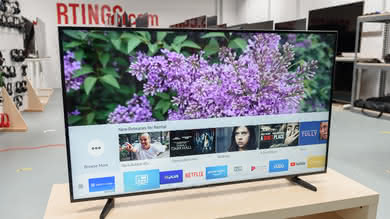
The C7 only gets a little warm, and the heat is fairly even across the display because each pixel in an OLED produces its own light.
for pictures & test results

The build quality is great. The TV feels solid, although the top of the screen does feel a bit thin which can make it a bit more difficult to move.
for pictures & test results

The LG C7 has a perfect contrast ratio, and like other LG OLED TVs, is a great performer when set in a dark room.
for videos & test results

Since there is no need for local dimming on OLED TVs, this video is for reference only.
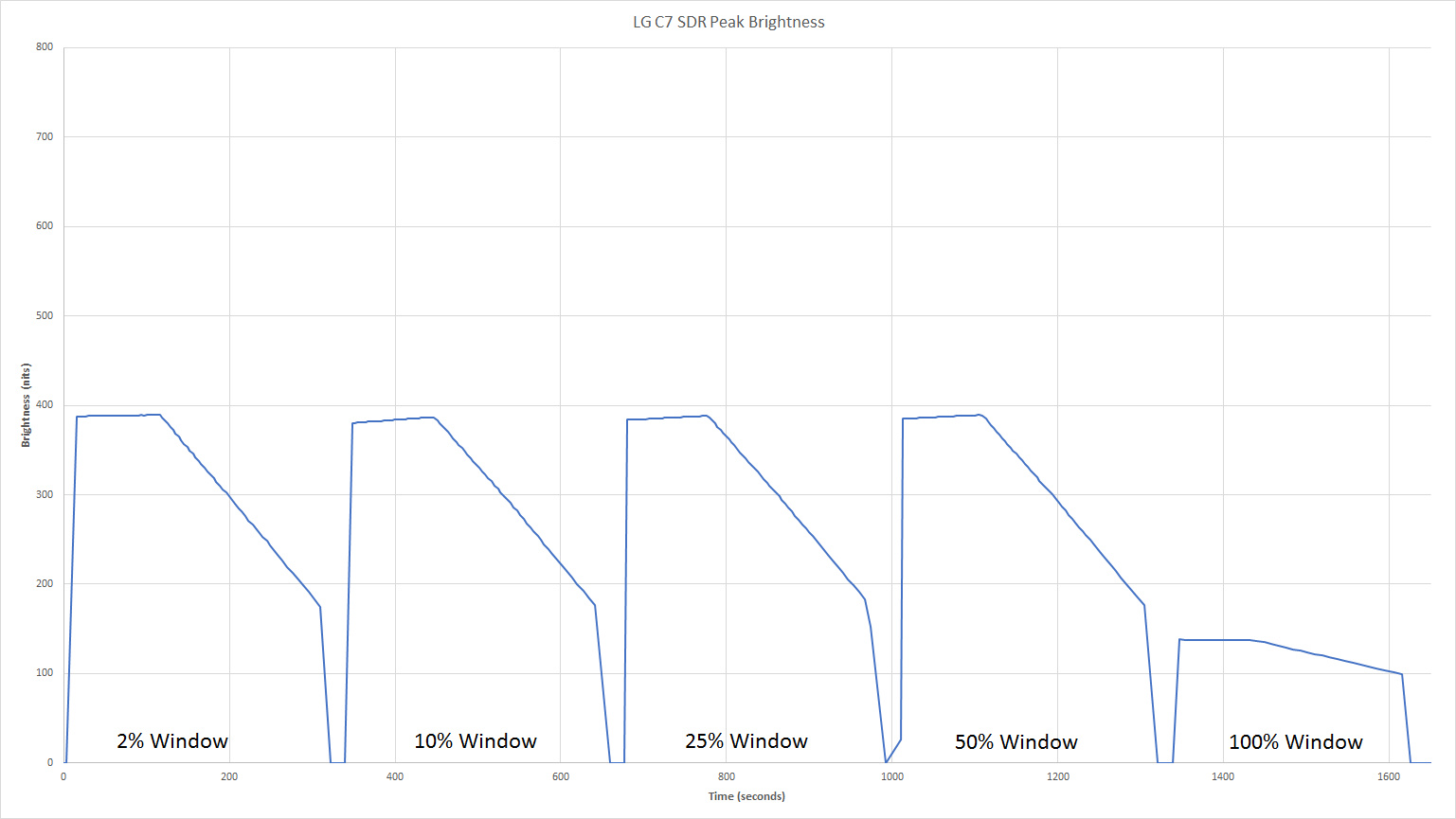
Good SDR peak brightness, a little brighter than the LG B6 2016 and C6 2016. The TV remains at a consistent ~380 cd/m2 for all content except extremely large and bright images like our 100% white window, which unfortunately dims quite significantly due to the TV's Automatic Brightness Limiter (ABL). This means that almost all scenes in SDR content will have a good brightness, but extremely bright scenes may dim.
The TV dims over time when showing a static image, but this won't happen during video. A plot of SDR peak brightness over time can be found here.
Update 04/24/2017: ABL is less of an issue if the OLED light setting is set to 35 or less, where the fluctuations between scenes will only drop by 20 cd/m2 or less.
Good HDR peak brightness, a little brighter than the LG B6 2016 and C6 2016. Although the TV gets very dim when showing a pure white window due to its Automatic Brightness Limiter (ABL), it is very bright when showing our real scene test, so most HDR content will be very bright. However the TV is unable to reach 1000 cd/m2 on small highlights like our 2% window, so small highlights in HDR content won't get as bright as intended.
The TV dims over time when showing a static image, but this won't happen during video. A plot of HDR peak brightness over time can be found here using the Cinema picture mode, and here using the Vivid picture mode. The TV is brighter when in Vivid mode, but colors aren't as accurate.
for pictures & test results

for pictures & test results

The overall gray uniformity of the C7 is good. There are some faint vertical lines visible when you look very closely and the right side is a bit warmer than the rest of the screen but it does not show when watching normal content. There is very little dirty screen effect which is good, especially when watching sport.
The 5% gray uniformity is also good, and when looking at our test picture, nothing really stands out. When viewed in a dark room, some vertical lines are visible, and it seems a bit worse than on the LG B6 2016. Note that those vertical lines are mostly visible when a uniform dark image is displayed and it very hard to notice with regular content like movies or TV shows.
for videos & test results

for pictures & test results
for pictures & test results
for pictures & test results
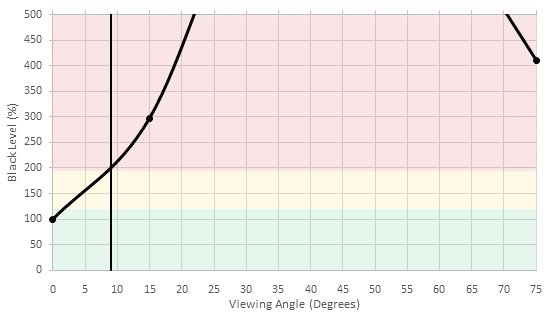
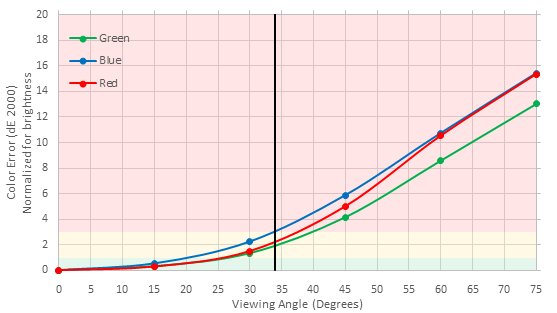
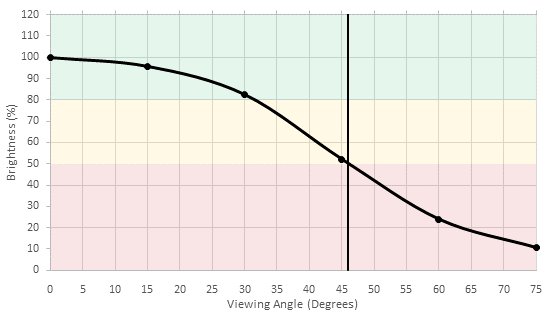
Great viewing angle. The true blacks of this OLED TV ensure that blacks never appear washed out even at an extreme angle, and the TV also remains very bright at all angles. Its weak point is its colors on an angle which do shift, however this should only be noticeable for people sitting at a significant angle to the TV.
for pictures & test results

The C7 has flawless black uniformity when displaying a black image. This is due to the fact that the pixels are totally turned off and emit no light when displaying a true black. No clouding whatsoever occurs and this provides one of the best experiences that a TV can provide, especially when watching movies in a dark room.
for pictures & test results

for pictures & test results

for pictures & test results

The C7 is excellent at handling reflections. The purple tint present on most high-end TVs is still visible, but much less so than the 2016 OLEDs. The reflections are fine even for a bright room.
for pictures & test results

for pictures & test results

for pictures & test results

Out of the box the color accuracy of C7 is a bit off and this may be noticeable to enthusiasts. The white balance dE is over 4, which is pretty high and the image is warmer than our target of 6500K. The color dE is also high and only the yellow and green track the target closely. The gamma also doesn't track our 2.2 target.
for pictures & test results

for pictures & test results

for pictures & test results

Calibration on the LG C7 is done pretty easily and the white balance is particularly responsive and precise. The color space management is a bit less responsive than the white balance, but that is almost always the case for LG TVs. Even if it is a bit less responsive, the total color dE was brought down significantly to a reasonable 1.22. In the end, the gamma was spot on our desired value of 2.2.
You can see our recommended settings here.
for pictures & test results

Upscaling of low quality content is good. Some halo artifacts can be seen along lines but details are preserved.
for pictures & test results

720p content such as cable is upscaled well. Some moire can be seen in the image from the camera focus.
for pictures & test results

1080p content such as Blu-rays are upscaled well. Details look good and the image is sharp.
for pictures & test results

Native 4k content looks good on the C7. No issues can be seen.
for pictures & test results

for pictures & test results

Outstanding color gamut, similar to the B6 2016 and C6 2016. The TV can accurately show nearly any color in the P3 color space, even deep greens that many other TVs struggle with. The Rec 2020 color space is also well covered. Colors in HDR content will be well reproduced.
for pictures & test results

for pictures & test results

Decent color volume. This OLED TV is able to show its wide color gamut for dark and moderately bright colors, but it is unable to show extremely bright colors at their proper brightness. This should only be a problem for extremely bright highlights in HDR content.
for pictures & test results

The LG C7P can display our test image smoothly without any banding typically seen on 8-bit panels. Light shades of color are displayed without problems, however small imperfections can be noticed in the darker shades of color and the dark part of the greyscale. Overall though the gradient performance is good, and these small flaws should not be a problem when watching standard content.
Update 2017-11-07: Note that when the TV is set to 'PC' mode, via the input menu, the banding is much more visible, and this for all picture modes.
for pictures & test results

The C7P OLED TV is prone to image retention just like previous models. Fortunately, the image retention is less strong than what we have measured on 2016 LG OLED TVs.
If you find out that your TV has some image retention after playing video games over a long time for example, there is a function in the 'Picture settings' page, under 'OLED Panel Settings' named 'Pixel Refresher' that will 'recalibrate' the screen to get rid of any imprinted images that may still be visible. This procedure lasts around one hour and the TV needs to be shut off for it to work. This can usually take care of any image retention.
Another feature is also available on the same settings page named 'Screen Shift' that will 'move' the screen slightly (you can't really notice it) to make the image retention less problematic. For our test, this feature was turned on but there is still some image retention.
Note that there is a variation in temporary image retention between units.
OLED panels such as the C7 do have the possibility of experiencing burn in. You can see our investigation into this here.

for pictures & test results

for pictures & test results

Like other OLED TVs, the C7 has an almost perfect response time. This results in almost no visible blur following moving objects. Unfortunately this means that low frame rate content may appear to stutter as there is no motion blur to smooth between the frames.
for pictures & test results

The C7 doesn't flicker to dim and instead shows each image for each frame. This makes motion appear slightly more smooth, but does result in some persistence blur (visible in the motion blur image).
The C7's OLED panel doesn't flicker, and has no optional flicker setting like the Sony A1E does; this means that flicker can't be added to make motion look clearer.
for pictures & test results

for pictures & test results

The C7P has a 120 Hz panel and is able to interpolate lower frame rate content to 120 fps, which significantly improves motion. Unfortunately the interpolation is not as good as on some other TVs: the motion stuttered at times during normal content, especially cartoons, and artifacts would appear in rare cases.
To enable motion interpolation (also called the soap opera effect) set 'TruMotion' to 'User'. For a 30fps source increase 'De-Judder' and for a 60fps source increase 'De-Blur'.
Update 11/13/2017: The motion interpolation performance has been clarified in the text.
The C7 experiences stutter, which is especially noticeable with low frame rate content. This is a result of the almost instant response time, so there is very little blur to smooth movement between frames.
The LG C7P is judder free when movies are played via 24p sources like DVDs, Blu-ray players, and native streaming apps. To be able to display 24p content without judder, the 'TruMotion' option must be set to 'User' and both the 'De-Judder' and 'De-Blur' sliders set to zero (when set to 0, no soap opera effect will be added).
When it come to movies playing via a 60p/60i source like cable boxes, the C7 was able to remove judder completely just by turning on the 'Real cinema' option.
The LG C7 OLED has a native 120Hz panel like other 2017 OLED TVs, but doesn't support any variable refresh rate features.
Very low input lag. When in game mode the input lag is a solid 21 ms regardless of input resolution. This should be good enough for all but the most competitive gamers. This input lag is lower than any of LG's 2016 OLEDs like the B6 2016, and is competitive with some of the best TVs from last year like the KS8000.
Update 04/24/2017: Turning on PC mode on any of the picture modes will result in input lag of about 21ms. 1080p outside game mode has been corrected after being re-tested.
Update 08/14/2017: webOS update 3.6 fixed the PC mode HDR issue, so 4:4:4 color can now be properly displayed in HDR content. The 4:4:4 + HDR input lag has been measured as ~21 for both 4k and 1080p, which is no different from the other low input lag measurements.
Update 09/20/2017: Tested 1080p @ 120 Hz input lag using our new input lag tool. It's nearly identical to the 1080p @ 60 Hz input lag, which is very unusual. The first on screen reaction input lag of 1080p @ 120 Hz on this TV is 4 ms higher than for 1080p @ 60 Hz, which counteracts the benefits of the 8 ms faster scannout of 120 Hz, producing an average input lag that is equal to the 60 Hz input lag. This may be by design, to keep the audio sync consistent between both refresh rates. Either way, ~20 ms input lag is very good for a TV, and should please most gamers.
All the common input resolutions are supported. For the TV to properly display 4:4:4 color, the HDMI input in use must have its icon changed to 'PC'. To play 4k @ 60 Hz @ 4:2:2 or 4:4:4 color, 'HDMI ULTRA HD Deep Color' in the general settings must be enabled for the input being used.
Update 05/31/2017: 1080p @ 120 Hz + HDR does not work properly. Its brightness appears to be following the SDR gamma curve rather than the HDR PQ curve, making everything look off and too bright.
Update 08/14/2017: webOS update 3.6 fixed the PC mode HDR issue, so 4:4:4 color can now be properly displayed in HDR content.



for pictures & test results

Unlike the 2016 OLEDs, the C7P doesn't have a component input.
Unlike the 2016 OLEDs, the C7 doesn't have a component input.
Since it doesn't have an analog audio out, to connect a pair of headphones, you will have to either use bluetooth or headphones with a digital optical audio input like the Turtle Beach Elite 800.
for pictures & test results

Passable frequency response performance. The C7 follows somewhat of a flat shape which is desired. A lot of compression occurs at max volume, but most people will not bring it up that high.
for pictures & test results

Decent distortion performance. Remains relatively low at standard levels and the amount scales linearly with raising the volume.
for pictures & test results

The webOS interface is split into three sections: settings, inputs and apps. Each has its own button on the remote, a quick menu containing common items, and a full menu with advanced options. This makes the interface easy to use and fast to navigate, but the split nature may confuse some first time users.
for pictures & test results

The TV did not display ads during our testing, but there was a personalized advertising section of the user agreement so the TV may have ads in some regions.
Update 05/25/2017: Ads were found in voice search results, like the UJ7700's search ads shown here. It can be assumed that there are also ads in the LG Content Store like on other 2017 webOS TVs.

for pictures & test results

The C7 comes loaded with all the popular apps like Netflix, Amazon Video and YouTube. Many more apps can be downloaded from the LG Content Store.
for pictures & test results

The C7's remote is great, and it's mostly unchanged from last year's smart remote. It has a lot of advanced features that make the TV easier to use. When the remote is pointed at the TV a cursor follows its movement, which allows the user to point at and select menu options directly. The cursor is very sensitive to movement and takes some getting used to, but it really helps when navigating the TV. The remote also has a microphone for voice commands, which works well.
for pictures & test results
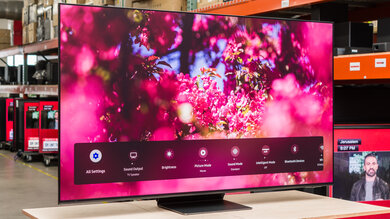
The webOS remote app has some useful features like streaming files off the device running the app, but is missing some others like text entry.
for pictures & test results

There is a simple joystick for navigating the TV without the remote. It's located on the back of the TV like the E6 and unlike the B6 2016 and C6 2016.
for pictures & test results

- Manual
- Batteries
- Remote
- Composite adapter