
Our Verdict
Superb TV overall. The Sony A1E OLED TV will please just about everyone with its picture quality and features.
- Perfect blacks
- Exceptional motion performance
- Striking design
- Input lag could be better
- Screen is at an incline
Terrific TV for movies. Blacks are as pure as can be thanks to OLED's ability to shut off individual pixels. This leads to a picture with depth that is unmatched by LED TVs.
The Sony A1E is great for watching TV shows. It handles reflections very well and upscaling of lower resolution content is as good as it gets. It could be a bit brighter though.
Very good TV for watching sports. The A1E has excellent motion and a very uniform screen. Games can be enjoyed from every angle as well.
The A1E is a great TV for video games. Input lag is low with a 4k input, and motion is excellent. Combined with the great picture quality, it makes for an immersive experience. Motion can also be enhanced by using the flickering feature.
Superb HDR performance. The A1E can reproduce a wide gamut of colors, and HDR movies are displayed with smooth gradients. It can get highlights bright enough to get a nice effect as well.
Remarkable HDR gaming capabilities. Input lag is not affected by an HDR input, and the picture quality and wide color gamut makes HDR games look great.
Excellent PC monitor. Text is crisp, mouse movements feel responsive and moving content and pages do not leave trails. The A1E also supports a 1080p 120hz input which is great.
Changelog
- Updated Oct 03, 2018: Retested the brightness after firmware PKG6.5629.0177NAA. The most significant change is that the TV's dimming over time is now more aggressive, sometimes dimming after just one minute of static content. The measurements have been updated, but the overall scores didn't change significantly. You can read more here.
- Updated Jun 12, 2018: A note for Xbox One X and Xbox One S owners: 1080p @ 120 Hz from the Xbox is only supported on this TV when the Xbox's connection type is changed from Auto-detect (Recommended) to HDMI, but unfortunately in this mode 4k and HDR aren't supported.
- Updated Mar 12, 2018: Converted to Test Bench 1.2.
- Updated Jan 23, 2018: High-end Sony TVs have now been updated with Dolby Vision through a firmware update (PKG6.2818.0075NAA). The input section has been updated.
Check Price
Differences Between Sizes And Variants
We tested the 55" (XBR55A1E). For the most part, we expect our review to be valid for the 65" (XBR65A1E) and 77" (XBR77A1E).
If someone comes across a different type of panel or if their Sony XBR-55A1E doesn't correspond to our review, let us know and we will update the review. Note that some tests such as the gray uniformity may vary between individual units.
| Size | US Model | Alternative Name | EU Model |
| 55" | XBR55A1E | XBR-55A1E | KD-55A1 |
| 65" | XBR65A1E | XBR-65A1E | KD-65A1 |
| 77" | XBR77A1E | XBR-77A1E | KD-77A1 |
Popular TV Comparisons

The Sony A1E is an excellent OLED TV with some of the best picture quality available, but it faces some competition in its price range from both LED and OLED TVs. See our recommendations for the best TVs.
The Sony A9F OLED is slightly better than the Sony A1E OLED. The A9F has slightly better picture quality, thanks to higher peak brightness and better color volume. The A9F has much better input lag with a 1080p source, and all four HDMI ports support the full bandwidth of HDMI 2.0. The A9F also has a faster smart interface thanks to a newer version of Android TV OS and a newer chipset.
The Sony A1E OLED is marginally better than the LG C7 OLED. The Sony A1E has an optional Black Frame Insertion feature that can improve the clarity of motion. The LG C7 doesn't support Black Frame Insertion, but it has much better (lower) input lag, great for gaming.
If you watch a lot of movies or have a wide seating arrangement, then the Sony A1E OLED is a better choice, but if you plan to use the TV as a PC monitor or watch a lot of content with static banners or logos like news, then the Sony Z9D is a better choice. The Sony A1E has an OLED panel and can display perfect blacks, which is great for movies and HDR content. The Sony A1E also has an instantaneous response time, which is excellent for playing video games. The Sony Z9D, however, is a better option if you are worried about the permanent burn-in risk.
The LG C8 OLED is slightly better than the Sony A1E OLED. The LG C8 has better input lag that makes it more responsive and better SDR peak brightness that makes it better for TV shows and sports, which are usually viewed in brighter rooms. The Sony A1E, on the other hand, has better support for the 1440p @ 60Hz signal which can be important for video gaming.

We buy and test dozens of TVs yearly, taking an objective, data-driven approach to deliver results you can trust. Our testing process is complex, with hundreds of individual tests that take over a week to complete. Most of our tests use specially designed test patterns that mimic real content, but we also use the same sources you have at home to ensure our results match the real-world experience. We use two main tools for our testing: a Colorimetry Research CR-100 colorimeter and a CR-250 spectroradiometer.
Test Results
Older Test Bench: This product has been tested using an older TV test methodology, before amajor update. Some of the test results below aren't directly comparable with other TVs. Learn more
for pictures & test results

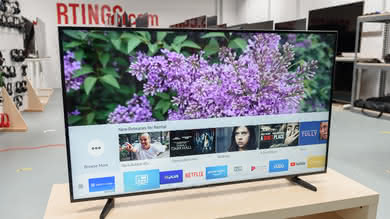
The A1E looks impressive from the front due to the lack of a visible stand and minimalistic appearance. Unfortunately the TV does lean back at a fairly significant angle, but this isn't too noticeable after a while. All of the inputs and the controls are located on the stand of the TV, and so can be difficult to access depending on the TV placement.
for pictures & test results

The rear of the TV extends outwards and forms the stand. It supports the TV very well (the screen itself makes up the front part of the stand) but does require a larger table than many TVs of the same size.
Footprint of the 55" TV stand: 13.0" x 48.4"
for pictures & test results

The TV looks good from the back, with a fabric covered grill over the stand and built in speakers. This can be removed to reveal the inputs and wall mount. Unfortunately the body of the TV picks up lots of fingerprints on the reflective finish and the inputs are very difficult to access if the TV is against a wall.

for pictures & test results

Although the stand extend quite far out the back, it folds in when mounting the TV. When folded in it will stick out a bit from the wall, but not too much. It also sits back at an angle when stood up, but it doesn't take long to get used to. If wall mounted then this isn't an issue.
for pictures & test results
The A1E is a fairly cool TV, never getting more than a little warm to the touch. The thickest part of the TV is in the center, which is also the warmest part of the TV. There is also a lot of heat along the bottom edge, which may contain some panel circuitry producing heat.
for pictures & test results

The build quality of the A1E is great, and everything feels very premium. The TV can be a bit difficult to carry though, as the screen tends to flex if the stand isn't well supported.
for pictures & test results

Like other OLED TVs, the Sony A1E has an infinite contrast ratio - when each pixel displays a 100% black color they are totally turned off and do not emit any light. The A1E is an excellent TV for watching movies in a totally dark room, producing deep dark scenes any light bleed normally associated with LED TVs.
for videos & test results

On OLED TVs there is no need for a local dimming feature since it uses a different type of technology, where there is not backlight to light up the pixels. Here the pixels themselves emit light and are completely turned off when a true black color is displayed on the screen. The video is for reference only.
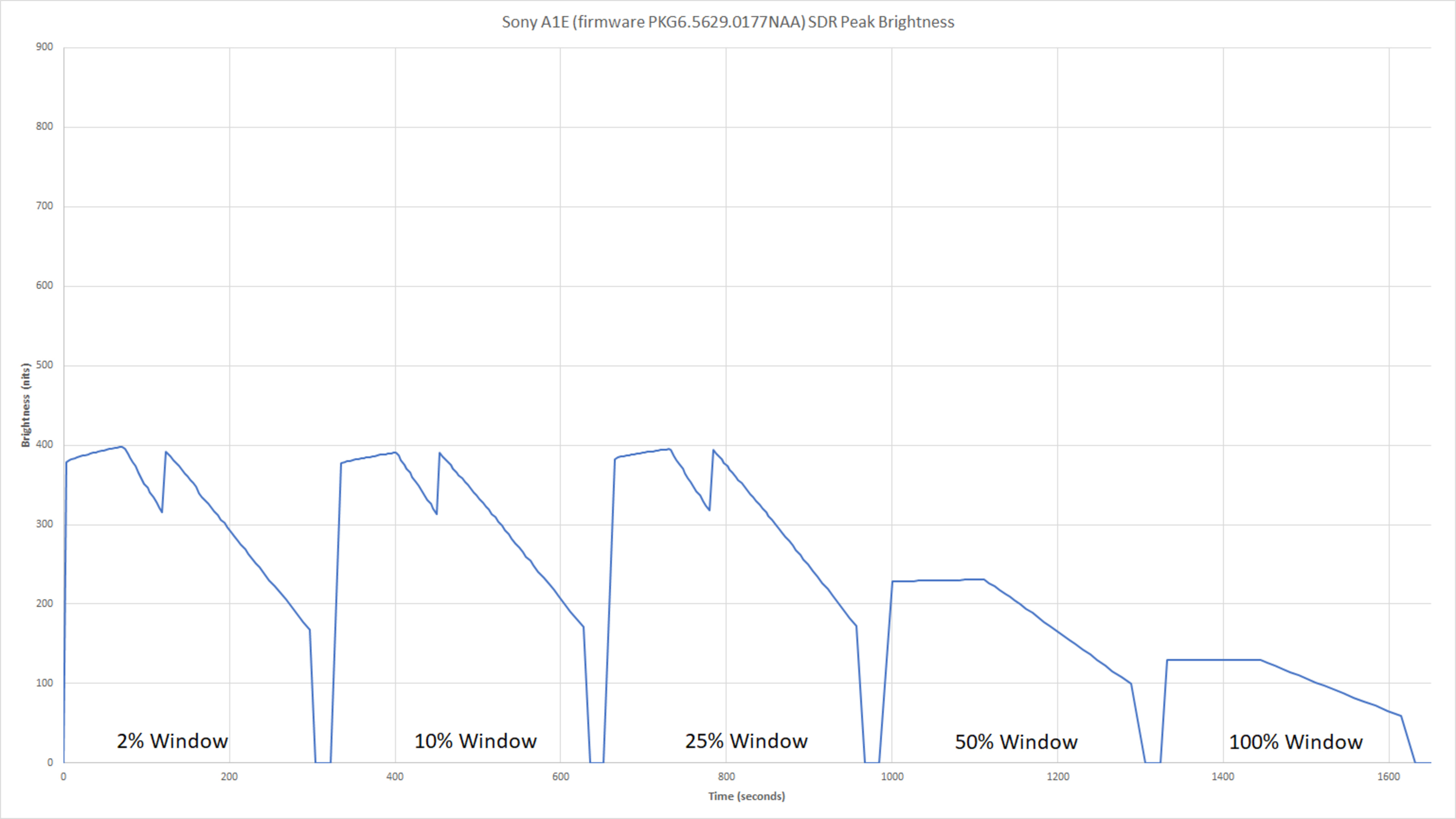
Decent SDR peak brightness. Most SDR content like our real scene test is not shown very brightly, because the TV's Automatic Brightness Limiter (ABL) dims the TV when a scene with high average brightness is shown. However bright highlights in dark scenes are more bright, as shown by our 2% and 10% white window tests, because the average brightness in those scenes is low.
When compared with its OLED rival, the LG C7, the A1E is noticeably less bright. Both have very similar brightness in our 2%, 10% and 25% tests, but the C7 is brighter in our real scene and larger window tests, suggesting that the A1E's ABL kicks in sooner than the C7's.
A plot of our brightness tests over time is shown here.
Update 10/03/2018: Retested the brightness after firmware PKG6.5629.0177NAA. The real scene and peak brightnesses are essentially unchanged (+/- 10 cd/m²), but the TV now dims more aggressively over time, sometimes dimming after just two minutes of static content, so most of our sustained brightness measurement are lower than they were before. The measurements have been updated, but the overall score didn't change significantly. You can see the plot over time here.
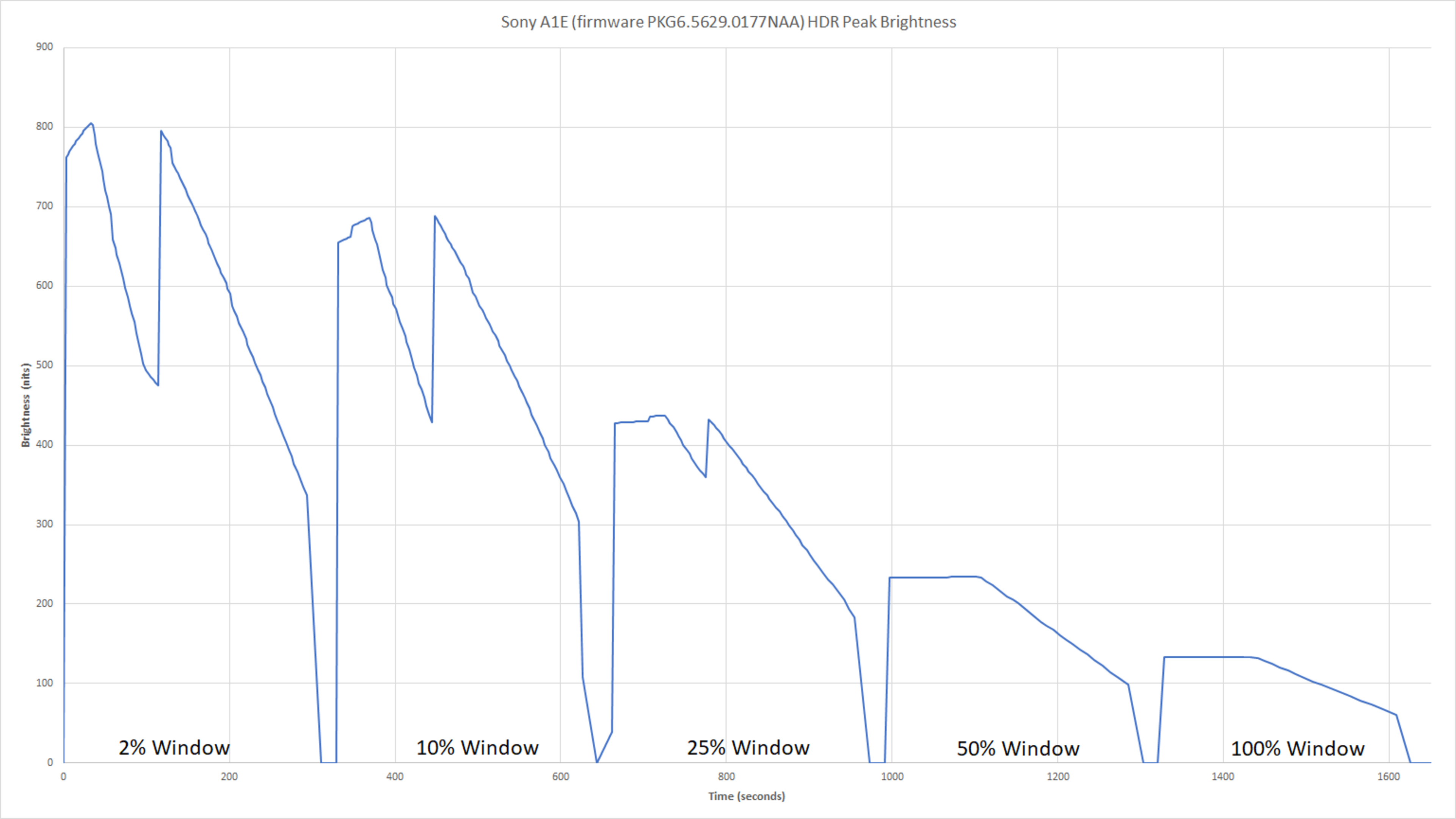
Decent HDR peak brightness. The highlight in our real scene test gets very bright, so the brightness in most HDR scenes will be shown accurately. However highlights in extremely bright scenes will be less bright than they should be, as shown by how dim our 50% and 100% white window tests are displayed. This is due to the TV's Automatic Brightness Limiter (ABL), which dims the TV when the average brightness of a scene is very high. A plot of our brightness tests over time is shown here. Overall the peak brightness is a bit less than the LG C7 in all tests, partly because the ABL is slightly more aggressive on the A1E.
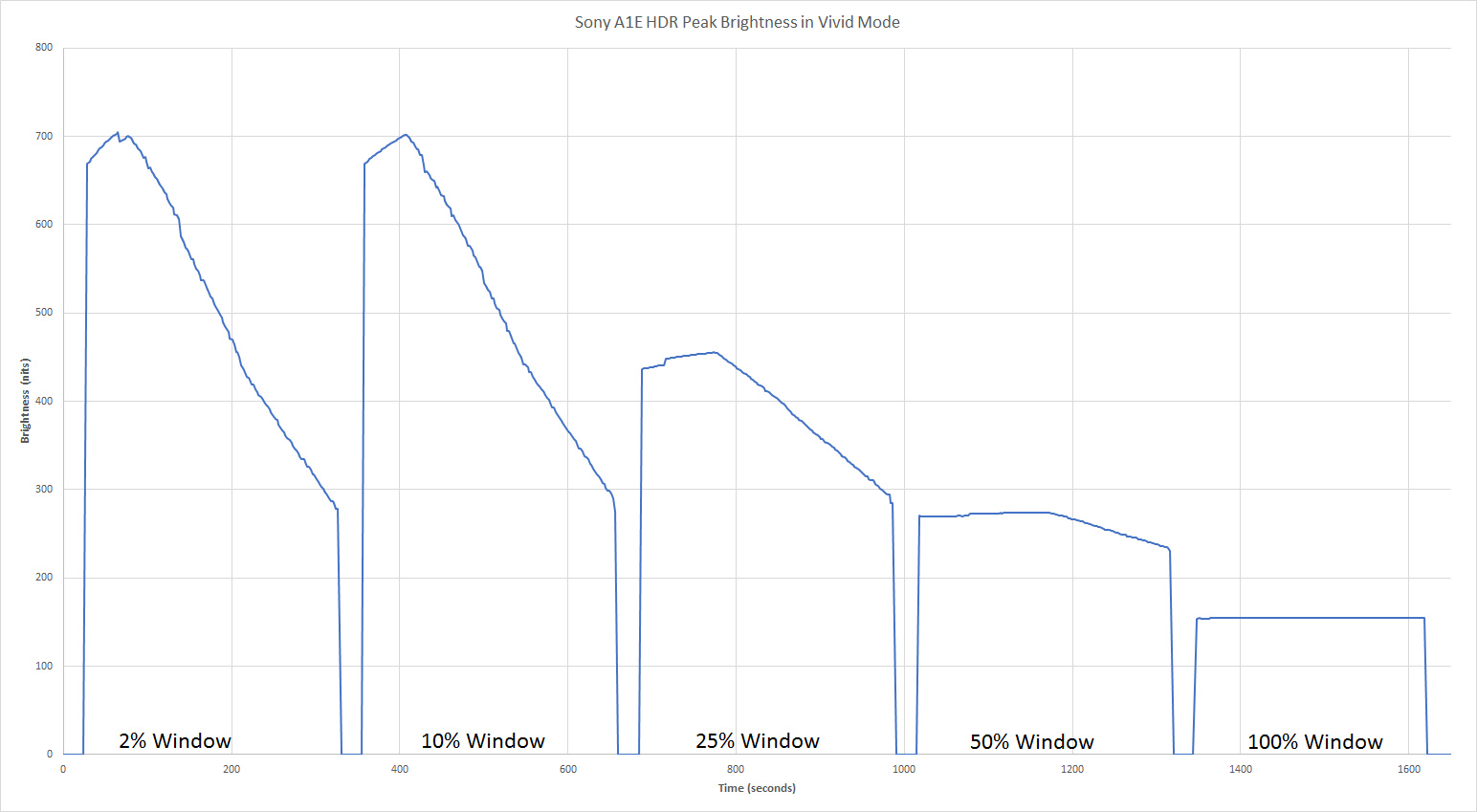
The A1E is a bit brighter in the Vivid picture mode with the Neutral color temperature, as shown in this plot. Our normal testing is done in the Cinema Pro picture mode using our recommended settings (found here), because the Cinema Pro mode has the most accurate color reproduction for HDR.
When the 'X-tended Dynamic Range' option is disabled the TV's ABL is also disabled, so it remains at a very dim 130 cd/m2 no matter the content displayed, as shown in this plot.
Update 10/03/2018: Retested the brightness after firmware PKG6.5629.0177NAA. The real scene and peak 2% window are a little brighter and the 100% window is a little dimmer, but the rest of the peaks are essentially unchanged. The most significant difference is that the TV's dimming over time is now more aggressive, sometimes dimming after only one minute of static content, so most of our sustained brightness measurements are significantly lower than before. The measurements have been updated, but the overall score didn't change significantly. You can see the plot over time here.
for pictures & test results

for pictures & test results

The Gray uniformity of the Sony A1 is excellent. Looking at out 50% gray test picture, the picture looks pretty uniform which is great as the 50% gray is more representative of the normal TV content.
The 5% gray is also very good, but some faint vertical line are visible, but these are only visible in very dark rooms.
This is a very similar result when compared to the LG C7, but note that the gray uniformity is unit dependent and you may actually have a slightly better or worse gray uniformity, depending on your unit.
for videos & test results

for pictures & test results
for pictures & test results
for pictures & test results
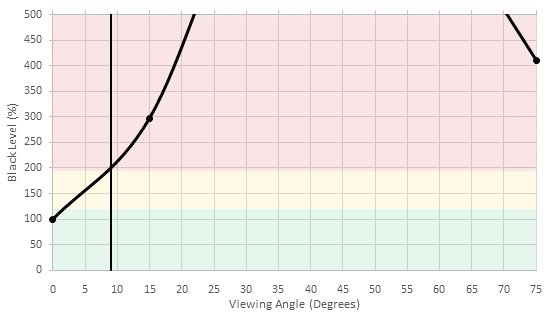
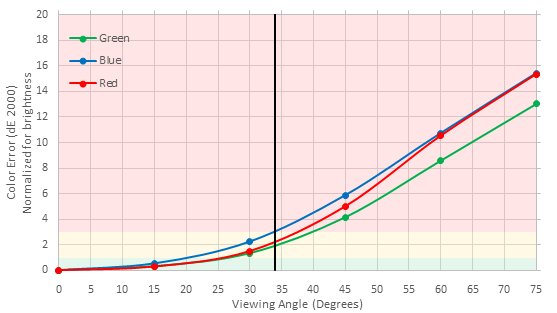
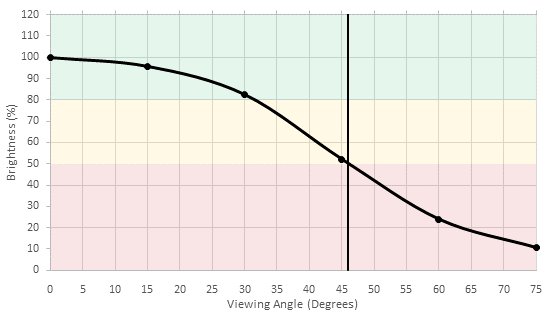
Wide viewing angle. Brightness only decreases a little at an angle, and the black level remains perfect; however colors do shift more significantly at an angle. Still this is a great TV for rooms with wide seating, as people sitting to the side of the TV will enjoy almost as good picture quality as people directly in front.
for pictures & test results

As with other OLED TVs reviewed before, the Sony A1 has a perfect black uniformity. This is because when the TV is displaying a perfectly black picture, the pixels are completely turned off and emit no light, which results in a black screen without any light bleed.
for pictures & test results

for pictures & test results

for pictures & test results

The A1E has a similar glossy finish to the LG C7 OLED. It works well to reduce the intensity of reflections and produces the same visible purple tint. This is common to most high-end TVs which are good at handling reflections.
for pictures & test results

for pictures & test results

for pictures & test results

The Sony A1E as a great accuracy out of the box and could be used as is by most people without a calibration. Looking at the white balance, we can see that the picture is a bit warm since it is missing a bit of blue, but even with this the dE is only of 3 which is very good for most people. The gamma is tracking very close to our desired goal of 2.2 and the colorspace is also very precise with only the blues and cyans being a bit more off than the other colors.
for pictures & test results

for pictures & test results

for pictures & test results

This TV, like the rest of the Sony line of TVs, comes with a 2 point and 10 point color calibration feature. The 2 and 10 point calibration is easy to use and we were able to bring down the white balance dE to a negligible dE of 0.4. The correction to the white balance flattens the gamma curve, even though the 30% and 40% were still a bit off as visible in the above picture. The Color dE was brought down to 1.57 from 1.95 but could not be corrected further, since this TV is lacking a proper color management system, as all other Sony TVs. Even with a lacking CMS, the final accuracy after calibration is excellent.
You can see our recommended settings here.
for pictures & test results

Low quality content such as DVDs are upscaled well. Some minor haloing artifacts are present and edges do appear a bit jagged but the image remains clear.
for pictures & test results

Cable and other 720p content looks good once upscaled. Some minor artifacts can be seen but details are preserved and the image isn't too soft.
for pictures & test results

1080p content such as Blu-rays look great. The image remains very clear.
for pictures & test results

Native 4k content looks great. No issues can be seen. Note that there are some moire artifacts caused by the camera which are not present on the screen.
for pictures & test results

for pictures & test results

Wide color gamut. The TV has excellent coverage of the DCI P3 gamut, and very good coverage of Rec 2020. It doesn't have great tracking of our target points but its tracking is better than a lot of other TVs. Deep colors in HDR content will be well represented.
for pictures & test results

for pictures & test results

Decent color volume. The TV struggles to make bright colors bright enough, perhaps due to the OLED panel's RGBW pixel structure; however OLED's perfect blacks help it bring its wide Rec 2020 color gamut to very dark colors.
The Rec 2020 color volume is extremely similar to that of the C7, which has a similar panel; however the DCI P3 color volume is worse than the C7's because the A1E's P3 color gamut narrows at low brightnesses, unlike its Rec 2020 gamut.
for pictures & test results

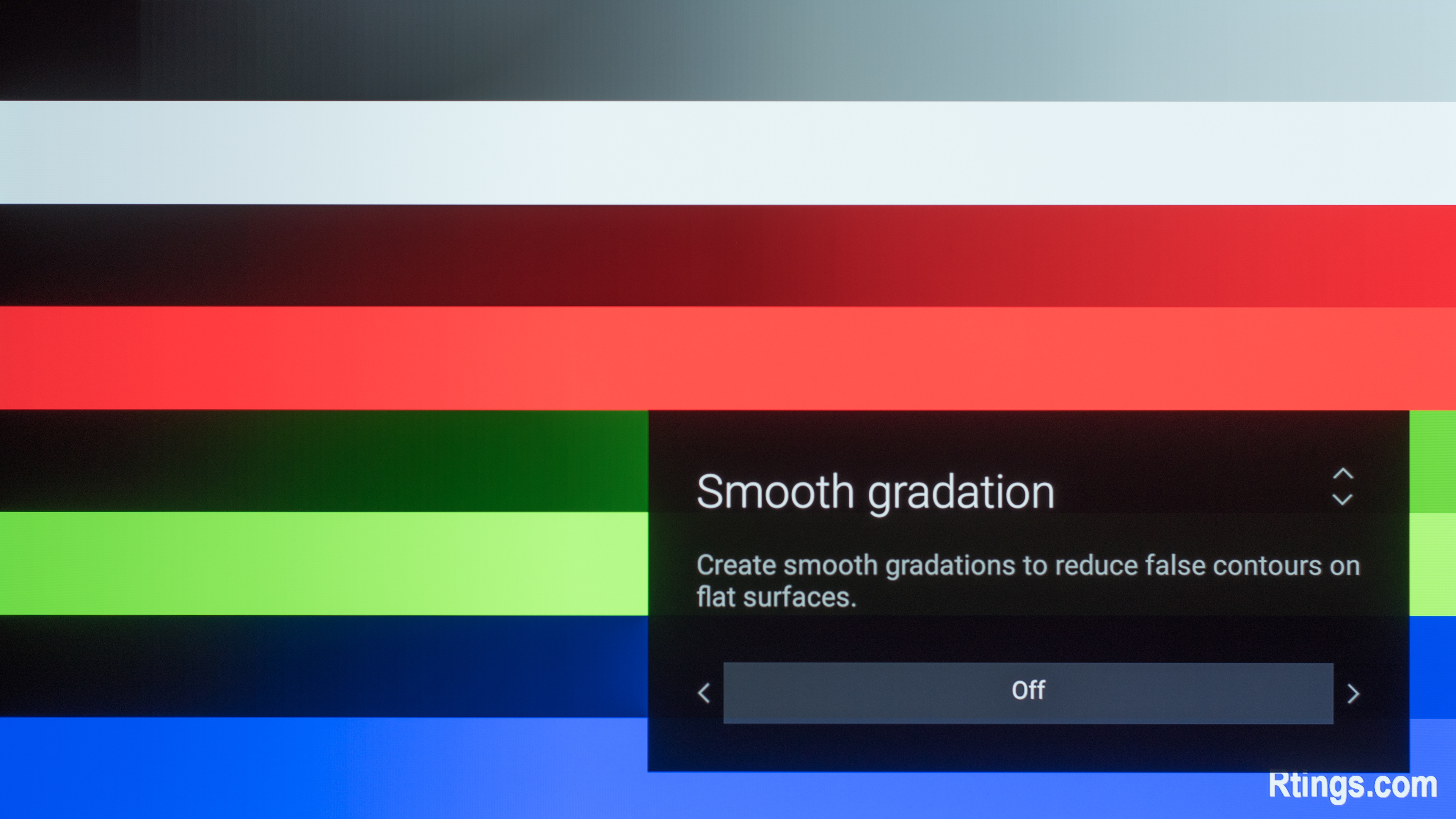
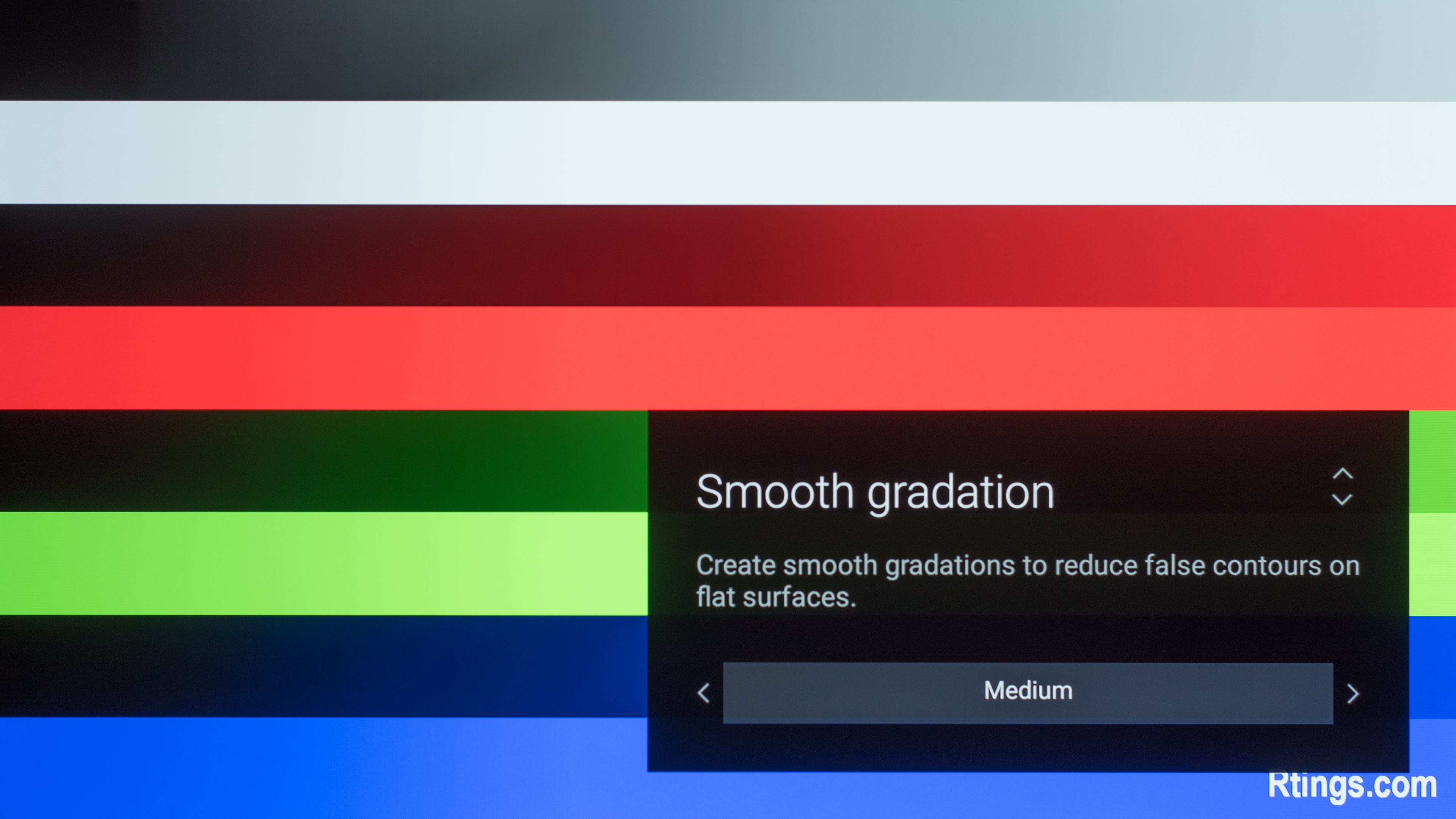
The Sony A1E does an amazing job at displaying our gradient test image. As you can see, no gradations can be noticed and overall the picture looks very smooth without any real tone problems and this on all 3 color and grayscale.
Note that this test was performed with the 'Smooth gradation' feature off to really showcase the native performance of this panel displaying our test gradient image.
The 'Smooth gradation' feature does an excellent job of smoothing 8-bit content by completely removing visible banding. We took some test pictures to show how effective is this feature by sending an 8-bit gradient image and turning on at each setting value the 'Smooth gradation' option. You can see how it looks set to Off, Low, Medium, or High.
for pictures & test results

The Sony OLED TV does present some image retention, like the LG C7 and other OLEDs we have tested. As you can see on our test picture taken right after the 10 minutes burn-in scene of our test clip, the Rtings logos are still clearly visible and stay visible even after 6 minutes of recovery. This test was performed with Sony's 'Pixel shift' setting enabled.
Note that there is a variation in temporary image retention between units.
OLED panels such as the A1E do have the possibility of experiencing burn in. You can see our investigation into this here.
for pictures & test results

Like other OLED TVs, the A1E has an RGBW pixel structure to increase the display brightness. This means not all of the sub-pixels are on at the same time.
for pictures & test results

for pictures & test results

The response time of the A1E is almost instantaneous, resulting in only a very short trail of persistence blur following fast moving objects. This is a similar result to other OLEDs such as the LG C7, but if you don't mind flicker then the A1 can improve this with flicker. Unfortunately this fast response time means that low frame rate content appears to stutter due to the lack of motion blur smoothing between frames. If you don't mind the soap opera effect, this can be improved using the motion interpolation features.
for pictures & test results

Like most OLEDs, the A1 doesn't flicker the image in order to dim; this means that motion on screen will look smooth and won't appear flickery, which is great. Some small flicker is detectable in our measurements, but shouldn't be noticeable in person.
for pictures & test results

for pictures & test results

Unlike the LG OLEDs we have tested, it is possible to add flicker which works well to clear up persistence blur with fast motion. To do so, set 'MotionFlow' to 'Custom' and 'Clearness' to 'High'. Unlike most Sony TVs the 'Clearness' option is either On ('High') or Off ('Low').
Update 05/08/2017: After further testing, it appears that BFI isn't functioning properly when showing 120 Hz content, including content interpolated to 120 Hz by motion interpolation. The TV instead replaces every second frame with a black one, effectively turning it into a 60hz refresh rate.
for pictures & test results

for pictures & test results

The A1 has a 120Hz panel which can interpolate lower frame rate content (adding the soap opera effect). To do so, set 'MotionFlow' to 'Custom' and increase the 'Smoothness' slider. For 30 fps content it is also necessary to set 'CineMotion' to 'Medium' or 'High'. There are significantly less artifacts than the C7 which has a buggy interpolation feature.
Unfortunately, the A1E does experience some stutter which is especially noticeable with low frame rate content such as 24p movies. This is a result of the almost instantaneous response time, which causes a static image to remain on the screen for almost the full frame duration.
The Sony A1 OLED TV can display 24p movies over 24p sources like DVDs and Blu-rays without judder. 24p movies playing via 60p or 60i sources like cable or satellite boxes are displayed without any judder with 'Motionflow' set to 'True Cinema' and 'CineMotion' set to 'High'.
Update 07/18/2017: The TV has been tested with the newest firmware update (PKG6.2648.0065NAA). The 24p playback remains the same.
Update 10/17/2017: With the latest firmware (PKG6.2669.0070NAA) the judder over 60Hz signals has been fixed.
This TV (as with other 2017 models) doesn't support a variable refresh rate.
The A1E has good input lag with a 4k signal, which should please most gamers; but it has a bit higher input lag with a 1080p signal, which may disappoint more competitive gamers. Both the Game and Graphics picture modes have the same input lag, and both support 4:4:4 color. All the Game mode input lag measurements are very similar to the X930E and Z9D but ~5 ms higher, even though all three use the same x1 Extreme processing engine.
Update 05/23/2017: The TV has been retested after the update to Android TV 7.0 Nougat, and the input lag is unchanged.
Update 07/18/2017: The TV has been tested with the newest firmware update (PKG6.2648.0065NAA). The input lag remains the same.
Update 09/20/2017: Tested 1080p @ 120 Hz input lag using our new input lag tool. It is much faster than the 1080p @ 60 Hz input lag, likely due to the TV bypassing some processing when it detects such an unusual signal.
Update 11/10/2017: Retested input lag with the latest firmware (PKG6.2669.0070NAA); there was no significant change.
All the common input resolutions are supported. Only the Game and Graphics picture modes can properly show 4:4:4 color. 4K @ 60 Hz @ 4:4:4 or 4:2:2 color are only supported on HDMI inputs 2 and 3, and only when 'HDMI Enhanced Format' is enabled.
When using the TV as a PC monitor 1080p @ 60 Hz is listed as the default resolution. 1080p @ 120 Hz is shown properly without artifacts and without the jagged upscaling seen on the X900E, but it isn't listed as a possible resolution so it must be added as a custom resolution.
Update 05/08/2017: BFI does not work with a 120hz input.
Update 06/12/2018: A note for Xbox One X and Xbox One S owners: 1080p @ 120 Hz from the Xbox is only supported on this TV when the Xbox's connection type is changed from Auto-detect (Recommended) to HDMI: (Xbox > Settings > Display & sound > Video fidelity & overscan > Display > Connection > HDMI). Unfortunately in this mode 4k, HDR, 50 Hz and 24 Hz aren't possible, so this mode is only recommended when the higher refresh rate of 120 Hz is more important to you than these other features.
Update 06/18/2018: Correction, 24 Hz and 50 Hz are in fact possible with the Xbox's connection type set to HDMI.


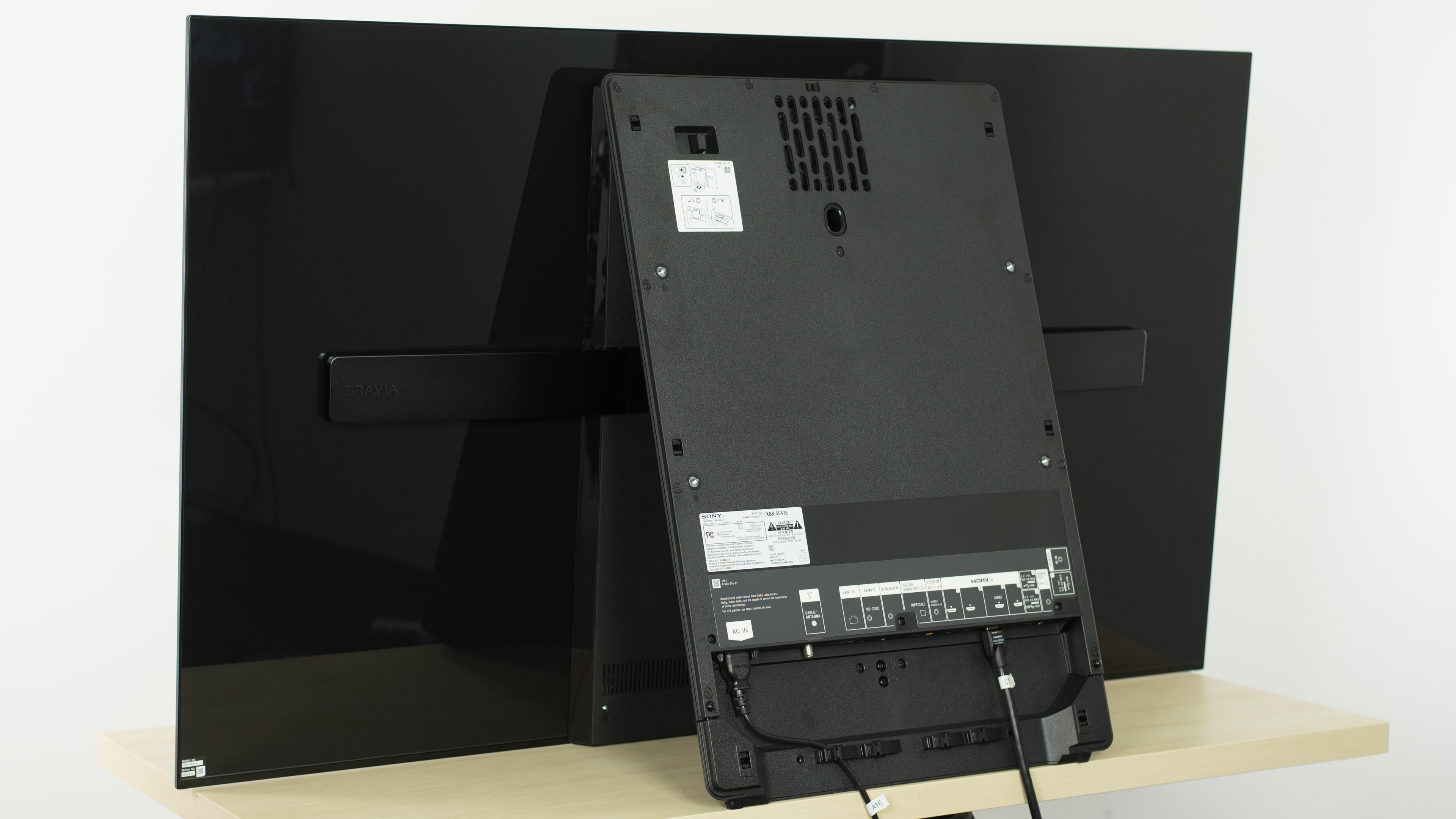





There is no input for component video on the A1. Unfortunately no adapter is included in the box for the composite input (Video In), so an adapter such as this may be required.
Dolby Vision will be enabled in a future update. Update 01/23/2018: The update enabling Dolby Vision compatibility is now available.
for pictures & test results

Good frequency response. The response is quite flat throughout, with some minor overemphasis on the midrange. It gets quite loud, and bass extension is quite good. As common with Sony TVs though, compression and aliasing are present at maximum volume.
for pictures & test results

While distortions levels are overall low, THD steeply rises to distracting levels at higher volumes. This isn't too big of a deal unless you plan to use your TV's speakers for a party.
for pictures & test results

There are no ads in the TV's main interface, though third party apps can still have ads. There is an option to opt out of personalized advertising for these ads.
The first row of the home screen is filled with suggested content. It is possible to disable all sources of suggested content until all that remains is a line saying "No recommendations available at this time". However after the TV is restarted some previously unlisted suggested content sources may appear, so the process of disabling sources must be repeated multiple times.
for pictures & test results

Most of the popular apps come preinstalled, such as Netflix, YouTube and Amazon Video. Many more apps can be downloaded from the included Google Play Store.
for pictures & test results

The remote is rather large with a dizzying array of buttons. Fortunately most commonly used buttons are clustered around the central navigation pad so they are within easy reach, except the input and power buttons which are at the top. Also at the top is the microphone button for voice search, which uses the microphone built into the remote.
The remote is nearly identical to those of the X930E and X930D, though it has a metal back while theirs have a plastic back.
Update 12/11/2017: Google Assistant has now been added to Android TV on Sony TVs, and it brings a lot of new features to the voice control: commands like 'open Netflix', 'switch to HDMI 1', 'pause video', 'how's the weather' and 'turn off TV' all work well, though commands to change picture settings like 'set the brightness to 20' and 'switch to Game mode' don't work. The remote score has been increased to reflect the new fuctionality.
for pictures & test results
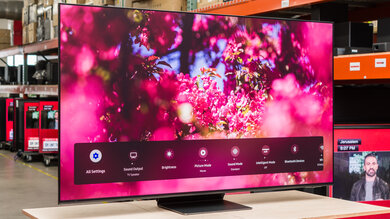
Update 09/12/2017: Sony has a remote app called 'Video & TV SideView' that's better than Google's Android TV app in most ways. The data fields and score have been updated to reflect the Sony app.
Update 07/11/2018: Sony's Video & TV SideView remote app has been retested on version 5.5.0. The remote app can now stream video files and can only directly launch apps. The data fields have been updated.
Update 10/12/2018: The remote app can directly launch both apps and inputs, even on version 5.5.0; "Apps Only" was a mistake. The value has been corrected to "Both".
for pictures & test results

There are three physical buttons on the TV. The center button changes between functions like power, input, channel and volume, while the (+) and (-) buttons increment the function. These buttons are located on the TV's rear leg, which makes them fairly difficult to reach from the front.
for pictures & test results

- Manual
- Batteries
- Remote
- IR Blaster
- Power cord latch
- Wall mount brackets