
Our Verdict
Good TV for mixed usage. Has good picture quality, and great motion handling. Lacks some of the features to improve picture quality found on higher end TVs, such as local dimming. Picture quality deteriorates when viewed from an angle.
- Excellent motion handling
- Wide color gamut
- Low input lag
- Picture quality degrades at an angle
- Average peak brightness
Average TV for watching movies. Picture quality is good, but lacks features such as local dimming to improve it further. Native contrast ratio provides good dark scene performance.
Better than average for watching TV in a bright room. The whole screen can get bright enough to deal with glare. Picture quality is good but degrades when viewed at an angle. Android TV platform works well for casual watching in a living room.
Really good sports performance. Uniformity is better than average, and picture quality is good. Great at handling fast motion. Unfortunately picture quality isn't as good when viewed at an angle.
Great for gamers. Very responsive TV, has low input lag and is great at handling fast motion. Picture quality is good.
Above average for watching HDR in a dark room. Picture quality is good, but lacks features such as local dimming to improve dark room performance. Highlights don't get bright. Wide color gamut is great.
Good TV for HDR gaming. Supports HDR10 and displays a wide range of colors. Unfortunately can't produce very bright highlights. Input lag is low in HDR mode, and picture quality is good.
Good for PC use. Supports a wide range of resolutions. Offers chroma support for clear text at all resolutions. Picture quality is good.
Check Price
Differences Between Sizes And Variants
We tested the 43" (XBR43X800D). Note that the 49" variation (XBR49X800D) has an external power brick, instead of the internal one in the 43". The 49" also has an IPS panel, so expect a lower native contrast ratio and wider viewing angle compared to the 43" model we reviewed and closer performance to the X700D but with a wide color gamut.
If someone comes across a different type of panel or if their Sony XBR43X800D doesn't correspond to our review, let us know and we will update the review.
| Size | Model |
| 43" | XBR43X800D |
| 49" | XBR49X800D |
Popular TV Comparisons

The Sony X800D provides a good picture quality and overall performance. For those looking for a TV to watch HDR content at a lower price, it is a good pick. It also works well for sports and video games due to the great motion handling.
Although the Samsung Q60A and the Sony X800D both have a VA panel, they're quite different. The Samsung is available in various sizes, while the Sony is only available in a 43-inch or 49-inch size, and the 49-inch uses an IPS panel instead of VA. The Samsung has a higher contrast ratio to produce deeper blacks, and it has lower input lag, making it more ideal for gaming. However, the Sony has better response times that result in a clearer image in fast-moving scenes. The Samsung runs on Tizen OS, and the Sony runs on Android TV. Both platforms have plenty of apps available through the app store.

We buy and test dozens of TVs yearly, taking an objective, data-driven approach to deliver results you can trust. Our testing process is complex, with hundreds of individual tests that take over a week to complete. Most of our tests use specially designed test patterns that mimic real content, but we also use the same sources you have at home to ensure our results match the real-world experience. We use two main tools for our testing: a Colorimetry Research CR-100 colorimeter and a CR-250 spectroradiometer.
Test Results
Older Test Bench: We tested this product using an older TV test methodology before a major update. Some of the test results below aren't directly comparable with other TVs. Learn more
for pictures & test results

The X800D features an industrial design. It has a mix of design elements between the Sony W650D and the Sony X850D. It looks good, and feels sturdy. It is also quite thin which is good.
for pictures & test results

The stand is metallic, and supports the TV well.
Footprint of the 43" TV stand: 8.6" x 20.1"
for pictures & test results

The rear of the TV is all plastic. It features a narrow VESA mount, and a zip tie for cable management. If wall mounted, some of the inputs are hard to access.

for pictures & test results

The TV is quite thin, which is good. If wall mounted it will not stick out too far. Note that the 49" variation has a power brick, which may affect the mounting.
for pictures & test results

Contrast ratio is good for the Sony X800D. The blacks are fairly deep and should procure a good picture quality in a dark room. Note that the 49" variation has an IPS panel, and so the contrast ratio is expected to be closer to 1000:1.
for videos & test results

There is no local dimming on the X800D. The video is for reference only.
The SDR peak brightness is average for the X800D, and it is about 100cd/m² less than what you get when in HDR mode. For a dark room, this result is enough but may be a bit dim for a very bright room.
The peak brightness is average. At around 375cd/m², it is good for dark room viewing, but may not be the best for a room with a lot of light. One thing is good though, it is that is does not change depending of the size of the test window and also it stays the same over a long period of time.
for pictures & test results

for pictures & test results

Gray uniformity is average on the X800D. The corners and side of the screen are a bit darker, but the center remains fairly homogeneous. Dirty screen effect should not be too much of a problem even for those watching sports like hockey, where it is usually very noticeable.
for videos & test results

for pictures & test results
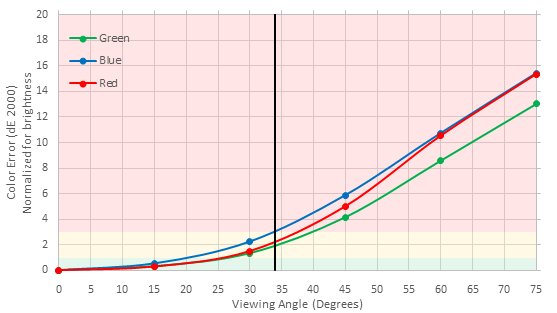
for pictures & test results
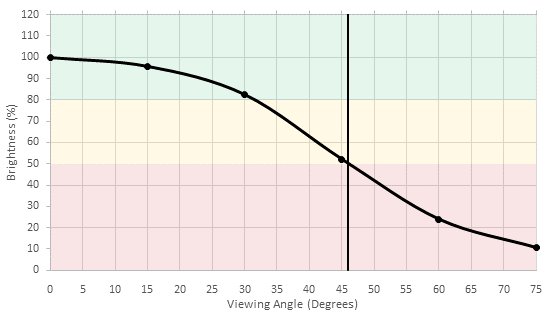
for pictures & test results
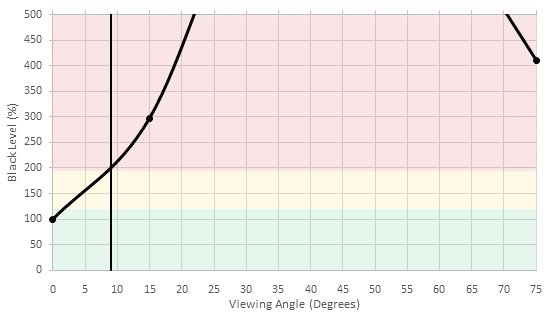
Viewing angle is not as good as an IPS panel, but not bad for an VA. The X800D keeps a good brightness, even at an angle, but it does lose a bit of contrast. Note that the 49" variation has an IPS panel, and so the viewing angle is expected to be better.
for pictures & test results

Black uniformity is relatively good. There is a bit of clouding on the test picture, but it should not be too noticeable during normal viewing.
for pictures & test results

The Sony X800D has a good 10 bit panel but it is not perfect. You can see see on our test picture that there is some small banding in the dark blue, dark green and also in the grayscale.
Update 09/08/2016: Our original test was showing an incorrect color depth of 8 bit due to some incorrect drivers on our system, but after some correction to our test apparatus, we tested again the color depth and we can confirm that the Sony X800D does in fact have an 10 bit panel.


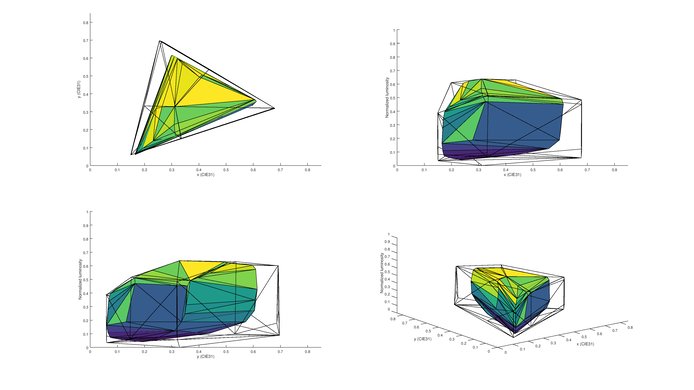
for pictures & test results

for pictures & test results

for pictures & test results

The calibration is quite easy, and provides good results. All of the issues with the white balance can be fixed easily. The colors remain over saturated. You can see our calibration settings here.
for pictures & test results

The X800D does a good job with low resolution content like DVDs. Small details are conserved and the final image does not look too soft.
for pictures & test results

Cable TV and other 720p content looks very good on the X800D.
for pictures & test results

1080p content like Blu-rays movies look very good and sharp once upscaled to 4k resolution. No details are lost.



Note here that there is no image retention on the 43" version of the Sony X800D. Since we did not test the 49" version, which is an IPS TV (the 43" is a VA TV), we cannot say whether the 49" is retention free or not. But since IPS TV are more prone to image retention, there could be a chance that there is some image retention to some degree.
for pictures & test results

for pictures & test results

The X800D has a semi-gloss finish which helps to diffuse reflections. They appear larger, but are easier to see through. Deals with reflections well enough to provide good performance in an average room.



for pictures & test results

for pictures & test results

for pictures & test results

The X800D doesn't have backlight flicker by default, but it is possible to achieve this by adjusting 'MotionFlow'. The flicker frequency of 100Hz is a bit strange.
The Sony X800D does not present judder on 24p content when played from DVDs, Blu-rays or other 24p sources. Unfortunately even when using the 'CineMotion' setting, judder is present on both 60p or 60i, meaning that people who are sensitive to judder will notice when watching movies from a cable/satellite box.
for pictures & test results

The Sony X800D has a 60Hz panel. It can interpolate 30fps content up to 60fps. To do so without backlight flicker, change the 'MotionFlow' setting to 'Standard' or 'Smooth'.
The input lag of the Sony X800D is quite low, which is good. To get the lowest input lag, select the 'Game' or 'Graphics' picture modes. This results in a lag of 33.3ms with an 1080p resolution, which should not be an issue for most people. When sending an HDR signal at 1080p, the input lag remains the same as under 'Game' or 'Graphic' mode.
Update 03/20/2017: The input lag has been retested with the latest firmware PKG6.0612.0004NAA.
The X800D accepts a 120Hz signal, but has a 60Hz panel so it can only display half of the frames. It supports chroma 4:4:4 at up to 4k @ 60Hz. To display 4:4:4, set the scene to 'Graphics' or 'Game'. This results in an input lag of 33.3ms. It accepts a 4k @ 60Hz @ 4:4:4 signal only HDMI 2 and 3, and requires 'Enhanced HDMI' to be enabled in the input settings.


There is one component in on the rear, which is shared with the composite in. There is also a composite in on the side, but the adapter for it is not included. An example of the adapter can be found here
for pictures & test results

Average performance. The frequency response is decent at lower volumes, however, there is compression and pumping present under heavier loads. On the other hand, the maximum loudness and low-frequency extension are above average for a TV.
for pictures & test results

Poor distortion performance. The overall amount of harmonic distortion at 75dB and 85dB are very low. However, as we've seen with other Sony TVs, there's a dramatic jump in the harmonic distortion amount at maximum loudness. There was also audible aliasing present. However, these artifacts will be less audible in real-life situations.
for pictures & test results

There are loads of apps which come pre installed, and access to the 'Google Play Store' allows access to almost anything. A web browser is available, as are the typical popular apps, like YouTube, Netflix, Amazon Video, and HBO Go. The X800D also includes access to the 'PlayStation Now' cloud gaming service.
for pictures & test results

The Sony X800D comes with a modified Android Smart OS. It can be a little slow to start up, but works well, feels refined and seems very stable.It has a wide variety of apps pre-installed with the option of downloading many more from the 'Google Play store'. The X800D is also 'Google Cast' ready, meaning that you can cast content from any compatible iOS and android device without any additional hardware. Photos and video can be viewed directly from an USB flash drive. Access to the 'PlayStation now' cloud gaming service also gives access to many more games not available from the 'Google Play Store' .The X800D comes with a basic remote, but includes voice recognition which works well.
There are no ads on this TV. Many featured apps add clutter on the home screen, though.
for pictures & test results

Controls are located behind the left side of the TV. They provide basic functionality and are easy to use, even when wall mounted.

