Our Verdict
The ASUS PG279Q is a very good monitor for most uses. It's an outstanding gaming monitor with clear motion and low input lag. The high-resolution screen, wide viewing angles, and great ergonomics also make it a great office monitor. It doesn't support HDR or wide color gamuts, but it's still a good monitor for media creation or watching videos, but like most IPS monitors, it doesn't look as good in a dark room.
- Excellent motion handling.
- Low input lag.
- Remains accurate when viewed from up close.
- Blacks appear gray in a dark room.
The ASUS Swift PG279Q is a great monitor for office use. The great ergonomics allow you to easily position it in any way you like. This 27 inch monitor has a QHD resolution which displays enough detail for most office applications. At the same time, anyone who sits next to you will enjoy the same picture quality even while looking from the side, so you can demonstrate your work nicely.
The ASUS PG279Q is an excellent gaming monitor. It has an outstanding response time at the max refresh rate, as well as outstanding low input lag. It supports NVIDIA's G-SYNC variable refresh rate technology for a nearly tear-free gaming experience, and it has an optional black frame insertion feature.
The ASUS PG279 is a good monitor for multimedia usage. It has a relatively large screen size and good resolution so you can enjoy your multimedia content without sacrificing detail. At the same time, it's very easy to position it to your liking. Finally, the low input lag, the good viewing angles, and the excellent gray uniformity will make sure that even those watching from the side will see a nice image without shades or dirty screen effect that feels very responsive.
You will enjoy using this monitor for media creation. It has a relatively large size and its resolution is great for working on photos or videos. It's very responsive due to its low input lag, it has good viewing angles, and has excellent gray uniformity.
This monitor doesn't support HDR.
Changelog
- Updated Feb 17, 2020: Converted to Test Bench 1.1.
- Updated Aug 03, 2018: Review published.
- Updated Aug 01, 2018: Early access published.
- Updated Jul 30, 2018: The product has arrived in our lab, and our testers will start evaluating it soon.
Check Price
Differences Between Sizes And Variants
We tested the 27" (PG279Q) which is the only size of this monitor available. There are other variants within the ASUS gaming range which differ in design, size, and refresh rate.
This monitor has been replaced by the PG279QZ, which is a minor revision. There's very little difference between them.
| Model | Size | Native Resolution | Refresh rate | Notes |
|---|---|---|---|---|
| PG279Q | 27" | 1440p | 144Hz | G-SYNC support |
| PG279QZ | 27" | 1440p | 144Hz | G-SYNC support |
| VG248QE | 24" | 1080p | 144Hz | Lightboost support |
| VG245H | 24" | 1080p | 75Hz | FreeSync support |
| VG278Q | 27" | 1080p | 144Hz | FreeSync support |
| VG275Q | 25" | 1080p | 75Hz | FreeSync support |
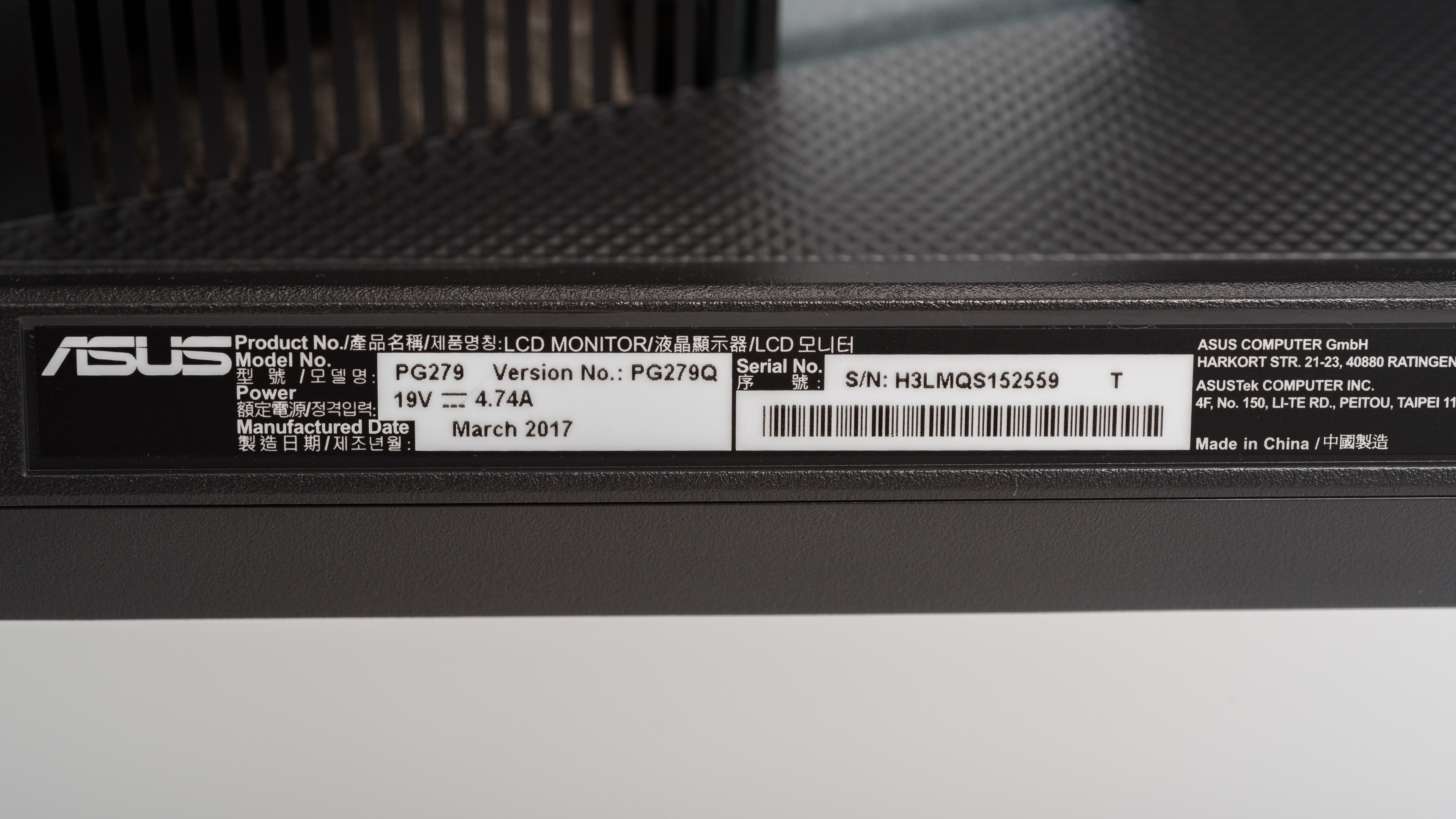
Note: The ASUS Swift PG279Q we purchased was manufactured in March 2017.
Popular Monitor Comparisons
The ASUS PG279Q is great for gaming due to the G-SYNC variable refresh rate support, and it's one of the best gaming monitors we tested in 2018. See our recommendations for the best monitors.
The ASUS ROG Swift PG279Q and the ASUS ROG Strix XG27AQ are both excellent gaming monitors from ASUS's Republic of Gamers brand. One of the biggest differences is that the PG279Q has native G-SYNC support while the XG27AQ is simply G-SYNC compatible. That said, the XG27AQ has faster response times at max refresh and especially at 60Hz, resulting in exceptionally clear motion. While the PG279Q has a marginally higher contrast ratio, the XG27AQ experiences less backlight bleed resulting in more uniform blacks, which is good if you prefer to game in the dark. That said, black uniformity can vary between individual units. The XG27AQ also supports HDR while the PG279Q doesn't, although its HDR experience is a bit lackluster because it doesn't get very bright for HDR content.
The ASUS ROG Swift PG279QM is better than its predecessor, the ASUS ROG Swift PG279Q. The PG279QM has a much faster response time at 60Hz, and unlike the PG279Q, it supports HDR. The PG279QM also has slightly better text clarity. On the other hand, the PG279Q is a bit more versatile for gaming, as it has an optional backlight strobing feature, which can improve the appearance of motion.
The ASUS ROG PG279Q is very similar to the ASUS PG279QZ. The two monitors are nearly identical in design and have a very similar overall performance, except for brightness. The older PG279Q is brighter than the newer PG279QZ.
The ASUS ROG PG279Q is better than the Acer Predator XB271HU Bmiprz. The ASUS has slightly better motion blur, which is great for gaming, and comes with marginally better out-of-the-box color accuracy that is great for office use. Also, if you plan to use it for media creation, the better black uniformity of the ASUS makes it a better choice.

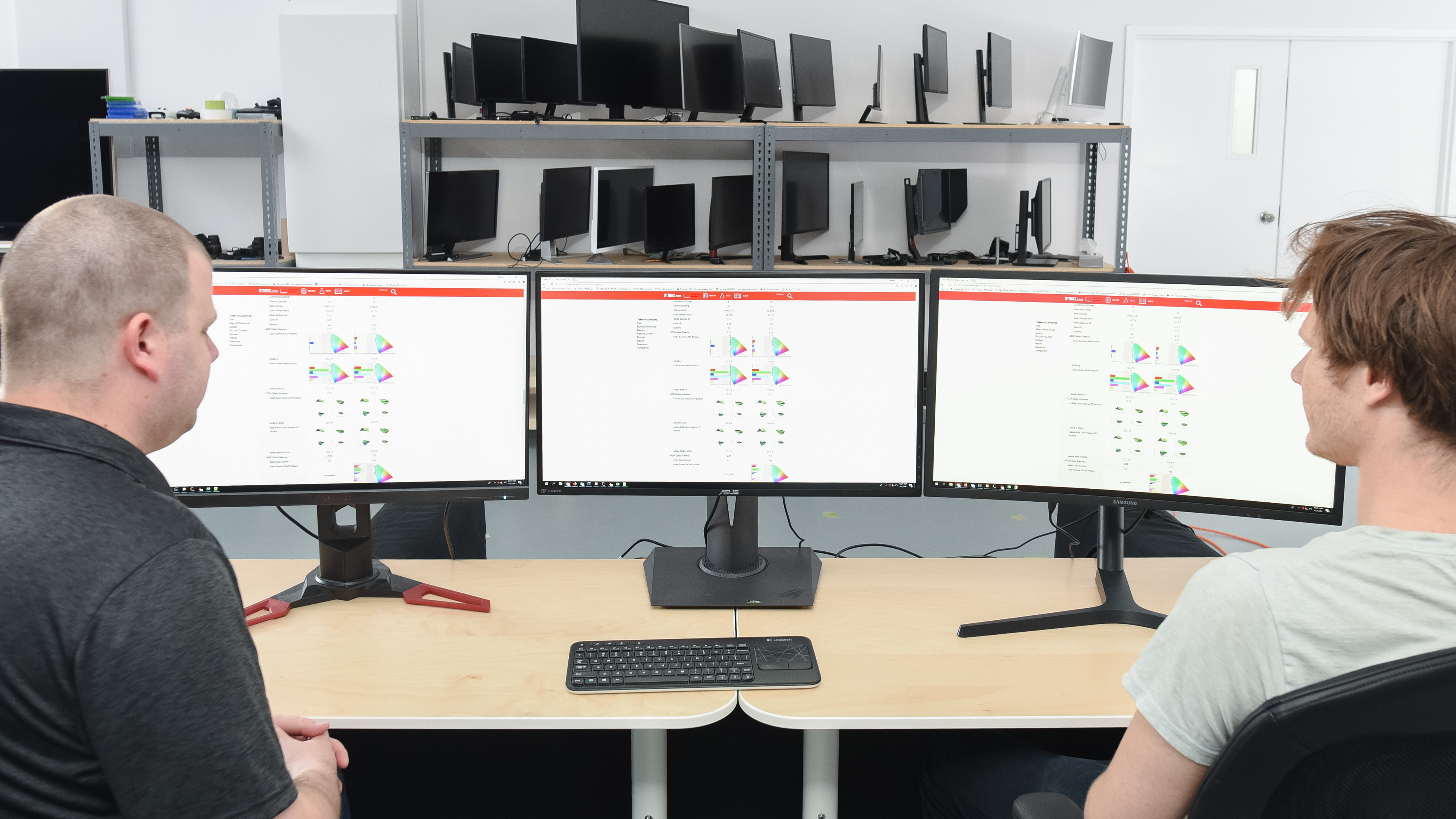
We buy and test more than 30 monitors each year, with units that we buy completely on our own, without any cherry-picked units or samples. We put a lot into each unbiased, straight-to-the-point review, and there's a whole process from purchasing to publishing, involving multiple teams and people. We do more than just use the monitor for a week; we use specialized and custom tools to measure various aspects with objective data-based results. We also consider multiple factors before making any recommendations, including the monitor's cost, its performance against the competition, and whether or not it's easy to find.
Test Results
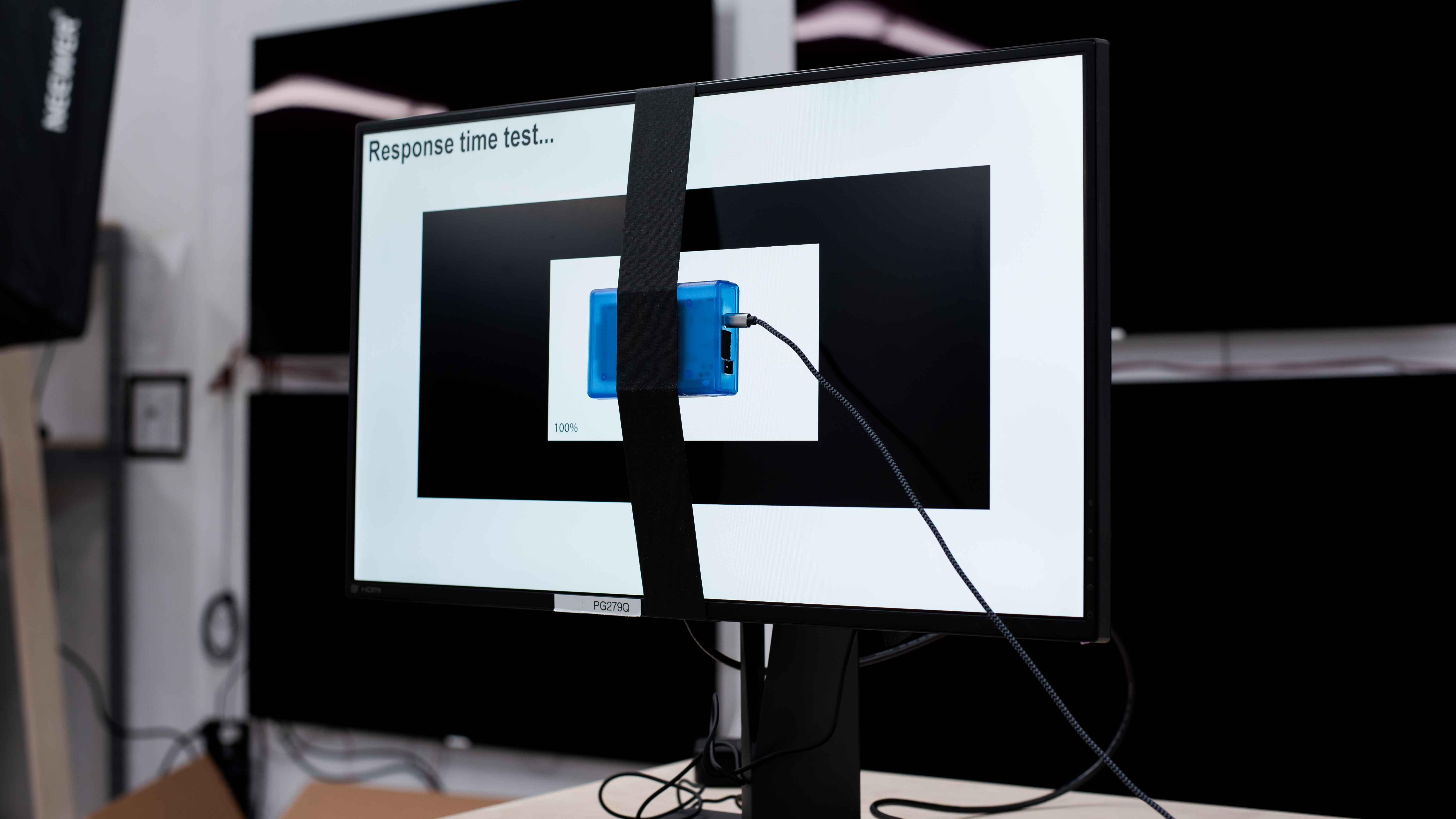

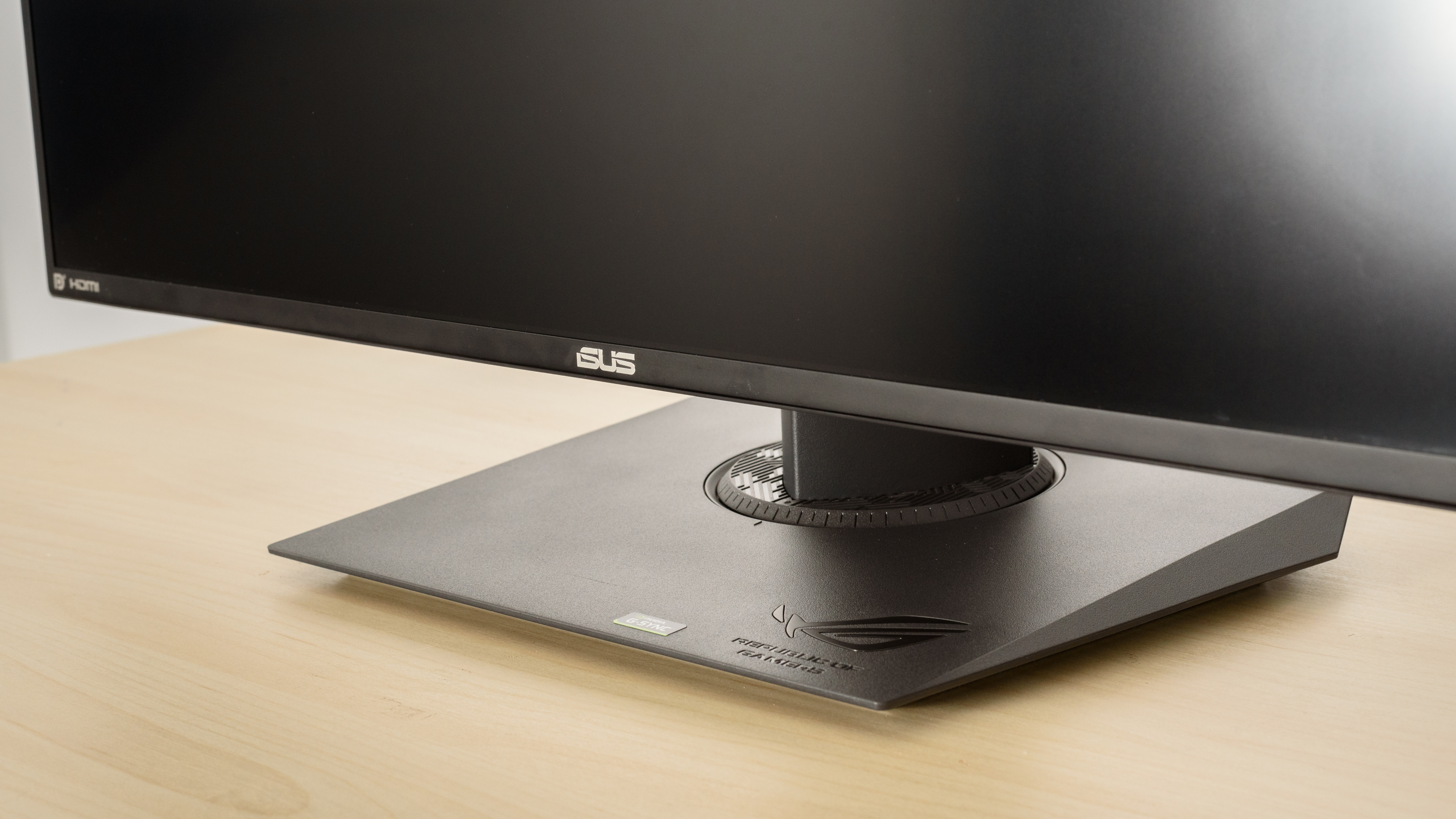
The ASUS PG279Q has a simple design that fits well in any decor. The stand is simple, but supports the display well and has great ergonomics.

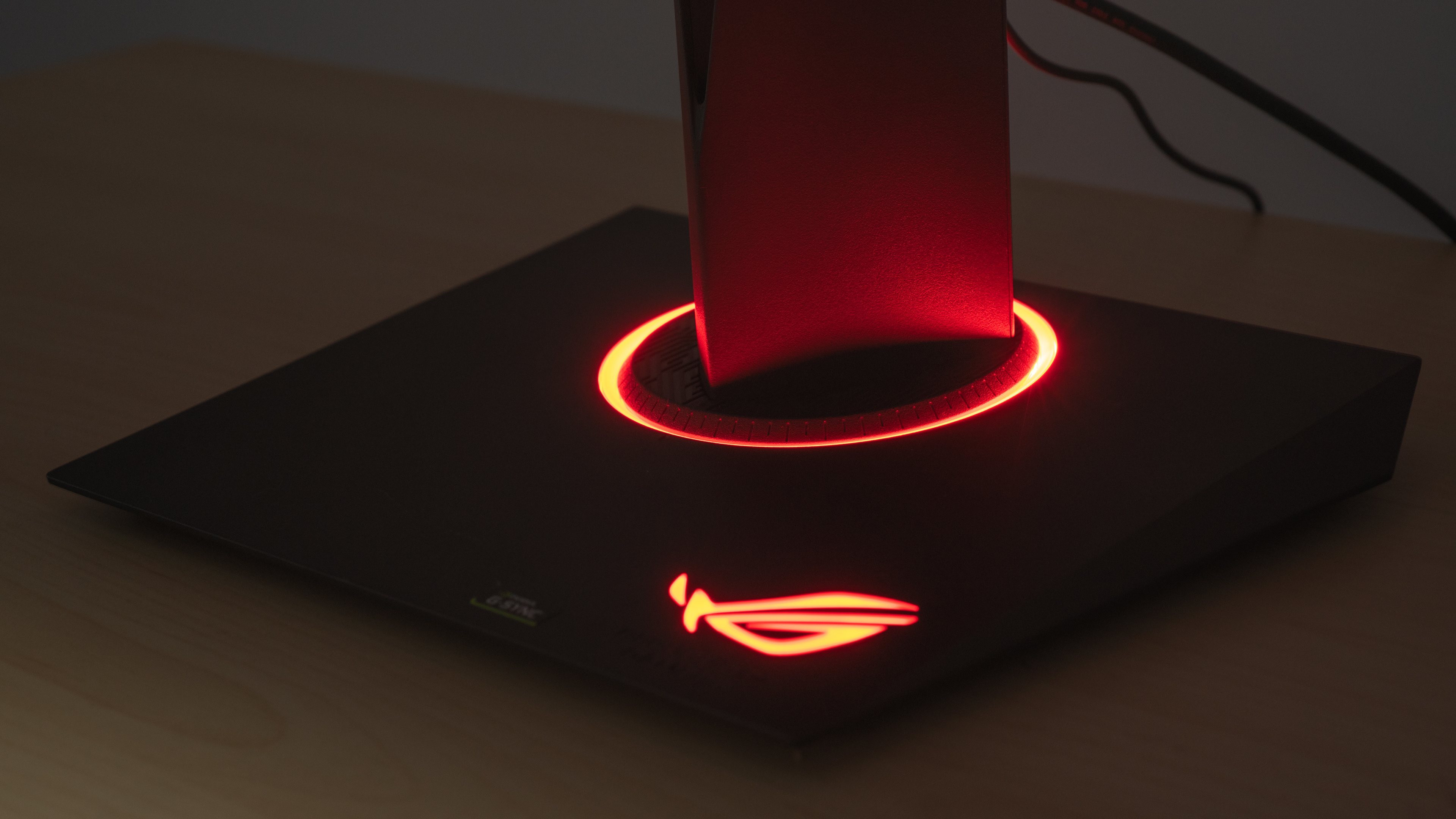
The ASUS PG279Q's stand is plain and supports the monitor well, although it'll wobble slightly if knocked. The base of the monitor can also light up with red LEDs, as seen here.

This monitor has great ergonomics, making it easy to place in an ideal viewing position. Unfortunately, although it can rotate to portrait orientation, it can only do so on one side, which might be an issue for some setups.

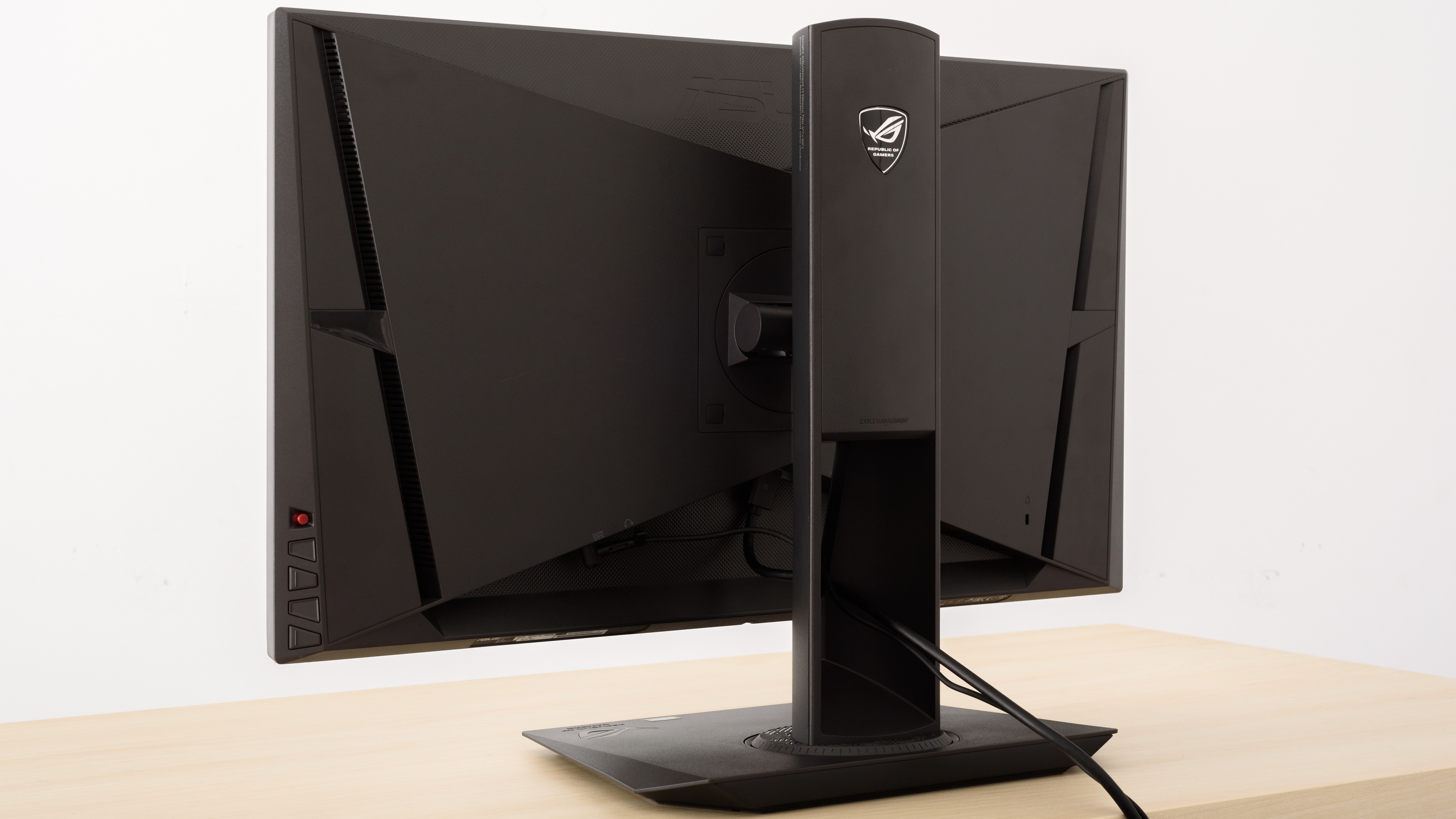
The back of the monitor is plain, with a simple design and no RGB bias lighting. There's a space within the stand that can be used for cable management.

The borders are thin on three sides, but there's a gap between the bezels and the actual screen.

This monitor is a bit thicker than most similar models we've tested, so it takes up a bit more space when not VESA mounted.

The build quality of this monitor is good. It's mostly plastic but feels very solid. After a few years of use in the office, the A on the ASUS logo on the front of the monitor has gone missing, as you can see here.

Decent contrast ratio, but blacks appear gray in a dark room. Although it's a bit better than most IPS or TN monitors, it's still not as good as monitors with VA panels, like the AOC CQ27G1.
This monitor doesn't have a local dimming feature. The above video is provided for reference only.
Great peak brightness in SDR. This monitor should have no issues overcoming glare in a bright room. This monitor is quite a bit brighter than its replacement, the ASUS ROG Swift PG279QZ.
This monitor doesn't support HDR. If you want a similar monitor that does, then check out the ASUS ROG Strix XG279Q.


Like most monitors with IPS panels, this monitor has great horizontal viewing angles. This is great if you often share your screen with someone else, or if you like to sit close to the monitor, as the image remains accurate at the sides.


Decent vertical viewing angles of the ASUS PG279Q. You can look at the monitor from small angles from below or above without noticing image deterioration. This is also good if you sit close to the monitor, as the edges don't lose accuracy.


Excellent gray uniformity. There's very little dirty screen effect, and although there are some darker spots along the edges, there's very little vignetting. In near-dark scenes, the uniformity is even better.

This monitor has disappointing black uniformity. There's noticeable clouding throughout the screen, and some backlight bleed from the corners.


Excellent out-of-the-box color accuracy for the ASUS PG279Q. A few colors might have noticeable inaccuracies, but other than that, the only issue is that gamma doesn't quite track the sRGB target curve, so most scenes are a bit too bright.


After calibration, the ASUS PG279Q has nearly perfect accuracy. Any remaining inaccuracies aren't noticeable.
You can download our ICC profile calibration here. This is provided for reference only and shouldn't be used, as the calibration values vary per individual unit even for the same model, due to manufacturing tolerances.


The ASUS PG279 has an excellent color gamut. The coverage of the sRGB color space is outstanding.


Excellent color volume. Due to the low contrast ratio, it can't display dark shades very well.
This monitor doesn't support HDR.
This monitor doesn't support HDR.

There are no signs of temporary image retention on this monitor.

There's a bit more banding than most 8-bit monitors we've tested, but it's still very good overall.


There's a small amount of vertical color bleed, but this shouldn't cause any issues.


The reflection handling of the PG279Q monitor is good. The monitor diffuses reflections across the screen, which helps to reduce their intensity. It should be fine for most rooms, but reflections may be distracting in a very bright room.


Text is clear and sharp, but it's recommended to enable ClearType for the best results.


| Overdrive Setting | Response Time Chart | Response Time Tables | Motion Blur Photo |
| Off | Chart | Tables | Photo |
| Normal | Chart | Tables | Photo |
| Extreme | Chart | Tables | Photo |
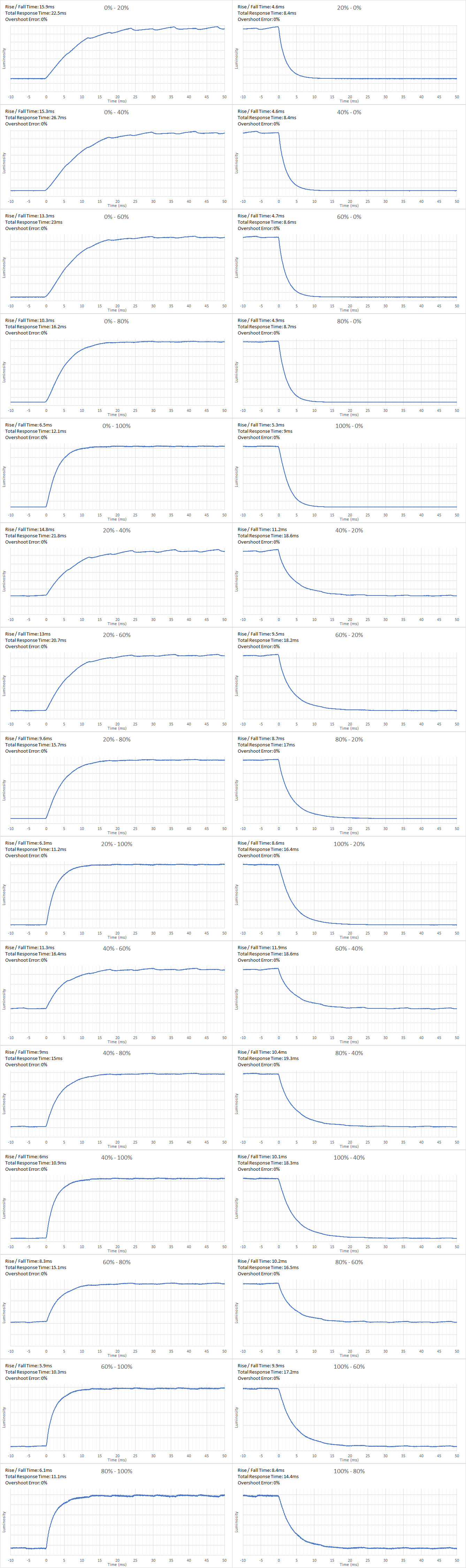
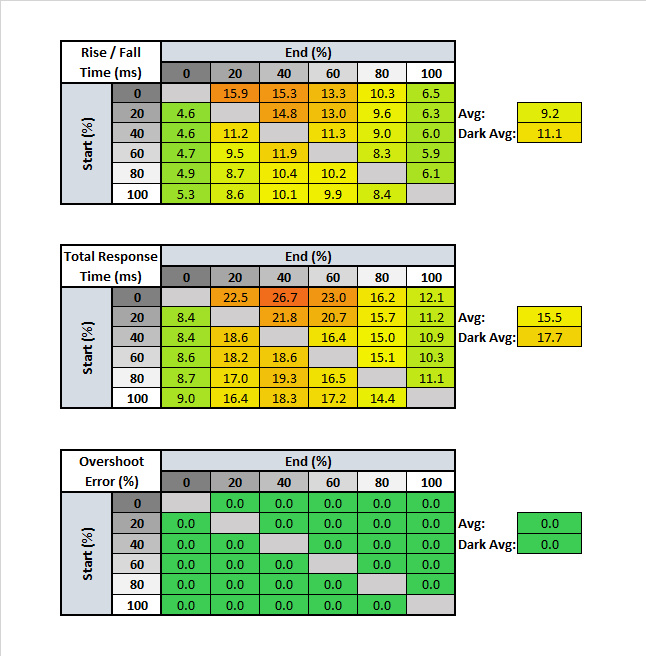
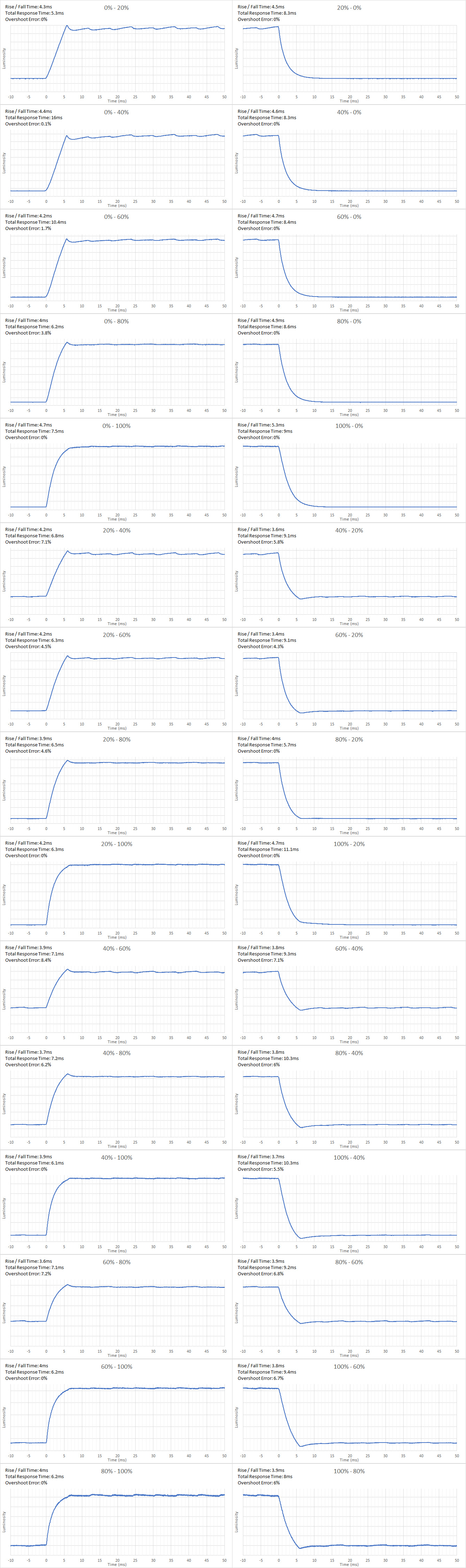
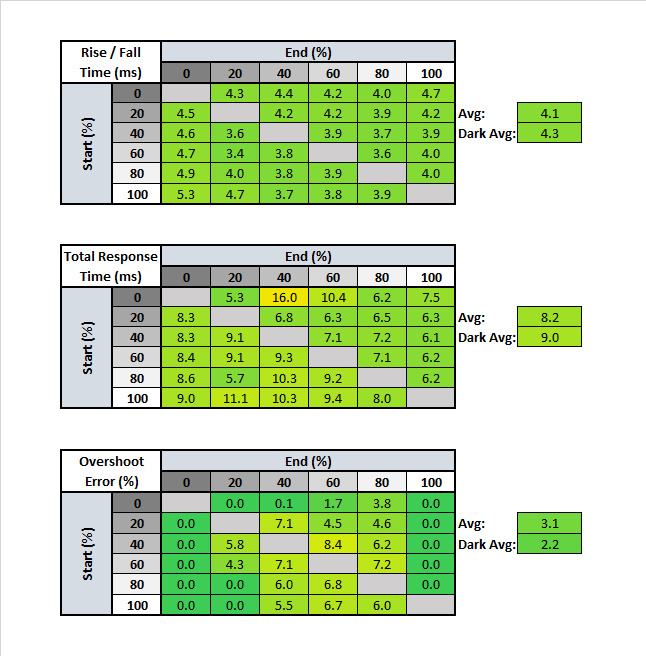
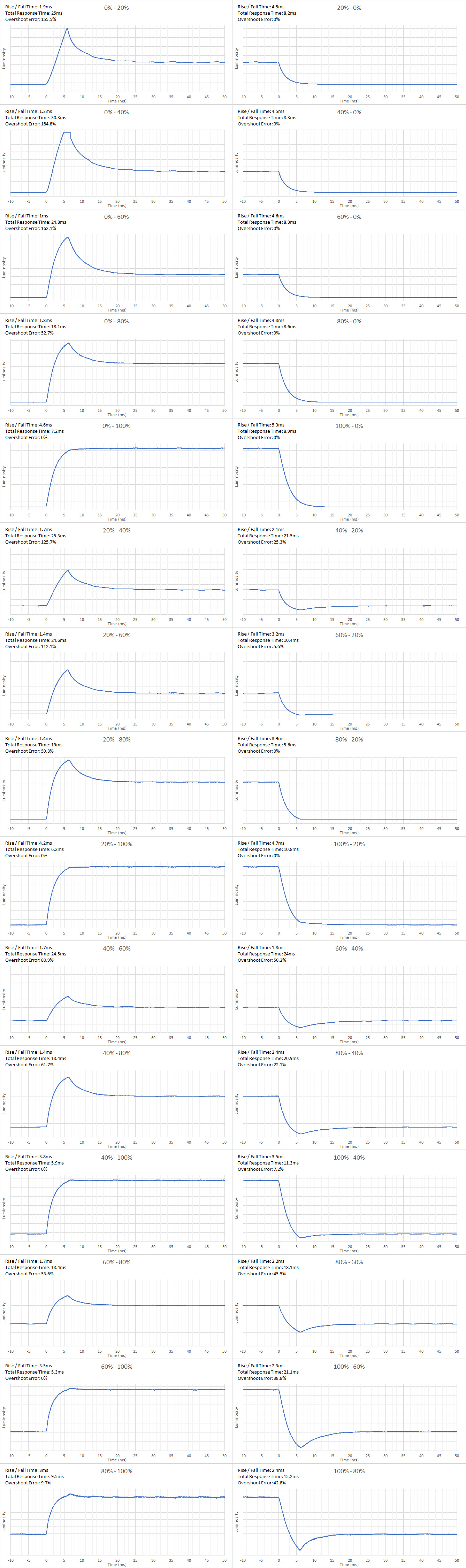
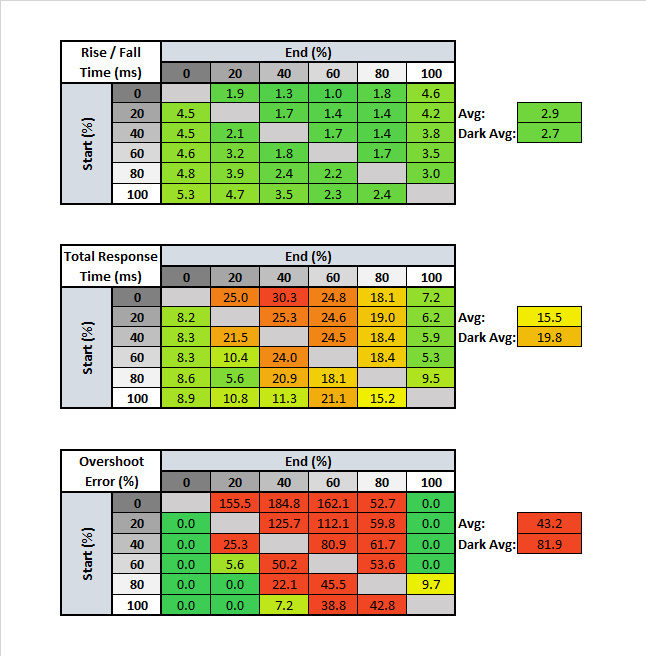
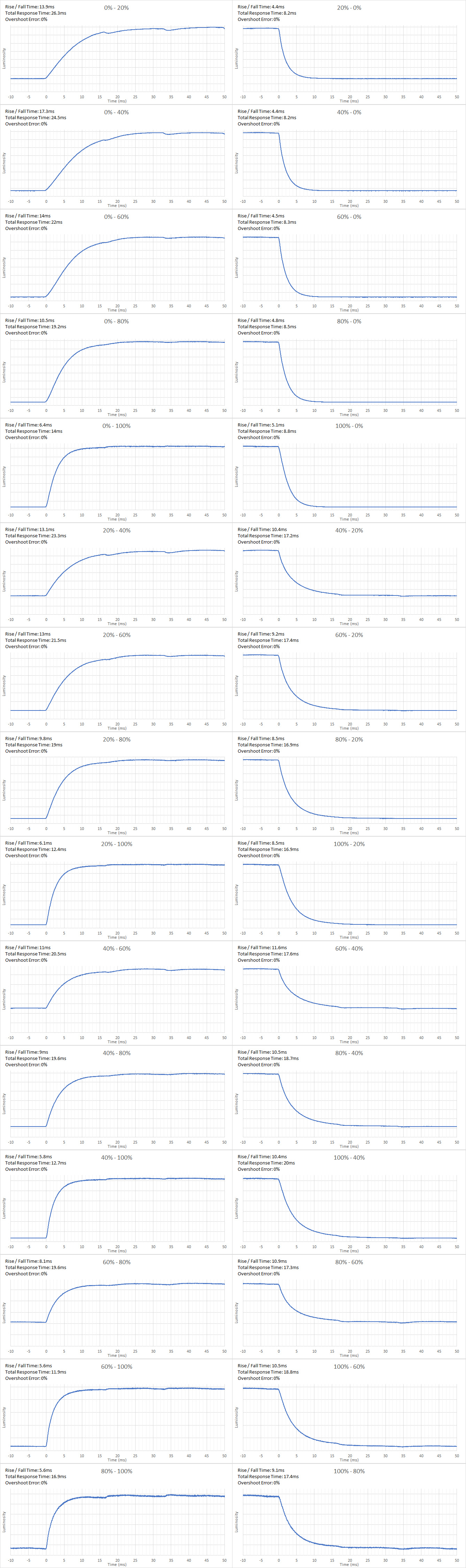
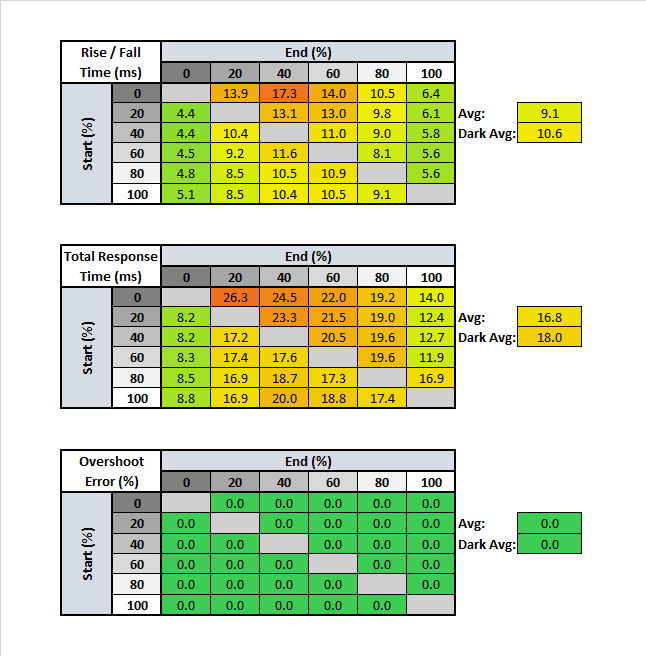
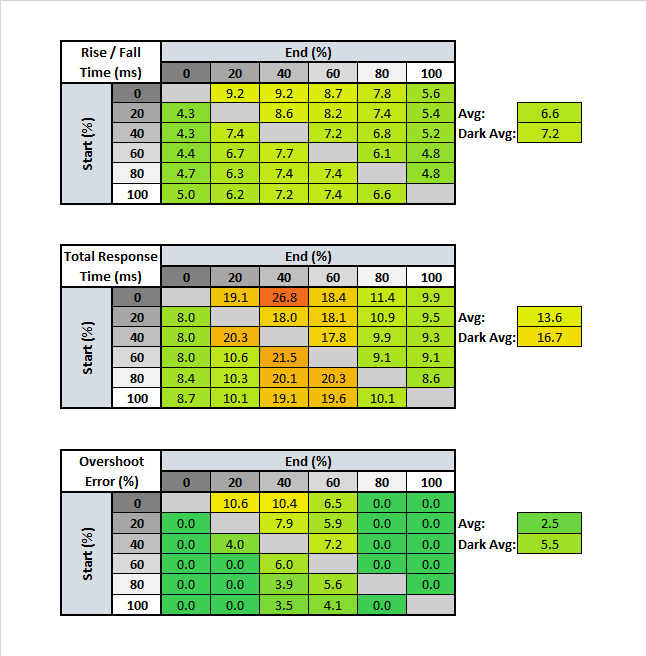
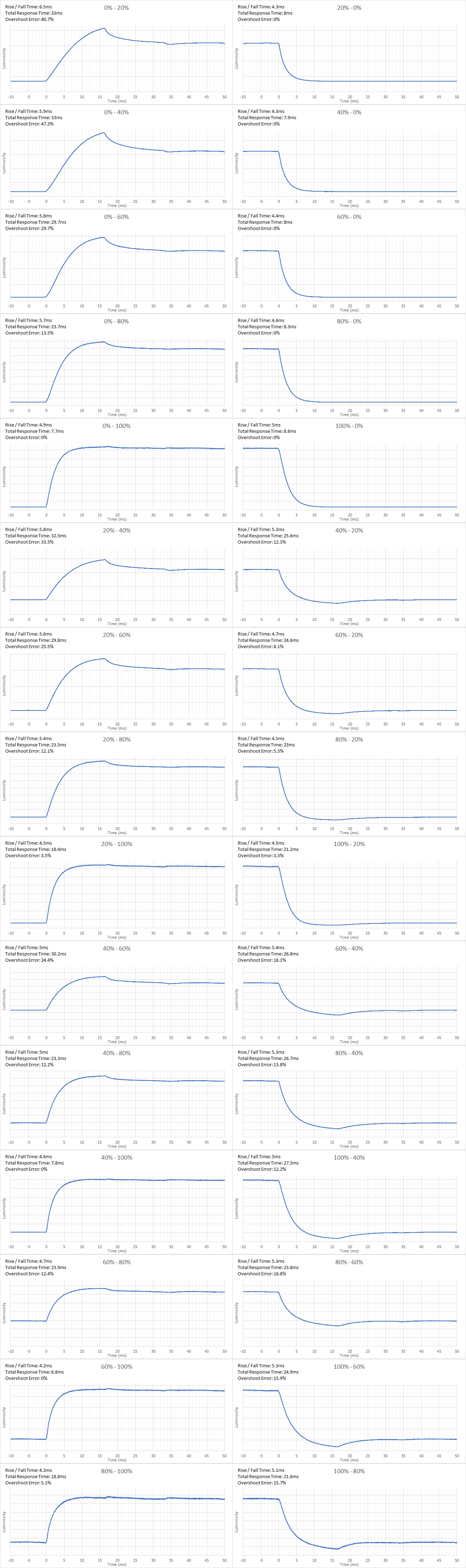
The response time of the PG279Q is outstanding. This results in a very small blur trail following moving objects, which is great for fast-paced video games. The Normal overdrive setting is the most balanced and provides the best response time with just a bit of overshoot. The Extreme option is a bit faster, but it adds some terrible overshoot, so we don't recommend it.


| Overdrive Setting | Response Time Chart | Response Time Tables | Motion Blur Photo |
| Off | Chart | Tables | Photo |
| Normal | Chart | Tables | Photo |
| Extreme | Chart | Tables | Photo |
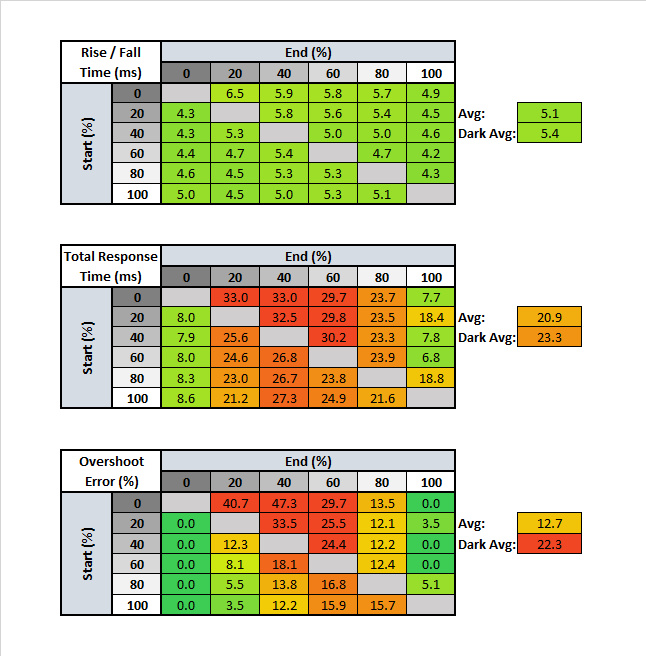
The 60Hz response time, which is especially important for console gamers, is great. There's a bit more overshoot with the 'Normal' setting than at the max refresh rate, but it's still decent. The recommended response time setting is the same as at the max refresh rate, so you don't have to worry about adjusting settings when switching inputs.

Like the majority of monitors, the ASUS PG279Q has a flicker-free backlight, which is great.


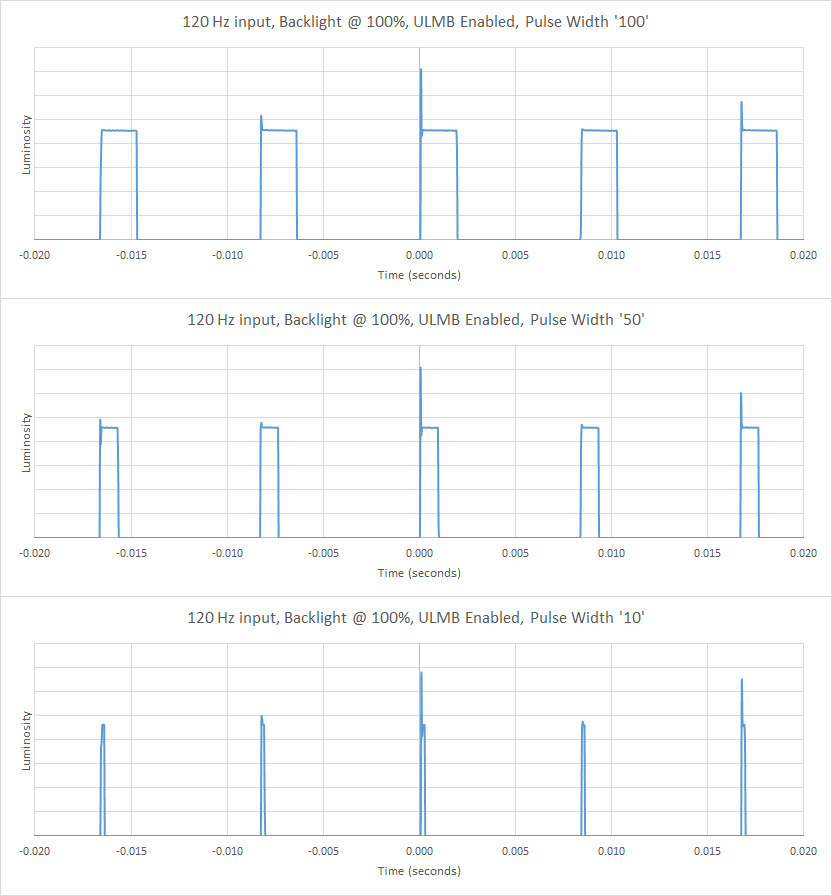
The ASUS Swift PG279Q can add optional flicker that matches the input rate using NVIDIA's ULMB feature. This makes motion look clearer, but also reduces the perceived brightness of the screen since the backlight is turned off during the majority of its duty cycle. The monitor also has a Pulse Width option to change the pulse width of the flicker, which makes motion even clearer but greatly reduces the brightness of the screen.
The ASUS PG279Q has an excellent native refresh rate, which can be overclocked directly from the OSD.
Excellent low input lag. The 60Hz input lag is a bit higher than usual, but still excellent for console gamers.
The ASUS PG279Q has a very good QHD native resolution and a fairly large 27" size, which are great for almost any use.

The Asus PG279Q has the same gaming features found on the other ASUS ROG monitors like the VG245H. The GamePlus menu, which can be quickly accessed by pressing the second-highest button, offers three features:
- Crosshair
- FPS counter
- Timer
To disable the OSD features, press the X button on the monitor to access the menu, then press it a second time to disable these OSD features.
The monitor also comes equipped with two internal speakers.
If you want a similar monitor, but with more extra features, the Gigabyte Aorus FI27Q is a good option.

The on-screen display is very intuitive, easy to navigate, and well-organized.