Our Verdict
The S2719DGF is a decent monitor for mixed usage. It has a very fast response time that leaves only minimal blur and a very low input lag to enhance the gaming experience. It has great size and resolution to allow you to multitask, and it can get bright enough to combat glare in most office environments. Unfortunately, it lacks good dark room performance with a low contrast ratio and terrible black uniformity.
- Extremely fast response time.
- Incredibly low input lag.
- Bad dark room performance.
- Image loses accuracy at an angle.
The Dell S2719DGF is a decent monitor for office use. The screen size and native resolution are suitable for working with multiple windows open at the same time. It has excellent ergonomics and you can easily swivel it towards your coworker sitting next to you if you wish to share your work. It does a decent job at handling reflections, so you won't have to worry if a few small light sources are facing the monitor.
The S2719DGF is a great monitor for gaming. It's very responsive to your actions due to the incredibly low input lag, and its extremely fast response time ensures that fast-moving content looks clear. It has a great resolution and large size for an immersive gaming experience, and it also supports FreeSync VRR to reduce screen tearing.
Decent monitor for multimedia. The S2719DGF is very responsive due to the low input lag, and it has great size and resolution so you can see every detail in your favorite videos. Unfortunately, the best image quality is reserved for those sitting directly in front of it due to the disappointing viewing angles.
The Dell S2719DGF is a decent monitor for media creation. It has a great resolution and size that allows you to open many windows on your screen. It has a great color gamut for casual users, but professionals might find it limiting. Unfortunately, the viewing angles are disappointing and you'll lose image accuracy when viewed from the side. On the upside, adjusting it how you like is easy due to the excellent ergonomics.
The Dell S2719DGF doesn't support HDR.
Changelog
- Updated Feb 24, 2020: Converted to Test Bench 1.1.
- Updated Jan 31, 2019: Review published.
- Updated Jan 29, 2019: Our testers have started testing this product.
- Updated Jan 29, 2019: Early access published.
Check Price
Differences Between Sizes And Variants
We tested the 27 inch S2719DGF, and there are two other sizes available in the same family of monitors, which are listed below.
| Model | Size | Native Resolution | Refresh rate | Notes | Year |
|---|---|---|---|---|---|
| S2719DGF | 27" | 2560x1440p | 144Hz |
FreeSync |
2019 |
| S2716DG | 27'' | 2560x1440p | 144Hz | G-Sync | 2016 |
| S2417DG | 24'' | 2560x1440p | 144Hz | G-Sync | 2017 |
If someone comes across a different type of panel or if their Dell S2719DGF doesn't correspond to our review, let us know and we will update the review. Note that some tests such as the gray uniformity may vary between individual units.
Our unit was manufactured in November 2018, and you can see the label here.
Popular Monitor Comparisons
The Dell S2719DGF is a decent monitor overall. It's great for gaming thanks to its many gaming-related features, and it's priced quite competitively too, so it tends to be a good choice if you're looking for a gaming monitor. See our recommendations for the best gaming monitors, the best 27 inch monitors, and the best budget gaming monitors.
The Dell S2721DGF is much better overall than the Dell S2719DGF. The S2721DGF has a faster refresh rate, and the IPS panel delivers much better viewing angles. The S2721DGF adds HDR support, but due to the low peak brightness and disappointing contrast, this doesn't add much.
The Dell S2716DG has very similar performance to the Dell S2719DGF, and the minor differences can be attributed to panel variance. The most significant difference between them is that the S2719DGF supports FreeSync VRR whereas the S2716DG supports G-SYNC VRR and incorporates a BFI feature that the S2719DGF is lacking.
The ASUS VG279Q is a bit better than the Dell S2719DGF. The VG279Q has much better black uniformity, although it still isn't great, and the VG279Q has an optional black frame insertion feature. The S2719DGF has a higher resolution screen, which some people might prefer, and it has a faster response time.
The DellS2719DGF and the Nixeus EDG 34 are very similar monitors in terms of overall performance. The 27 inch Dell uses a TN panel so it has a much better response time, resulting in clearer motion, and it has a wider range of refresh rates. However, the VA panel on the 34 inch Nixeus provides much better picture quality with great contrast ratio, fantastic gray uniformity, and unlike the Dell, it displays a wide color gamut. The Dell is more suited to gaming, while the Nixeus performs better for everyday use.

We buy and test more than 30 monitors each year, with units that we buy completely on our own, without any cherry-picked units or samples. We put a lot into each unbiased, straight-to-the-point review, and there's a whole process from purchasing to publishing, involving multiple teams and people. We do more than just use the monitor for a week; we use specialized and custom tools to measure various aspects with objective data-based results. We also consider multiple factors before making any recommendations, including the monitor's cost, its performance against the competition, and whether or not it's easy to find.
Test Results

The S21719DGF has a simple design similar to other Dell monitors. It's mainly black and should fit into any office or gaming environment.

The stand supports the monitor well with only minimal wobble. It's small so you can still place objects in front of it.

The ergonomics are excellent. You can adjust the height, tilt, swivel, and even rotate the monitor with ease. You'll have no problem placing it comfortably on your desk.

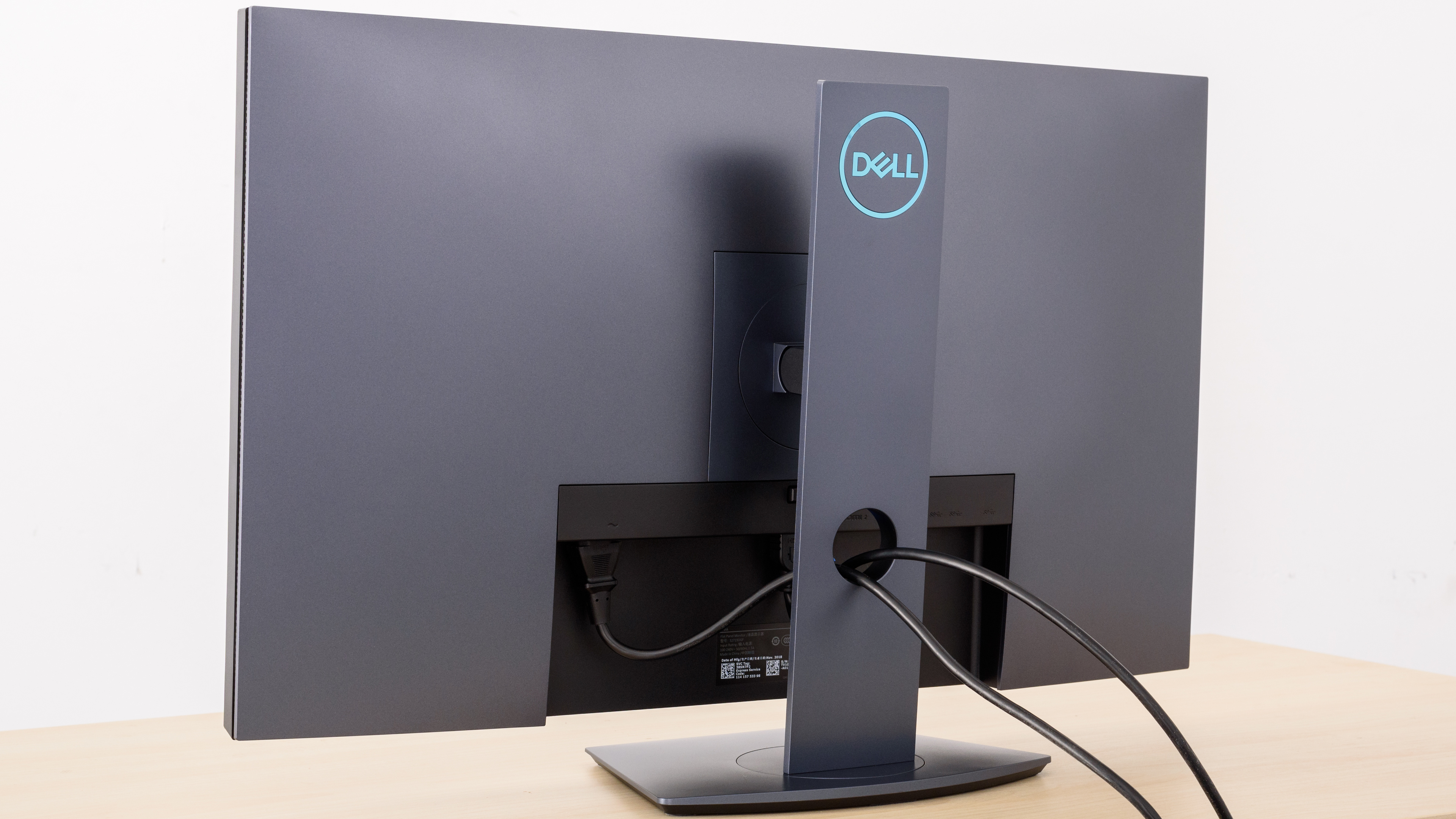
The back of the monitor is very plain. All the inputs are in the back and are facing downwards so they won't protrude if you VESA-mount it.
Cable management is serviced through a hole on the stand, just like most other Dell monitors.

The borders are thin and you'll have no problem placing two monitors side-by-side. There's a groove that runs along the outer side of the border that serves as a vent.

The monitor gets much thicker with the stand attached and will take up some space on your desk.

Good build quality. Like most other Dell monitors, it's mostly made of plastic but it's sturdy without gaps or loose ends.

The native contrast ratio of the Dell S2719DGF is disappointing and blacks look gray in a dark room.
The S2719DGF doesn't have a local dimming feature. The video above is provide for reference only.
Impressive SDR peak brightness. The S2719DGF maintains its brightness across different content extremely well and it can get bright enough to combat glare in most rooms.
This monitor doesn't support HDR.


Mediocre horizontal viewing angles. Viewing from the side loses image accuracy, which isn't ideal if you need to share your screen with a coworker or for co-op gaming.


Poor vertical viewing angles. As is the case with most TN panels, the colors appear inverted if you mount the monitor above eye level. However, if you place it slightly below eye level, you won't lose much image accuracy.


Good gray uniformity. The edges are a bit darker, but this isn't noticeable with most content. There's minimal dirty screen effect in the center, which is great for watching sports or during panning shots. The monitor is nearly uniform in dark scenes.

Terrible black uniformity for the S2719DGF. Backlight bleed is visible almost everywhere and unfortunately, this is also noticeable in normal content, especially when displaying a uniform dark color. Note that black uniformity is panel-specific and will differ from unit to unit, but we have seen reports displaying similar uniformity.


Good out-of-box color accuracy. Most colors are somewhat inaccurate and the color temperature is warmer than the target of 6500K, so colors will be closer to red/yellow. The gamma follows the target well, but most scenes will be darker than intended.


After calibration, its color accuracy is excellent. It's almost impossible to spot any inaccuracy with the naked eye. The color temperature is also extremely close to the 6500K target, and the gamma follows the target curve more closely, so most scenes will be at their correct brightness.
You can download our ICC profile calibration here. This is provided for reference only and shouldn't be used, as the calibration values vary per individual unit even for the same model due to manufacturing tolerances.


Great SDR color gamut. The S2719DGF covers nearly all of the sRGB color space used in most content. Photo editors might be a bit disappointed with the somewhat limited coverage of the Adobe RGB space used in photo editing.


Amazing SDR color volume. It can display a wide range of colors, although it can't produce dark saturated colors due to the low contrast ratio. The color volume is still an improvement over the S2716DG.
This monitor doesn't support HDR.
This monitor doesn't support HDR.

There are no signs of temporary image retention, even immediately after showing our high contrast static test for 10 minutes.

Outstanding gradient performance, although some banding is visible in darker shades.


Although there's some vertical color bleed, it shouldn't be noticeable with most content.


Decent reflection handling on the S2719DGF. The matte coating diffuses light across the screen, reducing their reflections. Although this works well in dim rooms, reflections might be distracting in bright rooms. This is very similar to the Dell P2217H.


The text clarity is decent. It can be improved using ClearType (top photo), which makes the diagonal or curved lines on the letters R, N, G, and S clearer.


| Overdrive Setting | Response Time Chart | Response Time Tables | Motion Blur Photo |
| Normal | Chart | Table | Photo |
| Fast | Chart | Table | Photo |
| Super Fast | Chart | Table | Photo |
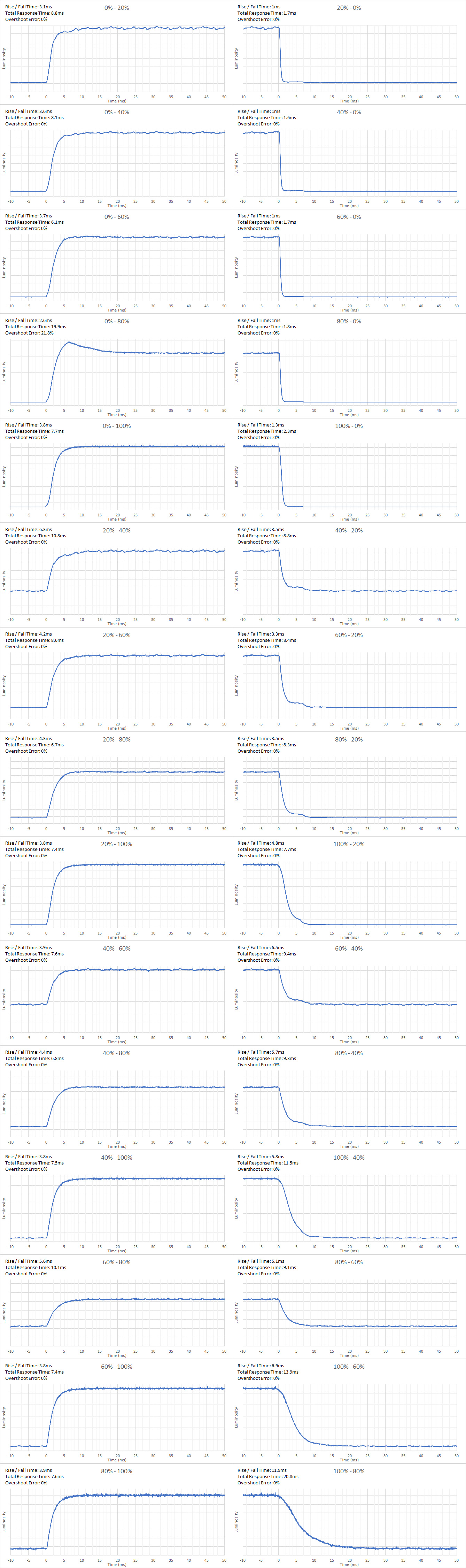
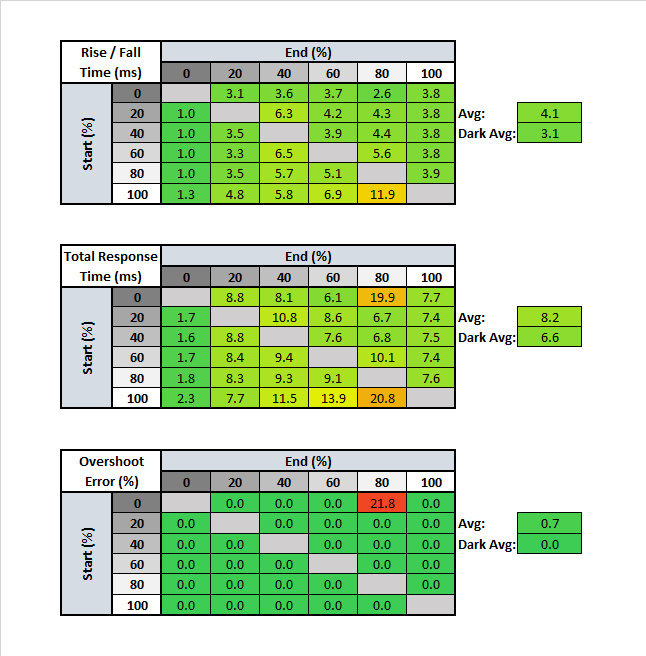
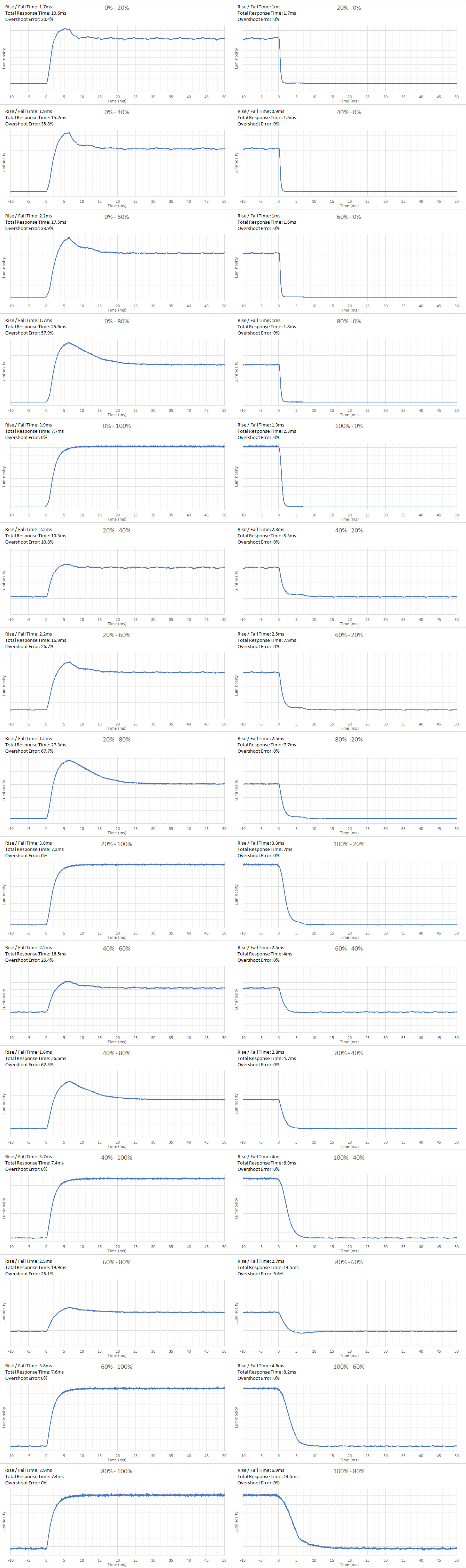
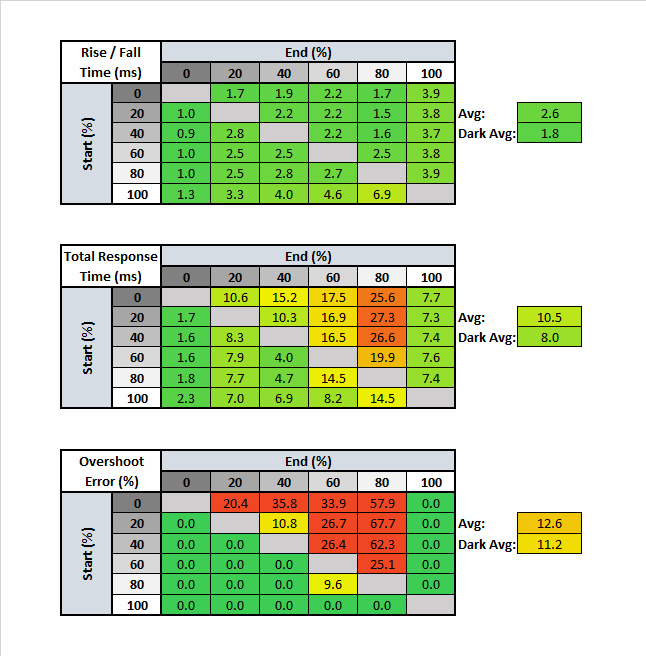
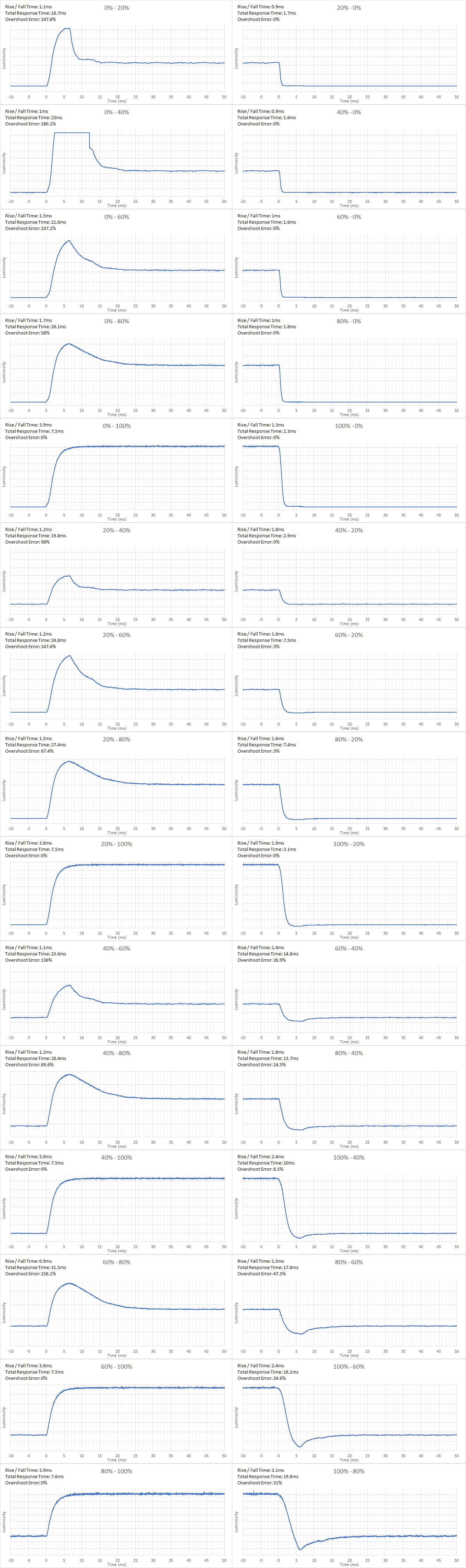
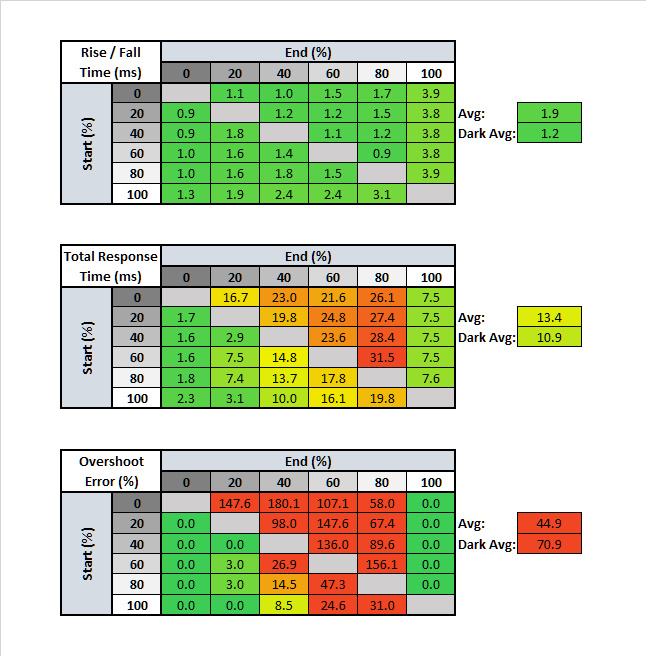
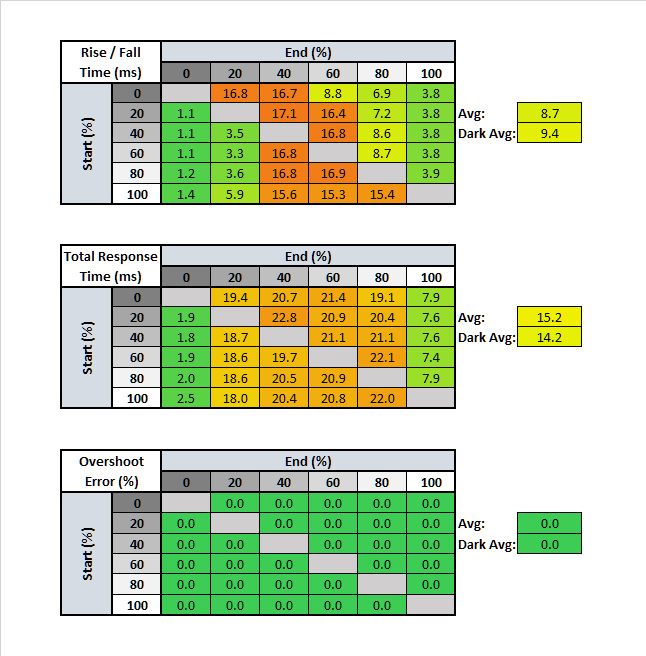
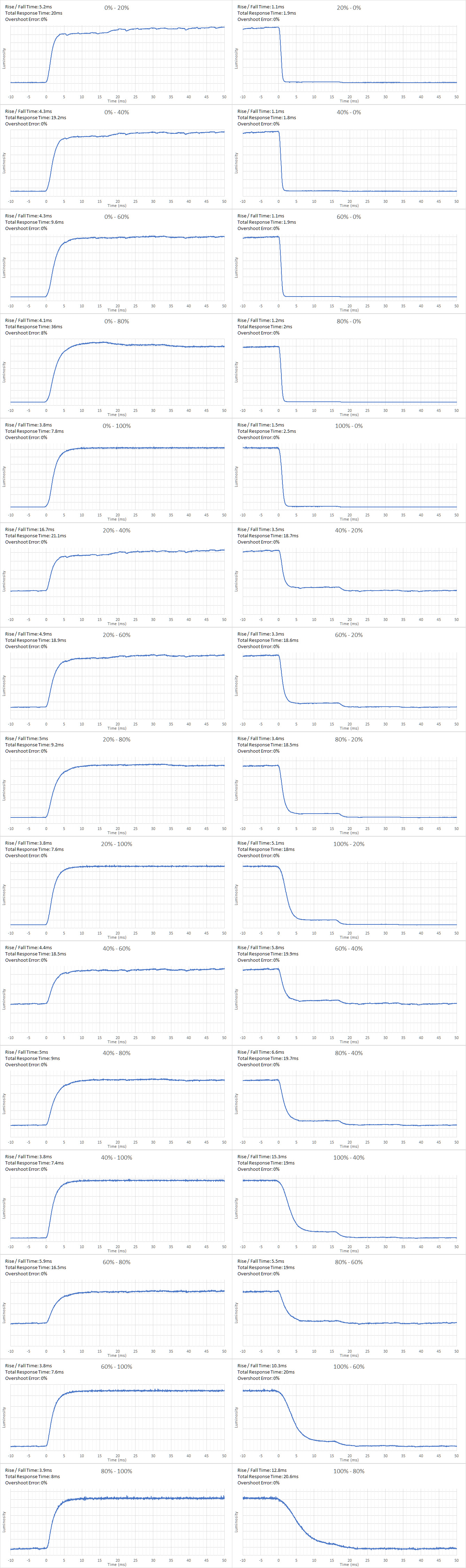
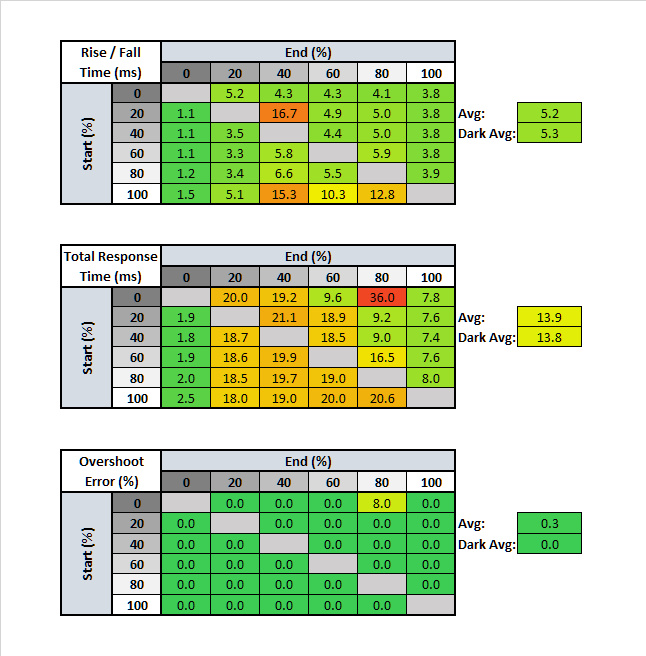
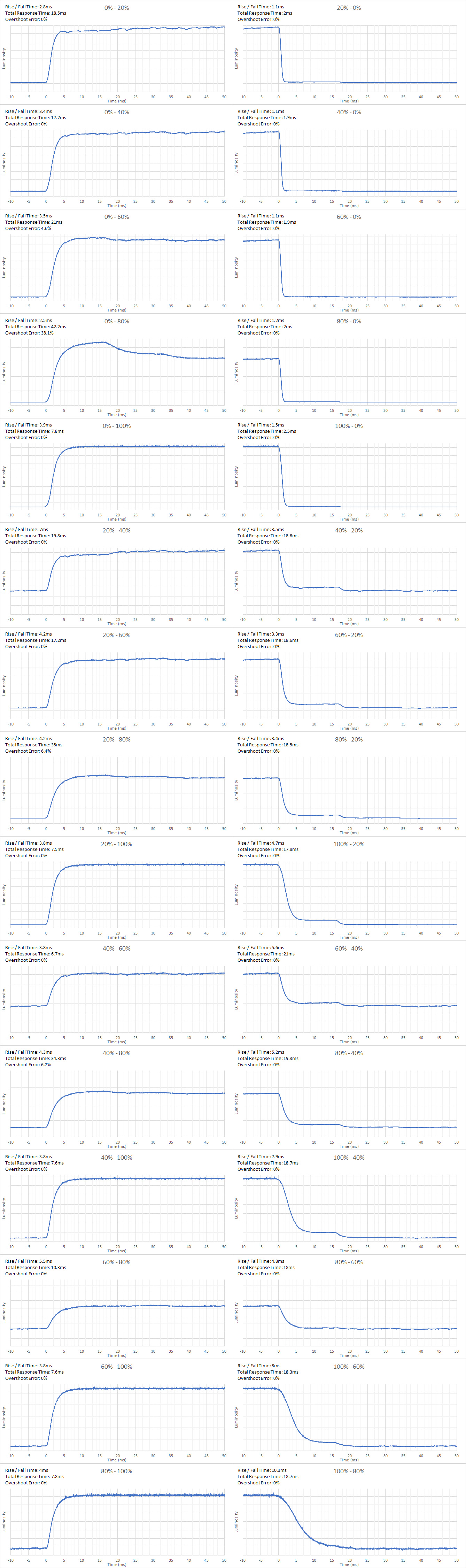
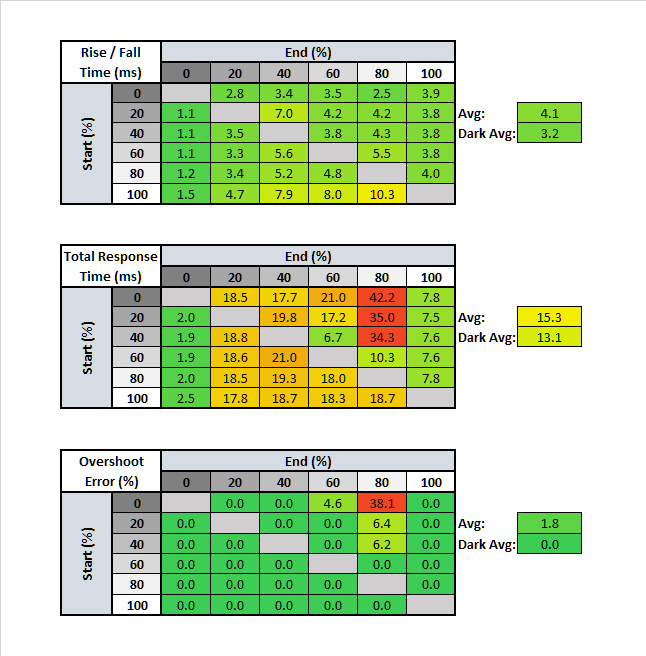
Outstanding response time, which is normal for TN panels. The best Overdrive setting is 'Normal' since it has the least amount of overshoot and motion looks extremely clear. There's visible ghosting using the 'Fast' and 'Super Fast' settings.


| Overdrive Setting | Response Time Chart | Response Time Tables | Motion Blur Photo |
| Normal | Chart | Table | Photo |
| Fast | Chart | Table | Photo |
| Super Fast | Chart | Table | Photo |
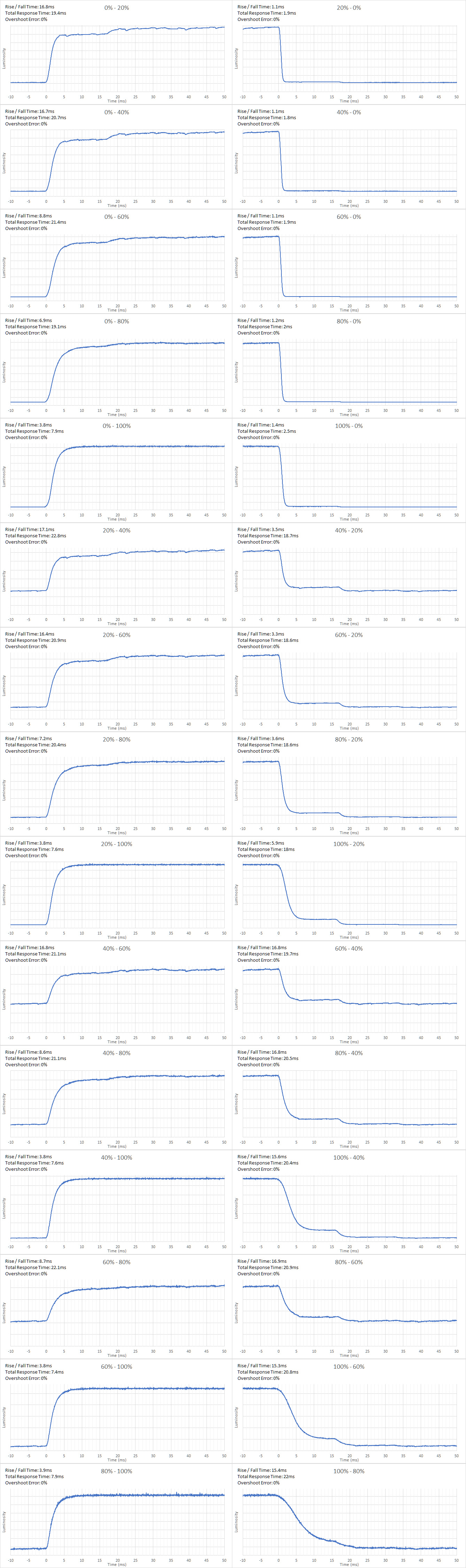
Excellent response time at 60Hz, which is great for people who want to use the S2719DGF for console gaming. When gaming at 60Hz, you might need to change the Overdrive setting compared to playing games at its max refresh rate. We recommend the 'Super Fast' setting, as motion looks the clearest, but the 'Normal' and 'Fast' settings perform similarly.

This monitor's backlight is flicker-free, which helps reduce eye strain.
The S2719DGF doesn't have a black frame insertion feature to help reduce motion blur.
The Dell S2719DGF has a refresh rate of 144Hz but it can be overclocked to 155Hz. It supports FreeSync VRR technology to help reduce tearing in games.
Note: The overclocking feature is unavailable when using an HDMI cable. It's only available when the monitor is connected through a DisplayPort connection.
Incredibly low input lag. The input lag remains low even with VRR enabled, which is great for gamers.
Great resolution and size for the S2719DGF monitor. There's enough screen real estate to allow you to open many windows at once.


There's one upstream USB 3.0 port that allows the monitor to work as a USB hub. Also, one of the 3.5mm analog audio out ports is a headphone port with adjustable volume, while the other is a fixed volume line out port.
The S2719DGF has some common additional features for an enhanced gaming experience:
- Frame Rate Counter: Counts the fps the monitor is displaying.
- Dark Stabilizer: Brings out dark details. Especially useful in FPS games.
- Timer: Allows you to display a stopwatch on the screen.
- Display Alignment: Shows grid lines on the edges of the screen to facilitate side-by-side alignment with another monitor.