
Our Verdict
Good TV for a range of usages. Low native contrast ratio so blacks appear gray in a dark room, but image remains accurate when viewed at an angle. Motion handling is great which is good for sports or gaming but unfortunately the input lag is fairly high.
- Great for fast motion content like sports and video games
- Wide viewing angle
- Blacks appear a little gray in the dark
- Average HDR performance
Below average for watching movies in a dark room. Low native contrast ratio so blacks appear gray, but uniformity is quite good.
Good for watching TV in a bright room. Image remains accurate when viewed at an angle which is good for wide living rooms. Can get fairly bright to combat glare and reflection handling is decent.
Good choice for watching sports. Image remains accurate when viewed at an angle so everyone gets a good view. Motion handling is great so only a short trail can be seen following fast moving objects.
Capable gaming TV for 1080p sources but input lag is a bit high for 4k sources, even for casual gamers. Motion handling is great but there is some temporary image retention.
Supports HDR10. Can produce a wide color gamut and gets quite bright to display HDR content which is good. Unfortunately picture quality is below average due to low native contrast ratio.
Supports HDR gaming. Picture quality is below average due to low native contrast ratio, and 4k input lag is a bit high. Motion handling is great and can produce bright vivid highlights with HDR.
Great PC monitor. Image remains accurate even when the sides are viewed from up close. Supports 4:4:4 for clear text across all backgrounds. Unfortunately the input lag at 4k is quite high, but motion handling is great.
Check Price
Differences Between Sizes And Variants
We reviewed the 55" (Sony XBR-55X850D). It has an IPS panel.
Update: The 65" and 75" are also IPS, so our review is also valid for that one. But the 85" has a VA panel, so it will produce better blacks directly in front, but worse color accuracy at an angle.
As an interesting note, the 55" shares a panel very similar to the 2016 LG 55UH8500 that we reviewed a few weeks ago. The response time measurements are almost the same, as well as the contrast ratio (around 1200:1, which is very good for an IPS).
| Size | Model | UK | Panel |
| 55" | XBR-55X850D | KD-55XD8505 | IPS |
| 65" | XBR-65X850D | KD-65XD8505 | IPS |
| 75" | XBR-75X850D | KD-75XD8505 | IPS |
| 85" | XBR-85X850D | KD-85XD8505 | VA |
Popular TV Comparisons

Compared to other TVs, the Sony X850D is a good choice for wide living rooms with seating on the side of the TV. If the main viewing position is directly in front of the TV, there are better alternatives.

We buy and test dozens of TVs yearly, taking an objective, data-driven approach to deliver results you can trust. Our testing process is complex, with hundreds of individual tests that take over a week to complete. Most of our tests use specially designed test patterns that mimic real content, but we also use the same sources you have at home to ensure our results match the real-world experience. We use two main tools for our testing: a Colorimetry Research CR-100 colorimeter and a CR-250 spectroradiometer.
Test Results
Older Test Bench: This product has been tested using an older TV test methodology, before amajor update. Some of the test results below aren't directly comparable with other TVs. Learn more
for pictures & test results

The designers behind the Sony 4k UHD X850D LED TV have done a decent job of making the TV look good, but it looks cheaper than last year's X850C. It still feels sturdy, but most of the metal finish is gone; its frame and stand are now entirely made of plastic. The new stand feels more solid, though. The X850D is relatively thin, but those looking to mount it flush on a wall will block some of its back connections.
for pictures & test results

The plastic stand is very sturdy and the TV feels safe on it, although it can still wobble a bit if you push against it. Footprint of the 55" TV stand: 10.2" x 18.1"
for pictures & test results

The back of the TV looks a little blocky. Some connections on the back might be inaccessible in a setup where the TV is mounted flush on a wall. Note that the 65" has VESA 300x300, and the 75" and 85" have a VESA 400x300 mount.

for pictures & test results

The top part and edges are thinner and the guts of the TV are behind the thick middle part.
for pictures & test results

Blacks aren't very deep and might appear a little gray in a dark environment. This won't be much of an issue in a room with a few lights on.

The SDR peak brightness is average for the Sony X850D. This TV does not have a local dimming feature, and thus the overall average is about 320cd/m², which is 100 less than what it can reach when in HDR mode. This is good for a dark room, fall a bit short for a very bright room.
Since the X850D doesn't support local dimming, all % values are near the same. The maximum brightness is not enough to enjoy HDR fully.


for videos & test results

for pictures & test results
for pictures & test results
for pictures & test results
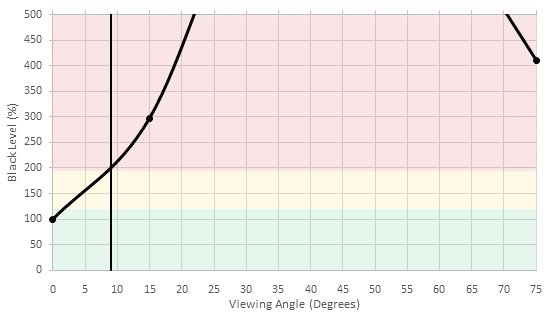
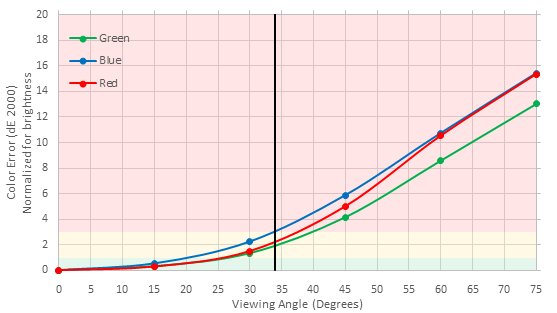
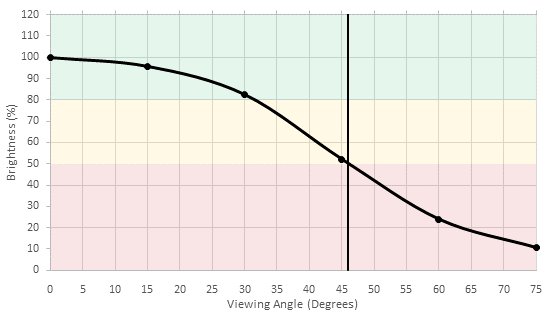
This is an IPS TV (except the 85"). Therefore, it has a wide viewing angle that is good for seating on the sides of the TV. Color saturation and contrast will stay good unless the TV is being viewed from wide angles.
for pictures & test results

There are no obvious clouding or flashlighting issues, although with a fully black screen, the lighter blacks are more apparent.
for pictures & test results

Our 10 Bit gradient pattern looks very good, without any of the 8 Bit gradations. This mean that HDR content should be free of any obvious color banding.


for pictures & test results

for pictures & test results

for pictures & test results

Any white balance issues could be fixed, although the X850D doesn't have separate color adjustments. The color still got better after the white balance calibration.
for pictures & test results

On the Sony X850D, details are nicely preserved, even at lower resolutions like 480p.
for pictures & test results

Cable TV looks good and sharp when upscaled, like the majority of Sony TVs.
for pictures & test results

Blu-rays looks sharp and crisp once upscaled.
for pictures & test results

The Sony X850D UHD LED TV have no problem with the native 4k resolutions. Content looks very nice and sharp, even when sitting very close to the TV.
for pictures & test results

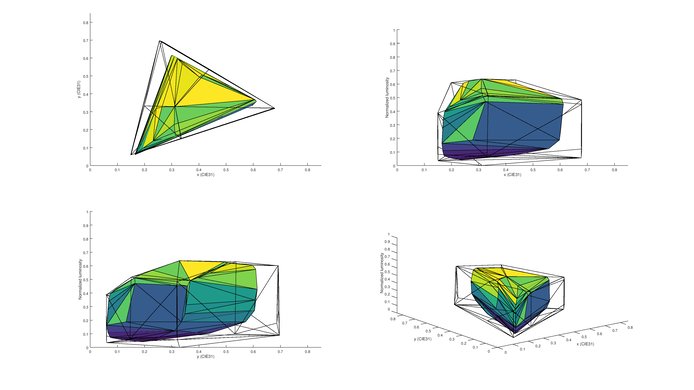
To enable the wide color gamut option, change 'Color space' from the 'Advanced settings' picture menu to 'DCI' or 'BT.2020'. For most content, leave it set to 'sRGB/BT.709'.
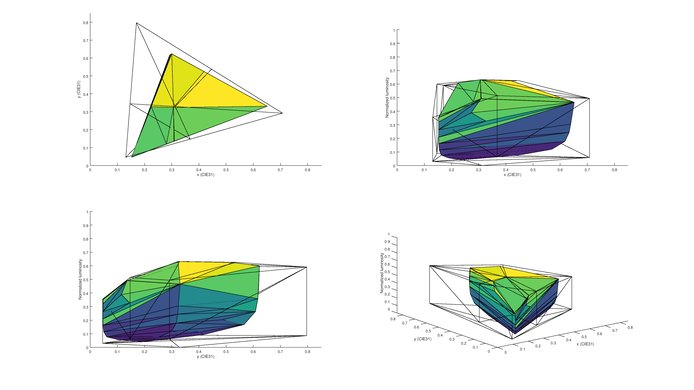
for pictures & test results

The Sony X850D does present some image retention, but unlike the X700D, the retention is present only right after the static scene of the test video. After 2 minutes, visually and from our computer analysis, we could not make out any image retention at all, which is pretty good for an IPS TV. This is particularly good for PC and video games enthusiasts.



for pictures & test results

for pictures & test results

Pixel response time is quick as a whole, but transitions to darker colors are slower. The backlight is flicker-free, so although motion appears a little blurry, it doesn't create a double effect like you see on most Samsung TVs.



With 24p content like Blu-ray, 'Motionflow' has to be set to 'True Cinema' to remove judder. For 60Hz signals like cable and streaming, you also need to set 'CineMotion' to 'High'.


Lowest 1080p input lag is achieved under 'Game' picture mode. The 'Clearness' setting under 'Motionflow' can be used to clarify action some more and won't increase the input lag (although it does darken the screen). 1080p input lag also stays low enough for some slower games when image interpolation is turned on, which is something that can't be said for most TVs.
Update 11/02/2016: With the latest firmware update (PKG3.531.0108NAB), the overall 1080p and 4k SDR remain the same, but the 4k HDR input lag is now almost half than was with was before and is now the same as 4k SDR. It is still a bit high even for casual gaming, but it is definitely an upgrade over the 93ms that it was before.
Most resolutions are accepted. To get chroma 4:4:4, select 'Game' or 'Graphics' picture mode. For 4k @ 60Hz @ 4:4:4, you also need to set the HDMI input to 'Enhanced format' (under 'External inputs' menu). Just like with last year's Sony TVs, 1080p @ 120Hz produces little artifacts (lines), but this shouldn't be too bothersome while gaming. The 'Graphics' picture mode has fewer of these little artifacts.


for pictures & test results

Decent frequency response. However, the low-end cutoff of 143Hz is rather high, even for a TV; this TV doesn't produce a lot of bass. It doesn't get very loud either, and pumping may be present at higher volumes.
for pictures & test results

This distortion pattern seems to be typical of Sony TVs: Good results at lower volumes, and then a big jump in harmonic distortion near the maximum loudness limit of the TV.
for pictures & test results

All the major apps are available, including a web browser, YouTube, Netflix, Amazon Video, HBO Go and more.
for pictures & test results

Not much has changed from Sony's Android TV smart platform from last year, which isn't such a bad thing, though some improvements would have been nice. It still feels like Sony uses a bunch of different interfaces thrown together into one. The content and apps are there, though, and that is what really matters. The interface is faster, too. As for the TV's inputs, you probably won't need more. Just make sure you have enough space in your setup to hide the huge power brick.
Sony Android TVs don't have ads. They do however have a slew of app recommendations on their home screen, which some might not like.
for pictures & test results

Basic TV controls are located on the back-right side of the TV. They might not be accessible if the TV is mounted flush on a wall.
for pictures & test results

The remote has the same familiar layout as last year's, but now has a soft finish.
for pictures & test results

- Remote
- Batteries
- 2 cable ties
- Power brick with cable
- IR blaster
- Manuals