
HDMI ARC (Audio Return Channel) allows HDMI devices to send and receive audio in both directions. The feature allows compatible TVs to output an audio signal (to a soundbar) using the same port from which it receives video. This functionality can help you reduce the number of cables in your setup. Meanwhile, the upgraded version of ARC, eARC (Enhanced Audio Return Channel), expands supported audio formats and offers lower latency (in most cases).
In this article, we'll explain the feature and discuss a couple of real-world usages so you can get the most out of your TV and soundbar combo.
Test results
The Foundation: HDMI
HDMI, or high-definition multimedia interface, is one of the most widely adopted means of transferring video and audio information between multimedia devices (displays, sources, and soundbars, for example).
Since its inception over 20 years ago, the technology has undergone several iterative updates ('revisions'). Notably, HDMI 1.4 and HDMI 2.1 introduced ARC and eARC, respectively. The latest version of HDMI also includes many other features, like auto low-latency mode and quick media switching, which you can read about in our dedicated HDMI article.

What is HDMI ARC?
Before we get into the 'enhanced' aspect of eARC, we first need to establish an understanding of the base functionality provided by ARC. Probably the biggest improvement to the user experience that comes with ARC is the flexibility to use an HDMI port as both an input and output for audio. For setups that otherwise wouldn't have used HDMI to transmit audio between devices, this also provides access to HDMI Consumer Electronics Control (CEC), which allows you to control interconnected devices' functionality with one remote or device. You could, for example, turn on your PS5, which would then automatically power on both your connected TV and soundbar, even if your bar was the last device in the chain.
Due to the ubiquity of Smart TVs, now preloaded with a variety of apps from big streamers like Netflix, Prime Video, Disney+, and Apple TV, users who care about audio are incentivized to connect their TVs to dedicated audio devices like an AVR or soundbar. Before the introduction of ARC, this often took the form of additional cables and connectors, most commonly Optical/TOSLINK. While this connection allowed for multi-channel output compared to other alternatives like RCA stereo, Optical has shortcomings compared to HDMI ARC, like increased audio latency.
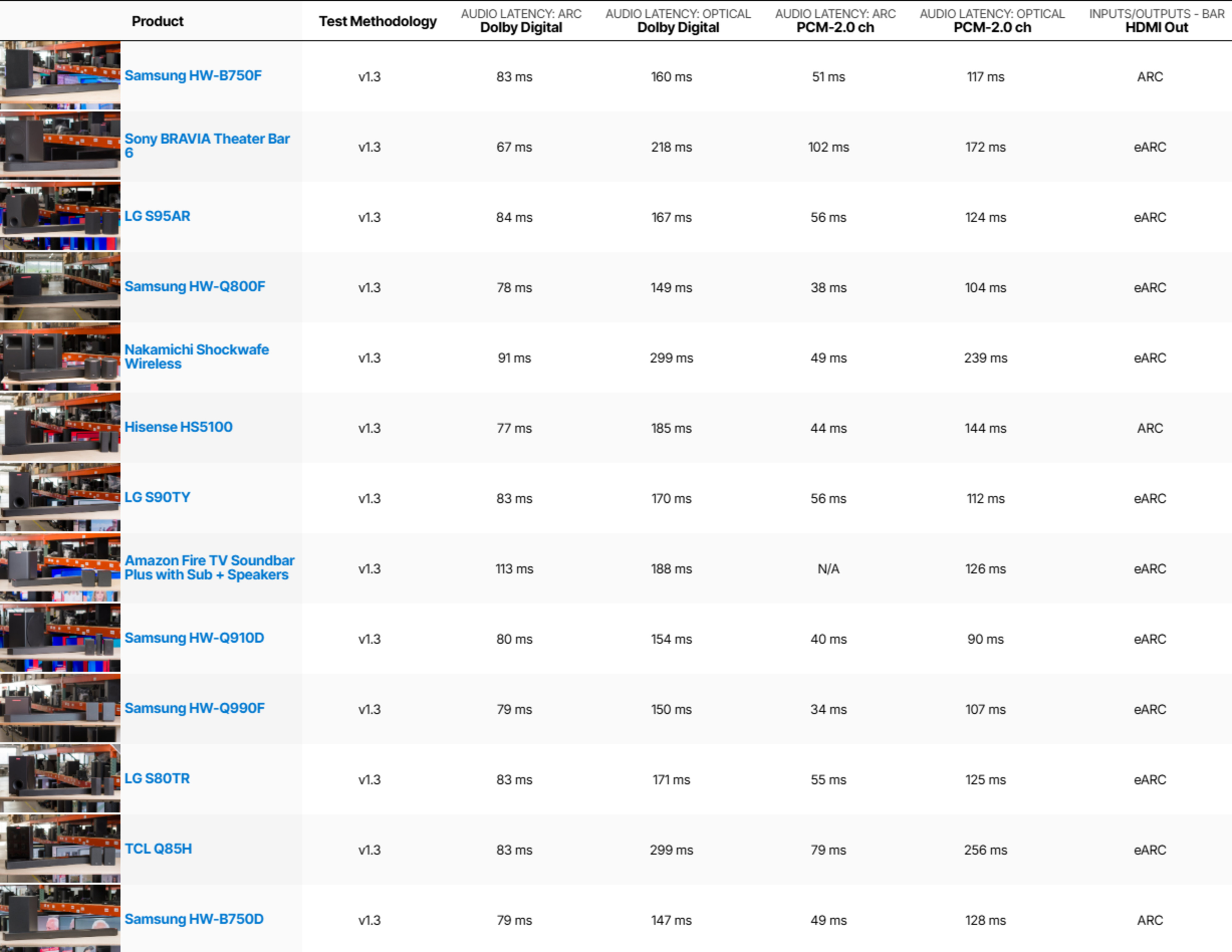
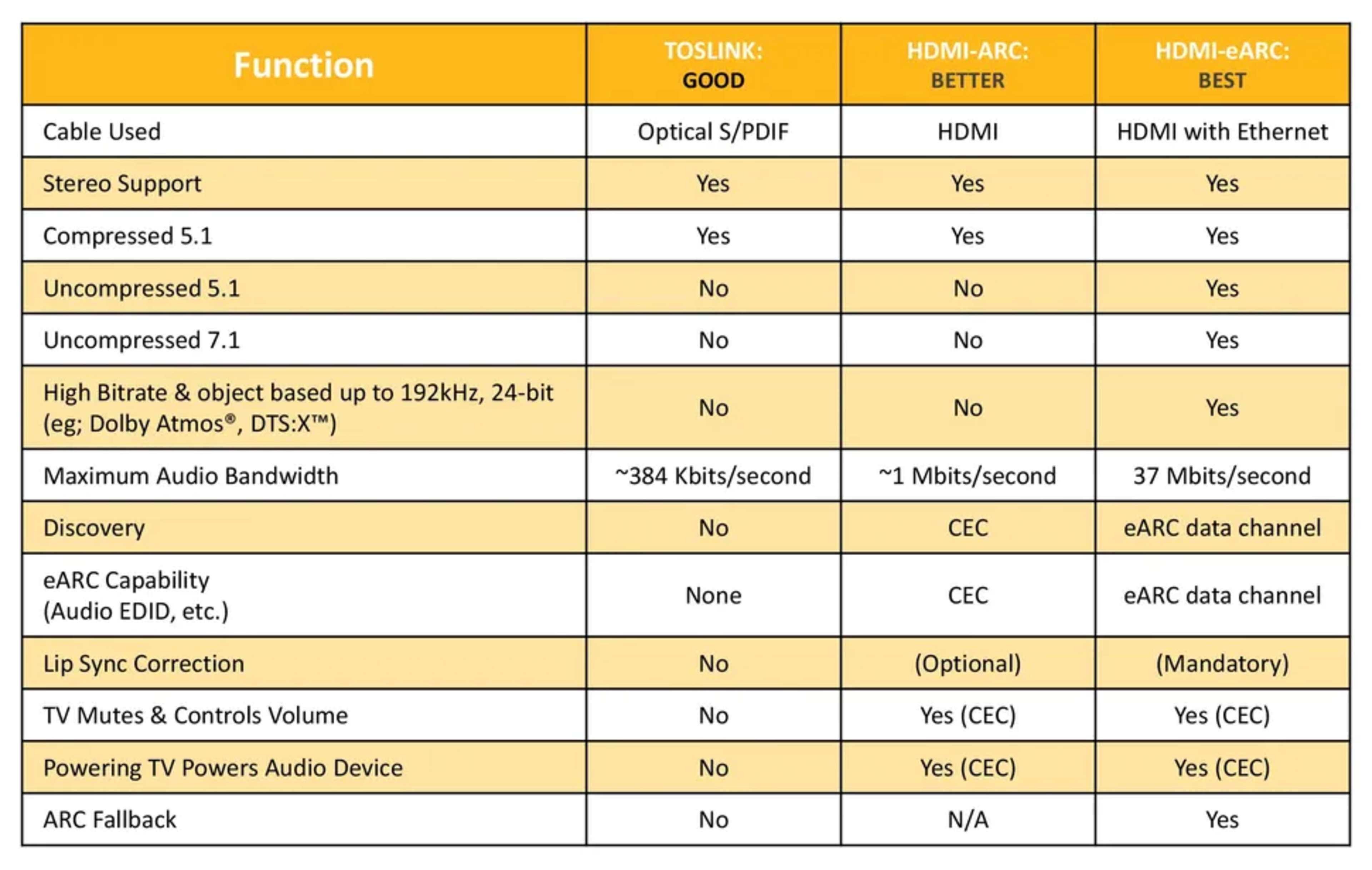
That said, ARC doesn't move the needle for audio format support at all. Both Optical and ARC support 2.0-ch PCM and compressed 5.1-ch formats (like Dolby Digital). In fact, most home theater enthusiasts have long enjoyed up to 8-ch of uncompressed lossless audio since HDMI 1.0 and later formats like Dolby TrueHD and DTS-HD MA with HDMI 1.3. The key difference is that their setups don't rely on ARC (or eARC) at all; instead, they use the traditional one-way HDMI audio/video path from the source to the AVR or soundbar, which provides far greater audio bandwidth.
What is HDMI eARC?
The HDMI Forum launched an upgrade in the form of eARC as part of HDMI 2.1, likely identifying the format limitations of ARC. Going from the ~1Mbps bandwidth limit of ARC to 37Mbps supported by eARC allows users to enjoy a higher channel count and uncompressed formats (like Dolby TrueHD and DTS-HD MA) while retaining the flexibility to use their TV's HDMI eARC port as an audio output. Sub-features like lip-sync correction also became mandatory with eARC (though effectiveness varies depending on device configuration and app usage).
How to Use eARC's Flexibility to Your Advantage
Everyone's home theater needs are different, and having a TV and soundbar/receiver that supports eARC can increase your options when you first set up your home theater and even when you rework or upgrade your devices.
Let's pretend you have a setup planned with the following devices:
- Desktop PC
- PS5
- Blu-ray player
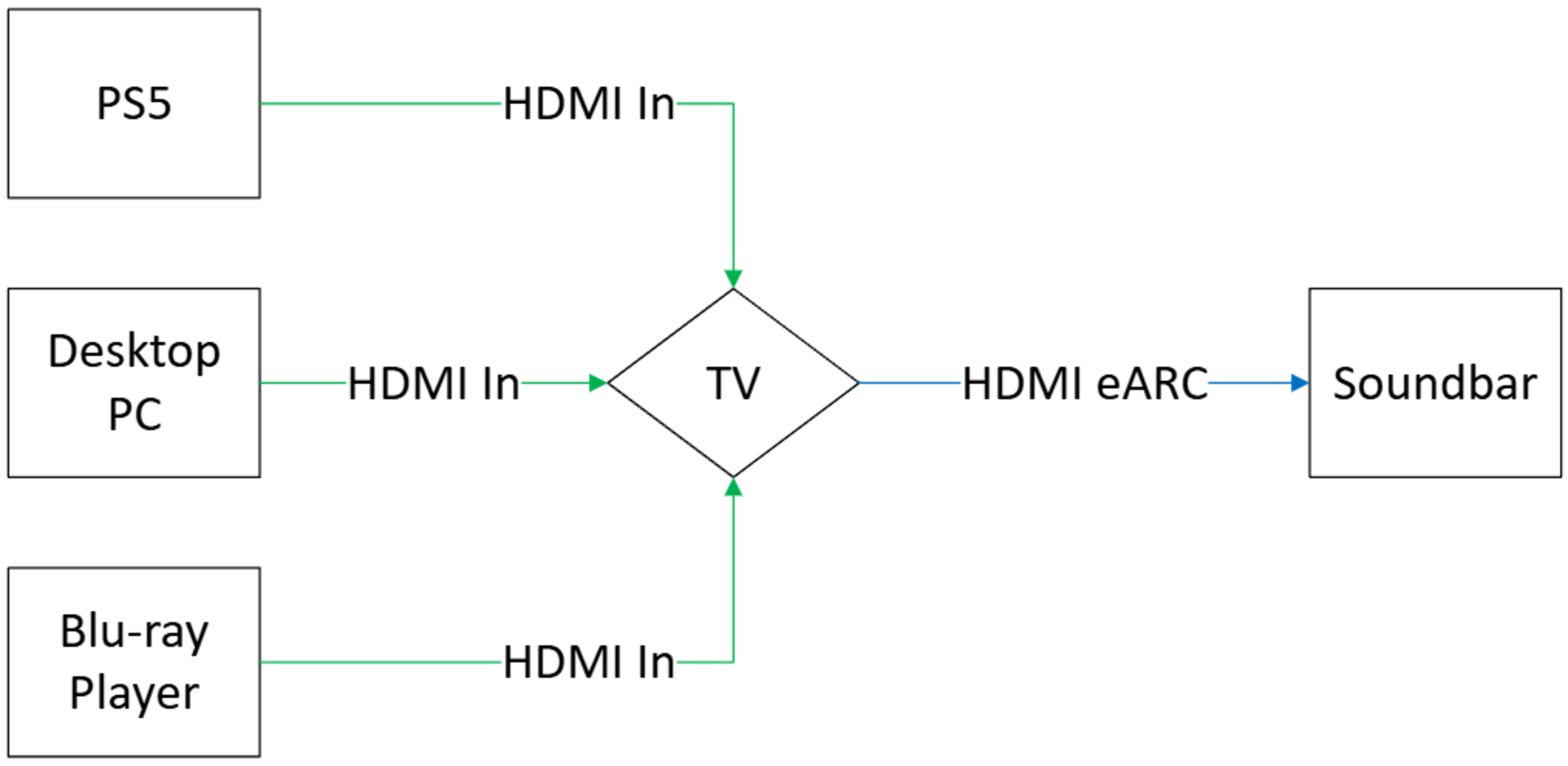
Each device can output high-quality or lossless audio; however, not all soundbars have three HDMI inputs for video passthrough (some have none). If you prefer all your source devices to connect to one 'hub,' you can use the TV as a device hub and pass through audio signals to your soundbar:
|
Blue = Audio Signal Green = Video + Audio Signal | |
 |
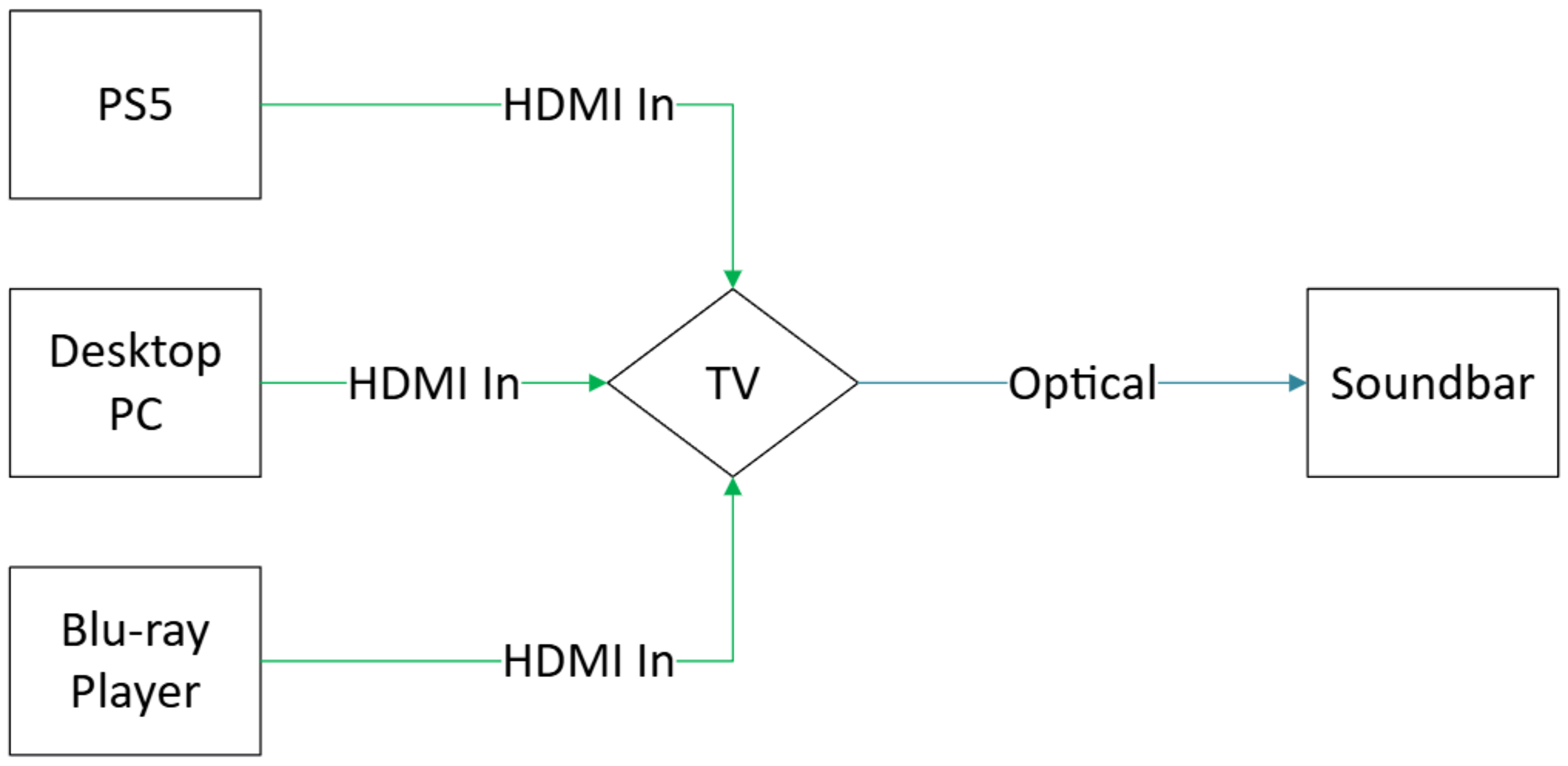 |
Both approaches above, connecting via HDMI eARC or by Optical, have a few benefits over a setup that uses the soundbar as a device hub. For one, you're more likely to find a TV with multiple high-bandwidth HDMI inputs, particularly if you're picking up one of LG's more expensive models (which typically feature 4x HDMI 2.1 ports). That said, connecting your TV to your soundbar using an Optical cable limits your options with supported formats (no Dolby Atmos or DTS:X, for example). As mentioned earlier, Optical generally has a higher latency, which can detract from the user experience in activities like gaming.
While eARC can expand the number of supported formats and has lower latency overall, you may run into problems, depending on the TV model and manufacturer you've picked out. Different ports can be assigned as ARC/eARC, which can cause problems if you want to output audio to your soundbar using eARC, but have a TV with a limited number of high-bandwidth HDMI ports. In the above example, two source devices benefit from full HDMI 2.1 bandwidth and features like VRR: the PS5 and Desktop PC. Let's consider two TVs with similar HDMI connectivity, but with differing eARC port allocation, to illustrate where HDMI eARC assignment can be an issue.
 |
 |
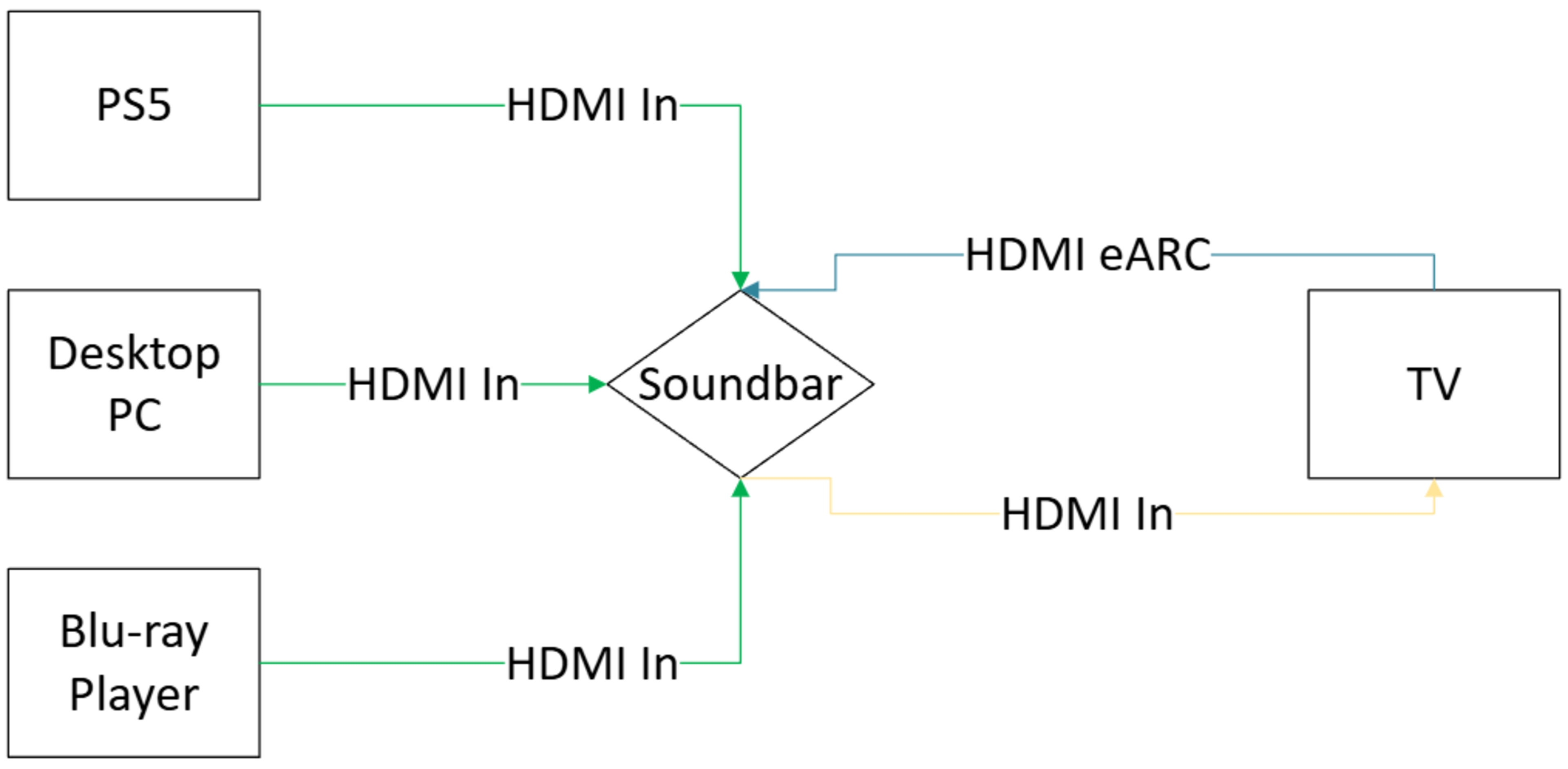
Now, what if you've decided on a wall-mounted TV, making ports difficult to access? There are a few soundbars that can accommodate 3x HDMI 2.1 inputs, like the Nakamichi DRAGON, so let's examine a scenario where you decide on a soundbar that can act as a device hub, and opt for a more traditional audio routing setup that resembles those predating ARC/eARC:
|
Yellow = Video Signal Blue = Audio Signal Green = Video + Audio Signal | |
 |
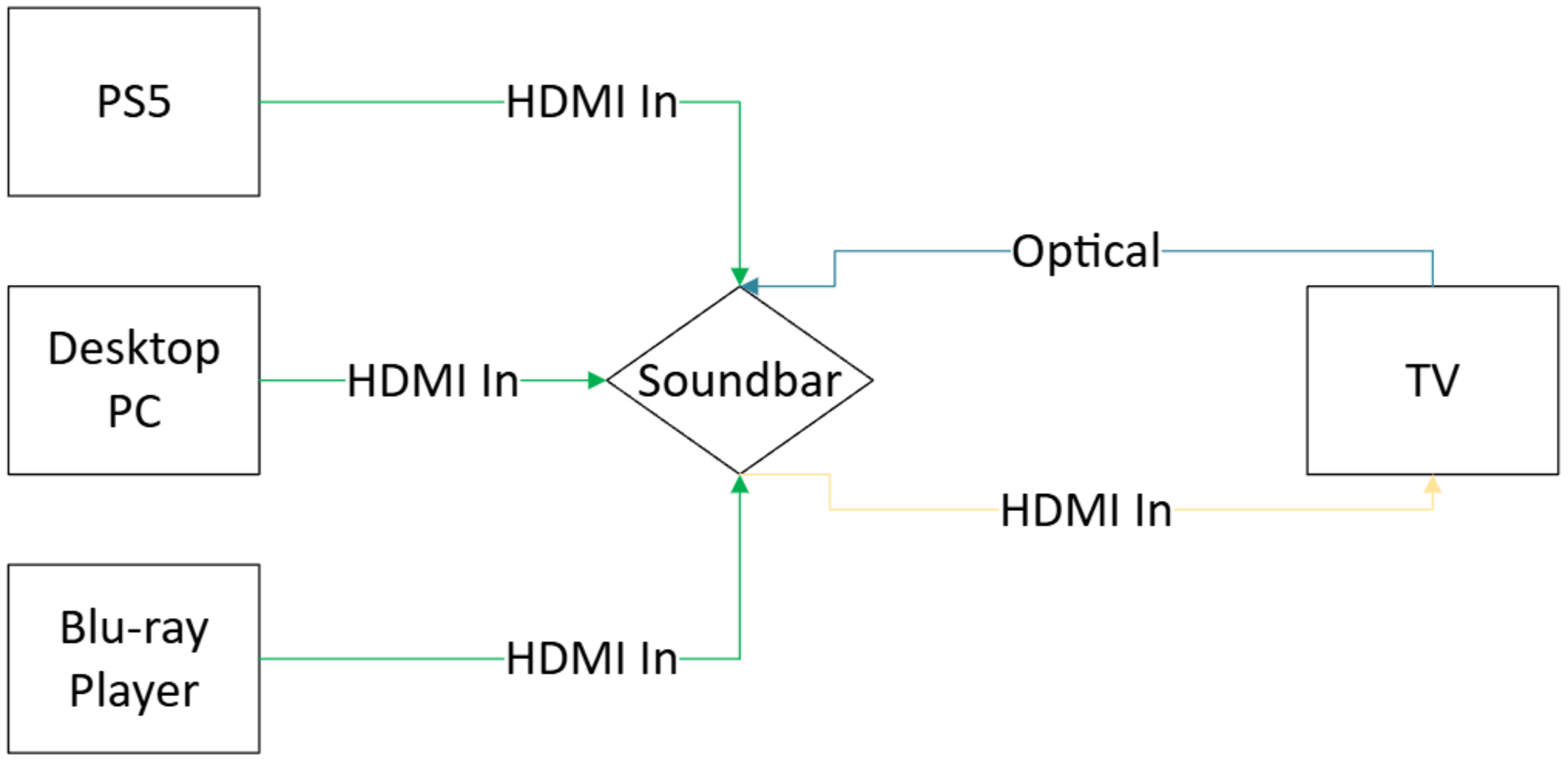 |
The limitations of Optical are the same in this example as in the previous one: you won't be able to enjoy advanced audio formats like Dolby Atmos and DTS:X with audio originating from your TV's apps (or other connected source devices) when using this connection. In this particular case, making the switch to HDMI eARC also removes one cable from your setup compared to the alternative, which can help keep things tidy.
Incidentally, there are also limitations regarding ARC/eARC port allocation and HDMI bandwidth. To begin with, the soundbar being used as a hub must have at least two HDMI 2.1 inputs to support the higher video bandwidth requirements of the PS5 and Desktop PC (in this example). Plus, if we consider the same two TVs from earlier, ARC/eARC is assigned to ports with differing capabilities; the HDMI 2.0 ARC/eARC port of the TCL QM6K may not support 4k @ 120Hz signals (at least without reducing color depth and/or chroma subsampling ratios), while the HDMI 2.1 ARC/eARC port on the Panasonic Z95B OLED can max out at 4k @ 144Hz, ensuring you can game at the highest refresh rate possible.
While these were just two example setups where you can benefit from eARC, feel free to mix and match approaches if you have a soundbar with only one HDMI input and a problem with your TV's ARC/eARC port allocation. You can even opt for Optical when latency won't matter that much, or downgrade to an HDMI 2.0 port when you don't need the video bandwidth (when using a Blu-ray player, for example). Check out our dedicated guide on how to set up your soundbar for more details on features and planning.
Conclusion
Overall, eARC is a feature that allows you to use bidirectional audio signaling to increase the flexibility and device support of your setup. Just keep in mind that real-world setups (like the examples before) have different limitations depending on the devices connected.
As always, please reach out to us in the comments or via email at feedback@rtings.com.
Recent Updates
09/25/2025: We've created the article to demystify an increasingly common HDMI feature: ARC/eARC.
03/10/2026: We've made small edits to the text to improve readability.