Sony BRAVIA Theater Bar 6  Soundbar Review

Reviewed Aug 20, 2025 at 09:33am
Tested using Methodology v1.3 
Sony BRAVIA Theater Bar 6
7.3
Mixed Usage 
7.9
Dialogue/TV Shows 
7.1
Music 
7.0
Movies 
 4

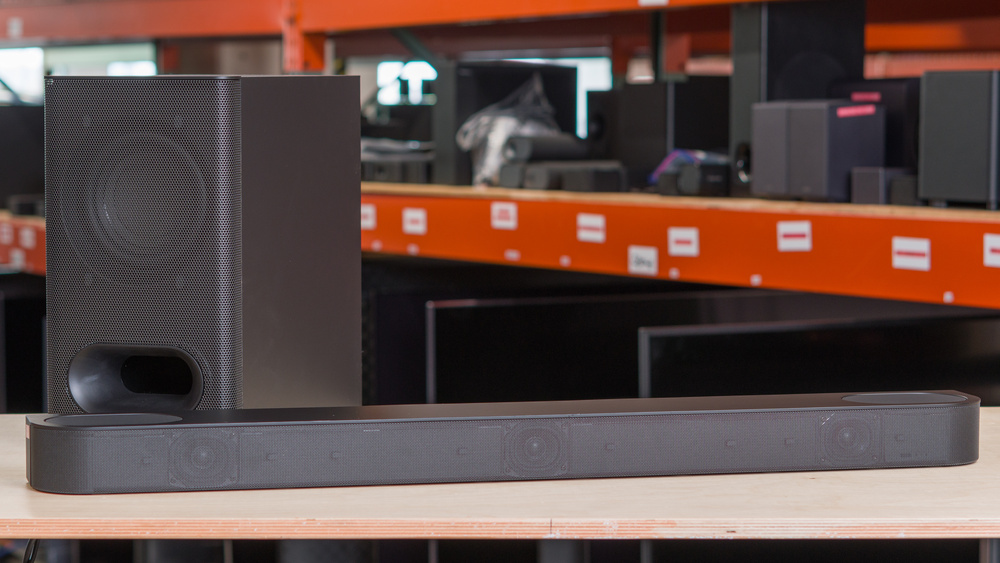
The Sony BRAVIA Theater Bar 6 is an entry-level soundbar offering from Sony. It features a more compact frame than other full-sized bars, with attachable feet that allow it to slot in over the legs of select Sony BRAVIA TVs. Its 3.1.2 configuration helps maximize what it can do with a pared-down setup, with two up-firing drivers and virtual surrounds bolstering playback from the bar and sub combo. Still, compromises have been made to keep both the size and cost down, with features like an HDMI In port and Wi-Fi connectivity omitted.

Our Verdict

7.3
Mixed Usage 

The Sony BRAVIA Theater Bar 6 is a decent choice for mixed usage, especially if space is at a premium. This compact bar and sub setup is capable of outputting a punchy, yet mostly balanced sound that reaches a high max volume, though it does compress the bass range as you crank it. The dedicated center channel excels at reproducing rich vocals and crisp dialogue, and voices can be further enhanced via sound customization options. That said, its stereo soundstage doesn't extend particularly wide, and the 5.1 implementation suffers from a lack of discrete surround drivers, relying instead on virtualization. The lack of elevation impacts the immersive qualities of Atmos content during movies and will bother those who enjoy watching movies in this object-based format, too.

Pros
  • Streamlined, compact size.

  • Balanced default frequency response, with punchy bass.

  • Low latency with ARC/eARC connection.

Cons
  • No discrete surround channels.

  • Barely any sense of height with Atmos content.

  • Wireless playback limited just to Bluetooth.

7.9
Dialogue/TV Shows 

The Sony BRAVIA Theater Bar 6 is very good for TV shows or dialogue-heavy content. The stereo frequency response tuning is very balanced in the mid-range, where most voices lie, though the punchy bass response can occasionally overpower this range. Still, the discrete center channel is a definite boon for fast-paced dialogue, helping you pinpoint voices within the mix, and there's even a dialogue enhancement mode to coax even more clarity from speech, should you need it.

Pros
  • Discrete center channel.

  • Low latency with ARC/eARC connection.

Cons
  • Wireless playback limited just to Bluetooth.

7.1
Music 

The Sony Theater Bar 6 is satisfactory for music. It has a relatively balanced sound, with a flat mid and treble response and a punchy bass range, courtesy of the discrete sub. While it can get quite loud, there's a fair bit of compression present in the bass range as you approach max volume, which can negatively impact audio quality. The stereo soundstage isn't the widest either, extending just to the peripheries of the bar, which is narrower than most soundars. It's nice to have a room correction tool included with a bar at this price point, though, even if you'll have to break out the tape measure to get the most out of it.

Pros
  • Streamlined, compact size.

  • Balanced default frequency response, with punchy bass.

Cons
  • No discrete surround channels.

  • Wireless playback limited just to Bluetooth.

7.0
Movies 

The Sony Theater Bar 6 is decent for movies. It has a mostly balanced tuning that yields a punchy bass response from the discrete sub. It won't shake the floor in intense action sequences the way a larger sub would, but it'll definitely add some substance to the frenetic, low-tuned toms in Hans Zimmer soundtracks. The discrete center channel really helps localize voices and dialogue within a crowded mix, and the bar can get quite loud, though it compresses the bass range at higher volumes. That said, this bar really suffers when it comes to Atmos implementation: Atmos content plays back in the stereo channels too, muddying the mix, while also pushing audio to the (virtual) surrounds. The up-firing drivers struggle to create any impression of height and elevation, and there's a palpable lack of depth to the sound field.

Pros
  • Discrete center channel.

  • Balanced default frequency response, with punchy bass.

Cons
  • No discrete surround channels.

  • Barely any sense of height with Atmos content.

  • 7.3
    Mixed Usage
  • 7.9
    Dialogue/TV Shows
  • 7.1
    Music
  • 7.0
    Movies
  • Changelog

    1.  Updated Oct 06, 2025: 

      The Stereo Dynamics section was altered slightly to make mention of the Samsung HW-Q600F.

    2.  Updated Aug 20, 2025: Review published.
    3.  Updated Aug 13, 2025: Early access published.
    4.  Updated Jul 30, 2025: Our testers have started testing this product.

    Check Price

    BlackBRAVIA Theater Bar 6
    SEE PRICE
    BestBuy.com
    BlackBRAVIA Theater Bar 6
    SEE PRICE
    Amazon.com
    BlackBRAVIA Theater Bar 6
    SEE PRICE
    B&H
    BlackBRAVIA Theater Bar 6
    SEE PRICE
    Walmart.com

    Differences Between Sizes And Variants

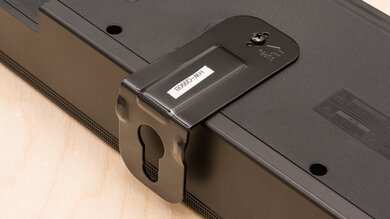
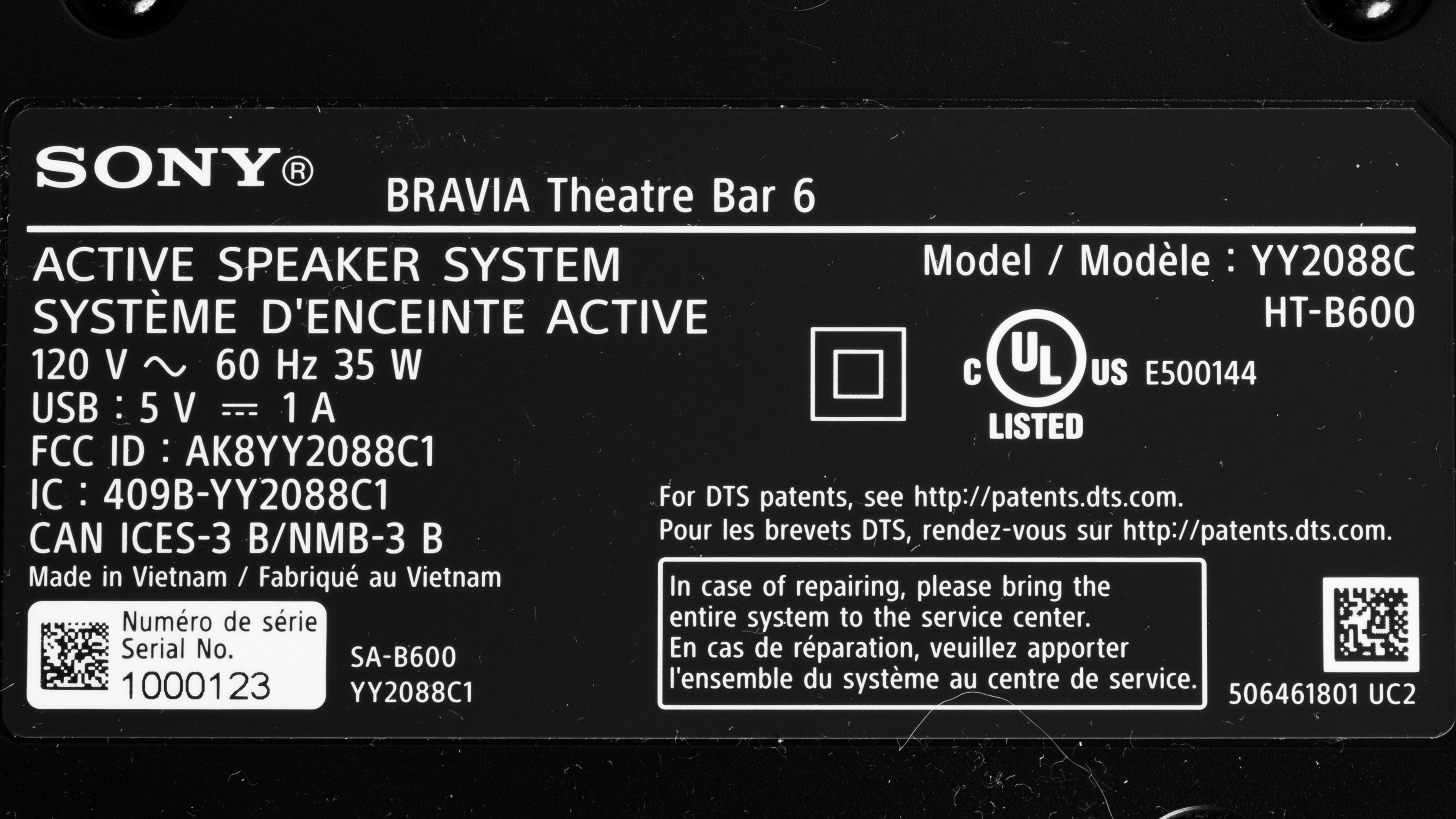
    The Sony BRAVIA Theater Bar 6 (also marketed as the Sony HT B600) comes in just one color variant: 'Black.' Here's a picture of its label. It's not to be confused with the BRAVIA Theatre System 6, an entirely different compact soundbar setup from Sony, that also features surround speakers.

    If you encounter another variant of this soundbar, please let us know in the comments, and we'll update our review.

    Popular Soundbar Comparisons

    The Sony Theater Bar 6 is a more affordable 3.1.2 soundbar from Sony, which comprises a bar and a discrete sub. As with other soundbars that lack discrete surround channels, it virtualizes these channels and downmixes them, which can cause surround sound content to lack width and an immersive quality. The similarly configured Samsung HW-S800B suffers from similar caveats, as it tends to push surround sound content to the front of the sound field. Still, it's a better choice in other regards, with a more balanced frequency response, a wider stereo soundstage, and a better dynamics performance. If you're looking for a bar that provides these extra surround channels, the 5.1.2 Samsung HW-Q800D is a solid bet. It's much more serviceable with 5.1 content and comes with a broader suite of sound enhancement options.

    If you're looking for more soundbars, check out our recommendations for the best soundbars, the best Dolby Atmos soundbars, and the best soundbars for movies.

    Samsung HW-Q600F

    The Samsung HW-Q600F is a better soundbar for most people than the Sony BRAVIA Theater Bar 6. While both bars feature tunings that reproduce your audio clearly with a bit of a low-end weight, the Samsung offers better dynamics, a higher max output, a slightly wider stereo soundstage, and an HDMI In port. Plus, its sound enhancements are more robust. On the other hand, the Sony adds modern touches such as a companion app and eARC audio with a much tighter latency. Despite having fewer ports, the Sony supports DTS:X and DTS-HD MA, too, but whether this is an advantage depends on what media you mainly consume.

    Sony BRAVIA Theater Bar 8

    The Sony BRAVIA Theater Bar 8 and the Sony BRAVIA Theater Bar 6 are both compact soundbar setups, suitable for smaller living spaces. The Theater Bar 6 is a bar/sub combo, while the Theater Bar 8 is a standalone bar, so the former has a punchier bass response, courtesy of the subwoofer. That said, the Theater Bar 8 is better built, has more wireless connectivity options, and features a full HDMI In port with 4k @ 120Hz passthrough. This versatile combination of features opens it up to more use cases, like gaming or wireless music streaming via Wi-Fi. The Theater Bar 8 retails for quite a bit more, though, so you'll have to decide if the additional features are worth the extra outlay. 

    Samsung HW-Q800D

    The Samsung HW-Q800D and the Sony BRAVIA Theater Bar 6 are both bar/sub setups, though the Samsung features two extra channels, which are used for surround sound content. While the Sony is more compact and can physically integrate with BRAVIA TVs, it trails behind the Samsung in pretty much every other regard. Its default frequency response isn't as balanced, and the Samsung comes out on top when it comes to dynamics, soundstage, and surrounds performance, too. Additionally, the Samsung has a wider range of sound customization options, an HDMI In port with 4k @ 60Hz passthrough, and a full suite of wireless connectivity options. Though it's part of Samsung's popular Q-series of soundbars, it can be found for around the same price or cheaper than the Sony. 

    LG S80TR

    The LG S80TR features two extra surround channels compared to the Sony BRAVIA Theater Bar 6, but this makes a substantial difference, making 5.1 content sound much more immersive. The LG also has a more balanced default stereo frequency response, more sound enhancement features, and a better dynamics performance. It also has a full HDMI In port, allowing you to use your soundbar as a hub between your display and a console or PC. That said, the Sony has a better center channel performance, which comes in handy for pinpointing dialogue in busy conversational scenes.

    Show more 

    Video

    Test Results

    perceptual testing image
    Sort:
    RATINGS
    Category:
    All
    Design
    Style - Bar

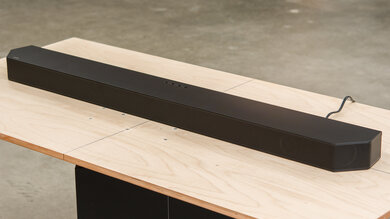
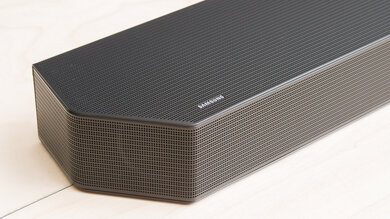
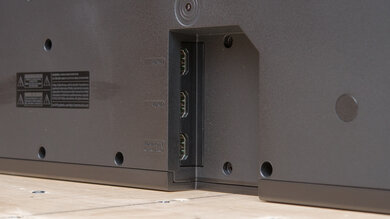
    The Sony BRAVIA Theater Bar 6 is a relatively compact bar, especially compared to the chunkier Sony BRAVIA Theater Bar 8. It features a slim design that's curved at the sides. A perforated metal grille bends around the front surface, with smaller grilles covering the height drivers on the top. There's a small alcove in the back of the bar where you can connect the cables.

    Style - Subwoofer
    Sub Wireless
    Yes
    Enclosure
    Ported

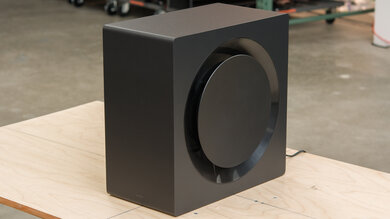
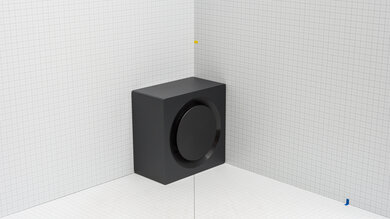
    The subwoofer matches the bar, finished in a similar black plastic, with a metal grille covering the driver. It's relatively lightweight and sports a port at the front.

    Style - Satellites
    Satellite Wireless
    No

    The Sony Theater Bar 6 doesn't come with any satellites.

    Dimensions - Bar
    Width37.4" (95.0 cm)
    Height2.4" (6.2 cm)
    Depth4.3" (11.0 cm)

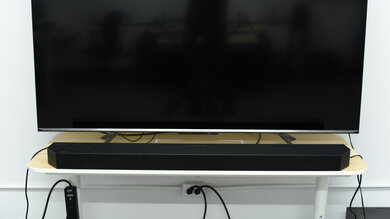
    The Sony BRAVIA Theater Bar 6 is on the more compact side for a soundbar, certainly less wide than its siblings in the BRAVIA Theater Bar lineup. While it won't fit between the legs of most 65-inch TV stands, it does come with attachable feet that allow it to sit perfectly on the legs of certain BRAVIA TVs.

    Dimensions - Subwoofer
    Width8.2" (20.8 cm)
    Height15.2" (38.6 cm)
    Depth15.0" (38.1 cm)

    The subwoofer is on the larger side, occupying a similar surface area to a desktop PC tower.

    Dimensions - Satellites
    WidthN/A
    HeightN/A
    DepthN/A
    Mounting
    Mountable Bar
    Yes
    Bar Brackets Included
    No
    Mountable Satellites
    No
    Satellite Brackets Included
    No

    While this soundbar doesn't come with any mounting brackets, it does come with attachable feet that allow it to sit directly on top of the legs of compatible BRAVIA TV stands.

    7.0
    Build Quality

    The Sony BRAVIA Theater Bar 6 has a decent build quality. While it visually resembles its more expensive siblings in the BRAVIA Theater Bar lineup, it features metal grilles in place of the fabric that covers the drivers of the Sony BRAVIA Theater Bar 8. However, the plastic used for the body is noticeably lighter and flimsier-looking. Still, if you keep it tucked away with your TV, it's unlikely to get damaged.

    It's a similar story with the sub too, which is constructed from lightweight particle board. While there are metal accents (the front grille and a plate at the back), the construction doesn't exactly convey a premium feel.

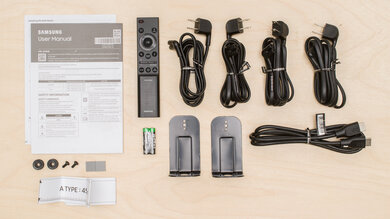
    In The Box

    • Quick setup guide
    • Reference guide
    • Remote control
    • 2x soundbar feet
    • 2x AAA batteries
    • HDMI cable (1.5 m/4.9 ft)
    • Wall mount template
    • Warranty card
    • 2x power cable (1.53 m/5 ft)
    Sound
    7.5
    Stereo Frequency Response
    See details on graph tool
    See details on graph tool
    Channels
    3.1.2
    Tested Preset
    Standard
    Slope
    -0.80
    Standard Error
    3.02 dB
    Low-Frequency Extension
    44.9 Hz
    High-Frequency Extension
    19.9 kHz

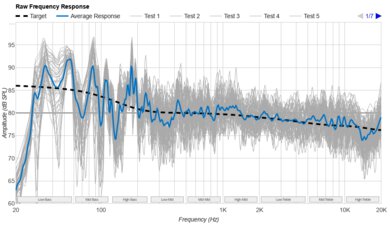
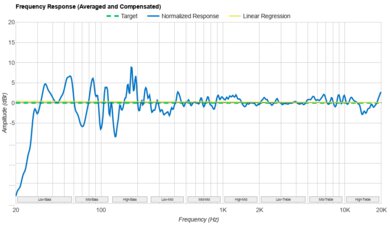
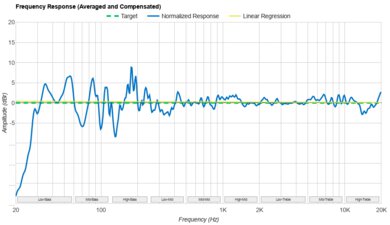
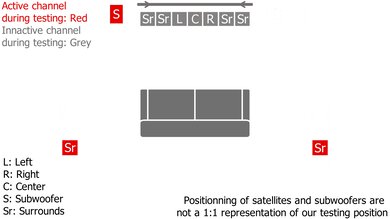
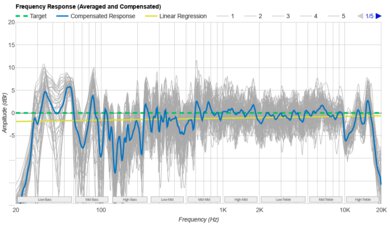
    The Sony Theater Bar 6's stereo frequency response is good. We tested it with the 'Sound Field' function disabled, using the 'Standard' preset, and with our room measurements entered for the manual room correction. We found that it had a punchy sound, with a prominent mid- and high-bass response that's complemented by a balanced mid and treble presentation. While the discrete sub doesn't extend particularly low, lacking that earth-shaking rumble, it does inject some slam into springy kick drums and orchestral timpani in film soundtracks. Voices and speech are clearly discernible, but there's a lack of high-end sparkle to them.

    We were able to put the bar through its paces with various different settings, though, including a few different sound modes and Sound Field enhancement types. The 'Vertical Surround' Sound Field mode boosts the bass and treble for an excited sound, at the expense of vocal/dialogue clarity, while the 'Dolby Virtualizer' mode increases the output by around 10 dB, which you might have to compensate for by turning down the volume. Both modes also virtualize stereo content to playback on all drivers.

    7.7
    Stereo Frequency Response With Preliminary Calibration
    See details on graph tool
    Suggested Preset
    Standard
    Suggested Bass Setting
    -3
    Suggested Treble Setting
    N/A
    Slope
    -0.05
    Standard Error
    2.11 dB
    Low-Frequency Extension
    47.6 Hz
    High-Frequency Extension
    19.9 kHz

    This bar only features adjustments for the bass level, which you can adjust on a scale of '10' to '-10.' We found that setting the bass to '-3' yielded the most balanced sound, taming some of the bass-range punchiness.

    6.5
    Stereo Soundstage
    See details on graph tool
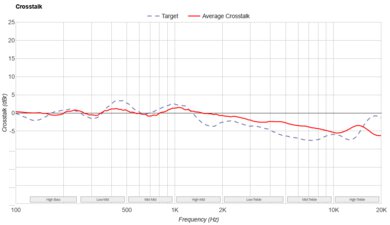
    Crosstalk Error
    2.55 dB

    The Sony Theater Bar 6's stereo soundstage performance is okay. The soundstage seems to extend to the extremities of the bar, which isn't particularly wide considering the bar's narrow dimensions. Tracking from left to right is adequate, with fast-paced dialogue panning across the length of the bar, but it's not the most immersive sound when paired with soaring orchestral soundtracks and expansive sound design. Enabling 'Sound Field' caused some loss in focus and width, as stereo content is virtualized to all drivers.

    6.7
    Stereo Dynamics
    See details on graph tool
    SPL @ Max Volume
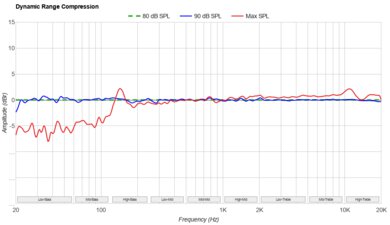
    91.8 dB SPL
    DRC @ 90dB
    2.53 dB
    DRC @ Max Volume
    4.56 dB

    This soundbar can get reasonably loud, certainly enough for most living rooms. That said, there's a fair bit of bass range compression at 90 dB, and it increases substantially when you hit max volume, which is less than 2 dB louder. The max volume can be increased even further (to 99.4 dB) by using the Advanced Auto Volume setting, but be aware that this will squash the dynamics of your audio content. If you want a soundbar with better dynamics, the Samsung HW-Q600F is worth looking at; like the Sony, you can choose whether to have additional dynamic range compression, too.

    8.4
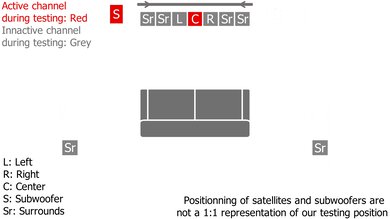
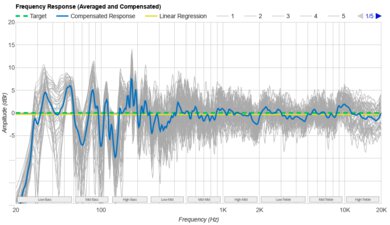
    Center
    See details on graph tool
    Localization
    Discrete
    Slope
    0.02
    Std. Err.
    2.74 dB
    SPL @ Max Volume
    90.1 dB SPL
    Weighted THD @ 80dB
    0.48
    Weighted THD @ Max Volume
    1.63

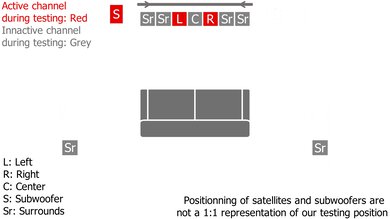
    The Sony Theater Bar 6's center channel performance is great. It's a discrete center tuned in a balanced way, allowing for detailed reproduction of vocals and speech. There's minimal distortion, even at higher listening levels, which also helps preserve dialogue clarity.

    4.3
    Surround 5.1
    See details on graph tool
    Localization
    Stereo (Downmix)
    Slope
    -0.87
    Std. Err.
    3.02 dB
    SPL @ Max Volume
    92.8 dB SPL
    Weighted THD @ 80dB
    0.34
    Weighted THD @ Max Volume
    1.72
    7.1 Rears
    No

    The 5.1 surround performance is disappointing. It's a 3.1.2 bar with no dedicated surround channels, so it has to downmix surround content to stereo. As a result, surround effects, like fighter jets zigzagging across the extremities of the sound field, don't sound particularly wide or enveloping.

    6.1
    Height (Atmos)
    See details on graph tool
    Localization
    Phantom (Up Firing, Bar)
    Slope
    -0.83
    Std. Err.
    3.00 dB
    SPL @ Max Volume
    72.9 dB SPL
    Weighted THD @ 80dB
    2.67
    Weighted THD @ Max Volume
    0.47

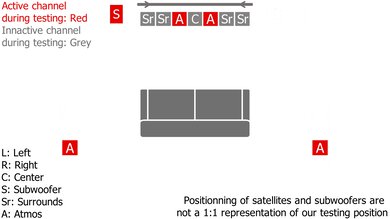
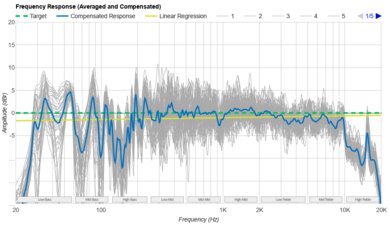
    This soundbar uses two up-firing height drivers as well as the two stereo L/R drivers and the subwoofer to playback Dolby Atmos content, which is somewhat unconventional (most soundbars will use exclusively the up-firing drivers). This means that our score for this test isn't indicative of the bar's real-life performance, as our mics also pick up output from the stereo L/R channels.

    Subjectively, we found that there was little to no perception of height or elevation. The inclusion of the L/R channels in Atmos playback, coupled with the lack of dedicated surround channels, means that much of the soundstage is confined to what's directly in front of you. Furthermore, there's significant compression in the bass range as the sub struggles to handle explosions and blasts of bass. Overall, this can make for a very muddled experience with Atmos content: fast-paced action scenes lack nuance as much of it is confined to a relatively small area and virtualized surrounds that can sometimes sound artificial.

    6.8
    Sound Enhancement Features
    Room Correction
    Yes
    Dialogue Enhancement
    Yes
    Auto-Volume/Night Mode
    Yes
    Subwoofer Level Adjustment
    Yes
    Bass Adjustment
    Yes
    Treble Adjustment
    No
    EQ
    No
    Surround Level Adjustment
    No
    Rear Level Adjustment
    No
    Height Level Adjustment
    Yes
    Virtual Surround
    Yes

    The Sony Theater Bar 6 has a reasonable selection of sound customization options. While it lacks the automatic room correction found in more premium bars, there's a manual feature you can use that requires you to input some measurements. While there are no EQ presets per se, there are a number of different Sound Field settings you can toggle through that optimize the surround sound performance to your room. There's also 'Night' mode (which disables the subwoofer), 'Voice' mode (which enhances dialogue), and 'Auto Volume' (which applies compression to ensure the volume stays consistent between scenes). There's some scope for more granular adjustments too, via the bass, height, and subwoofer level controls.

    There are also a few features that allow for better integration with Sony BRAVIA TVs. BRAVIA SYNC lets you use the remote of your compatible BRAVIA TV to adjust functions on the soundbar, like toggling Sound Field on/off or adjusting the bass level. The BRAVIA Connect app will also show unified controls for both the soundbar and TV when this function is engaged. Finally, there's support for Sony's Voice Zoom 3 tech, which lets you use the built-in speakers of compatible BRAVIA TVs to enhance dialogue. Subjectively, we found this made a negligible difference to dialogue clarity, though this will depend on your exact TV.

    Connectivity
    Inputs/Outputs - Bar
    Optical Audio In
    1
    HDMI Out
    eARC
    HDMI 2.1 Class Bandwidth
    No
    Full HDMI In
    No
    Analog Audio In 3.5mm (Aux)
    No
    RCA In
    No
    USB for Files
    No
    Ethernet
    No
    Subwoofer Output
    No

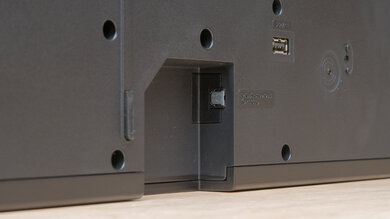
    This soundbar features an HDMI eARC out and an optical port for connecting to older TVs. Beyond this, it doesn't boast much in terms of physical connectivity. The USB-A port can only be used to install firmware updates. Although the app features a firmware update option, it doesn't function as intended, and updates have to be downloaded to a memory stick and initiated manually. If you own a compatible BRAVIA TV (like the Sony BRAVIA 5 we used in testing), you can take advantage of Sony's Voice Zoom 3 technology, which lets you use the TV's speaker channels to bolster dialogue.

    10
    Audio Format Support: ARC/eARC
    Dolby Atmos
    Supported
    Dolby Digital
    Supported
    Dolby Digital Plus
    Supported
    Dolby TrueHD
    Supported
    DTS
    Supported
    DTS:X
    Supported
    DTS-HD MA
    Supported
    PCM Channels
    Up To 7.1

    This soundbar supports all of the most widely used audio formats, ranging from Dolby Digital and DTS to object-based formats like Dolby Atmos and DTS:X. Although it can playback 7.1 PCM content, be aware that it will downmix this to 3.1.

    0.0
    Audio Format Support: HDMI In
    Dolby Atmos
    Not Supported
    Dolby Digital
    Not Supported
    Dolby Digital Plus
    Not Supported
    Dolby TrueHD
    Not Supported
    DTS
    Not Supported
    DTS:X
    Not Supported
    DTS-HD MA
    Not Supported
    PCM Channels
    Not Supported
    10
    Audio Format Support: Optical
    Dolby Digital
    Supported
    DTS
    Supported
    PCM Channels
    2.0

    This soundbar supports Dolby Digital and DTS playback via its optical port.

    9.4
    Audio Latency: ARC
    PCM-2.0 ch
    102 ms
    PCM-5.1 ch
    96 ms
    Dolby MAT (PCM) Atmos
    79 ms
    Dolby Digital
    67 ms
    Dolby Digital Plus
    73 ms
    Dolby Digital Plus Atmos
    77 ms

    Via an eARC connection, audio latency is remarkably low when using Dolby audio formats. It's a bit higher when playing back content using 2 or 5.1 channel PCM content, though, so you might need to tweak the A/V Sync function to ensure your audio and video remain tightly in sync.

    0.0
    Audio Latency: HDMI In
    PCM-2.0 ch
    N/A
    PCM-5.1 ch
    N/A
    Dolby MAT (PCM) Atmos
    N/A
    Dolby Digital
    N/A
    Dolby Digital Plus
    N/A
    Dolby Digital Plus Atmos
    N/A
    6.4
    Audio Latency: Optical
    PCM-2.0 ch
    172 ms
    Dolby Digital
    218 ms

    Audio latency via an optical connection is mediocre. There's a chance you'll experience some lip-sync issues, which you can compensate for using the A/V Sync function in the app.

    0.0
    Video Passthrough To TV
    1080p Max Refresh Rate
    Not Supported
    1080p @ 4:4:4 Max Refresh Rate
    Not Supported
    4k Max Refresh Rate
    Not Supported
    4k @ 120Hz @ 10-Bit
    Not Supported
    4k @ 4:4:4 Max Refresh Rate
    Not Supported
    8k Max Refresh Rate
    Not Supported
    HDR10 Passthrough
    No
    HDR10+ Passthrough
    No
    Dolby Vision Passthrough
    No
    HDMI Forum VRR Passthrough
    No
    FreeSync Passthrough
    No
    G-SYNC Passthrough
    No
    ALLM Passthrough
    No
    6.0
    Wireless Playback
    Bluetooth
    Yes
    Wi-Fi Playback
    No
    Chromecast built-in
    No
    Apple AirPlay
    No
    Spotify Connect
    No

    When it comes to wireless connectivity, the Sony BRAVIA Theater Bar 6 is limited to just Bluetooth, though it supports Bluetooth version 5.3.

    Additional Features
    Interface
    Display
    Yes

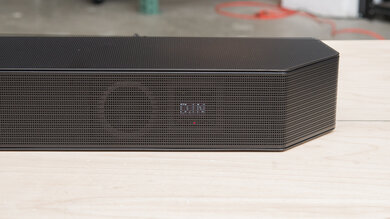
    This soundbar has an extremely minimal interface, comprising two LED dots on the bottom right corner of the bar. A dot glows blue when connected to a Bluetooth source or white when connected via eARC/ARC. It also blinks when you change the volume.

    Bar Controls

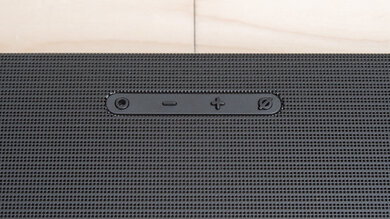
    The physical controls consist of just a power button on the right side of the bar.

    Remote

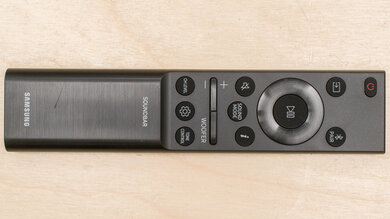
    The remote is the same as the one that comes with the Sony BRAVIA Theater Bar 8. It allows you to control basic functions like power, volume, and input source. For greater customizability, you can always use the BRAVIA Connect app (here's a video walkthrough).

    Voice Assistants Support
    Amazon Alexa
    No
    Google Assistant
    No
    Apple Siri
    No
    Microphone Mute
    No