Samsung HW-Q600F  Soundbar Review

Reviewed Oct 06, 2025 at 03:17pm
Tested using Methodology v1.3 
Samsung HW-Q600F
7.7
Mixed Usage 
8.1
Dialogue/TV Shows 
7.6
Music 
7.4
Movies 
 0
  1. Recommended in:
  2. Under $500

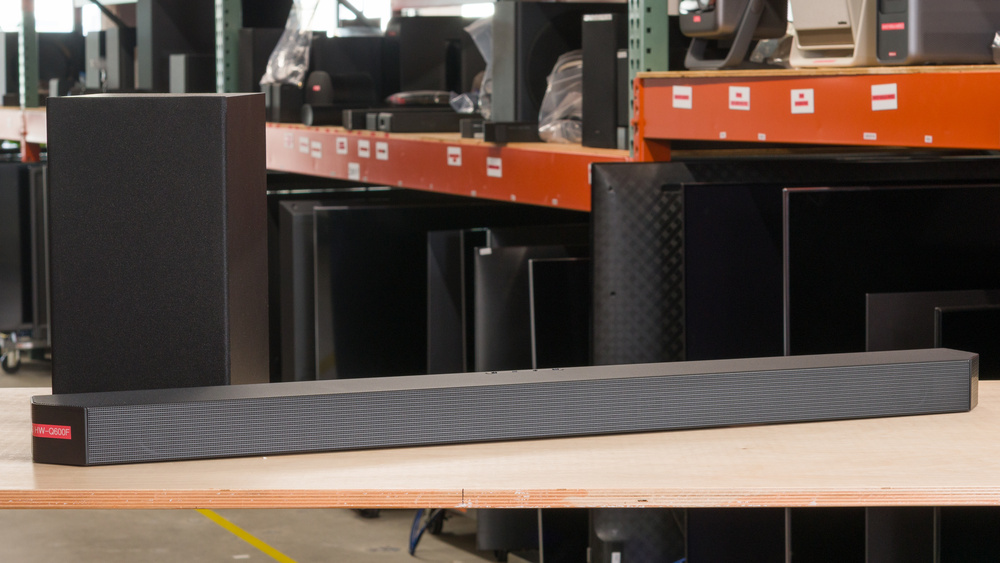
The Samsung HW-Q600F is a 2025 soundbar situated in the mid-tier with a 3.1.2 setup, replacing the last-gen Samsung HW-Q600C. It features nine drivers enclosed in a sleek and angular design with support for popular formats like Dolby Atmos. Select features like 'SpaceFit Sound Pro,' what Samsung calls room correction, and Q-Symphony are exclusive to compatible TVs by the brand, and the soundbar doesn't have app support, leaving all the functionality to the remote. In all, it's an uncomplicated soundbar aimed at balancing performance with feature coverage.

Our Verdict

7.7
Mixed Usage 

The Samsung HW-Q600F is good for mixed usage. The 3.1.2 configuration sounds very good out of the box. It retains the dynamics of your audio very well, with a balanced-sounding stereo and center tuning. Atmos yields a bit of height effect and exhibits good tracking across the horizontal field, too, though it's a little bright. Since the bar includes an HDMI In port, you can use it as an entertainment hub with a console, and Optical lends compatibility with older devices. Format support includes the common Dolby formats, but only DTS (not DTS:X). For surround sound, the bar plus sub kit lacks the necessary satellites to give surround sound audio its full due, so it's not particularly enveloping. Audio latency is a little elevated over HDMI connections, so you might need to compensate in the TV settings, and wireless connectivity is limited to Bluetooth.

Pros
  • Compatible with most audio formats.

  • Graphic EQ and EQ presets available.

  • Default tuning sounds very good.

  • Support for Dolby formats and DTS.

Cons
  • Room correction is only available with compatible Samsung TVs.

  • Downmixes surround audio.

  • Wireless audio limited to Bluetooth.

8.1
Dialogue/TV Shows 

The Samsung HW-Q600F is very good for watching TV shows and dialogue-dominant media. Thanks to the discrete center channel and its balanced frequency response, voices cut through clearly and sound natural. You can also use the 'Voice Enhance' mode to boost speech, if needed. Plus, the audio format support (Dolby Atmos, for example) means that big-budget shows on streaming platforms can play back as intended. 'Night' mode and optional 'DRC' also mean that you don't need to end the watch party just because it's late. In all, it's a great-sounding bar for TV, but you might need to play with your TV's A/V settings to compensate for latency.

Pros
  • Compatible with most audio formats.

  • Graphic EQ and EQ presets available.

  • Default tuning sounds very good.

Cons
  • Room correction is only available with compatible Samsung TVs.

  • Downmixes surround audio.

7.6
Music 

The Samsung HW-Q600F is good for listening to music. Its stereo frequency response delivers your music with ample boom on the kick and clear leads and articulate vocals. To tune the bar further, you can use the 7-band EQ or experiment with presets. It retains dynamics very well and gets loud enough to fill the room with your tunes. That said, the soundstage isn't especially wide, and you're limited to Bluetooth for wireless audio.

Pros
  • Compatible with most audio formats.

  • Graphic EQ and EQ presets available.

  • Default tuning sounds very good.

Cons
  • Room correction is only available with compatible Samsung TVs.

  • Wireless audio limited to Bluetooth.

7.4
Movies 

The Samsung HW-Q600F is decent for movies. The soundbar supports most audio formats, including Dolby Atmos and the rest of the Dolby suite, but it only supports standard DTS (and not the DTS:X, for example). It's well-tuned with a good amount of boom for tense action flicks. Atmos offers some height effects, but it's a little bright. It also necessarily downmixes surround sound formats, which limits how enveloping the sound can be without rear speakers or side-firing drivers. Audio latency over the HDMI ports is slightly higher, so you may need to use the TV's settings to offset that.

Pros
  • Compatible with most audio formats.

  • Graphic EQ and EQ presets available.

Cons
  • Room correction is only available with compatible Samsung TVs.

  • Downmixes surround audio.

  • 7.7
    Mixed Usage
  • 8.1
    Dialogue/TV Shows
  • 7.6
    Music
  • 7.4
    Movies
  • Changelog

    1.  Updated Oct 06, 2025: Review published.
    2.  Updated Sep 29, 2025: Early access published.
    3.  Updated Sep 16, 2025: Our testers have started testing this product.
    4.  Updated Jul 23, 2025: The product has arrived in our lab, and our testers will start evaluating it soon.

    Check Price

    BlackHW-Q600F
    SEE PRICE
    BestBuy.com
    BlackHW-Q600F
    SEE PRICE
    Amazon.com
    BlackHW-Q600F
    SEE PRICE
    Samsung.com
    BlackHW-Q600F
    SEE PRICE
    B&H
    BlackHW-Q600F
    SEE PRICE
    Walmart.com

    Differences Between Sizes And Variants

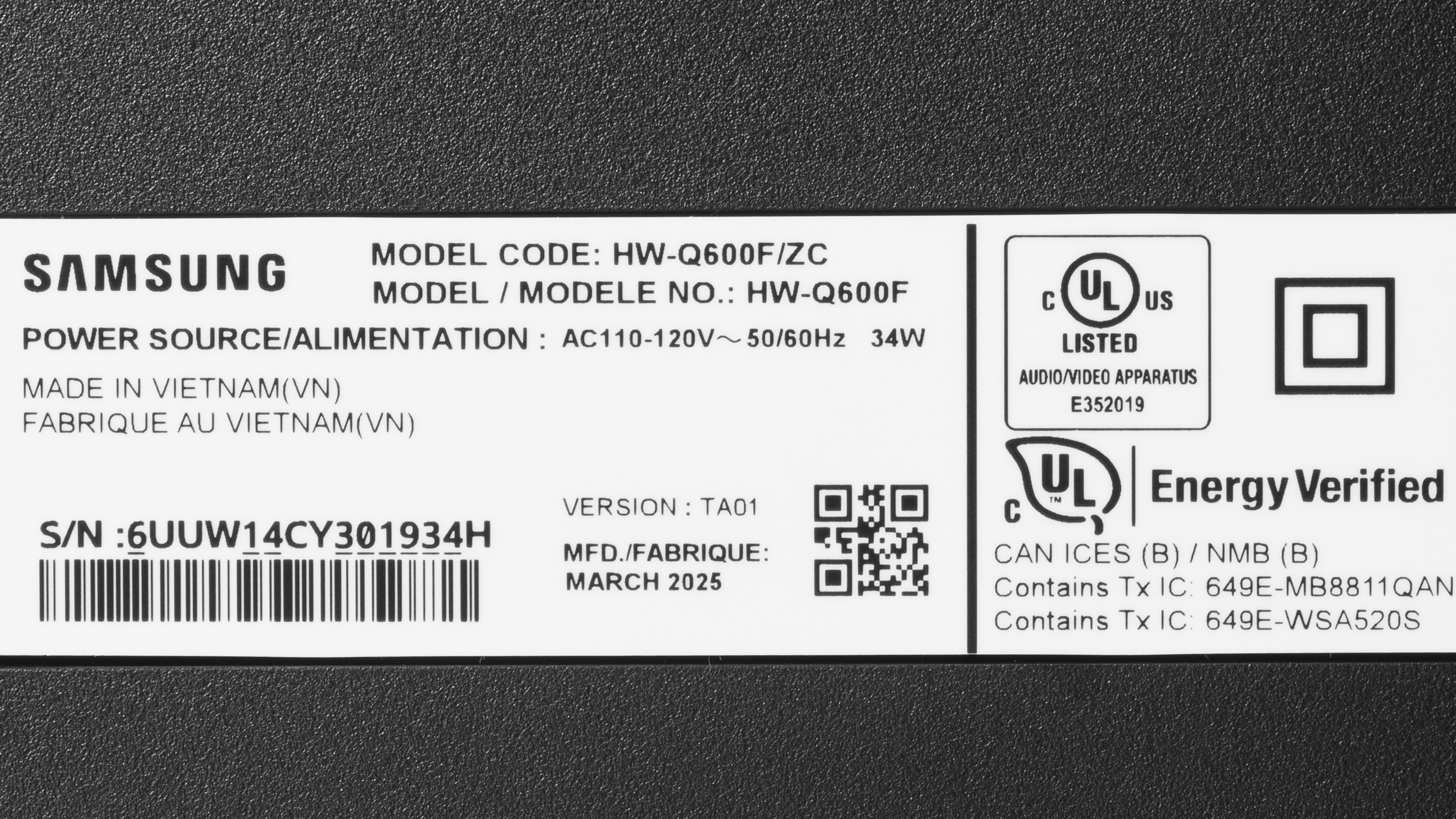
    The Samsung HW-Q600F is also listed as the Samsung HW-Q600F/ZC in some regions. It only comes in 'Black,' and you can view the label for our unit. You can also purchase the Samsung Wireless Rear Speaker Kit (SWA-9250S) to add satellites, but the surround sound test in this review isn't applicable to that configuration.

    If you encounter another variant of this soundbar, please let us know in the comments.

    Popular Soundbar Comparisons

    As with most mid-level soundbars, you don't get every feature on the Samsung HW-Q600F that the upper echelons of the Samsung Q-Series offer, like the Samsung HW-Q800F, which supplies greater connectivity, app support, and more audio channels than the Q600F, which downmixes surround audio. Unlike the 5.1 setup of the Samsung HW-B750F, the 3.1.2 Q600F uses two up-firing drivers to correctly handle object-based audio like Dolby Atmos, but downmixes surround formats. Further afield, the Vizio Elevate SE SL512X-0806 has five channels and satellites for a more encompassing surround sound. Like the Q600F, it has up-firing drivers to playback Atmos content, though it lacks an Optical port. However, the Q600F needs less out-of-the-box tuning than the Vizio to get an even sound, and it takes up less space.

    For more recommendations, check out the best soundbars under $500, the best soundbars for music, and the best Dolby Atmos soundbars.

    Samsung HW-Q600C

    The biggest change between the Samsung HW-Q600F and the Samsung HW-Q600C is the Dolby Atmos tuning. The Q600F delivers a slightly more immersive height effect, but it's also tuned to sound far brighter than the boomier Q600C's Atmos sound, which doesn't quite offer the same degree of height. Still, the rest of the soundbar's channels are still present and fill out the sound, so it might be worth looking at the Q800F for the slightly better height effect. Besides that, the soundbars are very similar with similar specs and performance. You can play with the tuning of these bars to coax them to sound similar, too.

    Sony BRAVIA Theater Bar 6

    The Samsung HW-Q600F is a better soundbar for most people than the Sony BRAVIA Theater Bar 6. While both bars feature tunings that reproduce your audio clearly with a bit of a low-end weight, the Samsung offers better dynamics, a higher max output, a slightly wider stereo soundstage, and an HDMI In port. Plus, its sound enhancements are more robust. On the other hand, the Sony adds modern touches such as a companion app and eARC audio with a much tighter latency. Despite having fewer ports, the Sony supports DTS:X and DTS-HD MA, too, but whether this is an advantage depends on what media you mainly consume.

    Samsung HW-Q800D

    The Samsung HW-Q800D is a better soundbar than the Samsung HW-Q600F due to its greater audio format support, companion app, and extensive wireless audio playback options. It also doesn't downmix surround sound audio formats. However, if you don't consume much media in surround sound, have no use for anything besides Bluetooth wireless connections, and don't care about companion apps, the Q600F shares some similar brute performance and tuning of the Q800D with a narrow feature set and fewer channels.

    Samsung HW-B750D

    The defining difference between the Samsung HW-B750D and the Samsung HW-Q600F comes down to whether you watch a lot of media mixed in surround sound or if you watch more media using Dolby Atmos. The B750D can reproduce 5.1 surround sound without downmixing, and its side-firing drivers create a wider sound. Whereas the Q600F uses up-firing drivers to make object-based Atmos audio have some height depth, but it downmixes surround sound audio.

    Test Results

    perceptual testing image
    Sort:
    RATINGS
    Category:
    All
    Design
    Style - Bar

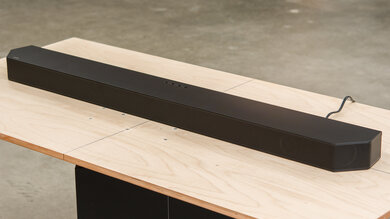
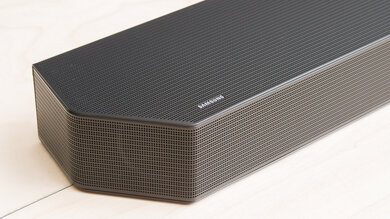
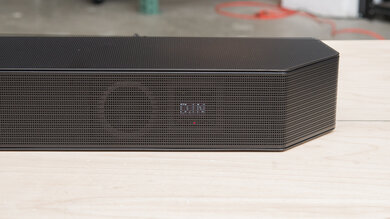
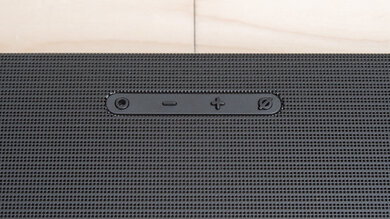
    The Samsung Q600F resembles the previous Samsung HW-Q600C, an angular, black bar covered in a matching perforated metal grille. Its top has an array of controls in the middle, set towards the back of the bar. A subtle silver logo is on the far left side of the top of the bar.

    Style - Subwoofer
    Sub Wireless
    Yes
    Enclosure
    Ported

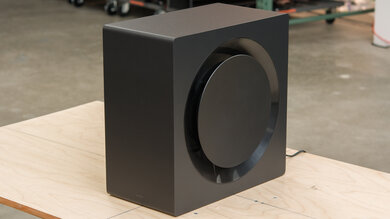
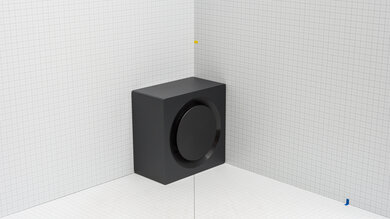
    The wireless subwoofer is fairly nondescript, like the last-generation Samsung HW-Q600C. It's block-shaped and finished in a satiny black with a thin fabric cover in the front. Around the back, it has a plastic port and a metal plate.

    Style - Satellites
    Satellite Wireless
    No

    This soundbar doesn't include satellites, but you can add the Samsung SWA-9250S.

    Dimensions - Bar
    Width40.6" (103.0 cm)
    Height2.2" (5.7 cm)
    Depth4.1" (10.5 cm)

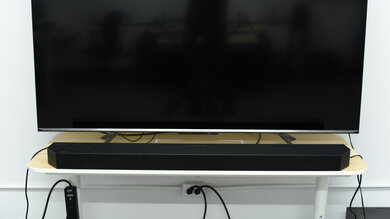
    The soundbar is too wide to fit between the legs of most 65-inch TVs, but it's not especially oversized. It's low profile enough that it's unlikely to obscure the bottom of your TV.

    Dimensions - Subwoofer
    Width7.3" (18.5 cm)
    Height13.5" (34.2 cm)
    Depth11.6" (29.4 cm)

    The sub isn't large; it's about the size of a smaller PC case. Since it's rear-ported, you'll need to place it at some distance away from the wall. Otherwise, its wireless design means you only need to ensure you have a power outlet nearby to manage cables.

    Dimensions - Satellites
    WidthN/A
    HeightN/A
    DepthN/A
    Mounting
    Mountable Bar
    Yes
    Bar Brackets Included
    Yes
    Mountable Satellites
    No
    Satellite Brackets Included
    No

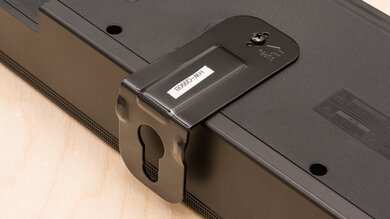
    The box includes two brackets and the necessary hardware to mount the bar.

    7.5
    Build Quality

    The Samsung HW-Q600F is well-built. The bar is plastic, with perforated metal grilles covering the front and top and textured plastic caps on the ends. The plastic endcaps are a departure from the Samsung HW-B750F, which has side-firing drivers, which are absent on this bar. The bar has enough heft to feel premium. The back of the bar is mostly dense plastic, though the angle of the various connection points can be a little tricky to manage with thick, stiff cables. Still, we see no obvious flaws.

    The subwoofer is made of particle board, and while it shows no issues, it's not as high-end as the bar. The fabric mesh covering the sub's driver feels thin and could snag or collect dust. On the back, the plastic port and the metal plate are utilitarian.

    In The Box

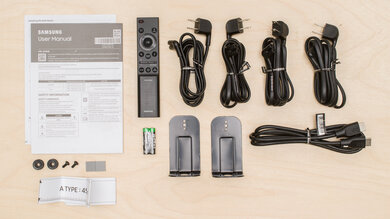
    • User guide
    • Guides for the remote and wall mount
    • Remote with batteries (2x AAA)
    • 2x mounting brackets
    • 2x screws and washers for brackets
    • 2x power cables (1.5 m/4.9 ft)
    • HDMI cable (1.5 m/4.9 ft)
    Sound
    7.8
    Stereo Frequency Response
    See details on graph tool
    See details on graph tool
    Channels
    3.1.2
    Tested Preset
    Standard
    Slope
    -0.08
    Standard Error
    2.64 dB
    Low-Frequency Extension
    40.0 Hz
    High-Frequency Extension
    19.9 kHz

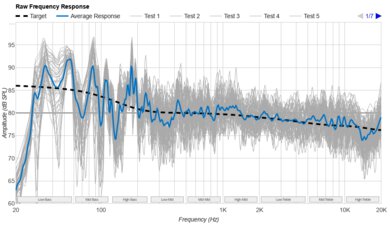
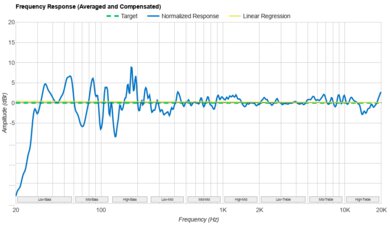
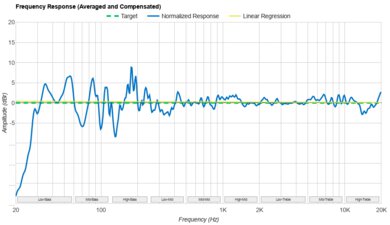
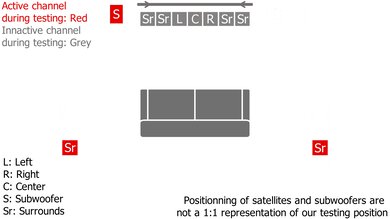
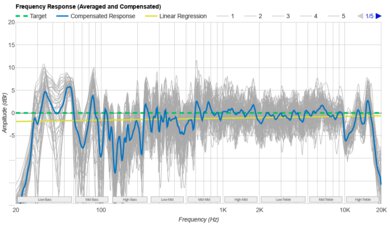
    The Samsung HW-Q600F has a very good stereo frequency response. It delivers a balanced sound with a bit of low-end punch and boom to fill out the bass region of your music without overwhelming the mids and treble. That said, it's not quite capable of giving you an intense, deep bass rumble like in trap and dubstep genres. The mid-range is very even, resulting in leads and melodies sounding natural and not at all muddy. Meanwhile, the treble range is bright, detailed, and airy to give harmonics from crash cymbals their sparkle. We compared 'Standard' mode to the other ('Adaptive,' 'Surround,' and 'Game') modes, and found 'Standard' sounds more balanced. These other modes are tuned similarly but use different processing to simulate different surround sound stages.

    The Samsung HW-Q600C has a slightly more rumbly sound out of the box with a warmer top-end, but both bars boast clear mids. The Samsung HW-Q600F delivers a bit more clarity in the treble. It's possible that using the EQ can make the bars sound even more alike.

    7.8
    Stereo Frequency Response With Preliminary Calibration
    See details on graph tool
    Suggested Preset
    Standard
    Suggested Bass Setting
    0
    Suggested Treble Setting
    0
    Slope
    -0.08
    Standard Error
    2.64 dB
    Low-Frequency Extension
    40.0 Hz
    High-Frequency Extension
    19.9 kHz

    Unlike the last generation, Samsung HW-Q600C, the Samsung HW-Q600F doesn't need additional tweaking to coax it to match our target curve more closely.

    7.0
    Stereo Soundstage
    See details on graph tool
    Crosstalk Error
    2.65 dB

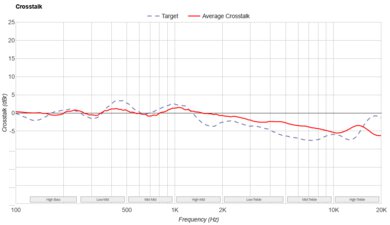
    The Samsung HW-Q600F has a decent stereo soundstage. It creates a soundstage that's about as wide as the bar, so it's not very wide, but not overly narrow either. Focus across the soundstage is okay, meaning sounds are mostly consistently noticeable across the spread, but there are some holes between the center and L/R channels. This results in the center channel's width seeming a bit small compared to the L/R channels, so elements that pan from center to one side move a little too quickly to the side driver.

    8.4
    Stereo Dynamics
    See details on graph tool
    SPL @ Max Volume
    95.0 dB SPL
    DRC @ 90dB
    0.31 dB
    DRC @ Max Volume
    1.41 dB

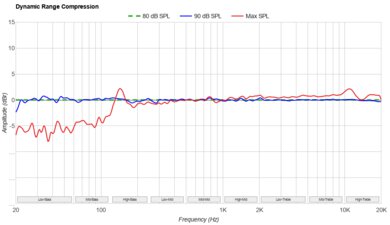
    This soundbar has great stereo dynamics. At max volume, it gets loud enough to fill most rooms. There's very little compression present, so the quiet and loud parts of your audio won't get squashed and lose their dynamics even at max.

    8.2
    Center
    See details on graph tool
    Localization
    Discrete
    Slope
    -0.50
    Std. Err.
    2.97 dB
    SPL @ Max Volume
    89.0 dB SPL
    Weighted THD @ 80dB
    0.56
    Weighted THD @ Max Volume
    2.95

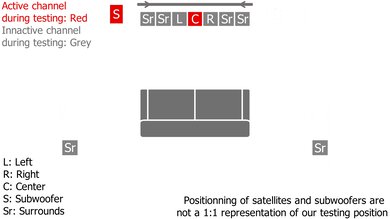
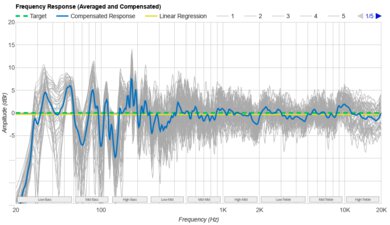
    The 3.1.2 soundbar's discrete center channel sounds great. While the overall tuning slightly favors lower frequencies, the mids and treble are tuned evenly, with enough emphasis on sibilant frequencies that voices cut through intelligibly. Voices and center-panned elements sound clear and not too harsh.

    3.9
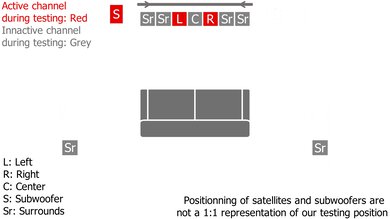
    Surround 5.1
    See details on graph tool
    Localization
    Stereo (Downmix)
    Slope
    -0.76
    Std. Err.
    4.01 dB
    SPL @ Max Volume
    90.9 dB SPL
    Weighted THD @ 80dB
    0.43
    Weighted THD @ Max Volume
    2.30
    7.1 Rears
    No

    The Samsung HW-Q600F has a poor 5.1 surround sound, which is expected for a 3.1.2 soundbar, seeing as it downmixes surround formats to stereo. Instead of surround sound mixes encompassing you from behind, the sound only comes from the bar in front of you and the sub. You can add the Samsung Wireless Rear Speaker Kit with SWA-9250S to achieve a more cinematic sound from all around. Alternatively, if you don't have the room for rear speakers but watch a lot of blockbusters mixed in 5.1, the Samsung HW-B750F's side-firing drivers may offer you a better compromise.

    5.7
    Height (Atmos)
    See details on graph tool
    Localization
    Phantom (Up Firing, Bar)
    Slope
    1.67
    Std. Err.
    5.15 dB
    SPL @ Max Volume
    87.3 dB SPL
    Weighted THD @ 80dB
    0.59
    Weighted THD @ Max Volume
    2.33

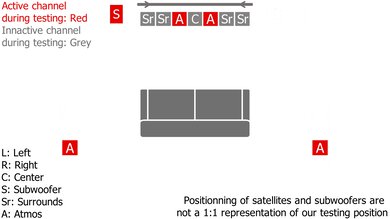
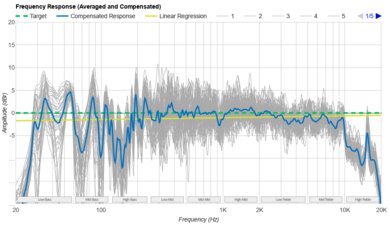
    The Samsung HW-Q600F features two up-firing drivers to handle height information. These channels are tuned to emphasize your audio's brighter details, like metal swords crossing, voices, glass breaking, and clanging noises during action scenes, which can err on the side of a little shrill. Unlike the last-gen Samsung HW-Q600C, it's not as boomy or full-sounding in the lower frequencies, so scenes with intense bass don't feel as immersive, due to the anemic bass response, but other channels of your audio can compensate for that. However, the HW-Q600F is relatively bright, and voices cut through better and don't compete as much with bassy effects as with the last gen.

    Subjectively, the height effect has improved somewhat over the previous model, delivering a greater sense of height (though it's still not much higher than eye level). Tracking moving objects across the horizontal plane is good, and it's easy to locate them.

    7.7
    Sound Enhancement Features
    Room Correction
    No
    Dialogue Enhancement
    Yes
    Auto-Volume/Night Mode
    Yes
    Subwoofer Level Adjustment
    Yes
    Bass Adjustment
    Yes
    Treble Adjustment
    Yes
    EQ
    Graphic + Presets
    Surround Level Adjustment
    No
    Rear Level Adjustment
    Yes
    Height Level Adjustment
    Yes
    Virtual Surround
    Yes

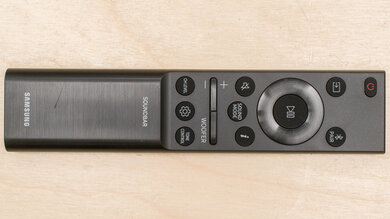
    The soundbar has good sound enhancement features. Since there's no app, you need the remote to access features like the sound modes: 'Standard,' 'Adaptive,' 'Surround,' 'Game,' and 'Virtual DTS:X.' In 'Standard' mode, you can access the 7-band EQ by holding the gear icon for about five seconds and using the directional buttons to select the frequency band and its volume (+/-6 dB). You can only use the EQ presets in the other sound modes, as is true for all the 2025 Q-Series models. You can also alter the bass and treble levels in any mode, giving you plenty of leeway for tuning the soundbar. That said, the soundbar's version of 'SpaceFit Sound Pro' (room correction) works exclusively with select Samsung TVs that have built-in mics, so we didn't use it for the measurements. In contrast, premium-range models like the Samsung HW-Q800F have the necessary built-in mics for the room correction feature to work independently of the TV.

    You can also use 'Voice Enhance' and 'Night' modes to augment the sound, depending on whether you need to make poor audio mixing sound more intelligible or keep the volume down. Plus, you can disable/enable 'DRC' (for dynamic range compression) by powering off the soundbar and then pressing and holding the gear icon for five seconds or so. Lastly, you can adjust the heights of various drivers, like the subwoofer. You'll need the wireless speaker kit for the rear speaker height changes to have any effect on the sound, though.

    The soundbar also features Samsung Q-Symphony, which creates a wireless connection to a compatible TV by the brand and adds the TV speakers. Although it sounds tempting, we've consistently found that a soundbar by itself sounds better than adding the TV speakers.

    Connectivity
    Inputs/Outputs - Bar
    Optical Audio In
    1
    HDMI Out
    eARC
    HDMI 2.1 Class Bandwidth
    No
    Full HDMI In
    1
    Analog Audio In 3.5mm (Aux)
    No
    RCA In
    No
    USB for Files
    1
    Ethernet
    No
    Subwoofer Output
    No

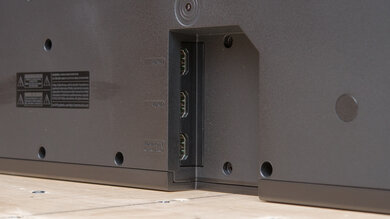
    This soundbar houses an eARC, HDMI In, Optical, and USB-A port. While it doesn't have 2.1 bandwidth, the HDMI In still allows you to use the soundbar as a hub with other devices, such as a gaming console. Its USB-A port lets you play back MP3, AAC, OGG, FLAC, WAV, and AIFF files. Plus, you can use the wireless Q-Symphony connection with compatible Samsung TVs to add the TV's speakers, and while we don't find that this feature tends to improve the sound, it's also dependent upon your TV setup.

    9.6
    Audio Format Support: ARC/eARC
    Dolby Atmos
    Supported
    Dolby Digital
    Supported
    Dolby Digital Plus
    Supported
    Dolby TrueHD
    Supported
    DTS
    Supported
    DTS:X
    Not Supported
    DTS-HD MA
    Not Supported
    PCM Channels
    Up To 7.1

    The eARC connection supports the full suite of popular Dolby audio formats, such as Atmos and Dolby Digital Plus. While the bar supports standard DTS, it downmixes DTS:X and DTS-HD MA to DTS. In lieu of proper DTS:X object-based audio, the bar includes the Virtual DTS:X sound mode to simulate the effect. 7.1 PCM audio is also downmixed because the bar is a 3.1.2 setup.

    9.6
    Audio Format Support: HDMI In
    Dolby Atmos
    Supported
    Dolby Digital
    Supported
    Dolby Digital Plus
    Supported
    Dolby TrueHD
    Supported
    DTS
    Supported
    DTS:X
    Not Supported
    DTS-HD MA
    Not Supported
    PCM Channels
    Up To 7.1

    The Samsung Q600F's HDMI In port is compatible with Dolby Atmos through Dolby TrueHD, and DTS. It downmixes DTS:X and DTS-HD MA to DTS. While the bar accepts 7.1 PCM audio, it necessarily downmixes the audio because it has a 3.1.2 configuration.

    10
    Audio Format Support: Optical
    Dolby Digital
    Supported
    DTS
    Supported
    PCM Channels
    2.0

    The Optical port supports Dolby Digital, DTS, and PCM, making it a good companion for older devices.

    6.3
    Audio Latency: ARC
    PCM-2.0 ch
    53 ms
    PCM-5.1 ch
    54 ms
    Dolby MAT (PCM) Atmos
    109 ms
    Dolby Digital
    132 ms
    Dolby Digital Plus
    142 ms
    Dolby Digital Plus Atmos
    137 ms

    The eARC has passable audio latency. It's slightly elevated, but depending on your TV setup and media format (like Dolby Digital Plus), you may or may not notice an A/V mismatch. If you experience noticeable latency, you can use your TV settings to make adjustments to compensate.

    5.9
    Audio Latency: HDMI In
    PCM-2.0 ch
    55 ms
    PCM-5.1 ch
    54 ms
    Dolby MAT (PCM) Atmos
    114 ms
    Dolby Digital
    151 ms
    Dolby Digital Plus
    147 ms
    Dolby Digital Plus Atmos
    142 ms

    The HDMI In's audio latency is middling. PCM audio passes through with very low latency. However, depending on the audio format and your devices, you might notice some lip-sync error. Your TV settings can help offset the latency.

    7.9
    Audio Latency: Optical
    PCM-2.0 ch
    118 ms
    Dolby Digital
    162 ms

    The Samsung HW-Q600F's Optical audio latency is great. The soundbar demonstrates low latency with PCM and Dolby Digital audio, but depending on your configuration, you may still experience a bit of delay, requiring you to manually adjust the TV's settings.

    8.1
    Video Passthrough To TV
    1080p Max Refresh Rate
    120Hz
    1080p @ 4:4:4 Max Refresh Rate
    120Hz
    4k Max Refresh Rate
    60Hz
    4k @ 120Hz @ 10-Bit
    Not Supported
    4k @ 4:4:4 Max Refresh Rate
    60Hz
    8k Max Refresh Rate
    Not Supported
    HDR10 Passthrough
    Yes
    HDR10+ Passthrough
    Yes
    Dolby Vision Passthrough
    Yes
    HDMI Forum VRR Passthrough
    Yes
    FreeSync Passthrough
    No
    G-SYNC Passthrough
    No
    ALLM Passthrough
    Yes

    The Samsung HW-Q600F has a single HDMI In port for video passthrough to your TV. It can do 1080p at 120Hz. 4k (at 4:4:4) is available at 60Hz, so color information is well preserved. HDR video receives support, but FreeSync and G-SYNC don't, but this may not be an issue, depending on your gaming rig.

    6.0
    Wireless Playback
    Bluetooth
    Yes
    Wi-Fi Playback
    No
    Chromecast built-in
    No
    Apple AirPlay
    No
    Spotify Connect
    No

    The soundbar only supports Bluetooth for wireless playback, which is a bit sparse, but if you center your audio around wired connections, it may not matter.

    Additional Features
    Interface
    Display
    Yes

    The scrolling LED display is set behind the soundbar's metal grille on the far right side of the bar (when you face it). Because the soundbar doesn't have an app, you'll need to rely on the responsive display for monitoring input selection, volume, sound modes, and EQ. Pressing the 'i' button on the remote will show your current settings.

    Bar Controls

    Set in the center of the bar, you'll find four raised buttons for the controls, comprising volume (+/-), input source, and power.

    Remote

    Since the Samsung HW-Q600F doesn't use an app, the remote control handles all of your controls. Most of the features have dedicated buttons, but there are a couple of secondary functions (as described in Sound Enhancement Features).

    Voice Assistants Support
    Amazon Alexa
    No
    Google Assistant
    No
    Apple Siri
    No
    Microphone Mute
    No