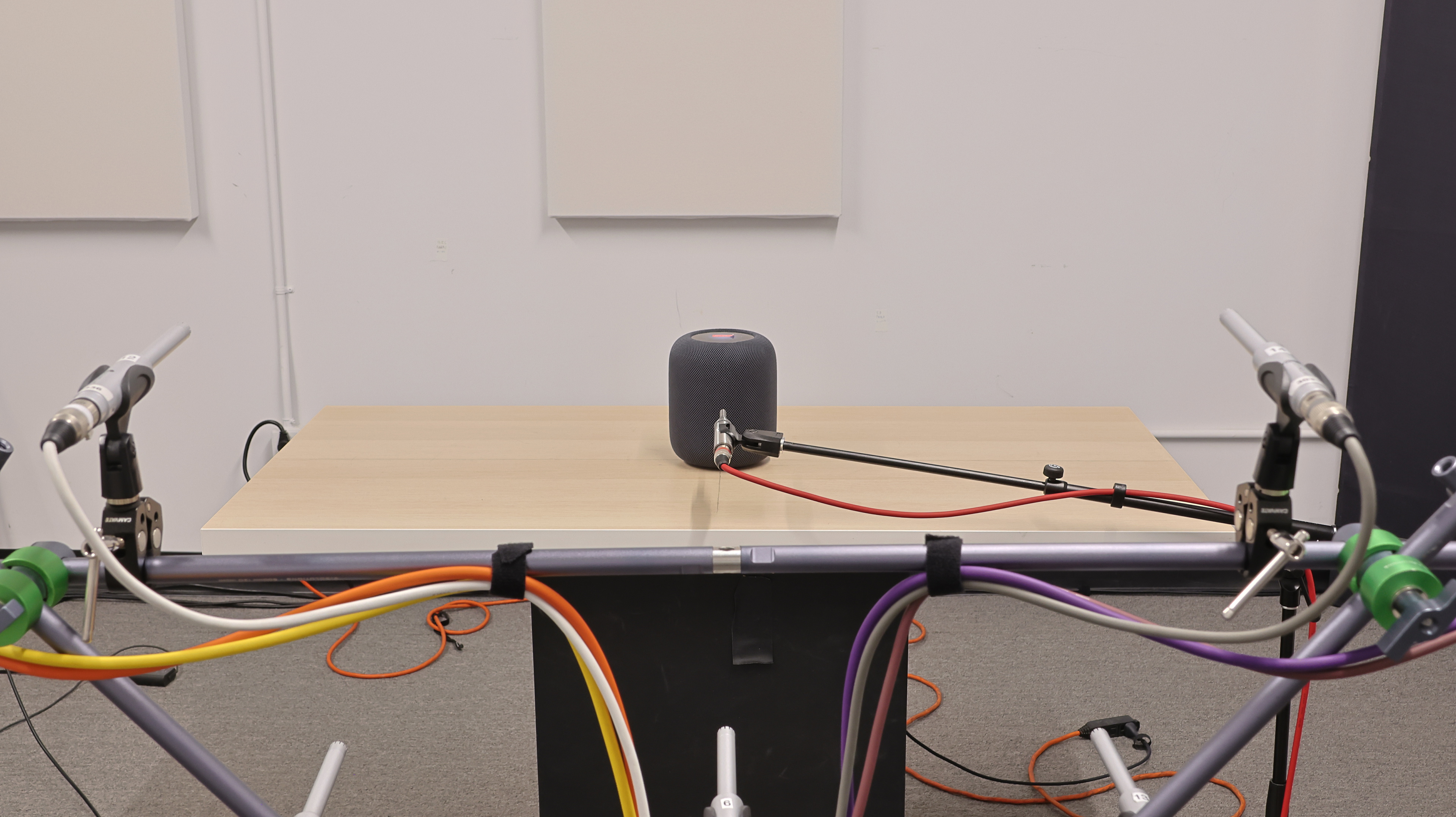
The Apple HomePod (2nd generation) is a stylish home speaker with built-in Siri for hands-free control. It has a similar design to the original Apple HomePod (1st generation) with support for immersive Spatial Audio tracks found on certain streaming platforms. However, it adds some new features for an improved sound. For example, its bass-EQ microphone is designed to maintain a steady response in the lower frequencies, even when you listen at low volumes. This speaker is ideal for those who already own products in the manufacturer's ecosystem, but it doesn't offer sound customization tools like other smart speakers on the market.
Our Verdict
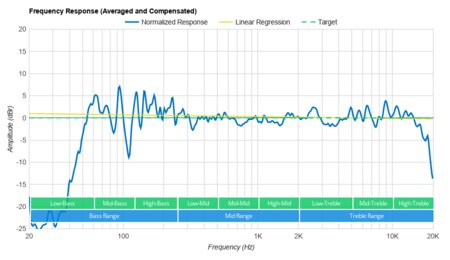
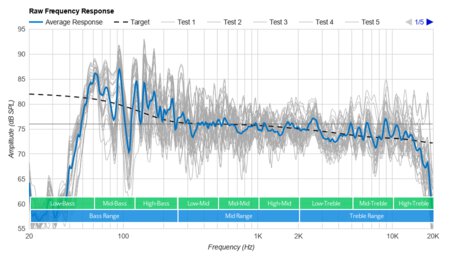
The Apple HomePod 2 is fair for music. Like most premium devices on the market, it has a room correction tool that automatically adjusts its output based on your room's unique acoustic characteristics. Voices and lead instruments are generally balanced and present in the mix, and there's a touch of extra brightness in the treble. However, it doesn't reproduce much low bass, so bass-heavy genres like EDM and hip-hop lack room-shaking thump. That said, you can't customize its sound easily, and it has to downmix stereo content into mono, which is disappointing for such a premium speaker.
- Room correction tool.
- Extended low-bass.
- No sound customization tools.
- Downmixes stereo content into mono.
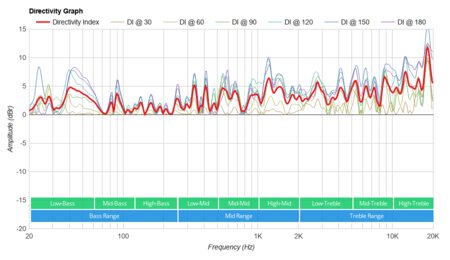
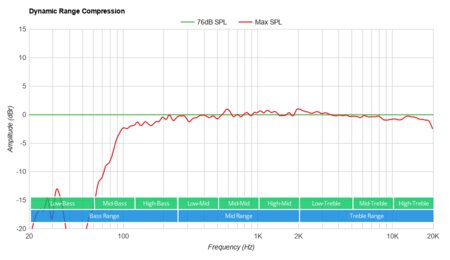
The Apple HomePod 2 is middling for watching videos from your paired device. Dialogue is reproduced with clarity, and its great directivity means your audio sounds consistent from different angles. However, it doesn't reproduce much low bass, so action-packed scenes lack deep rumble. This speaker also doesn't get very loud, so it can't bring a full cinematic sound, and it has to downmix stereo sound into mono to play it back.
- Extended low-bass.
- Apple AirPlay compatibility.
- No sound customization tools.
- Downmixes stereo content into mono.
- Wired-only design.
The Apple HomePod is fair for podcasts. Dialogue is reproduced with clarity right out of the box, meaning you can follow along with your favorite shows with ease. However, it doesn't get very loud and is best suited for near-field listening, smaller spaces, or quieter background music. Due to its wired design, you can't bring it with you to different rooms in the house, so you're limited to one spot when you listen. You'll need to buy multiple units if you want to spread sound to different rooms in your house using its multi-room function.
- Room correction tool.
- Apple AirPlay compatibility.
- No sound customization tools.
- Wired-only design.
This Apple HomePod is fantastic for voice assistant use. Built-in Siri lets you activate your device with just your voice, so you can enjoy hands-free control of your smart devices. The speaker easily understands your commands, too, even if you're further away or in a noisier environment. While there isn't a physical microphone mute button, you can ask Siri to stop listening when you want more privacy.
- Room correction tool.
- Built-in Siri.
- No sound customization tools.
The Apple HomePod isn't meant for outdoor use. It's a wired-only speaker that has to be connected to an outlet to use.
Changelog
- Updated Jul 28, 2026: This review has been updated to Test Bench 1.0.1. This includes the Test Bench 1.0 updates to all of our Sound tests: Frequency Response Accuracy, Raw Frequency Response, Directivity, and Loudness, as well as the revised Low-Frequency Extension calculation and related DRC updates introduced in Test Bench 1.0.1. There have also been text changes throughout the review, including to the usages and product comparisons, where applicable, to match these results. You can read more about these changes in our Test Bench 1.0 changelog and Test Bench 1.0.1 changelog.
- Updated Jul 13, 2026: This review has been updated to Test Bench 1.0, which includes new results for all of our Sound tests: Frequency Response Accuracy, Raw Frequency Response, Directivity, and Loudness. There have also been text changes made throughout the review, including to the usages and product comparisons, to match these results. You can read more about these changes in our changelog.
-
Updated May 20, 2026:
We referenced the WiiM Sound in the Voice Assistant box.
- Updated Feb 13, 2024: While there aren't any changes in the test results, we've updated the text for clarity and consistency across reviews.
Check Price
Differences Between Sizes And Variants
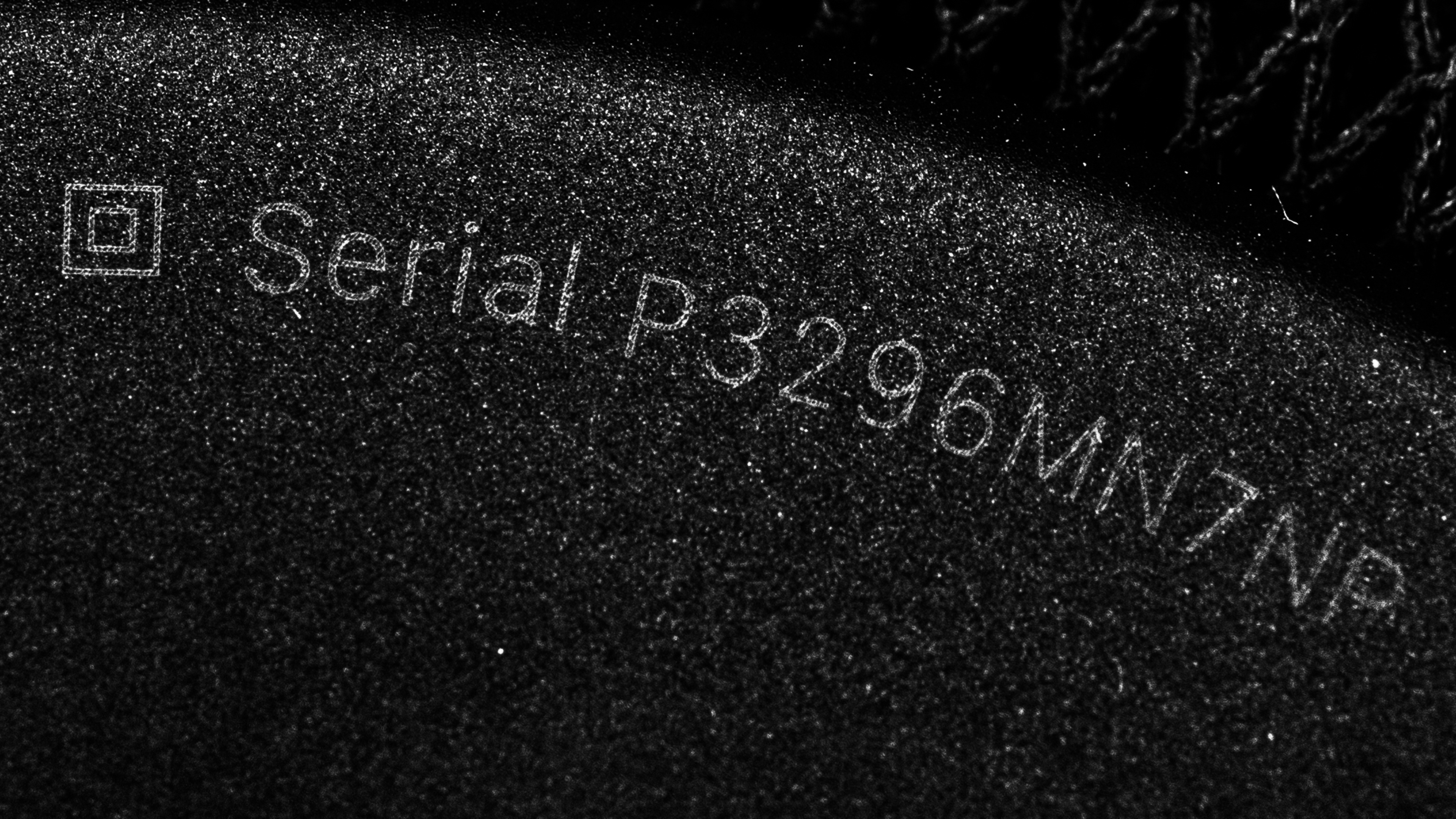
The Apple HomePod is available in Midnight and White color variants. While we tested the Midnight variant, we expect the White variant to offer similar performance. You can see the label for the model we tested here.
However, if you encounter another version of this speaker, please let us know in the forums, and we'll update our review.
Popular Speaker Comparisons
This is the second generation of the Apple HomePod with a similar design to its predecessor. However, compared to other smart speakers on the market, it doesn't offer a lot of sound customization tools. Plus, many of its features, like its companion app, are only available on iOS devices, so Android users can't access them.
You can also check out recommendations for the best home speakers, the best smart speakers, and the best Alexa speakers.
The Apple HomePod (2nd generation) is better than the Apple HomePod mini. The main advantage is that the 2nd-generation HomePod speaker has a built-in room correction microphone to automatically optimize its audio based on your room's unique acoustics, which the mini lacks.
Depending on your listening habits, you may prefer either the Amazon Echo Gen 4 or the Apple HomePod (2nd generation). Both smart speakers offer excellent voice assistant support through their respective assistants. Only the Amazon speaker can playback stereo content without downmixing it to mono, and its bass and treble adjustments make it more customizable overall.
The Apple HomePod (2nd generation) and the Sonos Era 100 are both very premium smart speakers, and depending on your listening habits, you may prefer one over the other. First, if you already own products in either the Apple or Sonos ecosystem, you'll find it's easier to integrate them with their respective speaker. For example, the Sonos speaker is designed to work with Sonos soundbars. Also, the Sonos is more customizable, with bass and treble adjustments on hand, and it supports Bluetooth, unlike the Apple speaker.
The Sonos Era 300 and the Apple HomePod (2nd generation) are both wired home speakers that perform very similarly. They have slightly different strengths, so choosing between them will come down to personal preference and which one integrates into your existing home electronics ecosystem. Both speakers are decently well-built and employ room correction tools to harness the acoustic potential of your room. The Sonos features both Wi-Fi and Bluetooth compatibility, whereas the Apple can only connect via Wi-Fi. The Apple speaker boasts outstanding voice assistant compatibility, with built-in Siri capabilities and excellent voice command recognition. It also has more intuitive controls, though its app isn't quite as easy to use as Sonos'.
Test Results
for pictures & test results
for pictures & test results

for pictures & test results