Sonos Playbar  Soundbar Review

Review updated May 05, 2020 at 12:05pm
Retest Jan 20, 2022 at 12:52pm
Tested using Methodology v1.0 
Sonos Playbar
7.2
Mixed Usage 
8.0
Dialogue/TV Shows 
7.6
Music 
6.4
Movies 
 0
The Sonos Playbar is an older 3.0 soundbar alright for mixed use. Although its sound profile is slightly bright, it still sounds fairly neutral and is good for vocal-centric content like podcasts and TV shows. It also lacks sub-bass but you can easily upgrade this setup with the separate subwoofer or satellites if you're looking for a better listening experience. On the downside, this soundbar doesn't support Bluetooth and doesn't have an HDMI port. Instead, you can use your Wi-Fi connection to stream your favorite jams.

Our Verdict

7.2
Mixed Usage 

The Sonos Playbar is alright for mixed use. Its sound is suitable for most audio content, like vocal-centric genres like podcasts or TV shows. However, it lacks sub-bass and won't be ideal for bass-heavy music or action movies. It also has poor surround performance and it doesn't support height channels or Atmos. Still, it has a wide soundstage which can help immerse you in your movies or music. The bar gets loud but at max volume, you can hear noticeable compression artifacts, especially in the bass range.

Pros
  • Solid well-built design.
  • Fairly balanced sound profile.
  • Great center channel performance for dialogue in movies.
  • Easily upgradable setup.
Cons
  • Lacks sub-bass.
  • No Full HDMI In ports.
8.0
Dialogue/TV Shows 

The Sonos Playbar is good for dialogue. It's got a fairly neutral sound but some may find it too bright. Voices sound accurate and clear which is great for vocal-centric content like audiobooks or podcasts. It can get fairly loud and you can easily stream content using Wi-Fi.

7.6
Music 

The Sonos Playbar is decent for music. It has a fairly balanced but bright sound. Without its separate subwoofer, it lacks a lot of sub-bass which can disappoint fans of more thumpy genres like EDM. However, it's got a wide soundstage that can immerse you in your favorite tunes. The bar can also get loud, but at max volume, there's noticeable compression, especially in the bass range.

6.4
Movies 

The Sonos Playbar is mediocre for movies. While it has a fairly neutral sound, it doesn't have height channels or Atmos content support. Its lack of bass and slight brightness may impact action movies that have a lot of rumbling explosions. On the upside, thanks to its side-firing speakers, it has a wide soundstage that can help create a more immersive sound experience. This soundbar can also get loud too, although at max volume, there are some compression artifacts, especially in the bass range.

  • 7.2
    Mixed Usage
  • 8.0
    Dialogue/TV Shows
  • 7.6
    Music
  • 6.4
    Movies
  • Changelog

    1.  Updated Jan 20, 2022: New update adds DTS support.
    2.  Updated Dec 22, 2021: Added third-party voice assistant support.
    3.  Updated Mar 29, 2021: Converted to Test Bench 1.0.
    4.  Updated Sep 27, 2019: Review published.

    Check Price

    Popular Soundbar Comparisons

    The Sonos Playbar is an older 3.0 soundbar that still performs well for its age. It has a balanced sound but lacks sub-bass. However, just like the Sonos Beam, you can easily upgrade your setup with a subwoofer and satellites. On the downside, it lacks now common connectivity options like HDMI ports and Bluetooth. If you're still shopping around for soundbars, take a look at our recommendations for the best soundbars, the best small soundbars, and the best soundbars 5.1.

    Sonos Beam

    The Sonos Beam is a better soundbar than the Sonos Playbar. The Beam has a more neutral sound profile and a sleek, compact design. It also supports ARC via an adapter and is Apple AirPlay compatible.

    Sonos Arc

    The Sonos Arc is a bit more versatile than the Sonos Playbar. The Arc has HDMI ports and also supports Atmos and eARC, unlike the Playbar. Both sound fairly bright, and the Playbar performs better at max volume than the Arc.

    Sonos Beam (Gen 2)

    The Sonos Beam (Gen 2) is better than the Sonos Playbar. The Beam is a better-built 5.0 setup that has a better surround performance. Unlike the Playbar, it supports Atmos content and Apple AirPlay 2, and has built-in voice assistant capabilities. It also has an HDMI ARC port. That said, the 3.0 Playbar gets louder.

    Bose Solo 5

    The Sonos Playbar is a better option than the Bose Solo 5. The Sonos can get noticeably louder and is better built. The Sonos also has a room correction feature to optimize its audio reproduction. The soundstage of the Sonos is also wider. On the other hand, the Bose supports Bluetooth, while the Sonos soundbar is only Wi-Fi compatible.

    Show more 

    Test Results

    perceptual testing image
    Sort:
    RATINGS
    Category:
    All
    Design
    Style - Bar

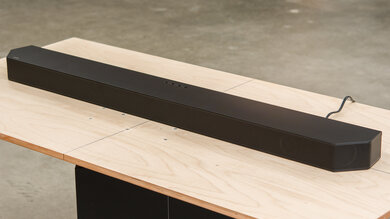
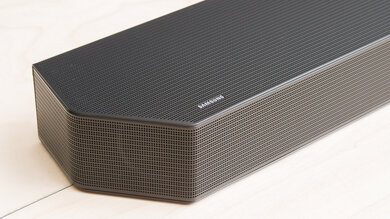
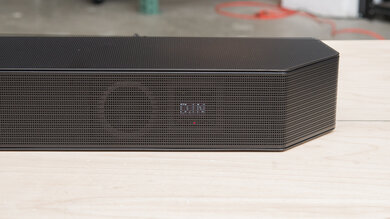
    The Sonos Playbar has a fabric wrap around the front face and top side of the bar that can be prone to tears or collecting dust. There's a metal grille on both sides of the bar while the back and underside are made from a good quality silver plastic. For a more sleek-looking design, check out the 2020 Sonos Arc soundbar.

    Style - Subwoofer

    This setup doesn't have a subwoofer.

    Style - Satellites

    The Sonos Playbar setup doesn't have satellites.

    Dimensions - Bar
    Width35.5" (90.1 cm)
    Height3.3" (8.5 cm)
    Depth5.4" (13.8 cm)

    The Sonos Playbar is fairly large. Its wide size may not fit between the legs of a 55" TV while its height could pose issues if your TV sits flush to the table or if it has a short stand.

    Dimensions - Subwoofer
    WidthN/A
    HeightN/A
    DepthN/A

    There's no subwoofer in this setup.

    Dimensions - Satellites
    WidthN/A
    HeightN/A
    DepthN/A

    There are no satellites with this bar.

    Back - Bar
    Bar Mounting
    Proprietary

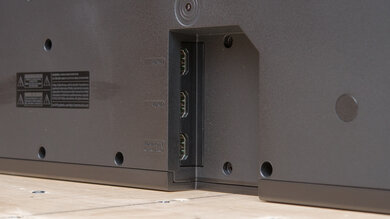
    The bar has an opening on the back for input connectivity as well as its power cable. Although it has wall-mounting holes on its underside, you have to buy the proprietary all-mounting bracket separately.

    Back - Subwoofer
    Enclosure
    No Subwoofer

    This setup doesn't have a subwoofer.

    Back - Satellites
    Mounting
    No

    This setup doesn't have satellites.

    8.0
    Build Quality

    This soundbar's build quality is great. Its plastic body feels very solid and the grilled sides are a nice touch. On the downside, the fabric covering on the top and front face can rip or get dirty easily.

    In The Box
    HDMI Cable Length
    N/A
    Digital Optical Cable Length
    1.5 m (4.9 ft)

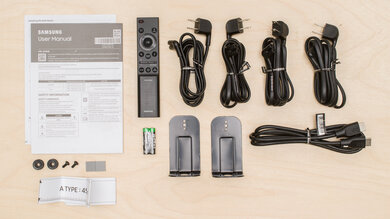
    • Sonos Playbar
    • Manuals
    • Flat ethernet cable
    • Power cable
    • Optical cable
    Sound
    7.4
    Stereo Frequency Response
    See details on graph tool
    See details on graph tool
    Tested Preset
    No Preset
    Slope
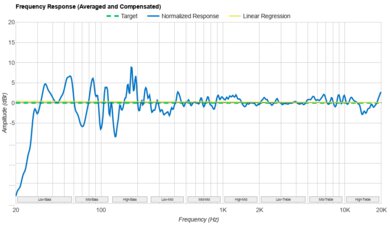
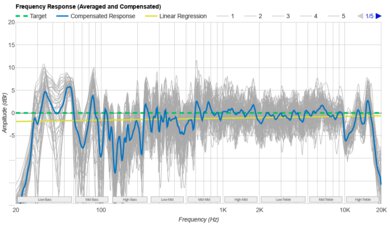
    0.48
    Std. Err.
    2.21 dB
    Channels
    3.0
    Low-Frequency Extension
    51.9 Hz
    High-Frequency Extension
    15.6 kHz

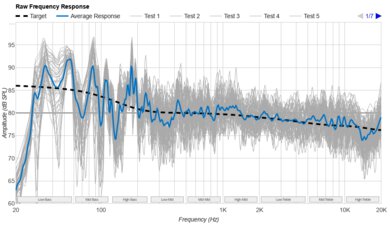
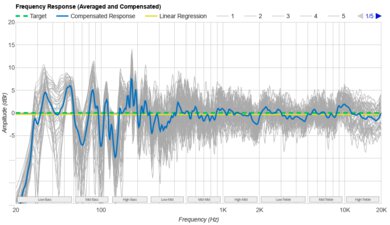
    The Sonos Playbar's stereo frequency response is fair. Similar to the Sonos Beam, this soundbar by itself struggles to produce deep thump and rumble. However, it still has a fairly neutral, but slightly bright sound.

    Note: This soundbar was tested with the bar only, but we plan to test it with a full setup (sub and satellites) in the future.

    7.5
    Stereo Frequency Response With Preliminary Calibration
    See details on graph tool
    Suggested Preset
    No Preset
    Suggested Bass Setting
    1
    Suggested Treble Setting
    -3
    Slope
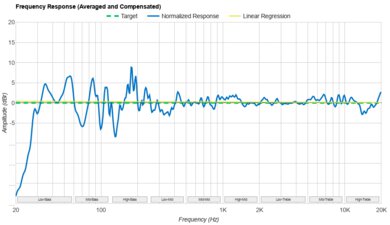
    -0.11
    Std. Err.
    2.04 dB
    Low-Frequency Extension
    51.1 Hz
    High-Frequency Extension
    19.3 kHz
    8.0
    Stereo Soundstage
    See details on graph tool
    Crosstalk Error
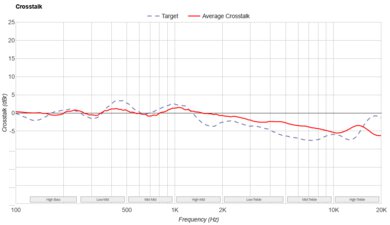
    2.63 dB

    The Sonos Playbar has a great soundstage. Its wide soundstage is thanks to its side-firing speakers that work together with its stereo speakers. Although you can't disable it, it produces a widening effect on the soundstage and it feels almost as wide as home theater tower speakers. On the downside, it slightly diffuses sound as if it's coming from a general area rather than an accurate pinpoint location.

    7.7
    Stereo Dynamics
    See details on graph tool
    SPL @ Max Volume
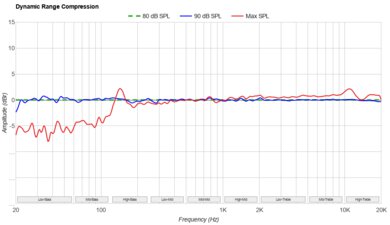
    96.0 dB SPL
    DRC @ Max Volume
    2.41 dB

    This soundbar has good stereo dynamics and can get pretty loud. You should be able to use it in large rooms without much of a problem. However, if you push it to its max volume, this soundbar produces thumping and compression artifacts, especially in the bass range.

    7.6
    Stereo Total Harmonic Distortion
    See details on graph tool
    Weighted THD @ 80dB
    0.47
    Weighted THD @ Max Volume
    1.96

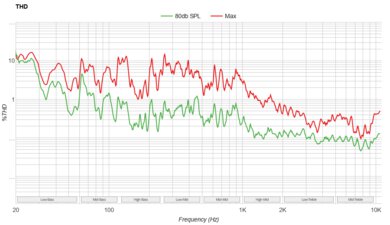
    The Sonos Playbar has good total harmonic distortion performance. At a normal listening volume, this soundbar's distortion is within good limits, producing a clear and pure sound. Even at max volume, there isn't a big jump in distortion either, although there may be compression artifacts in the bass range.

    8.8
    Center
    See details on graph tool
    Localization
    Discrete
    Slope
    0.44
    Std. Err.
    1.99 dB
    SPL @ Max Volume
    96.1 dB SPL
    Weighted THD @ 80dB
    0.67
    Weighted THD @ Max Volume
    1.83

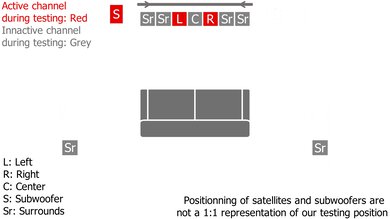
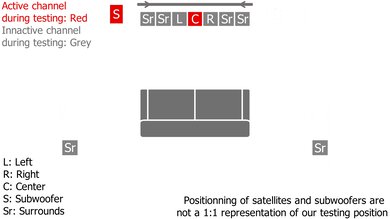
    The Sonos Playbar is a 3.0 setup with an excellently performing center channel. Its dedicated center channel is great for clearer and more accurate vocal content such as dialogue in movies or TV shows.

    4.5
    Surround 5.1
    See details on graph tool
    Localization
    Stereo (Downmix)
    Slope
    0.12
    Std. Err.
    2.51 dB
    SPL @ Max Volume
    94.8 dB SPL
    Weighted THD @ 80dB
    1.24
    Weighted THD @ Max Volume
    2.53
    7.1 Rears
    No

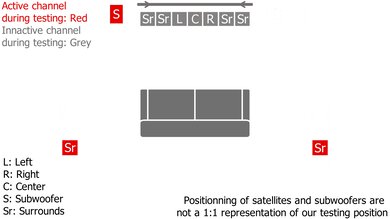
    As a 3.0 setup, the Playbar's surrounds performance is disappointing. The bar downmixes surround content to stereo which doesn't really produce an accurate or clear representation of surround objects. However, it has an accurate and well-balanced frequency response. If you want a standalone soundbar with a better surrounds performance, consider the Harman/Kardon Enchant 1300 instead.

    0.0
    Height (Atmos)
    Localization
    Not Supported
    Slope
    N/A
    Std. Err.
    N/A
    SPL @ Max Volume
    N/A
    Weighted THD @ 80dB
    N/A
    Weighted THD @ Max Volume
    N/A

    Unlike the Sonos Beam (Gen 2), the Sonos Playbar doesn’t support height channels or Atmos.

    6.2
    Sound Enhancement Features
    Room Correction
    Yes
    Dialogue Enhancement
    Yes
    Auto-Volume/Night Mode
    Yes
    Subwoofer Level Adjustment
    No
    Bass Adjustment
    Yes
    Treble Adjustment
    Yes
    EQ
    No
    Surround Level Adjustment
    No
    Rear Level Adjustment
    No
    Height Level Adjustment
    No
    Virtual Surround
    No

    Update 01/20/2022: The new Sonos S2 app is advertised to add additional EQ settings for the bar. However, we found that the EQ tab leads users to the same bass and treble adjustments found in the previous version of the app, so there aren't any changes to our results.

    The Sonos Playbar has excellent sound enhancement features. It has a dialogue enhancement feature, which is great for your favorite TV shows or podcasts, as well as a night mode that can help adjust the volume level of the content you're playing. Unlike the Samsung HW-S60T, it lacks a proper EQ for you to tweak its sound. However, you can still adjust the amount of treble and bass on this soundbar. There's even a room correction feature that adapts the sound to your specific room, but it's only currently available on the iOS app.

    Connectivity
    Physical Inputs - Bar
    Optical Audio In
    1
    HDMI ARC
    No
    HDMI Out
    No
    Full HDMI In
    No
    Analog Audio In 3.5mm (Aux)
    No
    RCA In
    No
    USB for Files
    No
    Ethernet
    2

    This bar has limited physical inputs and you can only connect devices that have an optical connection. On the bright side, it can connect to your network if you use its two ethernet ports. If you're looking for a soundbar with HDMI ports, check out the Samsung HW-Q70R.

    0.0
    Audio Format Support - ARC
    eARC
    No
    Dolby Atmos
    No
    Dolby Digital
    No
    Dolby Digital Plus
    No
    DTS
    No
    DTS:X (eARC only)
    No
    Dolby TrueHD (eARC only)
    No
    DTS-HD MA (eARC only)
    No
    5.1 PCM (eARC only)
    No

    The Sonos Playbar doesn't have an HDMI port.

    0.0
    Audio Format Support - Full HDMI In
    Dolby Atmos
    No
    DTS:X
    No
    Dolby Digital
    No
    Dolby Digital Plus
    No
    DTS
    No
    Dolby TrueHD
    No
    DTS-HD MA
    No
    5.1 PCM
    No

    This soundbar doesn't have an HDMI port.

    10
    Audio Format Support - Optical
    Dolby Digital
    Yes
    DTS
    Yes

    Update 01/20/2022: The new Sonos S2 app update added support for DTS content. We've updated our results accordingly.

    The Sonos Playbar uses its optical port to playback surround sound in Dolby Digital content such as Blu-ray discs and streaming services, but it downmixes the signal. It also supports DTS content.

    8.8
    Latency
    ARC
    N/A
    Optical
    36 ms
    Full HDMI In
    N/A
    2.0
    Wireless Playback
    Bluetooth
    No
    Wi-Fi
    Yes
    Chromecast built-in
    No
    Apple AirPlay
    No

    The Sonos Playbar has disappointing wireless playback capabilities and can't use a Bluetooth connection. However, you can connect to it using your Wi-Fi. Unfortunately, it doesn't support Apple AirPlay or Chromecast built-in which can make it difficult to stream from your mobile devices without using Wi-Fi. For a soundbar with more wireless playback options, see the Bowers & Wilkins Formation Bar.

    Other Input Specifications
    4k @ 60 Hz Passthrough
    No
    4k @ 60 Hz @ 10 bit Passthrough
    No
    4k @ 60 Hz @ 4:4:4 Passthrough
    No
    HDR10 Passthrough
    No

    The Sonos Playbar doesn't have HDMI ports, so it can't passthrough any video signal.

    Connectivity - Subwoofer
    Sub Wireless
    No

    This soundbar doesn't have a subwoofer.

    Connectivity - Satellites
    Sat Wireless
    No

    This bar doesn't have any satellites.

    Additional Features
    Interface
    Display
    No

    The interface is located on the right side of the bar. It has a status light that flashes or changes color depending on what you're doing.

    Bar Controls

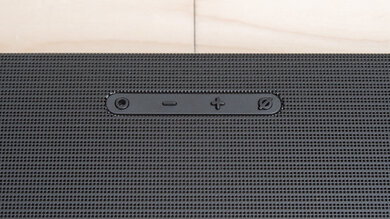
    The bar's controls are located on its right side. There's only a button for play/pause and another for volume up and down.

    Remote
    Universal Remote
    No

    The Sonos Playbar doesn't have a remote. However, if you're using the Sonos Controller app, you can program your TV's IR remote to control for volume by using the 'Remote Control Setup' feature.

    Voice Assistants Support
    Amazon Alexa
    No
    Google Assistant
    No
    Apple Siri
    No

    Update 12/22/2021: Added additional information about third-party voice assistant support.

    The Sonos Playbar doesn't have built-in voice assistant capabilities. However, if you have a third-party Amazon Alexa or Google Home device, you can connect it to the bar to control it with your voice. You just need to set it up in the Amazon Alexa or Google Home app respectively to use it.

    App
    App NameSonos Controller
    iOSYes
    AndroidYes
    Acts As A Remote
    Yes
    Controls Soundbar's Settings
    All
    Casts Device Files
    Yes

    This soundbar has access to the Sonos Controller companion app. It can link all of your music services like Spotify together so you can search through all of them at once to find your favorite tune. You can also control your entire network of Sonos speakers, which is great if you choose to upgrade this setup and even set up room configurations. However, some may find this app hard to use to control the soundbar instead of a remote. Their room connection feature, Trueplay Tuning, is also only currently available on the iOS version of the app.

    Other Features
    Power Saving
    No
    HDMI CEC (TV Remote Control)
    No

    This bar doesn't have any power saving features such as an auto off-timer. While you can set a sleep timer that stops your audio after a set time, this doesn't turn the bar off. If you're using the Sonos Controller app, you can also configure your TV remote to control the soundbar's volume, but it doesn't support HDMI CEC.