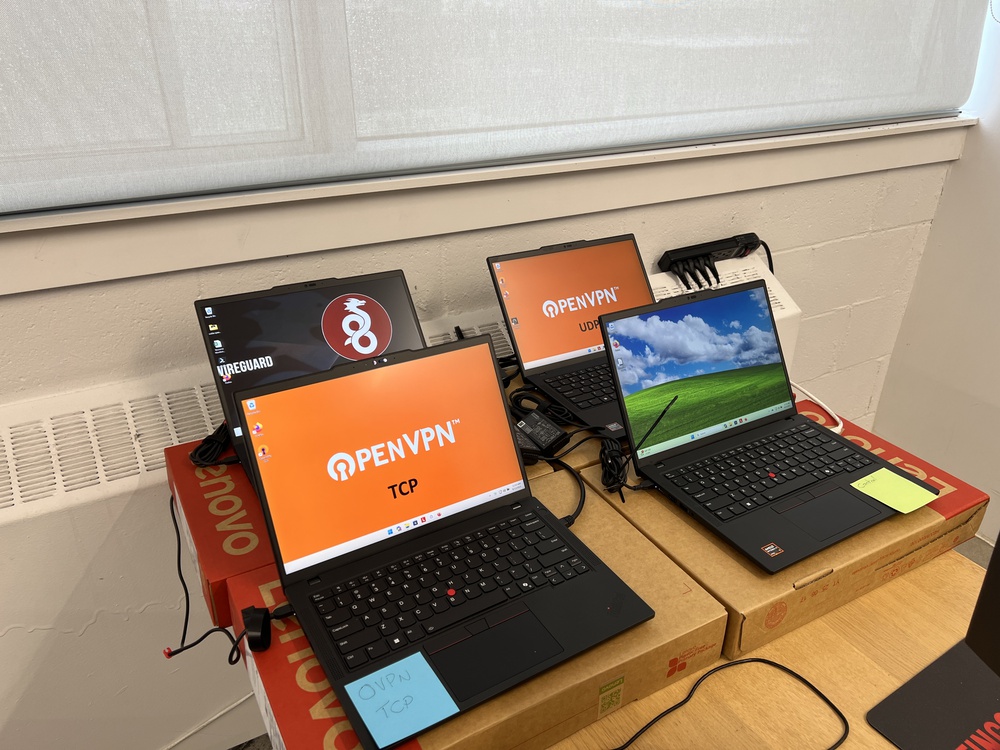
You may have seen WireGuard and OpenVPN listed as different protocol options in your VPN client, but have you wondered what the difference is between them? We wanted to see how they perform in the real world, so we created a controlled, side-by-side comparison with four identical, brand-new laptops. In this article, we discuss the main technical differences between WireGuard vs OpenVPN and share the results of our performance comparison.
Test results
What Is A VPN Protocol?
VPN protocols are sets of rules that dictate how your device communicates with the VPN server you're trying to reach. They define how your data is encrypted, routed, and authenticated before and when it arrives at the VPN server. Each protocol works differently and can result in significantly different speeds, security, and resource usage, so it's important to choose wisely.
If you want to learn more about the different tactics these protocols use to keep your traffic hidden, check out our guide to VPN obfuscation.
Overview
Along with being the name of the protocol itself, OpenVPN is a software project and the name of the company that manages it, OpenVPN Inc., founded in 2001. The OpenVPN protocol is free and open source, meaning that anyone can inspect the code and audit it for vulnerabilities. This is an important detail because it means that more eyes can scrutinize the protocol, lowering the chances that vulnerabilities in the code base last very long. However, its extremely large codebase (hundreds of thousands of lines) means it's highly impractical for individuals to review and gives it a much wider 'attack surface' for bugs to appear. Still, that isn't to say it's not secure. Decades of its existence have seen numerous extensive security audits, and it's still widely considered one of the best VPN protocols available.
Flexibility & Modes
OpenVPN is highly flexible and configurable. It can operate two transport modes:
- TCP: Prioritizes stability by sending packets in order and checking for errors each time they're sent or received, ensuring that the data reaches its destination intact. As a result, it can be slow and bandwidth-intensive.
- UDP: Sends data in an unordered stream without any confirmation from the receiver that there aren't any errors or lost packets. It's significantly faster and has lower latency than TCP, but is more prone to errors and packet loss.
Having the option to choose between the two is a plus because each excels in its own wheelhouse. If you're gaming or streaming video, UDP is better since speed is the priority, but if you're sending emails or text-based messages, TCP ensures that those communications arrive in their entirety.
Cryptography, Security, and Performance
OpenVPN uses OpenSSL as its core encryption library. It's another open-source project that's frequently updated and supports numerous cryptographic ciphers, hashes, and public-key cryptography. You can configure additional layers of security, including PFS (Perfect Forward Security) and TLS (Transport Layer Security). All these options make OpenVPN extremely flexible for a variety of different uses and risk profiles.
While configurability can be a benefit, it can also be a drawback. It's important to note that as a subscriber to a VPN service, you're at the mercy of how your VPN provider configures their OpenVPN servers, so the experience using it can vary greatly from server to server. It also has a higher overhead than WireGuard, so it's generally slower with worse latency.
Overview
Jason A. Donenfeld initially released WireGuard in the mid-2010s. It aims to be simpler, faster, and more secure than other protocols by using one set of fixed cryptographic primitives. Like OpenVPN, it's open-source with a code base that anyone can review. Unlike OpenVPN, however, it only has ~4000 lines of code, making it feasible for individuals to audit and find potential vulnerabilities.
Simplicity
A big part of why WireGuard has so few lines of code is that it's cryptographically opinionated. That means it only supports one cryptographic suite: ChaCha20 for encryption, Poly1305 for authentication, and Curve25519 for key exchange. These are among the newest and most secure cryptographic technologies available, with no known security vulnerabilities. Another reason for its compactness is that the protocol doesn't handle authentication in the same way that others do. Instead, each peer is configured with the other's public key, and once traffic is encrypted, it's sent along. VPN clients usually automate this step and generate the configuration files for you. Unlike OpenVPN, WireGuard only operates in UDP mode and doesn't offer a TCP mode.
While WireGuard relies exclusively on ChaCha20, OpenVPN can also be configured to use AES-256. You can learn more about how this industry-standard cipher protects your data in our guide to AES-256 encryption.
Performance Considerations
Since there's only one available set of cryptographic primitives, WireGuard doesn't offer close to the level of flexibility that OpenVPN does, but this is by design. One benefit is higher throughput and performance potential due to the lower overhead in the user space. Thanks to its smaller codebase, it has a smaller 'attack surface', meaning there are fewer places overall for bugs and vulnerabilities to appear.
Its lack of flexibility can be an obvious dealbreaker for specific scenarios where you require the configuration options of OpenVPN. A common scenario would be if you needed to use TCP, since some networks completely block UDP traffic.
The Setup
We set up four identical, brand-new Lenovo ThinkPad P14s Gen 6 laptops running Windows 11 with Speedtest.net's CLI (command line interface) installed. The first laptop was a control, where we ran speed tests directly from our Montreal office's network to a Speedtest server in London, England. We configured laptops two and three to connect to Mullvad's OpenVPN servers in London using the OpenVPN Community Client, as per Mullvad's installation guide. Laptop two was configured to use TCP, and laptop three was configured to use UDP. Finally, we configured laptop four to connect to Mullvad's WireGuard servers in London using the WireGuard client. We opted to use each protocol's native client instead of the Mullvad app to eliminate potential variables associated with the app and to attempt to make the test more comparable across different VPN services. That said, the results are still highly dependent on the VPN provider and their server infrastructure and load.
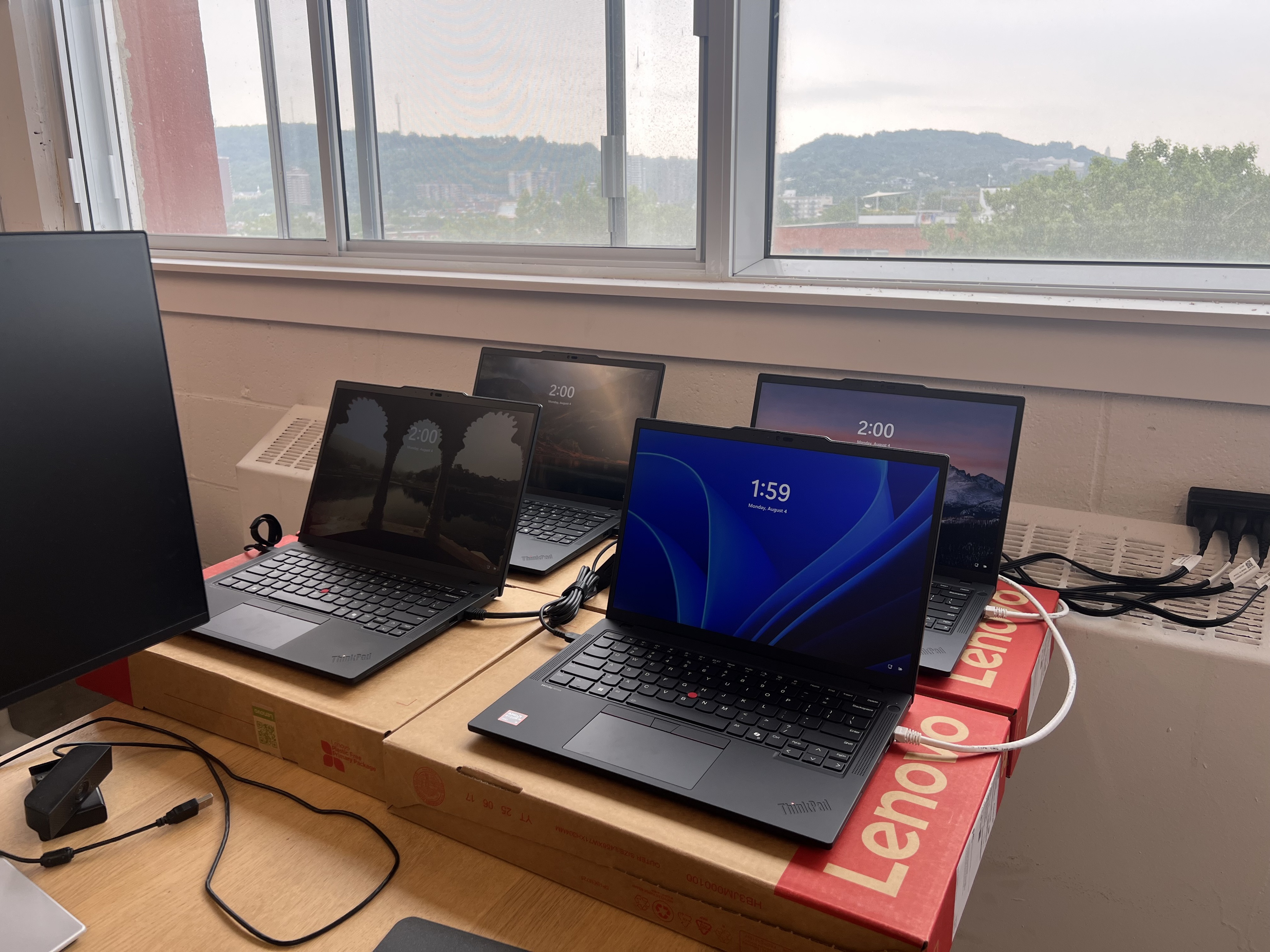
We created a script to automatically run the speed test on each laptop every 40 minutes over 12 hours. We scheduled the tests to run overnight to ensure that no traffic on our office's internet would use bandwidth, and staggered the test runs so each laptop had as much bandwidth as possible and didn't interfere with the other tests.
Setup Limitations
It's also important to note that our results are highly dependent on physical network attributes, like where the server you're trying to connect to is located. We would've very likely achieved significantly different results if we had connected to VPN servers in Montreal, for instance. That said, our results still illustrate the general trends between the two protocols well and are comparable to each other.
The Results
The table below shows the average results that we achieved when comparing OpenVPN vs WireGuard.
| Protocol | Download Speed (Mbps) | Upload Speed (Mbps) | Ping Jitter (ms) | Ping Latency (ms) | Download Latency IQM (ms) | Upload Latency IQM (ms) | Download Latency Jitter (ms) | Upload Latency Jitter (ms) | Packet Loss (%) |
|---|---|---|---|---|---|---|---|---|---|
| Control | 897.0 | 918.5 | 0.4 | 80.6 | 171.3 | 174.6 | 62.2 | 57.1 | 0 |
| OpenVPN TCP | 44.1 | 39.2 | 0.3 | 92.7 | 360.5 | 143.8 | 89.5 | 44.7 | 0 |
| OpenVPN UDP | 149.1 | 125.8 | 2.9 | 84.0 | 323.4 | 161.9 | 89.8 | 56.0 | 15.2 |
| WireGuard | 353.6 | 366.0 | 0.6 | 90.1 | 611.6 | 253.2 | 102.1 | 77.8 | 0 |
We ran a total of 19 speed tests for each protocol, with one exception: OpenVPN UDP. Ten of the speed tests failed, so the results have a smaller sample size of 9 instead of 19 for the others. We can't say for sure why this happened. The failures could've been caused by errors in the Speedtest CLI program itself or possibly by the high instance of packet loss.
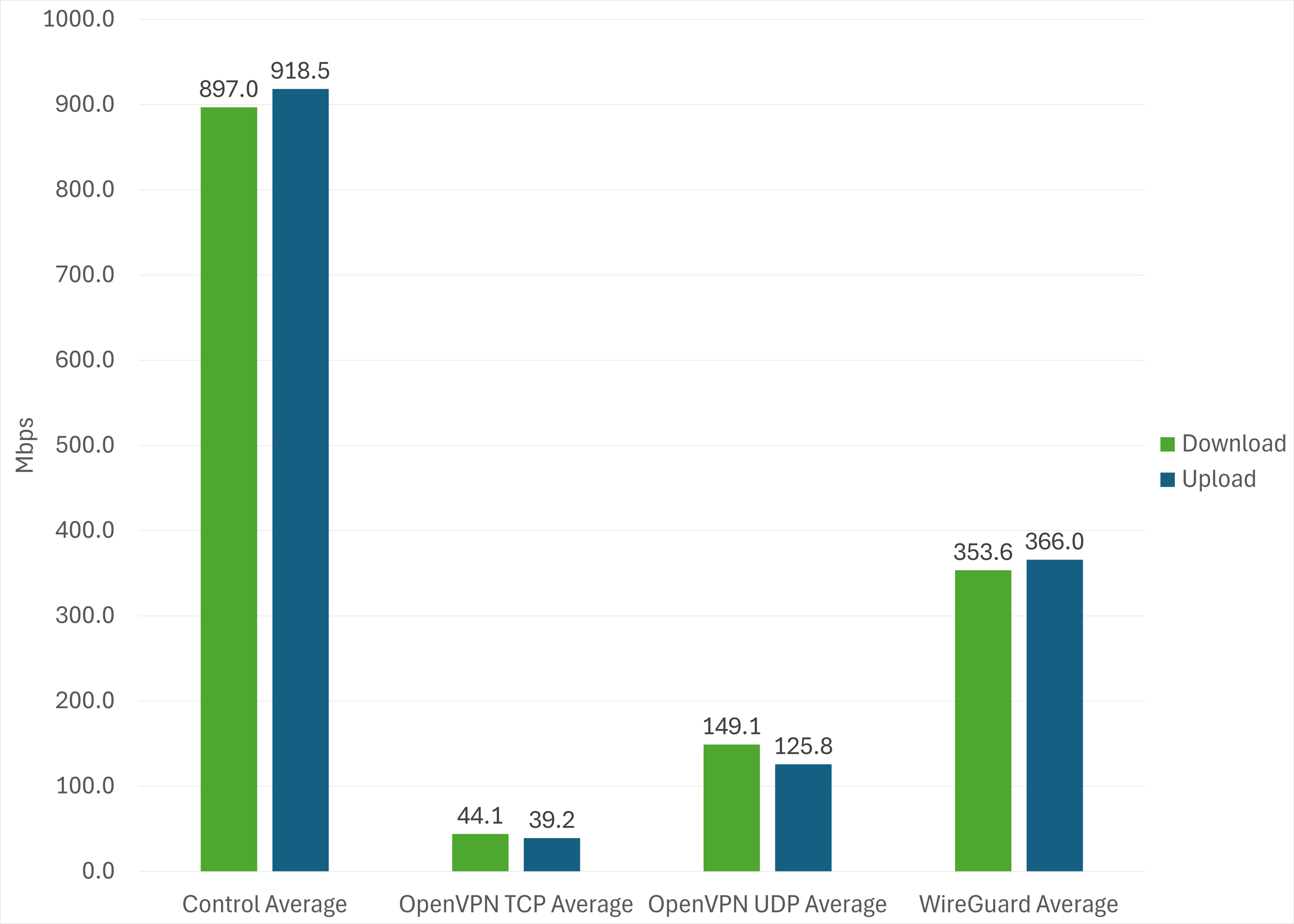
As expected, WireGuard is the clear winner when it comes to pure speed. This cleanly illustrates how its simple, low-overhead design benefits raw throughput.
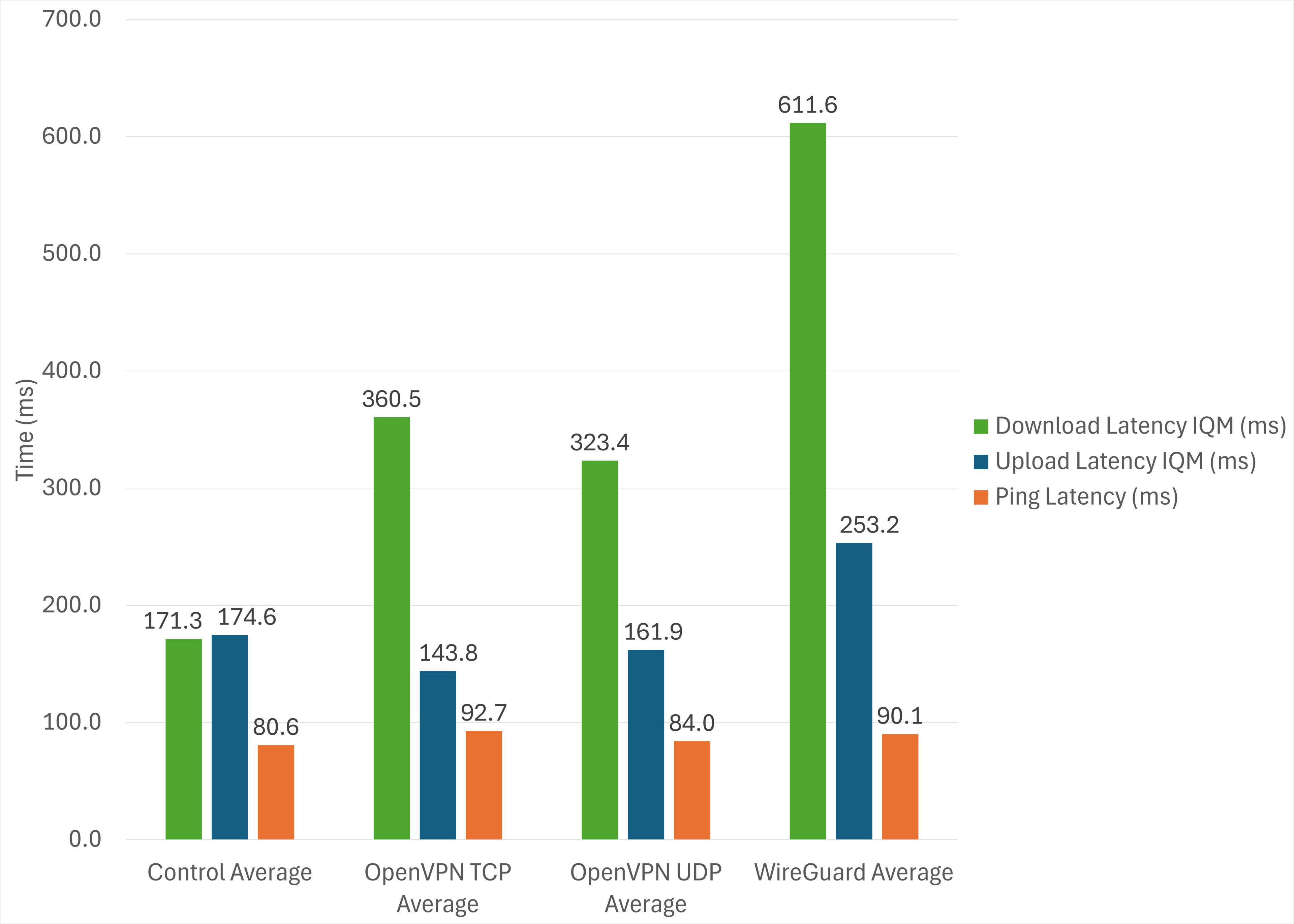
While there's no significant difference in unloaded ping latency between the protocols, WireGuard exhibits a higher download latency IQM (interquartile mean) than the other protocols. It's possible that since WireGuard has significantly higher throughput than OpenVPN, it fills the network buffer on the server-side too quickly, resulting in bufferbloat and increased latency. Another likely cause of the high latency could be network routing. Since we were running the speed test to a trans-Atlantic server, the data has a physically long way to travel before reaching the server, and minor differences in routing can affect final latency.
In practice, you'd only notice higher loaded latency if you were doing something latency-sensitive (like gaming or on a video call) while also downloading something at full speed.
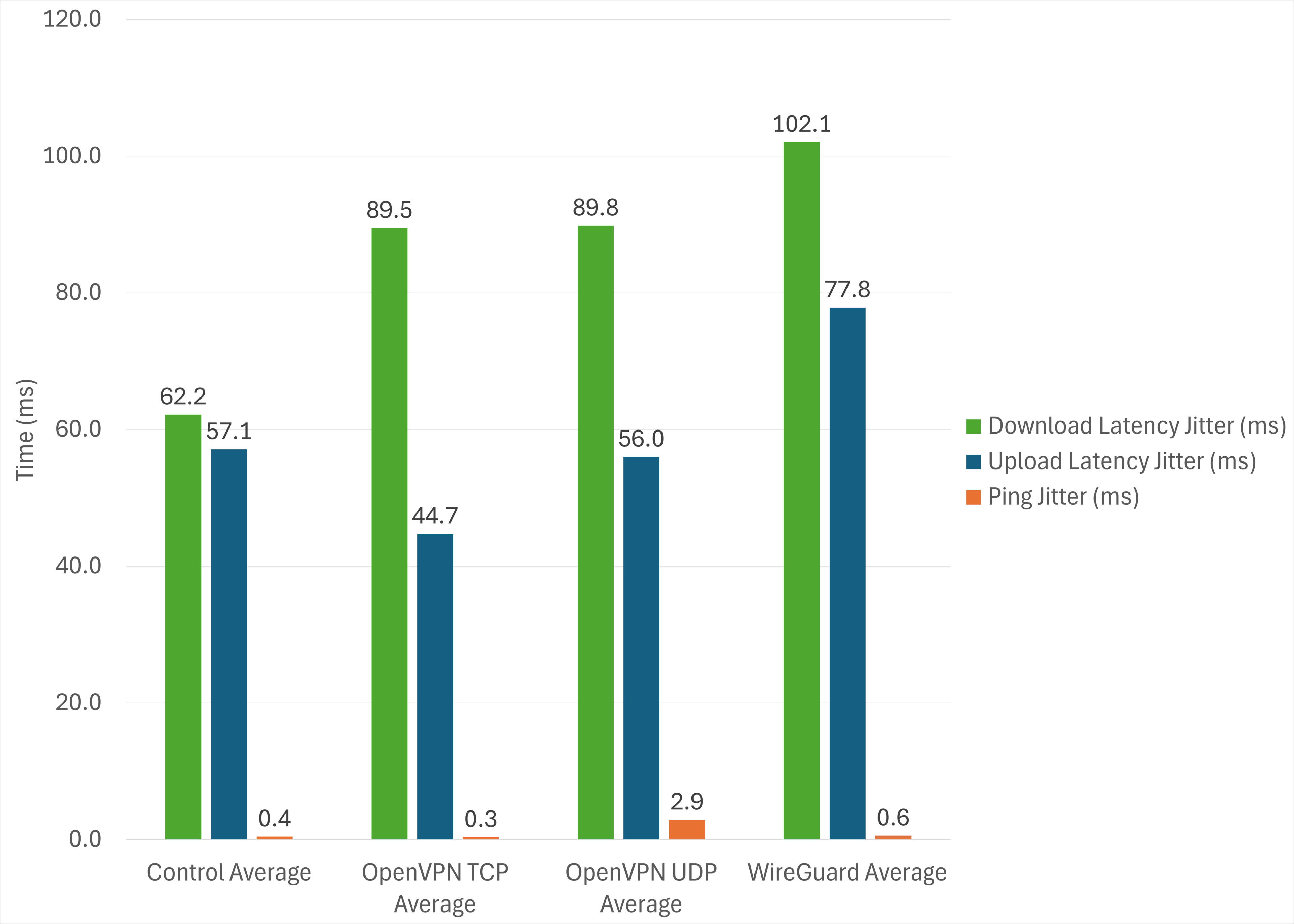
While each protocol has a negligible amount of unloaded Ping Jitter, WireGuard fares slightly worse when it comes to loaded Download Latency Jitter and Upload Latency Jitter. Again, this could be caused by WireGuard's high throughput, resulting in timing variations between packets that grow into measurable jitter. That said, the differences aren't significant enough between the protocols to result in a meaningful impact in everyday use.
Conclusion
Thanks to its simple, lightweight design, WireGuard delivers significantly faster download speeds than OpenVPN in either TCP or UDP mode without suffering from packet loss. This makes it the best choice for downloading large files quickly or streaming high-bitrate video.
That said, we observed higher latency and jitter with WireGuard under load. This could be due to how the protocol prioritizes sending packets quickly over UDP, potentially filling network buffers and causing queuing delays. In practice, this would only be noticeable if you were fully saturating your internet connection while also doing something latency-sensitive, like gaming or on a video call.
Ultimately, WireGuard is likely the best protocol if you're using a commercial VPN provider and your device supports it. Its easier configuration and simplicity make it easy to configure securely, and its lightweight design has less overhead for better speeds. Still, OpenVPN absolutely has its place, and if you need its flexibility or TCP fallback, especially, it gets the job done.