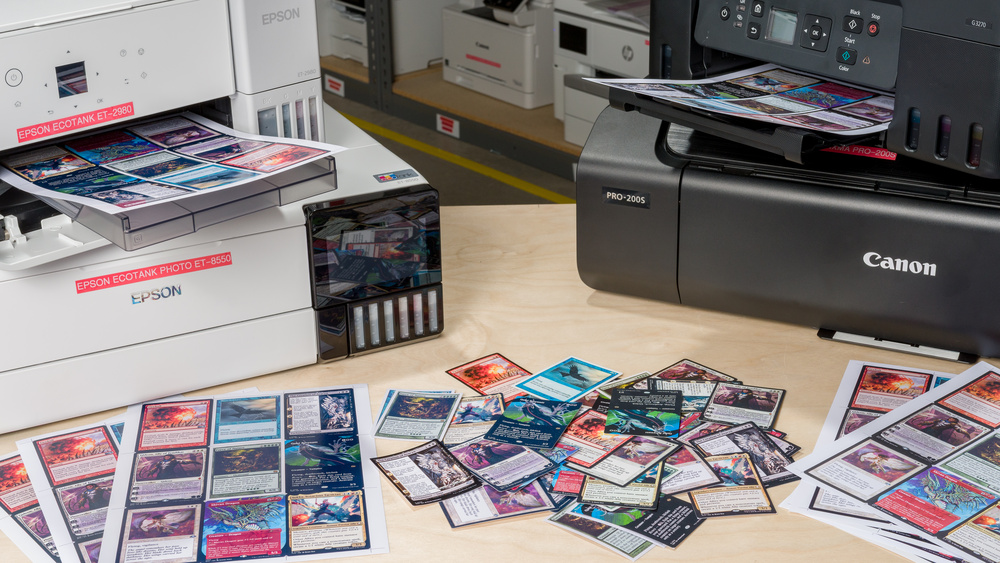
Playing card games like Magic: The Gathering can become expensive quickly, especially when experimenting with different decks or fine-tuning a build. As a result, many players turn to printed proxies to test cards or get started without a large upfront investment.
You don't need an expensive printer to make good-looking playing card proxies. In our testing, affordable inkjet tank printers produced readable, visually appealing cards when paired with compatible photo paper and high-resolution artwork. High-end photo printers delivered better blacks, contrast, and fine detail, but the improvement was relatively small compared to the higher price.
For most people, the best proxy-printing setup is simple: use the printer you already have, choose good-quality compatible paper, and start with high-DPI card images. If you are buying a printer specifically for proxies, an affordable inkjet tank printer is the best value. A high-end photo printer only makes sense if you also plan to print photos, artworks, or other projects where the extra quality and larger format support are useful.
The one major exception is card feel. If you want proxies that feel closer to real playing cards, laser printing on black core TCG cardstock is worth considering. The tradeoff is lower image quality compared to inkjet printing, especially with lower-resolution card images.
High-End Photo Printers Look Better, But Usually Aren't Worth It For Proxies
High-end photo printers produce higher-quality proxies, but the improvement is relatively small compared to their much higher cost. In our testing, affordable household printers delivered very good results, making them a more practical choice for most users. In many cases, the best printer for printing proxies may simply be the one you already own.
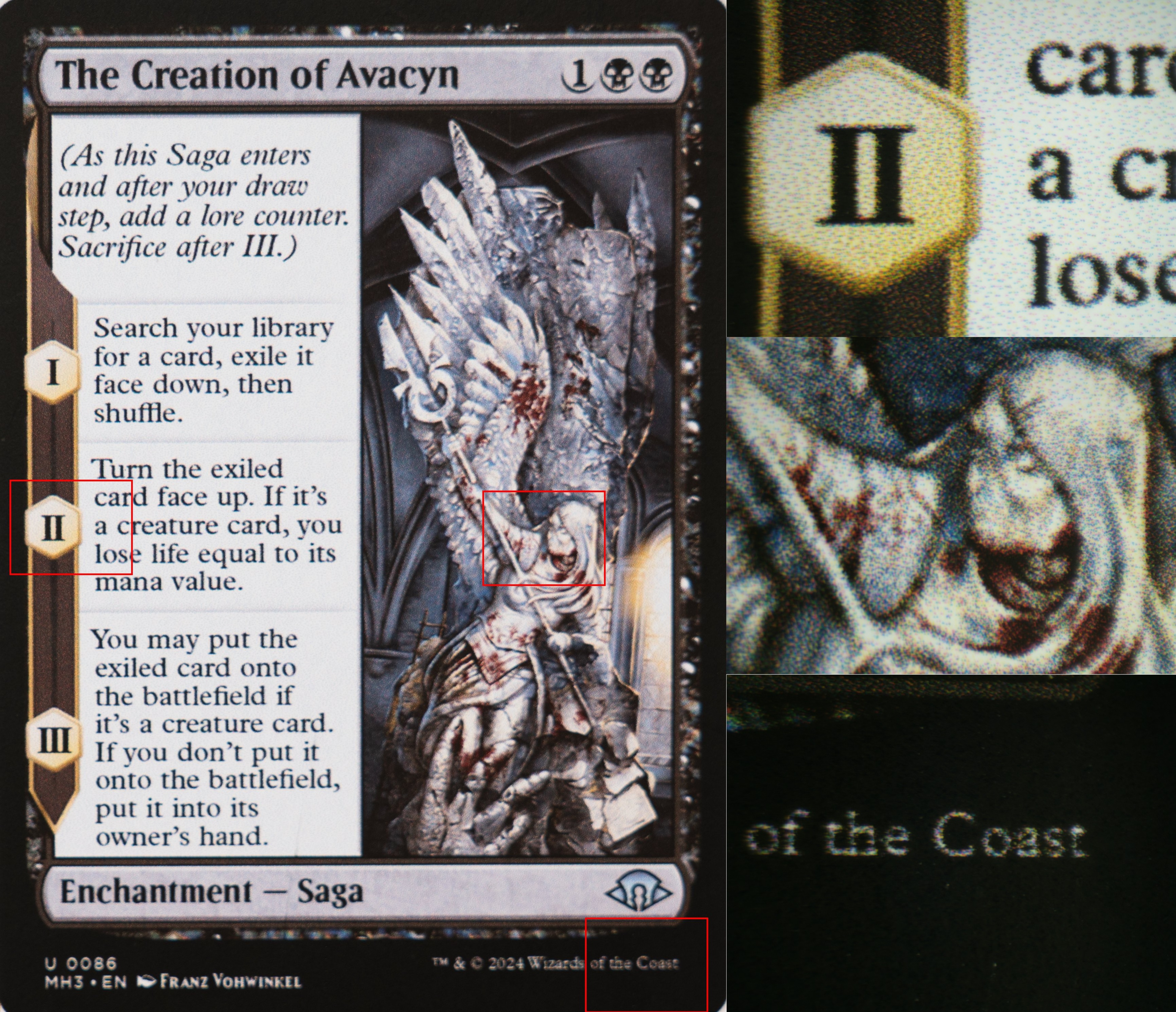
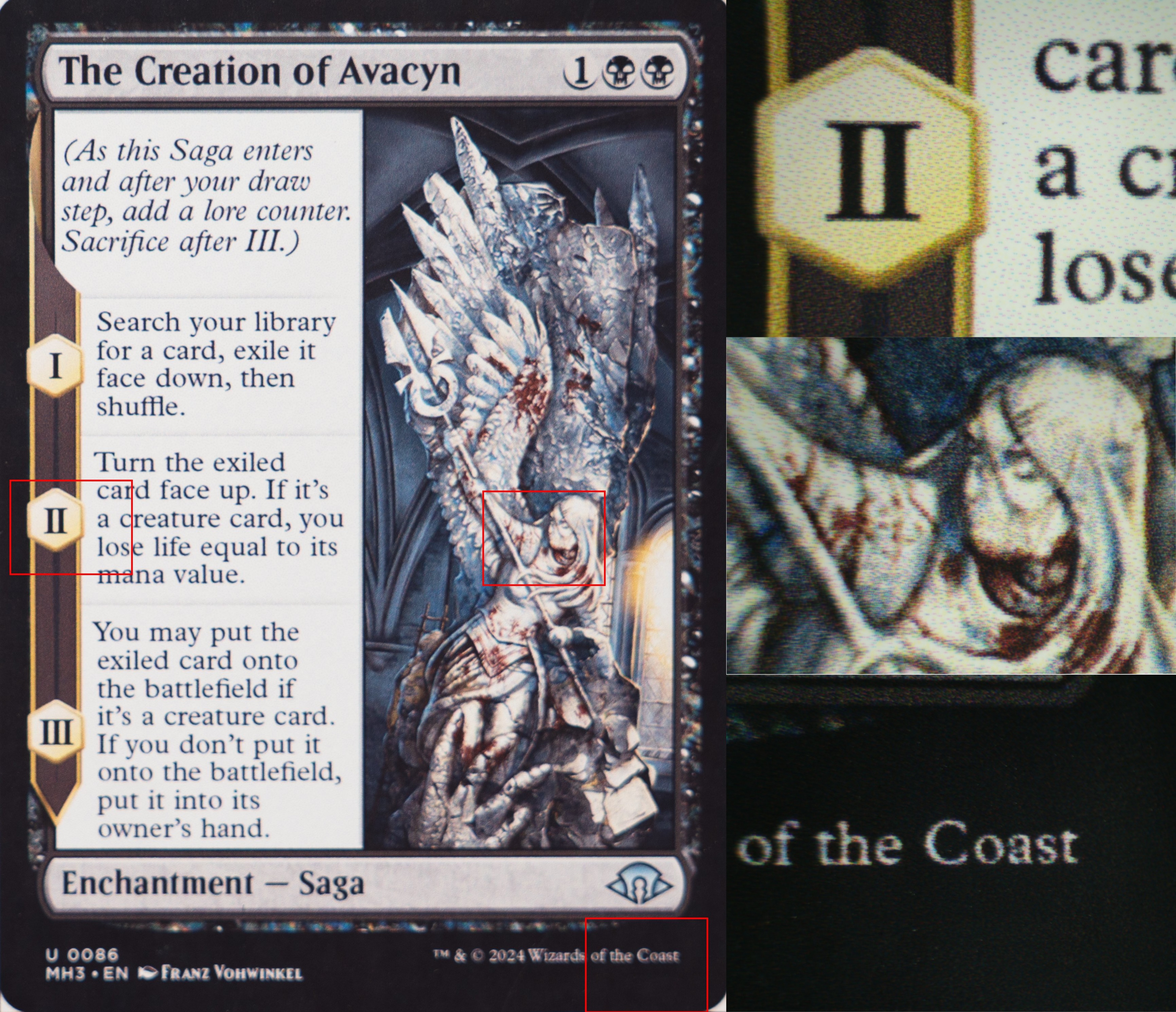
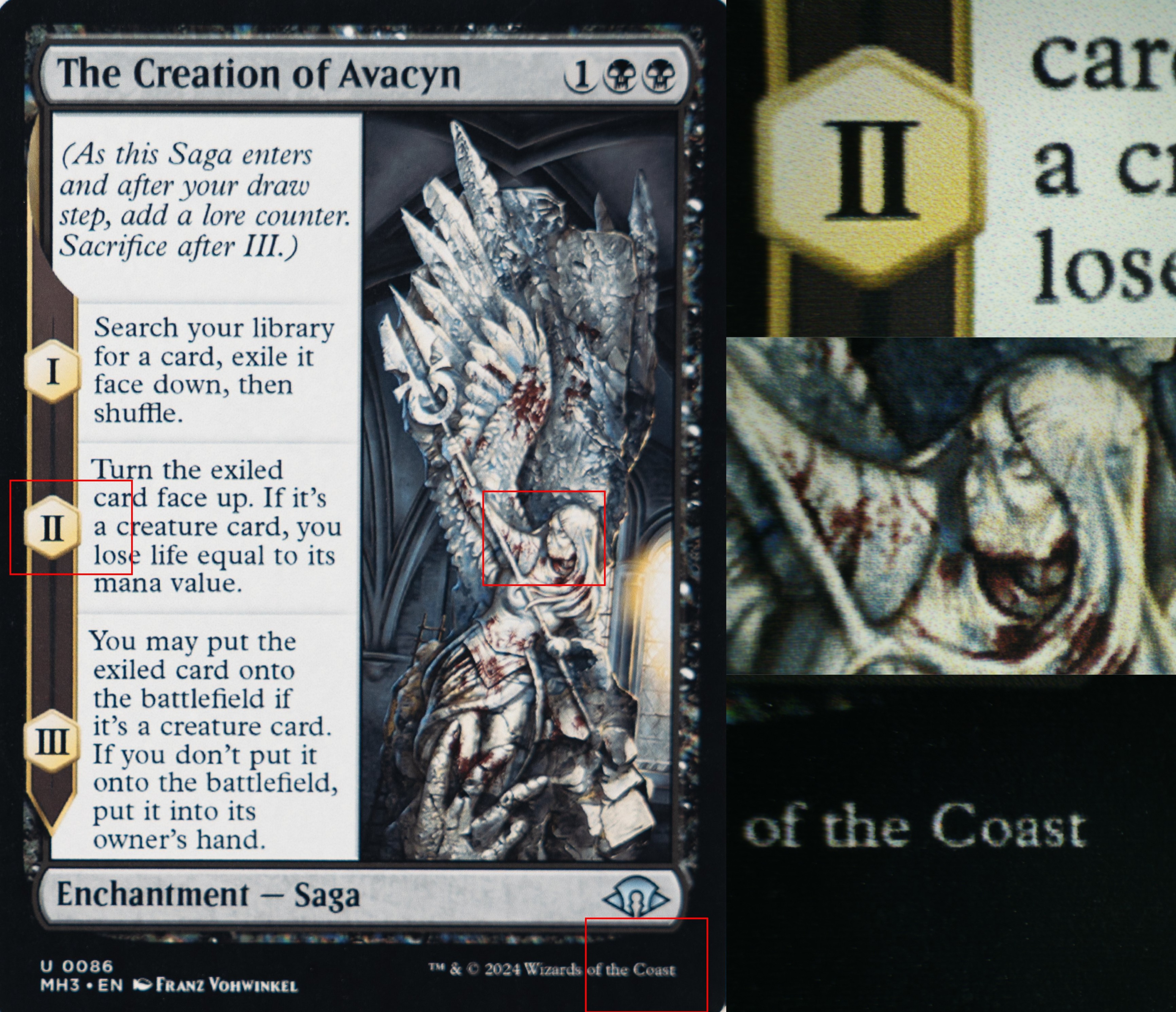
While premium models offer slightly sharper details and richer colors, these gains come with diminishing returns, especially when the price is three to four times that of entry-level options. The following images present a card printed on each printer, with different regions of interest magnified under the microscope to illustrate the marginal differences between prints from affordable printers and those from high-end photo printers.
| Epson ET-2980 | Canon G3270 | Epson ET-8550 | Canon PRO-200S |
 |
 |
 |
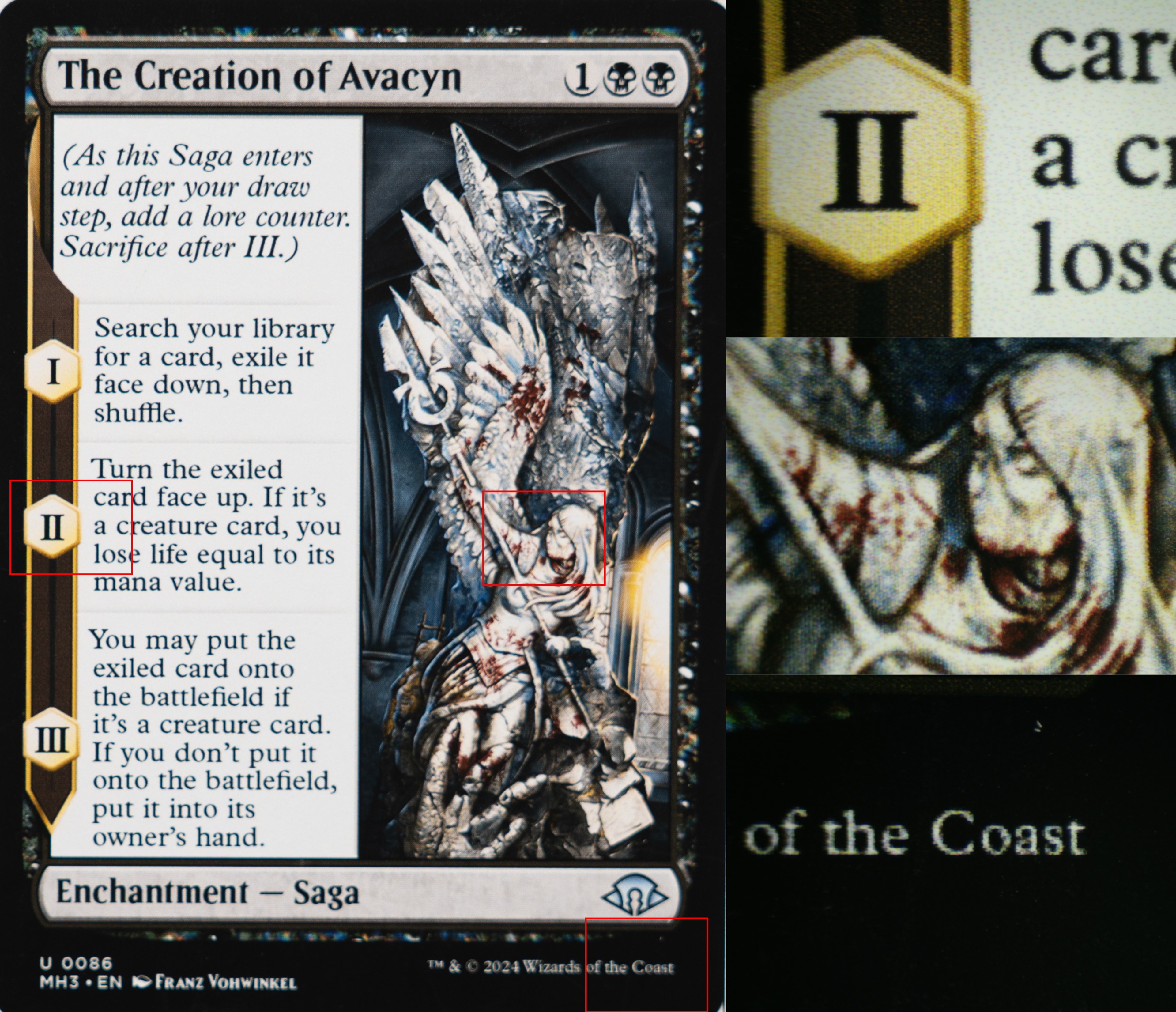 |
The Creation of Avacyn printed on Koala matte photo paper (the red rectangles indicate the regions of interest magnified under the microscope).
To evaluate the differences between printers, we printed proxies using four inkjet printers occupying two different price ranges and paired them with paper from a neutral brand (i.e., not tied to a specific manufacturer). We selected two affordable tank printers and two high-end photo printers from different brands to compare output quality under similar conditions.
We selected the following printers and papers for our tests:
- Affordable tank printers:
- High-end photo printers:
- Generic brand paper:
- Koala Double-Sided Matte Photo Paper (48 lb – 180 gsm)
- Koala Ultra Premium Glossy Photo Paper (66 lb – 250 gsm)
Most consumer inkjet printers use a hybrid ink system: pigment-based black ink for sharper text on plain paper, and dye-based color inks for more vibrant photo output. Dye-based inks generally produce more saturated colors and smoother transitions, making them well-suited for photo and artwork printing. Pigment-based inks, while slightly less vibrant, offer better longevity and resistance to fading. We discuss this in more detail in the following article: A Guide To Home Photo Printing: Color Gamut, Substrates, And ICC Profiles. For comparison purposes with affordable printers, we selected two high-end photo printers that use dye-based color ink.
The following table indicates the type of ink used by each tested printer:
| Black | Color | |
| Epson ET-2980 | Pigment | Dye |
| Canon G3270 | Pigment | Dye |
| Epson ET-8550 | Pigment and dye | Dye |
| Canon PRO-200S | Dye | Dye |
Table showcasing the type of ink used for each tested printer.
For all tests, we installed the appropriate drivers and selected the highest available print quality, while leaving other settings on default. We avoided manual adjustments such as brightness, contrast, or color correction to ensure consistent and repeatable results across printers. While manual tuning can improve individual prints, it's highly dependent on the artwork and can be difficult to apply consistently, especially when printing multiple cards with varying color profiles on the same page.
Affordable Inkjet Printers Are Good Enough for Most Playing Card Proxies
Affordable printers are more than capable of producing good-looking, readable proxies. In our tests, they consistently delivered sharp text and clear artwork, regardless of the paper type used. While minor color differences can occur, particularly when printing on glossy paper, they don't significantly affect the overall usability of the proxy as a playing card.
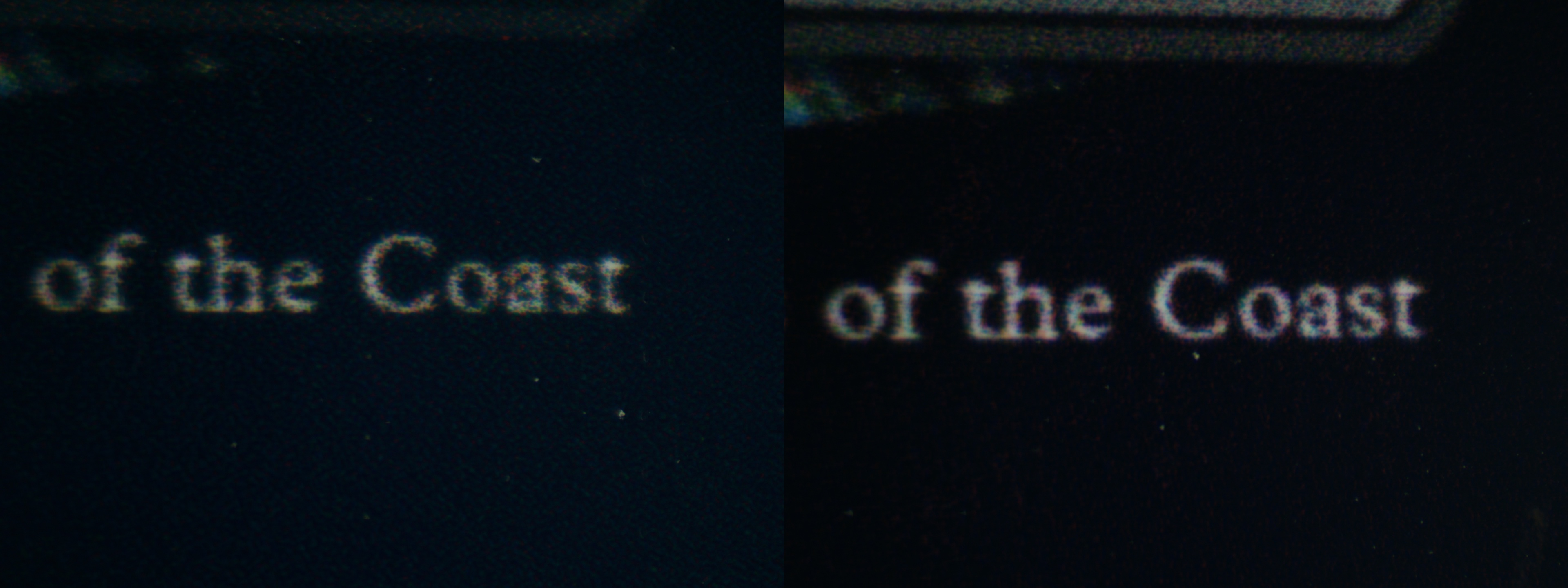
(Upper left: Epson ET-2980 with Koala matte photo paper
Upper right: Canon G3270 with Koala matte photo paper
Lower left: Epson ET-2980 with Koala glossy photo paper
Lower right: Canon G3270 with Koala glossy photo paper)
On matte paper, both affordable printers produced sharp, easily readable text, and fine details in the artwork were clearly visible. On glossy paper, however, the printers switched to using a mix of dye-based color inks to reproduce black, as pigment-based black ink isn't well-suited for this type of media. This resulted in a slight bluish tint, especially on the Epson ET-2980, where cyan appeared to be more prominent in the mix. Despite this, the text remained readable, and the artwork details were still well defined.
This behavior is tied to the selected paper type in the print settings. When 'glossy paper' is selected, the printer avoids using pigment-based black ink and instead creates black using a combination of dye-based color inks. On matte paper, pigment-based black ink is used, resulting in more neutral and consistent blacks.
Between the two models, the Canon G3270 handled this transition better, producing a more balanced composite black, while the Epson ET-2980 showed a more noticeable color shift.
(Left: Epson ET-2980 with Koala Glossy Photo Paper
Right: Canon G3270 with Koala Glossy Photo Paper)
It's worth noting that this effect could likely be reduced with manual color correction. However, as mentioned earlier, all tests were conducted using default settings to ensure consistency.
What You Gain with a High-End Photo Printer
High-end photo printers produce better-looking proxies than affordable models, but the difference is relatively subtle in practice. While they offer slightly sharper text and richer blacks, the overall improvement is modest when viewed with the naked eye.
When comparing prints side by side, proxies from high-end printers like the Epson ET-8550 and Canon PRO-200S appear more refined, with deeper blacks and greater contrast that make the artwork stand out more. However, proxies printed on affordable models, especially the Canon G3270, still look very good, with sharp text and clearly visible details.
| Koala Matte Photo Paper | 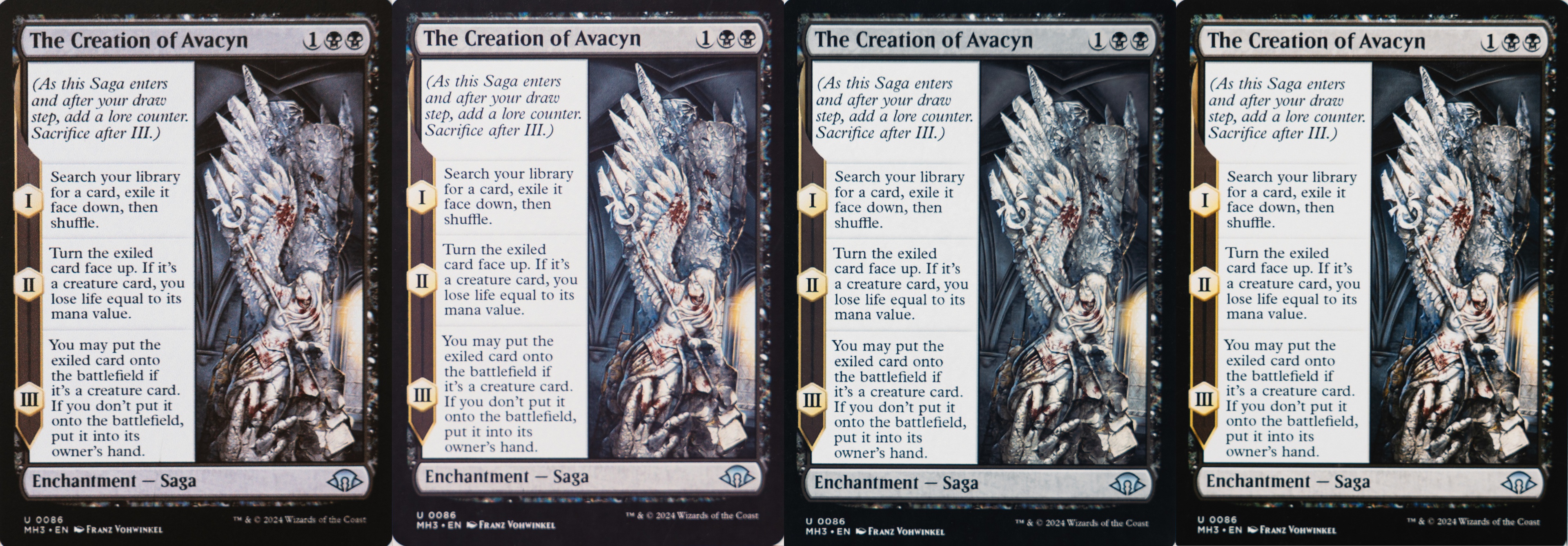 |
| Koala Glossy Photo Paper | 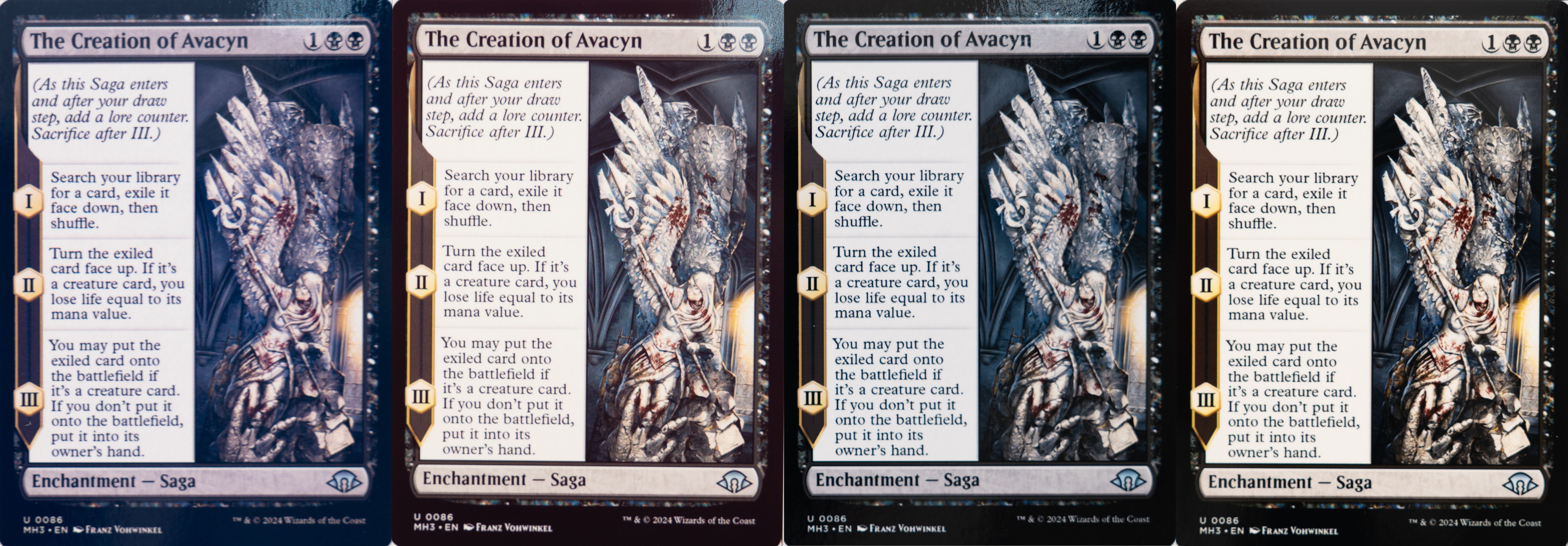 |
Comparison of The Creation of Avacyn printed on Koala photo paper between affordable printers and high-end photo printers
(From left to right: Epson ET-2980, Canon G3270, Epson ET-8550, Canon PRO-200S)
One of the main advantages of high-end photo printers is their ability to use dye-based black ink on photo paper. This results in deeper, more neutral blacks compared to affordable printers, which often rely on a mix of color inks to reproduce black. Under magnification, this difference is clearly visible, with high-end printers producing true black areas instead of composite tones.

(From left to right: Epson ET-2980, Canon G3270, Epson ET-8550, Canon PRO-200S)
Text also appears slightly sharper on high-end printers. While the difference is subtle to the naked eye, it becomes more apparent under magnification, particularly on glossy paper. Among the tested models, the Epson ET-2980 produced the softest text, while the Canon PRO-200S delivered the sharpest results.
| Koala Matte Photo Paper |  |
| Koala Glossy Photo Paper |  |
Comparison of the text of The Creation of Avacyn between a real MTG card and prints from affordable printers and high-end photo printers, as seen under the microscope.
(From left to right: Epson ET-2980, Canon G3270, Epson ET-8550, Canon PRO-200S, Real MTG Card)
Two main factors contribute to this difference. First, high-end printers can use dedicated black ink for text on photo paper, whereas affordable models often rely on composite black, which can create a slight halo effect around letters and reduce edge definition. Second, droplet size plays a role. Printers like the Epson ET-2980 use larger droplets, which limit precision and lead to minor ink spread at the edges of fine details. Together, these factors result in more defined edges in both text and artwork. This is particularly noticeable when zooming in on fine details, such as the facial features in The Creation of Avacyn, where high-end printers produce cleaner, more precise lines.
| Koala Matte Photo Paper |  |
| Koala Glossy Photo Paper |  |
Comparison of the artwork of The Creation of Avacyn between a real MTG card and prints from affordable printers and high-end photo printers, as seen under the microscope.
(From left to right: Epson ET-2980, Canon G3270, Epson ET-8550, Canon PRO-200S, Real MTG Card)
The Quality Gain Is Real, But Small
High-end photo printers deliver better-looking proxies, but the improvement is relatively small compared to their significantly higher cost. In our tests, affordable printers produced results that were already very good, making the jump to premium models less compelling for most users.
Proxies printed on high-end models appeared more refined, with slightly sharper details and deeper blacks that improved contrast and made the artwork stand out more. However, affordable printers still produced prints that were easy to read and visually appealing, with strong overall image quality. In particular, the Canon G3270 performed surprisingly well, producing results that were not far off those from the Epson ET-8550. With minor adjustments such as brightness, contrast, or color correction, it may even be possible to further reduce the gap between affordable and high-end printers.
Given how close the results are, the significant price difference may not be justified for everyone. While high-end printers offer measurable improvements, the gain in quality isn't proportional to the increase in cost.
We also observed that paper type can influence certain print characteristics. For example, on the Epson ET-2980, ink droplets appeared larger on matte paper than on glossy paper, which can slightly affect edge sharpness and texture. While these differences were subtle in our testing, they suggest that paper selection might still play a role in the final appearance of prints, particularly on more affordable printers.
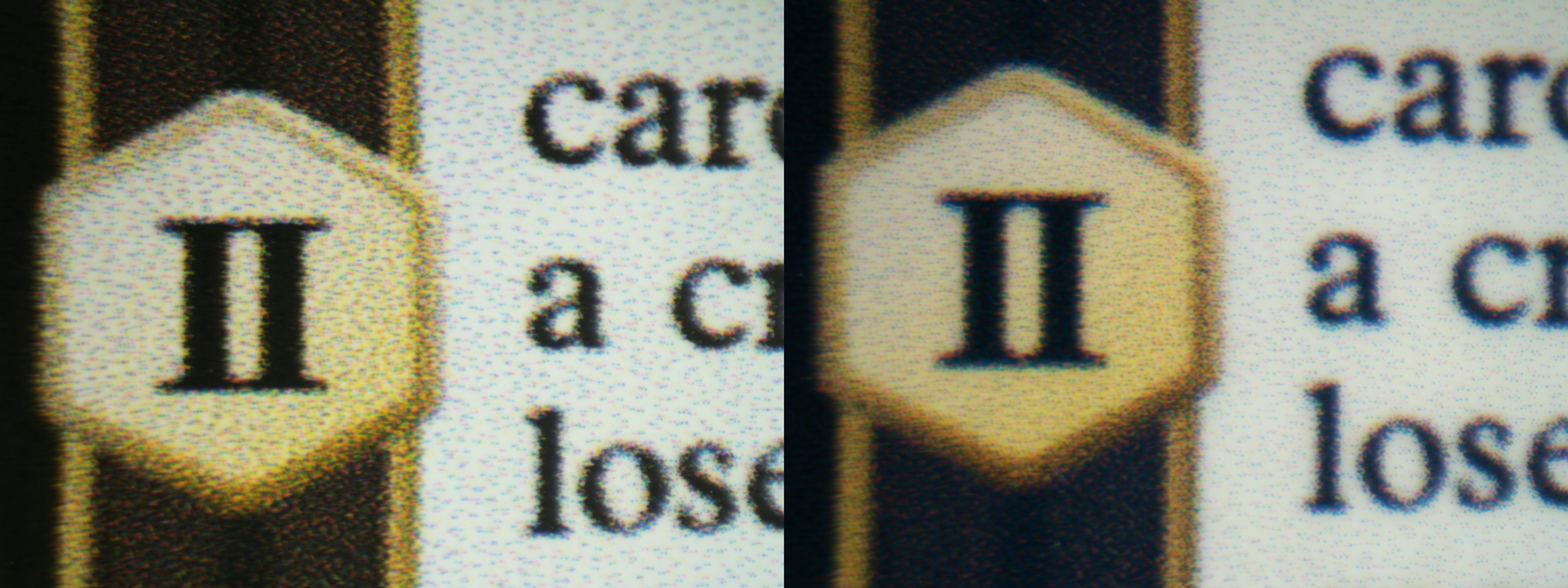
(Left: Koala matte photo paper
Right: Koala glossy photo paper)
The Impact Of Paper On Print Quality
Paper type and brand have a relatively small impact on the overall visual quality of printed proxies, with most differences relating more to texture, reflectivity, and overall feel than to sharpness or detail. In our tests, most photo papers delivered very similar results, especially on high-end printers. That said, paper choice can have a slightly greater impact on more affordable printers. Using manufacturer-matched paper may provide minor improvements in color accuracy and sharpness, while high-end photo printers tend to produce consistently high-quality results regardless of the paper used.
Photo paper comes in a variety of finishes beyond just glossy and matte. For example, luster and satin papers fall between the two, offering a semi-gloss finish with a slight texture that helps reduce reflections. To evaluate how paper brand, finish, and quality affect proxy print quality, we tested five different types of paper:
- Koala Double-Sided Matte Photo Paper (48 lb – 180 gsm)
- Koala Ultra Premium Glossy Photo Paper (66 lb – 250 gsm)
- Koala Ultra Premium Photo Paper Satin (72 lb – 270 gsm)
- Epson Ultra Premium Photo Paper Glossy (79 lb – 297 gsm)
- Canon Photo Paper Pro Luster (69 lb – 260 gsm)
When comparing Koala satin, matte, and glossy photo papers, we didn't observe a meaningful difference in print quality. In this case, the choice largely comes down to personal preference. Glossy papers offered more vibrant colors, while satin and luster finishes reduced reflections. While the paper finish doesn't significantly impact the level of detail or sharpness, differences in texture and reflectivity can affect how visually pleasing the print appears.
As expected, prints from high-end photo printers still offer higher overall quality than those from more affordable models. However, the affordable printers performed well, producing proxies that look very good on their own.
| Koala Matte Photo Paper | 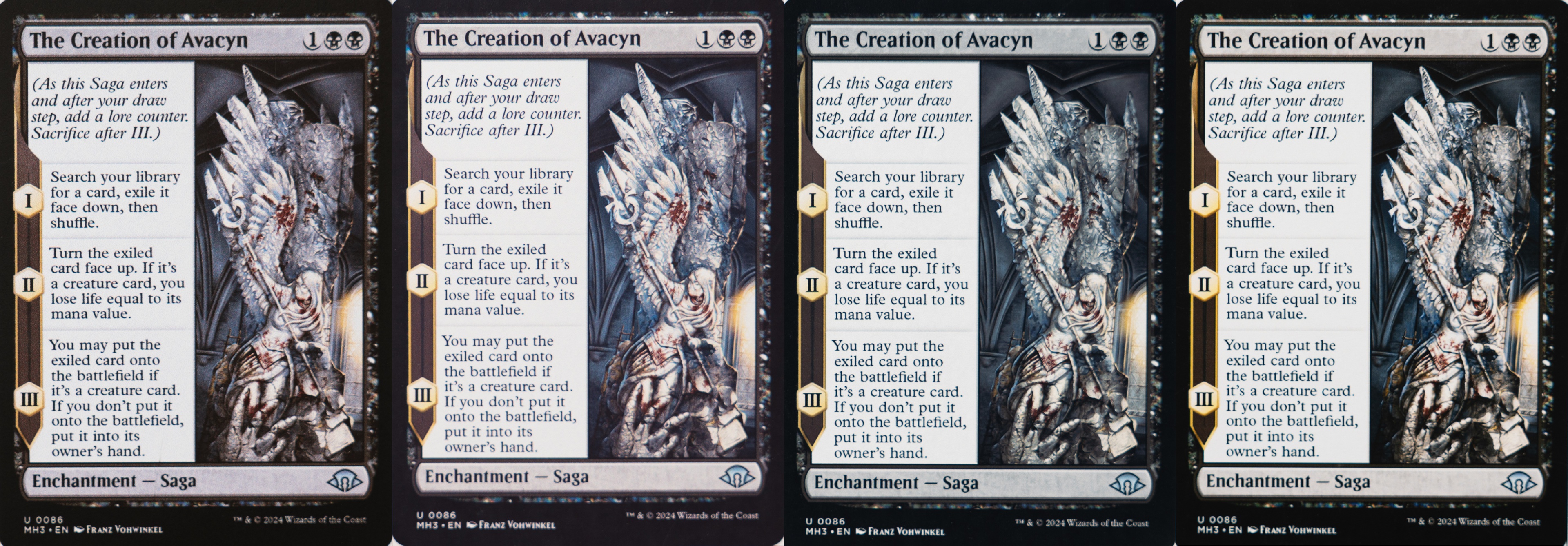 |
| Koala Glossy Photo Paper | 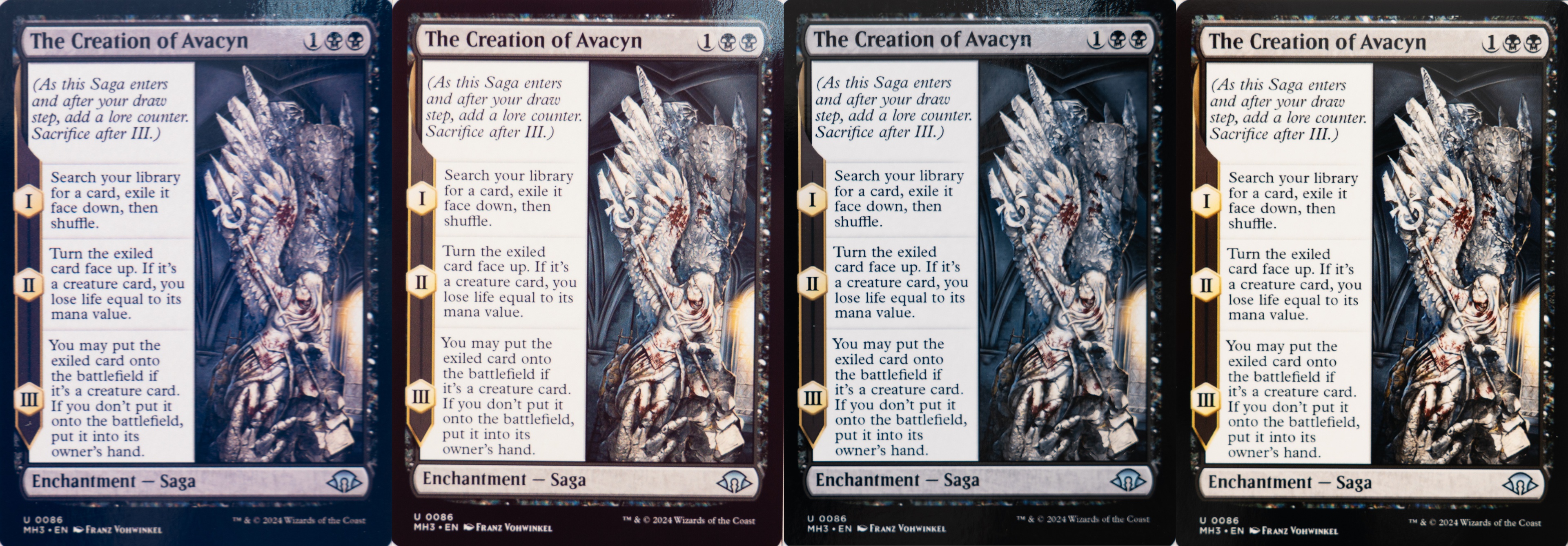 |
| Koala Satin Photo Paper | 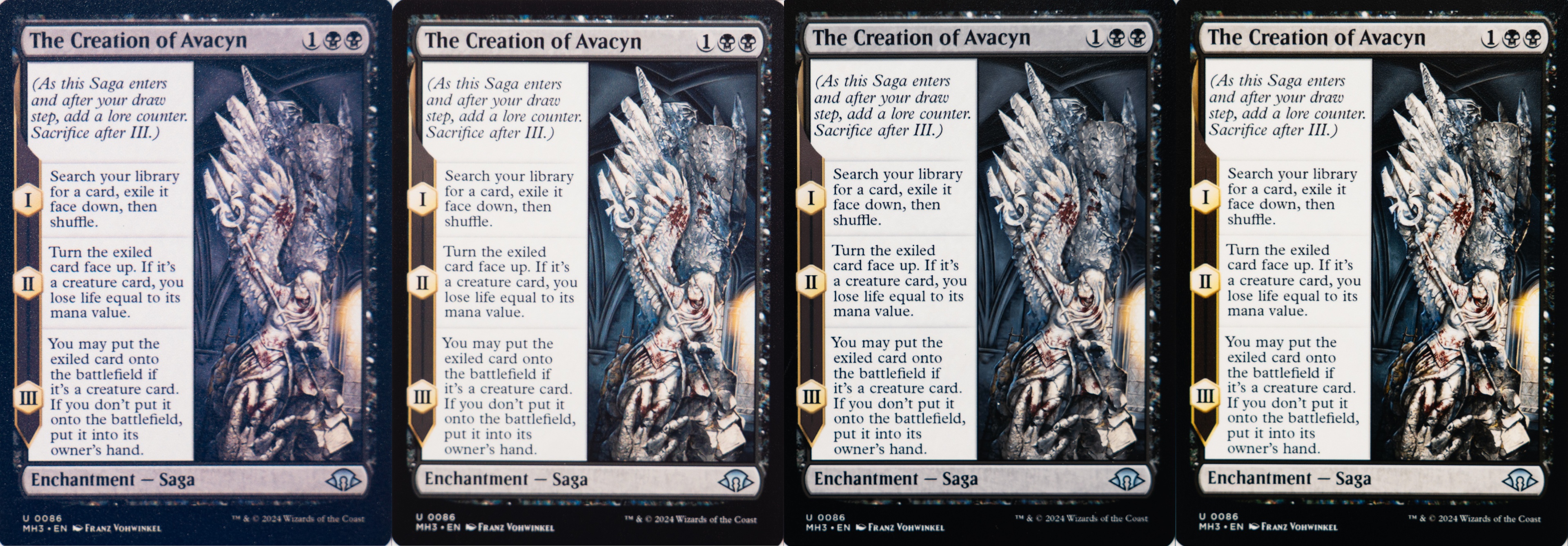 |
| Epson Glossy Photo Paper | 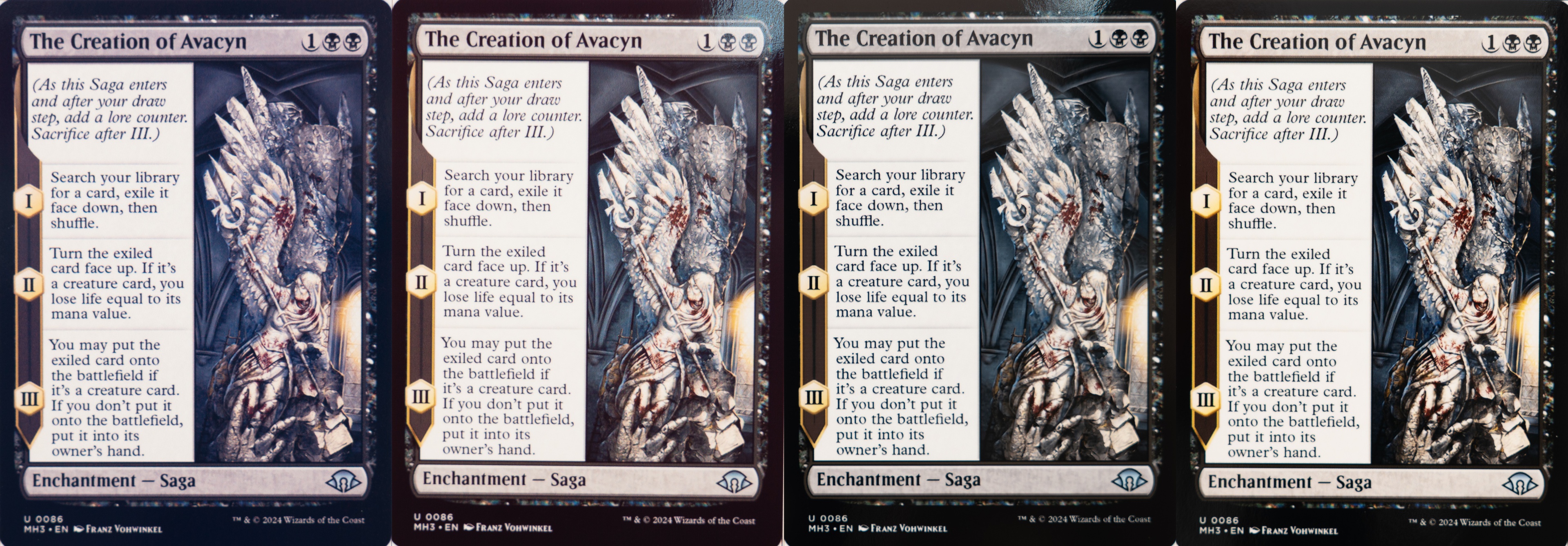 |
| Canon Luster Photo Paper | 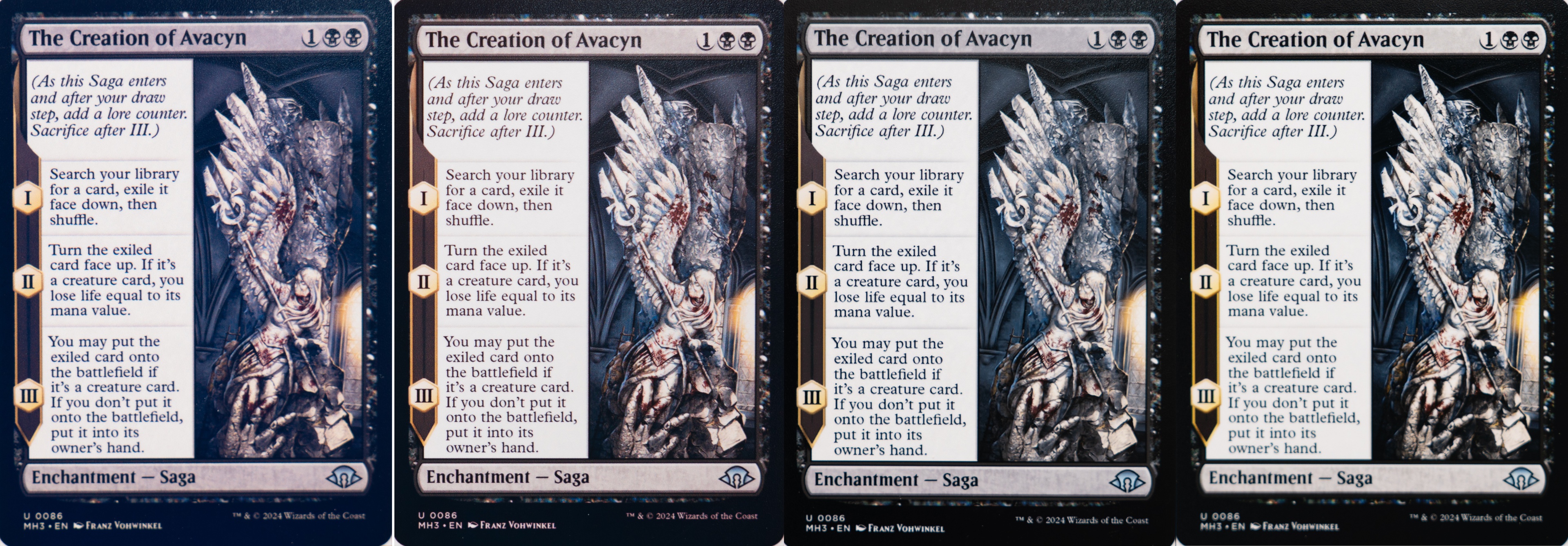 |
Comparison of The Creation of Avacyn printed with affordable printers and high-end photo printers.
(From left to right: Epson ET-2980, Canon G3270, Epson ET-8550, Canon PRO-200S)
There was a slight increase in sharpness on the Canon G3270, with edges and lines appearing marginally more defined under the microscope when comparing the artwork on Koala satin paper to Canon luster paper, but these differences remain minor in practice.
| Koala Satin Photo Paper |  |
| Canon Luster Photo Paper |  |
Comparison of the artwork of The Creation of Avacyn between prints from affordable printers and high-end photo printers, as seen under the microscope.
(From left to right: Epson ET-2980, Canon G3270, Epson ET-8550, Canon PRO-200S)
We observed a similar trend with Epson printers when comparing prints on Koala glossy paper versus Epson glossy paper. Overall, the differences were minimal. However, on the Epson ET-2980, the bluish tint seen on Koala paper was less noticeable when using Epson's own paper. This suggests slightly better color accuracy when using manufacturer-matched paper on more affordable printers, particularly when reproducing blacks with dye-based color inks.
We didn't observe the same effect on the higher-end Epson ET-8550, likely because it uses a dedicated dye-based black ink, which reduces reliance on composite black and results in more consistent output regardless of the paper used.
Surprisingly, across all printers, we observed that the card artwork appeared slightly more yellowish for the proxies printed on the Epson glossy photo paper, indicating that, even though it's the same finish, the two glossy papers have different color profiles. The difference is subtle, though. As mentioned previously, doing some color correction could mitigate this effect.
| Koala Glossy Photo Paper |  |
| Epson Glossy Photo Paper |  |
Comparison of the artwork of The Creation of Avacyn between prints from affordable printers and high-end photo printers, as seen under the microscope.types
(From left to right: Epson ET-2980, Canon G3270, Epson ET-8550, Canon PRO-200S)
When selecting paper for printing proxies, there's no single 'right' choice as long as the paper is compatible with your printer. Our results show that using a good-quality photo paper is generally enough to produce good-looking proxies. Beyond that, several factors come into play when deciding what works best for you. Some users may prioritize thickness, while others may care more about the texture or overall feel. Additionally, many people choose to laminate their proxies to increase rigidity, thickness, or durability, which further influences the final result. With all these variables, it's difficult to identify a single 'perfect' paper.
For those aiming to replicate the feel of real cards as closely as possible, thicker and more rigid paper may seem ideal. However, papers that match the thickness and stiffness of actual playing cards are typically not compatible with inkjet printers and are instead designed for use with laser printers.
Inkjet vs. Laser Printing For Proxies
For printing proxies, inkjet printers generally produce better-looking results than laser printers. They offer higher image quality, more accurate colors, and better compatibility with photo papers. However, laser printers provide a unique advantage: the ability to print on black core TCG cardstock, which closely replicates the feel of real playing cards.
As a result, the choice between the two comes down to priorities. Inkjet printers are the better option for visual quality, while laser printers are better suited for users who prioritize card thickness and physical feel.
Inkjet printers are particularly well-suited for arts and crafts, as they support a wide range of media (matte, glossy, satin, luster, vinyl, etc.) and produce vibrant colors with smooth gradients. Tank-based models also offer high page yields, making them cost-effective over time.
Laser printers, on the other hand, use toner instead of liquid ink, making them less prone to clogging and similarly efficient for high-volume printing. However, they don't perform well on traditional glossy photo paper, as the toner sits on the surface rather than being absorbed.
We decided to use two laser printers and print proxies on two different types of paper that were compatible with them:
- Koala Double-Sided Matte Photo Paper (48 lb – 180 gsm)
- Black Core TCG Card Stock (330 gsm)
We used the Koala matte photo paper for comparison purposes with inkjet printers. We selected the following laser printers:
On Koala matte photo paper, the laser printers did not perform as well as the inkjet models. Colors appear more faded, and blacks are less uniform. In terms of text quality, the Canon performed reasonably well, producing readable and fairly sharp text. The Brother, however, showed softer, blurrier text by comparison.
| Gideon, Ally of Zendikar (300 DPI) | 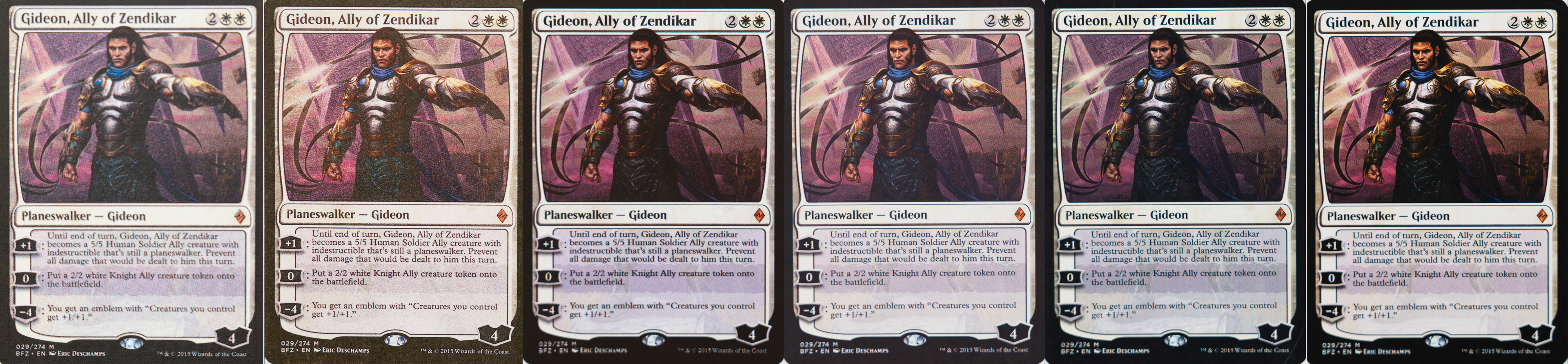 |
| The Creation of Avacyn (800 DPI) | 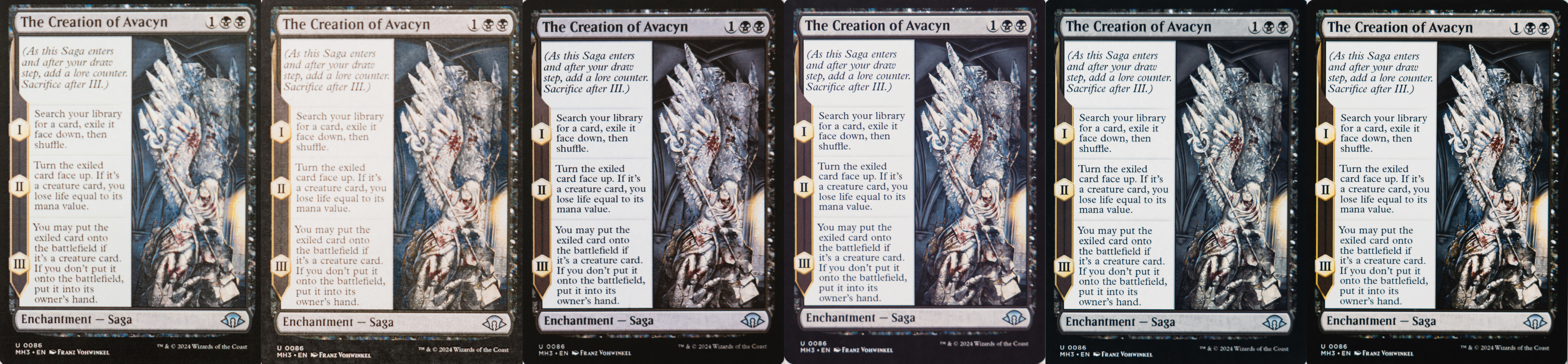 |
Comparison of two cards printed on Koala matte photo paper with laser printers or inkjet printers.
(From left to right: Brother MFC-L8905CDW, Canon MF665Cdw, Epson ET-2980, Canon G3270, Epson ET-8550, Canon PRO-200S)
For proxies printed on black core TCG cardstock, overall print quality was lower, but the feel and thickness were very close to real cards. The Canon MF665Cdw still produced decent results, while the Brother MFC-L8905CDW was more disappointing in comparison.
Many users choose to laminate their proxies to increase thickness, rigidity, and durability. One advantage of using a laser printer with black core TCG cardstock is that it can eliminate the need for lamination altogether. If you intend to play with the cards, this combination can closely replicate the feel of authentic cards.
One important consideration is ensuring that your printer can handle the thickness of the paper. For example, prints from the Canon MF665Cdw showed slight creasing along the edges (notably on The Creation of Avacyn). While the printer was able to feed the paper, the rollers appear to have caused minor damage. According to the manufacturer's specifications, the Canon MF665Cdw supports a maximum paper weight of 200 gsm, so this cardstock exceeds its recommended limit. Despite this, the printer still completed the prints without jamming.
| Gideon, Ally of Zendikar (300 DPI) | 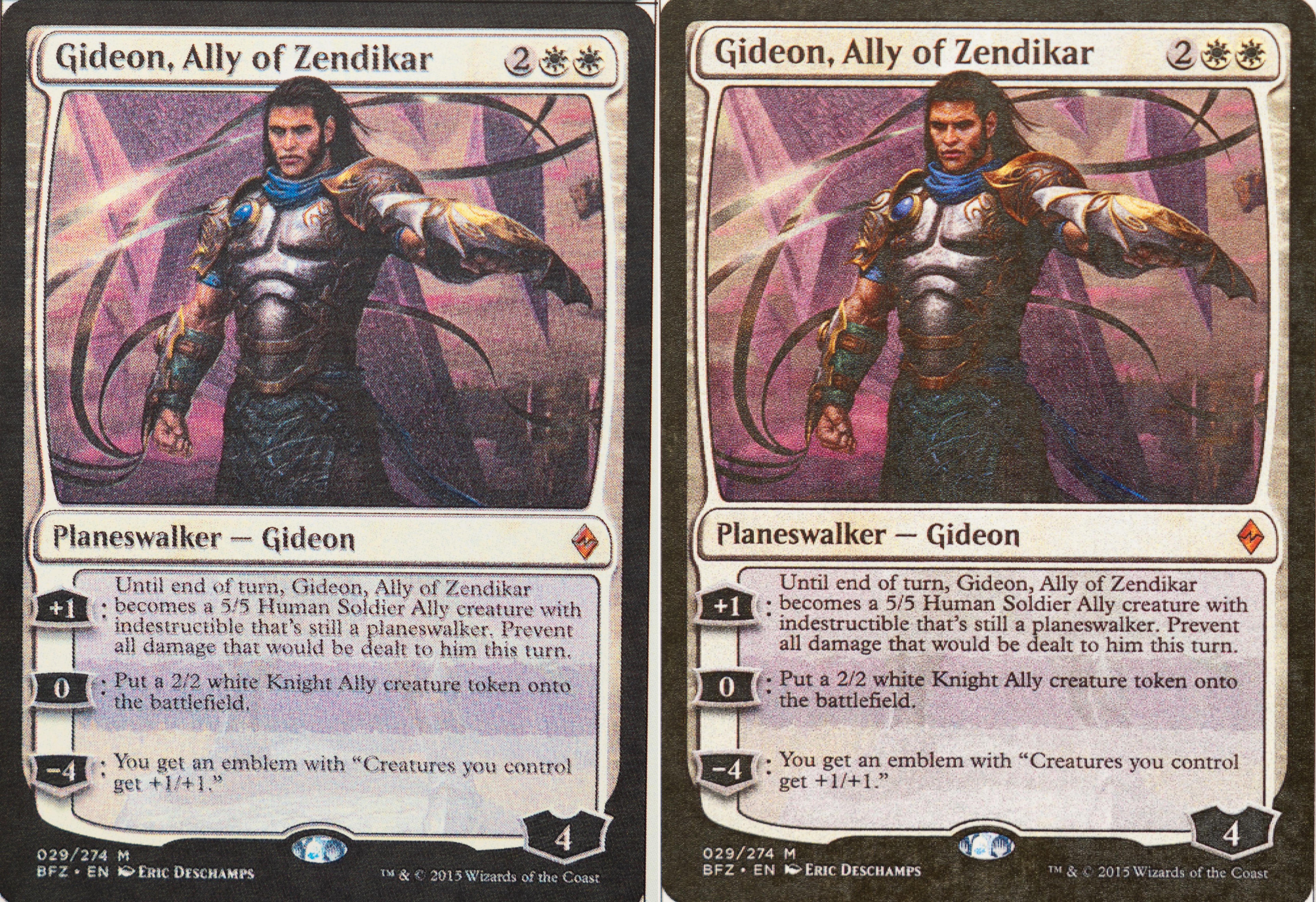 |
| The Creation of Avacyn (800 DPI) | 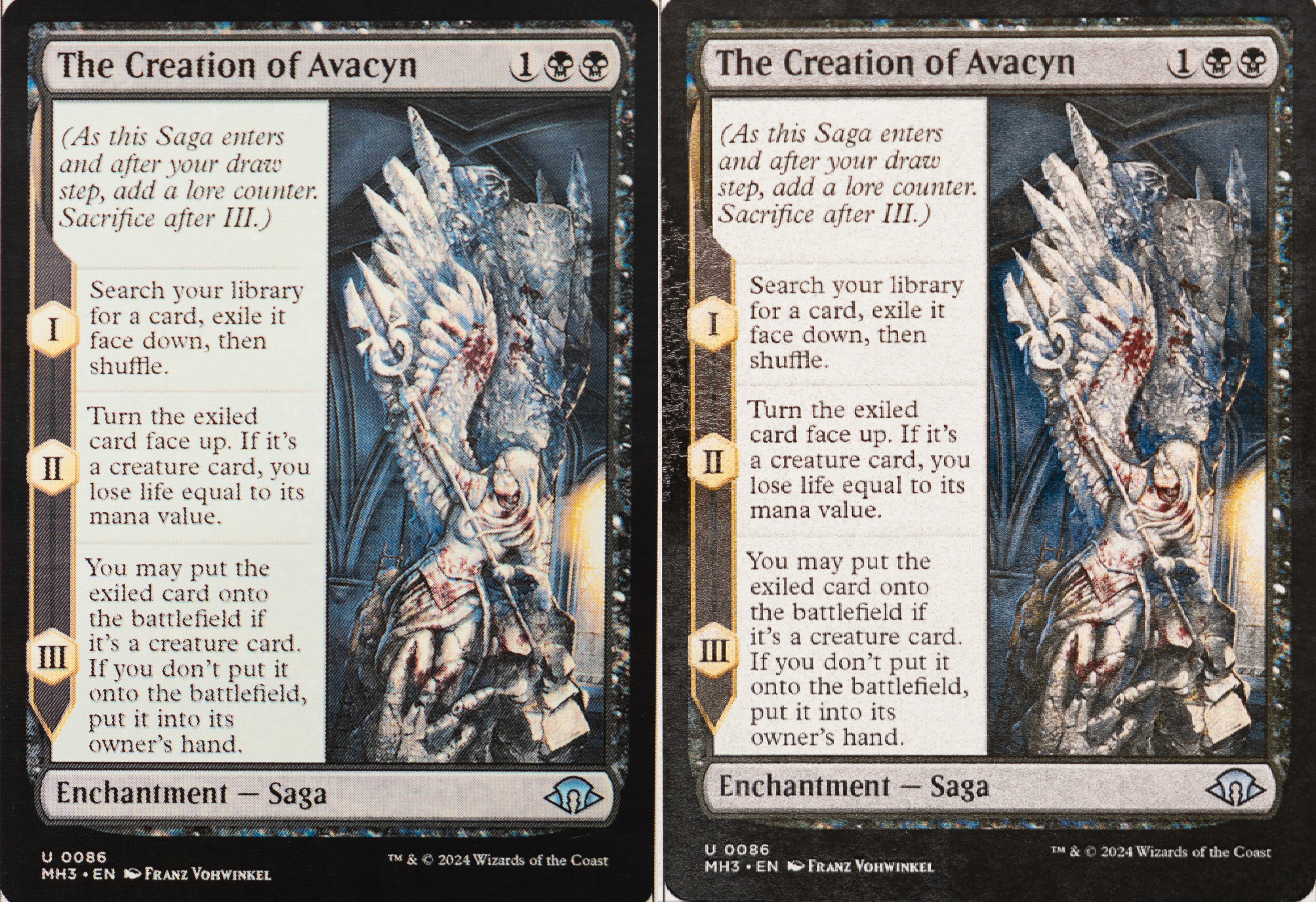 |
Comparison of two cards printed on black core TCG cardstock with laser printers.
(From left to right: Brother MFC-L8905CDW, Canon MF665Cdw)
Even though laser printers can use black core cardstock, the resolution of the source artwork is even more important when printing proxies with these printers. When comparing the text on The Creation of Avacyn (800 DPI) to Gideon, Ally of Zendikar (300 DPI), the difference in sharpness is clearly visible, an effect that is even more pronounced on the Brother MFC-L8905CDW. Overall, laser printers appear to be less forgiving of lower-resolution artwork, making DPI a critical factor in achieving good print quality.
| Gideon, Ally of Zendikar (300 DPI) | 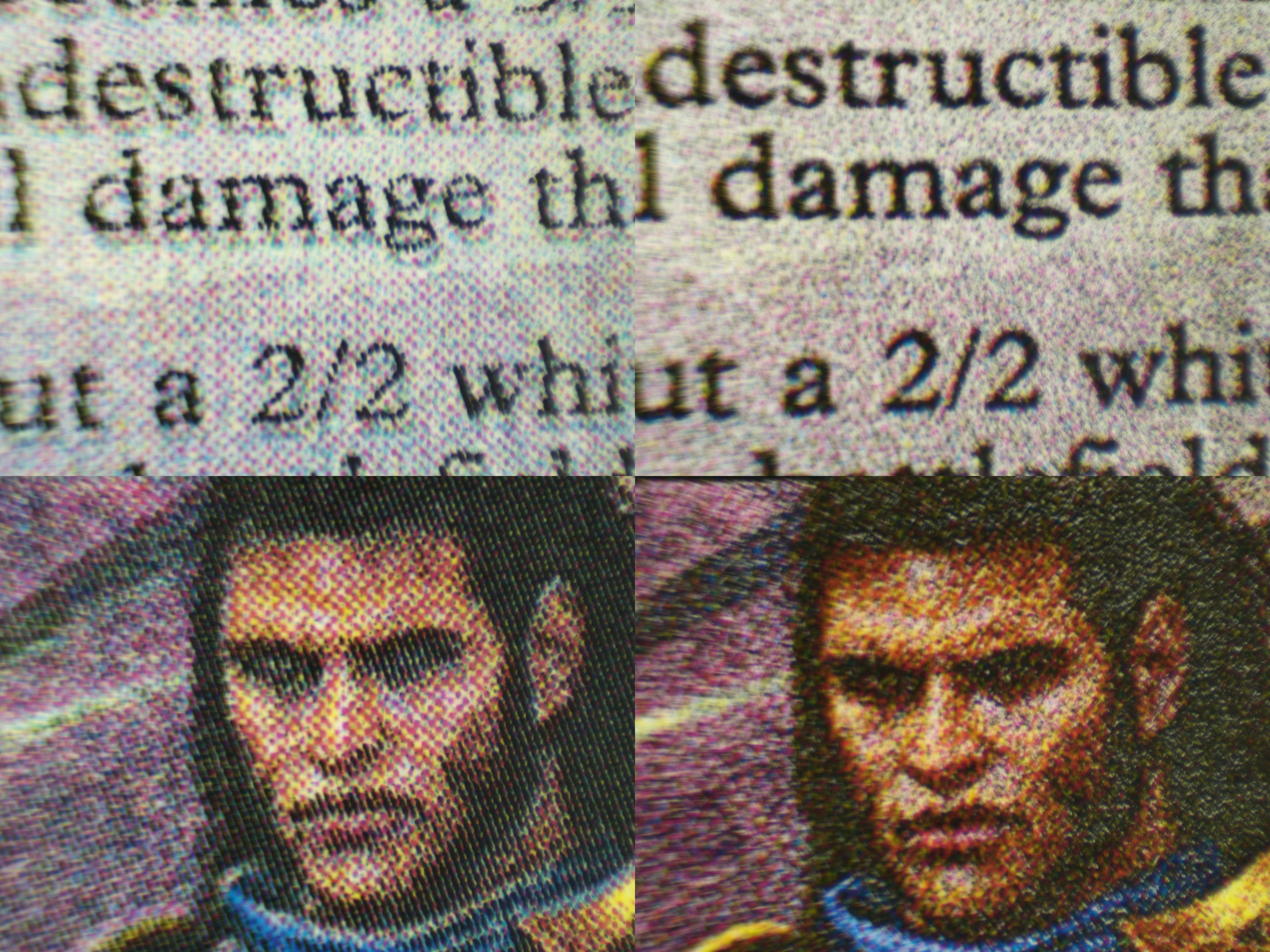 |
| The Creation of Avacyn (800 DPI) |  |
Text and artwork of two cards printed on black core TCG card stock with different laser printers.
(From left to right: Brother MFC-L8905CDW, Canon MF665Cdw)
Laser printers form images using a fixed grid of toner dots and rely heavily on dithering (patterns of dots) to reproduce shades and fine details. Inkjet printers, on the other hand, can vary droplet size and placement, allowing for smoother gradients and edge transitions. With high-resolution images (e.g., 800 DPI), laser printers have enough detail to produce very fine dithering patterns, resulting in sharp output. However, with lower-resolution images (e.g., 300 DPI), there isn't enough detail available, so the printer must rely more heavily on visible dot patterns. This makes text appear softer and reduces detail in the artwork. This effect is less noticeable on inkjet printers, which are generally more forgiving with lower-resolution content due to their ability to blend edges more smoothly.
Overall, inkjet printers remain the better choice for printing proxies, thanks to their broader paper compatibility and their ability to produce smoother results with lower-resolution artwork. Laser printers, while more limited in image quality, especially with lower DPI artworks, offer a unique advantage, which is the ability to print on black core TCG cardstock. This makes them a compelling option for users who prioritize the physical feel and authenticity of the cards over visual fidelity.
To Print Great-Looking Proxies, Use High-Resolution Card Images
To achieve the best-looking proxies, using high-resolution artwork, ideally 600 DPI or higher, is essential. At this resolution, prints generally look sharp across all printer types, including laser models, making low-detail output rarely an issue. However, some cards are only available in lower resolutions, as was the case with Gideon, Ally of Zendikar. In these situations, inkjet printers tend to produce better results by smoothing edges and preserving more detail, with high-end photo printers offering a slight additional improvement. Whenever possible, selecting higher-DPI artwork remains the most effective way to ensure good print quality.
| Gideon, Ally of Zendikar (Text) |  |
| Gideon, Ally of Zendikar (Artwork) |  |
Comparison of Gideon, Ally of Zendikar printed on Koala matte photo paper, prints from laser printers, affordable printers, and high-end photo printers, as seen under the microscope.
(From left to right: Brother MFC-L8905CDW, Canon MF665Cdw, Epson ET-2980, Canon G3270, Epson ET-8550, Canon PRO-200S, Real MTG Card)
Conclusion
For most MTG proxy makers, an affordable inkjet printer is the best starting point. In our tests, entry-level tank printers produced readable, good-looking proxies when paired with compatible photo paper and high-resolution artwork. High-end photo printers produced better results, especially in blacks, contrast, and fine detail, but the improvement was relatively small compared to the higher cost.
Laser printers are less impressive for image quality, but they have one important advantage: they can print on black core TCG cardstock, which better matches the thickness and feel of real cards. That makes laser printing a better option for users who care more about physical feel than visual fidelity.
Overall, before buying a more expensive printer, start with the printer you already have, use good paper, and prioritize high-DPI artwork.