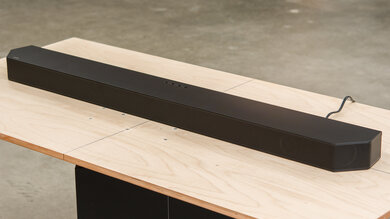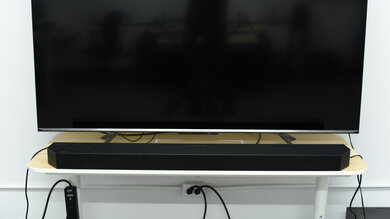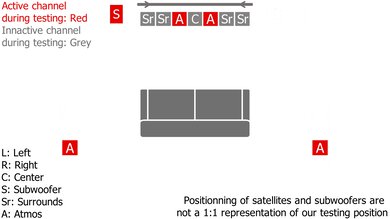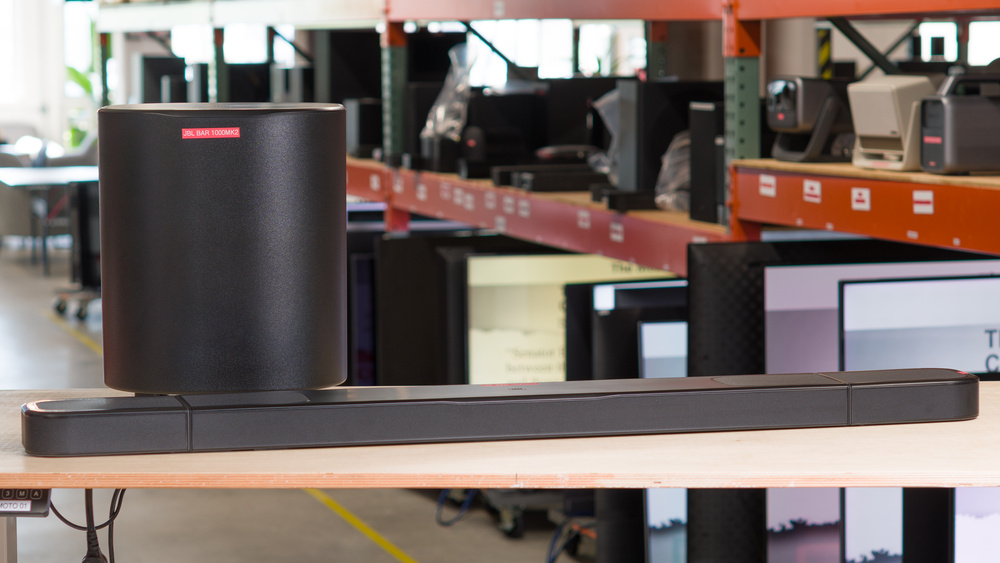
The JBL Bar 1000MK2 is the 2025 successor to the JBL Bar 1000. This updated 7.1.4 soundbar continues the original's novel design, allowing you to set it up like a conventional bar plus subwoofer. Alternatively, you can remove the completely wireless satellites that bookend the bar and place them in the room for a more immersive surround setup.
Our Verdict
The JBL Bar 1000MK2 is great for mixed usage. The soundbar supports all the most popular audio formats with an impressive suite of three HDMI In ports, eARC, Optical, and nearly every wireless format to maximize your media options. It boasts room correction, seven-band EQ, sound modes, and channel adjustments to modify the default full sound with plenty of low-end and warm treble. Its flexible design is a throughline with removable, truly wireless satellites. That said, the convenience of wireless satellites comes with the trade-off of needing to charge them either by docking them on the bar or with USB-C connections. If you're looking for HDMI 2.1 for video passthrough, it doesn't quite meet the requirements either. The bar also treats L/R channels and rear satellite channels as the same with Dolby Digital and Dolby Digital Plus content.
Versatile and extensive wired and wireless connectivity.
Room correction and graphic EQ available.
Great dynamics performance.
Truly wireless satellites don't even require power cables.
Satellites exhibit latency compared to the soundbar and sub with Dolby Atmos.
Satellites need recharging, which could be a pain for marathon sessions.
Dolby Atmos can seem overly compressed and lacks obvious verticality.
The JBL Bar 1000MK2 is impressive for watching TV and consuming dialogue-heavy content. Its default frequency response suits all sorts of TV genres, adding extra bassy weight to suspenseful thrillers and rendering speech from period dramas with clarity. The bar supports all common audio formats found on streaming services, as well as your Blu-rays and old DVDs, with low latency delivered via eARC, HDMI In, or Optical. Useful sound modifications include room correction, EQ, sound modes like 'Pure Voice,' night modes, and channel level adjustments.
Versatile and extensive wired and wireless connectivity.
Room correction and graphic EQ available.
Great dynamics performance.
Truly wireless satellites don't even require power cables.
Satellites exhibit latency compared to the soundbar and sub with Dolby Atmos.
Satellites need recharging, which could be a pain for marathon sessions.
Dolby Atmos can seem overly compressed and lacks obvious verticality.
The JBL Bar 1000MK2 is very good for music. It supports plenty of wireless formats, including Spotify, Apple AirPlay 2, and Roon. Its stereo soundstage offers a natural stereo soundstage free of gaps. Its room correction and sound modes reproduce your music's deep bass oomph, and if you're willing to tinker, the app's EQ and level adjustments let you tailor the listening experience more. The tuning's mid-range is clear with a bit of presence, and the treble sounds warm. It has very little compression, preserving your audio's liveliness and dynamics. You can leave the satellites connected to the bar, or remove them for a more immersive surround experience by using them as rear speakers. You can even use the battery-powered satellites by themselves in 'Broadcast' mode as Atmos-equipped speakers in another room to listen to music. That said, Dolby Digital and Dolby Digital Plus content, even in stereo, will play from the satellites, which some people might dislike.
Versatile and extensive wired and wireless connectivity.
Room correction and graphic EQ available.
Great dynamics performance.
Truly wireless satellites don't even require power cables.
Satellites exhibit latency compared to the soundbar and sub with Dolby Atmos.
Satellites need recharging, which could be a pain for marathon sessions.
Dolby Atmos can seem overly compressed and lacks obvious verticality.
The JBL Bar 1000MK2 is very good for watching movies. It's well-tuned, delivering blockbuster films with ample bass rumble and fairly balanced mids with a somewhat warm treble. The 7.1.4 bar supports every popular audio format with a competent companion app and remote packed with 'Night' and 'Pure Voice' modes and EQ to enhance your experience. Besides that, the connectivity is comprehensive, eARC, three HDMI Ins, and Optical. You can use the detachable satellites to create a more enveloping sound with Atmos drivers. One possible downside is that the bar processes Dolby Digital and Dolby Digital Plus by sending left- or right-panned audio to the bar and the rear satellites, rather than treating the satellites as discrete channels. Although this means you get sound from all around you, it diminishes the movement of sound effects intended to move from one place to another. The battery-powered satellites also introduce their own latency, which can't be compensated for in the settings, but this won't necessarily bother everyone.
Versatile and extensive wired and wireless connectivity.
Room correction and graphic EQ available.
Great dynamics performance.
Truly wireless satellites don't even require power cables.
Satellites exhibit latency compared to the soundbar and sub with Dolby Atmos.
Satellites need recharging, which could be a pain for marathon sessions.
Dolby Atmos can seem overly compressed and lacks obvious verticality.
Check Price
Differences Between Sizes And Variants
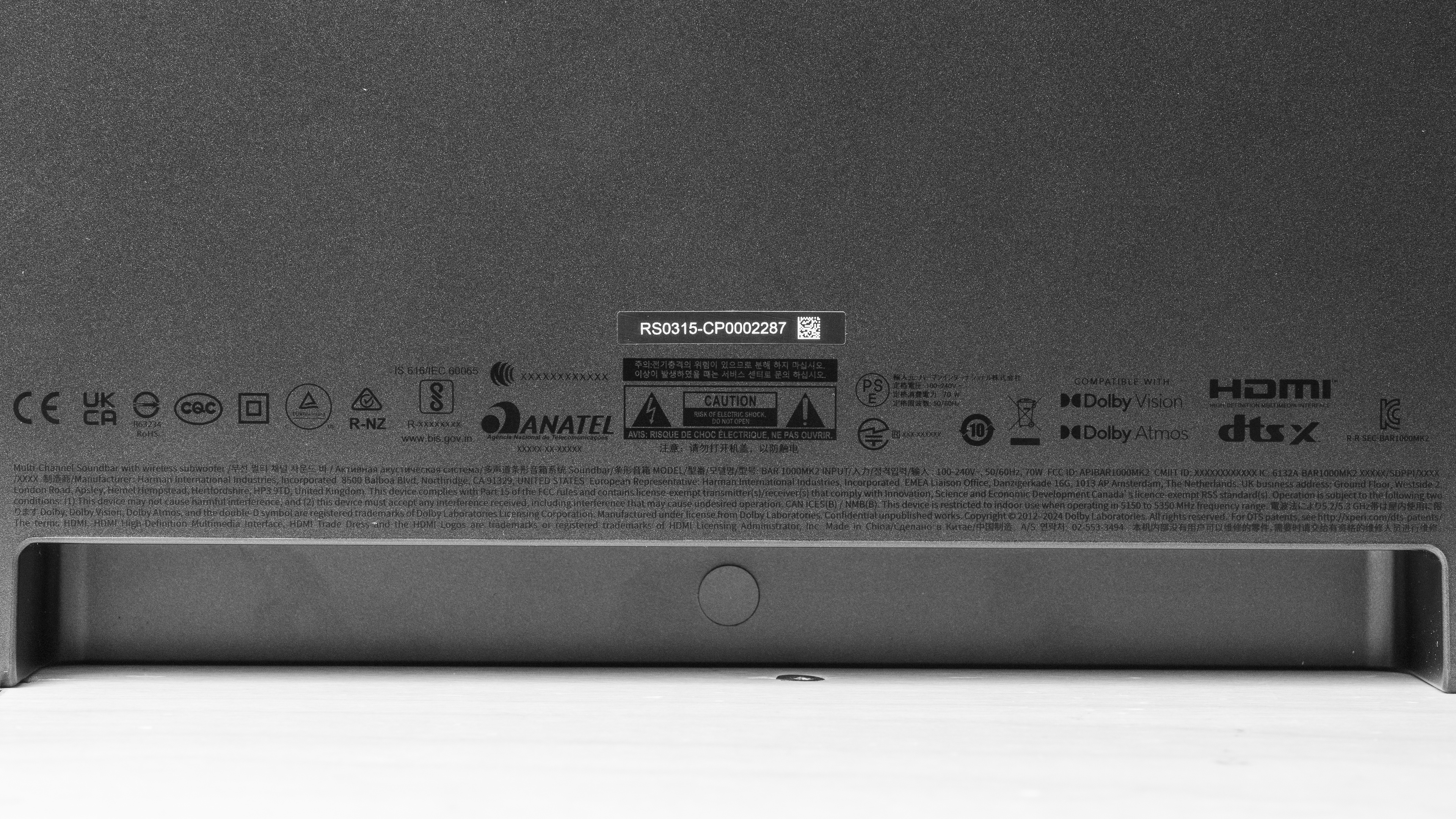
The JBL 1000MK2 comes in one color, 'Black.' You can view the label for the soundbar and one of the satellites. If you encounter another variant, please let us know in the comments, and we'll update our review.
Popular Soundbar Comparisons
It's quite unusual to see a semi-modular soundbar configuration like the JBL Bar 1000MK2, aside from the brand's own models, such as the JBL Bar 1000, the larger 11.1.4 JBL Bar 1300X, and its replacement, the 2025 JBL Bar 1300XMK2. Generally, the rest of the soundbar competition uses power cables for the satellites, rather than running off of internal batteries and docking on the bar to recharge or using a USB-C cable and power source, as with the Bar 1000MK2. While convenient in some ways, this design can introduce latency between the satellites and the bar and sub, something rarely encountered with conventional wireless surround speakers.
Soundbars like the LG S95TR and the Samsung HW-Q930D add two extra channels, making them 9.1.4 soundbars, compared to the 7.1.4 Bar 1000MK2. If you can find a place for power cables, you can set and forget the LG or Samsung satellites. However, as far as pure connectivity is concerned, the JBL includes three full HDMI In ports compared to the lone HDMI In available on the LG and Samsung models, making the JBL a more versatile entertainment hub.
If you're still debating what kind of bar you need, check out the best soundbars, the best Dolby Atmos soundbars, and the best soundbars for movies.
The Samsung HW-Q990F is a superior soundbar to the JBL Bar 1000MK2, although they each have distinct advantages. The Samsung offers a better default tuning, a higher-end build, greater Atmos verticality, and a higher spec'd 2.1 HDMI In. That said, the JBL has a unique design that allows you to use it as a bar with a sub, or remove the ends of the bar to use as satellites. It offers an impressive three HDMI In ports, though they have lower bandwidth than the Samsung's two. It also nearly matches the Samsung with regard to most tuning features like room correction and EQ. However, it's not as balanced-sounding out of the box, and it blends surround channels with any content panned to the L/R. Atmos content also plays from the satellites with a slight, but noticeable lag. Still, the JBL subwoofer doesn't chuff, even when the volume is pushed, as the Samsung's sub can under heavy bass loads.
Despite a three-year age gap, the JBL Bar 1000MK2 is better than the JBL Bar 1000, but not by a massive stretch. Both are 7.1.4 soundbars with removable satellites. The MK2 has longer-lasting internal batteries in the satellites. It also has better dynamics with less compression and improved surround sound performance. Atmos is more prevalent in the mix with the MK2, with a greater sense of height, but the satellites' Atmos audio is hindered by a latency compared to the rest of the soundbar's audio. The Bar 1000 doesn't seem to suffer from this latency in the satellites with Atmos content, but the Atmos implementation itself isn't as impressive otherwise. Still, it provides similar audio format support and connectivity with a well-tuned bar. Then again, its wired audio latency is higher.
Depending on your home's configuration and viewing habits, you might prefer the Samsung HW-Q800F or JBL Bar 1000MK2. The Samsung has a conventional design of a bar and subwoofer. In contrast, the JBL can either be set up the same way, or you can remove the docked satellites that bookend the bar for a more immersive surround experience. One advantage of the Samsung is that it treats Dolby Digital audio exactly as mixed, and it's a bit more balanced out of the box. Meanwhile, the JBL blends the satellite channels with the respective left or right driver, which impacts tracking sound effects as they move around the stereo field with Dolby Digital audio. Comparing Atmos performance is a bit of a wash: the Samsung is more precise with tracking objects, but since the drivers are only in front of you, it's not as enveloping. Then again, the JBL's satellites deliver Atmos from all around you, but the satellites have a slight latency, which affects the definition of objects. The Samsung has tighter wired latencies, but if you own several gaming consoles, you might like the two extra HDMI In ports on the JBL.
When compared, the JBL Bar 1000MK2 and the JBL Bar 1300X have different strengths, but mostly they share similarities. The Bar 1000 MK2 is newer with a more balanced surround tuning and much better dynamics performance with a higher top output volume. The Atmos effect is more present in the mix. However, it's somewhat hindered by a bit of a lag in the Atmos-equipped satellites, which impacts the definition of 3D objects. The Bar 1300X doesn't have this same latency when handling Atmos, but it's much more subtle in the mix overall by default. Otherwise, it has two extra channels and a very similar tuning. Even so, its compression flattens out the liveliness of trebly sounds, and it doesn't get as loud at max volume. Still, both soundbars use the same app with features like room correction, EQ, voice enhancement, night mode, and channel level adjustments.
Test Results
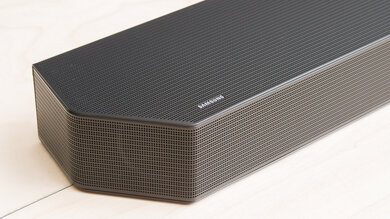
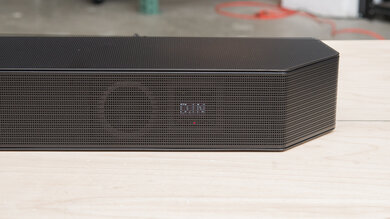
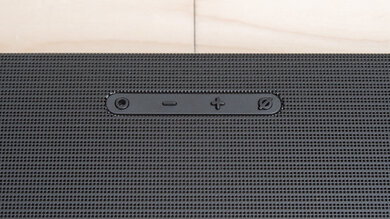
Like the previous generation (JBL Bar 1000), the JBL Bar 1000MK2 offers you the option of connecting the small drivers to the soundbar or using them as satellites, leaving the slim bar under your TV. The sleek, mostly plastic soundbar has rounded edges with fine metal grilles over all the drivers and two vented ports at the back. The top displays the brand logo in the center, which doubles as a status indicator. It uses touch controls, but the plastic is fairly prone to picking up fingerprints. Compared to the JBL Bar 1000, it comes in a darker shade of black, whereas the original looks closer to charcoal.
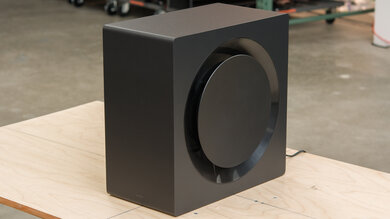
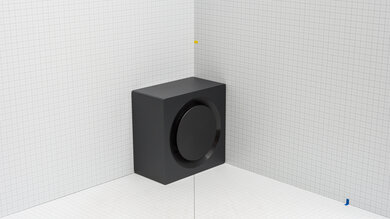
The wireless subwoofer is all black with rounded off corners. Its 10-inch driver faces downwards with a bass port located around the back. The design means you don't have to worry about grille cloths snagging on any pets or rowdy kids.
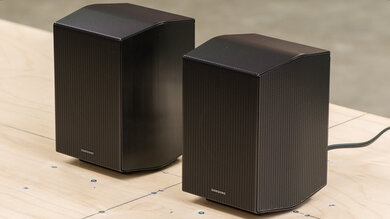
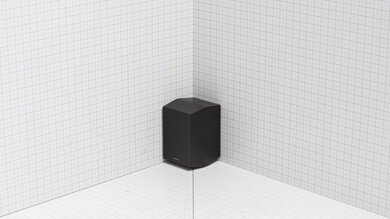
The two slim, detachable satellites are completely wireless and run on internal batteries when they're removed from the central bar. They can charge either via a USB-C connection or when they're connected to the bar. According to the manufacturer, the batteries last 10 hours and take four hours to fully recharge, but how long they last for you depends on variables like output levels. You can manually turn them off/on, too. Most conventional wireless satellites still need to be plugged into a power source, but then again, they don't need charging.
Their look totally matches the bar: black plastic with metal grilles covering the front-facing and upfiring drivers.
The bar is rather compact when the satellites are removed at 90 cm (35.4 inches) and can fit between the legs of some larger TVs. With the satellites docked to the bar, it's wider at 120 cm (47 inches). It's not very tall either, so it won't block the bottom of your TV screen.
The subwoofer is on the larger side, housing a 10-inch driver, though it's not as imposing as the dual 10-inch driver-equipped Nakamichi Shockwafe Wireless. It's a bit shorter than the JBL Bar 1000's sub, and a bit more squat.
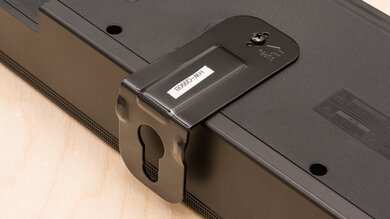
The soundbar includes all the necessary brackets, screws, washers, and wall anchors to mount the bar and the two satellites. Often, satellite mounting hardware is an extra cost, so it's nice to see it included.
The JBL Bar 1000MK2 is very well built. The hefty bar and satellites are made of the same plastic shell with metal grilles protecting drivers spread across the bar. The undersides of the satellites feature anti-slip rubber feet, preventing them from scratching surfaces. Each connection point feels solid.
The subwoofer is mostly plastic with smooth seams and feels pretty dense. It has anti-slip rubber feet to elevate the 10-inch down-facing driver off of even shag carpet
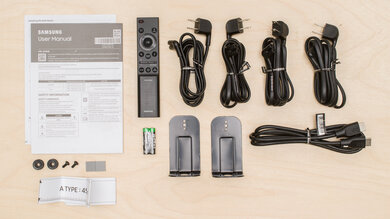
- Quick Start guide
- Safety Instruction and Warranty papers
- Remote with batteries (2x AAA)
- 2x power cables (1.5 m / 4.9 ft)
- HDMI cable (1.2 m / 3.9 ft )
- 2x L-shape wall-mount bracket (for the main bar)
- 2x U-shape wall-mount bracket (for the satellites)
- Template for mounting with screws, nails, anchors, and washers
- 2x side caps for the soundbar (when satellites are detached)
- 2x side caps for satellites (when detached from the soundbar)
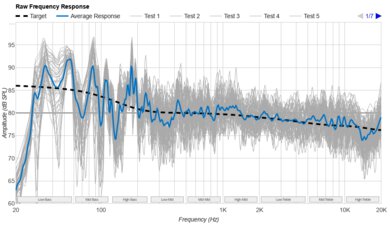
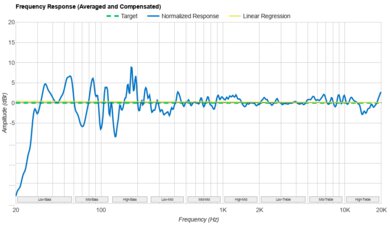
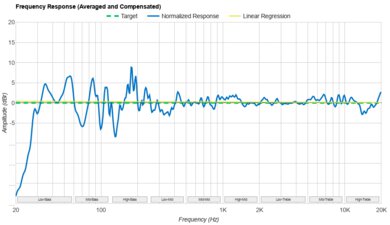
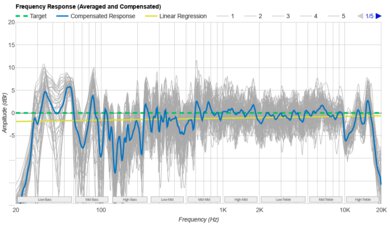
The JBL Bar 1000MK2 has a very good stereo frequency response. We tested it in 'Smart Mode,' with 'Pure Voice' disabled, and Atmos/Surround set to the default 'Mid' setting. We also used the room correction tool.
It's capable of producing a deep low-end extension for a full bass without any chuffing, thanks to the dedicated subwoofer. It has a somewhat mid-forward and warm treble tuning. As a result, rumbly sub-bass elements, such as wobbly bass synths and hefty 808 kicks, are prominent in the mix, while the airiness and sparkle of cymbal hits sound relatively dulled. You can change the tuning within the companion app, too. With 'Smart Mode' off, the frequency response matches our target a little better, seemingly brightening up the treble a touch, but the soundbar defaults to it being on every time you power the bar on. Here's a comparison of sound modes: 'Smart Mode' on, off, and 'Pure Voice.'
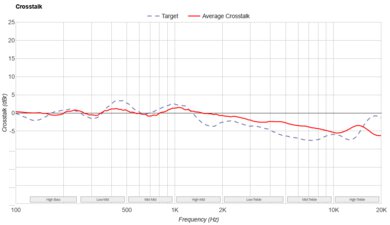
Notably, regardless of the sound mode setting, the bar upmixes stereo content and sends the audio to the rear satellites and all other channels, which appears to be meant to create a more immersive listening experience. However, it may be annoying for some people who prefer to listen to stereo mixes as the creators originally intended without additional processing.
Compared to the last generation, JBL Bar 1000, the bass is more controlled, and the top-end is darker on the MK2 model. The upmixing effect seems less artificial on the MK2, as well.
Basic adjustments are pretty limited: you get a bass slider ('3' is default). However, more nuanced equalization can occur within the app's seven-band EQ, but this moves beyond the scope of a basic preliminary calibration. That said, if you adjust the 8kHz slider to '+4' in the app, it brightens the somewhat dull treble response and brings it a little closer to our target by reintroducing some sparkle.
The JBL Bar 1000MK2 has a good stereo soundstage performance. It's perceived as a few inches wider than the bar's ends. Tracking from side to side is good without obvious holes in the soundstage. However, content panned to the extreme left or right is allocated to the satellite speakers rather than coming from the bar. This seems intentional and is meant to make your audio feel more immersive, but depending on your preferences, it might be unwanted. If you turn off 'Smart Mode,' the soundbar sends more audio to the rear speakers.
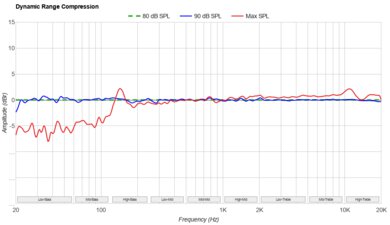
The JBL Bar 1000 MK2 gets pretty loud and demonstrates impressive dynamics. If you push the bar to max volume, limiting occurs in the treble region. If you turn off 'Smart Mode,' there's slightly less dynamic range compression at maximum volume, but otherwise, the performance is comparable to the results with 'Smart Mode' on.
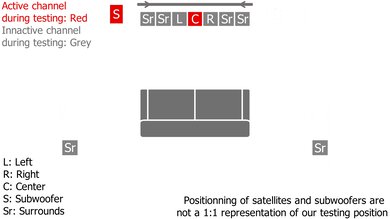
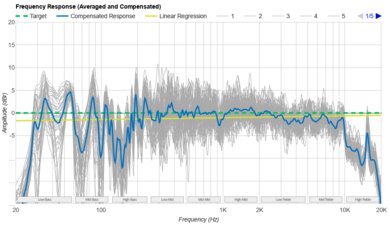
The JBL Bar 1000MK2's center channel has amazing performance. The soundbar uses a discrete center channel, which produces a rather even sound for solid dialogue clarity. Although it has some peaks and dips, in all, the sound is smooth with airiness in the high-treble region. With 'Smart Mode' turned off, the sound trends a bit less full in the low-end.
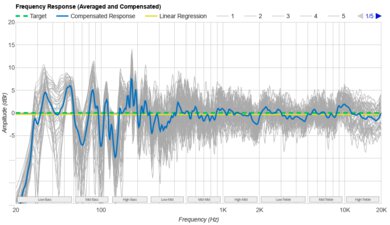
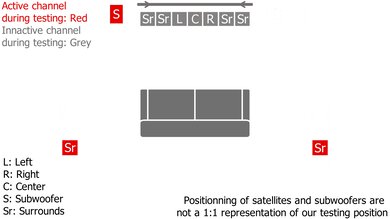
The 5.1 surround performance is very good. However, it's quite bass-heavy with 'Smart Mode' enabled, with a significant dip in the low-mids and a relatively harsh push in the high-mids and low-treble. Sounds like Godzilla's stomps arrive with a burst of boom and thump, while dialogue can still cut through the mix, it might sound a bit uneven with deeper speaking voices.
The surround performance is better with 'Smart Mode' off, and tends to sound fairly bright in comparison.
With 'Smart Mode' on, the JBL Bar 1000MK's Atmos and height drivers are fairly well-tuned, particularly for dialogue (including whispers), and tracking from side to side is good and easy to follow. Depending on the content, trebly sounds can sound convincing or suffer from too much compression, which takes away from the immersive element. Meanwhile, low, rumbling, and growling sound effects play with a good amount of body and boominess.
However, there's not much noticeable height effect, and the bar treats object placement somewhat oddly because the rear speakers don't output channels as loudly, which skews the sound field and impacts definition. We also noticed a slight delay in the audio coming from the wireless satellites. With 'Smart Mode' off, the delay is more prominent, with the upshot of a more even distribution of audio playing back from the satellites. This distracting audio delay isn't observable with the JBL Bar 1000, but the height effect sees a bit of improvement on the MK2.
The JBL Bar 1000MK2 includes a wide range of sound enhancement and customization features. There's a room correction tool, which requires a few steps, including removing the satellites; you can follow the steps using your remote or the app. You get two different types of night modes: one that mutes everything except the satellites. You can also press and hold the 'mute' button on the remote for five seconds, followed by the '-' volume button, to apply a more conventional dynamic range compression effect that levels out quiet and loud sounds. Besides that, you get scope for virtually every other metric: dialogue enhancement ('Pure Voice'), a seven-band EQ, and level adjustment for every channel.
By default, 'Smart Mode' is enabled whenever you power up the soundbar, and the bar won't recall your settings next time. If you prefer the standard surround mode, you'll need to turn it off manually each time. To disable 'Smart Mode,' press and hold the 'mute' button for five seconds, then press the '+' volume button; unfortunately, we found this method to be somewhat unreliable and doesn't consistently work. But when it works, you'll see the display on the bar indicating whether 'Smart Mode' is on or off.
You can even access 'Broadcast Mode' via the companion app and take the detachable satellite speakers with you outside of the room with the soundbar.
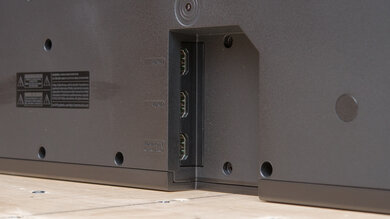
The JBL Bar 1000MK2 supplies plenty of ins and outs with a similar layout as the JBL Bar 1000, including a whopping three HDMI In ports. Although these aren't HDMI 2.1, they save you the hassle of plugging and unplugging different consoles, PCs, and media players from the bar. Additionally, eARC is available, as is an Optical port for connecting older devices.
The sole USB-A port can be used for listening to MP3 files, but this feature appears to be U.S.-exclusive, and in other regions, the port is for service-only. There's an Ethernet port for establishing a hardwired Internet connection, too.
This soundbar supports all of the common audio formats available, including Dolby Digital, Dolby Atmos, and DTS:X. One thing to keep in mind is that the soundbar treats Dolby Digital and Dolby Digital Plus audio channels so that left- and right-panned content will play from not only the bar, but also the surrounds, at all times. This is intended behavior by the soundbar, which can make some content feel more immersive. However, if a sound is meant to move from a surround speaker to the bar's front-facing driver, such as a plane whizzing by, the soundbar's treatment reduces the impact of that effect, because instead of audio passing from the satellites to the front bar, the satellites always play a faint version of the sound.
The JBL Bar 1000MK2 lends support via its three full HDMI In ports to nearly all audio formats. The bar covers surround sound, 3D object-based audio, and PCM, you name it. While this may not be an issue for most people, the bar processes Dolby Digital and Dolby Digital Plus formats by sending left and right audio channels to both the respective left and right channels on the bar, as well as to the rear satellites. As a result, anything panned to the left side (for example) also plays from the left satellite at the same time, which appears to be meant to make your experience more immersive. The trade-off is that if a sound is mixed to move from a satellite to the front-facing speaker (or vice versa), it won't replicate this effect.
The JBL Bar 1000MK2 supports the usual audio format suspects: Dolby Digital, DTS, and PCM. This covers most streaming services and Blu-rays. Since this bar processes Dolby Digital audio by sending L/R channels simultaneously to the rear satellites, as designed by the manufacturer, panning from a satellite to its matching L or R channel doesn't occur. Instead, audio will play from the satellite and the respective left or right front-facing driver.
The soundbar's eARC latency is good. Although some audio latency is present, most of the supported formats have tight enough timing that A/V sync should match up well. If not, you may choose to make adjustments to your TV's settings to compensate.
We also noticed that the Atmos audio coming from the satellites exhibits a longer delay when 'Smart Mode' is off, causing them to fall slightly out of sync with the rest of the audio, which is noticeable for some people. PCM and Atmos together have an 84 ms latency with the satellites, whereas Dolby Digital Plus with Atmos exhibits a 114 ms delay. Unfortunately, you can't compensate for latency just for the satellites.
The HDMI In audio latency is also good. Most of the supported formats have low latency figures, but that can depend on your specific media, app, and TV configuration.
We noticed there's additional latency between the bar and subwoofer compared to the wireless satellites with Dolby Atmos content, causing the satellites to have a greater delay than the rest of the kit. With Atmos and PCM content, the satellites have a 90 ms latency, and Atmos and Dolby Digital Plus content have a 114 ms latency. While you can adjust various settings to compensate for audio latency, there's no clear solution to fix the latency between parts within the soundbar kit.
The Optical's audio latency is fair. Optical tends to yield higher latency figures than eARC or HDMI In, so you may encounter some lip-sync mismatch, particularly with Dolby Digital content. However, you can use the app or your TV settings to offset the difference.
Although not the most comprehensive in terms of support and refresh rates, the three HDMI In ports on the JBL Bar 1000MK2 can deliver 4k video at 60Hz (8-bit, 4:4:4). 1080p content is supported with the quicker 120Hz refresh rate, which means you can watch sports or play fast-paced games, also in part thanks to the variable refresh rate and ALLM video passthrough options.
The JBL Bar 1000MK2 lends you fantastic wireless playback options. In addition to the expected connections, like Wi-Fi and Bluetooth, the bar is also Roon Ready. If you have an account with Roon, you can wirelessly connect your curated audio library.
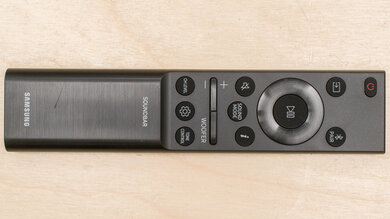
The remote looks a bit different from the last generation's remote. It mostly uses symbols, and some functions are secondary, which requires some memorization. Otherwise, most of the functions, like EQ, are also accessible via the JBL ONE companion app, which you can see in action.