Nakamichi Shockwafe Wireless  Soundbar Review

Reviewed Jul 14, 2025 at 11:03am
Tested using Methodology v1.3 
Nakamichi Shockwafe Wireless
7.9
Mixed Usage 
7.8
Dialogue/TV Shows 
7.8
Music 
8.0
Movies 
 17
  1. Recommended in:
  2. Soundbars

The Nakamichi Shockwafe Wireless is an 11.2.6 soundbar system that bridges the gap between the premium Nakamichi DRAGON and the more affordable and compact Nakamichi Shockwafe 9.2 Ultra eARC. It ships with dual ported 10-inch subwoofers as standard, though this can't be upgraded to an earth-shaking four sub configuration, like the DRAGON. Still, it comes across as a marriage of brutalist form and modern-day function, housing useful features like Apple AirPlay support and 4k @ 120Hz passthrough within its gargantuan frame. Under the hood lies further potential for customization via the numerous DSP presets and surround modes, accessible via the remote or the Nakamichi companion app. 

Our Verdict

7.9
Mixed Usage 

The Nakamichi Shockwafe Wireless is great for mixed usage. This 11.2.6 system has a bass-heavy sound, bolstered by its dual sub design. While this lends itself well to huge dancehall beats and cinematic action sequences in films, the huge low-bass can overpower mid-range elements, like voices and vocal melodies, unless reigned in with the extensive manual room tuning settings. Similarly, the recessed treble range means elements like shakers and whispered dialogue can get lost in the mix. That said, this system can get incredibly loud with minimal compression. It's also well-appointed when it comes to audio format support and I/O. There's a host of DSP presets and surround modes available for extensive sound customization. However, all stereo modes feature playback from the surrounds, which can make it difficult to identify voices and other audio cues within the stereo field.

Pros
  • 120Hz @ 4k passthrough @ 10-bits with 2 HDMI In ports.

  • Gets very loud with minimal compression. 

  • Many different DSP presets. 

Cons
  • No graphic EQ. 

  • Poor latency via optical connection.

7.8
Dialogue/TV Shows 

The Nakamichi Shockwafe Wireless is very good for dialogue and TV shows. While it has a somewhat uneven bass-heavy sound that can lead to intense rumble compared to folley work like footsteps, the mid-range is clear with a slightly dulled treble, provided it's not competing with deep bass-range frequencies. The balanced, discrete center channel ensures good focus for voices, allowing you to follow conversations across the screen. Low latency across all connection types (except for Optical) means you'll rarely run into AV desync issues, though these can be fixed with the 'Lip Sync' function. There's plenty of volume on tap, and even at high volumes, there's a minimal amount of compression, meaning there's little impact on how dialogue is mixed.

Pros
  • Gets very loud with minimal compression. 

  • Many different DSP presets. 

  • Support for all major formats, including DTS:X and Atmos.

Cons
  • No graphic EQ. 

  • Atmos height performance isn't the most convincing.

7.8
Music 

The Nakamichi Shockwafe Wireless is very good for mixed usage. Its dual subwoofer design produces a hefty, thump sound that can make trap 808s shake the ground. That said, control and precision in the bass range are sacrificed for brute force due to an uneven bass range, which delivers more rumble than thud on kick drums. Mid-range instruments sound more or less natural, but that can vary with busy mixes full of bassy parts. The mostly under-emphasized treble range has a little trouble rendering alto and tenor vocals with bright detail and airiness. That said, the dynamics performance is remarkable, allowing for extremely loud playback without stripping songs of their dynamic intricacies. The soundstage is wide and immersive, though stereo modes playback audio from the surrounds too, which can dull the sound at its extremities and bother stereo purists.

Pros
  • Gets very loud with minimal compression. 

  • Many different DSP presets. 

Cons
  • No graphic EQ. 

8.0
Movies 

The Nakamichi Shockwafe Wireless is impressive for movies. The towering low-bass response provided by the dual subwoofer design is great for injecting action flicks with a dose of bassy excitement and tension, but it's a bit uneven with weakened punch and somewhat dulled treble. The stereo soundstage is wide, and like the surround sound, it's expansive. Surround sound content sounds great with low-end heft and bright treble. You get an immersive and well-tuned height effect for Atmos content with room to play with the settings to simulate different sound fields. Turning up the volume to its (very loud) max volume doesn't degrade audio quality. There's support for all major audio formats, including Dolby Digital, DTS:X, and Atmos. If you prefer a plug-and-play bar, remember that while finessing the extensive manual calibration settings offers rewards, it still delivers a blistering bass by default.

Pros
  • Gets very loud with minimal compression. 

  • Many different DSP presets. 

  • Support for all major formats, including DTS:X and Atmos.

Cons
  • Poor latency via optical connection.

  • Atmos height performance isn't the most convincing.

  • 7.9
    Mixed Usage
  • 7.8
    Dialogue/TV Shows
  • 7.8
    Music
  • 8.0
    Movies
  • Changelog

    1.  Updated Aug 15, 2025: 

      We've updated text and graphs in the verdicts and sound tests after incorporating feedback and suggestions for sound settings from the manufacturer. Sections updated include Popular Soundbar Comparisons, Stereo Frequency Response, Stereo Frequency Response with Preliminary Calibration, Stereo Dynamics, Center, Surround 5.1, and Height (Atmos).

    2.  Updated Aug 07, 2025: 

      We've updated the review to mention the LG S95AR in Height (Atmos).

    3.  Updated Jul 14, 2025: Review published.
    4.  Updated Jul 03, 2025: Early access published.

    Check Price

    BlackShockwafe Wireless
    SEE PRICE
    Amazon.com
    BlackShockwafe Wireless
    SEE PRICE
    B&H
    BlackShockwafe Wireless
    BestBuy.com
    BlackShockwafe Wireless
    Walmart.com

    Differences Between Sizes And Variants

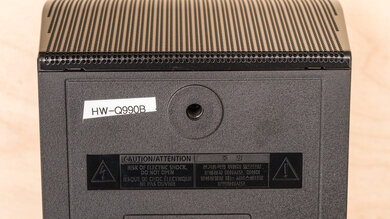
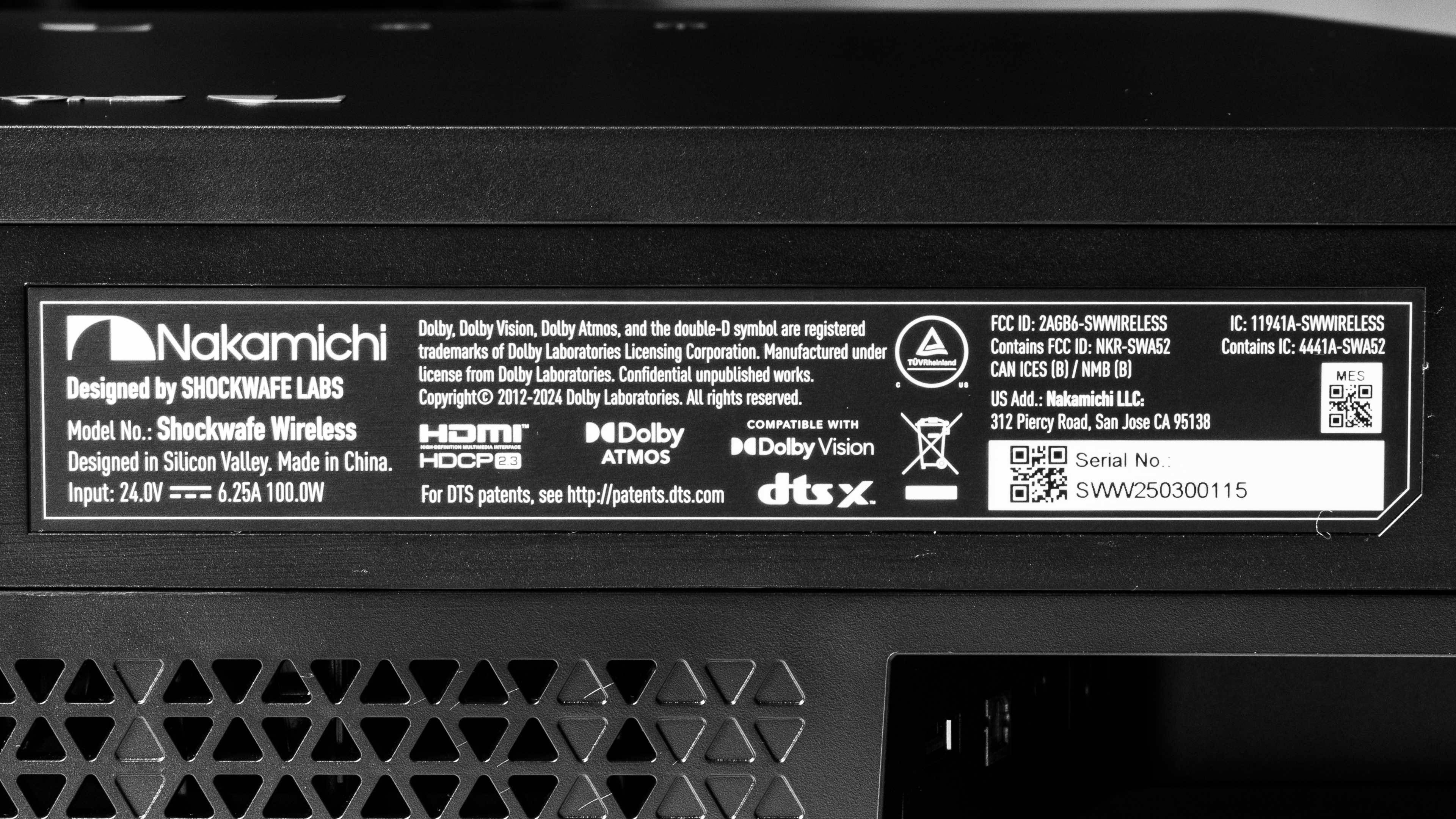
    The Nakamichi Shockwafe Wireless comes in just one color variant: Black. Unlike the Nakamichi DRAGON, it comes in one configuration: with dual 10-inch subwoofers (here's a picture of its label). If you encounter another variant of this soundbar, please let us know in the comments, and we'll update our review. 

    Popular Soundbar Comparisons

    The Nakamichi Shockwafe Wireless represents the middle ground between the top-of-the-line Nakamichi DRAGON and the older Nakamichi Shockwafe Ultra 9.2 eARC. While it comes with only two satellites, compared to the Shockwafe Ultra's four, both soundbars ship with hard-hitting, dual subs, and the Shockwafe Ultra has a slightly deeper low-frequency extension but a less clear treble. Despite fewer satellites, the Shockwafe Wireless improves on surround sound tuning and Atmos performance with updated appointments to connectivity, such as HDMI 2.1 with 4k @ 120Hz passthrough. Both the Shockwafe Wireless and the DRAGON have this, with two and three full HDMI In ports, respectively. While performance is comparable in most regards, the Shockwafe Wireless features better wireless connectivity, with Apple AirPlay support. Although the Shockwafe Wireless is a good choice if customizability is your goal, it lacks some of the features found in the Samsung HW-Q990F, like a graphic EQ and automatic room correction.

    Check out our recommendations for the best soundbars, the best Dolby Atmos soundbars, and the best soundbars for movies.

    Nakamichi DRAGON

    The Nakamichi Shockwafe Wireless represents a pared-down alternative to the Nakamichi DRAGON for those who don't need top-of-the-line specs without losing out on high output volumes. Both systems ship with dual subs as standard, though you can configure the DRAGON with up to four. Unsurprisingly, both bars can output massive amounts of bass, sometimes to the detriment of the rest of the frequency range, which is easily eclipsed. Both bars are well-built and feature HDMI 2.1 ports with 4k @ 120Hz passthrough. However, the DRAGON offers a slightly better surround and more bassy heft to Atmos (Height) performance, adding an extra layer of immersion to movies. It also offers greater customizability, thanks to its OSD interface. That said, the Shockwafe Wireless' Atmos performance rivals the DRAGON's. The Shockwafe Wireless is also compatible with Apple AirPlay, which makes it easier to incorporate into an iOS-centric household.

    Samsung HW-Q990F

    Comparing the Nakamichi Shockwafe Wireless to the Samsung HW-Q990F is like comparing a utilitarian pick-up truck with a fully-featured modern SUV. The Nakamichi takes up much more space (physically and visually) but provides you with raw power (when it comes to volume and bass output). Meanwhile, the Samsung is more compact, with improved wireless connectivity and expanded sound customization options that employ better interfaces (e.g., a full graphic EQ). The Samsung performs better all-around: it has a more balanced default frequency response with fewer significant peaks and dips. Still, if it's raw horsepower that you desire and you're willing to pay the higher price tag, the Nakamichi will be a worthwhile purchase with impressive surround sound and comparable Atmos performance.

    Nakamichi Shockwafe Ultra 9.2 eARC

    The Nakamichi Shockwafe Wireless represents a few meaningful upgrades on the Nakamichi Shockwafe Ultra 9.2 eARC. Its dual sub configuration allows it to produce a much bassier sound, though both bars roll off the treble somewhat. They perform quite similarly when it comes to a clear center channel and dynamics. That said, if you have the space to accommodate the larger Shockwafe Wireless, you'll benefit from a louder max volume, a notably more balanced surround sound, and slightly more convincing Atmos performance. Plus, the HDMI 2.1 support with the ability to passthrough 4k signals with a 120Hz refresh rate signals its modernity.

    Sonos Ultimate Immersive Set with Arc Ultra

    The Sonos Ultimate Immersive Set with Arc Ultra and the Nakamichi Shockwafe Wireless are both premium soundbars, but they have different strengths that lend themselves to different usages. The Sonos is a good choice if you own other Sonos products and value wireless connectivity, due to its Wi-Fi and Spotify Connect compatibility. It offers a more balanced default sound, with a wider stereo soundstage. It also takes up much less real estate in a living room or home theater. Still, the Nakamichi should be considered if you care about dynamics: it gets much louder, with minimal compression at higher volumes. It also boasts a similarly immersive Atmos performance as the Sonos. The Nakamichi also comes equipped with two HDMI 2.1 In ports, giving it the edge for gamers who prefer to use their soundbar as a hub between a display and their console/PC.

    Test Results

    perceptual testing image
    Sort:
    RATINGS
    Category:
    All
    Design
    Style - Bar

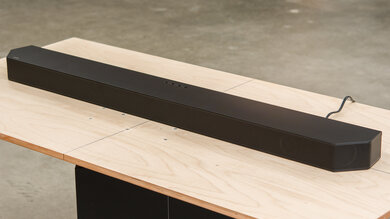
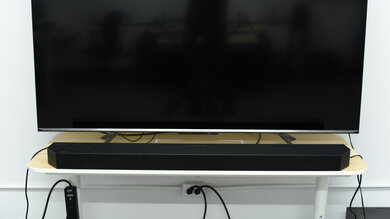
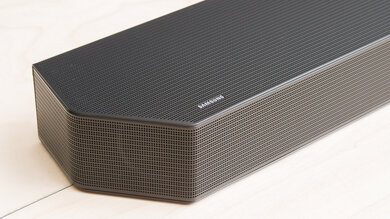
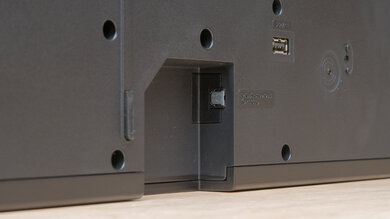
    The Nakamichi Shockwafe Wireless is similar to the Nakamichi DRAGON in both size and design. It's a large, angled soundbar that'll take up a lot more surface area on a TV stand than the average soundbar. It employs a similar monochromatic, brutalist design to the DRAGON with a subtly arched front panel and perforated metal grilles covering the drivers. There are larger grilles at the back of the bar to help with heat dissipation and a selection of inputs located on the underside. While the overall aesthetic is toned down compared to the DRAGON, it's still a very eye-catching bar. 

    Style - Subwoofer
    Sub Wireless
    Yes
    Enclosure
    Ported

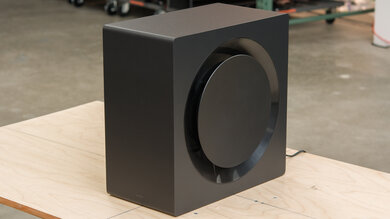
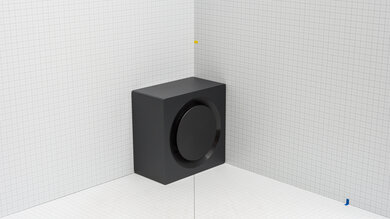
    This unit comes with a pair of ported, modern-looking subwoofers with built-in downward-firing drivers. They're made of a dense plastic, with a slightly brushed exterior that sets them apart from the other components.

    Style - Satellites
    Satellite Wireless
    Yes

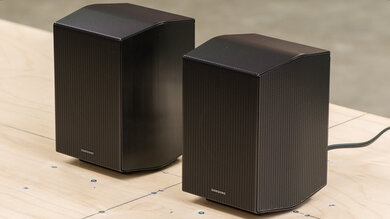
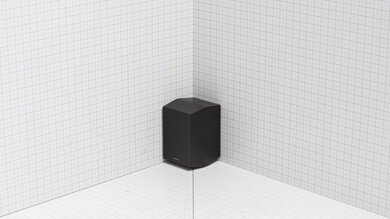
    The satellites are similarly bulky and feature a perforated metal grille that covers almost the entire body, including the drivers.

    Dimensions - Bar
    Width53.9" (137.0 cm)
    Height4.6" (11.6 cm)
    Depth9.0" (22.8 cm)

    While it's not as wide as the Nakamichi DRAGON, this bar is deeper and a little taller. Needless to say, it takes up quite a bit of real estate on a TV stand or table. Its height also means you'll need to ensure your TV legs are tall enough to guarantee a good view of the display or to prevent the bar from blocking the IR receiver of your TV. Depending on your setup, you might be better off mounting your display.  

    Dimensions - Subwoofer
    Width12.6" (32.1 cm)
    Height22.4" (56.9 cm)
    Depth12.6" (32.1 cm)

    The subwoofer is among the largest we've tested, similar in size to mid-sized Bluetooth party speakers like the JBL PartyBox 110. The stock configuration ships with two 10-inch (25.4 cm) subwoofers, and unlike the Nakamichi DRAGON, there isn't the option to expand to four.

    Dimensions - Satellites
    Width8.0" (20.2 cm)
    Height10.0" (25.3 cm)
    Depth7.8" (19.9 cm)

    The satellite speakers are hexagonal in shape. They're similarly bulky to the rest of the setup, so if you lack suitable surfaces to place them on, you may need to purchase a mounting kit.

    Mounting
    Mountable Bar
    Yes
    Bar Brackets Included
    No
    Mountable Satellites
    Yes
    Satellite Brackets Included
    No

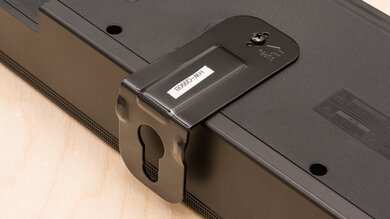
    While both the bar and the satellites are mountable to walls or stands, you'll need to purchase these separately from the manufacturer's website.

    8.0
    Build Quality

    The Nakamichi Shockwafe Wireless has a great build quality. The whole kit uses mostly metal and dense plastic, which contributes to both its hefty weight and sturdy feel. Generally, the Nakamichi Shockwafe Wireless opts for covered drivers, in contrast to the Nakamichi DRAGON's exposed driver design. As a result, much of the bar, sub, and satellites are covered in a perforated metal grille that gives it a more uniform look and gives the drivers some protection from dust. The bar sits on soft rubber feet to lift it from whatever surface it sits on, while the subwoofers are elevated by a few inches off the ground to accommodate the downward-firing drivers.

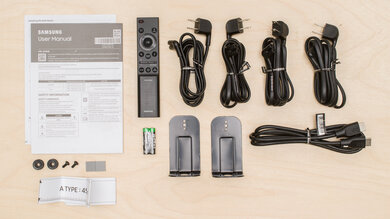
    In The Box

    • App connection guide
    • Firmware update guide
    • Manual
    • Remote (Batteries Included)
    • 4x power cables (Surround/Subs) 3m/10ft
    • Main unit power cable 1.5 m / 5ft
    • Main unit power adapter 1.5 m / 5ft
    • 2x HDMI cable 2 m / 6.5ft
    • USB key with initial firmware update.
    Sound
    7.6
    Stereo Frequency Response
    See details on graph tool
    See details on graph tool
    Channels
    11.2.6
    Tested Preset
    Music 1
    Slope
    -0.12
    Standard Error
    4.23 dB
    Low-Frequency Extension
    34.1 Hz
    High-Frequency Extension
    14.9 kHz

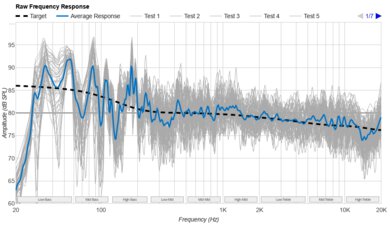
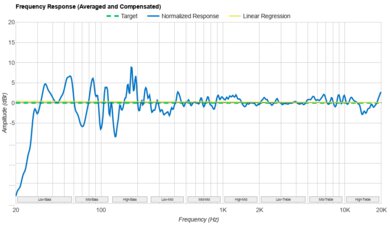
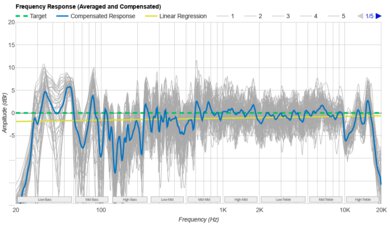
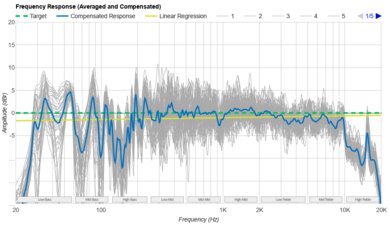
    The Nakamichi Shockwafe Wireless has a good stereo frequency response. The dual subs deliver intense low rumble to the soundbar's bass, though it's not even throughout the range, with a dip in the mid- and high-bass, which weakens the bar's boominess. Meanwhile, the mid-range is more even-sounding with fewer drastic peaks and dips than the bass range. Still, in tracks like Sonique's It Feels So Good, the anthemic vocal line and trance stabs occasionally play second fiddle to the sub-bass frequencies, though the dips in the high-bass can cause the punch to seem soft on kicks. The de-emphasized treble range reproduces a somewhat veiled vocal articulation, so shakers and cymbals are pushed back in the mix. If you find your ears fatigue from bright mixes, the slightly subdued high frequencies with this tuning may appeal.

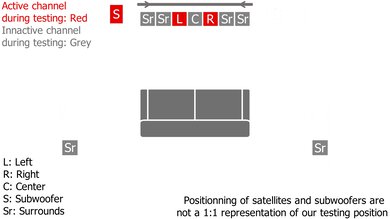
    We tested it using the 'Music 1' preset in 'All Channel Stereo' mode. While this yielded the most balanced results, it also caused audio to play back from every channel. In the absence of an automatic room correction, we also completed the manual room calibration process before testing and followed the placement instructions. We've revisited our initial results and chosen to break our usual out-of-the-box testing protocol to make small adjustments based on the manufacturer's feedback because this better reflects how we expect owners to use this soundbar. These additional tweaks included changing the Low Frequency Effect to -1 dB (out of a range of 0 dB to -12 dB) and setting the crossover to 130Hz (rather than 180Hz by default).

    7.6
    Stereo Frequency Response With Preliminary Calibration
    See details on graph tool
    Suggested Preset
    Music 1
    Suggested Bass Setting
    7
    Suggested Treble Setting
    5
    Slope
    -0.12
    Standard Error
    4.23 dB
    Low-Frequency Extension
    34.1 Hz
    High-Frequency Extension
    14.9 kHz

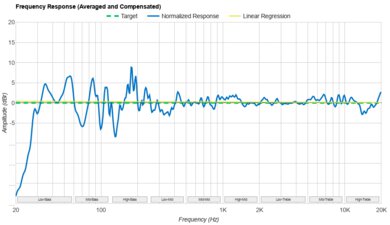
    In our testing room, the Nakamichi Shockwafe Wireless required no additional adjustments outside of the initial manual room correction described in the Stereo Frequency Response section. By default, the bass is '7' and the treble is '5.'

    7.5
    Stereo Soundstage
    See details on graph tool
    Crosstalk Error
    3.24 dB

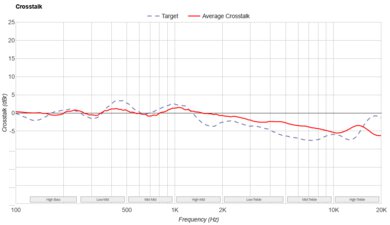
    The Nakamichi Shockwafe Wireless has a good stereo soundstage performance. The soundstage extends almost to the extremities of the bar, with a faint echo around the edge of the bar and satellites, though this doesn't do much to increase the sense of width. There's good focus across the bar, with no audible holes in the stereo image. This isn't always the case when sound stretches to the surrounds, though, as there's some treble-range roll-off as the sound pans hard left or right.

    It's worth noting that using 'All Channel Stereo' mode causes audio to play back across every channel, rather than just the main soundbar's drivers, with the intention of widening the soundstage. However, this all-channel playback can also interfere with how voices are placed within the stereo image, making it harder to pinpoint exactly where they're coming from. While vocal placement is less of an issue with regular 'Stereo' mode, we found that it sounded boxy and lacking in focus by comparison.

    9.2
    Stereo Dynamics
    See details on graph tool
    SPL @ Max Volume
    110.3 dB SPL
    DRC @ 90dB
    0.27 dB
    DRC @ Max Volume
    3.00 dB

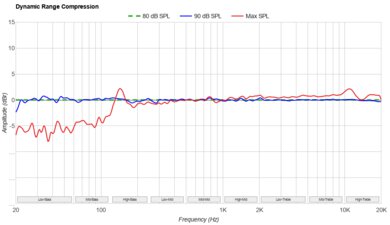
    The Nakamichi Shockwafe Wireless has a superb stereo dynamics performance. It can get extremely loud without compressing very much, which is great if you want to preserve the intricacies of your music, even at high volumes. That said, we couldn't get it to reach the advertised 120 dB max volume, achieving slightly over 110 dB instead. In all, that's plenty loud for most people's needs.

    8.4
    Center
    See details on graph tool
    Localization
    Discrete
    Slope
    -0.73
    Std. Err.
    3.99 dB
    SPL @ Max Volume
    103.8 dB SPL
    Weighted THD @ 80dB
    0.18
    Weighted THD @ Max Volume
    1.47

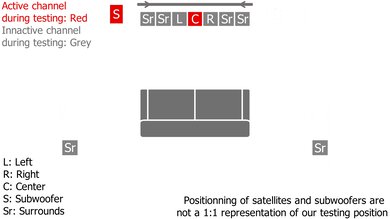
    The Nakamichi Shockwafe Wireless has great center channel performance. For this test, we used the 'Movie 1' preset in 'Native' mode with Low Frequency Effect at -1 dB and crossover adjusted to 130Hz. These settings lend the mid-range a clearer emphasis to cut through without sounding muddy. Dialogue has great tracking, allowing you to pinpoint voices within the sound field.

    8.2
    Surround 5.1
    See details on graph tool
    Localization
    Discrete
    Slope
    -0.45
    Std. Err.
    3.50 dB
    SPL @ Max Volume
    95.2 dB SPL
    Weighted THD @ 80dB
    0.40
    Weighted THD @ Max Volume
    3.67
    7.1 Rears
    Yes

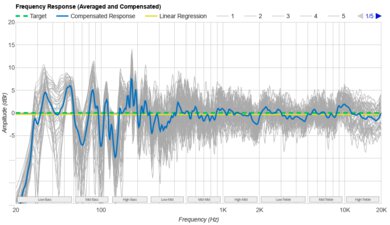
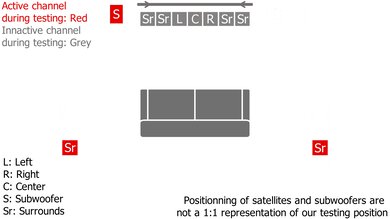
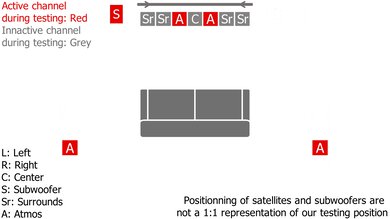
    We tested the Nakamichi Shockwafe Wireless' surrounds performance using the 'Movie 1' preset in 'Native' mode with Low Frequency Effect at -1 dB and crossover at 130Hz, as we found these were the most natural sounding settings. With these settings, the discrete satellite speakers do an impressive job of accurately playing back surround sound content from all around you, with solid tracking through the range. That said, there's a dip in the low-mids that can cause voices and melodic instrumentals to sound thin and overwhelmed by the boosted bass and relatively excited treble.

    During the testing process, we experimented with other surround settings, but found that 'Dolby Surround' was too digital and processed, while 'Studio' was artificially narrow.

    6.8
    Height (Atmos)
    See details on graph tool
    Localization
    Phantom (Up Firing, Bar & Satellites)
    Slope
    0.13
    Std. Err.
    3.63 dB
    SPL @ Max Volume
    90.6 dB SPL
    Weighted THD @ 80dB
    1.58
    Weighted THD @ Max Volume
    1.08

    As with our surrounds and center testing, we found that 'Movie 1' and 'Native' with Low Frequency Effect at -1 dB and crossover at 130Hz was the setting combination that brought out the best height response. While we tried all three of the Adaptive Height Dispersion (AHD) settings, our test results were achieved with AHD disabled, as we found it pushed the sound too overwhelmingly to the surrounds and would sound artificial at times. Furthermore, Nakamichi states that leaving AHD disabled "delivers height performance as intended by the movie director." That's not to say these settings aren't useful, though, as we noticed that the 'Focal' mode centered height sounds, while 'Wide' spreads them further towards the surrounds. 'Ultra' balances the two, trying to enhance the experience by playing content louder and using a wider range above your head.

    Overall, Atmos content sounds immersive, with plenty of rumble and punch in scenes that are rife with explosions, flying debris, and engine growl. Although dialogue can sometimes get a little buried in the mix, trebly metallic clinks sound detailed without verging on piercing. Tracking of vertical objects isn't exactly pinpoint, but they'll reach a height of a foot or two overhead, like the detailed sound of a giant monster's breath above you. Objects moving from the rear satellites towards the front do so smoothly without major holes, indicating a decent balance between the satellites and bar. Additionally, if you're looking for a more balanced, less bassy Atmos experience out of the box, check out the LG S95AR.

    6.2
    Sound Enhancement Features
    Room Correction
    No
    Dialogue Enhancement
    No
    Auto-Volume/Night Mode
    Yes
    Subwoofer Level Adjustment
    Yes
    Bass Adjustment
    Yes
    Treble Adjustment
    Yes
    EQ
    Presets
    Surround Level Adjustment
    Yes
    Rear Level Adjustment
    Yes
    Height Level Adjustment
    Yes
    Virtual Surround
    Yes

    The Nakamichi Shockwafe Wireless has a fair few sound customization and enhancement features that are very much geared towards advanced users who enjoy tinkering. There's no automatic room correction, for example, though a more advanced room calibration feature lets you plug in your room dimensions to optimize the sound for your space. Additional advanced settings include crossover frequency, Low Frequency Effect, sub strength, outer/inner surround level, and per-channel output level.

    As with the Nakamichi DRAGON, you have a range of DSP presets to toggle between, including 'Music' and 'Movie' (each with a range of three presets 1–3), 'Game,' 'News,' and 'Sports.' You can also choose between two different stereo modes: 'All Channel Stereo' and 'Stereo,' as well as three different surround modes: 'Dolby Surround,' 'Studio,' and 'Native.' There's an adjustable night mode for those with concerns for their neighbors, as well as a few Adaptive Height Dispersion (AHD) settings. The latter lets you cycle through presets that alter the perception of height with Atmos content. While there's no dialogue enhancement mode, we found that the 'News' preset naturally accentuated voices.

    Connectivity
    Inputs/Outputs - Bar
    Optical Audio In
    1
    HDMI Out
    eARC
    HDMI 2.1 Class Bandwidth
    Yes
    Full HDMI In
    2
    Analog Audio In 3.5mm (Aux)
    1
    RCA In
    No
    USB for Files
    No
    Ethernet
    No
    Subwoofer Output
    No

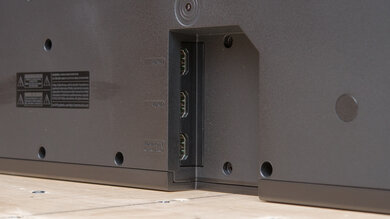
    There are plenty of inputs, all of which are located in a crevice on the underside of the bar. There's an HDMI eARC port, two full HDMI In ports, an optical port, and a 3.5 mm input you can use to connect devices via an AUX cord. There's also HDMI 2.1 support for high-resolution signals. Finally, there's a USB port that's used only for firmware upgrades. Curiously, the bar was delivered with a USB key and instructions for updating the soundbar before initial use. The supposed rationale behind this was to ship all units before tariffs kicked in, meaning there was little time to individually install firmware updates on every unit.

    10
    Audio Format Support: ARC/eARC
    Dolby Atmos
    Supported
    Dolby Digital
    Supported
    Dolby Digital Plus
    Supported
    Dolby TrueHD
    Supported
    DTS
    Supported
    DTS:X
    Supported
    DTS-HD MA
    Supported
    PCM Channels
    Up To 7.1

    The Nakamichi Shockwafe Wireless has incredible format support. Just about every major audio format is supported, including DTS and Dolby Digital, as well as object-based formats like Dolby Atmos and DTS:X. Unlike the DRAGON, however, there's no support for DTS:X Pro.

    10
    Audio Format Support: HDMI In
    Dolby Atmos
    Supported
    Dolby Digital
    Supported
    Dolby Digital Plus
    Supported
    Dolby TrueHD
    Supported
    DTS
    Supported
    DTS:X
    Supported
    DTS-HD MA
    Supported
    PCM Channels
    Up To 7.1

    The Nakamichi Shockwafe Wireless has outstanding format support via HDMI In. It supports all major audio formats, so you'll have no trouble playing back audio from your favorite Blu-rays or streaming platforms.

    10
    Audio Format Support: Optical
    Dolby Digital
    Supported
    DTS
    Supported
    PCM Channels
    2.0

    There's support for both Dolby Digital and DTS, as well as PCM playback via the optical port.

    8.4
    Audio Latency: ARC
    PCM-2.0 ch
    49 ms
    PCM-5.1 ch
    49 ms
    Dolby MAT (PCM) Atmos
    73 ms
    Dolby Digital
    91 ms
    Dolby Digital Plus
    100 ms
    Dolby Digital Plus Atmos
    100 ms

    Latency via an eARC connection is great. Latency is pretty low across every audio format, so it's unlikely you'll experience any syncing issues between your audio and video. If you do, you can always manually adjust for any delay with the 'Lip Sync' function, accessible through the remote. That said, latency can vary somewhat across different setups. 

    7.9
    Audio Latency: HDMI In
    PCM-2.0 ch
    57 ms
    PCM-5.1 ch
    58 ms
    Dolby MAT (PCM) Atmos
    77 ms
    Dolby Digital
    117 ms
    Dolby Digital Plus
    113 ms
    Dolby Digital Plus Atmos
    105 ms

    Latency using the HDMI In port is very good and fairly low across all audio formats. You can always manually adjust for any AV desync issues with the 'Lip Sync' function, accessible through the remote. That said, latency can vary somewhat across different setups. 

    5.0
    Audio Latency: Optical
    PCM-2.0 ch
    239 ms
    Dolby Digital
    299 ms

    Optical latency is disappointing. Latency is high when playing back PCM 2-channel audio and even higher when using Dolby Digital. You'll likely have to make some adjustments using the 'Lip Sync' function to ensure your audio and video are in sync.

    10
    Video Passthrough To TV
    1080p Max Refresh Rate
    120Hz
    1080p @ 4:4:4 Max Refresh Rate
    120Hz
    4k Max Refresh Rate
    120Hz
    4k @ 120Hz @ 10-Bit
    Supported
    4k @ 4:4:4 Max Refresh Rate
    120Hz
    8k Max Refresh Rate
    60Hz
    HDR10 Passthrough
    Yes
    HDR10+ Passthrough
    Yes
    Dolby Vision Passthrough
    Yes
    HDMI Forum VRR Passthrough
    Yes
    FreeSync Passthrough
    Yes
    G-SYNC Passthrough
    Yes
    ALLM Passthrough
    Yes

    This soundbar supports HDMI 2.1 and can passthrough 4k signals @ 120Hz @ 10-bit. It also features two HDMI In ports, giving you many options when it comes to using the bar as a hub between different devices and displays. 

    7.0
    Wireless Playback
    Bluetooth
    Yes
    Wi-Fi Playback
    No
    Chromecast built-in
    No
    Apple AirPlay
    Yes
    Spotify Connect
    No

    This soundbar has some limited wireless playback options. It has Bluetooth compatibility, as well as compatibility with Apple AirPlay, but there's no support for other wireless interfaces, like Google Chromecast or Wi-Fi.

    Additional Features
    Interface
    Display
    Yes

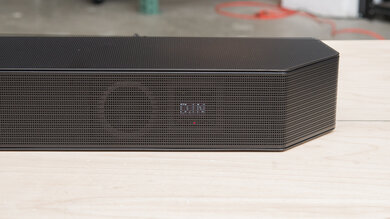
    There's a dot-matrix display at the front of the soundbar that's capable of conveying a surprising amount of detail. It shows when you change the audio format and your current input selection, scrolling through the full details when you press the 'Stop' button on the remote.

    Bar Controls

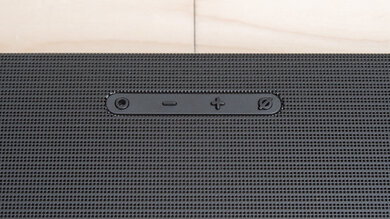
    There are a few controls on the top panel of the bar that let you change a handful of parameters. The five buttons let you power on/off, switch the input, increase/decrease the volume, and enter demo mode.

    Remote

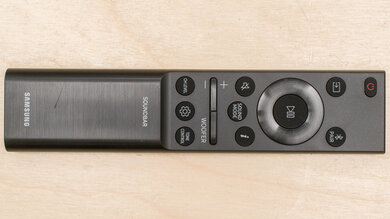
    The Nakamichi Shockwafe Wireless comes with a large, well-featured remote that lets you tweak advanced parameters and settings. There's also the Nakamichi Remote app, which you can use to adjust the same settings from the comfort of your smartphone or mobile device. 

    Voice Assistants Support
    Amazon Alexa
    No
    Google Assistant
    No
    Apple Siri
    No
    Microphone Mute
    No

    This soundbar doesn't feature any built-in voice assistant support, so it relies on the capabilities of your Alexa or Google Assistant-compatible device for voice commands.