Roku Streambar SE  Soundbar Review

Reviewed Oct 11, 2024 at 09:57am
Tested using Methodology v1.3 
Roku Streambar SE
5.7
Mixed Usage 
6.8
Dialogue/TV Shows 
6.1
Music 
4.8
Movies 
 2

The Roku Streambar SE is a compact, entry-level soundbar intended as an all-in-one device for those wanting to improve their TV speakers and introduce Smart TV functionality. Its 2.0 configuration means that it's incapable of playing back common surround sound formats like DTS or object-based and lossless formats like Dolby Atmos. However, at such a low price point, it's an enticing proposition for those looking for an entry point into the soundbar world. Plus, its wireless playback capabilities make it a versatile choice.

Our Verdict

5.7
Mixed Usage 

The Roku Streambar SE is sub-par for mixed usage. While its compact and lightweight design will appeal to those with limited space, its 2.0 configuration and lack of support for surround sound formats means it's not ideal for movies. It has a solid enough center performance, as well as dialogue enhancement settings that can make it a reasonable choice for watching TV shows. Though it lacks low- and mid-bass, it has a punchy sound and balanced mid-range that'll work for playing back music in a pinch — just don't expect hi-fi sound. That said, its ability to effectively function as a Smart TV, despite its wireless playback options, is a great selling point for those who don't have a smart TV and want a simple, all-in-one home entertainment solution.

Pros
  • Small and compact design.

  • Great wireless playback options and integrated streaming capabilities.

  • Dialogue enhancement and basic EQ controls.

Cons
  • No format support for anything beyond PCM 2.0.

  • Compresses a lot at max volume.

  • No discrete center channel.

  • Latency is quite high across all inputs.

6.8
Dialogue/TV Shows 

The Roku Streambar SE is okay for dialogue and TV shows. It has a balanced mid-range reproduction that can help bring out the detail in voices and speech. While it lacks a discrete center channel, its two channels combine to simulate a phantom center that can help you pinpoint dialogue. You can also choose from a few different levels of dialogue enhancement to further accentuate speech. That said, there's some compression as you crank the volume, which can interfere with audio clarity at higher volumes.

Pros
  • Small and compact design.

  • Great wireless playback options and integrated streaming capabilities.

  • Dialogue enhancement and basic EQ controls.

Cons
  • Compresses a lot at max volume.

  • No discrete center channel.

  • Latency is quite high across all inputs.

6.1
Music 

The Roku Streambar SE is passable for music. While it lacks rumble and boom in the bass range, it has an over-emphasized high-bass that can add some punch to kicks and basslines. Its balanced mid-range helps add detail to vocals and lead instruments, but its rolled-off treble range can cause sibilants, like cymbals, to sound dull and muffled. Despite its soundstage doesn't extend much beyond the bar itself, there's a good amount of separation between the left and right channels that can accentuate wild track panning. That said, its poor dynamics performance means it can't get very loud, and there's a lot of compression as you turn up the volume.

Pros
  • Great wireless playback options and integrated streaming capabilities.

  • Dialogue enhancement and basic EQ controls.

Cons
  • Compresses a lot at max volume.

  • No discrete center channel.

4.8
Movies 

The Roku Streambar SE is a poor choice for movies. There's no support for popular surround sound formats, like DTS and Dolby Digital, and the bar's 2.0 configuration means that it relies entirely on its left and right drivers for audio playback. The lack of a subwoofer means that there's not much in the way of rumble or boom in the bass range, and the absence of rear speakers means there's not much width to the overall sound. The disappointing dynamics performance can interfere with audio clarity, too, as cranking up the volume will introduce compression artifacts. While there's no dedicated center channel, the balanced mid-range reproduction helps bring out detail in dialogue, which is aided by the dialogue enhancement modes available.

Pros
  • Small and compact design.

  • Dialogue enhancement and basic EQ controls.

Cons
  • No format support for anything beyond PCM 2.0.

  • Compresses a lot at max volume.

  • No discrete center channel.

  • Latency is quite high across all inputs.

  • 5.7
    Mixed Usage
  • 6.8
    Dialogue/TV Shows
  • 6.1
    Music
  • 4.8
    Movies
  • Changelog

    1.  Updated Oct 11, 2024: Review published.
    2.  Updated Oct 03, 2024: Early access published.
    3.  Updated Sep 27, 2024: Our testers have started testing this product.
    4.  Updated Sep 24, 2024: The product has arrived in our lab, and our testers will start evaluating it soon.

    Check Price

    BlackStreambar SE
    SEE PRICE
    Amazon.com
    BlackStreambar SE
    SEE PRICE
    BestBuy.com
    BlackStreambar SE
    SEE PRICE
    B&H
    BlackStreambar SE
    SEE PRICE
    Walmart.com

    Differences Between Sizes And Variants

    The Roku Streambar SE comes in one color variant: 'Black' (here's a picture of its label). If you encounter another variant of this soundbar, let us know in the comments, and we'll update this review.

    Popular Soundbar Comparisons

    The Roku Streambar SE is a small, speaker-sized Bluetooth soundbar that occupies an interesting space in the market. Its two-channel configuration and lack of support for popular audio formats from Dolby and DTS means that it won't appeal to home cinema enthusiasts. That said, it boasts more wireless playback options than other budget soundbars, like the Hisense HS2100, though the Hisense offers Dolby Digital and DTS support, as well as a dedicated subwoofer. Few soundbars outside the Roku line offer built-in compatibility with streaming services, so if you don't have a Smart TV but want slightly more functionality, you can check out the Roku Streambar Pro. It has a better performance overall and is compatible with the Dolby Digital format.

    Check out our recommendations for the best budget soundbars, the best all-in-one soundbars, and the best soundbars under $200.

    Roku Streambar

    The Roku Streambar SE is a cheaper, pared-down version of the Roku Streambar. Both come with a selection of wireless connectivity options, including Wi-Fi and Airplay compatibility, as well as integrated access to streaming apps. However, there are some caveats that come with the SE version's price. It compresses much more at max volume and can't get as loud. It also isn't as well-built and doesn't support Dolby Digital. 

    Roku Streambar Pro

    The Roku Streambar Pro is a better variant of the Roku Streambar SE with more specifications. Both soundbars come with a similar suite of wireless connectivity options, including Wi-Fi and Airplay connectivity, as well as easy access to streaming apps. The two also share a similar sound profile; one that lacks bass and high-end sheen. However, the Pro variant has some improvements in its performance, most notably when it comes to dynamics, and it supports the popular Dolby digital format. It also offers voice assistant support and headphone monitoring via its remote.

    Bose TV Speaker

    The Bose TV Speaker is a more premium alternative to the Roku Streambar SE. With the Bose's more premium price tag comes a more premium build quality and improved performance across the board. The Bose features a more balanced frequency response, with more bass on tap and a more present treble range. While it can't get as loud, it compresses much less at max volume, so you can push the volume without worrying about it impacting audio quality. The Bose also supports Dolby Digital playback, which is a very common audio format for watching movies. That said, the Roku has a lot more wireless streaming options. It's compatible with Apple Airplay and Wi-Fi and can even act as a Smart TV substitute. It's also quite a bit cheaper than the Bose.

    Hisense HS2100

    The Hisense HS2100 is a better soundbar for most use cases, compared to the Roku Streambar SE. Its dedicated subwoofer gives it much more boom and rumble in the bass range, and it can get louder without compressing as much. It also has a better soundstage performance, has lower latency across all connection types, and is compatible with Dolby Digital and DTS formats. That said, the Roku is a solid choice if space is at a premium or if you need a device that doubles as a Smart TV; it has a suite of wireless connectivity options and easy access to streaming services.

    Test Results

    perceptual testing image
    Sort:
    RATINGS
    Category:
    All
    Design
    Style - Bar

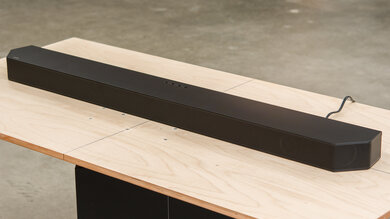
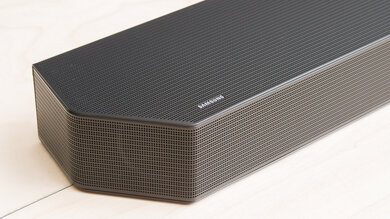
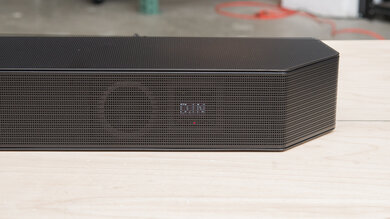
    This bar isn't as wide as most soundbars, and its proportions have more in common with some Bluetooth speakers. It's made of hard plastic, with an aluminum grille protecting the drivers in front. There aren't any physical buttons found on the bar, but there are rubber feet on the underside to help with stability.

    Style - Subwoofer
    Sub Wireless
    No
    Enclosure
    No Subwoofer

    While there's no subwoofer included, you can always purchase a Roku Wireless Subwoofer separately.

    Style - Satellites
    Satellite Wireless
    No

    You can purchase compatible satellite speakers separately.

    Dimensions - Bar
    Width9.6" (24.4 cm)
    Height2.4" (6.1 cm)
    Depth3.5" (8.8 cm)

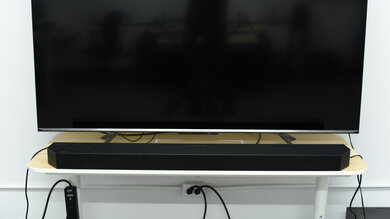
    The Roku Steambar SE's dimensions are diminutive compared to other soundbars, meaning it can easily fit between the legs of most TVs and doesn't disrupt your view of the TV at all.

    Dimensions - Subwoofer
    WidthN/A
    HeightN/A
    DepthN/A
    Dimensions - Satellites
    WidthN/A
    HeightN/A
    DepthN/A
    Mounting
    Mountable Bar
    No
    Bar Brackets Included
    No
    Mountable Satellites
    No
    Satellite Brackets Included
    No
    7.0
    Build Quality

    The build quality is decent. The entire bar is made of hard plastic with an aluminum grille covering the drivers. The plastic itself feels a little hollow, and its overall construction doesn't exactly feel premium. That said, the aluminum grille feels sturdy and doesn't buckle to the touch.

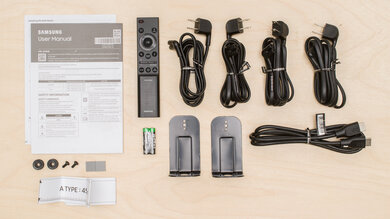
    In The Box

    • Manuals
    • Remote with 2x AAA batteries
    • Power adapter
    • HDMI cable (4.9 ft / 1.5 m)
    • Optical cable (5.9 ft / 1.8 m)
    • Stickers
    Sound
    6.4
    Stereo Frequency Response
    See details on graph tool
    See details on graph tool
    Channels
    2.0
    Tested Preset
    Standard
    Slope
    -0.46
    Standard Error
    3.85 dB
    Low-Frequency Extension
    77.7 Hz
    High-Frequency Extension
    19.9 kHz

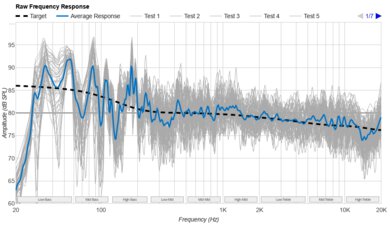
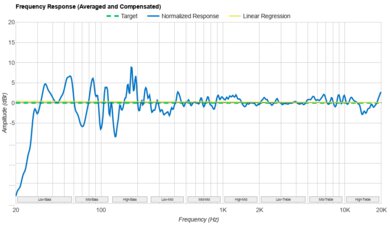
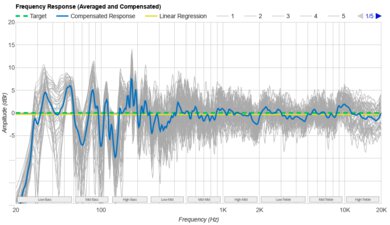
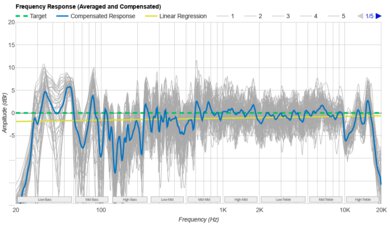
    The Roku Streambar SE has an acceptable stereo frequency response. It really struggles to reproduce bass frequencies due to its size and design. It compensates for this lack of bass by boosting the high-bass frequencies, resulting in a muddier sound that lacks boom and rumble. It has a balanced mid-range, though, which helps ensure dialogue and speech remain clear and detailed. Unfortunately, there's some serious roll-off in the treble range, which can cause sibilant S and T sounds to be dull and lispy.

    6.4
    Stereo Frequency Response With Preliminary Calibration
    See details on graph tool
    Suggested Preset
    Standard
    Suggested Bass Setting
    0
    Suggested Treble Setting
    2
    Slope
    0.00
    Standard Error
    3.62 dB
    Low-Frequency Extension
    78.9 Hz
    High-Frequency Extension
    19.9 kHz

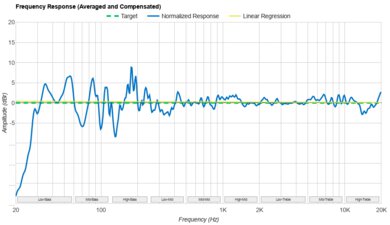
    You can adjust the bass and treble levels on this bar to tailor the sound to your liking. We recommend raising the treble level to '2' to get a more balanced sound.

    6.0
    Stereo Soundstage
    See details on graph tool
    Crosstalk Error
    4.04 dB

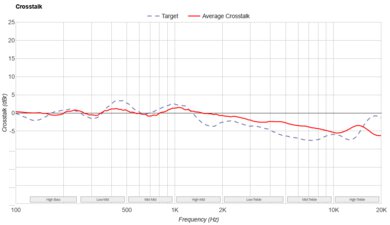
    The stereo soundstage performance is mediocre. The soundstage is perceived to be about the width of the bar, which isn't particularly wide, considering the size of the bar. The focus is decent; however, the size of the bar is once again a limiting factor when it comes to pinpointing audio objects within the stereo field.

    5.0
    Stereo Dynamics
    See details on graph tool
    SPL @ Max Volume
    87.9 dB SPL
    DRC @ 90dB
    N/A
    DRC @ Max Volume
    7.72 dB

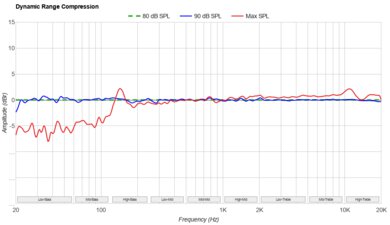
    The Roku Streambar SE has a disappointing dynamics performance. It can't get very loud, though it's still loud enough to fill the average living room with sound. That said, there's some considerable compression at max volume that creates some pumping artifacts in the bass range. Given that the compression starts to become noticeable when you hit 80 dB, we'd recommend keeping the bar at a moderate volume if you want to avoid compression artifacts, even if the output is a little quiet.

    6.3
    Center
    See details on graph tool
    Localization
    Phantom
    Slope
    -1.02
    Std. Err.
    3.52 dB
    SPL @ Max Volume
    87.0 dB SPL
    Weighted THD @ 80dB
    0.54
    Weighted THD @ Max Volume
    1.63

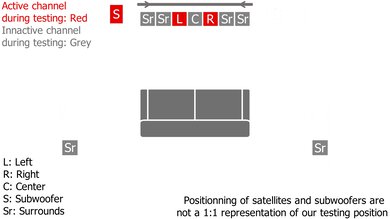
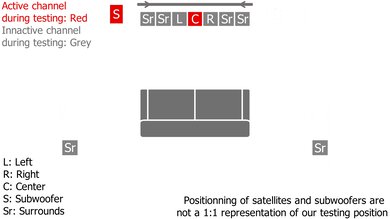
    The center performance is passable. Given its 2.0 configuration, this bar doesn't feature a discrete center channel and relies on its left and right channels to simulate a phantom center. The frequency response is quite balanced, especially in the mids, so speech and dialogue sound clear and understandable. That said, the lack of a discrete center and the slightly veiled treble response means that speech doesn't sound totally natural, either.

    3.7
    Surround 5.1
    See details on graph tool
    Localization
    Stereo (Downmix)
    Slope
    -1.20
    Std. Err.
    3.70 dB
    SPL @ Max Volume
    85.4 dB SPL
    Weighted THD @ 80dB
    1.01
    Weighted THD @ Max Volume
    1.43
    7.1 Rears
    No

    Due to its 2.0 configuration, the Roku Streambar SE has to downmix surround sound formats to stereo in order to play them back. As a result, the audio sounds one-dimensional and not very immersive, especially when compared to soundbars with satellite speakers. However, the manufacturer sells rear speakers which you can purchase separately and add to your setup.

    0.0
    Height (Atmos)
    Localization
    Not Supported
    Slope
    N/A
    Std. Err.
    N/A
    SPL @ Max Volume
    N/A
    Weighted THD @ 80dB
    N/A
    Weighted THD @ Max Volume
    N/A
    5.1
    Sound Enhancement Features
    Room Correction
    No
    Dialogue Enhancement
    Yes
    Auto-Volume/Night Mode
    Yes
    Subwoofer Level Adjustment
    No
    Bass Adjustment
    Yes
    Treble Adjustment
    Yes
    EQ
    Presets
    Surround Level Adjustment
    No
    Rear Level Adjustment
    No
    Height Level Adjustment
    No
    Virtual Surround
    No

    This soundbar has a relatively barebones selection of sound customization options, all of which can be accessed through the companion app or via the TV app. You can toggle through different volume modes, including 'Levelling' (Auto-volume) and 'Night Mode' (which turns down the bass frequencies so as not to disturb neighbors). You can also toggle through different speech clarity modes or choose between 'Dialogue,' 'Movie,' and 'Music' EQ presets.

    Connectivity
    Inputs/Outputs - Bar
    Optical Audio In
    1
    HDMI Out
    No
    HDMI 2.1 Class Bandwidth
    No
    Full HDMI In
    No
    Analog Audio In 3.5mm (Aux)
    No
    RCA In
    No
    USB for Files
    1
    Ethernet
    No
    Subwoofer Output
    No

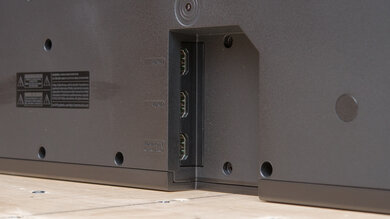
    The Roku Streambar SE comes with a few basic inputs. You can connect it to your TV using optical and HDMI ARC connection types using the cables that come in the box. You can also plug in a USB drive to playback audio and video files.

    0.3
    Audio Format Support: ARC/eARC
    Dolby Atmos
    Not Supported
    Dolby Digital
    Not Supported
    Dolby Digital Plus
    Not Supported
    Dolby TrueHD
    Not Supported
    DTS
    Not Supported
    DTS:X
    Not Supported
    DTS-HD MA
    Not Supported
    PCM Channels
    2.0

    The Roku Streambar SE only supports playback via PCM 2.0. It doesn't support any surround sound formats, so depending on the format used, this bar will either downmix content to stereo or output no audio at all.

    0.0
    Audio Format Support: HDMI In
    Dolby Atmos
    Not Supported
    Dolby Digital
    Not Supported
    Dolby Digital Plus
    Not Supported
    Dolby TrueHD
    Not Supported
    DTS
    Not Supported
    DTS:X
    Not Supported
    DTS-HD MA
    Not Supported
    PCM Channels
    Not Supported
    2.0
    Audio Format Support: Optical
    Dolby Digital
    Not Supported
    DTS
    Not Supported
    PCM Channels
    2.0

    This bar can only playback PCM 2.0 content via an optical connection, as there's no compatibility with DTS or Dolby Digital formats.

    5.2
    Audio Latency: ARC
    PCM-2.0 ch
    120 ms
    PCM-5.1 ch
    122 ms
    Dolby MAT (PCM) Atmos
    N/A
    Dolby Digital
    N/A
    Dolby Digital Plus
    N/A
    Dolby Digital Plus Atmos
    N/A

    This bar's audio latency via its HDMI ARC connection is disappointing. Latency when playing back PCM content is on the higher side, so there's a chance you'll encounter sync issues between your audio and video, though different devices and apps compensate for this differently. You can always adjust the latency settings on your TV to compensate for this.

    0.0
    Audio Latency: HDMI In
    PCM-2.0 ch
    N/A
    PCM-5.1 ch
    N/A
    Dolby MAT (PCM) Atmos
    N/A
    Dolby Digital
    N/A
    Dolby Digital Plus
    N/A
    Dolby Digital Plus Atmos
    N/A
    5.2
    Audio Latency: Optical
    PCM-2.0 ch
    173 ms
    Dolby Digital
    N/A

    Latency using an optical connection is poor. You may encounter lip-sync issues between your audio and video, though different devices and apps compensate for latency differently. You can always manually adjust for this if your TV has a latency compensation function.

    0.0
    Video Passthrough To TV
    1080p Max Refresh Rate
    Not Supported
    1080p @ 4:4:4 Max Refresh Rate
    Not Supported
    4k Max Refresh Rate
    Not Supported
    4k @ 120Hz @ 10-Bit
    Not Supported
    4k @ 4:4:4 Max Refresh Rate
    Not Supported
    8k Max Refresh Rate
    Not Supported
    HDR10 Passthrough
    No
    HDR10+ Passthrough
    No
    Dolby Vision Passthrough
    No
    HDMI Forum VRR Passthrough
    No
    FreeSync Passthrough
    No
    G-SYNC Passthrough
    No
    ALLM Passthrough
    No
    9.0
    Wireless Playback
    Bluetooth
    Yes
    Wi-Fi Playback
    Yes
    Chromecast built-in
    No
    Apple AirPlay
    Yes
    Spotify Connect
    Yes

    This bar is a fantastic way to introduce wireless playback options into your home entertainment setup. It's compatible with Bluetooth, Wi-Fi, Airplay, and Spotify Connect. Plus, it features built-in support for streaming apps like Netflix and Apple TV.

    Additional Features
    Interface
    Display
    No

    The Roku Streambar SE lacks a display and instead has a single white LED on the front of the bar. This light pulses when you send a signal from the remote and turns off when you power down the bar.

    Bar Controls
    Remote

    This bar comes with a remote that has a similar layout to the one that comes with the Roku Streambar Pro. It lets you quickly adjust the volume and playback and navigate the menus. There are also shortcuts for apps like Netflix and Apple TV. You can also use the mobile app if you'd rather control the bar using your phone.

    Voice Assistants Support
    Amazon Alexa
    No
    Google Assistant
    No
    Apple Siri
    No
    Microphone Mute
    No

    Unlike other Roku bars, this bar doesn't feature voice assistant support that's built into the remote. Instead, to use voice commands, you'll need to use the Roku app on iOS and Android, which features the built-in Roku voice assistant. You can also pair it with a third-party device, like Apple Home or Amazon Alexa, to use the device's voice assistant capabilities.