Vizio V Series V21-H8  Soundbar Review

Review updated Dec 15, 2021 at 03:12pm
Tested using Methodology v1.2 
Vizio V Series V21-H8
7.0
Mixed Usage 
7.7
Dialogue/TV Shows 
7.4
Music 
6.3
Movies 
 2
Notice: This soundbars was replaced by Vizio V Series V21x-J8
  1. Recommended in:
  2. Vizio

The Vizio V Series 2.1 Sound Bar is a 2.1 setup with a dedicated subwoofer. It has a boomy sound profile that's well-suited to listening to bass-heavy music and action-packed TV shows. There's even an HDMI ARC port and a dedicated AUX port for connecting to voice assistant speakers. This bar can get pretty loud, but there's a bit of distortion at max volume. However, as a 2.1 setup, it downmixes surround content into stereo, and it doesn't support Atmos content. That said, it has a few EQ presets and a virtual surround mode, so you have some ability to customize its sound.

Our Verdict

7.0
Mixed Usage 

The Vizio V21-H8 is decent for mixed usage. On its 'Music' preset, this soundbar has a bass-heavy sound profile that adds extra boom to your audio. Vocals and lead instruments are reproduced clearly, and you can use its bass and treble adjustments to customize its sound. However, there's no Atmos support, and its surround performance is poor.

Pros
  • Gets loud.
  • Four EQ presets.
Cons
  • Doesn't support Atmos content.
  • Some distortion at max volume.
7.7
Dialogue/TV Shows 

The Vizio V21-H8 is good for dialogue-centric content like TV shows. It can reproduce voices clearly and accurately, and there's even a dialogue enhancement mode to make them more clear and crisp. However, due to its 2.1 setup, it has a phantom center, so voices aren't as accurately localized to a pinpoint location in the soundstage.

Pros
  • Gets loud.
  • Dialogue enhancement feature.
Cons
  • Some distortion at max volume.
7.4
Music 

The Vizio V21-H8 is satisfactory for music. On its default 'Music' preset, it has a boomy sound profile with extra punch and warmth in the bass range. Vocals and lead instruments are reproduced clearly, though this may be overwhelming for some listeners. Fortunately, there are bass and treble adjustments to help you customize its sound to your liking.

Pros
  • Four EQ presets.
Cons
  • Some distortion at max volume.
6.3
Movies 

The Vizio V21-H8 is passable for movies. This 2.1 setup has to downmix surround content into stereo to play it, which doesn't sound very immersive. Also, it doesn't support Atmos content. That said, it can get pretty loud, and it can reproduce dialogue quite clearly. The extra boom in the bass helps accentuate action-packed scenes, too.

Pros
  • Gets loud.
Cons
  • Doesn't support Atmos content.
  • 7.0
    Mixed Usage
  • 7.7
    Dialogue/TV Shows
  • 7.4
    Music
  • 6.3
    Movies
  • Changelog

    1.  Updated May 05, 2023: Converted to Test Bench 1.2. Updated the results for audio format support via ARC/eARC, HDMI In, and Optical. Added Video Passthrough to TV results as well.
    2.  Updated Apr 06, 2023: Added cable lengths to In The Box.
    3.  Updated Apr 05, 2023: Converted to Test Bench 1.1. With this update, we've added a Mounting test and added information aboutSubwoofer Output, Spotify Connect, and Microphone Mute.
    4.  Updated Dec 15, 2021: Updated review for accuracy and clarity.

    Check Price

    BlackV21 H8
    SEE PRICE
    Amazon.com
    BlackV21 H8R
    SEE PRICE
    Amazon.com

    Differences Between Sizes And Variants

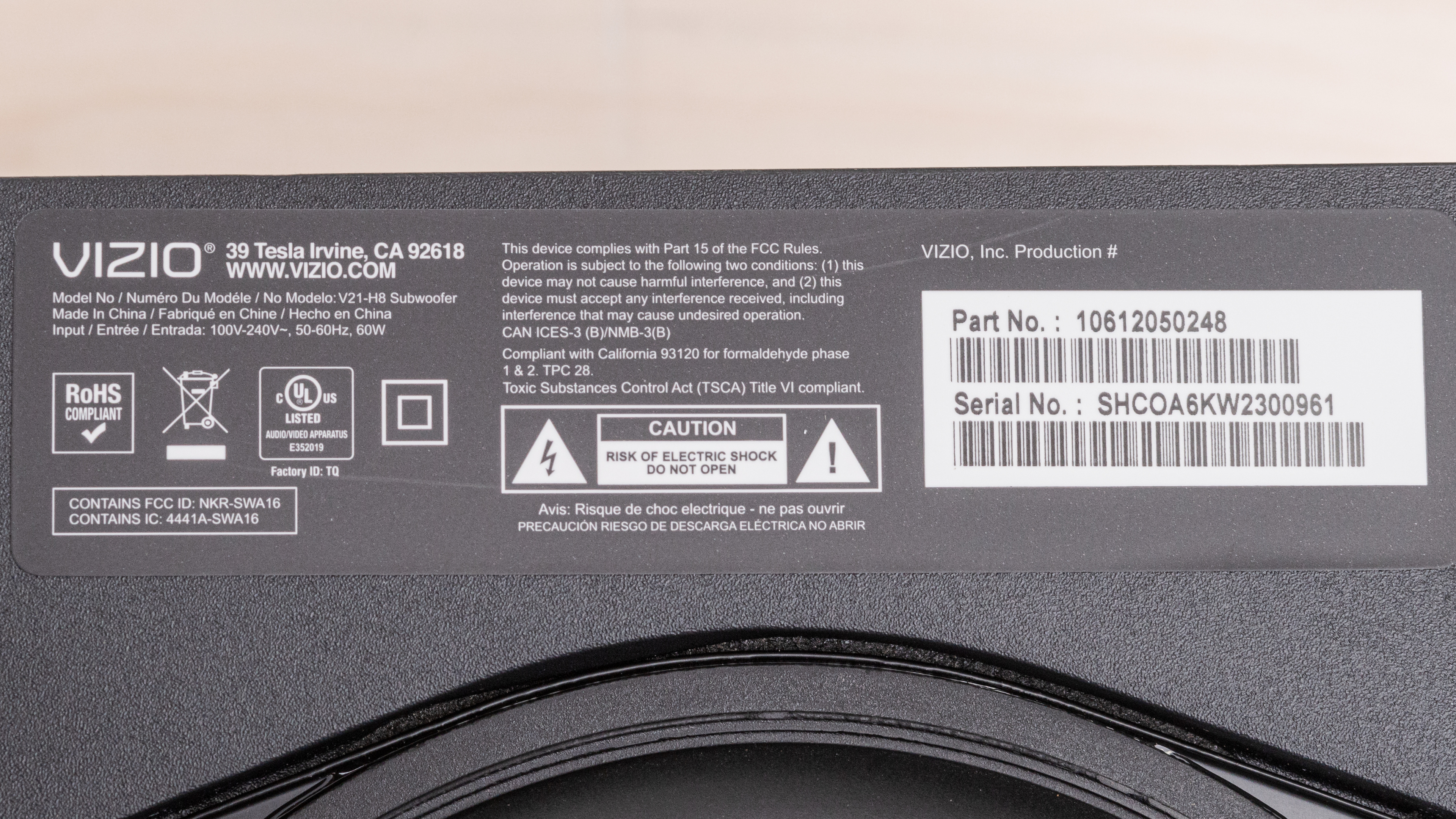
    The Vizio V21 soundbar comes in one color variant: Black. You can see the label for the model we tested here. There's also another variant of this soundbar, the Vizio V21-H8R, which has a similar look but comes with a screen on the remote.

    If you come across any other variants of this soundbar, let us know in the discussion section below so we can update our review.

    Popular Soundbar Comparisons

    The Vizio V21 soundbar is a 2.1 setup from Vizio's 2020 lineup. It's fairly straightforward, but it does have a few sound enhancement features, including four EQ presets and a designated AUX port for a voice assistant speaker. However, unlike some of the more premium soundbars we've tested, it doesn't support Dolby Atmos content, and you can only stream audio to the bar via Bluetooth.

    If you're looking for more soundbars, check out our recommendations for the best soundbars under $200, the best soundbars for dialogue, and the best soundbars under $300.

    Vizio M Series M21d-H8R

    The Vizio V Series V21-H8 is a better soundbar than the Vizio M-Series M21d-H8R. The V Series has a more neutral sound profile and a better soundstage performance. Also, it gets louder with much less compression at max volume. However, the M-Series is better-built, and it has a Full HDMI In port that supports 4k passthrough.

    Hisense HS2100

    The Hisense HS2100 and the Vizio V Series V21-H8 are both 2.1 bars with similar strengths. They're similarly sized, and both are decently well-built, with support for Dolby Digital and DTS but not Dolby Atmos. They both have warm default sound profiles that still reproduce dialogue and speech clearly, and both get loud enough to fill a living room with sound. The Vizio has less compression at max volume and allows you to adjust the subwoofer level. Otherwise, both soundbars offer an extremely similar performance, though the Hisense retails for less.

    Vizio V Series V51-H6

    The Vizio V Series V51-H6 is a better soundbar than the Vizio V Series V21-H8. The V51-H6 is a 5.1 setup that has dedicated satellite speakers, unlike the 2.1 V21-H8. It also has a better-balanced, more neutral sound profile. 

    Samsung HW-T450

    The Vizio V Series V21-H8 is a somewhat better overall soundbar than the Samsung HW-T450. The Vizio is better-built, and it comes with more connectivity options, including an HDMI ARC port and two AUX ports. It also has more sound enhancement features, including dialogue enhancement. That said, the Samsung has less compression at max volume, so it may be better suited for use during loud parties.

    Show more 

    Test Results

    perceptual testing image
    Sort:
    RATINGS
    Category:
    All
    Design
    Style - Bar

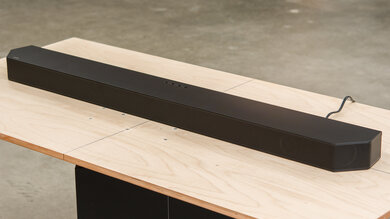
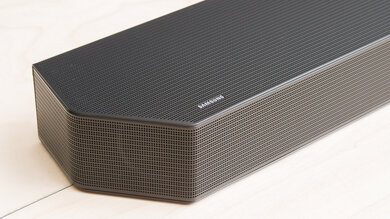
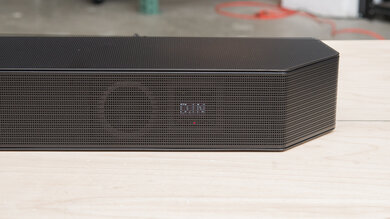
    The Vizio V21-H8 is a plain, simple soundbar. The top, back, and underside of the bar are black plastic, and there's fabric covering the front and the sides.

    Style - Subwoofer
    Sub Wireless
    Yes
    Enclosure
    Ported

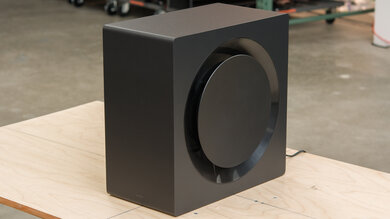
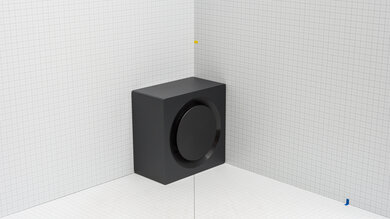
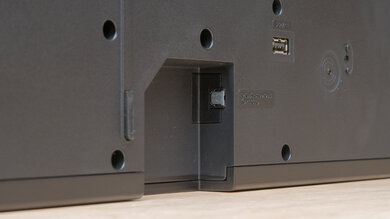
    The subwoofer is made of melamine with a plastic top, and it sits on four plastic pegs. There's a port on the back side, along with a pairing button.

    Style - Satellites
    Satellite Wireless
    No

    If you're looking for a setup with dedicated satellite speakers, check out the Vizio V Series V51-H6.

    Dimensions - Bar
    Width36.0" (91.5 cm)
    Height2.3" (5.8 cm)
    Depth3.2" (8.2 cm)

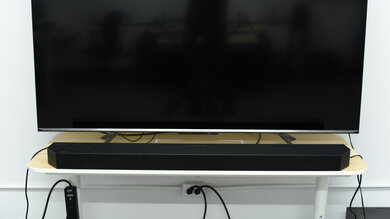
    The Vizio V21 soundbar is long, but it should still fit between the legs of most 55 inch TVs. Also, it isn't very tall, so it shouldn't block your TV screen unless your TV sits flush against your table.

    Dimensions - Subwoofer
    Width8.3" (21.2 cm)
    Height9.8" (25.0 cm)
    Depth8.3" (21.2 cm)

    The subwoofer is about the same width as an average desktop PC, but unlike many other soundbars with an external subwoofer such as the TCL Alto 6+, it's also fairly short. It connects wirelessly to the bar, so you can place it anywhere in your room as long as it can connect to a power source.

    Dimensions - Satellites
    WidthN/A
    HeightN/A
    DepthN/A
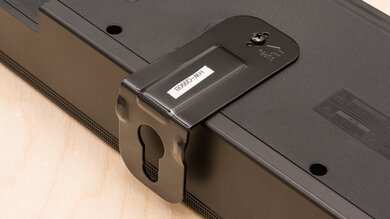
    Mounting
    Mountable Bar
    Yes
    Bar Brackets Included
    Yes
    Mountable Satellites
    No
    Satellite Brackets Included
    No
    7.0
    Build Quality

    The Vizio V21-H8 has a decent build quality. The sides of the subwoofer are made of melamine, while the top is made of plastic. The bar itself is mostly made of plastic, which feels solid and durable. However, the fabric covering the front and sides of the bar seems like it could get dirty or rip easily. For a better-built soundbar, check out the Vizio M-Series M21d-H8R or the Samsung HW-A550.

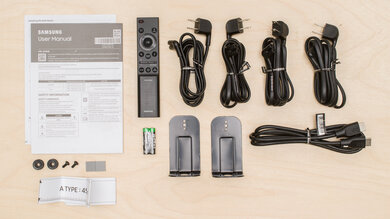
    In The Box

    • Manual
    • Remote
    • 2x AAA batteries for remote
    • Brackets with screws and wall template
    • HDMI cable (4.9 ft / 1.5m)
    • Optical cable (4.9 ft / 1.5m)
    • 2x power cable (4.9 ft / 1.5m and 8.0 ft / 2.4m)
    • Stereo RCA to 3.5mm Audio cable (4.9 ft / 1.5m)
    • 3.5mm to 3.5mm Audio cable (4.9 ft / 1.5m)
    Sound
    7.6
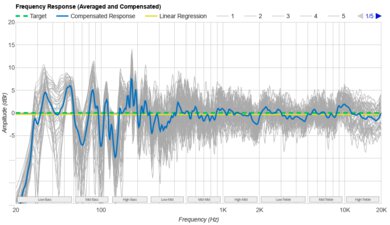
    Stereo Frequency Response
    See details on graph tool
    See details on graph tool
    Tested Preset
    Music
    Slope
    -0.86
    Std. Err.
    4.28 dB
    Channels
    2.1
    Low-Frequency Extension
    34.1 Hz
    High-Frequency Extension
    16.5 kHz

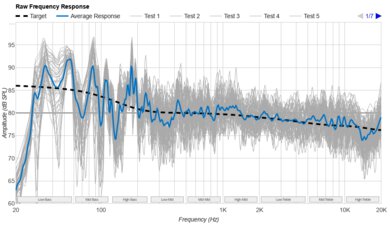
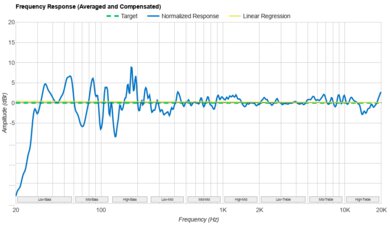
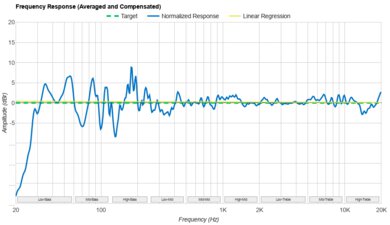
    The Vizio V21 has a good stereo frequency response. On its 'Music' preset, it has a boomy sound profile due to the overemphasized bass range. Vocals and lead instruments are reproduced clearly and accurately, but you notice extra punch and warmth in your audio, which can be overwhelming for some users. There are also some bass and treble adjustments to help you customize its sound.

    7.5
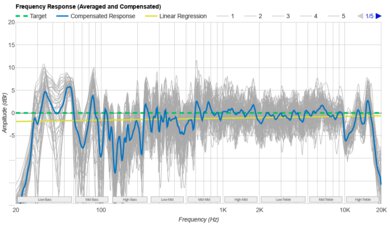
    Stereo Frequency Response With Preliminary Calibration
    See details on graph tool
    Suggested Preset
    Music
    Suggested Bass Setting
    -4
    Suggested Treble Setting
    0
    Slope
    -0.09
    Std. Err.
    2.81 dB
    Low-Frequency Extension
    43.0 Hz
    High-Frequency Extension
    16.0 kHz

    With calibration, the Vizio V Series V21-H8 has a good stereo frequency response. It has a more neutral, balanced sound profile with its bass set to '-4'. There's still a little extra punch in the bass range, though. That said, it's suitable for listening to lots of different types of audio content.

    7.0
    Stereo Soundstage
    See details on graph tool
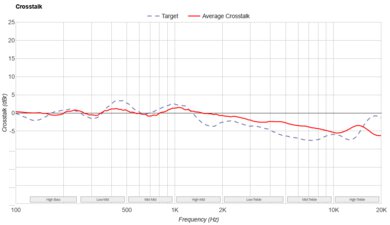
    Crosstalk Error
    2.99 dB

    The Vizio V21 has a satisfactory stereo soundstage. It sounds about as wide as the bar itself, but the bar doesn't have any tricks to make it sound wider than that. Its focus is okay, so objects like voices and instruments seem to come from an accurate, pinpoint location rather than a general area.

    7.5
    Stereo Dynamics
    See details on graph tool
    SPL @ Max Volume
    95.8 dB SPL
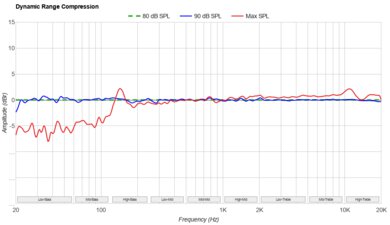
    DRC @ Max Volume
    2.88 dB

    This soundbar has good stereo dynamics. It can get louder than the Vizio V Series V21x-J8, but there's a bit of compression when you play it at max volume, especially in the bass range, so audio reproduction isn't as clear.

    7.7
    Stereo Total Harmonic Distortion
    See details on graph tool
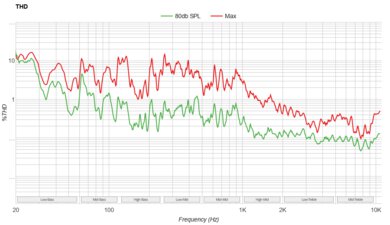
    Weighted THD @ 80dB
    0.45
    Weighted THD @ Max Volume
    1.78

    This soundbar has a good stereo total harmonic distortion performance. At normal listening volumes, the bar produces a clean and pure sound. There's a bit of a jump in THD at max volume, but it may not be audible with real-life content.

    6.4
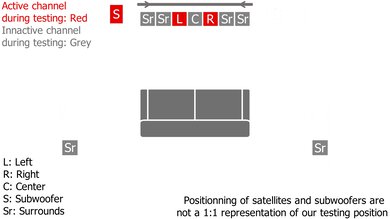
    Center
    See details on graph tool
    Localization
    Phantom
    Slope
    -0.83
    Std. Err.
    4.33 dB
    SPL @ Max Volume
    95.8 dB SPL
    Weighted THD @ 80dB
    0.43
    Weighted THD @ Max Volume
    1.79

    The Vizio V21-H8 has an acceptable center channel performance. Due to its 2.1 configuration, it has to use its left and right channels to simulate a phantom center. This doesn't sound as clear or as real as discrete localization, though. You may notice that voices aren't accurately anchored to a pinpoint location in the soundstage.

    3.9
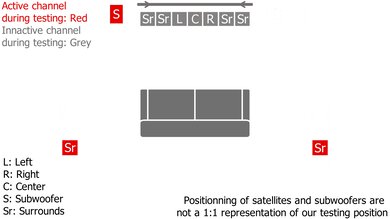
    Surround 5.1
    See details on graph tool
    Localization
    Stereo (Downmix)
    Slope
    0.79
    Std. Err.
    3.62 dB
    SPL @ Max Volume
    88.2 dB SPL
    Weighted THD @ 80dB
    0.90
    Weighted THD @ Max Volume
    3.51
    7.1 Rears
    No

    This soundbar has a poor surrounds performance. It has to downmix surround content into stereo, which doesn't sound as clear and accurate as a home theater setup. Surround objects seem like they're coming from in front of you rather than all around you.

    0.0
    Height (Atmos)
    Localization
    Not Supported
    Slope
    N/A
    Std. Err.
    N/A
    SPL @ Max Volume
    N/A
    Weighted THD @ 80dB
    N/A
    Weighted THD @ Max Volume
    N/A
    6.8
    Sound Enhancement Features
    Room Correction
    No
    Dialogue Enhancement
    Yes
    Auto-Volume/Night Mode
    Yes
    Subwoofer Level Adjustment
    Yes
    Bass Adjustment
    Yes
    Treble Adjustment
    Yes
    EQ
    Presets
    Surround Level Adjustment
    No
    Rear Level Adjustment
    No
    Height Level Adjustment
    No
    Virtual Surround
    Yes

    The Vizio V21 has an adequate selection of sound enhancement features. You can customize its sound using its bass and treble adjustments as well as its EQ presets, including 'Movie', 'Music', 'Dialogue', and 'Game'. You can even use the TVOL button on the remote to activate the night mode feature when watching TV at night. However, it lacks premium sound enhancement features, such as a graphic EQ and room correction.

    Connectivity
    Inputs/Outputs - Bar
    Optical Audio In
    1
    HDMI Out
    ARC
    HDMI 2.1 Class Bandwidth
    No
    Full HDMI In
    No
    Analog Audio In 3.5mm (Aux)
    1
    RCA In
    No
    USB for Files
    1
    Ethernet
    No
    Subwoofer Output
    No

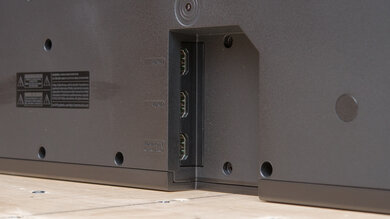
    The Vizio V21-H8 has several inputs. There are two AUX ports: one for analog audio and one for a voice assistant speaker only. You can connect it to your TV via ARC or Optical In. However, there isn't a Full HDMI In, so you can't use the soundbar as a hub between your devices.

    6.3
    Audio Format Support: ARC/eARC
    Dolby Atmos
    Not Supported
    Dolby Digital
    Supported
    Dolby Digital Plus
    Not Supported
    Dolby TrueHD
    Not Supported
    DTS
    Supported
    DTS:X
    Not Supported
    DTS-HD MA
    Not Supported
    PCM Channels
    2.0

    The Vizio V21-H8 supports Dolby Digital and DTS content over its ARC port, and these formats are found commonly on Blu-ray discs and streaming platforms like Netflix and Hulu. However, it doesn't support higher-end formats like Dolby Atmos.

    0.0
    Audio Format Support: HDMI In
    Dolby Atmos
    Not Supported
    Dolby Digital
    Not Supported
    Dolby Digital Plus
    Not Supported
    Dolby TrueHD
    Not Supported
    DTS
    Not Supported
    DTS:X
    Not Supported
    DTS-HD MA
    Not Supported
    PCM Channels
    Not Supported
    10
    Audio Format Support: Optical
    Dolby Digital
    Supported
    DTS
    Supported
    PCM Channels
    2.0

    The Vizio V21-H8 supports Dolby Digital and DTS content via Optical Audio In, but it's downmixed to 2.1.

    8.1
    Latency
    ARC
    59 ms
    Optical
    52 ms
    Full HDMI In
    N/A

    The Vizio V21-H8 has a great latency performance. It has fairly low latency, so the audio you hear is in sync with the video you see on the screen. As a result, it's a solid choice for watching videos and movies. Some apps and TVs compensate for latency differently, so your real-world experience can vary.

    0.0
    Video Passthrough To TV
    1080p Max Refresh Rate
    Not Supported
    1080p @ 4:4:4 Max Refresh Rate
    Not Supported
    4k Max Refresh Rate
    Not Supported
    4k @ 120Hz @ 10-Bit
    Not Supported
    4k @ 4:4:4 Max Refresh Rate
    Not Supported
    8k Max Refresh Rate
    Not Supported
    HDR10 Passthrough
    No
    HDR10+ Passthrough
    No
    Dolby Vision Passthrough
    No
    HDMI Forum VRR Passthrough
    No
    FreeSync Passthrough
    No
    G-SYNC Passthrough
    No
    ALLM Passthrough
    No

    This soundbar doesn't have an HDMI In port, so it doesn't support video passthrough.

    6.0
    Wireless Playback
    Bluetooth
    Yes
    Wi-Fi Playback
    No
    Chromecast built-in
    No
    Apple AirPlay
    No
    Spotify Connect
    No

    The Vizio V21 has acceptable wireless playback connectivity options. You can use Bluetooth to stream audio wirelessly to the bar. The bar lacks other wireless connections that could make it more versatile.

    Additional Features
    Interface
    Display
    No

    The Vizio V21 doesn't have a display. Instead, there are indicator lights on the left side of the bar that change colors based on the inputs. There's also audio feedback when you select a new preset mode.

    Bar Controls

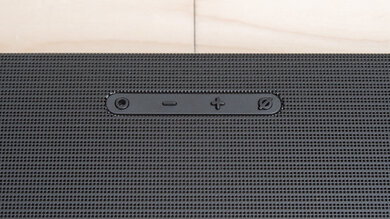
    On top of the bar, there are a few buttons that let you control its basic functions. You can power the bar on/off, change the input, activate Bluetooth pairing mode, and adjust the volume.

    Remote

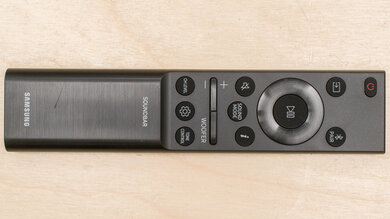
    The remote control is fairly simple and allows you to control all settings. If you buy the Vizio V21-H8R variant, there's a screen on the remote.

    Voice Assistants Support
    Amazon Alexa
    No
    Google Assistant
    No
    Apple Siri
    No
    Microphone Mute
    No

    This soundbar doesn't have built-in voice assistant support. However, the manufacturer says that you can use it with Alexa, Google Assistant, and Siri if you connect a third-party voice assistant device via the designated AUX port. Vizio also says that you can pair a voice assistant device to the bar via Bluetooth.