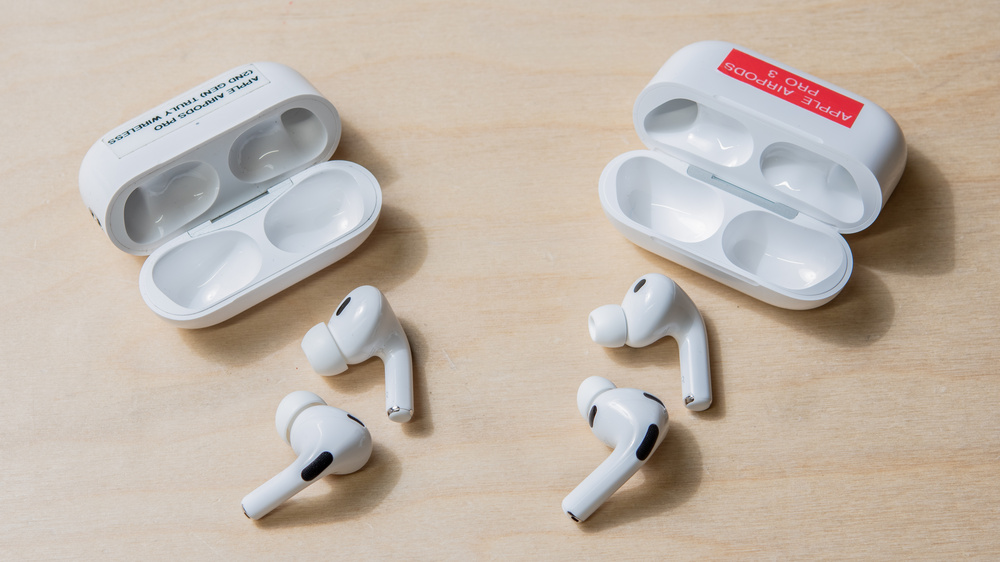
In a showdown of the Apple AirPods Pro 2 vs the Apple AirPods Pro 3, the competition is stiff as the tech giant faces off against itself. We've run both pairs through rigorous testing and think that most people should go with the newer version, the Apple AirPods Pro 3. The Pro 3 set a new pace for noise isolation performance and a longer continuous battery life. But there's more to headphone performance than ANC and battery life, so dig into the details below to learn more, or take a look at their detailed side-by-side testing comparisons.
Fit, Comfort, and Build Quality
The Apple AirPods Pro 3 share a similar look to the rest of the lineup, including the Apple AirPods Pro 2, but the buds are a bit larger overall. Comfort is subjective, but there was a clear preference for the AirPods Pro 3 in a blind test during our review period. The Pro 3 feel more comfortable and secure, unless your ears are sensitive to deeper-fitting in-ear designs compared to the AirPods Pro 2. That said, some people appreciate the less invasive in-ear fit of the AirPods Pro 2 vs the AirPods Pro 3's deeper fit that sits a little farther into the ear canal. However, the AirPods Pro 2 can slowly migrate out of place over time and may need a quick readjustment from time to time. Both pairs share basically the same default controls and the force sensor on the stems.
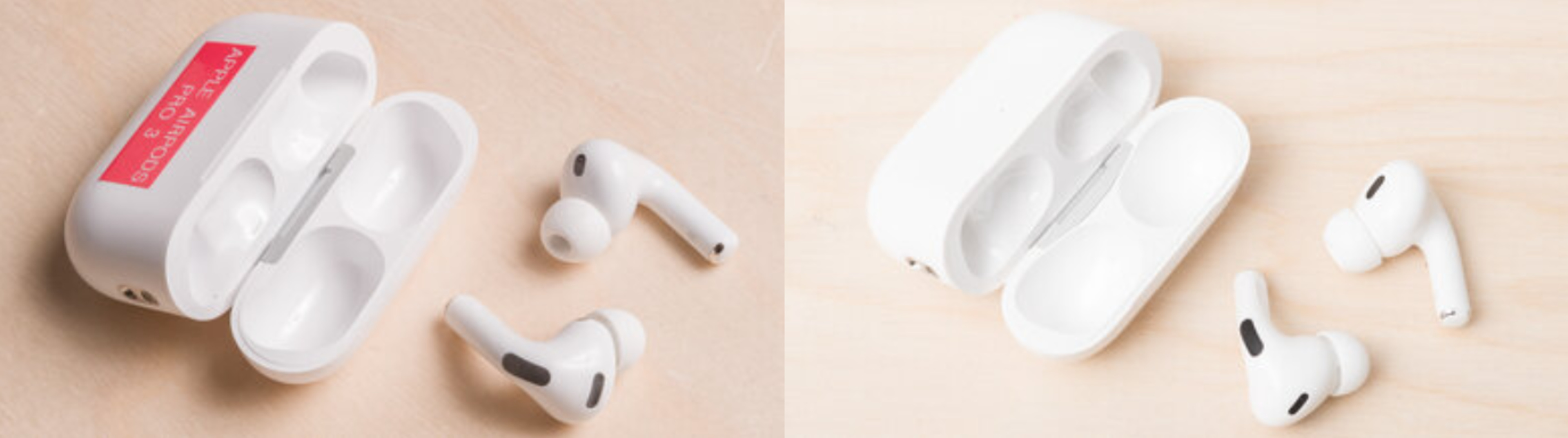
Notice the different shapes of the housings and the nozzles of the AirPods, and how they can affect the fit. |
Exclusive to the AirPods Pro 3 are heart monitors that can be synced to apps like Apple Fitness+. These use a combination of physical sensors built into the buds. You can toggle them on/off in your iPhone's Health Settings for continuous live readouts of your heart metrics.
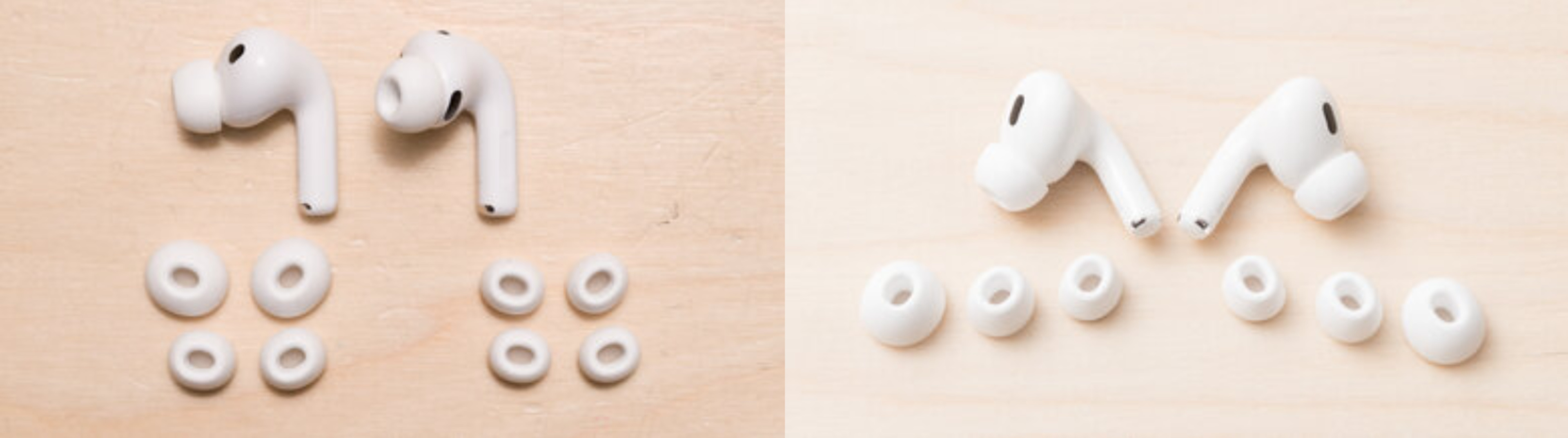
Both pairs feel more or less alike, with smooth, glossy plastic and a similarly solid build. The AirPods Pro 2 come equipped with soft and malleable silicone ear tips. New to the AirPods Pro 3 are hybrid silicone-and-foam ear tips that combine the familiar silicone texture with a slightly different in-ear fit. Unfortunately, these hybrid silicone-and-foam ear tips are relatively easy to rip compared to the last generation's all-silicone ones. It's worth exercising caution when swapping sizes and preparing for the possibility of replacing them sooner than you would have with the AirPods Pro 2 ear tips. Wear-and-tear is a normal part of owning earbuds with replaceable ear tips, and when they begin to deteriorate, it impacts the in-ear seal, which can affect bass response and noise isolation performance.
The AirPods Pro 2 case is a bit smaller, which lets it fit into even the tightest pockets, but the larger Pro 3 case is more resilient to the elements. |
The AirPods Pro 2's IP rating depends on whether you own one with an earlier Lightning (IPX4) or USB-C (IP54) port. In comparison, the larger case of the AirPods Pro 3 has a higher IP rating of IP57, making them more dust and water-proof. The Pro 3 only comes with a USB-C port, though. Both models have MagSafe cases, so you can wirelessly charge them. That said, the AirPods Pro 3's case has an updated 'Ultra Wide Band' chip to offer more precise tracking when using the 'Find My' function; even though both cases have this capability, the Pro 3 sees an improvement.
Do the AirPods Pro 3 Have Better ANC Than the AirPods Pro 2?
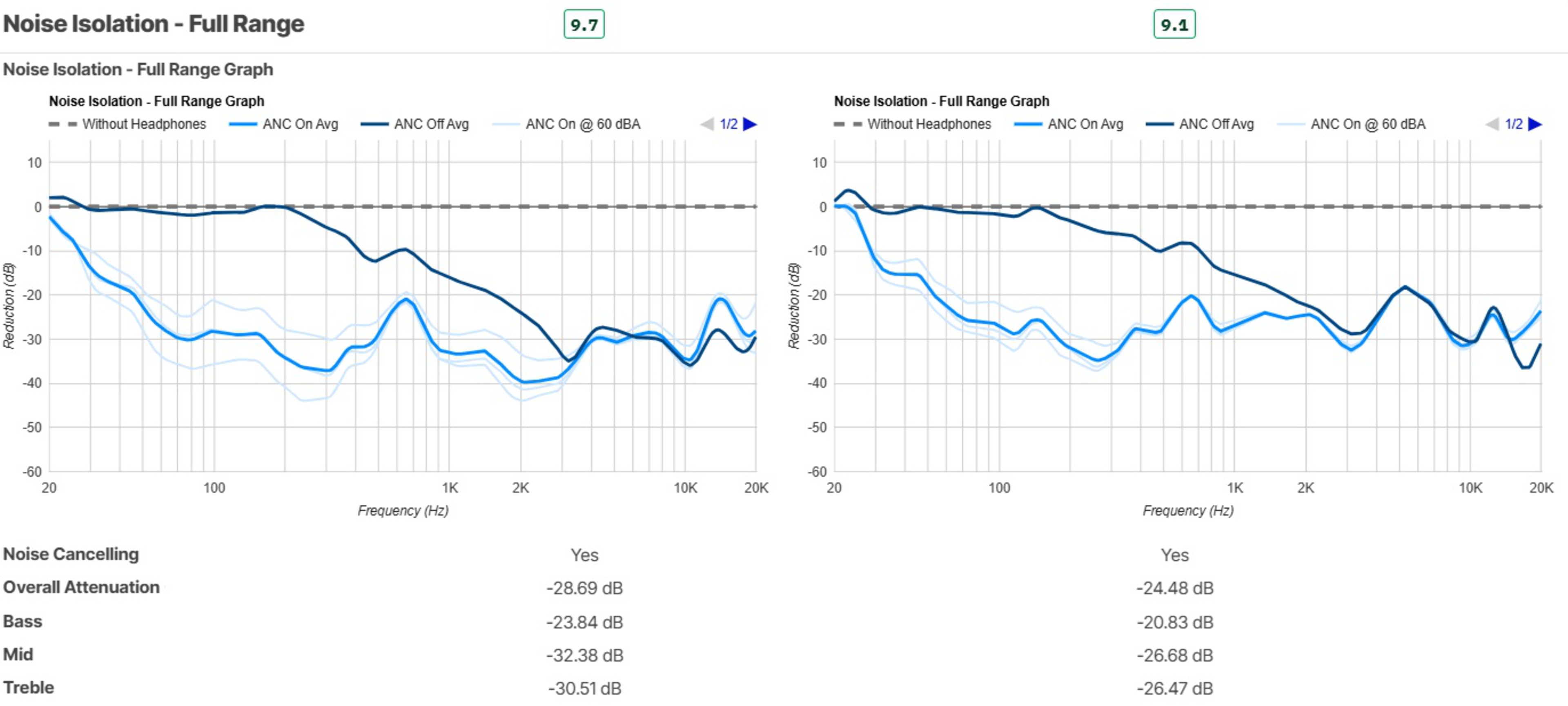
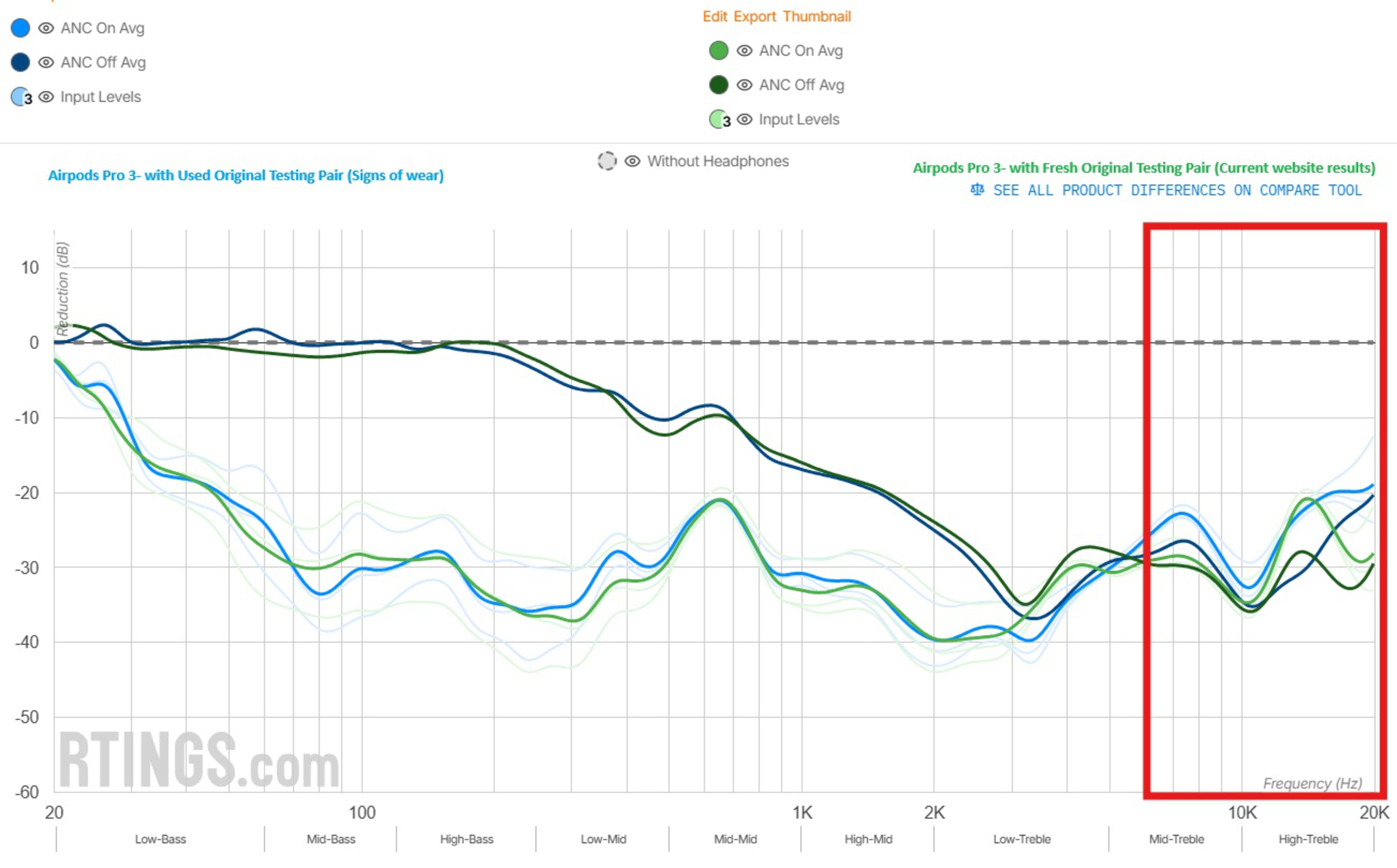
Overall, the AirPods Pro 3 exhibit superior noise isolation. The AirPods Pro 2 are still competitive against most ANC-equipped earbuds on the market, but the successor blocks even more noise. Those hybrid silicone-and-foam ear tips and the slightly deeper in-ear fit are effective at preventing high-pitched frequencies from reaching your ears. As mentioned already, those ear tips on the Pro 3 are a bit more delicate, which means over time, the earbuds' ability to block out high-pitched frequencies may deteriorate. We measured a comparison between new ear tips and the ear tips we'd been using during our rigorous testing process, and we found that high frequencies are less effectively attenuated by the used ear tips. Similarly, caring for your AirPods by cleaning them and keeping the mics and vents free of debris helps with their ANC performance.
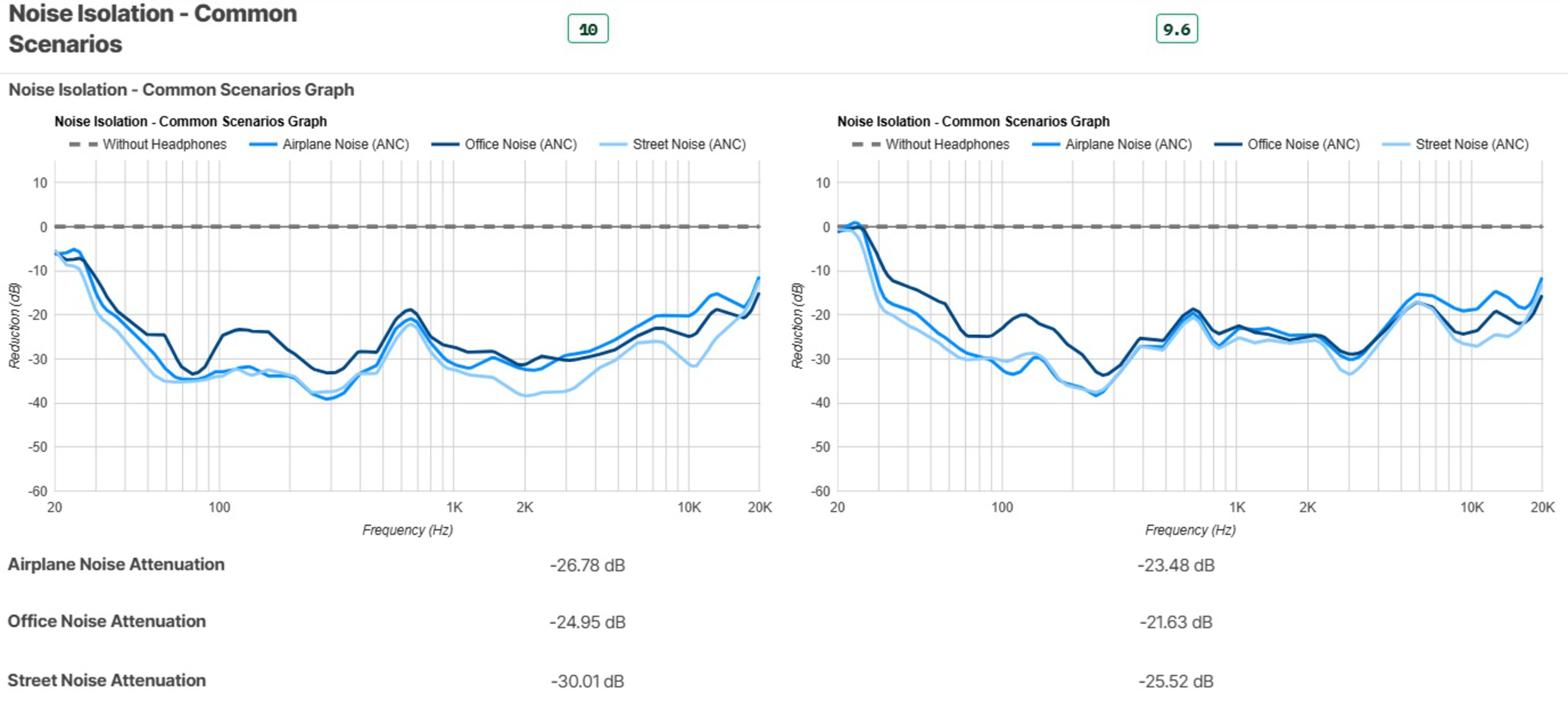
In common scenarios, the Pro 3's ANC continues to outperform the Pro 2's already fantastic noise isolation performance, especially with street noises. Both pairs have solid Transparency modes, but subjectively, we found that the Pro 3's implementation was a little more natural-sounding, with fewer artifacts produced by louder sounds in your environment. The Transparency mode on the Pro 2 is still good, though.
AirPods Pro 2 vs AirPods Pro 3: How Do They Sound?
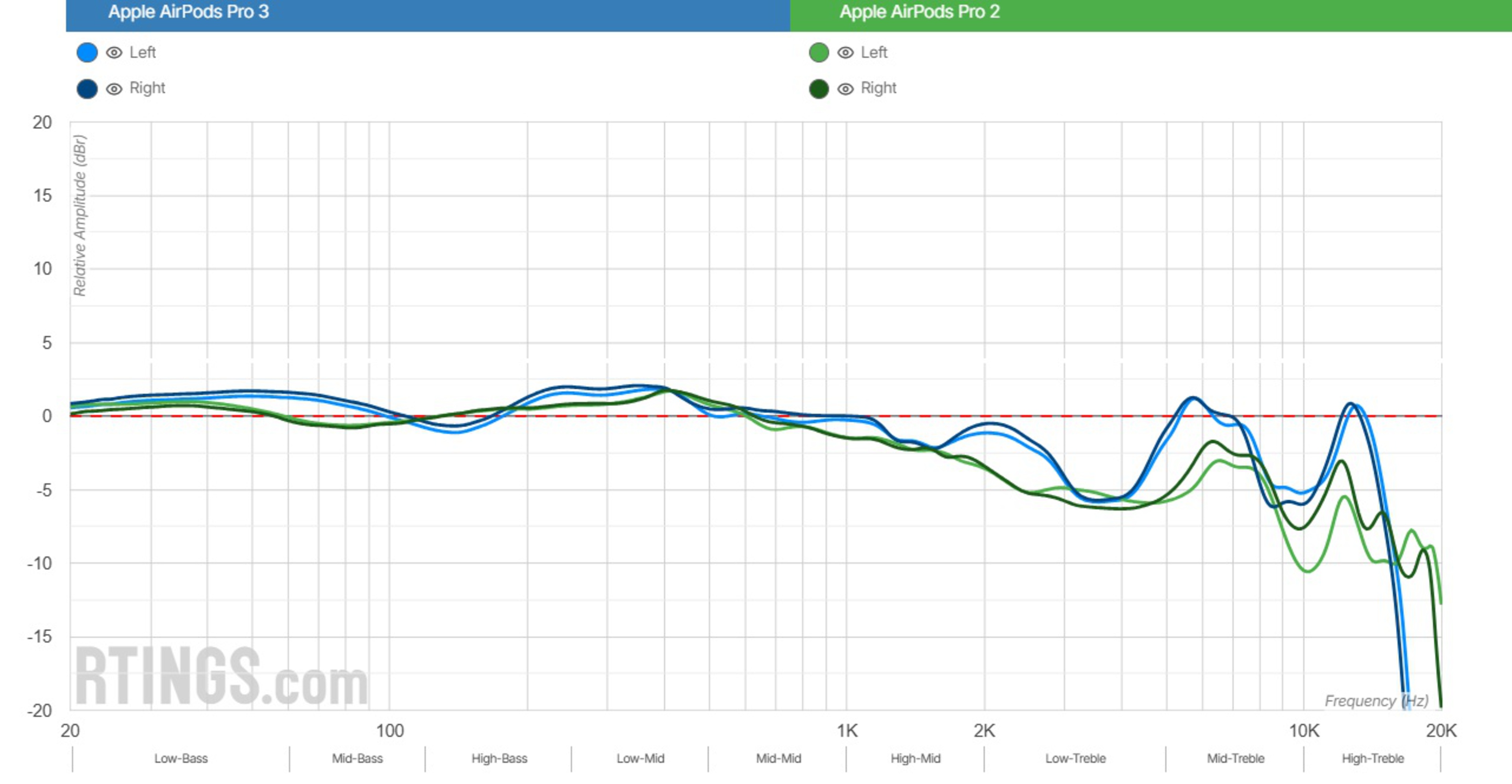
Both pairs of earbuds support Adaptive EQ and use loudness contouring. Adaptive EQ compensates for your ears' anatomy by changing the tuning so that you hear the earbuds as the manufacturer intended. Loudness contouring alters the EQ relative to the output loudness based on how human hearing works, so that at lower volume settings, the balance of lows, mids, and highs is perceived as similar to when audio is louder. In practice, that means highs and lows are boosted when you listen at low levels to compensate for the human auditory system. It's important to note that our standard measurements bypass loudness contouring. You can also see how the loudness alters the tuning at different volume levels with an iPhone 16e and the AirPods Pro 3. In short, both pairs have these features, and they're designed specifically to pair with iOS devices.
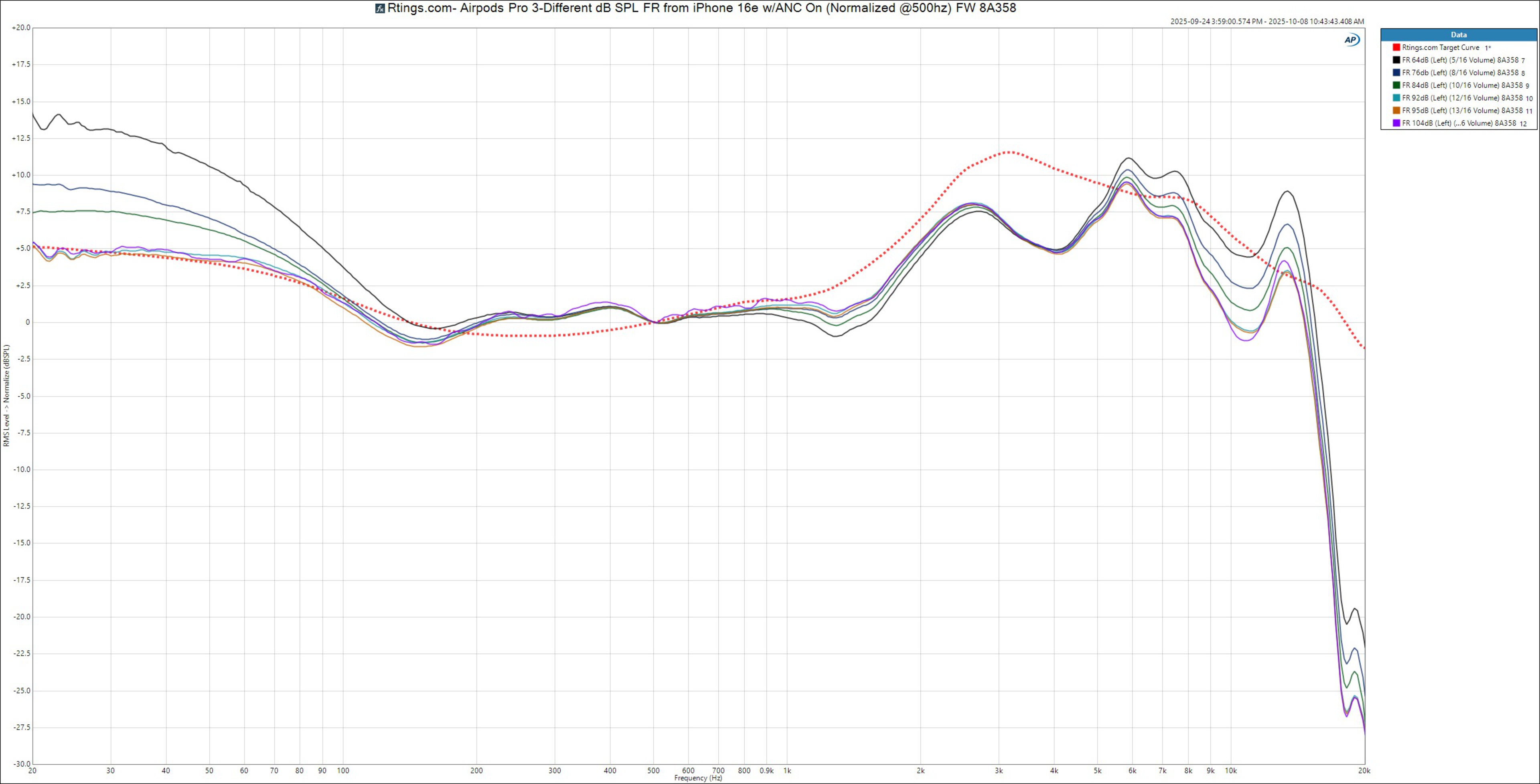
The AirPods Pro 3 are tuned for a bit more bassy oomph in the lower registers and a notably brighter treble. Both pairs have similar mid-ranges, which tilt to favor lower mids and de-emphasize upper mids. In contrast, the AirPods Pro 2 are a bit more conservatively tuned across the board with a slightly less punchy bass and a warmer top end. Unfortunately, neither pair includes a manual equalizer in the iOS Settings menu, so it's definitely worth choosing the pair that aligns with your taste's tuning. For what it's worth, the Pro 3 complies with our target curve better, particularly in the treble range, but if you prefer a warmer treble, the Pro 2 delivers.
While everyone has their own taste profile, some owners have commented across the annals of the internet that they find the Pro 3 sound V-shaped or too excited. Part of this could be due to Apple's loudness contouring, as we've just mentioned. But it's also true that the Pro 3's frequency response is a little bassier and considerably brighter than the Pro 2, so that pushed mid-range means they're not totally V-shaped.
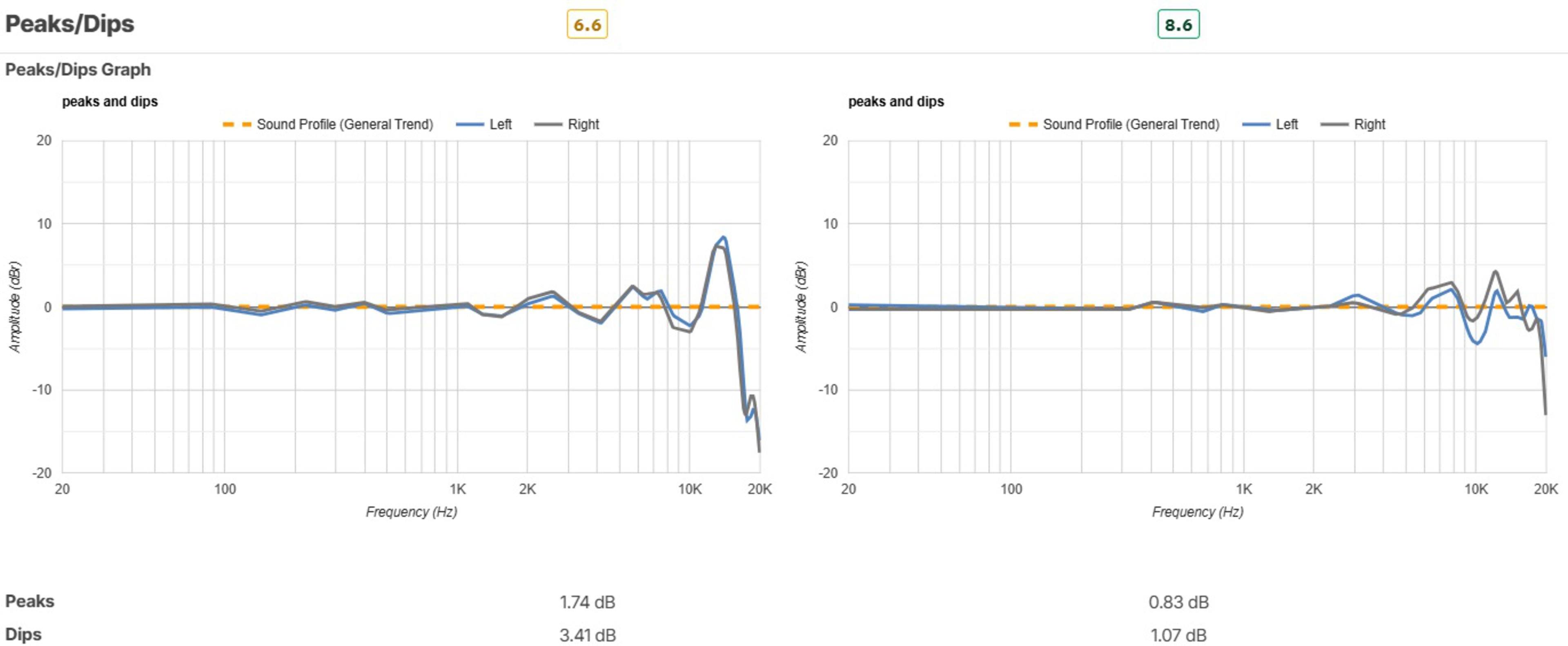
It's worth considering the role of peaks and dips because these help to indicate how smooth a frequency response is and, with extreme deviations, can also offer a clue into where you might experience auditory masking. The Pro 2's overall more conservative frequency response exhibits fewer major peaks and dips, resulting in a sound profile that recreates your audio without as many frequencies "jumping out" within the mix, particularly in the treble. With that said, most of the peaks and dips in the Pro 3's tuning reside in the high-treble at the edges of many people's hearing, but even ignoring that, there are still more across the range in the Pro 3's tuning.
Microphone Performance
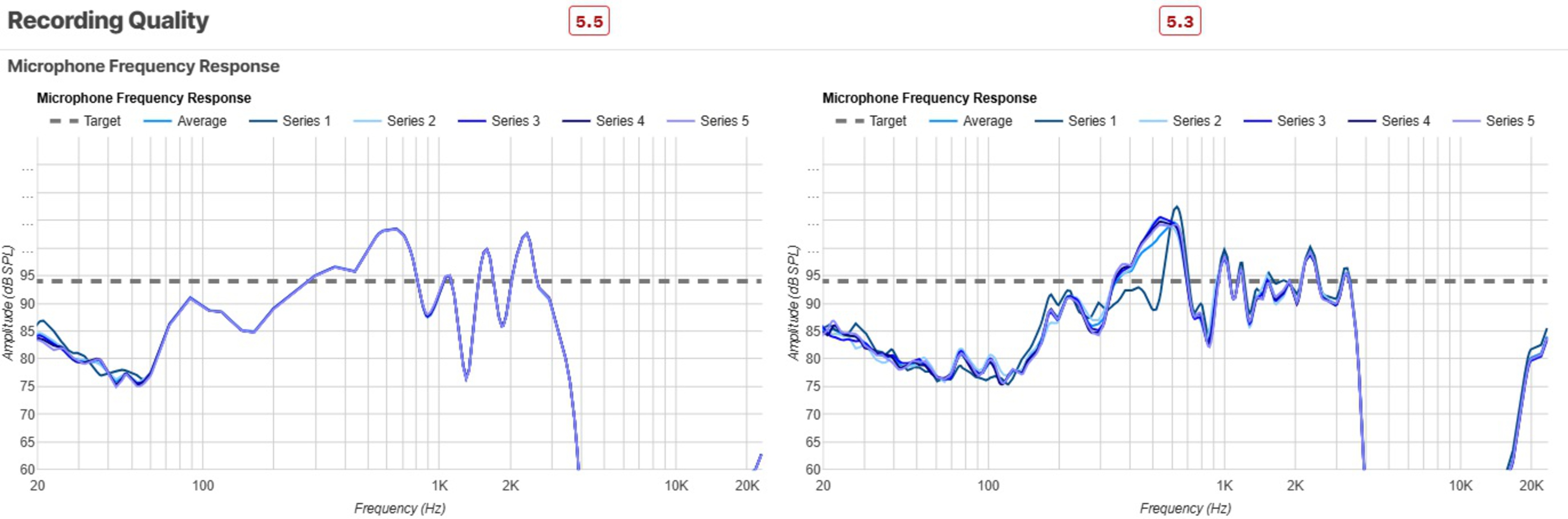
The AirPods Pro 3's microphone system is meant for use with other Apple devices, so how it sounds and how well it separates your voice from background noise depends on which device you pair to the buds. If you take a lot of calls and use an iPhone, the Pro 3 is the one to choose. While its mic seems unimpressive with our testing rig's standard configuration, listen to this AirPods Pro 3 demo recorded with the iPhone 16e (and this recording of the Pro 3's noise handling with an iPhone 16e). Demonstratively, the AirPods Pro 3's mic system sounds much fuller and clearer with the iPhone, and even pairing the AirPods Pro 3 to a Samsung Galaxy Flip 7 results in clearer sound than the AirPods Pro 2 were able to produce (though still not as clear as with the iPhone 16e). And here's a sample of the AirPods Pro 3's noise handling with the same Galaxy Flip 7 phone for comparison with the iPhone 16e demo.
On the other hand, if you attend many meetings using a work PC (and not macOS), neither the Pro 3 nor the Pro 2's mic systems particularly excel due to a severe roll-off in the mic's treble with a PC, which negatively affects your voice's intelligibility and articulation. The Pro 3's mic noise handling is decent with our rig and a bit better than the AirPods Pro 2's noise handling. Still, both perform considerably better when you use an iPhone and can select the native Voice Isolation features in the Settings.
Battery Performance and Bluetooth
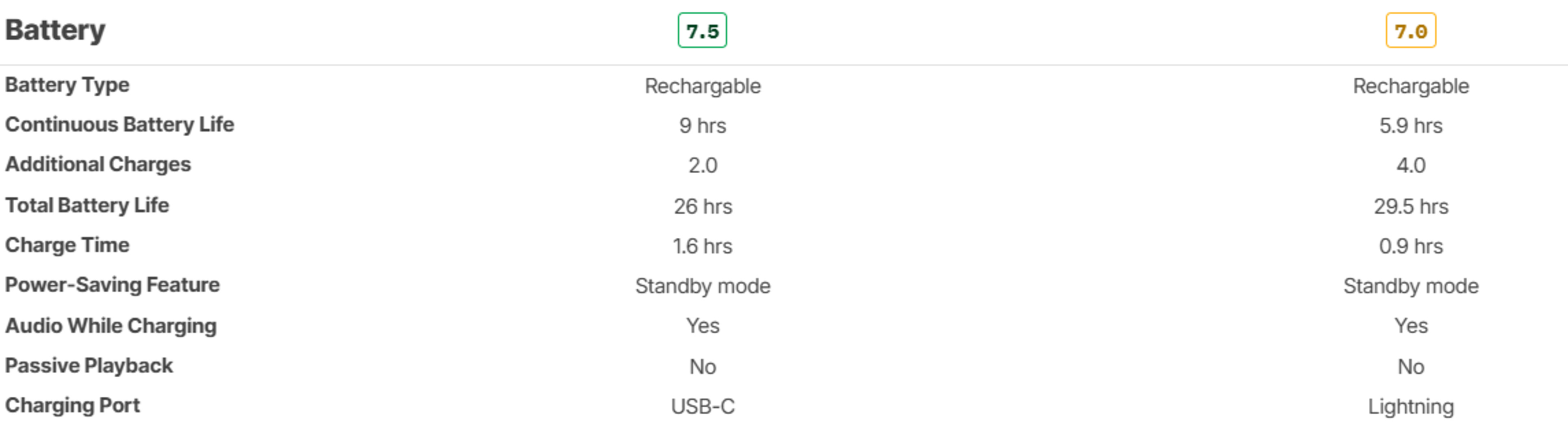
The continuous battery life received an upgrade on the AirPods Pro 3, reaching nine hours with ANC on, compared to six hours under the same conditions for the AirPods Pro 2. Battery life varies with usage, and you might experience different results if you're using Spatial Audio and fielding phone calls, but as a baseline, expect the Pro 3 to last longer during continuous playback. However, the AirPods Pro 2's case houses four recharges instead of the Pro 3's two, so the Pro 2 have roughly 3.5 more total hours of battery life. The Pro 2's longer total battery life is possibly offset by the fact that the buds need more frequent recharging, even if the case doesn't need to be.
As for Bluetooth performance, not much has changed between the generations; both use Bluetooth 5.3 with an H2 chip and offer support for AAC and SBC codecs. Conventional multi-device pairing is still off the menu, but you can swap between devices on the same iCloud account. The AirPods Pro 2 exhibited slightly lower latency over SBC (160 ms vs the AirPods Pro 3's 183 ms), but since this line is designed to use the AAC codec with iOS/iPadOS and macOS devices, you'll likely experience different results depending on the device.
Software Features for the AirPods Pro 3 and AirPods Pro 2
Since many features rely more on the interaction of the AirPods and their respective iPhone's capabilities and OS version, it's worth ensuring compatibility with your device. While it's expected that the brand will continue to add features over time, as has been the case with the AirPods Pro 2, let's start with similarities. Both pairs support Apple Spatial Audio with or without headtracking, so compatible Dolby Atmos tracks can simulate 3D Audio or apply an algorithm to 'spatialize' conventional stereo or mono audio tracks.
Through the iOS Settings menu (because neither pair has its own app), you can adjust listening modes (Transparency, Noise Cancelling, Conversation, and Adaptive), reallocate some controls, and enable/disable gesture controls. The built-in fit test can help ensure that isolation works as expected. Live Translation, which is still in beta (at the time of writing), works on either pair with a compatible iPhone and up-to-date firmware. The Live Translation function is a little slow for normal conversation, but in a pinch, it'll help for asking directions. You can use Conversation Boost by itself with the Pro 2 and Pro 3, or in conjunction with using the buds as hearing aids for 'mild to moderate' hearing loss. On the other end of the hearing spectrum, you can use either pair as hearing protection and to test your own hearing. However, the hearing aid and protection tech are limited by regional availability.
The central difference is that the Pro 3's hardware allows the software to support heart monitoring with functions like a caloric Burn Bar to give biofeedback and live workout guides via the Apple Fitness Buddy, and with an Apple Fitness+ subscription. You can also sync to select third-party fitness apps.
Conclusion and Takeaways
Despite mostly matching or improving the performance of the AirPods Pro 3 compared to the Pro 2, any big release comes with polarization, which highlights the unique preferences of individuals. For every critic of the original unsealed fit of the AirPods, there were haters of the ear tips on the Pro models, and similarly, the revised fit of the Pro 3 and tuning won't suit everybody. That deeper in-ear fit of the Pro 3 provides stability with fewer readjustments, which most people find comfortable, but it could be a dealbreaker if what you like about the AirPods Pro 2 is their less invasive fit. In addition, the greater treble emphasis on the AirPods Pro 3's frequency response and slightly punchier bass can come across as too excited if you're accustomed to the more laid-back and smooth tuning of the Pro 2. Still, you might enjoy the extra detail on sounds like the ride cymbals reproduced by the Pro 3, given that, to a degree, sound preference is subjective.
Outside of these personal preferences around fit and tuning, and objective considerations like the Pro 3's more delicate hybrid silicone-and-foam ear tips, it's mostly upsides from here with the third-gen model. There's class-redefining ANC on tap, a notably longer continuous battery life, and a more robust IP57 rating on the Pro 3. Plus, with the release of AirPods Pro 3, the Pro 2 can be found cheaper, making them a better value pick for many, especially since they still have stellar noise cancellation, even if it's not the best on the market.
Keep in mind that many of the same limitations apply across both generations of AirPods. For example, the Apple integration is essential for getting the most out of both sets of buds, so they may not be worth it if you don't own an iPhone, given the absence of an equivalent Android app. Similarly, the codec suite is primed for Apple, with only AAC and SBC Bluetooth codecs onboard, limiting the bitrate bandwidth compared to other premium earbuds with higher quality codecs. The brand continues to insist that you enjoy their sound profile without modification unless you use a third-party equalizer. Lastly, regional differences mean that if you want to use the buds as hearing aids or as hearing protection, for instance, it's worth checking which features are available where you live, and if your iPhone is recent enough to support the features you want.