Bose QuietComfort Ultra Headphones (2nd Gen)  Headphones Review

Reviewed Oct 30, 2025 at 11:14am
Retest Nov 05, 2025 at 03:49pm
Tested using Methodology v2.0 
Bose QuietComfort Ultra Headphones (2nd Gen)
7.5
Sports And Fitness 
8.6
Travel 
8.3
Office Work 
6.3
Wireless Gaming (In Development) 
7.4
Wired Gaming (In Development) 
8.1
Audio Reproduction Accuracy 
9.3
Noise Isolation 
7.2
Microphone (In Development) 
 73

The Bose QuietComfort Ultra Headphones (2nd Gen) are the 2025 follow-up to the original Bose QuietComfort Ultra Headphones Wireless from 2023. Rather than reinventing the headphones altogether, the next-gen Bose cans add a few bells and whistles, including new colors and USB-C wired listening. Still, much remains the same in the companion app, the controls scheme, and the Bluetooth codec suite, which isn't totally unwarranted, given that what's comfortable (as in the name, 'QuietComfort') is often synonymous with what's familiar.

Our Verdict

7.5
Sports And Fitness 

The Bose QuietComfort Ultra Headphones (2nd Gen) are good for sports and fitness, depending on the type of workout. While they're really comfortable to wear, they don't excel at staying put with vigorous exercise. So, if you solely use them for upright movements like cable pulls, they'll do, but calisthenics and bench presses are likely to cause them to slip free. That said, their long battery life will last several visits to the gym, and their tuning suits a variety of genres. Plus, the case can protect them from other necessities in your gym bag, like keys. Still, they don't have an IP rating, and they're rather large and not as breathable as earbuds.

Pros
  • Remarkable noise isolation.

  • 37-hour battery life.

  • Very comfortable.

Cons
  • Not stable enough for most exercise routines.

8.6
Travel 

The Bose QuietComfort Ultra Headphones (2nd Gen) are amazing for travel. Their adaptive ANC and passive isolation excel at reducing background noise, such as bus rumble and ambient plane cabin din. Their lightweight design and ample padding make them a comfortable companion for long flights, along with the 37-hour battery life. Besides multi-device Bluetooth pairing, they'll also connect to various wired inputs available on flights, like 3.5 mm analog and USB-C ports, while you can still access ANC. By default, they offer a full low-end, somewhat neutral mids, and a slightly darker top-end. Plus, their app lets you change their EQ and listening modes to taste. Still, despite their folding frame and padded zip case, they're not very small because they're over-ears.

Pros
  • Remarkable noise isolation.

  • Bluetooth, analog, and USB-C audio.

  • 37-hour battery life.

  • Very comfortable.

Cons
  • Bass and mids can vary on different people.

  • Mic doesn't work when used wired.

8.3
Office Work 

The Bose QuietComfort Ultra Headphones (2nd Gen) are great for office work. Thanks to their cushiony padding and light weight, you can wear them for long periods without discomfort. The 37-hour battery life can nearly last a full work week of nonstop playback. Their noise isolation performance is remarkable, but with office noises specifically, they don't fully block out lows as strongly (it depends on your particular office's types of noises). Their mic system sounds decent and captures your voice, sounding more or less natural, while prioritizing your voice above the background noise. That said, the mic doesn't completely reject environmental sounds, and using the wired connections disables the mic too. Still, multi-device Bluetooth pairing alongside USB-C and analog audio grant plenty of options for connectivity.

Pros
  • Remarkable noise isolation.

  • Bluetooth, analog, and USB-C audio.

  • 37-hour battery life.

  • Very comfortable.

Cons
  • Bass and mids can vary on different people.

  • Mic doesn't work when used wired.

6.3
Wireless Gaming (In Development) 

The Bose QC Ultra Headphones 2nd Gen aren't ideal for wireless gaming. They're Bluetooth-only and introduce latency, which can throw you off during fast-paced games. They support aptX Adaptive (Low Latency), which is one of the best-case scenario codecs for gaming with Bluetooth headphones, but it's not widely supported and tends to be limited to mobile gaming on Android devices.

7.4
Wired Gaming (In Development) 

The Bose QuietComfort Ultra Headphones (2nd Gen) are satisfactory for wired gaming. Although you can use them with either the analog audio cable or USB-C, the active power introduces more latency than passive headphones. It's not a significant amount of latency, though. You also can't use the microphone when they're plugged in, which is fine for solo games, but you'll need an outboard mic to talk to teammates. Otherwise, the headphones deliver a solid low-end, giving enemy footsteps enough volume to detect and locate, clear mids, and a slightly warm top-end. Still, their frequency response consistency is influenced by your anatomy, which alters what you hear, even with the CustomTune tech. They're amazingly comfortable and lightweight to carry you through marathon sessions. Their stellar noise isolation also ensures you can focus.

Pros
  • Very comfortable.

  • Analog or USB-C audio connectivity.

Cons
  • Bass and mids can vary on different people.

  • Mic doesn't work when used wired.

8.1
Audio Reproduction Accuracy 

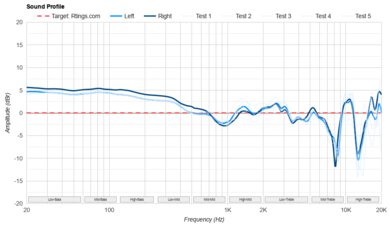
The Bose QuietComfort Ultra Headphones (2nd Gen) have great audio reproduction accuracy. Their smooth sound profile has minimal peaks and dips, except in the treble, where there are some peaks and dips that can sound relatively a bit sharp or dull, depending on the pitch. The drivers are well-matched overall, though there's a very slight difference in the mids. They also have very low harmonic distortion and tight group delay. Relative to our target curve, they yield a somewhat fuller bass, a mostly flat mid-range, and a warmer treble. Their PRTF indicates that they interact with your outer ear to somewhat mimic the effect of listening to an angled reference speaker.

9.3
Noise Isolation 

The Bose QuietComfort Ultra Headphones (2nd Gen) demonstrate superb noise isolation performance. Their active noise cancelling includes adaptive modes to offer you options to suit different needs and situations. They comprehensively attenuate background noise, making them a good choice for dealing with street noises and airplane cabin din.

7.2
Microphone (In Development) 

The Bose QuietComfort Ultra Headphones (2nd Gen) have a decent microphone system. Their frequency response is mostly flat where human voices reside, resulting in somewhat natural-sounding captured speech. The mic's noise rejection is satisfactory because it prioritizes your voice above sounds in the backdrop, but it doesn't completely eradicate the noise.

6.8
Frequency Response Consistency 

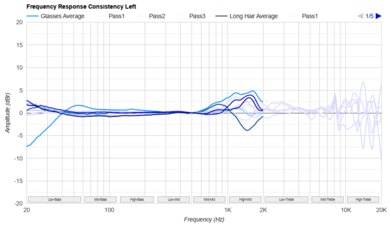
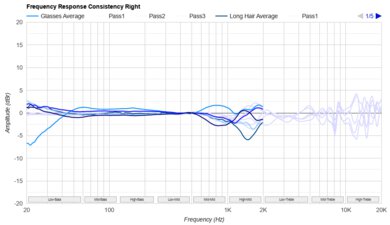
The Bose QuietComfort Ultra Headphones (2nd Gen)'s frequency response consistency is okay. They can sound different between people, especially those wearing glasses or who have a small head. The headphones have CustomTune, meant to modify the sound profile based on your anatomy, and because the function is always on, we can't say how much of a difference it makes. However, low bass and high-mids are particularly prone to variation between people, even if the sound is reasonably consistent for the same person between listening sessions.

  • 7.5
    Sports And Fitness
  • 8.6
    Travel
  • 8.3
    Office Work
  • 6.3
    Wireless Gaming (In Development)
  • 7.4
    Wired Gaming (In Development)

  • Performance Usages

  • 8.1
    Audio Reproduction Accuracy
  • 9.3
    Noise Isolation
  • 7.2
    Microphone (In Development)
  • 6.8
    Frequency Response Consistency
  • Changelog

    1.  Updated Nov 05, 2025: 

      The Noise Isolation - Common Scenarios audio demos have been re-uploaded because their audio tracks were previously muted.

    2.  Updated Oct 30, 2025: Review published.
    3.  Updated Oct 21, 2025: Early access published.
    4.  Updated Oct 03, 2025: Our testers have started testing this product.

    Check Price

    Differences Between Sizes And Variants

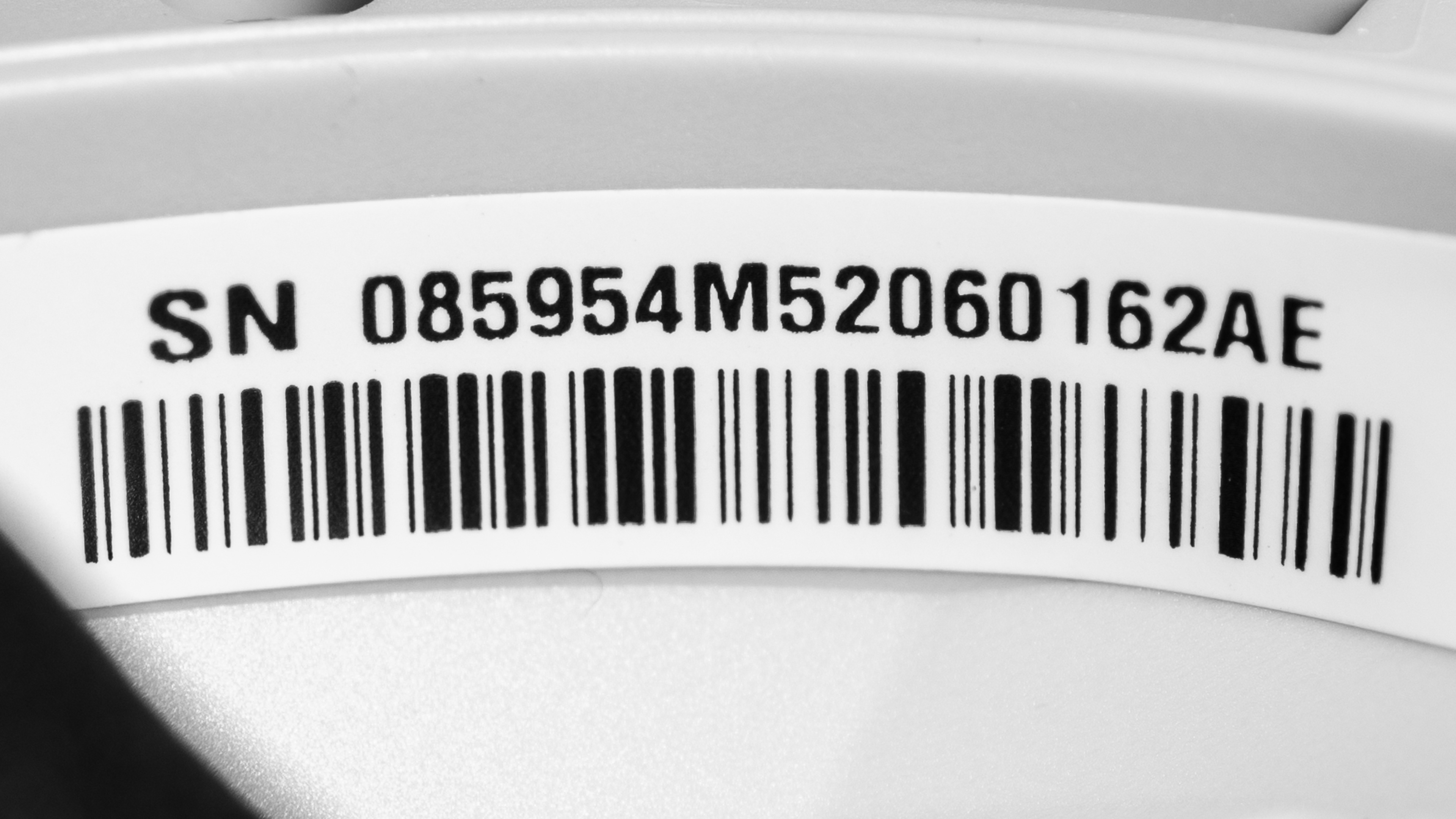
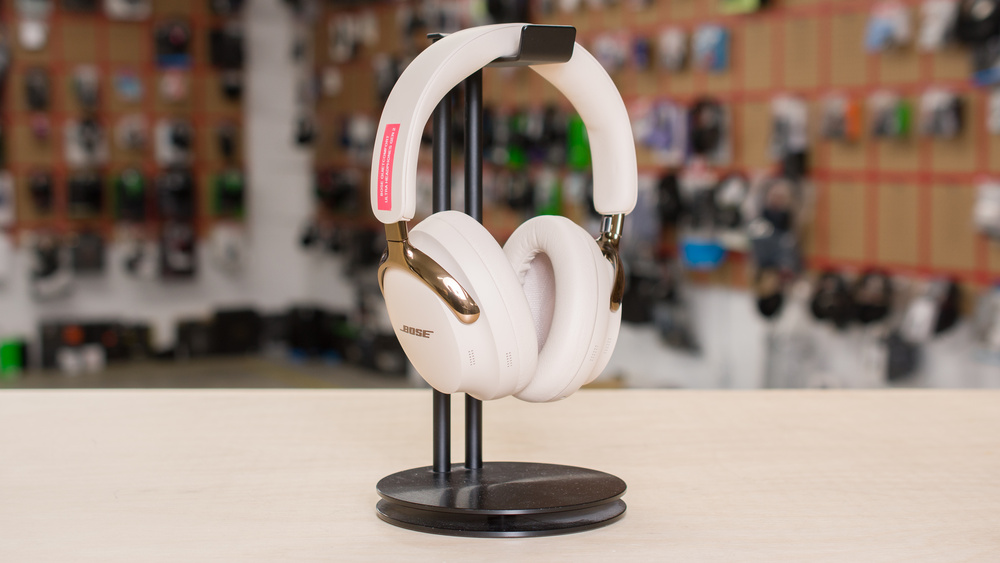
    The colors for the Bose QuietComfort Ultra Headphones (2nd Gen) include: 'White,' 'Black,' 'Desert Gold,' 'Midnight Violet,' and 'Driftwood Sand.' Our unit (label here) is the 'Driftwood Sand' colorway.

    If you encounter another variant of these headphones, please let us know in the comments.

    Popular Headphones Comparisons

    The Bose QuietComfort Ultra Headphones (2nd Gen) deliver a handful of incremental updates to the previous flagship Bose QuietComfort Ultra Headphones Wireless. These headphones and the step-down Bose QuietComfort Headphones Wireless share the same app, comfortable fit, and fantastic noise isolation performance. An extended battery life, lossless playback via USB-C audio, and a 'Cinema' Immersive Audio mode are available on the QC Ultra Headphones 2nd Gen. The QC Ultra Headphones 2nd Gen sound warmer in the treble range than the QC Ultra and QC Headphones Wireless, which comes down to personal taste. In the premium tier, the Sony WH-1000XM6 are a clear contender with marginally better ANC, more extensive controls, and a better equalizer. However, the Bose QC Ultra Headphones (2nd Gen) are more comfortable with more space for your ears, and they're a little bit better built. Still, each pair have different approaches from the perspective of how people want to experience their headphones.

    For more recommendations, check out the best travel headphones, the best noise cancelling headphones, and the best USB-C headphones.

    Sony WH-1000XM6

    The Sony WH-1000XM6 and the Bose QuietComfort Ultra Headphones (2nd Gen) are both flagship noise cancelling headphones with different selling points. With the Sony, you get a bit stronger noise isolation performance (though it's quite close) and a somewhat more excited default tuning. The touch controls are more comprehensive, but some people may prefer buttons on the Bose. For the most part, preferences are the deciding factor between these headphones. If you want more user control over things like EQ, the Sony may appeal. Meanwhile, the Bose gives you some tools to carve out a sound, but some modes are combined or more minimal. They feel very comfortable on more people and have a longer battery life with USB-C audio, too. They also give a more consistent sound if you wear glasses. However, if you take a lot of calls, the Sony might be a better pick, but the Bose's mic is fine for calls, and both pairs aren't necessarily worlds apart.

    Bose QuietComfort Ultra Headphones Wireless

    There are small tweaks to features between the newer Bose QuietComfort Ultra Headphones (2nd Gen) and the previous Bose QuietComfort Ultra Headphones Wireless. However, overall noise cancelling strengths are similar, so whichever you choose, it ought to be for other reasons than ANC. The 2nd Gen has a longer battery life, adds USB-C audio, and has less excited treble response. They're slightly more padded, but both are quite comfortable. Their app features, like three-band EQ and presets, mean they share more in common with the original QC Ultra Headphones, than not. The QC Ultra Headphones keep up well with their successor and adhere closer to our target frequency response in the treble (though it depends on your tastes). Both have virtual soundstages, similar control schemes, and aptX Adaptive suite for low-latency or high-quality Bluetooth connection.
    Bose QuietComfort Headphones Wireless

    The Bose QuietComfort Ultra Headphones (2nd Gen) are the next generation flagship after the Bose QuietComfort Headphones Wireless, which belong to the step below the flagship in the QC line. The QC Ultra (2nd Gen) have a more premium build, a considerably longer battery life, USB-C audio, and somewhat better noise isolation performance. Their mic sounds better, too. On the other hand, the QC Headphones have an in-line mic, so you can still use the mic when you plug them in, which is useful for gaming. Their slightly smaller frame takes up a little less room in your bag, and the smaller ear cups contribute to considerably more consistent sound between listening sessions and different people. They share many of the same app features (like three-band EQ), except for Immersive Audio, available with the QC Ultra (2nd Gen), too. Depending on your tastes, you may prefer the warmer top-end of the QC Ultra (2nd Gen) or the much more excited, V-shaped tuning of the QC Headphones.

    Sennheiser MOMENTUM 4 Wireless

    Depending on your core usages, you may prefer the Bose QuietComfort Ultra Headphones (2nd Gen) to the older Sennhesier MOMENTUM 4 Wireless. The Bose, being a newer flagship model, outperform when it comes to noise isolation performance. They're also more portable over-ears and a bit more comfy. Plus, their mic offers better fidelity, which is fortunate if you take a lot of calls. Their Bluetooth range is better, too. Even so, the Sennheiser have a stellar 62 hours of battery life (versus 37 hours for the Bose), and their app includes a more comprehensive EQ. Since they're a couple of years older, you may find them for a cheaper price and still get USB-C and analog audio alongside aptX Adaptive (available on the Bose, too). It's worth picking the pair that more closely matches your preferred tuning, if the noise isolation and better mic on the Bose isn't enough to decide.

    Test Results

    perceptual testing image
    Sort:
    RATINGS
    Category:
    All
    Sound
    Sound Profile
    See details on graph tool
    Normalization Frequency
    700 Hz
    Bass Amount
    Emphasized (3 dB)
    Treble Amount
    Underemphasized (-4 dB)
    Sound Signature
    Warm

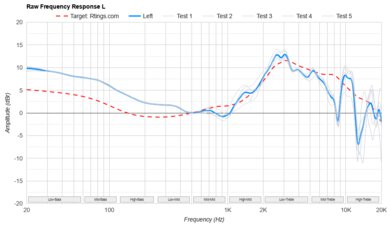
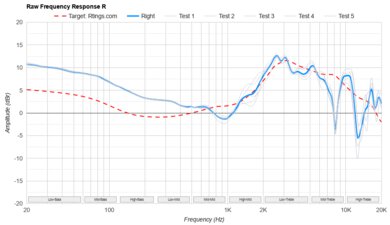
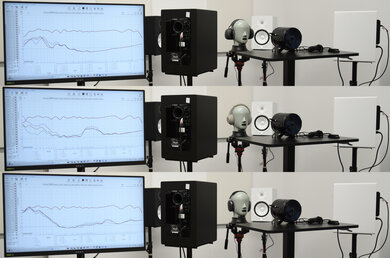
    The Bose QuietComfort Ultra Headphones (2nd Gen) use the brand's CustomTune technology, which adjusts the frequency response between 800Hz and 5kHz to your ears by playing a tone. Once calibrated on our rig, the bass is emphasized with a relatively de-emphasized mid-range, except for a peak in the high-mids. The treble is warmer than the previous Bose QuietComfort Ultra Headphones Wireless' tuning and our target curve. That said, like a sound profile chimera, the Bose QC Ultra Headphones (2nd Gen)'s treble is voiced in the top-end a bit closer to the SenseLab Aizu and SoundGuys.com Headphones Preference Curves, but the bass is much closer to our curve. However, that's not the end of the story because these headphones come with EQ presets and a custom three-band EQ, so you can change the sound to your tastes.

    These headphones also change their tuning slightly if you turn the ANC off. The cans also support USB-C and analog wired connections, and they sound a bit different in those modes, too. We compared the CustomTune calibration (mainly of note between 800Hz and 5kHz) on two different subjects and then on the testing rig's B&K 5128 to see how the measurements changed or didn't between people.

    6.8
    Frequency Response Consistency
    See details on graph tool
    See details on graph tool
    Std. Deviation
    1.14 dB

    Their frequency response consistency is fair. They use CustomTune calibration to adjust their sound based on your ears and anatomy. That said, their adaptive tuning means that different people tend to experience varying sound profiles. Some takeaways we found include a slight drop in the low bass if you wear glasses and a pretty drastically variable mid-range on most people. People with small heads may experience a large dip followed by a large peak in the upper mid-range, which can cause voices to sound unevenly distant and harsh. On the other hand, people with long hair or large-sized heads may experience the inverse: a peak in the mid-mids and a notably deep dip in the high-mids.

    Raw Frequency Response
    See details on graph tool
    See details on graph tool
    9.1
    Bass Profile: Target Compliance
    See details on graph tool
    RMS Deviation From Target
    2.8 dB
    Low-Frequency Extension
    20 Hz
    Low Bass
    3 dB
    Mid Bass
    3.04 dB
    High Bass
    1.69 dB

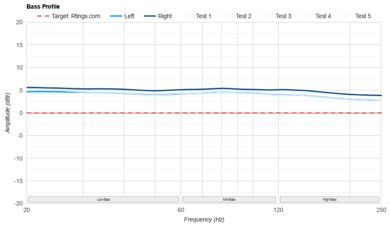
    The Bose QuietComfort Ultra Headphones (2nd Gen) have superb bass target compliance. Compared to our curve, the low-end is boosted across the range, with more emphasis on rumble and punch, and tapers off somewhat in the high bass. Bass guitar and kicks in disco tracks like Got to Have Loving by Don Ray and Cerrone are infused with a bit of extra low-end fullness.

    9.2
    Mid-Range Profile: Target Compliance
    See details on graph tool
    RMS Deviation From Target
    1.25 dB
    Low Mid
    -0.69 dB
    Mid-Mid
    -0.22 dB
    High Mid
    0.72 dB

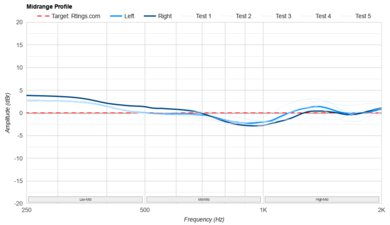
    The mid-range target compliance is exceptional and doesn't deviate too far astray from our curve. There's minor underemphasis in the lower mids and a bump in the upper mids, resulting in natural-sounding pianos and sparkly lead guitars that can sound a little harsh. That said, our unit has a very slight mismatch in the upper mids, making one side a bit quieter than the other.

    7.0
    Treble Profile: Target Compliance
    See details on graph tool
    RMS Deviation From Target
    4.29 dB
    Low Treble
    -3.76 dB
    Mid Treble
    -3.91 dB
    High Treble
    -6.02 dB

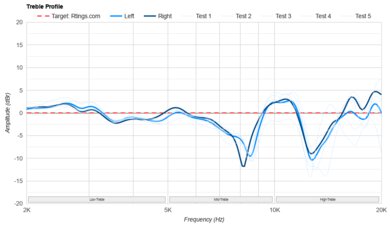
    The Bose QuietComfort Ultra Headphones (2nd Gen) have satisfactory treble target compliance. Nearly the entire range is de-emphasized relative to our curve. Vocal articulation and cymbal harmonics sound a little warm and slightly dull, but not piercing or hissy.

    8.0
    Peaks/Dips
    See details on graph tool
    Peaks
    1.1 dB
    Dips
    1.54 dB

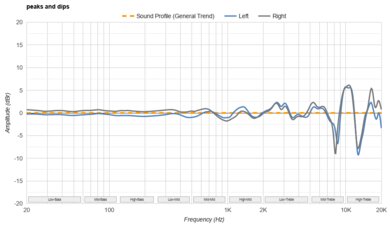
    Their peaks and dips are very good. The lows are mostly smooth and consistent. The mids are also more or less smooth with only minor deviations (and a small L/R mismatch in the high-mids). In the treble range, there are sharper peaks and valleys, which tend to make vocal and upper harmonics come across as either relatively a bit dull or shrill, depending on the pitch.

    8.1
    Stereo Mismatch
    See details on graph tool
    See details on graph tool
    Weighted Amplitude Mismatch
    0.26 dB
    Weighted Frequency Response Mismatch
    1.40 dB
    Weighted Phase Mismatch
    1.8°

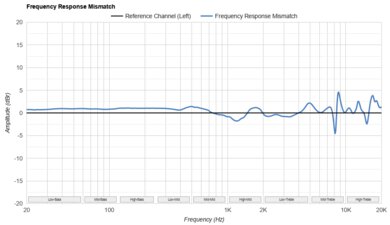
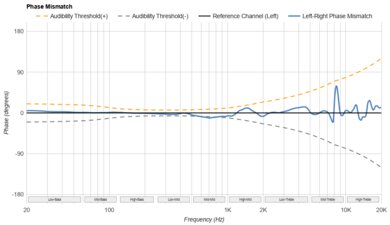
    These over-ears have very good stereo matching. Their weighted amplitude is closely matched, so each driver reproduces your audio at nearly the same output loudness. There's a mismatch in the mid-range's frequency response and phase, which isn't audible in a sine sweep, but it can slightly affect the stereo image, depending on the content and your sensitivity. Otherwise, the higher, treble mismatches aren't obvious during playback. That said, these results only apply to our unit, so your results may vary.

    7.9
    Group Delay
    See details on graph tool
    Weighted Group Delay
    0.8 ms

    The group delay performance is very good. Across the range, the drivers output frequencies without bleeding into each other within the time domain, resulting in tight bass and transparent treble.

    7.2
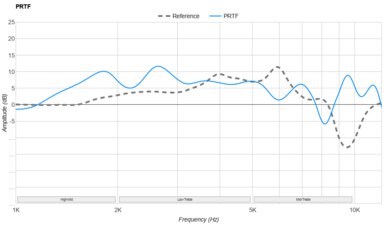
    PRTF
    See details on graph tool
    PRTF Accuracy (RMS Deviation)
    2.55 dB
    PRTF Size (Avg.)
    4.38 dB
    PRTF Distance
    10.88 dB

    The PRTF measurements indicate a decent amount of interaction with your ears' pinna. This suggests some similarities with your sense of spaciousness when compared to the effect of an angled reference speaker.

    9.4
    Harmonic Distortion
    See details on graph tool
    See details on graph tool
    WHD @ 94 dB SPL
    0.07%
    WHD @ 104 dB SPL
    0.09%

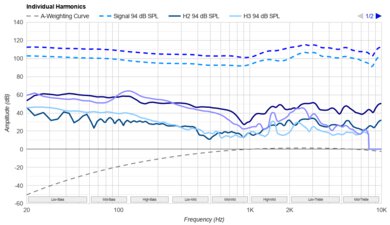
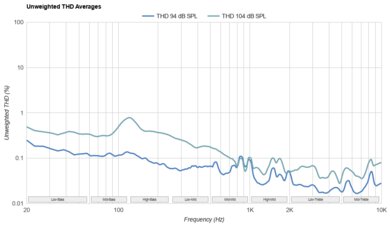
    These over-ears exhibit fantastically low harmonic distortion. At 94 dB and 104 dB/SPL, each frequency tested through the headphones is delivered with very little coloration, leaving your audio unaffected by unwanted artifacts.

    Electrical Aspects
    Sensitivity @1kHz-1V
    N/A
    Bluetooth Max SPL
    104.9 dB

    These headphones require their built-in power to work, even when using a wired connection, so it's unnecessary to take impedance and sensitivity measurements.

    3.3
    Virtual Soundstage
    Head Modeling
    No
    Speaker Modeling
    On/Off
    Room Ambience
    No
    Head Tracking
    Adjustable
    Virtual Surround
    Immersive Audio

    Through the Bose Music companion app, you can access the virtual soundstage feature, labeled as 'Immersive Audio.' It uses headtracking 'Motion' (or not, if you disable it in 'Still' mode) and speaker modeling to apply a (digital signal processor) DSP to make audio seem more spacious. In 'Motion' mode, sound moves around you in response to your head movements and reorients to center around you if you stop moving. The effect works on any conventional stereo audio, but it doesn't work with Dolby Atmos audio the way that the Sony WH-1000XM6 do.

    'Cinema' mode sets your ANC to the highest strength and disables head movements. It sounds a little different from the stereo sound profile, with a bit more low-end rumble and a little more excited treble. Unfortunately, due to the nature of effects like phase used for virtual soundstages, we can't capture this difference in a representative way with our testing rig, which is designed for stereo.

    Test Settings
    Firmware
    5.0.20
    Power
    On
    Connection
    Bluetooth
    Codec
    SBC, 16-bit, 44.1kHz
    Test InstrumentAudio Precision APx517B
    EQ
    No EQ
    ANC
    Quiet
    Tip/Pad
    Default
    Microphone
    Integrated

    These are the settings used to test these headphones. We also used the CustomTune feature on our test rig so that it could adapt to its ear shape. Our results are only valid when used in this configuration.

    Design
    Style
    TypeOver-ear
    EnclosureClosed-Back
    WirelessYes
    TransducerDynamic

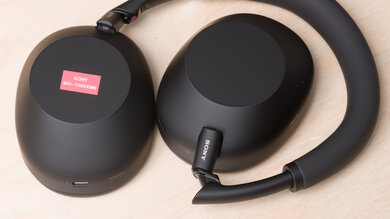
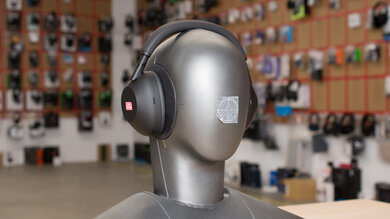
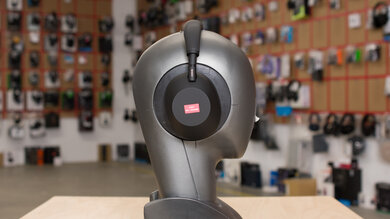
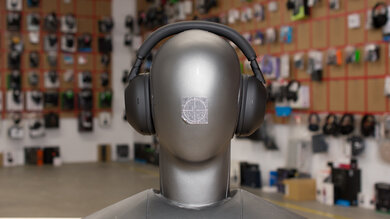
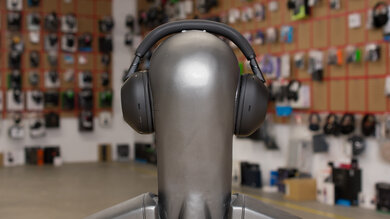
    The Bose QuietComfort Ultra Headphones (2nd Gen) resemble the original Bose QuietComfort Ultra Headphones Wireless in design, except for the flashier shiny metallic-colored yokes on the 2nd Gen. The headband has a slightly thicker strip of padding, too. Depending on the color you choose, the mostly metal and plastic build has matching or tonal details, and the brand logo on the outside of each ear cup. At release, the colors include: 'White,' 'Black,' 'Desert Gold,' 'Midnight Violet,' and (like our unit) 'Driftwood Sand.'

    8.5
    Comfort
    Weight0.58 lbs
    Clamping Force
    0.8 lbs

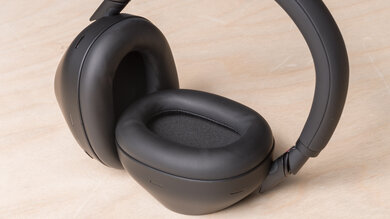
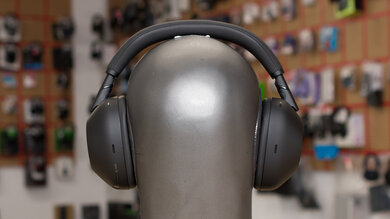
    The Bose QC Ultra Headphones (2nd Gen) are amazingly comfortable. They're lightweight with generous padding along the headband, and they don't clamp hard. Their ample padding feels a little more premium than the previous Bose QuietComfort Ultra Headphones Wireless, but otherwise, they're very similar to wear. The enclosures are slightly angled to accommodate a variety of ear shapes and sizes.

    7.6
    Controls
    OS Compatibility
    Not OS specific
    Ease Of UseDecent
    FeedbackGood
    Call/Music ControlYes
    Volume ControlYes
    Microphone ControlNo
    Channel Mixing
    No
    Noise Cancelling ControlPresets
    Talk-Through
    On/Off
    Additional ControlsShortcut

    Their controls are similar to the last generation's. A combination of two buttons and a touch-sensitive slider handles all of the playback and call controls. When you press and hold the multi-function button, you can change which preset listening modes (which include ANC settings) the headphones use by modifying them within the app. You can also assign a single 'Shortcut' in the app, and the options are: 

    • Quiet (ANC Max/Immersive Audio off)
    • Aware (Transparency Max/'ActiveSense' Off/Immersive Audio off)
    • Immersion (ANC Max/Immersive Audio with 'Motion' mode)
    • Cinema (ANC Max/Immersive Audio with 'Still' mode)

    Although there's a degree of customization as a perk, stacking commands to only two buttons and a slider can be a little tedious and requires some amount of memorization. The touch-sensitive slider's responsiveness can be a little inconsistent with your fingertips, which is annoying when altering the volume, and it doesn't audibly indicate any change registered when skipping a track. Otherwise, the clicky buttons offer immediate feedback while chimes and voice prompts alert you to listening modes, pairing status, minimum and max volume settings, and battery level.

    6.4
    Portability
    L7.4" (18.8 cm)
    W5.7" (14.4 cm)
    H1.7" (4.3 cm)
    Volume71.03 in³ (1,164.01 cm³)
    Transmitter RequiredNo

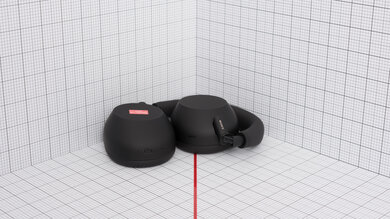
    These over-ears aren't bad for portability. They feature articulating arms with hinges and can fold and lay flat to save space. Still, they're not the smallest cans available, but they're easy enough to rest around your neck if you're short on space in your bag.

    8.0
    Case
    TypeHard case
    L8.4" (21.3 cm)
    W6.2" (15.7 cm)
    H2.2" (5.6 cm)
    Volume114.28 in³ (1,872.70 cm³)

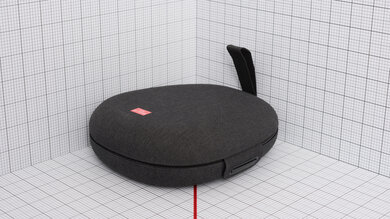
    Their zip case is great. It's a semi-hardshell case with a bit of give, comprised of plastic and faux leather. While similar to the last generation's carrying case in dimensions with a big pouch for cables, this one supplies more protective padding inside and a smoother zipper.

    8.0
    Build Quality

    The Bose QuietComfort Ultra Headphones (2nd Gen) have great build quality. They're made of plastic, aluminum, and synthetic leather. The enclosures are aluminum, and despite the metallic shine, the yokes are plastic. Their hinges are metal, though, and feel sturdy, as does the sliding headband; over time, these could wear down a little, but they feel well-constructed.

    The faux leather padding along the headband and earpads feels a bit nicer and has a bit more give than on the Bose QuietComfort Ultra Headphones Wireless. The AUX and USB-C cables are a shortcoming, though: both are rather short (which can result in a lot of accidental tugs) and thin.

    7.0
    Stability

    These headphones are decently stable. They're meant for walking around and sitting down, but not for exercise or headbanging. They can shift with sudden movements and tilts, while intense head shakes will knock them off.

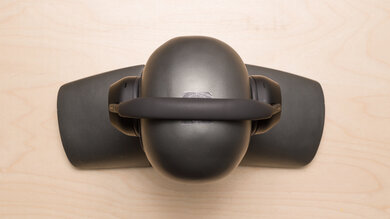
    Headshots 1
    Headshots 2
    Top
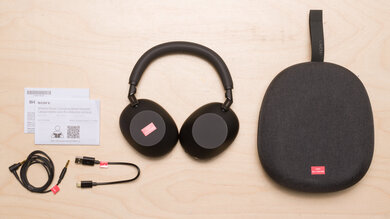
    In The Box

    • Bose QuietComfort Ultra Headphones (2nd Gen)
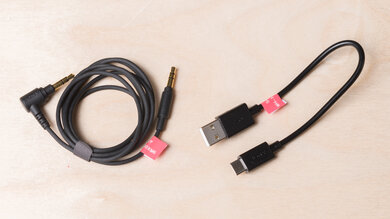
    • 3.5 mm to 2.5 mm (1/8" to 1/16") TRS audio cable (102 cm/40 inches)
    • USB-C to USB-C cable (95 cm/37.4 inches)
    • Carrying case
    • Quick start guide
    Isolation
    9.5
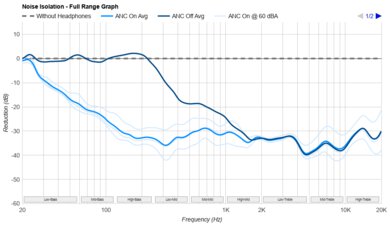
    Noise Isolation - Full Range
    See details on graph tool
    Noise CancellingYes
    Overall Attenuation
    -26.46 dB
    Bass
    -18.55 dB
    Mid
    -27.49 dB
    Treble
    -34.94 dB

    The Bose QuietComfort Ultra Headphones (2nd Gen) have superb full-range noise isolation. Through a mixture of passive isolation and the adaptive ANC system, the headphones do a solid job of blocking rumbly noises, chatter, and high-pitched squeaks like sneakers on linoleum flooring. That said, the overall performance is similar to the Bose QuietComfort Ultra Headphones Wireless with slightly different strengths. The 2nd Gen block out more trebly noises. You can also adjust the strength of the ANC within the app.

    The adaptive nature of the ANC system extends to the 'Aware' (aka transparency) mode as part of the 'ActiveSense' feature, and it uses a combination of transparency and ANC to filter out unpleasant noises while offering situational awareness. It's quite quick to respond to fast transients like keyboard strokes and hand claps, and it softens the noise from reaching your ears. The vocal clarity in the 'Aware' mode means you can quickly ask for directions without removing your headphones.

    That said, some owners have reported a few seconds of ANC 'hiss' in the background, which we can confirm we also experienced. It's not a persistent background hiss, and it only lasts a few seconds when there are changes to either your environment's noise level or your playback (paused audio or volume settings), but if you wear ANC headphones mainly to block out noise and don't listen to music, it could be annoying. In contrast, the previous model has complaints of a persistent background hiss from the ANC, which seems quieter, while the QC Ultra 2nd Gen's hiss is louder, but it goes away.

    9.5
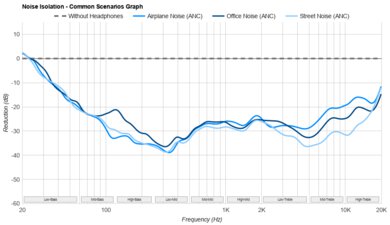
    Noise Isolation - Common Scenarios
    See details on graph tool
    Airplane Noise Attenuation
    -22.46 dB
    Airplane Noise Isolation Audio
    Office Noise Attenuation
    -21.01 dB
    Office Noise Isolation Audio
    Street Noise Attenuation
    -25.35 dB
    Street Noise Isolation Audio

    These over-ears have remarkable noise isolation in common scenarios. Overall, the noise isolation's effectiveness is comparable to the last generation model, but these two headphones don't tackle the frequencies in the exact same way. For example, brighter noises in office settings are blocked better by the QC Ultra Headphones Gen 2, but they don't filter out low, punchy noises quite as well in office settings. Still, street and airplane noises like traffic and din are handled very well.

    While some owners of the previous Bose QuietComfort Ultra Headphones Wireless complained of unwanted noise produced by external vibrations, we haven't been able to reproduce that effect on the 2nd Gen, but we also haven't experienced this with their predecessor either. There's the effect of low-pitched noise produced from the headphones slightly moving around on your head when walking around, but that's also commonly experienced on most ANC cans, and it doesn't match the descriptions provided by owners of the last-gen model's ANC issue.

    Noise Isolation - Voice Handling
    Female Voice 1
    Male Voice 1
    Female Voice 2
    Male Voice 2
    ANC Wind Handling
    See details on graph tool
    ANC Wind Noise

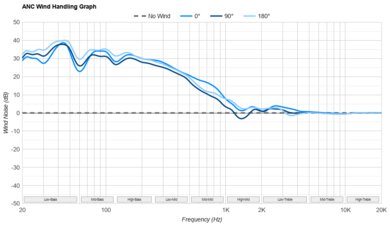
    These headphones have a wind reduction feature, 'Wind Block.' While the interaction of wind with the ANC system produces noise, which is normal, it depends on the angle of the wind. It also works better than the previous model, particularly with low-pitched noise and when the air hits the headphones at a 90-degree angle.

    7.4
    Leakage
    See details on graph tool
    Leakage Audio
    Overall Leakage @ 1ft
    37.07 dB

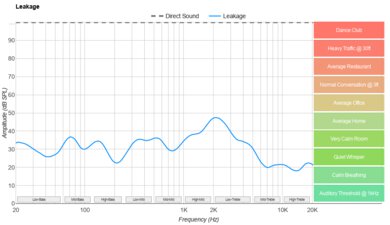
    Their leakage performance is decent. Most of the audio that escapes resides in the mid-range, meaning that lead melodies and voices are more audible. However, it depends on your output volume, environment, and the nearest person's proximity to you. In most environments, except for a quiet corner at a library with someone sitting uncomfortably close, nobody can hear your audio.

    Microphone
    Microphone Style
    Integrated
    Yes
    In-Line
    No
    Boom
    No
    Detachable Boom
    No
    MicYes
    7.2
    Recording Quality
    See details on graph tool
    Recorded Speech
    LFE
    91.1 Hz
    FR Std. Dev.
    2.29 dB
    HFE
    6,001.45 Hz
    Weighted THD
    5.349
    Gain
    -11.52 dB

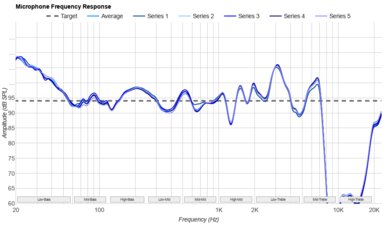
    The mic's recording quality is decent. The response is fairly flat across the frequencies of the human voice, so deeper and higher-pitched voices sound more or less true-to-life. Their software features an adjustable side-tone (labeled 'Self Voice'), so you can hear yourself while on a call to counteract the disorientation of being on a call with ANC enabled.

    7.2
    Noise Handling
    See details on graph tool
    SpNR
    26.28 dB
    Noise Gate
    No
    Speech + Pink Noise Handling
    7.0
    Speech + Pink Noise Audio Sample
    Speech + Subway Noise Handling
    7.5
    Speech + Subway Noise Audio Sample

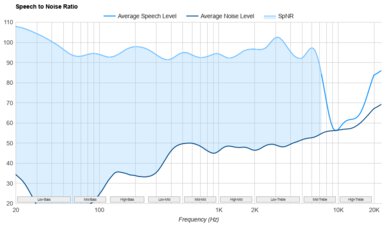
    The mic system's noise handling performance is satisfactory. Constant noise in the backdrop is lowered in intensity, and your voice is prioritized, but the noise isn't totally rejected. With regard to common subway station sounds like other people and approaching trains, the mic system decreases the volume of the noise well, though it's still audible. It doesn't perfectly preserve your speech with a couple of minor dropouts from a passing train, but it manages to do a decent job of retaining your voice.

    Active Features
    8.7
    Battery
    Battery Type
    Rechargable
    Continuous Battery Life
    37 hrs
    Additional Charges
    0.0
    Total Battery Life
    37 hrs
    Charge Time
    2.15 hrs
    Power-Saving Feature
    Auto-Off Timer and Standby Mode
    Audio While Charging
    Yes
    Passive Playback
    No
    Charging PortUSB-C

    The Bose QuietComfort Ultra Headphones (2nd Gen) have excellent battery performance. In our standardized testing, they lasted 37 hours, exceeding the manufacturer's advertised 30-hour battery life. This is a marked improvement over the first-generation Bose QuietComfort Ultra Headphones Wireless' 29 hours of juice. You still can't use them as passive wired headphones when the battery dies; though, you can use them while they're recharging. They include an auto-off timer and a standby mode to conserve the battery life. If you lay them flat on a table, they'll automatically enter a low-power standby mode.

    8.0
    App Support
    App NameBose
    iOSYes
    AndroidYes
    macOSNo
    WindowsNo
    Equalizer
    Graphic + Presets
    ANC Control
    Adjustable
    Mic ControlNo
    Room Effects
    No
    Playback Control
    Yes
    Button MappingYes
    Surround Support
    No

    The Bose companion app is great, and it provides virtually the same interface (viewable in this video demo) as their predecessor. The app gives you access to EQ presets and a three-band graphic EQ, which isn't the most granular when compared to the Sony WH-1000XM6's equalizer, but if you prefer an uncomplicated EQ, it does the job. The app includes 'Modes,' a menu that combines preset combinations of ANC or transparency modes with various 'Immersive Audio' (more on this in Virtual Soundstage) settings, which is handy for changing multiple settings at once.

    You can also assign a 'Shortcut' function to the multi-function button. Several features are on/off: on-ear detection, touch control, and noise control. However, the noise control's custom slider, meant to modify the ANC's strength (at the time of writing), has a software bug that prevents the slider from changing the ANC strength, so it's more of an on/off situation. The app lets you set a battery auto-off timer, adjust the volume of the sidetone ('Self Voice'), and alter the voice prompt settings. You can also use the Source function to manually switch input.

    Connectivity
    7.1
    Wired Connection
    Analog Audio
    Yes
    USB Audio
    USB-C
    Detachable
    Yes
    Length
    3.28 ft (1.00 m)
    Connector
    1/16" TRS
    Latency - Analog
    30.6 ms
    Latency - USB
    37.1 ms
    Recorded Latency
    Recorded Latency ConnectionUSB

    These headphones have decent wired connectivity. Unlike their predecessor, they support USB-C audio playback. They can also connect with an analog audio cable; a 3.5 mm to 2.5 mm (1/8" to 1/16") TRS comes in the box. However, the wired latency is higher than most wired headphones due to the built-in active processing the headphones perform. It's not elevated enough to be bothersome or cause noticeable A/V sync when watching videos, but if you're editing video and audio, it could introduce frustrations. The microphone is also disabled when you use them wired.

    7.6
    Bluetooth Connection
    Bluetooth Version
    5.4
    Multi-Device Pairing
    2 Devices
    Quick Pair (Android)
    Yes
    Quick Pair (iOS)
    No
    Line Of Sight Range
    334.65 ft (102.00 m)
    Latency - SBC
    291 ms
    Latency - aptX
    N/A
    Latency - aptX Adaptive (High Quality)
    373 ms
    Latency - aptX Adaptive (Low Latency)
    89 ms
    Latency - LDAC
    N/A
    Recorded Latency
    Recorded Latency CodecaptX Adaptive (Low Latency)
    AAC Support
    Yes

    Their Bluetooth performance is good. These support multi-device pairing with two devices. In addition to the standard SBC and AAC codecs, these support the aptX Adaptive suite. Depending on your device and the Developer Settings in Android, aptX Adaptive (High Quality) and aptX Adaptive Lossless are capable of virtually lossless audio, but many devices don't have the Snapdragon Sound chip and will instead downgrade to aptX Adaptive (Low Latency). Compared to the previous model, latency is similar, but your real-world experience can vary with different devices and apps, which may compensate for A/V sync differently.

    0.0
    Wireless Connection (Dongle)
    Line Of Sight Range
    N/A
    Latency - Dongle
    N/A
    Recorded Latency
    N/A
    PC Compatibility
    Analog
    Audio Only
    Wired USB
    Audio Only
    Non-BT Wireless
    No

    You can pair these headphones via Bluetooth for mic and audio support. If you use the USB-C or analog TRS audio cable for listening to audio, the mic won't work, though.

    PlayStation Compatibility
    PS4 Analog
    Audio Only
    PS4 Wired USB
    Audio Only
    PS4 Non-BT Wireless
    No
    PS5 Analog
    Audio Only
    PS5 Wired USB
    Audio Only
    PS5 Non-BT Wireless
    No

    These headphones can connect to your PS4 and PS5 with the USB-C cable or analog audio cable, but they can only receive audio.

    Xbox Compatibility
    Xbox One Analog
    Audio Only
    Xbox One Wired USB
    No
    Xbox One Non-BT Wireless
    No
    Xbox Series X|S Analog
    Audio Only
    Xbox Series X|S Wired USB
    No
    Xbox Series X|S Non-BT Wireless
    No

    These are only compatible with Xbox consoles if you the analog TRS cable and plug it into the controller's AUX port. If you need a mic, you'll need to get an outboard one, though.

    0.0
    Base/Dock
    Type
    No Base/Dock
    USB Input
    No
    Line In
    No
    Line Out
    No
    Optical Input
    No
    RCA Input
    No
    Dock Charging
    No
    Power Supply
    No Base/Dock