Razer BlackShark V3 Pro  Headphones Review

Reviewed Nov 06, 2025 at 09:07am
Writing modified Nov 18, 2025 at 09:18am
Tested using Methodology v2.0 
Razer BlackShark V3 Pro
7.2
Sports And Fitness 
7.4
Travel 
7.5
Office Work 
8.0
Wireless Gaming (In Development) 
8.1
Wired Gaming (In Development) 
7.7
Audio Reproduction Accuracy 
7.1
Noise Isolation 
7.8
Microphone (In Development) 
 11
  1. Recommended in:
  2. Xbox Series X/S

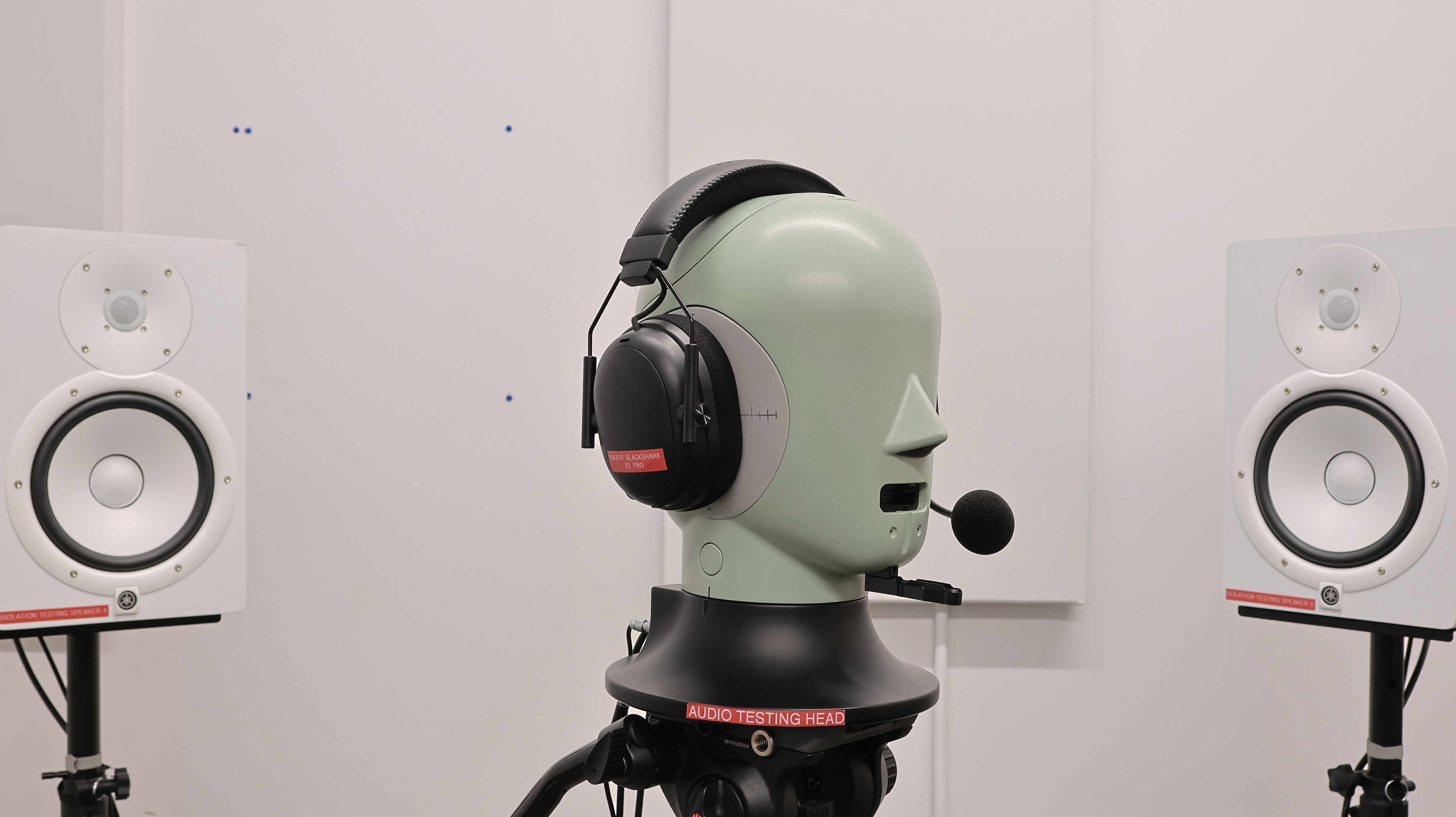
The Razer BlackShark V3 Pro are the latest entry in Razer's aviation-inspired gaming headset lineup, promising improved performance over the Razer BlackShark V2 Pro Wireless 2023. They're closed-back wireless gaming headphones designed for PC, console, and mobile use, offering both low-latency wireless connection via their 2.4GHz dongle and Bluetooth connectivity, along with features like active noise cancelling (ANC).

Our Verdict

7.2
Sports And Fitness 

The Razer BlackShark V3 Pro wireless headset is satisfactory for sports and fitness. You probably won't want to take these big and bulky over-ears on a strenuous workout, as they'll fall off your head with vigorous movement. That said, if you want to go on a walk while taking that business call, these will do the job, since they block out a decent amount of sound, and their boom mic does an impressive job separating your voice from any noise around you. For true workout companions, you'll want to look elsewhere.

Pros
  • Decent ANC.

  • Long, almost 70-hour battery life.

Cons
  • Sound changes a lot if you have long hair, a larger head, or wear glasses.

  • Not the best choice if you like to headbang or move around a lot.

7.4
Travel 

The Razer BlackShark V3 Pro are decent for travel. You probably won't want to make them your main set of travel cans if you're a frequent flier, as their ANC is a couple of tiers below the best on the market, so it can't block out the sound of engine rumbles particularly well. But the ANC is decent enough for use in a pinch, and the headphones' long battery life and comfortable fit mean they can double as a casual use pair for commuting from time to time. That said, we wouldn't suggest these become your go-to for this use.

Pros
  • Decent ANC.

  • Long, almost 70-hour battery life.

Cons
  • Sound changes a lot if you have long hair, a larger head, or wear glasses.

  • Not the best choice if you like to headbang or move around a lot.

7.5
Office Work 

The Razer BlackShark V3 Pro wireless are good for office work. They have an impressive boom mic, making them a great choice for conference calls, while the ANC does a satisfactory job of blocking out the sound of chatty coworkers. That said, if you work in a busy, open-plan office, you might prefer a pair with superior ANC. Still, these cans are comfortable for long days at the office, and their slightly V-shaped sound profile suits most types of audio.

Pros
  • Mic has impressive noise handling.

  • Decent ANC.

  • Long, almost 70-hour battery life.

Cons
  • Sound changes a lot if you have long hair, a larger head, or wear glasses.

  • Not the best choice if you like to headbang or move around a lot.

8.0
Wireless Gaming (In Development) 

The Razer BlackShark V3 Pro are great for wireless gaming. They offer low-latency performance via their 2.4GHz dongle, while their V-shaped sound profile suits most game audio, and you can always customize their sound to taste in the excellent Synapse companion app. This headset has a very good boom mic that reproduces your voice naturally while also doing an impressive job separating it from any noise around you. Coupled with the decent ANC performance, it means you'll be able to focus on your gaming even in slightly busy areas like shared living rooms. The on-ear controls are easy to use, even while you're in the thick of frenetic multiplayer gaming sessions, and their almost 70-hour battery life will get you through a full weekend of gaming without a recharge.

Pros
  • Mic has impressive noise handling.

  • Decent ANC.

  • Long, almost 70-hour battery life.

  • Low latency via both wired and 2.4GHz wireless connections.

Cons
  • Sound changes a lot if you have long hair, a larger head, or wear glasses.

  • Not the best choice if you like to headbang or move around a lot.

8.1
Wired Gaming (In Development) 

The Razer BlackShark V3 Pro are great for wired gaming. They have outstandingly low latency when connected via wired analog or USB-C, making them well-suited for competitive play. Their boom mic captures speech clearly and naturally while impressively minimizing background noise, so your voice cuts through even in noisy environments. And with decent ANC, you can game without distraction from your noisy neighbor. Their default V-shaped tuning renders game soundtracks and effects with plenty of excitement, and you can fine-tune their sound using Razer's Synapse software. The physical controls are well-positioned and intuitive, and with nearly 70 hours of battery life, you can easily play through multiple days before needing to recharge.

Pros
  • Mic has impressive noise handling.

  • Decent ANC.

  • Long, almost 70-hour battery life.

  • Low latency via both wired and 2.4GHz wireless connections.

Cons
  • Sound changes a lot if you have long hair, a larger head, or wear glasses.

  • Not the best choice if you like to headbang or move around a lot.

7.7
Audio Reproduction Accuracy 

The Razer BlackShark V3 Pro have good audio reproduction accuracy. Their V-shaped sound profile suits game audio: effects like explosions have extra rumble, while dialogue retains its clarity even in busy cut scenes. That said, kick drums and other bass-heavy sounds can feel a bit loose, and some peaks and dips in the treble range can render sounds like sibilants relatively dull or piercing, depending on their pitch. The left and right drivers are generally well-matched in phase and amplitude, so objects are positioned correctly in the stereo field. And as a nice bonus, these closed-backs actually present a fairly speaker-like sound, which adds a welcome sense of immersiveness to game soundtracks.

7.1
Noise Isolation 

The Razer BlackShark V3 Pro have decent noise isolation. They're not the best choice for commuting regularly, but they can block out the sound of your chatty roommates, allowing you to focus on your game.

7.8
Microphone (In Development) 

The Razer BlackShark V3 Pro have a very good boom microphone. It renders your voice accurately, though you lack a little sparkle, and it does an impressive job of separating your voice from any noise around you.

5.5
Frequency Response Consistency 

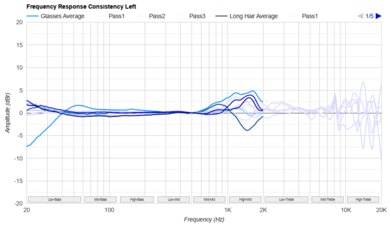
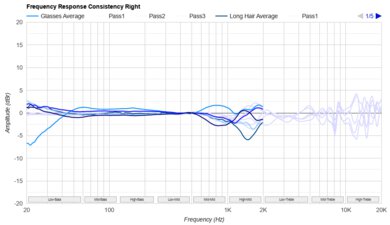
The Razer BlackShark V3 Pro have sub-par frequency response consistency. Gamers who wear glasses, have a larger head, or have longer hair may notice inconsistent bass delivery, rendering sounds like kick drums boomy or thin, depending on your individual anatomy.

  • 7.2
    Sports And Fitness
  • 7.4
    Travel
  • 7.5
    Office Work
  • 8.0
    Wireless Gaming (In Development)
  • 8.1
    Wired Gaming (In Development)

  • Performance Usages

  • 7.7
    Audio Reproduction Accuracy
  • 7.1
    Noise Isolation
  • 7.8
    Microphone (In Development)
  • 5.5
    Frequency Response Consistency
  • Changelog

    1.  Updated Nov 18, 2025: 

      We've updated the review to mention the SteelSeries Arctis Nova Elite in Microphone Style.

    2.  Updated Nov 06, 2025: Review published.
    3.  Updated Oct 23, 2025: Early access published.
    4.  Updated Oct 06, 2025: Our testers have started testing this product.

    Check Price

    2XKO Edition for Xbox
    SEE PRICE
    Amazon.com
    Black for PC
    SEE PRICE
    Amazon.com
    Black for PS
    SEE PRICE
    Amazon.com
    Black for Xbox
    SEE PRICE
    Amazon.com
    Counter-Strike 2 Edition for PC
    SEE PRICE
    Amazon.com
    White for PC
    SEE PRICE
    Amazon.com
    White for PS
    SEE PRICE
    Amazon.com

    Differences Between Sizes And Variants

    The Razer BlackShark V3 Pro are available in two main colorways ('Black' and 'White') and three platform variants: PC, PlayStation, and Xbox. There is also a special edition 2XKO variant for Xbox. You should select the variant that works with your gaming platform, especially if you're an Xbox user, since neither the PlayStation nor PC variants work with Xbox.

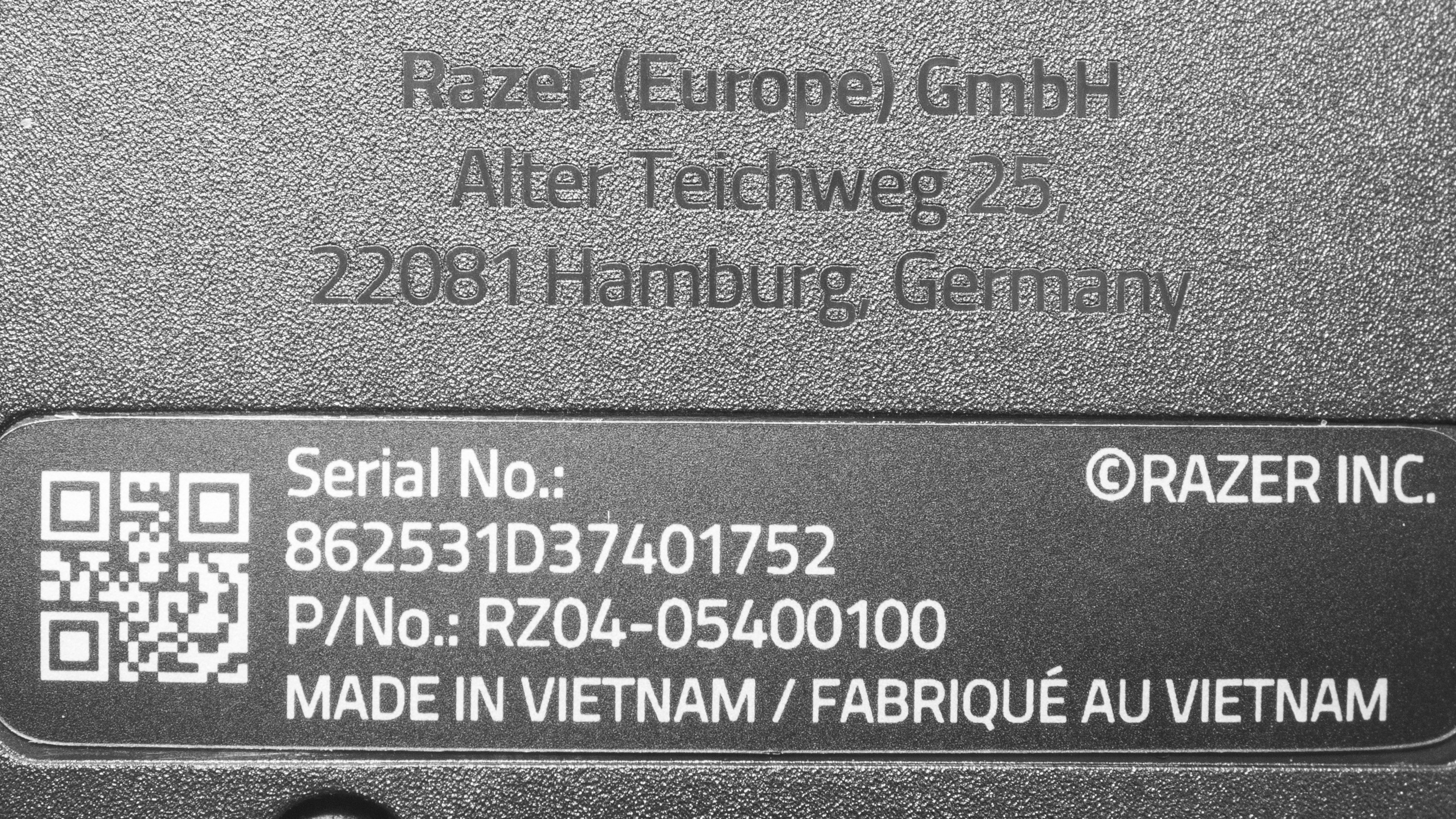
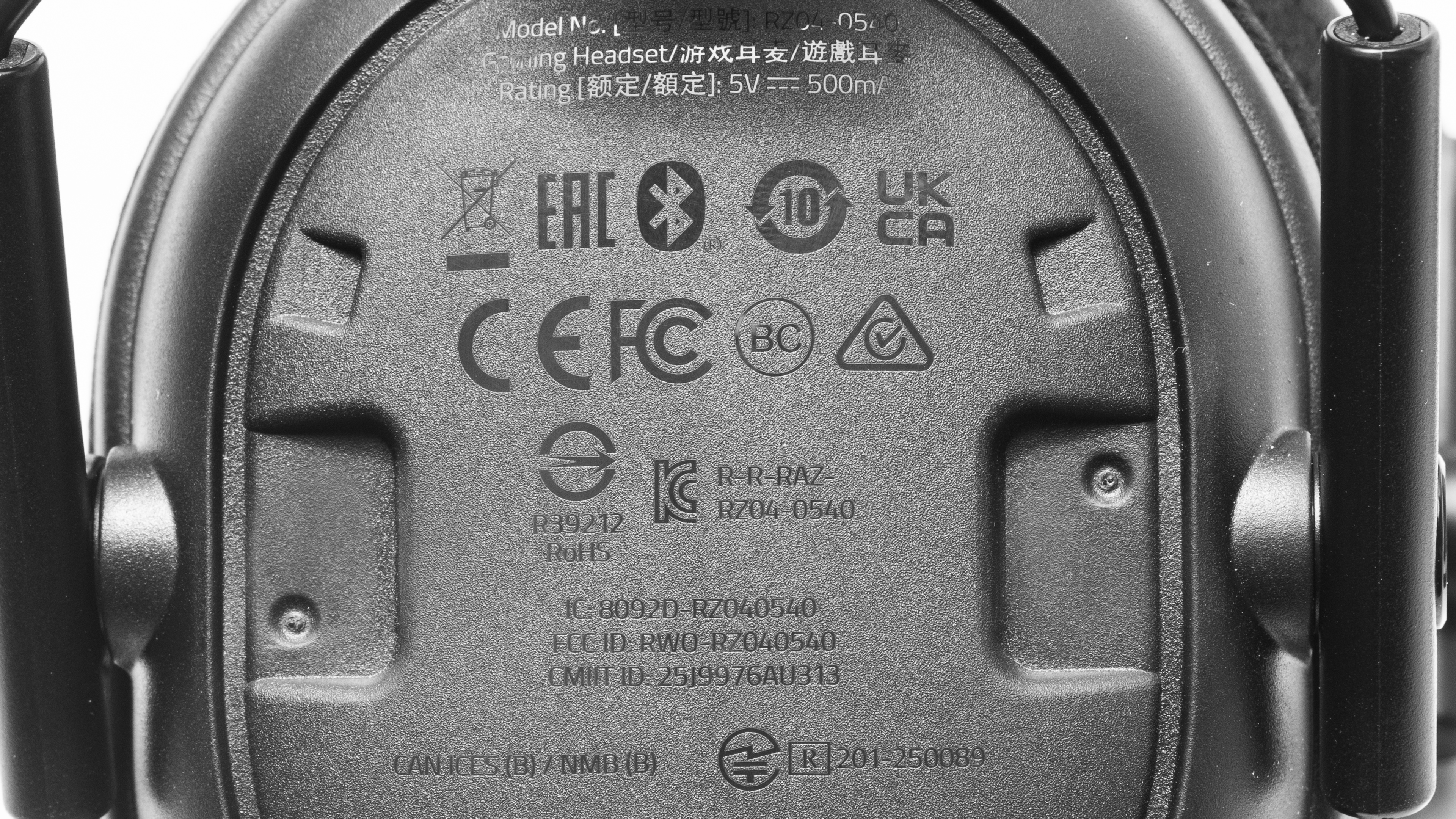
    We tested the 'Black' PC model, but we also expect our results to be valid for the 'White' version. Our model came with two labels (1 and 2).

    If you encounter another variant of these headphones, please let us know in the comments, and we'll update our review.

    Popular Headphones Comparisons

    The Razer BlackShark V3 Pro sit near the top of Razer's headset lineup, positioned in the premium tier of wireless gaming headphones but still priced competitively compared to other flagship models. They're the sequel to the Razer BlackShark V2 Pro Wireless 2023 and compete with high-end options like the SteelSeries Arctis Nova Pro Wireless, the Audeze Maxwell Wireless, and the Logitech G PRO X 2 LIGHTSPEED Wireless. Like those headsets, they offer a mix of strong connectivity options, including low-latency 2.4GHz wireless and Bluetooth, along with companion apps with a plethora of customization options. Each headset also offers competitive mic performance.

    That said, the addition of ANC is still fairly rare and is a marked upgrade over the older V2 Pro. Of their main competitors, only the SteelSeries also offer ANC, but the Razer's superior left and right driver matching means competitive gamers will likely prefer the accuracy of the Razer. That said, driver matching is related to quality control, so your experience may differ. Both the Audeze and SteelSeries offer some advantages over the Razer, like sturdier construction and better sonic consistency across wears and wearers, but rapid wireless latency and near-70-hour battery life make the Razer a strong all-around choice for competitive and immersive gamers alike.

    If you're looking for more headphones, check out our recommendations for the best gaming headsets, the best wireless gaming headsets, and the best PS5 gaming headsets.

    Audeze Maxwell Wireless

    The Razer BlackShark V3 Pro and the Audeze Maxwell Wireless are gaming headsets with slightly different strengths. The Razer offer a lower latency wireless connection, and our unit has better-matched left and right drivers, making it easier to correctly locate objects like enemy fighters in the stereo field. They also have ANC, so they're a better choice if you game in noisy areas. On the other hand, the Audeze feel a bit better built, their mic has better noise handling, and you may prefer their warm default sound, compared to the Razer's V-shaped profile. That said, you can tweak the sound profile of each headset in their respective companion apps. 

    Razer BlackShark V2 Pro Wireless 2023

    The Razer BlackShark V3 Pro is a better gaming headset than the Razer BlackShark V2 Pro Wireless 2023. The on-ear controls are noticeably improved with the V3 Pro, so they're easier to use when you're in the thick of a busy game. They also feel better built, and the addition of ANC means you can game in peace, even in shared spaces like living rooms. That said, the mic performance is broadly comparable across the generations, so if you don't tend to adjust on-ear controls much and don't need ANC, you could get a bargain with the older generation. But beware: both headsets offer sub-par frequency response consistency, so they're not the best choice for gamers with long hair or who wear glasses.

    Logitech G PRO X 2 LIGHTSPEED Wireless

    The Razer BlackShark V3 Pro are slightly better gaming headphones than the Logitech G PRO X 2 LIGHTSPEED Wireless, though the choice may come down to your particular preferences. The Razer offer ANC, so they're the pair to get if you plan to occasionally use the headphones in more casual settings, for instance, while commuting. They also have much better on-ear controls. The mics are broadly comparable but have different strengths, with the Logitech offering superior noise handling and the Razer having a more life-like recording quality. That said, when it comes to battery life, the Logitech last 30 hours longer than the Razer, though the Razer's almost 70 hours is still more than enough to get you through a long session, and is impressive since the cans last that long while also running ANC. 

    SteelSeries Arctis Nova Pro Wireless [PC, PS, Xbox]

    The Razer BlackShark V3 Pro are slightly better premium gaming headphones than the SteelSeries Arctis Nova Pro Wireless. Unlike most gaming headsets, both of these offer ANC, making them decent choices if you find yourself gaming in shared spaces often or live near a busy road. The Razer's more accurate stereo matching makes it easier to precisely locate objects like enemy gunfire in the stereo field, and they're a bit more comfortable over long sessions. And if you often immerse yourself in gaming marathons, the Razer's near-70 hours of battery life far surpass the SteelSeries' 25. That said, the ANC and mics are broadly comparable between the two, and the SteelSeries' sound doesn't change as much if you wear glasses, so they might be the pair to choose if that's the case. 
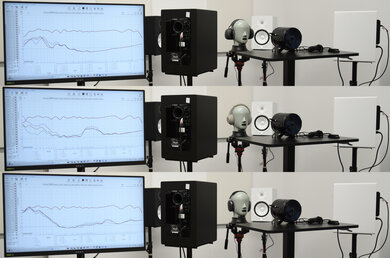
    Overhauling Our Audio Measurements And A New Multi-Curve Graphing Tool
    Overhauling Our Audio Measurements And A New Multi-Curve Graphing Tool

    We've upgraded our Headphones Test Bench to 2.0! This update brings several key changes to our tests and usages, making it easier than ever to interpret our sound results based on your personal preferences. You'll also find a brand-new interactive graph tool featuring multiple targets (including our own!) for you to explore and compare.

    For a full breakdown, check out our changelog, which includes detailed commentary from our test designer explaining the rationale behind our update.

    We'd also love to hear your thoughts: your feedback helps us keep improving, so join us in the comments!

    Test Results

    perceptual testing image
    Sort:
    RATINGS
    Category:
    All
    Sound
    Sound Profile
    See details on graph tool
    Normalization Frequency
    800 Hz
    Bass Amount
    Slightly Emphasized (2 dB)
    Treble Amount
    Emphasized (2 dB)
    Sound Signature
    V-Shaped

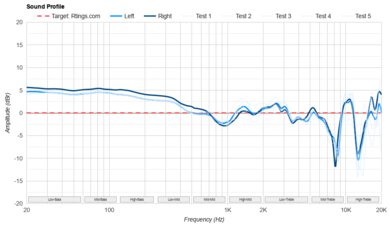
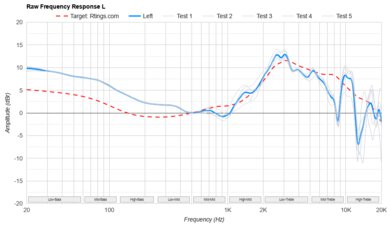
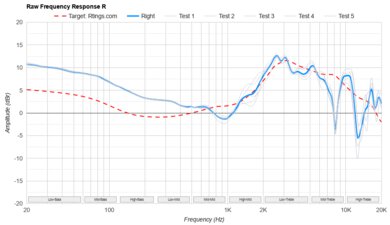
    The Razer BlackShark V3 Pro have a V-shaped sound profile, meaning they put out more bass and treble than our target curve. That said, gaming headsets tend to offer slightly V-shaped sound profiles, as the extra bass makes soundtracks and effects like explosions feel more immersive, while the added treble brings clarity to dialogue even in busy cutscenes.

    We took measurements of the frequency response when connected via each of the four connection methods (Bluetooth, dongle wireless, USB wired, and analog wired). We measured the frequency response of the headphones via their wireless dongle with ANC on and off, as well as the effect of different EQ presets on the sound (with ANC set to 4). Finally, we also measured the response of the headphones when connected via analog, both passively and actively.

    5.5
    Frequency Response Consistency
    See details on graph tool
    See details on graph tool
    Std. Deviation
    1.52 dB

    These headphones have middling frequency response consistency. Their sound changes quite a bit depending on their fit. In particular, people who wear glasses or have larger heads or longer hair could experience significantly more or less bass than our Sound Profile measurement shows.

    The uneven frequency response consistency could stem from several design factors. It might be related to the cloth covering or the softness of the pads, or else the yokes, which seem to apply uneven pressure around the ear cups. Any of these could create small air gaps that break the seal the earpads form with your head, impacting frequency response consistency.

    Raw Frequency Response
    See details on graph tool
    See details on graph tool
    8.9
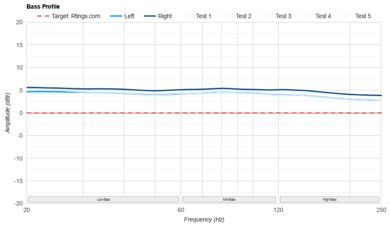
    Bass Profile: Target Compliance
    See details on graph tool
    RMS Deviation From Target
    3.0 dB
    Low-Frequency Extension
    20 Hz
    Low Bass
    3.98 dB
    Mid Bass
    2.21 dB
    High Bass
    0.16 dB

    The Razer BlackShark V3 Pro have excellent compliance with our bass target. There's a little more low-bass thump and mid-bass punch than our target, which makes explosions in games like Battlefield 6 sound exciting and immersive. The high bass is virtually flat relative to our target, so the extra low-end doesn't muddy up dialogue. That said, some gamers may wish for a little extra high bass, as that can improve the audibility of sound effects like footsteps.

    8.6
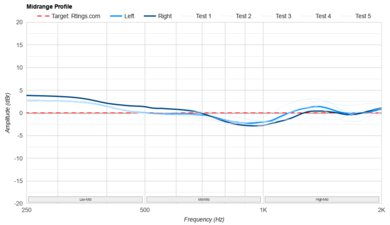
    Mid-Range Profile: Target Compliance
    See details on graph tool
    RMS Deviation From Target
    1.88 dB
    Low Mid
    -0.63 dB
    Mid-Mid
    0.07 dB
    High Mid
    -0.42 dB

    The Razer BlackShark V3 Pro have fantastic compliance with our target curve in the mid-range. The low-mids and mid-mids are virtually flat, so dialogue and instruments sound accurate and present without ever sounding muddy. The high-mids are a little more uneven, with a small boost and dip making dialogue in cutscenes from Baldur's Gate 3 sound a touch honky or recessed, depending on the pitch of the speaker.

    7.6
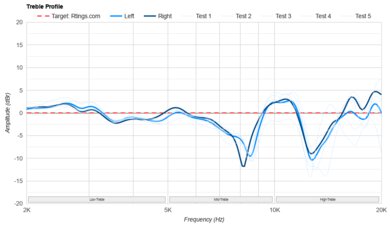
    Treble Profile: Target Compliance
    See details on graph tool
    RMS Deviation From Target
    3.65 dB
    Low Treble
    1.25 dB
    Mid Treble
    3.86 dB
    High Treble
    -6.95 dB

    The treble compliance is good. The low-treble and mid-treble are boosted relative to our target, which adds clarity to voices and sheen to sounds like cymbals. But the range is also a touch uneven, so some pitches will jump out of the mix more than others, which can be a little distracting.

    7.3
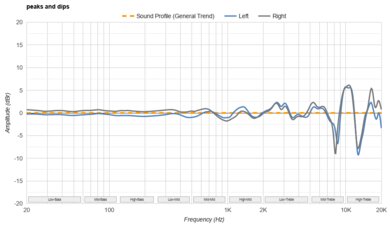
    Peaks/Dips
    See details on graph tool
    Peaks
    1.57 dB
    Dips
    1.96 dB

    The Razer BlackShark V3 Pro have a decent peaks and dips performance, meaning they do a satisfactory job of adhering to their own V-shaped sound profile. The bass and mid-range are well-controlled, but while the overall treble range is fairly bright, it's fairly uneven. The result is sounds like cymbals or sibilants can be rendered as a bit piercing depending on their pitch.

    7.4
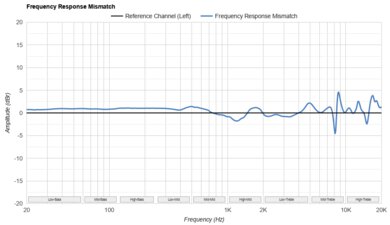
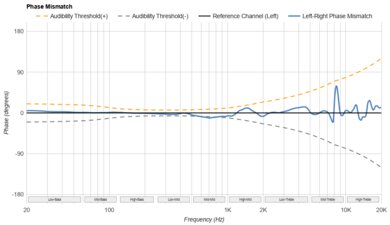
    Stereo Mismatch
    See details on graph tool
    See details on graph tool
    Weighted Amplitude Mismatch
    0.63 dB
    Weighted Frequency Response Mismatch
    0.97 dB
    Weighted Phase Mismatch
    1.3°

    The Razer BlackShark V3 Pro have decently well-matched left and right drivers. Across the whole frequency range, the drivers are especially well-matched in phase, with any differences falling below the audibility threshold. That said, some differences in amplitude between the drivers in the treble range might be noticeable to you, but they're small enough that they'll be inaudible with real-world content. Stereo matching is also related to quality control, so your experience may differ.

    7.5
    Group Delay
    See details on graph tool
    Weighted Group Delay
    1.0 ms

    The group delay results are good, but subjectively, the region could sound tighter and more accurate. The bass in songs like My Old Ways by Tame Impala sounds a little weak and loose. That said, there are no issues through the mid-range and treble regions.

    7.9
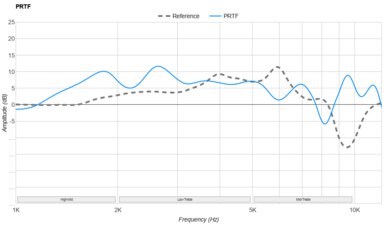
    PRTF
    See details on graph tool
    PRTF Accuracy (RMS Deviation)
    2.86 dB
    PRTF Size (Avg.)
    4.71 dB
    PRTF Distance
    14.35 dB

    These headphones offer very good pinna interaction. Though they're closed-backs, they do a convincing job of making your audio feel immersive. The sound might not be quite as speaker-like as a pair of open-backs like the Sennheiser HD 800 S, but your audio feels spacious and somewhat out of head.

    9.1
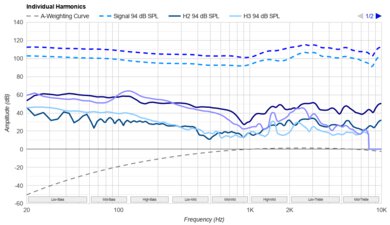
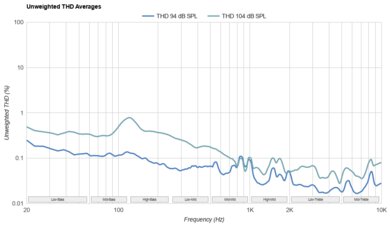
    Harmonic Distortion
    See details on graph tool
    See details on graph tool
    WHD @ 94 dB SPL
    0.09%
    WHD @ 104 dB SPL
    0.17%

    These headphones have exceptionally low harmonic distortion. Even if you listen at unsafe levels, your audio will be reproduced cleanly and without artifacts.

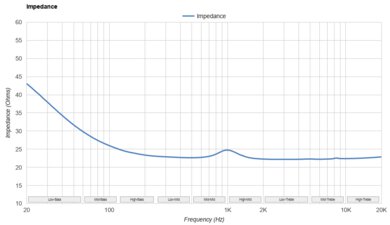
    Electrical Aspects
    See details on graph tool
    Sensitivity @1kHz-1V
    117.2 dB SPL
    Bluetooth Max SPL
    104.5 dB

    When used passively, these headphones don't require an amp to drive them, so you'll be able to listen to music at a reasonable level, even when connected to a mobile device or laptop.

    2.0
    Virtual Soundstage
    Head Modeling
    No
    Speaker Modeling
    On/Off
    Room Ambience
    No
    Head Tracking
    No
    Virtual Surround
    THX Spatial Audio

    When connected via the USB wireless dongle or USB-C cable, you can use THX Spatial Audio with these headphones. That said, like most spatial audio software, we don't find the effect very convincing.

    Test Settings
    Firmware
    1.1.2.0
    Power
    On
    Connection
    Wireless (Proprietary)
    Codec
    PCM, 24-bit, 48kHz
    Test InstrumentAudio Precision APx517B
    EQ
    Default (Flat)
    ANC
    4
    Tip/Pad
    Default
    Microphone
    Boom

    These are the settings used to test these headphones. Our results are only valid when the headphones are used in this configuration.

    Design
    Style
    TypeOver-ear
    EnclosureClosed-Back
    WirelessYes
    TransducerDynamic

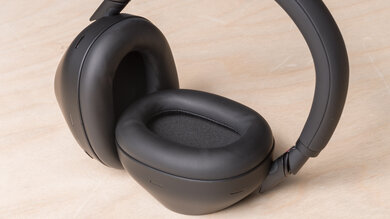
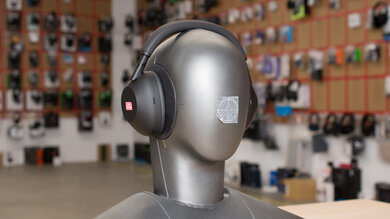
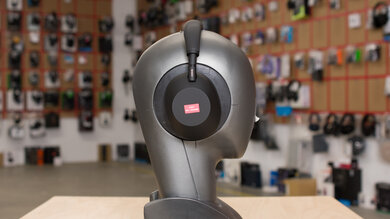
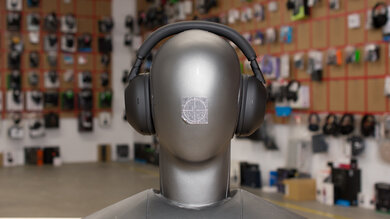
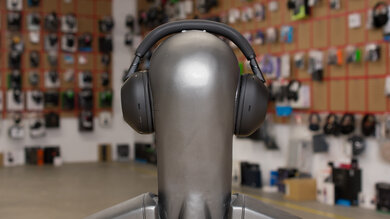
    The Razer BlackShark V3 Pro are closed-back, over-ear gaming headphones that share the same aviation-inspired design as earlier models in the BlackShark lineup. They have oval ear cups wrapped in a mix of soft fabric with memory foam padding. The headband has soft padding underneath, and at each end, exposed metal yokes connect to each ear cup, giving them a slightly rugged look. A detachable boom mic plugs into the left ear cup, which also houses the volume wheel and power button. The Razer logo appears subtly on the removable magnetic faceplates on each cup, and the overall matte black finish gives the headset a professional, understated appearance compared to flashier gaming designs.

    7.5
    Comfort
    Weight0.8 lbs
    Clamping Force
    1.1 lbs

    The Razer BlackShark V3 Pro offer a small improvement in comfort over the previous Razer BlackShark V2 Pro Wireless 2023. The ear cups and headband use the same soft cloth-covered padding, which feels gentle on the skin and distributes pressure evenly across the head. But the clamping force is mild and consistent, so the headset doesn't feel tight even during long gaming sessions. If you wear glasses, the pads don't create additional pressure points, although the frames can slightly break the ear cup seal, leading to sub-par frequency response consistency. The ear cups also have more swivel and range of motion than the previous generation's, helping them sit more naturally and reducing the bulky feel of the older model. However, the closed design can get a bit warm after extended use, and the symmetrical ear pad shape may not perfectly match everyone's ears.

    8.4
    Controls
    OS Compatibility
    Not OS specific
    Ease Of UseGreat
    FeedbackGreat
    Call/Music ControlYes
    Volume ControlYes
    Microphone ControlMute/Unmute
    Channel Mixing
    Yes
    Noise Cancelling ControlOn/Off
    Talk-Through
    No
    Additional ControlsNoise-Canceling, ANC Modes, Talk Through

    The Razer BlackShark V3 Pro have a well-designed control scheme that's easy to use and an improvement over the Razer BlackShark V2 Pro Wireless 2023. Each button and dial is easy to reach and identify by touch, with distinct textures that make them simple to tell apart while you're wearing the headset.

    All main controls are split between the two ear cups. On the left, you'll find the mute/unmute button, a textured volume wheel that's easier to grip and smoother to adjust than before, and a power button that now has a grainy texture to help distinguish it from the mute control. The power button handles call functions, as you can view here, and playback functions: single press for play/pause, double press for next track, and triple press for previous track.

    The right ear cup includes a game/chat balance wheel, which lets you mix audio levels with audible chimes when you reach the Game, Middle, or Chat positions, and a wireless mode button for switching between 2.4GHz, Bluetooth, and simultaneous audio connections.

    Overall, the controls are intuitive and responsive. Buttons feel clicky and tactile, and you get audio feedback for volume limits and mode changes.

    5.4
    Portability
    L7.9" (20.1 cm)
    W6.5" (16.5 cm)
    H3.7" (9.5 cm)
    Volume192.10 in³ (3,147.93 cm³)
    Transmitter RequiredNo

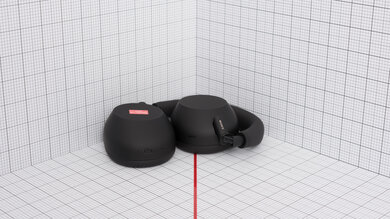
    These headphones aren't very portable, which is typical of gaming headphones. The design is large and bulky, and the ear cups don't fold flat to save space. That said, portability isn't a major concern if you mostly keep them at your desk or gaming setup.

    0.0
    Case
    TypeNo case
    LN/A
    WN/A
    HN/A
    VolumeN/A
    7.5
    Build Quality

    The Razer BlackShark V3 Pro have a solid build quality that's a clear improvement over the previous Razer BlackShark V2 Pro Wireless 2023. The materials feel sturdier overall, from the reinforced cloth and plastic surfaces to the braided cable connecting the ear cups to the headband.

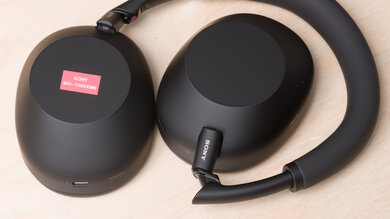
    The hinges have been redesigned to allow more ear cup rotation, improving flexibility and reducing strain during adjustment. The headband uses soft cloth padding that feels comfortable and doesn't bottom out, helped by the headset's relatively light weight. The yokes are still thin but now feel stronger and more stable thanks to their aluminum construction. The ear cups have thick, deep padding with an ample interior. You'll also find the headset's label under one of the ear cups.

    7.0
    Stability

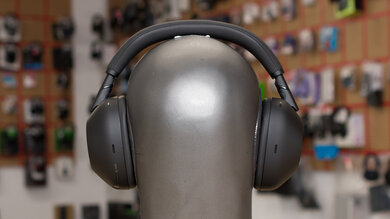
    The Razer BlackShark V3 Pro have decent stability, though they aren’t ideal for heavy movement. They tend to shift around during light shakes or tilts, especially when you move your head quickly. If you're a headbanger, these might not stay securely in place. But they’re stable enough for regular gaming and casual use at your desk. Just don't get too carried away!

    Headshots 1
    Headshots 2
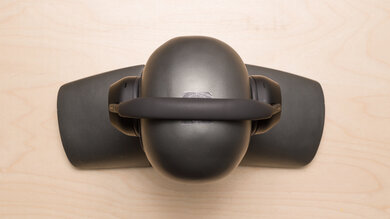
    Top
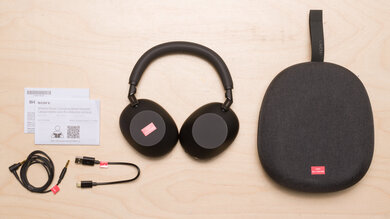
    In The Box

    • User manual
    • Stickers
    • Earcup faceplates
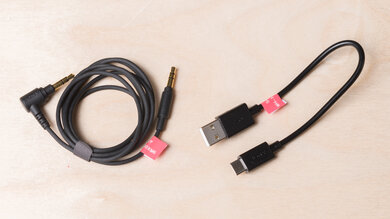
    • USB-A to USB-C cable (1.51 m/4.95 ft)
    • USB-C to TRRS analog cable (1.51 m/4.95 ft)
    • Boom mic
    • 2.4GHz dongle
    Isolation
    7.3
    Noise Isolation - Full Range
    See details on graph tool
    Noise CancellingYes
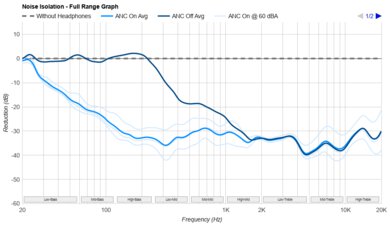
    Overall Attenuation
    -18.73 dB
    Bass
    -10.15 dB
    Mid
    -19.41 dB
    Treble
    -28.40 dB

    The Razer BlackShark V3 Pro have satisfactory noise isolation performance. While they can't rival headphones that prioritize ANC performance like the Sony WH-1000XM6, they do a decent enough job blocking out noise, especially in the mid-range and treble, where sounds that clash with the human voice sit. That means you should be able to better hear in-game soundtracks and teammates' voices, even if gaming in a shared apartment. The headphones offer four levels of ANC; you can view their performance on this graph.

    6.9
    Noise Isolation - Common Scenarios
    See details on graph tool
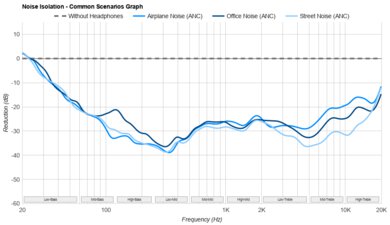
    Airplane Noise Attenuation
    -16.42 dB
    Airplane Noise Isolation Audio
    Office Noise Attenuation
    -16.45 dB
    Office Noise Isolation Audio
    Street Noise Attenuation
    -18.13 dB
    Street Noise Isolation Audio

    The Razer BlackShark V3 Pro do an okay job of blocking out real-world noise. While they're just short of what we'd call good, since these headphones are most likely to be used indoors with your gaming rig, that performance is enough to remove most distractions. If you take them out and about with you, they'll greatly reduce sounds like chatty coworkers or street noise, but you'll still hear the odd voice or car horn poking through. 

    Noise Isolation - Voice Handling
    Female Voice 1
    Male Voice 1
    Female Voice 2
    Male Voice 2
    ANC Wind Handling
    See details on graph tool
    ANC Wind Noise

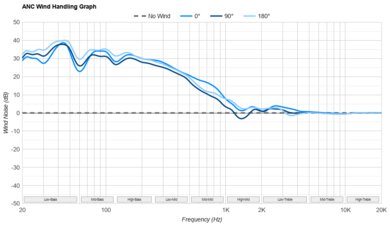
    The Razer BlackShark V3 Pro don't have an ANC wind reduction feature. As a result, if you use them outside on a windy day, you're likely to hear plenty of wind noise artifacts along with your audio.

    7.2
    Leakage
    See details on graph tool
    Leakage Audio
    Overall Leakage @ 1ft
    38.34 dB

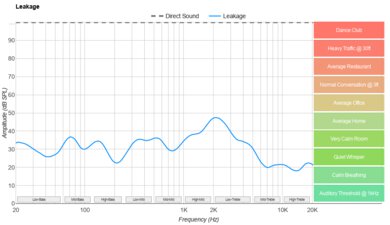
    The leakage performance is satisfactory. At regular listening levels, they don't leak much sound, and what does leak out sounds fairly thin and nasal. That said, if you listen at louder volumes in very quiet spaces, people around you will hear some of your in-game noise.

    Microphone
    Microphone Style
    Integrated
    No
    In-Line
    No
    Boom
    Yes
    Detachable Boom
    Yes
    MicYes

    These headphones come with a detachable boom mic. Their companion app also offers a host of methods for customizing the mic's performance and sound. If you need a fallback microphone when you're out and about, the SteelSeries Arctis Nova Elite have a backup beamforming mic that automatically activates when you retract their boom mic.

    8.1
    Recording Quality
    See details on graph tool
    Recorded Speech
    LFE
    82.34 Hz
    FR Std. Dev.
    1.78 dB
    HFE
    6,001.45 Hz
    Weighted THD
    0.809
    Gain
    18.7 dB

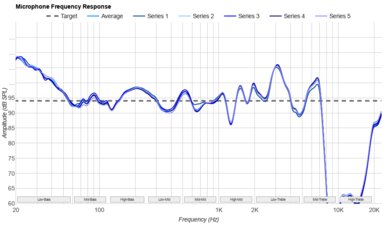
    The microphone has a great recording quality. It has a virtually flat response across the parts of the spectrum where the human voice lives, so your voice sounds true-to-life and detailed. The treble roll off means your voice lacks a little airiness, but that doesn't affect your intelligibility much.

    We measured the frequency response of the mic via each of its three connection types. And you can also listen to recordings taken via the analog connection (1, 2, and 3), wired USB connection (1, 2, and 3), and Bluetooth connection (1, 2, and 3).

    The headphones' companion app also offers many settings for customizing the mic's performance.

    7.5
    Noise Handling
    See details on graph tool
    SpNR
    32.69 dB
    Noise Gate
    On/Off Toggle
    Speech + Pink Noise Handling
    7.5
    Speech + Pink Noise Audio Sample
    Speech + Subway Noise Handling
    7.5
    Speech + Subway Noise Audio Sample

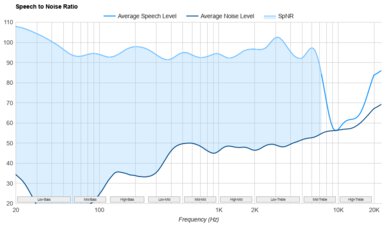
    The Razer BlackShark V3 Pro's mic does a good job separating speech from background noise, though the performance is a bit worse than the Razer BlackShark V2 Pro Wireless 2023. Still, its performance is good enough for gaming at home, and even if you have to take a call on the subway while using these cans, they'll do a good job blocking out most of the background noise, though some rumble will likely make it through. If you like to customize settings, the companion app offers a range of methods for adjusting the mic's performance.

    Active Features
    9.4
    Battery
    Battery Type
    Rechargable
    Continuous Battery Life
    69.7 hrs
    Additional Charges
    0.0
    Total Battery Life
    69.7 hrs
    Charge Time
    3.9 hrs
    Power-Saving Feature
    Auto-Off Timer
    Audio While Charging
    Yes
    Passive Playback
    Yes
    Charging PortUSB-C

    These headphones have superb battery performance. They're advertised to last 70 hours, and we measured just about that. That said, battery life varies with use. For example, we measured 42 hours of continuous playback time when the headphones were connected via their dongle's Ultra-Low Latency Mode. The headphones also offer battery-saving features like an auto-off timer. They fully charge in just under four hours, and you can use them while charging.

    8.5
    App Support
    App NameRazer Synapse 4
    iOSYes
    AndroidYes
    macOSNo
    WindowsYes
    Equalizer
    Graphic + Presets
    ANC Control
    Adjustable
    Mic ControlAdjustable Level
    Room Effects
    No
    Playback Control
    No
    Button MappingNo
    Surround Support
    Yes

    The Razer BlackShark V3 Pro come with an excellent companion app. Take a look at it in action. It lets you toggle between Stereo and THX Spatial Audio, fine-tune sound with a 10-band EQ and presets, and create or load profiles for individual games. There are also options for volume control that can be synced with Windows and a game/chat balance slider for quick mixing.

    Under the Enhancements tab, you can enable Ultra-Low Latency (2.4GHz) mode, adjust ANC strength from levels 1 to 4, or activate an Ambient Mode, tweak the in-call audio mix, and toggle sound processing features like Sound Normalization, Bass Boost, and Voice Clarity. Mic settings are organized on a dedicated page, where you can adjust mic volume, apply mic EQ presets and enhancements, and control mic monitoring (sidetone) with a slider. You can also manage power settings from within the app.

    The mobile app offers similar controls and includes Bluetooth Gaming Mode, letting you manage connections and enable low-latency Bluetooth features directly from your phone.

    Connectivity
    9.6
    Wired Connection
    Analog Audio
    Yes
    USB Audio
    USB-C
    Detachable
    Yes
    Length
    4.95 ft (1.51 m)
    Connector
    USB-C
    Latency - Analog
    0.2 ms
    Latency - USB
    11.5 ms
    Recorded Latency
    Recorded Latency ConnectionAnalog

    These headphones offer outstandingly low latency when connected via their wired connections. When used via their analog cable, latency is a negligible 0.2 ms with the headphones powered off, and 25 ms when the headphones are turned on. Latency via their USB-C connection is 11.5 ms.

    8.7
    Bluetooth Connection
    Bluetooth Version
    5.3
    Multi-Device Pairing
    Bluetooth + Console/Non-BT Wireless
    Quick Pair (Android)
    No
    Quick Pair (iOS)
    No
    Line Of Sight Range
    334.65 ft (102.00 m)
    Latency - SBC
    132 ms
    Latency - aptX
    N/A
    Latency - aptX Adaptive (High Quality)
    N/A
    Latency - aptX Adaptive (Low Latency)
    N/A
    Latency - LDAC
    N/A
    Recorded Latency
    Recorded Latency CodecSBC
    AAC Support
    Yes

    These headphones have excellent Bluetooth performance. They use Bluetooth 5.3, and you can maintain simultaneous connections to the wireless dongle and your Bluetooth source. That said, their latency is a little too high via this connection for serious gaming. With their Low Latency Audio mode enabled, we measured 132 ms of latency, and with the mode disabled, it's 172 ms.

    9.1
    Wireless Connection (Dongle)
    Line Of Sight Range
    297.24 ft (90.60 m)
    Latency - Dongle
    13 ms
    Recorded Latency

    These headphones offer superb latency performance when used via their dongle. Razer advertises latency as low as 10 ms when used via the Ultra-Low Latency Mode, and we measured 13.25 ms with this feature enabled, along with a 66.5 m range. With Ultra-Low Latency turned off, latency increases to 35.08 ms, but you get longer battery life and extended wireless range.

    PC Compatibility
    Analog
    Audio + Microphone
    Wired USB
    Audio + Microphone
    Non-BT Wireless
    Audio + Microphone

    You can connect these headphones to your PC via any of the connection methods for full mic and audio delivery.

    PlayStation Compatibility
    PS4 Analog
    Audio + Microphone
    PS4 Wired USB
    Audio + Microphone
    PS4 Non-BT Wireless
    Audio + Microphone
    PS5 Analog
    Audio + Microphone
    PS5 Wired USB
    Audio + Microphone
    PS5 Non-BT Wireless
    Audio + Microphone

    You get full audio and mic capability when connected to your PlayStation via both wired methods and the wireless dongle.

    Xbox Compatibility
    Xbox One Analog
    Audio + Microphone
    Xbox One Wired USB
    No
    Xbox One Non-BT Wireless
    No
    Xbox Series X|S Analog
    Audio + Microphone
    Xbox Series X|S Wired USB
    No
    Xbox Series X|S Non-BT Wireless
    No

    You can't use the variant we tested on Xbox wirelessly, though it will work via analog. You can buy an Xbox variant that will work wirelessly with the platform.

    3.4
    Base/Dock
    Type
    Wireless USB Dongle
    USB Input
    Yes
    Line In
    No
    Line Out
    No
    Optical Input
    No
    RCA Input
    No
    Dock Charging
    No
    Power Supply
    USB-C

    These headphones come with a wireless dongle that enables a low-latency wireless connection for use while gaming. That said, the USB-C wireless dongle requires connection via the included USB-C to USB-A cable. That allows you to position it in direct line of sight from your gaming position, but also makes the setup a bit bulkier and less practical for portable devices like the Nintendo Switch. In contrast, the Razer BlackShark V2 Pro Wireless 2023's dongle plugs straight into the USB port like a thumb drive, which saves space but offers less positioning flexibility.