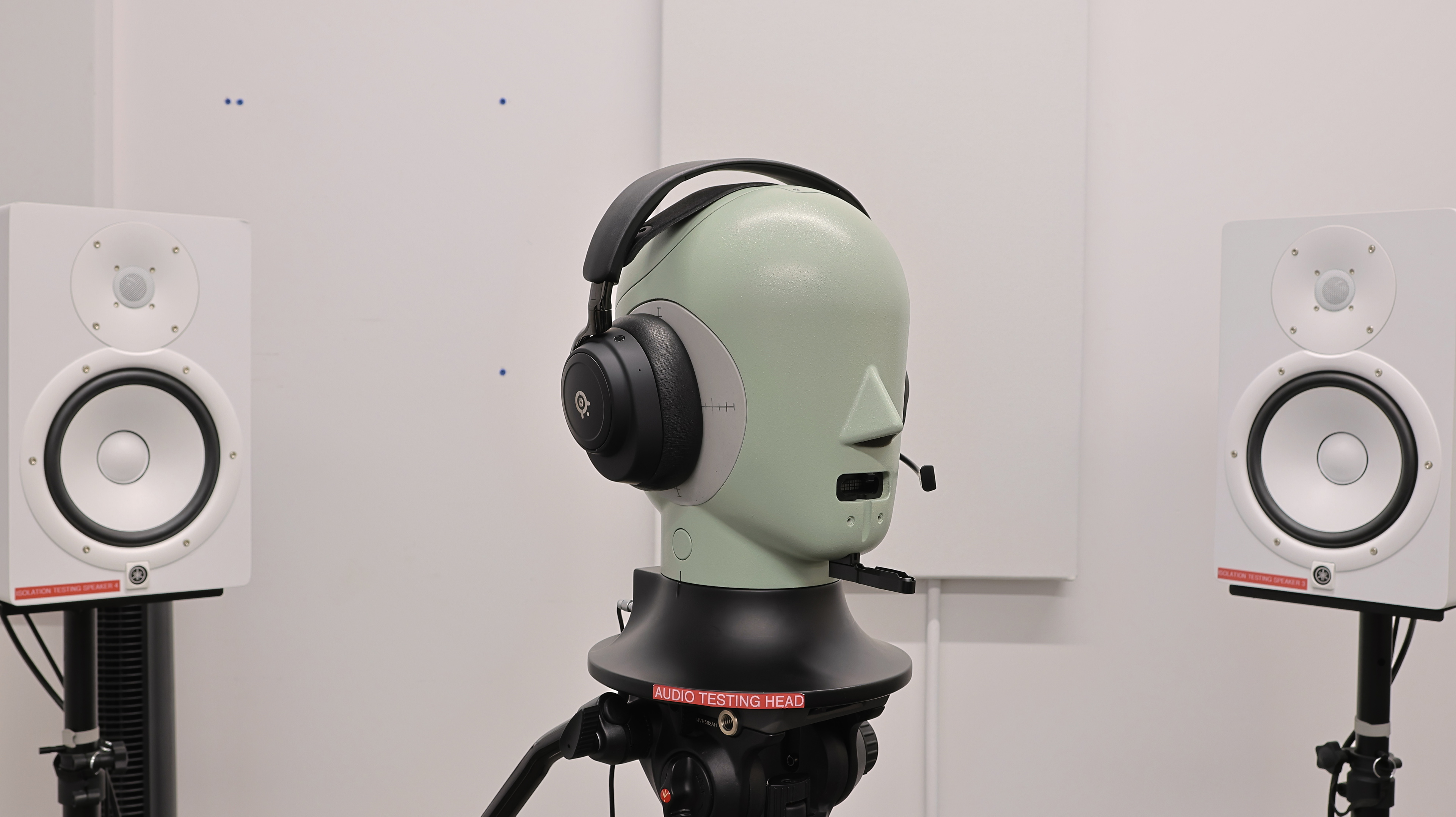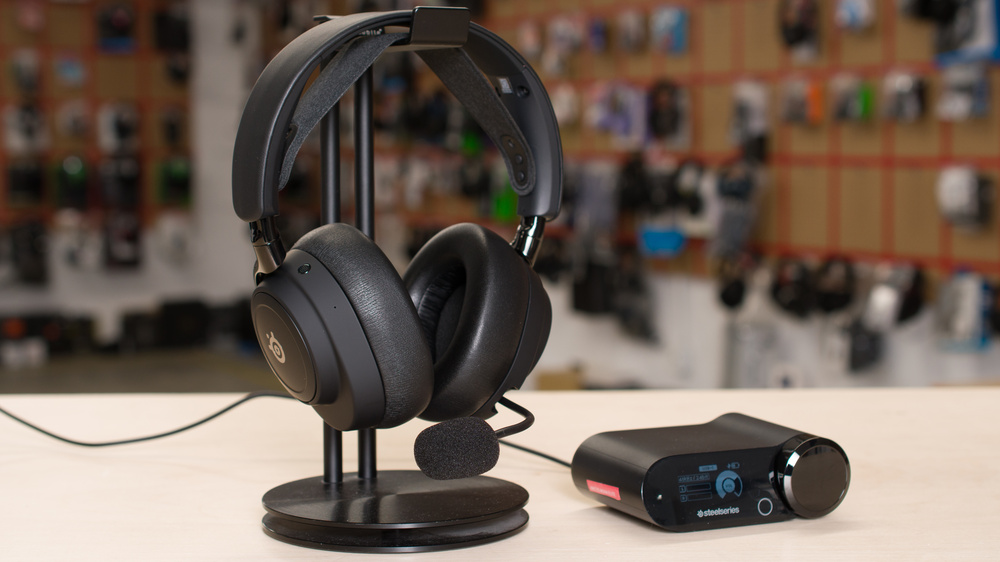
The SteelSeries Arctis Nova Elite are a premium entry in the brand's expansive Arctis gaming audio product line. SteelSeries improves on the previous king of the hill, the SteelSeries Arctis Nova Pro Wireless, by incorporating more premium materials, removing protruding pain points, and expanding the number of supported connections on the GameHub dock. The Elite also feature a retractable boom mic and an active noise cancellation (ANC) system, which is relatively uncommon for gaming headsets. That said, it's the changes under the hood that will largely determine whether the Elite are worth nearly double the price of the Pro Wireless at the time of their release.
Our Verdict
The SteelSeries Arctis Nova Elite aren't meant for sports use. While they're comfortable, isolate you from other gym-goers, and work wirelessly, they're quite bulky and aren't stable. If you run, jump, or shake your head even a bit, these heavy headphones might slide off your head. Considering the hefty price tag, it's probably best to avoid potential damage and relegate these headphones to sports you can play with a Joy-Con.
Amazing noise isolation.
Unstable and bulky design.
The SteelSeries Arctis Nova Elite are great for travel. While the headphones are a bit bulky, they're comfortable and have great noise isolation, so you can enjoy peace and quiet whether you're on a bus touring Europe or a busy transcontinental flight visiting Asia for the first time. While their continuous battery life of 18.5 hours is a little on the shorter side for over-ears, we tested it under rigorous conditions (with simultaneous 2.4GHz and Bluetooth device connections). If you aren't connected to multiple devices, the battery should last longer. The headphones also come with an extra hot-swappable battery, which should be plenty to tackle most people's itineraries. And even in the worst-case scenario, they can also be used passively with an analog connection.
Amazing noise isolation.
Works passively with the boom mic.
Unstable and bulky design.
The SteelSeries Arctis Nova Elite are great for office work. They have a retractable boom mic that sounds excellent and reproduces your voice naturally on calls. And their connectivity options allow you to pair up to two Bluetooth devices simultaneously, while maintaining their 2.4GHz wireless connection. You can bounce between several devices, listen in on presentations, take calls, and sneak in some rest and relaxation, all without the hassle of disconnecting and reconnecting repeatedly. The headphones also have amazing noise isolation, so you can do all of that without any unwanted external distractions.
Expansive and flexible wireless connectivity options.
Excellent microphone performance.
Amazing noise isolation.
Unstable and bulky design.
The SteelSeries Arctis Nova Elite are very good for wireless gaming. They have a GameHub wireless transmitter that supports USB or Line connections to four devices (three audio streams simultaneously). Via this 2.4GHz connection, the headphones support up to 96kHz, have 24-bit audio, have low audio latency, and offer oodles of customization options that persist even when you're gaming on consoles. You can also control some limited settings on the GameHub's control wheel, allowing you to switch to a different EQ without leaving the action. The headphones' boom mic is excellent for communicating with teammates, or egging on opponents on voice chat, too. And the hot-swappable battery system lets you stay wireless indefinitely. The cherry on top? The ANC keeps you isolated from your surroundings, letting you focus on creating chaos on the battlefield and not on chaos in your living room.
Expansive and flexible wireless connectivity options.
Excellent microphone performance.
Unstable and bulky design.
The SteelSeries Arctis Nova Elite are very good for wired gaming. They have near zero latency when wired, though you'll miss out on many of the headphones' active features when connected via analog. Since the headphones power off when wired, you won't have access to any EQs, microphone customizations (and noise reduction), or ANC. That said, the headphones' boom mic still reproduces your voice naturally and intelligibly over a wired connection. On the upside, the wired passive route could be the flexibility you're looking for in a gaming headset if you're on the road and can't spare the luggage space for the dock and extra cables.
Excellent microphone performance.
Works passively with the boom mic.
Unstable and bulky design.
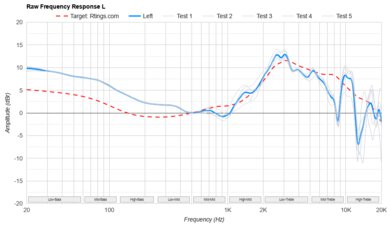
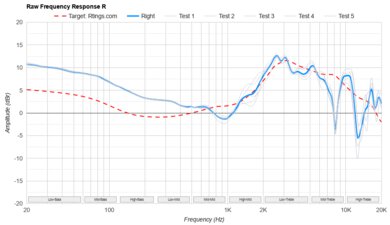
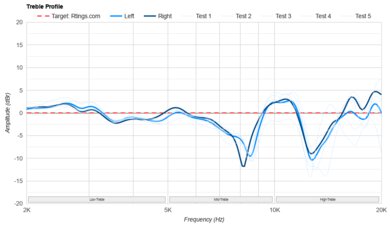
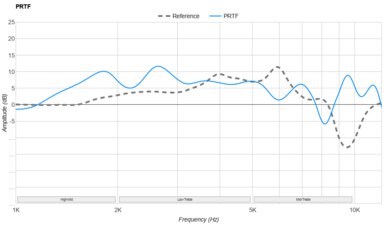
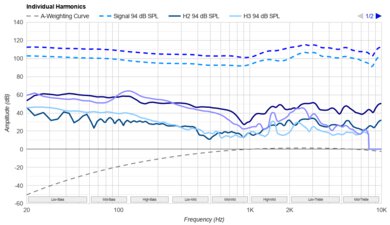
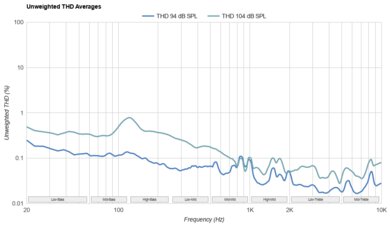
The SteelSeries Arctis Nova Elite have good audio reproduction accuracy. The headphones' frequency response doesn't deviate much from their warm sound signature, though a deep and wide dip in the 5.5kHz region can render sibilants in vocal and instrument reproduction somewhat dull. The headphones' group delay, stereo matching, and harmonic distortion performance highlight no significant issues, so you'll enjoy cinematic cutscenes with accurately placed sound objects in the stereo image and no timbral degradation due to distortion at loud volumes. While these over-ears excite your pinna, their PRTF doesn't resemble an angled speaker setup.
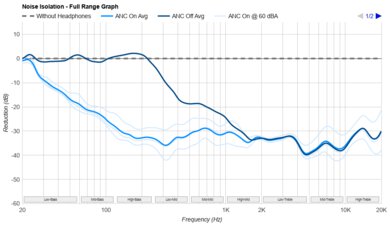
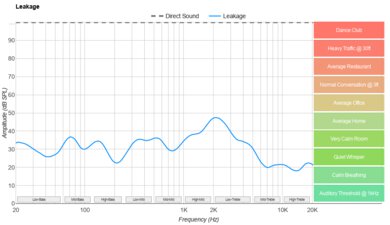
The SteelSeries Arctis Nova Elite have excellent noise isolation performance. They come equipped with an active noise cancellation system, which is quite rare for gaming headphones. The ANC implementation isn't just for show, either, as the headphones handily shut out noise from bustling family gatherings or construction across the street. That said, they perform a little weaker in mid-range attenuation, so you may notice some voices slipping through. The SteelSeries also don't leak much audio, so people close by likely won't notice you're gaming on your phone even in a quiet library.
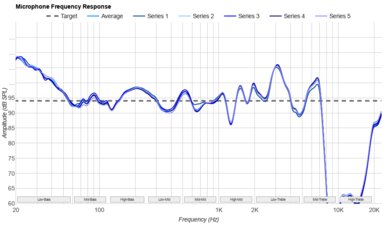
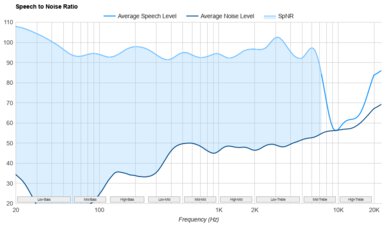
The SteelSeries Arctis Nova Elite have excellent microphone performance. Our scoring was done with the retractable boom microphone, which renders your voice naturally, and keeps you intelligible even amidst loud, sustained background noise. You can separate your voice from noise even more effectively by toggling on noise reduction in the app or directly on the GameHub transmitter.
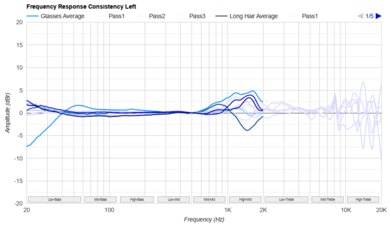
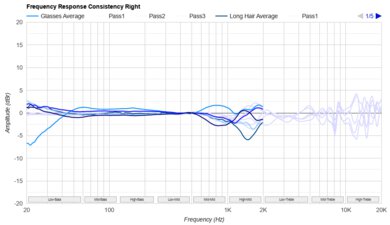
The SteelSeries Arctis Nova Elite have alright frequency response consistency. If you wear glasses, you can expect your listening experience to differ slightly from our measurements with reduced bass delivery. With an uninterrupted seal, the headphones reliably deliver audio between wears and different wearers.
Performance Usages
Check Price
Differences Between Sizes And Variants
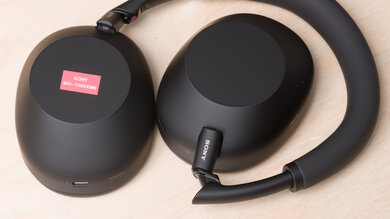
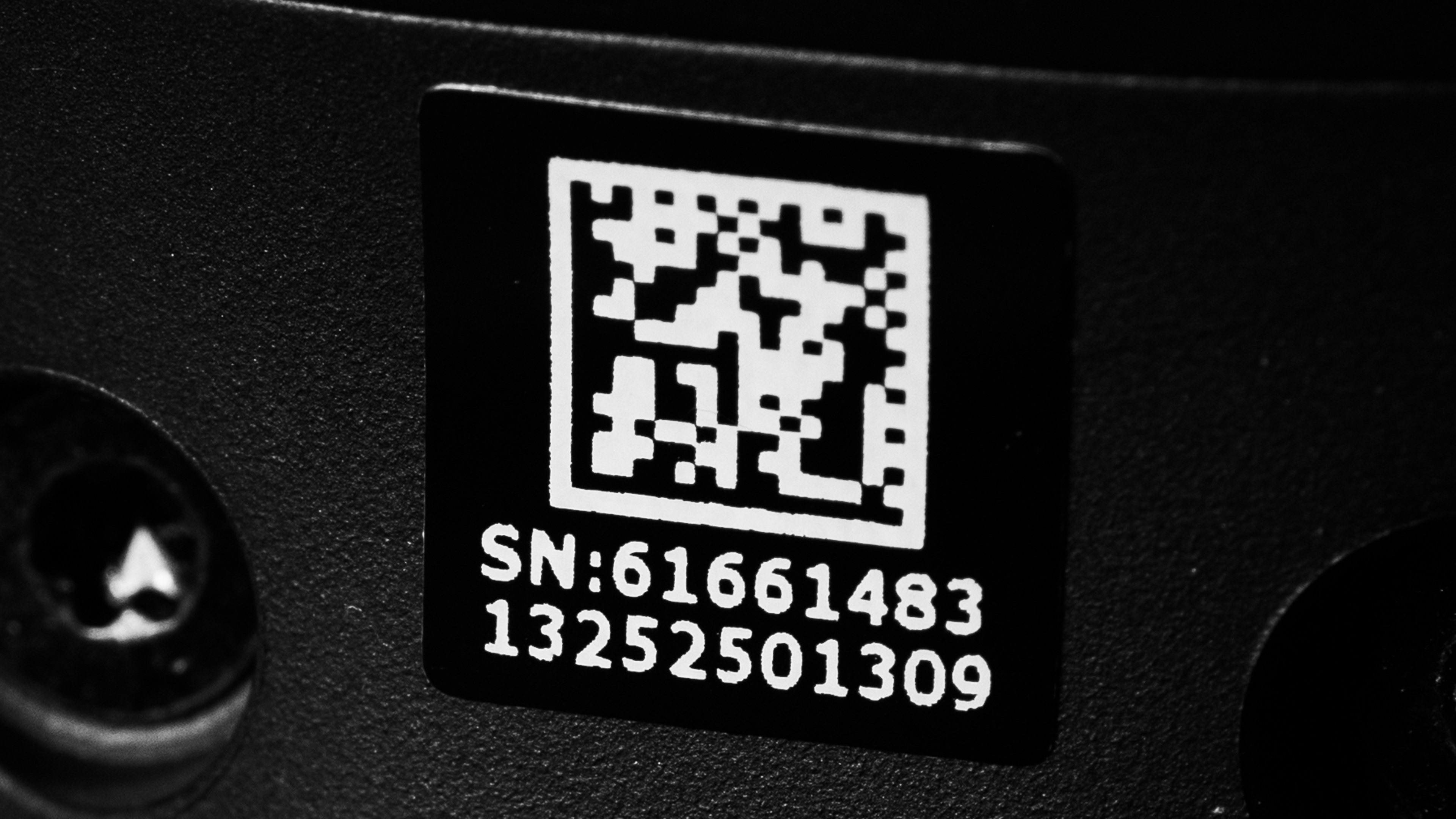
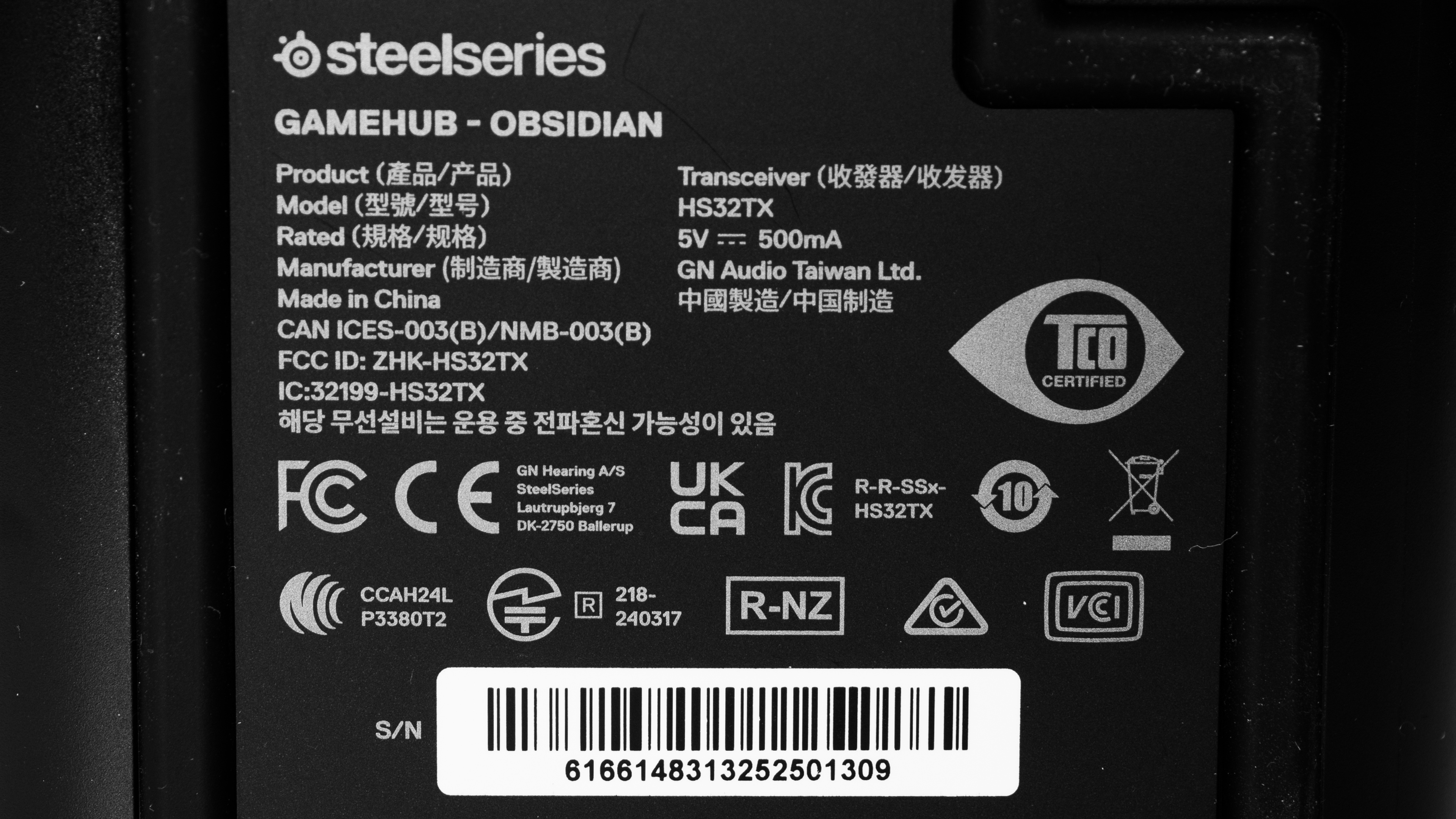
The SteelSeries Arctis Nova Elite comes in 'Obsidian' or 'Sage & Gold' color variants. We tested the 'Obsidian' variant. You can view our unit's headphone label and GameHub label. Unlike other gaming headsets, the SteelSeries Arctis Nova Elite don't have console-specific variants, and they work with PC, Xbox, PlayStation, and Nintendo Switch.
If you encounter other variants, please let us know in the comments, and we'll update the review.
Popular Headphones Comparisons
The SteelSeries Arctis Nova Elite are one of the most expensive gaming headphones available on the market, cementing themselves among the likes of the Master & Dynamic MG20, the Astro A50 X, the Audeze Maxwell Wireless, and the Razer BlackShark V3 Pro. While each entry supports varying degrees of multi-device support, the SteelSeries stand out with their ability to mix simultaneous audio from up to three devices from their wireless transmitter in addition to one Bluetooth device connected directly to the headphones. That said, the Astro's dock can also serve as a multi-device HDMI hub and pass through video to a display.
Compared to the rest of the SteelSeries Arctis Nova line, the Nova Elite easily outperform ANC-enabled entries like the SteelSeries Arctis Nova Pro Wireless and the SteelSeries Arctis GameBuds in noise isolation, and the entire product line in microphone recording quality and noise handling. They also have more expansive Bluetooth codec support, bringing LC3 and LC3+ to the table.
If the SteelSeries Arctis Nova Elite are within your budget and you're looking for a competitive edge, consider picking up a dedicated audiophile headphone from our best audiophile headphones article and pairing it with a third-party standalone microphone. Otherwise, check out our entries for best gaming headset and the best wireless gaming headset for more cost-efficient picks.
The SteelSeries Arctis Nova Elite is an updated, more premium version of the SteelSeries Arctis Nova Pro Wireless. The Elite headset retains most of the design and functionality of the Pro, albeit with aluminum yokes and hinges and a more matte finish. The newer entry also improves on some pain points of the previous version, relocating the protruding feedback mics for the ANC system elsewhere to prevent chafing on the wearer's ears. The Elite also feature an improved ANC system that significantly outperforms the Pro's. While the older Pro support simultaneous audio from one audio source on the dock and a separate Bluetooth device, the newer Elite allow you to mix up to three dock devices and one separate Bluetooth device together, making it the better option for gamers with multiple consoles and/or a PC. That said, these improvements come at almost double the cost, so it's worth considering whether you need all the extra connectivity and ANC to begin with.
The Astro A50 X and the SteelSeries Arctis Nova Elite are similar headphones with plenty of dock connectivity options. The Astro support both USB and HDMI connections from consoles, allowing them to serve as an HDMI passthrough hub to a display. That said, the Astro support fewer devices in total (up to 3x USB-C inputs or 2x HDMI 2.1 inputs) compared to the SteelSeries GameHub dock (up to 3x USB-C inputs + Line). While both have natural-sounding microphones, the SteelSeries's boom mic is more effective at keeping your voice audible despite background noise. And although the Astro A50 X support Bluetooth, the headphones are tethered to the dock, while you can use the SteelSeries while out and about via Bluetooth. Overall, your decision between the products will come down to whether you want a device that can double as a casual-use headphone and whether you value HDMI hub functionality.
The SteelSeries Arctis Nova Elite and the Razer BlackShark V3 Pro are both gaming headphones. Both entries feature ANC systems, but the SteelSeries outperform across most of the range, faltering slightly in mid-range attenuation, where background voices may be slightly more audible. Both have solid microphones that reproduce your voice naturally, but the Razer don't have an integrated mic to fall back on when the boom mic is detached. The SteelSeries are also more flexible in connectivity options, allowing simultaneous audio mixing from multiple devices and parametric EQ adjustments compared to the Razer's graphic EQ. That said, the SteelSeries are around double the price of the Razer, making them less attractive from a value-for-money perspective.
The SteelSeries Arctis Nova Elite and the Logitech G PRO X 2 LIGHTSPEED Wireless may both be gaming headphones, but they fall into widely different price categories. While the SteelSeries offer additional features like excellent ANC, a dock transmitter that works with multiple sources simultaneously, and a better boom microphone, they're significantly more expensive. Meanwhile, the Logitech offer a more barebones package, though they have a more comfortable fit and a much longer 97-hour battery life. Though it's not as customizable or expansive a solution for simultaneous audio, the Logitech can also splice in a secondary audio source via a 3.5 mm line-in on their wireless dongle. In this head to head, your best bet is to buy based on your use case. If you don't have multiple consoles or any intention of using your gaming headphones when out and about, go with the Logitech.
We've upgraded our Headphones Test Bench to 2.0! This update brings several key changes to our tests and usages, making it easier than ever to interpret our sound results based on your personal preferences. You'll also find a brand-new interactive graph tool featuring multiple targets (including our own!) for you to explore and compare.
For a full breakdown, check out our changelog, which includes detailed commentary from our test designer explaining the rationale behind our update.
We'd also love to hear your thoughts: your feedback helps us keep improving, so join us in the comments!
Test Results
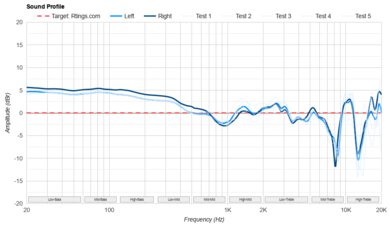
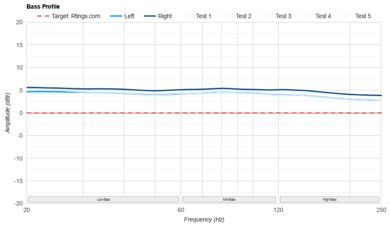
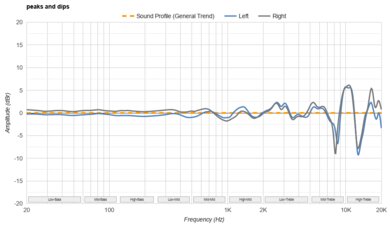
The SteelSeries Arctis Nova Elite have a warm sound profile. They have a slight bass emphasis and cuts in the mid-treble and high-treble that may help relieve listening fatigue over long gaming sessions. If that isn't your preference, they provide plenty of EQ presets. We only tested the basic ones, but the headphones' app ('Engine,' 'Sonar,' and 'SteelSeries Arctis Companion') comes with hundreds of game-specific EQs, too.
The headphones' frequency response isn't too different across Bluetooth, non-Bluetooth wireless, and analog connections. Note that the analog connection deviates from the other connection types because the wired connection automatically powers the headphones off, deactivating ANC. Over Bluetooth and non-Bluetooth wireless, the headphones' frequency response is similar with ANC disabled.
The headphones' frequency response consistency is alright. While their audio delivery varies, it isn't as bad as other gaming headsets like the Audeze Maxwell Wireless or the Razer BlackShark V3 Pro. The earpad seal can be interrupted if you wear glasses, leading to slightly subdued bass, but it won't be significantly worse.
These headphones have remarkable bass target compliance. Their frequency response is very slightly elevated relative to our target in this range, but not to the extent of muddying detail.
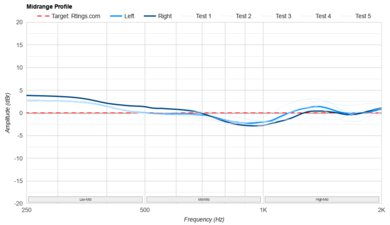
The SteelSeries Arctis Nova Elite have excellent mid-range target compliance and deviate minimally from our curve. You may notice vocals and instruments pushed back a smidge due to minor underemphasis in the high-mids.
Their treble range compliance is passable. The headphones' frequency response mostly matches our target in this range, but a significant dip in the low- to mid-treble and a rolloff in the high-treble mean some vocals are reproduced with dulled sibilants and lacking in airiness. In the LoL Worlds 2025 Anthem, Sacrifice, G.E.M.'s rousing vocals can sound somewhat muffled and closed-off.
The SteelSeries Arctis Nova Elite have decent peaks and dips performance. For most of the measured frequency spectrum, the headphones' response deviates minimally from their warm sound profile. That said, a huge dip in the mid-treble can make footsteps sound dull or muffled.
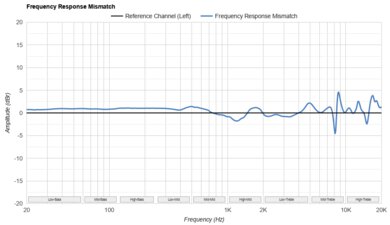
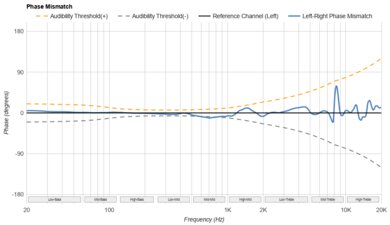
The SteelSeries Arctis Nova Elite have great stereo matching. The L/R drivers are well-matched in overall amplitude, and phase and frequency response across most of the range. Fluctuations in the mid and upper treble won't be noticeable to most, so sound objects like your opponent's footsteps will be accurately in the stereo image.
The headphones' group delay performance is excellent. Minor group delay fluctuations in the bass range don't indicate the presence of significant phase shifts between neighboring frequencies; constructive and destructive wave interactions won't affect the headphones' frequency response.
While these over-ears stimulate your pinna, their PRTF doesn't resemble that of our benchmark, an angled stereo speaker setup. They likely won't sound as natural or immersive as headphones like the Sennheiser HD 800 S.
The SteelSeries Arctis Nova Elite have remarkable harmonic distortion performance. At high output levels, most discerning audiophiles won't notice any timbral changes due to harmonic distortion.
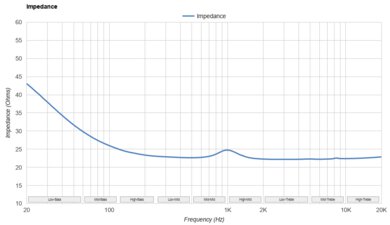
These headphones don't need an amp to drive them when used passively.
The SteelSeries Arctis Nova Elite have access to various virtual surround features depending on the platform. They support the Spatial Audio feature included in 'Sonar,' Dolby Atmos on Xbox, and PlayStation's Tempest 3D. This allows them to convert multi-channel formats and output into virtualized surround binaural audio. If you're using 'Sonar,' you can also adjust the distance and position of the virtual 'speakers,' depending on your preferences.
These are the settings used to test the SteelSeries Arctis Nova Elite. Our results are only valid when used in this configuration.
Due to the complexity of the headphones, there are multiple firmware versions corresponding to the various components. Here's a screenshot.
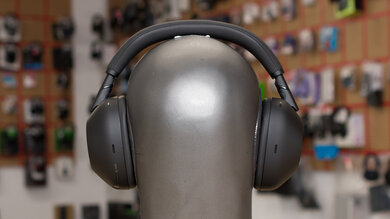
The SteelSeries Arctis Nova Elite gaming headset is a souped-up, premium update to the SteelSeries Arctis Nova Pro Wireless. It retains the ski-band and general SteelSeries headphone aesthetic, but minor design tweaks allow the headset to blend in with other casual-use headphones. That said, only the 'Obsidian' color variant can pass as understated casual over-ears; the alternative, 'Sage & Gold,' is much less subtle.
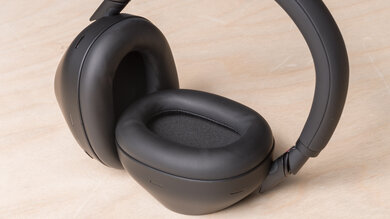
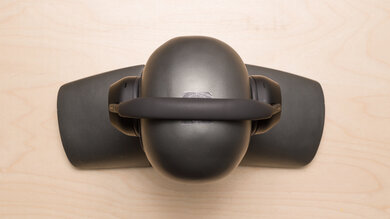
Our 'Obsidian' Elite headset features a matte black finish on its ear cup housing and sports faux leather upholstery on the top of the headband. Similar to the Pro, the yokes attach to the rear-facing side of the ear cups, though the yoke and hinge assembly is finished with glossy aluminum instead of plastic. In contrast, the magnetic removable plates on the sides of the ear cups have a matte finish with an embossed SteelSeries logo. Most of the controls are located on the left ear cup, which features a dedicated mic button and volume wheel. The left ear enclosure also features a boom mic that retracts subtly into the ear cup housing.
The SteelSeries Arctis Nova Elite are comfortable headphones. They clamp a little harder and weigh slightly more than the similar SteelSeries Arctis Nova Pro Wireless. That said, the soft ear cup padding and fabric headband help mitigate discomfort from the higher clamp force and weight, respectively. Plus, SteelSeries relocated the feedback mic for the ANC system on the Elite, so it no longer protrudes as it does on the Pro. The Elite's ear cups also have a wider range of motion than those on the Pro, allowing the headphones to better accommodate a wider range of head shapes and sizes.
The SteelSeries Arctis Nova Elite have excellent controls. You can control basic functionality using physical controls built into the headphones and more in-depth features using the GameHub (wireless dock).
The headphones are easy to use thanks to their dedicated volume control wheel and mic mute/unmute button. You can also access other key functionality, including playback controls and transparency toggling with the headphones' multipurpose Bluetooth and power buttons. The headphones also provide audio feedback when powering on, reaching min/max volume, and muting/unmuting the microphone (the mic also illuminates a red LED when muted).
You can also control the GameHub via its scrolling wheel. The dock enables you to access plenty of customization features, including channel mixing, sidetone adjustment, and more.
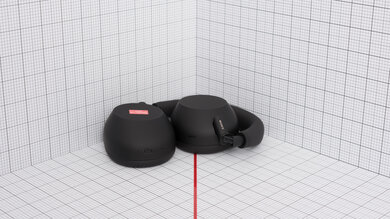
Like most over-ear headphones, the SteelSeries Arctis Nova Elite aren't very portable. Though you can swivel the ear cups flat to rest on your collarbones and around your neck when not in use, they don't fold down to reduce their footprint.
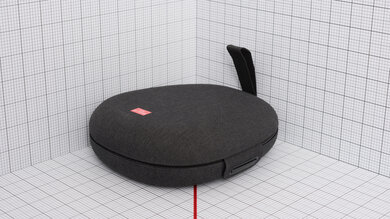
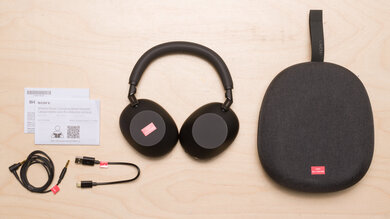
The headphones have a decent soft case, but it's a bit basic for premium headphones. The exterior has a plasticky texture, while the interior has a faux leather finish. They have a magnetic clasp and an additional inner pouch for cables and accessories.
The SteelSeries Arctis Elite have excellent build quality. Their construction includes more premium and sturdy materials than the similarly designed SteelSeries Arctis Nova Pro Wireless. The Elite upgrades a potential weak point of the Pro's design by replacing the ear cup hinges with aluminum. The microphone also extends and retracts in a motion that's smoother than on the Pro. That said, the Elite's headband and earpads still incorporate faux leather, which can delaminate over time. Similar to the Pro, you can remove the magnetic ear cup plates to access the battery or charging port.
During testing, we also noticed marks on the telescoping arms of the headband after they were extended. You can wipe the marks off with a cloth, but it's possible the headphones may develop more permanent markings over time.
The SteelSeries Nova Elite have excellent noise isolation performance against synthetic pink noise. They significantly outperform another similar ANC headphone from the brand, the SteelSeries Arctis Nova Pro Wireless, and handily shut out whirring PC or console fans and thudding footsteps from upstairs neighbors. You can also adjust the headphones' ANC strength using their app or the GameHub.
These headphones do an excellent job of blocking out noise in common scenarios. They excel in bass and treble range attenuation, dealing with squeaky office chairs and rumbly buses and planes. That said, they don't have the greatest performance in mid-range noise isolation, especially when compared to industry-leading ANC products like the Sony WH-1000XM6 or the Bose QuietComfort Ultra Headphones (2nd Gen).
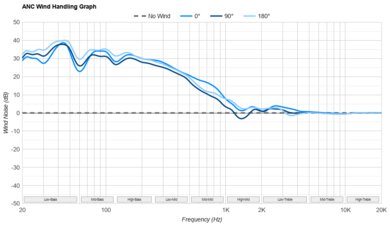
These headphones don't have a wind reduction feature. This isn't too surprising, as their primary use as gaming headphones typically involves being indoors. That said, you'll notice some popping sounds due to wind interaction with the headphones' ANC mics if you're out and about on a gusty day.
The headset doesn't leak much audio. Someone sitting close to you likely won't perceive any sound effects from your mobile game above the noise floor of a quiet environment like a library.
The headphones feature a retractable boom mic and a secondary beam-forming mic.
The headphones' boom mic has great recording quality. When connected via the wireless transmitter, your voice sounds clear and natural. If you switch your connection type (Bluetooth or analog), the microphone performs slightly differently, though the most noticeable change is over Bluetooth due to the limited bitrate.
If you retract the boom mic, the headphones switch to their beamforming mic, which reproduces your voice as less natural, but still intelligible. You can listen to a recording of the mic with the headphones connected via the wireless transmitter.
The headphones' software also offers customization options for the mics, including various EQ presets and gain adjustment.
The boom mic's noise handling performance is great. With the noise reduction feature set to off (by default), the mic naturally rejects low to medium level sustained noise, likely due to its pickup pattern. Against extremely overwhelming, sustained noise, such as the arrival of a subway train, your voice still remains intelligible, but the mic also allows a lot of noise through.
As you'd expect, the beamforming mic doesn't perform as well as the boom mic against noise. Even with the noise reduction feature set to medium (by default), your voice can still be drowned out by the arrival of a subway train.
The headphones have an overall superb battery. They have a hot-swappable battery system that allows you to charge one battery in the dock while the other is in use. With ANC on high and both the non-Bluetooth GameHub and Bluetooth connections established, a single battery lasted 18.5 hours, which is a far cry from SteelSeries's advertised 30 hours per battery. That said, the brand doesn't specify the conditions under which they achieved 30 hours.
The shorter battery life doesn't matter much, as you can easily swap the batteries, and they charge to full in 1.9 hours. The headphones also stay powered on for just under nine seconds with the battery removed, giving you just enough time to insert a fresh one if you're quick enough. It's also worth mentioning that replacing removable batteries is significantly cheaper and more convenient than replacing integrated ones on other headphones.
The SteelSeries Arctis Nova Elite have access to several applications for desktop or mobile configuration. The SteelSeries GG desktop app, which functions as the configuration center for most of the brand's peripherals, houses two distinct sub-apps: 'Engine' and 'Sonar.'
'Engine' offers device-focused, rudimentary (but still expansive) features, allowing you to apply a 10-band parametric EQ, cycle between numerous game-specific EQ presets, EQ your microphones, control sidetone, and adjust device settings such as inactivity timers and dock screen brightness. You can see how 'Engine' works in a video.
On the other hand, 'Sonar' is more of an audio mixing software like VoiceMeeter or Elgato Wave Link. The app allows you to assign programs to specific channels and apply customizations to each channel, including parametric EQ and AI noise suppression (for communications).
Finally, you can control the headphones on your phone with the SteelSeries Arctis Companion app. Similar to 'Engine,' the mobile app allows you to cycle through game-specific and custom presets, configure your microphone, and adjust behavior when on call or inactive. Most importantly, any changes you make via the Bluetooth app are preserved even when you play on consoles. You can watch a video of the mobile app in action.
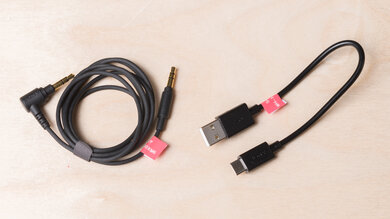
The headphones come with three USB-A to USB-C cables and one 1/8" TRRRS to TRRS cable. The USB-C cables connect source devices, like a PS5 or PC, to the dock, while the analog cable connects your headphones to a source device directly.
If you plan to use the headphones via their analog connection, make sure to connect the TRRRS connector (the non-angled jack) to your headphones for the best performance.
These headphones have great Bluetooth connectivity. They run Bluetooth v5.3 and support Bluetooth multipoint (SBC) with up to two devices, as well as simultaneous connection with the GameHub dock. You can mix together simultaneous audio from the wireless transmitter (up to USB 1 + USB 2/3 + Line) and your active Bluetooth connection.
While the headphones are advertised to support Bluetooth LE and LC3/LC3+, we were only able to test their performance with SBC via Bluetooth Classic. As you'd expect from the universal, barebones codec, audio latency is too high for most gaming applications. That said, if you have a device that supports LC3 or LC3+, you can expect lower audio latency, which could make gaming on a mobile device via Bluetooth with decent audio/video synchronization a possibility.
The SteelSeries Arctis Nova Elite have very good non-Bluetooth connectivity. Their latency when connected to their dock is 34 ms, and they have plenty of range, should you want to grab a drink while queueing for a match.
Their wireless connection also supports Hi-Res audio up to 96kHz/24-bit, although this depends on the capabilities of your source devices. Whether you can maintain Hi-Res audio also depends on the quality of your headphones' wireless connection to the transmitter, as codecs dynamically adjust their performance based on signal quality.
You can connect the headphones to your PC over analog or non-Bluetooth wireless (via their dock). When connected using either option, the headphones' mic and output work without issue.
More advanced users can also use the dock's line-in and line-out ports, or connect the dock to their PC via two USB-C connections (which enables allocation of programs to one of the two audio streams, allowing for software-less game/chat mixing).
The SteelSeries Arctis Nova Elite work with PlayStation consoles over both non-Bluetooth wireless (via their dock) and analog connections. Over both connections, the headphones' mic and output audio work fine, just keep in mind that the headphones power off when connected directly to a source via analog (this also changes how they sound).
If you want to EQ or adjust the headphones' behavior while gaming on an Xbox, you can do so with the mobile app (while PlayStation to the console over non-Bluetooth wireless).
These headphones work with Xbox consoles over both non-Bluetooth wireless (via their dock) and analog connections. Over both connections, the headphones' mic and output audio work fine, just keep in mind that the headphones power off when connected directly to a source via analog (this also changes how they sound).
If you want to EQ or adjust the headphones' behavior while gaming on an Xbox, you can do so with the mobile app (while connected to the console over non-Bluetooth wireless).
The SteelSeries Nova Elite's dock isn't a traditional one. While you can't store your headphones on it (like you can with the Astro A50 X), it serves as a charging station for the included extra hot-swappable battery, an input hub, and the headphones' non-Bluetooth wireless 'dongle.' The dock supports three USB-C connections (to consoles or PCs) and has a dedicated line-in and line-out for more advanced setups.