SteelSeries Arctis GameBuds  Headphones Review

Reviewed May 14, 2025 at 09:42am
Tested using Methodology v2.0 
SteelSeries Arctis GameBuds
8.2
Sports And Fitness 
7.5
Travel 
7.0
Office Work 
7.2
Wireless Gaming (In Development) 
5.8
Wired Gaming (In Development) 
7.5
Audio Reproduction Accuracy 
7.3
Noise Isolation 
6.0
Microphone (In Development) 
 30

The SteelSeries Arctis GameBuds are the brand's true wireless solution for gamers who prefer in-ears and casual gamers who can't justify owning multiple pairs of headphones. While there are some inherent compromises, such as lower continuous battery life than most wireless over-ears, you get full support from the robust SteelSeries software on PC and mobile devices. Plus, their active noise cancelling (ANC) feature onboard is still a rarity on dedicated gaming headphones, which makes them a bit more suitable if you want to use them for everyday Bluetooth audio. They also come with a USB 2.4GHz wireless dongle that works with PlayStation, PC, or your smartphone's USB-C port.

Our Verdict

8.2
Sports And Fitness 

The SteelSeries GameBuds are great for sports and fitness use. Their comfortable and stable in-ear fit ensures they stay put during vigorous exercise. The buds are certified as IP55 against dust and water, so they'll hold up if you jog in the rain. Their charging case is small enough to fit into most pockets, too. Out of the box, they provide a balanced sound signature with a little bit of extra boom on kicks to help you find your rhythm. You can also adjust the EQ and intuitive controls via the app. If you prefer to work out in silence, their ANC is decent, but not class-leading.

Pros
  • Wireless USB and Bluetooth audio connectivity.

  • Comfortable and stable fit.

  • Well-built with IP55 rating.

Cons
  • Noise isolation is only satisfactory.

7.5
Travel 

The SteelSeries Arctis GameBuds are good for travel. They're very portable with a continuous battery life of over eight hours that can last through most regional travel. You'll likely have to recharge the buds in their case at some point in your trip if you take a flight to the other side of the world. They're comfortable, so long as you don't mind a somewhat deep in-ear fit, and their controls are intuitive and comprehensive. If you watch movies or game on your device, the wireless transmitter ensures there's tight A/V matching, but the Bluetooth implementation lacks high-quality codecs, fast pairing, and multi-pairing. Their ANC is satisfactory at isolating out background din and chatter, but it's not the strongest noise cancellation either.

Pros
  • Wireless USB and Bluetooth audio connectivity.

  • Comfortable and stable fit.

  • Comprehensive PC and mobile app with plenty of customization available.

  • Well-built with IP55 rating.

Cons
  • Noise isolation is only satisfactory.

7.0
Office Work 

The SteelSeries GameBuds are decent for office work. They feel comfortable if you don't mind a somewhat deep in-ear fit, and their continuous battery life is a little over eight hours, so you can probably make it through a shift without a recharge. Their default sound is quite balanced as well. Their discreet colorway doesn't shout gamer, so you'll still look professional on the job. While their microphone is alright for the purposes of most online meetings and calls, it can struggle to reject background noise, though there are customizable features in the app that may help. Still, the ANC is only satisfactory when it comes to filtering out office clatter like keystrokes.

Pros
  • Wireless USB and Bluetooth audio connectivity.

  • Comfortable and stable fit.

Cons
  • Disappointing mic noise handling by default.

  • Noise isolation is only satisfactory.

7.2
Wireless Gaming (In Development) 

The SteelSeries Arctis GameBuds are decent for wireless gaming. Their continuous battery life should last long enough for the average player's gaming session, but you'll need to take a break and recharge them in the case if it falls short. While the onboard ANC isn't as powerful as many premium Bluetooth earbuds, it's enough to help you focus if you're gaming in most homes. Their USB wireless dongle ensures a stable connection with low latency to keep up with speed runs, and the basic Bluetooth implementation is more of a bonus. They feel comfortable and reproduce a balanced-sounding version of your audio with reassignable button controls. You also benefit from the brand's PC and mobile apps for dedicated EQ presets, spatial audio, and comprehensive microphone channel mixing and tuning. That said, the default mic settings struggle to reject background noise without affecting your voice's clarity.

Pros
  • Wireless USB and Bluetooth audio connectivity.

  • Comprehensive PC and mobile app with plenty of customization available.

Cons
  • Disappointing mic noise handling by default.

  • Noise isolation is only satisfactory.

5.8
Wired Gaming (In Development) 

The SteelSeries GameBuds are wireless only, so you can't use them for wired gaming.

7.5
Audio Reproduction Accuracy 

The SteelSeries Arctis GameBuds have good audio reproduction accuracy. Their frequency response is balanced, with slightly elevated bass and de-emphasized treble, relative to our target curve. Since they offer excellent frequency response consistency and good peaks/dips, you can expect a predictable and smooth sound. Their overall stereo mismatch and group delay performances deliver a stable stereo image for locating objects without space. That said, there are narrow peaks of harmonic distortion present in the treble, which may be audible.

7.3
Noise Isolation 

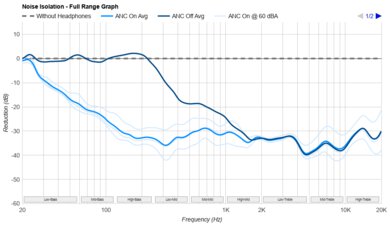
The SteelSeries Arctis GameBuds are decent for noise isolation. There are three strengths to choose from, and on the highest setting, it filters out a reasonably even amount of noise without many narrow bands of frequencies 'poking' through, except for a weak effect on deep rumbles. Still, it's not very powerful compared to top-performing ANC earbuds, but if you don't need the best, it's a satisfactory ANC option.

6.0
Microphone (In Development) 

The SteelSeries Arctis GameBuds have passable microphone performance. Speech sounds fairly natural and clear, if a little bright. However, they struggle to prioritize your voice when you use them in noisy environments. Still, there are a lot of extra features in the app, such as adjustable noise gates and EQ, that may help with the disappointing noise rejection, but this requires trial and error.

8.5
Frequency Response Consistency 

The SteelSeries Arctis GameBuds deliver audio with impressive frequency response consistency. Since frequency response consistency largely influences what you hear when you wear earbuds, this ensures that the balance of audio frequencies won't differ much at all between wears.

  • 8.2
    Sports And Fitness
  • 7.5
    Travel
  • 7.0
    Office Work
  • 7.2
    Wireless Gaming (In Development)
  • 5.8
    Wired Gaming (In Development)

  • Performance Usages

  • 7.5
    Audio Reproduction Accuracy
  • 7.3
    Noise Isolation
  • 6.0
    Microphone (In Development)
  • 8.5
    Frequency Response Consistency
  • Changelog

    1.  Updated May 14, 2025: 

      The Differences Between Sizes and Variants and Style sections were updated to mention the 'Glorange' colorway.

    2.  Updated May 14, 2025: Review published.
    3.  Updated May 02, 2025: Early access published.
    4.  Updated Apr 07, 2025: Our testers have started testing this product.

    Check Price

    Black (Xbox)
    SEE PRICE
    Amazon.com
    Glorange (PS)
    Amazon.com

    Differences Between Sizes And Variants

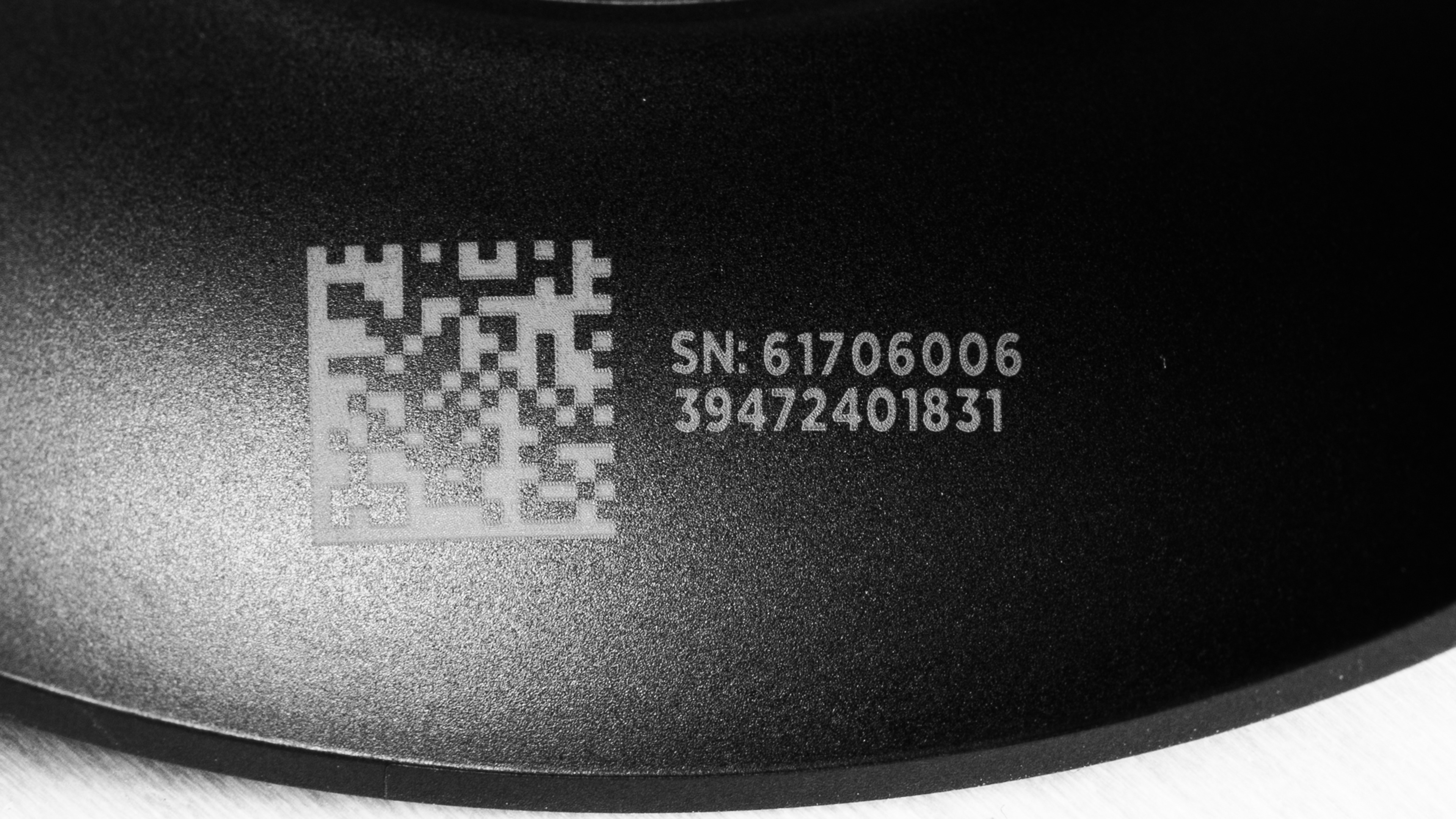
    The SteelSeries GameBuds come in PlayStation ('Black,' 'White,' and 'Glorange') and Xbox ('Black') versions. Our unit is the PlayStation variant in 'Black' (here's the label), and we expect the 'White' and 'Glorange' PlayStation colorways to perform similarly. Although many functions likely cross over between the PlayStation and Xbox variants, such as mobile app compatibility and the basic design, we've only tested the PS variant, so our results are only valid for this version. It has been reported that the Xbox variant can work with PS consoles, but we haven't used that variant, so we can't confirm this.

    If you encounter another variant of these headphones, please let us know in the comments.

    Popular Headphones Comparisons

    The market for gaming earbuds is growing, but they're still niche products with compromises compared to fully-fledged headsets. With that said, true wireless designs are notable because they can usually double as your everyday Bluetooth earbuds. The SteelSeries Arctis GameBuds' IP55 rating and longer battery life certainly suggest you can take them on the go, but the mic's noise handling falls short out of the box compared to the Razer Hammerhead Pro HyperSpeed, though the Razer's battery is much shorter. Meanwhile, the ASUS ROG Cetra True Wireless SpeedNova offer a comparable battery performance with considerably more impressive ANC than the SteelSeries, though the ASUS have a much more uneven sound profile, and they're not as comfortable. Additionally, the mobile app for the SteelSeries is more powerful and complete than the ASUS and Razer mobile apps. If you only plan on using the earbuds with a PC, the SteelSeries GG software for PC is still powerful, but in that case, the ASUS and Razer software are more similar in overall capabilities.

    If you're not strictly interested in the best earbuds for gaming, check out the best wireless gaming headsets, and the best SteelSeries headsets.

    Sony INZONE Buds Truly Wireless

    The Sony INZONE Buds Truly Wireless and the SteelSeries Arctis GameBuds have different strengths and limitations that will influence your choice. The Sony have a longer continuous battery life, they work well with PlayStation and PCs, and they have better ANC and mic noise handling than the SteelSeries. However, the SteelSeries are a bit more flexible when it comes to Bluetooth codec support. Even though the SBC codec isn't exactly high-quality, most devices can support it compared the limited compatibility of the LC3 codec on the Sony. The SteelSeries feel more comfortable with better controls and an IP55 rating, too, though they only come in an Xbox variant. Otherwise, both support wireless USB dongles and low-latency audio.

    ASUS ROG Cetra True Wireless SpeedNova

    The SteelSeries Arctis GameBuds and the ASUS ROG Cetra True Wireless SpeedNova are both multi-use earbuds for wireless gaming with USB dongles at low latency and Bluetooth connectivity. If your priorities are the best noise isolation between the two models, a slightly better mic noise handling performance out of the box, or you prefer very excited bassy tuning, the ASUS are the ones to pick. On the other hand, the SteelSeries are well-rounded with a more comfortable fit, better controls, nicer build quality, a balanced sound profile, and a deep app. That said, the ANC is a bit weaker, and the mic needs finessing in the app settings to possibly improve the disappointing noise handling by default.

    EPOS GTW 270 Hybrid Truly Wireless

    The SteelSeries Arctis GameBuds are better for gaming than the EPOS GTW 270 Hybrid Truly Wireless. The SteelSeries have over eight hours of continuous battery life, ANC, and a more comprehensive app. While the EPOS are well-made, their continuous battery is quite short at just over three hours, which is very limiting. Other features don't exactly outperform the SteelSeries enough to edge the EPOS ahead, unless you count the greater Bluetooth codec compatibility, but the EPOS' wireless 2.4GHz latency is higher than the SteelSeries, which can introduce a little more A/V mismatch while gaming wirelessly.

    Razer Hammerhead True Wireless 2021

    Choosing between the SteelSeries Arctis GameBuds and the Razer Hammerhead True Wireless 2021 depends on whether you want earbuds for wireless USB audio or Bluetooth. Only the SteelSeries include a 2.4GHz dongle for low-latency gaming with PS consoles, PCs, or mobile devices, and it can connect via Bluetooth, too. They boast a more comfortable, stable fit and a longer battery life. However, the Razer have better microphone noise handling performance out of the box, and otherwise, they operate more like casual true wireless buds, but the SteelSeries can be used like standard Bluetooth buds, too.
    Overhauling Our Audio Measurements And A New Multi-Curve Graphing Tool

    We've upgraded our Headphones Test Bench to 2.0! This update brings several key changes to our tests and usages, making it easier than ever to interpret our sound results based on your personal preferences. You'll also find a brand-new interactive graph tool featuring multiple targets (including our own!) for you to explore and compare.

    For a full breakdown, check out our changelog, which includes detailed commentary from our test designer explaining the rationale behind our update.

    We'd also love to hear your thoughts: your feedback helps us keep improving, so join us in the comments!

    Test Results

    perceptual testing image
    Sort:
    RATINGS
    Category:
    All
    Sound
    Sound Profile
    See details on graph tool
    Normalization Frequency
    550 Hz
    Bass Amount
    Slightly Emphasized (1 dB)
    Treble Amount
    Balanced (-1 dB)
    Sound Signature
    Balanced

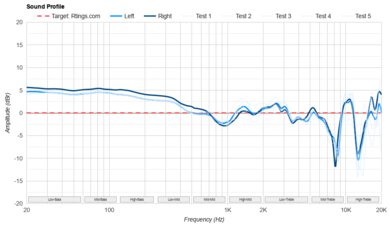
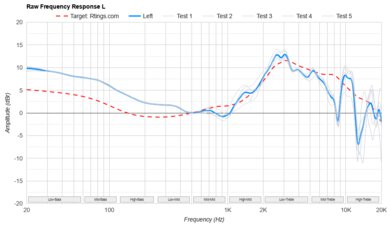
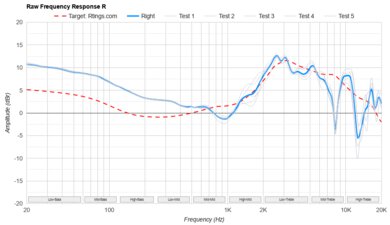
    The SteelSeries Arctis GameBuds have a balanced sound signature, and they sound basically the same whether you use the wireless dongle or the Bluetooth connection. Bass and low mid-range frequencies are a bit emphasized relative to our target curve (and every other target curve we reference) for extra oomph during explosions. Compared to our target frequency response, the treble regions are balanced but de-emphasized. Still, this treble region more closely adheres to the SenseLab Aizu preference curve, except for the large dip in the high-treble.

    Because the app has hundreds of EQ presets, we can't measure all of them. Many of these presets are meant for specific game titles. The app also has a dedicated custom EQ with settings that you can save to the buds for use with different devices.

    8.5
    Frequency Response Consistency
    See details on graph tool
    See details on graph tool
    Std. Deviation
    0.65 dB

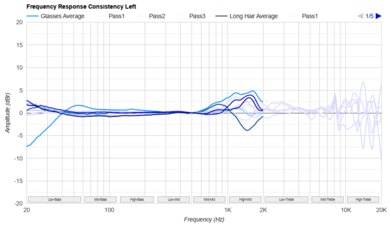
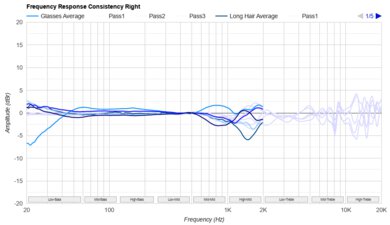
    These buds have excellent frequency response consistency. Once you've found the correct ear tips, you can anticipate a predictably similar sound with each use.

    Raw Frequency Response
    See details on graph tool
    See details on graph tool
    9.4
    Bass Profile: Target Compliance
    See details on graph tool
    RMS Deviation From Target
    2.4 dB
    Low-Frequency Extension
    20 Hz
    Low Bass
    -1.24 dB
    Mid Bass
    2.31 dB
    High Bass
    2.6 dB

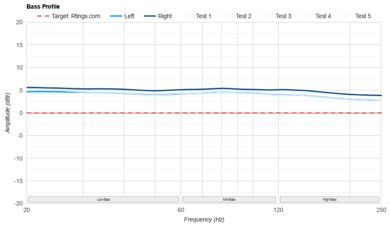
    These earbuds have remarkable bass profile target compliance. The range is tilted to emphasize the punch and boom of higher bass frequencies like kick drums or explosions. There's a little roll-off in the sub bass: the tuning follows our curve very well without overwhelming higher registers.

    9.3
    Mid-Range Profile: Target Compliance
    See details on graph tool
    RMS Deviation From Target
    1.12 dB
    Low Mid
    1.44 dB
    Mid-Mid
    -0.38 dB
    High Mid
    -0.91 dB

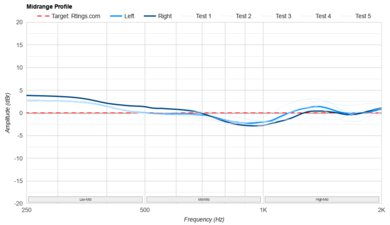
    The mid-range's target compliance is superb. There's a slight boost to the low-mids for a touch of extra warmth to bass guitar harmonics. Otherwise, the response rather tightly follows our curve for natural-sounding dialogue in the chat mix.

    9.4
    Treble Profile: Target Compliance
    See details on graph tool
    RMS Deviation From Target
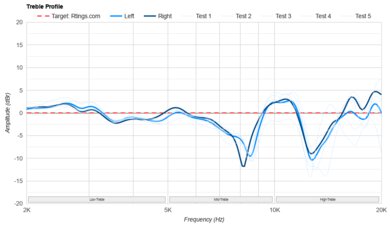
    2.18 dB
    Low Treble
    -2.01 dB
    Mid Treble
    0.99 dB
    High Treble
    -2.53 dB

    The SteelSeries Arctis GameBuds have fantastic treble target compliance. The low-treble is a little de-emphasized but very even and bright. A boost in the mid-treble (and a mismatch between the L/R) injects a little added emphasis to the presence of cymbal harmonics in tracks like Peng! 33 by Stereolab. Lastly, the dip followed by the peaks in the high-treble can feel uneven in airiness or closed off, but this range strongly depends on your hearing's sensitivity.

    7.8
    Peaks/Dips
    See details on graph tool
    Peaks
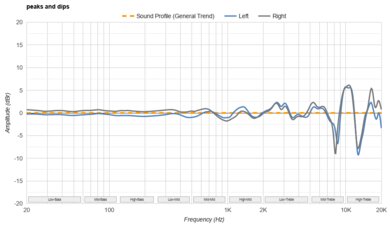
    1.21 dB
    Dips
    1.7 dB

    These earbuds have very good peaks and dips performance. Their balanced sound signature is quite smooth from the bass to the low-treble, and it's an even sound that doesn't have many frequencies jumping out in the mix. The low-treble has a small peak with a dip that adds a bit of harshness or dullness, depending on the pitch of the vocals, but it's minor. A larger peak occupying most of the mid-treble causes sounds like cymbal harmonics to be relatively shrill in the mix. The dips and peaks in the high-treble cause very high harmonics to either sound closed-off or somewhat hissy, depending on the pitch, but this is quite reliant on your hearing's sensitivity.

    8.0
    Stereo Mismatch
    See details on graph tool
    See details on graph tool
    Weighted Amplitude Mismatch
    0.34 dB
    Weighted Frequency Response Mismatch
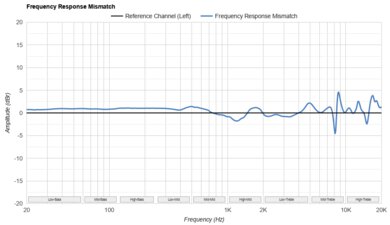
    0.87 dB
    Weighted Phase Mismatch
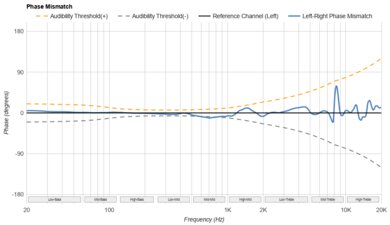
    1.6°

    These earbuds have very good stereo mismatch performance. Each driver is well-matched in weighted amplitude, and the weighted frequency response is matched, except for a deviation in the right driver's mid-treble. The weighted phase also shows the frequency response's slight mismatch in the treble, but it still falls below the audibility threshold. As a result, the stereo image places objects within the field with accuracy and doesn't tilt strongly with real-world content. This can vary with different pairs of the same earbuds, so our results only apply to our particular set.

    7.5
    Group Delay
    See details on graph tool
    Weighted Group Delay
    1.0 ms

    These buds exhibit good group delay performance. On the whole, low frequencies retain their punch, and the mids through treble playback transparently.

    Cumulative Spectral Decay
    0.0
    PRTF
    PRTF Accuracy (RMS Deviation)
    N/A
    PRTF Size (Avg.)
    N/A
    PRTF Distance
    N/A
    7.2
    Harmonic Distortion
    See details on graph tool
    See details on graph tool
    WHD @ 94 dB SPL
    0.59%
    WHD @ 104 dB SPL
    0.74%

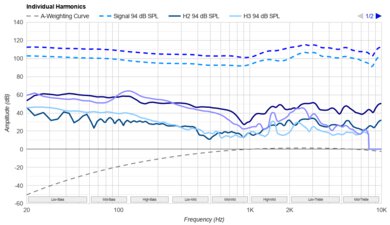
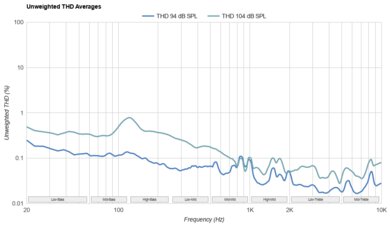
    The harmonic distortion is decent. The bass, mids, and lower treble frequencies retain their purity when pushed to 94 dB/SPL and 104 dB/SPL. However, there are peaks of added harmonic distortion in the upper treble regions, which may be audible with some content.

    Electrical Aspects
    Sensitivity @1kHz-1V
    N/A
    Bluetooth Max SPL
    102.1 dB

    These are active earbuds that require their charged batteries to work.

    2.9
    Virtual Soundstage
    Head Modeling
    No
    Speaker Modeling
    Adjustable
    Room Ambience
    No
    Head Tracking
    No
    Virtual Surround
    Spatial Audio

    You can use the Sonar tab within the SteelSeries GG software to access the virtual surround sound. It doesn't have head modeling, head tracking, or simulated room ambience. However, you can adjust the speaker modeling for distance. There's also 3D audio supported with the PlayStation 5.

    Test Settings
    Firmware
    1.7.0
    Power
    On
    Connection
    Wireless (Proprietary)
    Codec
    PCM, 16-bit, 48kHz
    Test InstrumentAudio Precision APx517B
    EQ
    Flat
    ANC
    On
    Tip/Pad
    Silicone (small)
    Microphone
    Integrated

    These are the settings used to test the PS variant of the SteelSeries Arctis GameBuds. Our results are only valid when using them in this configuration.

    Design
    Style
    TypeIn-ear
    EnclosureClosed-Back
    WirelessTruly Wireless
    TransducerDynamic

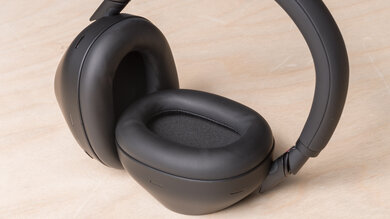
    The SteelSeries Arctis GameBuds are stemless true wireless earbuds with tonal monochromatic colorways ('Black' or 'White') in semi-matte plastic. They lack the typical flashes of RGB lights you'll commonly find on gamer-oriented products, and except for the SteelSeries logo featured on the buttons of each bud (because if you know, you know), they visually pass the stuffy office test. That said, if you prefer a bright pop of color, there's a limited edition 'Glorange' variant that comes in transparent orange plastic with the logo in white, evoking memories of retro gaming consoles.

    7.5
    Comfort
    Weight0.03 lbs
    Clamping Force
    0 lbs

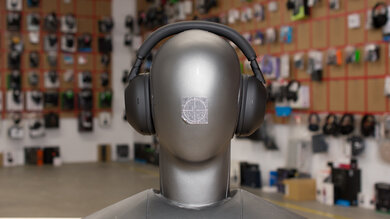
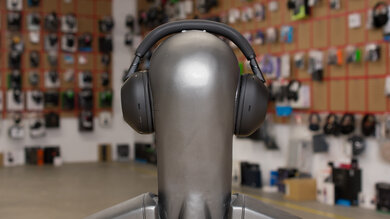
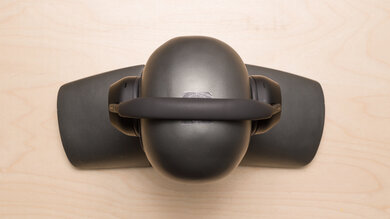
    These earbuds are comfortable thanks to their ergonomic shape. They come with three round silicone ear tips, and they feel balanced and lightweight. These share the same parent company as Jabra, so if you have recent experience with Jabra truly wireless buds, these feel like they're in the same ballpark concerning the fit, though they lack the silicone coating found on the Jabra Elite 8 Active Gen 2. The only potential points of complaint are the somewhat deep in-ear fit, if you're sensitive to that, and while the buttons are shallow, it's still possible to slightly press the buds in when using the controls.

    8.4
    Controls
    OS Compatibility
    Not OS specific
    Ease Of UseGreat
    FeedbackGreat
    Call/Music ControlYes
    Volume ControlYes
    Microphone ControlMute/Unmute
    Channel Mixing
    No
    Noise Cancelling ControlOn/Off
    Talk-Through
    On/Off
    Additional ControlsSource Switch

    The SteelSeries Arctis GameBuds have impressive controls. You can remap them via their app; check out their default settings. The earbuds use shallow, clicky buttons located on the flat outer face of the housings. You can easily tell the commands have registered with chimes for volume controls, guidance for connection statuses, and listening modes. WearSense is the brand's version of in-ear detection, so it'll pause audio when you remove a bud.

    Most controls are covered already, but there are somewhat unique options you can assign within the app. Some of these niche controls you can add are for gaming and calls, like dedicated channel mixing with the microphone and sidetone functionality found in the app.

    9.5
    Portability
    L1.1" (2.9 cm)
    W1.3" (3.4 cm)
    H0.8" (2.1 cm)
    Volume1.28 in³ (21.00 cm³)
    Transmitter RequiredYes

    The SteelSeries Arctis GameBuds are remarkably portable. They'll easily slip into virtually any pocket, except maybe a coin pocket on your jeans.

    8.5
    Case
    TypeHard case
    L2.8" (7.0 cm)
    W2.1" (5.3 cm)
    H1.2" (3.1 cm)
    Volume7.02 in³ (115.00 cm³)

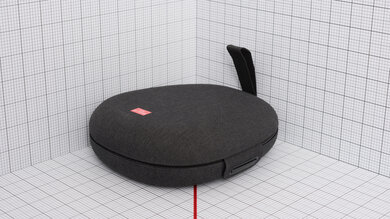
    The charging case is great. It sits flat and opens like a clamshell with a notch in the hinge to keep the case open, though the hinge itself gives the lid a bit of lateral play. The magnet is strong and securely closes the case when not in use. It's slightly bulky, but it houses the wireless dongle and the earbuds, so that's expected. You can charge it via the USB-C port or wirelessly with a Qi pad.

    8.0
    Build Quality

    The SteelSeries Arctis GameBuds are impressively built. While they're lightweight, the plastic is of a nice quality, and their seams are tight without rough edges. The earbuds have an IP55 rating against dust and water, indicating they'll manage fine if you press the controls with chip-flavor-dusted fingers or get water on them at the gym. The case is well-made with a strong magnet, but it doesn't have an IP rating. Unfortunately, the case's hinge feels a little flimsy compared to the rest of the package.

    8.5
    Stability

    The SteelSeries Arctis GameBuds are impressively stable. Their somewhat deep in-ear fit, ergonomic shape, and balanced weight ensure they stay put during vigorous exercise. Since you only get three ear tip sizes to choose from, if your ears are either very large or very small, it might be harder to dial in the fit for maximum stability, especially because there aren't additional stabilizers.

    Headshots 1
    Headshots 2
    Top
    In The Box

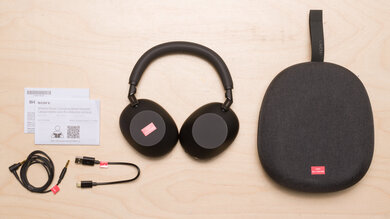
    • SteelSeries GameBuds
    • 3x pairs of ear tips (S, M, L)
    • USB-C wireless dongle
    • USB-A to USB-C adapter
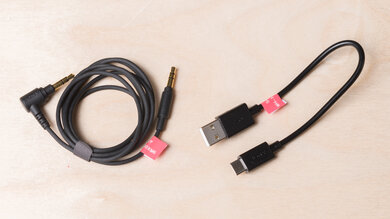
    • USB-C to USB-C charging cable (22 cm/8.7 in)
    Isolation
    7.1
    Noise Isolation - Full Range
    See details on graph tool
    Noise CancellingYes
    Overall Attenuation
    -18.20 dB
    Bass
    -11.64 dB
    Mid
    -18.78 dB
    Treble
    -25.52 dB

    When set to 'High,' the ANC on the buds has decent full-range noise isolation. Since most people game in the privacy of their homes, its performance is satisfactory for dampening A/C units to an extent and blocking out high-pitched racket. However, the ANC isn't as impressive as the noise cancelling on gaming buds like the ASUS ROG Cetra True Wireless SpeedNova. The SteelSeries earbuds also have two lower strength ANC settings that filter out nearly the same frequencies, only to a lesser degree, as you'd expect.

    7.0
    Noise Isolation - Common Scenarios
    See details on graph tool
    Airplane Noise Attenuation
    -16.85 dB
    Airplane Noise Isolation Audio
    Office Noise Attenuation
    -16.17 dB
    Office Noise Isolation Audio
    Street Noise Attenuation
    -18.47 dB
    Street Noise Isolation Audio

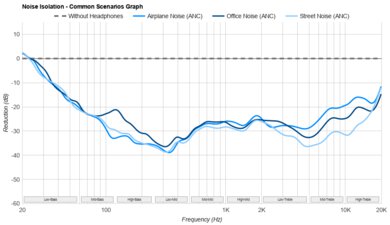
    The SteelSeries Arctis GameBuds are satisfactory for noise isolation in common scenarios. While the ANC isn't the strongest, its attenuation is pretty even across the high-bass through treble frequencies, so there aren't many narrow bands of noise poking through, except for low rumbling noises like engine noise or ambient din. Generally, ANC isn't a very common feature on gaming headphones, so while this noise isolation result isn't the most impressive, assuming your home is quieter than the street, this performance might be enough to focus on your game.

    Noise Isolation - Voice Handling
    Female Voice 1
    Male Voice 1
    Female Voice 2
    Male Voice 2
    ANC Wind Handling
    See details on graph tool
    ANC Wind Noise

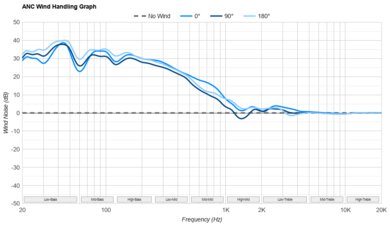
    These earbuds are sensitive to the angle at which the wind hits them, and they don't have a wind mode. Unfortunately, if the buds are directly exposed to a cross breeze (at 180 degrees), the air interacts with the mics, and the ANC system feeds the noise back into your ears, which can be annoying. That said, they're less noisy when wind hits at other angles, and if you're gaming at home, it's not such a concern.

    9.7
    Leakage
    See details on graph tool
    Leakage Audio
    Overall Leakage @ 1ft
    22.61 dB

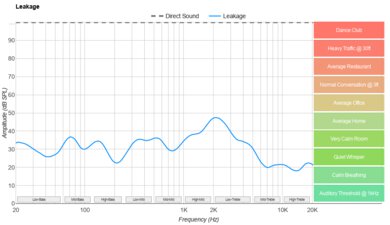
    These buds have fantastic leakage performance. Only a thin-sounding version of your audio is audible in calm settings, keeping your team chat fairly private at normal listening levels.

    Microphone
    Microphone Style
    Integrated
    Yes
    In-Line
    No
    Boom
    No
    Detachable Boom
    No
    MicYes
    6.5
    Recording Quality
    See details on graph tool
    Recorded Speech
    LFE
    82.34 Hz
    FR Std. Dev.
    3.7 dB
    HFE
    7,452.94 Hz
    Weighted THD
    61.381
    Gain
    -19.24 dB

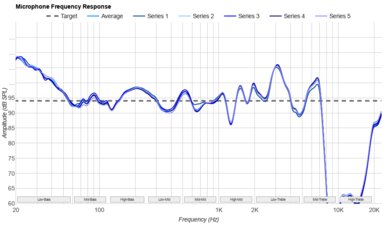
    The microphone system sounds alright on these earbuds. They capture somewhat true-to-life sounding audio that's intelligible, if a little sharp. However, their software includes oodles of extra adjustable settings, so you may experience better or worse results with experimentation.

    For reference, these were measured with the Clearcast AI Noise Cancellation enabled with the default '50' setting (out of a scale of 0 to 100). The noise gate, compressor, EQ, and noise reduction were all disabled. The noise reduction feature automatically turns 'off' when Clearcast AI Noise Cancellation is 'on.'

    The software also allows you to adjust the sidetone and chat mix, so you can tailor the experience to your tastes.

    5.6
    Noise Handling
    See details on graph tool
    SpNR
    13.94 dB
    Noise Gate
    On/Off Toggle
    Speech + Pink Noise Handling
    5.0
    Speech + Pink Noise Audio Sample
    Speech + Subway Noise Handling
    6.5
    Speech + Subway Noise Audio Sample

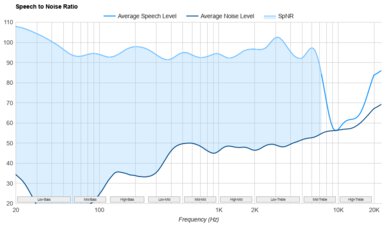
    These earbuds have disappointing noise handling. With the default mic settings at '50' (out of 0 to 100) when Clearcast AI Noise Cancellation is enabled, they muffle background noise somewhat, but at the cost of voice clarity. Meanwhile, background chatter is quieter, though present. Sudden noises like subway train engines can overwhelm your speech, but the gain is limited, so it doesn't hurt the ears of the person on the line with you.

    All that said, the software has a myriad of other mic settings that may work better in your particular setup.

    Active Features
    7.7
    Battery
    Battery Type
    Rechargable
    Continuous Battery Life
    8.25 hrs
    Additional Charges
    3.0
    Total Battery Life
    33 hrs
    Charge Time
    1.1 hrs
    Power-Saving Feature
    Auto-Off Timer and Standby Mode
    Audio While Charging
    Yes
    Passive Playback
    No
    Charging PortUSB-C

    Their battery performance is good. The earbuds are advertised to reach 10 hours of playback with ANC off (over the 2.4GHz and Bluetooth connections) at full volume, and in our standardized battery test with ANC enabled, they reached 8 hours and 15 minutes. The Sony INZONE Buds Truly Wireless manage to last longer under the same testing conditions, but keep in mind that the Sony are much more limited when it comes to Bluetooth connectivity.

    The case can supply an extra three recharges, and you can use either the USB-C port or a wireless charging pad to charge the case.

    9.0
    App Support
    App NameSteelseries GG
    iOSYes
    AndroidYes
    macOSYes
    WindowsYes
    Equalizer
    Parametric + Graphic
    ANC Control
    Adjustable
    Mic ControlAdjustable Level
    Room Effects
    No
    Playback Control
    No
    Button MappingYes
    Surround Support
    Yes

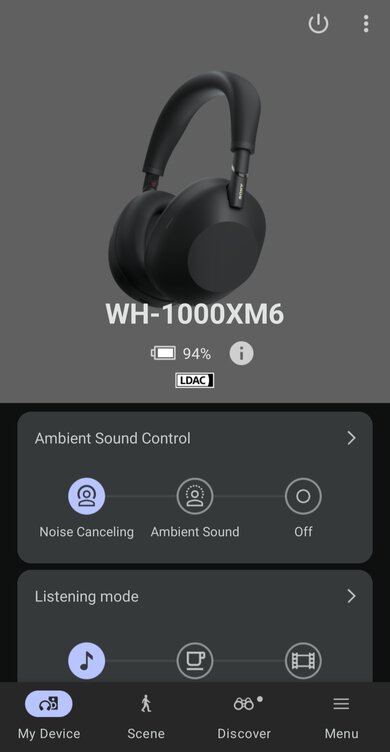
    The SteelSeries Arctis GameBuds have outstanding app support, and in many ways, the apps can be regarded as the backbone of the buds' functionality. The SteelSeries GG app is available on PC, and there are mobile versions for iOS/Android (here's a tour of the mobile version). With the PC version, you can use the Sonor and Engine tabs to dive deep with control remapping, extensive channel mixing (for your sidetone, team chat, and game audio). Mic controls include, but aren't limited to, Clearcast AI Noise Cancellation, a noise gate, noise reduction, mic EQ, and a compressor.

    Custom EQs and settings are available for specific game titles in the PC app. Spatial audio includes adjustable settings alongside listening mode controls with different ANC strengths and transparency mode. When you save settings using the Engine tab in the app (PC or mobile version), your settings will save to the earbuds. You can even change settings via the mobile app if you're simultaneously connected to Bluetooth and using the 2.4GHz dongle. This effectively means you can change things like the EQ settings mid-game using the phone app while using the buds with a PlayStation, for instance.

    Connectivity
    0.0
    Wired Connection
    Analog Audio
    No
    USB Audio
    No
    Detachable
    No
    Length
    N/A
    Connector
    No Wired Option
    Latency - Analog
    N/A
    Latency - USB
    N/A
    Recorded Latency
    N/A
    Recorded Latency ConnectionNo Wired Audio

    The SteelSeries Arctis GameBuds can only connect wirelessly. Their USB-C to USB-C cable is for charging the battery case.

    7.9
    Bluetooth Connection
    Bluetooth Version
    5.3
    Multi-Device Pairing
    Bluetooth + Console/Non-BT Wireless
    Quick Pair (Android)
    No
    Quick Pair (iOS)
    No
    Line Of Sight Range
    334.65 ft (102.00 m)
    Latency - SBC
    230 ms
    Latency - aptX
    N/A
    Latency - aptX Adaptive (High Quality)
    N/A
    Latency - aptX Adaptive (Low Latency)
    N/A
    Latency - LDAC
    N/A
    Recorded Latency
    Recorded Latency CodecSBC
    AAC Support
    No

    The SteelSeries GameBuds have very good Bluetooth performance. They use Bluetooth 5.3 and SBC codec only. You can connect them simultaneously to one device via Bluetooth while the included USB-C wireless transmitter manages a second connection. That said, it's a bit sparse otherwise: you can't connect to a second Bluetooth device, and there's an absence of higher resolution codecs or fast pairing. Latency is also high enough that lip-sync issues can crop up when watching videos, but some apps and devices compensate for that. Still, for most people, the USB-C wireless transmitter is the main appeal, while Bluetooth serves as a nice-to-have, though it's a little limited.

    7.6
    Wireless Connection (Dongle)
    Line Of Sight Range
    334.65 ft (102.00 m)
    Latency - Dongle
    48 ms
    Recorded Latency

    The SteelSeries Arctis GameBuds have good wireless connectivity via their USB-C transmitter. You can also connect the adapter for use with USB-A ports. Latency is low enough for A/V sync to match well and keep up with fast-paced games.

    The transmitter is also designed with enough clearance that you probably won't need to remove your phone case if you plug it into the USB-C port.

    PC Compatibility
    Analog
    No
    Wired USB
    No
    Non-BT Wireless
    Audio + Microphone

    You can connect the SteelSeries Arctis GameBuds either via the USB-C wireless dongle or over Bluetooth for full audio and mic support.

    PlayStation Compatibility
    PS4 Analog
    No
    PS4 Wired USB
    No
    PS4 Non-BT Wireless
    Audio + Microphone
    PS5 Analog
    No
    PS5 Wired USB
    No
    PS5 Non-BT Wireless
    Audio + Microphone

    The PS variant of these earbuds deliver full audio and mic support when using the USB-C wireless dongle.

    Xbox Compatibility
    Xbox One Analog
    No
    Xbox One Wired USB
    No
    Xbox One Non-BT Wireless
    No
    Xbox Series X|S Analog
    No
    Xbox Series X|S Wired USB
    No
    Xbox Series X|S Non-BT Wireless
    No

    Our unit is the PlayStation variant, which doesn't work with Xbox consoles, but SteelSeries also makes an Xbox version of the Arctis GameBuds. We've not tested the Xbox model, so some functions may differ from our PS variant's measurements.

    2.2
    Base/Dock
    Type
    Wireless USB Dongle + Charging Case
    USB Input
    No
    Line In
    No
    Line Out
    No
    Optical Input
    No
    RCA Input
    No
    Dock Charging
    Yes
    Power Supply
    USB-C

    The included charging case charges via USB-C and wirelessly. It can also hold an extra three charges.