Choosing a projector is usually more complicated than choosing a TV. With a TV, the display size is fixed. With a projector, screen size depends on where the projector sits, available room depth, and screen or wall width.
That's why our projector throw calculator exists. In practical terms, it works as both a projector throw distance calculator and a projector distance calculator, helping you figure out how large an image a projector can make in your room, what projector distance that size requires, and how bright the image is likely to be at that size.
Global Controls
How To Use Our Projector Throw Distance Calculator
The best way to use our projector throw distance calculator is to start with the hard limits in your room. First, figure out how much projector-to-screen depth you actually have and how much wall width you can realistically dedicate to the image. Then compare projectors by the size they can produce in that space, not just by their advertised maximum screen size.
From there, look at zoom and lens shift to judge how forgiving each projector will be during setup. Then check the estimated brightness output to see whether your preferred screen size remains realistic after accounting for screen size, room conditions, and screen gain.
The buying process gets much simpler once you narrow things down in that order. If your room is shallow, focus on short-throw and UST models first. If your room is deeper and you want more flexibility in mounting, a longer-throw model with useful zoom and lens shift may be a better fit. The goal isn't just to buy a projector that can make a large image. It's to buy one that can make the right image in your room.
What Is Throw Ratio?
Throw ratio is the most important projector spec for figuring out placement, as it's the distance between the projector's lens and the projection surface divided by the width of the projected image. A lower throw ratio means the projector can create a large image from closer to the screen. A higher throw ratio means it needs to sit farther back to create the same image size. In practical terms, a projector's throw ratio tells you how far you need to position it from your projection surface or screen to obtain your desired projected image width.
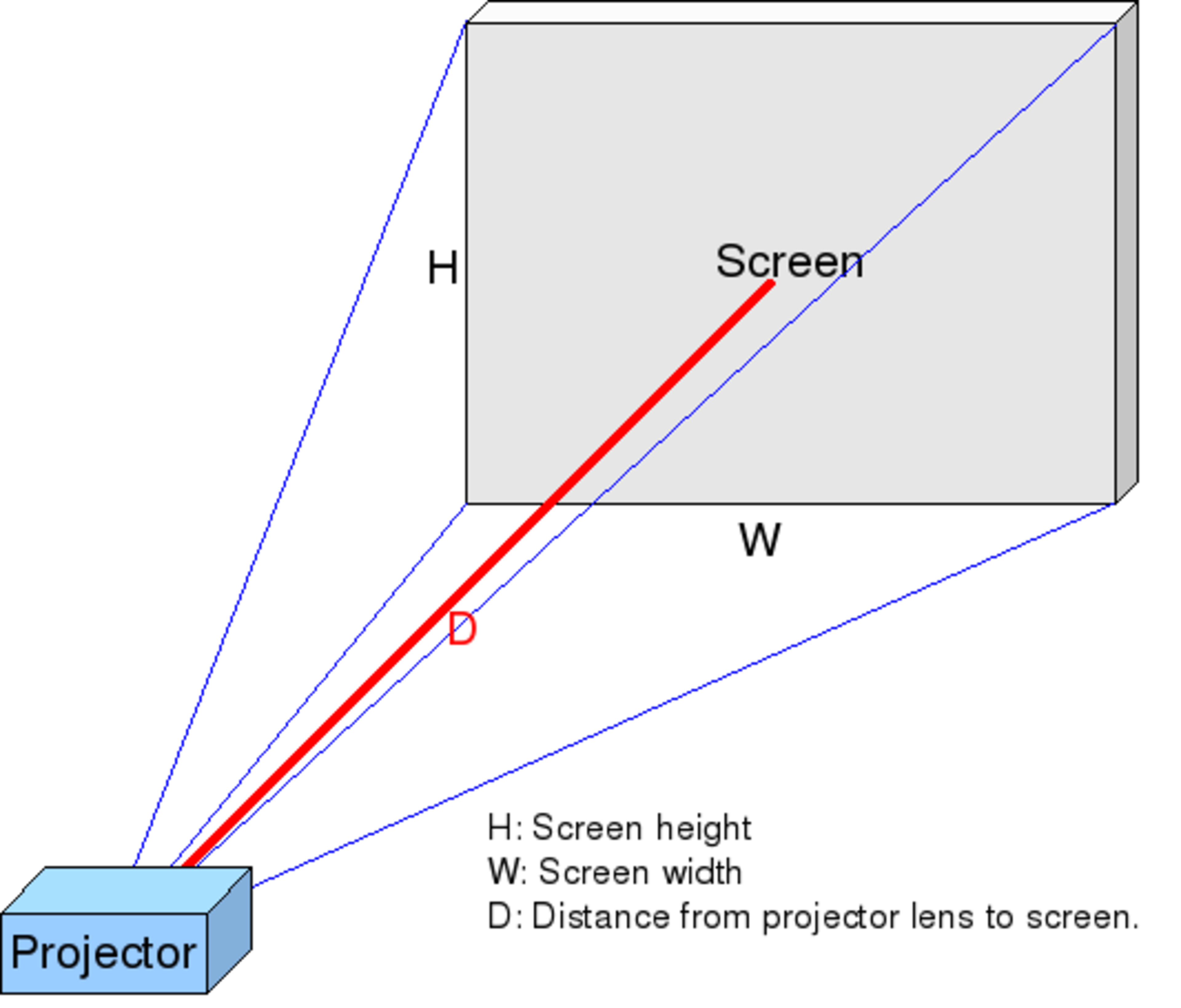
Projector math is based on image width, not screen diagonal. A 100-inch 16:9 image is about 87.2 inches wide, not 100 inches wide. So if a projector's minimum throw ratio is 1.2:1, it needs roughly 1.2 times that width, or about 104.6 inches, to make a 100-inch 16:9 image. That's the kind of calculation our projector tool is doing behind the scenes.
Before you even think about image quality, make sure the projector can physically make the image size you want from the distance your room allows. If it can't, nothing else matters. A better projector with the wrong throw ratio is still the wrong projector for your space.
standard-Throw vs. Short-Throw vs. Ultra-Short-Throw
Once you understand the throw ratio, the standard-throw, short-throw (ST), and ultra-short-throw (UST) labels become much easier to understand. These are broad placement categories, not strict universal standards. Standard-throw projectors need more room depth and are usually meant to sit farther from the screen, often on the ceiling in the middle or rear of a larger room. Short-throw projectors can make a large image from much closer in, which helps in smaller spaces and reduces the chance of people walking through the image. Ultra-short-throw projectors go a step further and are designed to sit just inches from the wall or screen.
That distinction matters because each category solves a different room problem. If you have a dedicated theater room and plenty of depth, a standard-throw model can be easy to live with. In smaller rooms, short-throw projector distance can be the difference between a clean, workable setup and a projector that sticks too far into the space. And if you want the projector right under the screen in a TV-replacement-style setup, UST is the category to look at. At RTINGS, we generally group these categories by throw ratio: ultra-short-throw models are below 0.4, short-throw models fall between 0.4 and 1.0, and standard-throw models are 1.0 and up.
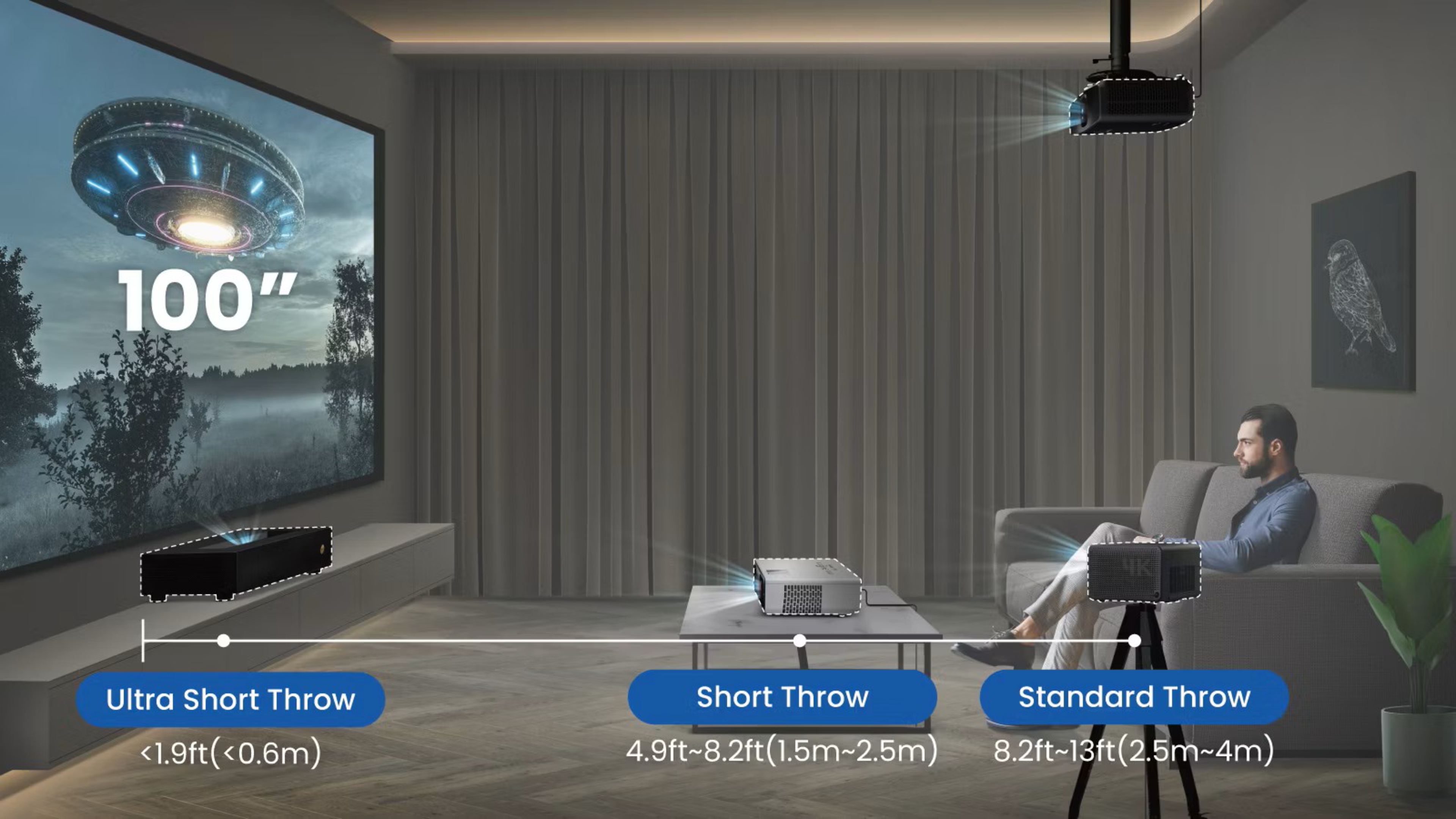
Example Throw Distances By Projector Type
If you don't want to do the math yourself, the table below gives a few quick-reference examples of projector throw distance for common screen sizes, using representative throw ratios for each projector type.
| Screen Size | Ultra-Short Throw (< 0.4, measurement below taken at 0.25) |
Short Throw (0.4 to 1.0, measurement below taken at 0.5) |
Standard Throw (> 1.0, measurement below taken at 1.0) |
|---|---|---|---|
| 90" | 1'8" (0.50m) | 3'3" (1.00m) | 6'6" (1.99m) |
| 100" | 1'10" (0.55m) | 3'8" (1.11m) | 7'3" (2.21m) |
| 120" | 2'2" (0.66m) | 4'4" (1.33m) | 8'9" (2.66m) |
| 135" | 2'5" (0.75m) | 4'11" (1.49m) | 9'10" (2.99m) |
| 150" | 2'9" (0.83m) | 5'5" (1.66m) | 10'11" (3.32m) |
Note: These examples assume a 16:9 image and a fixed throw ratio, with throw distance measured from the projector lens to the screen. Since many projectors have optical zoom, their actual usable throw range can vary.
Screen Size, Aspect Ratio, and Wall Width
Distance is only one part of the projector setup. You also need to make sure the image actually fits your wall or screen and makes sense for the room. One of the easiest mistakes to make is thinking only in terms of diagonal size. Diagonal is useful, but wall width is often the real constraint. Since the throw ratio is based on image width, not diagonal, the wall width may become the limiting factor before the room depth does.
A 100-inch 16:9 image is about 87.2 inches wide, and that's before you account for a screen frame, borders, nearby furniture, speakers, or simple breathing room around the image. That's why wall width matters so much in a projector calculator. It answers a more practical question than "How big can I go?" It answers "How big can I go and still make it fit?"
Aspect ratio matters for the same reason. Changing the aspect ratio also changes the image width. If someone says they want a 120-inch screen, that still leaves an important unanswered question: 16:9, 16:10, 4:3, or a wider cinema format? The right choice depends on what you watch and how much wall space you actually have.
Zoom and Why Throw Ratio Is Often a Range
Many projectors don't have one fixed throw ratio. They have a range, and that range comes from the projector using a zoom lens instead of a fixed lens. The wide end of the zoom (sometimes called the wide-angle end) produces the largest image for a given distance, while the tele end (or telephoto end) produces the smallest. That's why many spec sheets list a minimum and maximum throw ratio instead of a single number.
Our calculator shows both throw ratio and zoom information because zoom affects how forgiving a projector is during setup. A projector with a wide zoom range gives you more flexibility if your mounting position isn't perfect. A projector with little or no zoom gives you less wiggle room. For a fixed installation, it's usually best to choose a projector that fits your room without depending too heavily on the edges of its zoom range.
It's also important to separate optical zoom from digital zoom. Optical zoom changes image size through the lens without reducing image quality. Digital zoom electronically shrinks or crops the image to help it fit, so it should be treated more like a convenience feature than true installation flexibility. If you're planning a permanent setup, proper projector placement and optical adjustment are much better starting points.
Lens Shift and Installation Flexibility
Image size is only one side of placement; final image position is the other. Lens shift is one of the most useful setup features a projector can have because it physically moves the lens vertically and/or horizontally to reposition the image while keeping it straight and properly focused. That makes it very different from keystone correction, which digitally reshapes the image to square it up.
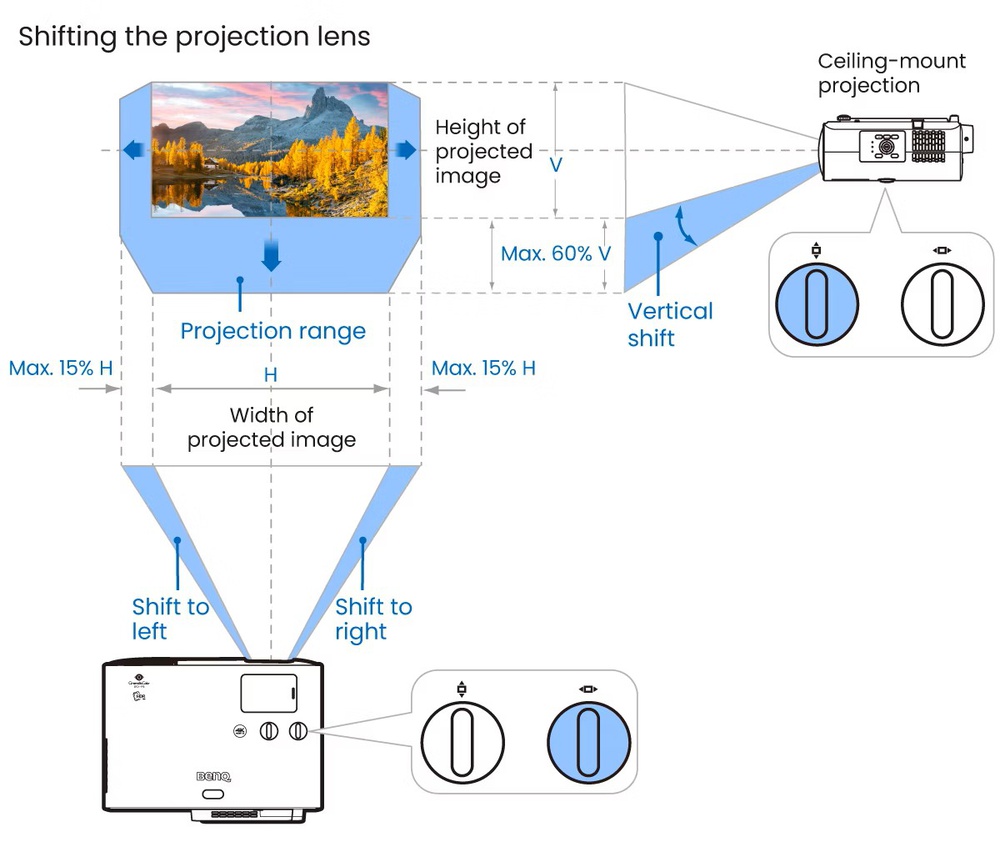
Not every projector has lens shift, and even when it does, the amount varies a lot from model to model. Some projectors offer very little flexibility, while others offer enough shift to make ceiling mounting or shelf mounting much easier. There's one important catch, though: you generally cannot max out horizontal and vertical lens shift at the same time. So a projector with generous lens shift is flexible, but it still isn't magic.
In practice, lens shift is best thought of as a placement aid, not a substitute for buying the right projector for the room. It can help refine a setup, but it won't rescue a projector whose throw ratio is fundamentally wrong for your screen size and mounting depth.
Brightness, Screen Gain, and How Big You Can Really Go
Even a projector that fits perfectly geometrically can still disappoint if it doesn't have enough brightness for the screen size you want. Screen size isn't just about fit; it's also about brightness. Projector makers usually quote brightness in lumens, but those specs don't tell you by themselves how bright the image will actually look on your screen. In practice, the two biggest variables are ambient light and screen size. The larger the image, the more that available light is spread out, which means a size that looks great in a dark room can look flat or washed out in a brighter room.
Screen gain is part of that equation, too. Gain is a measure of screen luminance relative to a 1.0 reference, with higher numbers indicating greater brightness. Some screen surfaces spread light more evenly across the room, which usually helps the image look more consistent from different seating positions. More reflective, higher-gain surfaces can make the image look brighter, but they often look best when viewed more head-on and can look dimmer from farther off to the side. So gain isn't a free upgrade.
That means the largest screen your projector can produce isn't always the largest screen you should use. The right answer depends on your room lighting, where people sit, and the type of screen surface you're using. Screen choice can matter even more with short-throw and ultra-short-throw projectors because their placement is less forgiving, and small issues with screen flatness or setup tend to be easier to notice.
Screen Size vs. Viewing Distance
Throw distance tells you where the projector goes. Viewing distance tells you where you should sit. Once you know the image size your room and projector can realistically support, the same general field-of-view logic from our TV Size to Distance article still applies. If you want a deeper explanation of mixed-use versus cinema-style seating distance, that's the best place to start.
Short-Throw and UST Recommendations
If you already know you need a projector that can create a large image from close to the screen, take a look at our best short-throw projectors article. If you're building a more traditional dedicated setup and want to compare models aimed at dark-room viewing, our best home theater projectors article is a good next stop.
Picture Quality and Projector Reviews
Throw ratio only answers whether a projector fits your room. It doesn't tell you how good the picture will look once it's there. After you narrow down placement, use our projector reviews and tools to compare brightness, contrast, color accuracy, input lag, and overall value.
Conclusion
There's no single best projector throw distance. There's only the throw distance, screen size, wall width, brightness level, and installation flexibility that make sense together in your room. That's why projector shopping can feel harder than TV shopping, and why a good throw calculator is so useful. It lets you stop thinking in vague marketing terms and start thinking in actual fit.
For projectors, bigger is only better if the projector can make that image from the distance you have, if the wall can hold it, and if the picture is still bright enough to look good once it gets there. That's exactly the problem our Projector Throw Calculator is built to solve. A good projector throw calculator does more than estimate image size; it helps you see whether the projector throw distance, wall width, and brightness all make sense together.

