It can be difficult to decide between 4k vs. 1080p, especially with the cost of streaming services constantly increasing. 4k streaming packages usually come at a premium price point, offering better picture quality and perks like an ad-free experience or the ability to stream to more devices at once. Is it always worth paying more for the premium package, though, or can you let your TV do the heavy lifting? In this article, we'll break down the differences between streaming packages and compare the 1080p and 4k versions to help you decide whether it's worth paying more.
What Do 4k And 1080p Mean?
Before we get into the comparisons, let's start by exploring what these terms even mean. 4k and 1080p refer to the resolution of the display. A 1080p image has 1920 horizontal pixels and 1080 vertical pixels, while a 4k image has 3840 horizontal pixels and 2160 vertical pixels. This means that a 4k TV has four times the total number of pixels as a 1080p TV.
| Resolution | Resolution | Horizontal Pixels | Vertical Pixels | Total Pixels | Marketing Names |
|---|---|---|---|---|---|
| 1080p | 1920x1080 | 1920 | 1080 | 2 million+ | Full HD, FHD |
| 4k | 3840x2160 | 3840 | 2160 | 8 million+ | 2160p, Ultra HD, UHD |
4k vs. 1080p
Almost all TVs on the market in 2026 have a 4k native resolution. There are a few 8k models still available, and even fewer 1080p models, usually very small models (<32 inches). So if you're here, chances are you already have a 4k TV, and you're trying to decide between the 1080p (or lower) and the 4k package of your favorite streaming service.
Is 4k Better Than 1080p?
 |
 |
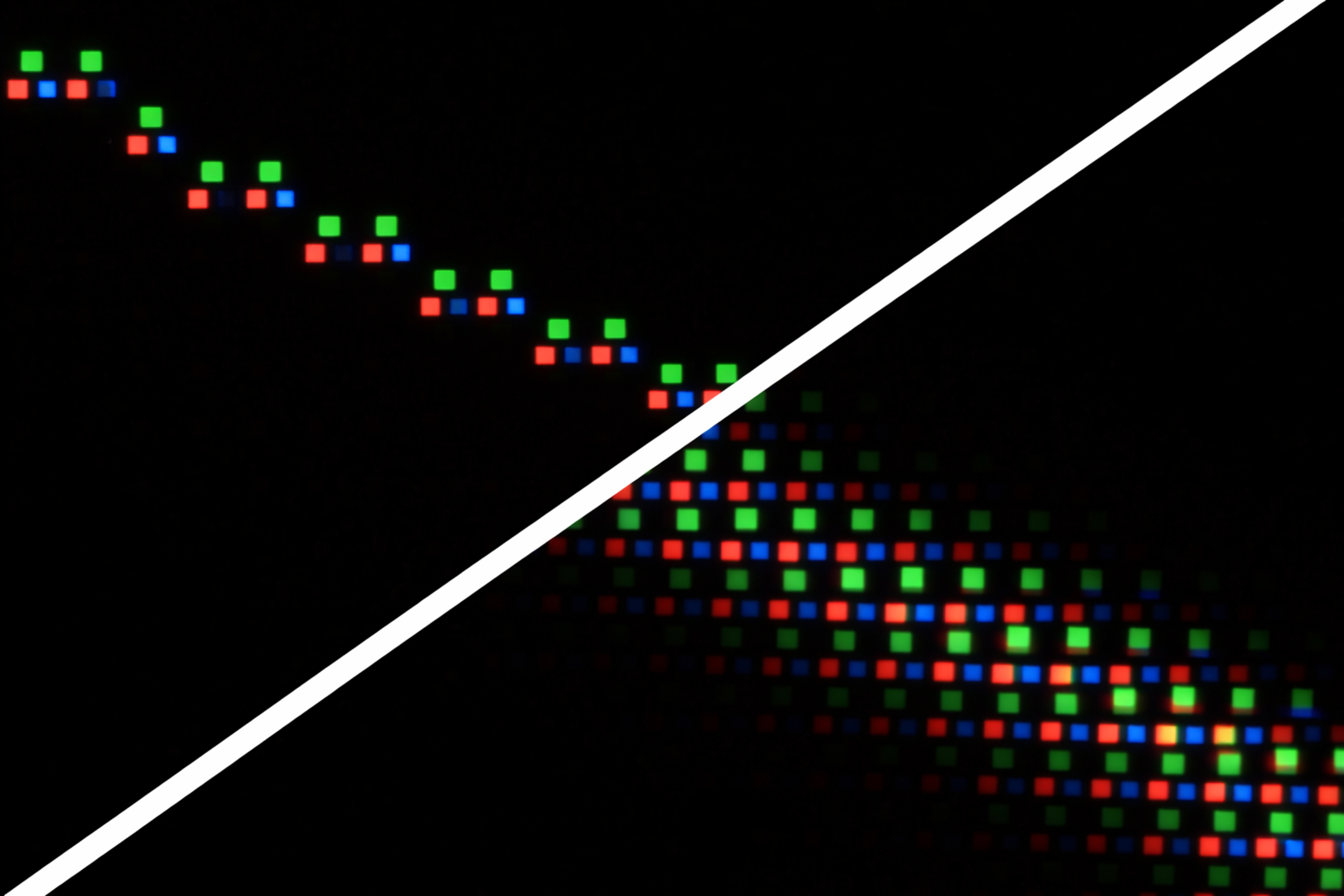
Before we even get into the content, from a purely technical standpoint, is 4k better than 1080p? Assuming you have a 4k TV, the answer is yes, without a doubt. To understand why, we'll take a look at a few sample images, each shown in both a native 4k image and a 1080p image upscaled to 4k on a recent QD-OLED TV. The first test pattern shows a diagonal white line that's only one pixel thick. On the native 4k image, the line is very clear and sharp; it's a single pixel thick, with no artifacts. When we instead take a 1080p image, again with a 1-pixel-thick diagonal line, and upscale it to 4k, it's much softer.
When the TV upscales the diagonal line from the 1080p image, it has to double the image's height and width, so every pixel becomes four. You might expect the TV to simply double each pixel horizontally and vertically, but in reality, very few TVs upscale that way. Additional processing is applied to the line, resulting in soft edges that sort of fade out from the center, so it's not even a solid line.
So, overall, yes, without a doubt, 4k is better than upscaled 1080p. The exact processing done varies between TV models, though, so a higher-end 4k TV will usually produce better results.
4k vs. 1080p Streaming Services
Information in this table is subject to change. Current as of March 17, 2026.
| Service | 1080p package | 4k package | Notes | ||
|---|---|---|---|---|---|
| Tier | Supported Devices | Tier | Supported Devices | ||
| Netflix |
|
2 | Premium | 4 | |
| Paramount+ |
|
|
Premium | 4 | |
| Apple TV+ | N/A | N/A | - | 6 | Only one tier, but different ways to subscribe. |
| Max (HBO) |
|
2 | Premium | 4 | |
| Disney+ |
|
2 | Premium | 4 | |
| Amazon Prime Video | Standard | 4 | Ultra | 5 | As of April 2026: Ultra is ad-free, standard plan has ads. |
| Peacock | Premium | 3 | Premium Plus | 3 | Premium offers some content in 4k. |
As you can see, all major streaming companies offer 4k streaming plans, but with very few exceptions, you have to pay for the highest tier available. These higher tiers usually include a few extra goodies, like letting you stream on more devices at once or access better audio formats. Most premium tiers are also ad-free, so if those bother you, it may be worth spending more just to get rid of them.
Another big difference is HDR. Most of the standard-tier or basic plans mentioned above don't offer HDR support; you have to pay extra for the higher tiers. A lot of people find that HDR makes a more noticeable difference in image quality than the resolution bump alone, so it may be worth upgrading for that alone.
Amazon recently announced changes to its tiers. The existing "Ad Free" package has been renamed to "Prime Video Ultra" and has a price increase, and 4k streaming is now locked behind that tier. This means that Amazon Prime subscribers or standalone Prime Video subscribers will lose access to 4k streaming and Dolby Atmos audio when this change takes effect on April 10, 2026. Surprisingly, the standard tier still supports HDR and Dolby Vision.
When 4k Isn't Really 4k: Bandwidth
Even when you pay for the 4k package, you may not get the 4k stream all the time. It depends on many different factors, including your internet connection speed and how busy the streaming service's servers are. Most streaming services can dynamically adjust the streaming resolution and bitrate as they stream to you. They aim to achieve the most consistent playback experience possible, so at times you'll see the quality drop even though you're paying for the highest tier. Not all content is available in 4k, either, so even if everything else lines up, you might only get 1080p if the content hasn't been updated to 4k.
All streaming services are heavily compressed to save bandwidth. This compression can cause all sorts of issues, like macroblocking and pixelization, especially in darker scenes. There's no clear winner between them, though. They all employ variable bitrate and dynamic encoding based on factors like the device you're watching on and your internet bandwidth, so if you want the best possible quality, it's important to make sure your internet speed can keep up. As the number of connected devices in your home increases, you'll also need a more powerful router to make sure each device can get the maximum speed possible.
Most streaming services target fixed bandwidth brackets depending on the tier you're subscribed to. If you're only paying for a 1080p tier, your content will likely stream at a much lower bandwidth, so you may actually see more banding and macroblocking.
HDR
HDR, which stands for High Dynamic Range, became more popular around the same time as 4k TVs. While it's often marketed together, it has nothing to do with resolution and actually refers to color and luminance. It allows content creators to use a wider range of colors and luminance levels. It improves picture quality and produces richer, more vibrant colors. There are different HDR formats, and you may see some companies advertise 4k HDR, but just because a TV supports it doesn't mean HDR looks good. You can learn more about HDR here.
Conclusion
Native 4k content offers several advantages over 1080p. The higher resolution is almost always tied to higher streaming bandwidth and advanced video formats like HDR. On a modern TV, these differences result in significantly better picture quality, with fewer compression artifacts and brighter, more vibrant colors. When you combine that difference with the extras that come with a premium streaming package, like more users or an ad-free experience, it's clear that paying more for the 4k plan is almost always worth the extra expense.