Products
Tested using Methodology v0.9
Updated Feb 06, 2026 02:41 PM
SEE PRICE
Amazon
Tested using Methodology v1.0
Updated Aug 20, 2026 03:16 PM
SEE PRICE
XGIMI


Imaging Technology
DLP
Native Resolution
Pixel Shift 4k
Light Source
Laser
Imaging Technology
Native Resolution
Pixel Shift 4k
Projector Type
Standard Throw
Light Source
LED + Laser
Our Verdict
Hisense PX1-PRO
XGIMI HORIZON Ultra
The XGIMI HORIZON Ultra is better than the Hisense PX1-PRO. The XGIMI is much brighter, so it provides better image quality in moderately lit rooms. The XGIMI is also more accurate pre-calibration, but unfortunately, unlike the Hisense, you can't improve its accuracy through calibration. The Hisense has the edge regarding features, as it has two 4k @ 120Hz capable HDMI 2.1 ports, but it's just not bright enough to provide a graphically pleasant gaming experience.
Variants
- PX1-PRO (Black)
- HORIZON Ultra (Misty Gold)
Check Price
Black
PX1-PRO
SEE PRICE
Amazon
Misty Gold
HORIZON Ultra
SEE PRICE
XGIMI
Black
PX1-PRO
SEE PRICE
Walmart.com
Misty Gold
HORIZON Ultra
SEE PRICE
Walmart.com
Black
PX1-PRO
SEARCH
B&H
Misty Gold
HORIZON Ultra
SEE PRICE
Amazon
Black
PX1-PRO
SEARCH
BestBuy.com
Misty Gold
HORIZON Ultra
SEE PRICE
BestBuy.com
Black
PX1-PRO
SEARCH
Hisense
Misty Gold
HORIZON Ultra
SEARCH
B&H
Main Differences for
Home Theater
Home Theater
Threshold
Home Theater
Full Comparison
Picture Quality
Brightness
Brightness Measurement Picture

White Light Output
Color Light Output
Brightness Uniformity
Screen Brightness
Effective Contrast
APL Native Contrast

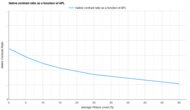
0.1% APL Native Contrast
0.5% APL Native Contrast
1% APL Native Contrast
5% APL Native Contrast
10% APL Native Contrast
15% APL Native Contrast
25% APL Native Contrast
50% APL Native Contrast
Native Full-On/Full-Off Contrast
Full-On/Full-Off Contrast
Average White Light Measurement
Average Black Floor Measurement
Pre-Calibration Color Accuracy
Pre White Balance Picture

Pre Gamma Curve Picture

Pre Color Picture

White Balance dE 2000
Color dE 2000
Gamma
Color Temperature
Picture Mode
Color Temp Setting
Gamma Setting
Post-Calibration Color Accuracy
Post White Balance Picture

Post Gamma Curve Picture

Post Color Picture

White Balance dE 2000
Color dE 2000
Gamma
Color Temperature
Picture Mode
White Balance Calibration
Color Calibration
Color Gamut
Gamut Picture - Rec. 709

Rec. 709 xy
Rec. 709 uv
Gamut Picture - Rec. 2020

Rec. 2020 xy
Rec. 2020 uv
Color Volume
CIELAB DCI-P3 Picture
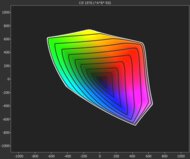
CIELAB DCI-P3 Coverage
CIELAB BT.2020 Picture
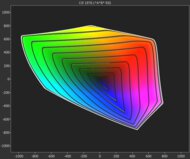
CIELAB BT.2020 Coverage
Motion
Judder
Stitch Pictures

De-Judder Resolution Impact
Judder-Free 24p
Judder-Free 25p
Judder-Free 24p via 60p
Judder-Free 25p via 60p
Judder-Free 24p via Native Apps
Judder-Free 25p via Native Apps
Rainbow Effect
RBE Video

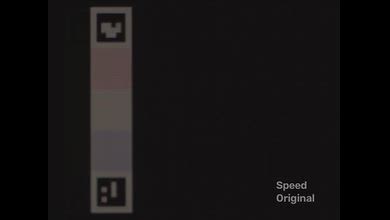
Color Flash Sequence
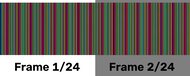
RBE Reduction Mode
Color Flashes Per Second
Design
Size
Dimension Picture

Height
Width
Depth
Weight
Weight
Volume
Additional Carrying Features
Carrying Picture

Carrying Case Picture
Carrying Handle
Lens Protection
Carrying Case
Physical Setup Flexibility
Style Picture

Mounting Holes Picture

Optical Zoom
Projector Type
Minimum Throw Ratio
Maximum Throw Ratio
Horizontal Lens Shift
Vertical Lens Shift
Body Adjustment
Mounting Holes
Imaging
Style Picture
Imaging Technology
Native Resolution
Aspect Ratio
Light Source
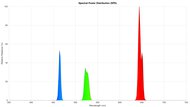
Spectral Power Distribution
Minimum Throw Ratio
Maximum Throw Ratio
Battery
Battery Life
Charge Time
Power Source
Fan Noise
Noise @ Maximum Brightness Video

Noise @ Maximum Brightness
Inputs
Inputs & Connectivity
HDMI
HDMI 2.1 Rated Speed
USB Data Ports
Audio Out 3.5mm
Digital Optical Audio Out
Bluetooth
Wi-Fi
Ethernet Speed
Supported Resolutions
4k @ 60Hz
4k @ 120Hz
1440p @ 60Hz
1440p @ 120Hz
1080p @ 60Hz
1080p @ 60Hz @ 4:4:4
1080p @ 120Hz
1080p Maximum Refresh Rate
Variable Refresh Rate
VRR
Input Lag
4k @ 60Hz
4k @ 60Hz Outside Game Mode
4k @ 120Hz
1080p @ 60Hz
1080p @ 60Hz Outside Game Mode
1080p @ 120Hz
1080p @ Max Refresh Rate
HDR Format Support
HDR10
HDR10+
Dolby Vision
HLG
Audio Passthrough
ARC/eARC
eARC: Dolby Atmos Over Dolby Digital Plus
eARC: Dolby Digital Plus 7.1
eARC: LPCM 7.1 Over Dolby MAT
eARC: Dolby TrueHD 7.1
eARC: DTS:X Over DTS-HD MA
eARC: DTS-HD Master Audio 7.1
eARC: LPCM Channels (Bitstream)
ARC: Dolby Digital 5.1
ARC: DTS 5.1
Optical: Dolby Digital 5.1
Optical: DTS 5.1
3D
3D Support
Features
Inputs & Connectivity
Inputs Picture

HDMI
ARC/eARC
Wi-Fi
USB Data Ports
In The Box
In The Box Picture

Smart Features & Sound
Interface Picture

Smart OS
Cast Capable
Speaker(s)
Remote-Free Operation
Screen Adaptation
Focus
Vertical Keystone
Horizontal Keystone
Post-Movement Auto-Correction
Obstacle Avoidance
Auto Screen Fit
Check Price
Black
PX1-PRO
SEE PRICE
Amazon
Misty Gold
HORIZON Ultra
SEE PRICE
XGIMI
Black
PX1-PRO
SEE PRICE
Walmart.com
Misty Gold
HORIZON Ultra
SEE PRICE
Walmart.com
Black
PX1-PRO
SEARCH
B&H
Misty Gold
HORIZON Ultra
SEE PRICE
Amazon
Black
PX1-PRO
SEARCH
BestBuy.com
Misty Gold
HORIZON Ultra
SEE PRICE
BestBuy.com
Black
PX1-PRO
SEARCH
Hisense
Misty Gold
HORIZON Ultra
SEARCH
B&H
Hisense PX1-PRO
XGIMI HORIZON Ultra
Comments
Hisense PX1-PRO vs XGIMI HORIZON Ultra: Main Discussion
What do you think of these products? Let us know below.
Looking for a personalized buying advice from the RTINGS.com experts? Members have direct access to buying advice on our member forum.