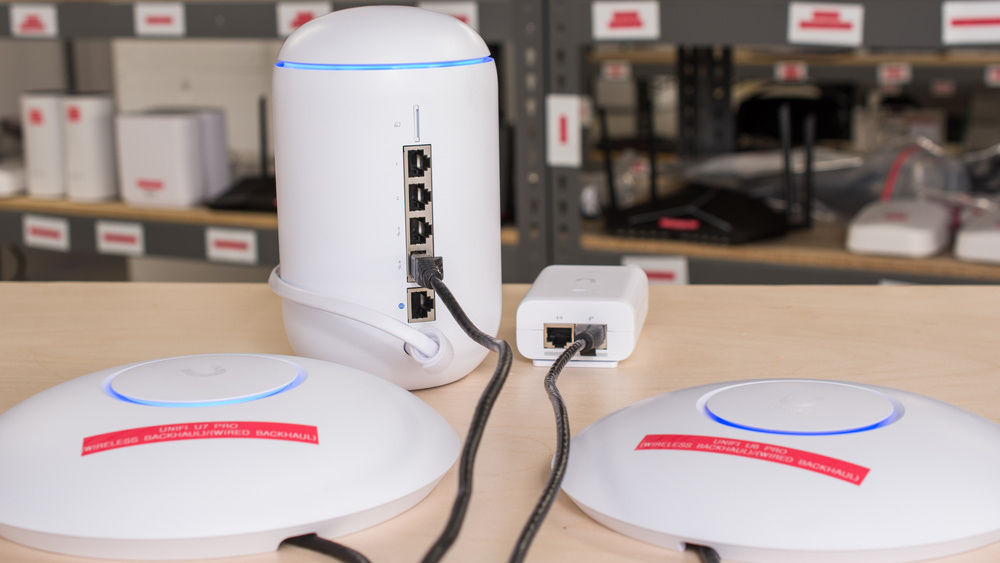
If you live in a large home with many rooms, have thick walls made of brick or concrete, or want to enjoy the wonders of the internet in your backyard, you might benefit from a Wi-Fi network with multiple access points.
When we started reviewing routers, we found that using a mesh system was a great way to extend the range of your Wi-Fi network. These systems are usually straightforward to configure and are an effective plug-and-play solution for most people. That said, these systems usually incur a speed penalty when you connect to the satellite unit. We explored this in detail in our mesh range article, positing that connecting your mesh units with an Ethernet cable, known as using wired backhaul, is the best way to maximize range and minimize speed loss throughout your home. We put that to the test by buying two UniFi access points and testing wired vs. wireless backhaul configurations, confirming that wired backhaul is the better option.
Test results
What Is Backhaul?
In multi-access point setups, such as a TP-Link Deco BE63 mesh system, an AiMesh network using ASUS routers, or just using a Wi-Fi extender, the secondary devices must connect to the main router that receives your ISP connection. That connection is called backhaul, and it can either be wired using an Ethernet cable or wireless using Wi-Fi. Wired backhaul provides a direct connection with dedicated bandwidth, while wireless backhaul shares airspace with your regular Wi-Fi traffic. This can add interference, reducing speeds and reliability on busy networks. Some modern mesh systems use a dedicated band for wireless backhaul or use multiple bands simultaneously to avoid this problem.
Not All Mesh systems Are Made Equal
Different mesh systems can implement backhaul in different ways. Most consumer mesh routers like ASUS' AiMesh, eero's TrueMesh, and TP-Link's Deco can automatically and dynamically select a band (2.4GHz, 5GHz, or 6GHz, if your APs support it) to use as a dedicated backhaul between your access points. Some can even use multiple bands simultaneously as a backhaul.
UniFi Access Points
Owned by Ubiquiti, UniFi is a networking equipment brand that sells gear targeted towards prosumer, business, and enterprise customers. While they make everything from IP phones to EV chargers, they're best known for their networking equipment and software integration.
We purchased a UniFi U6 Pro and a UniFi U7 Pro, wireless access points in their flagship lineup, and tested each in a wired and wireless backhaul configuration. These units are primarily intended for use in offices and large-scale environments and are popular options for IT professionals and home enthusiasts because of their high degree of configurability and integration with UniFi's Network application.
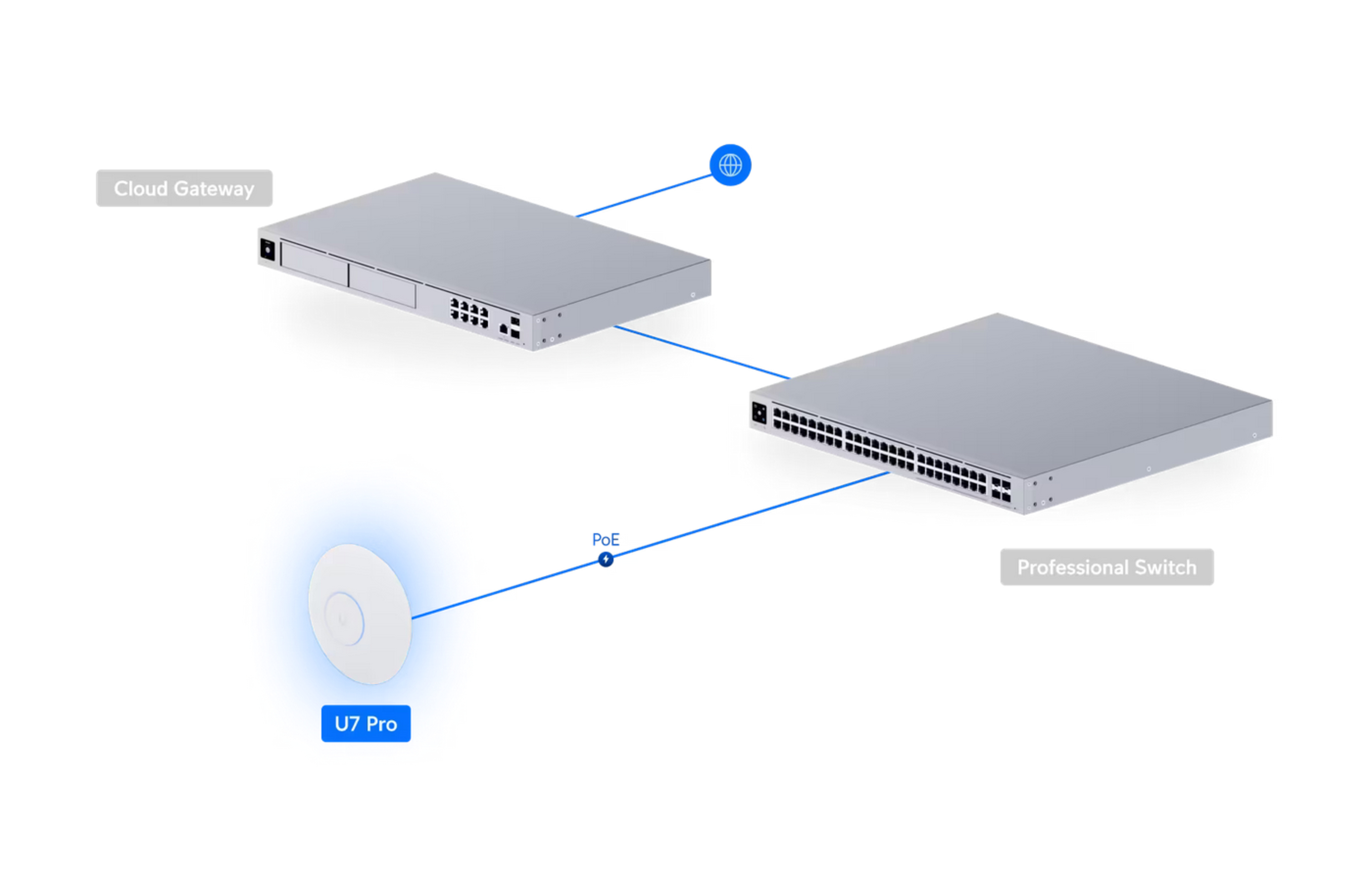
The Test Setup
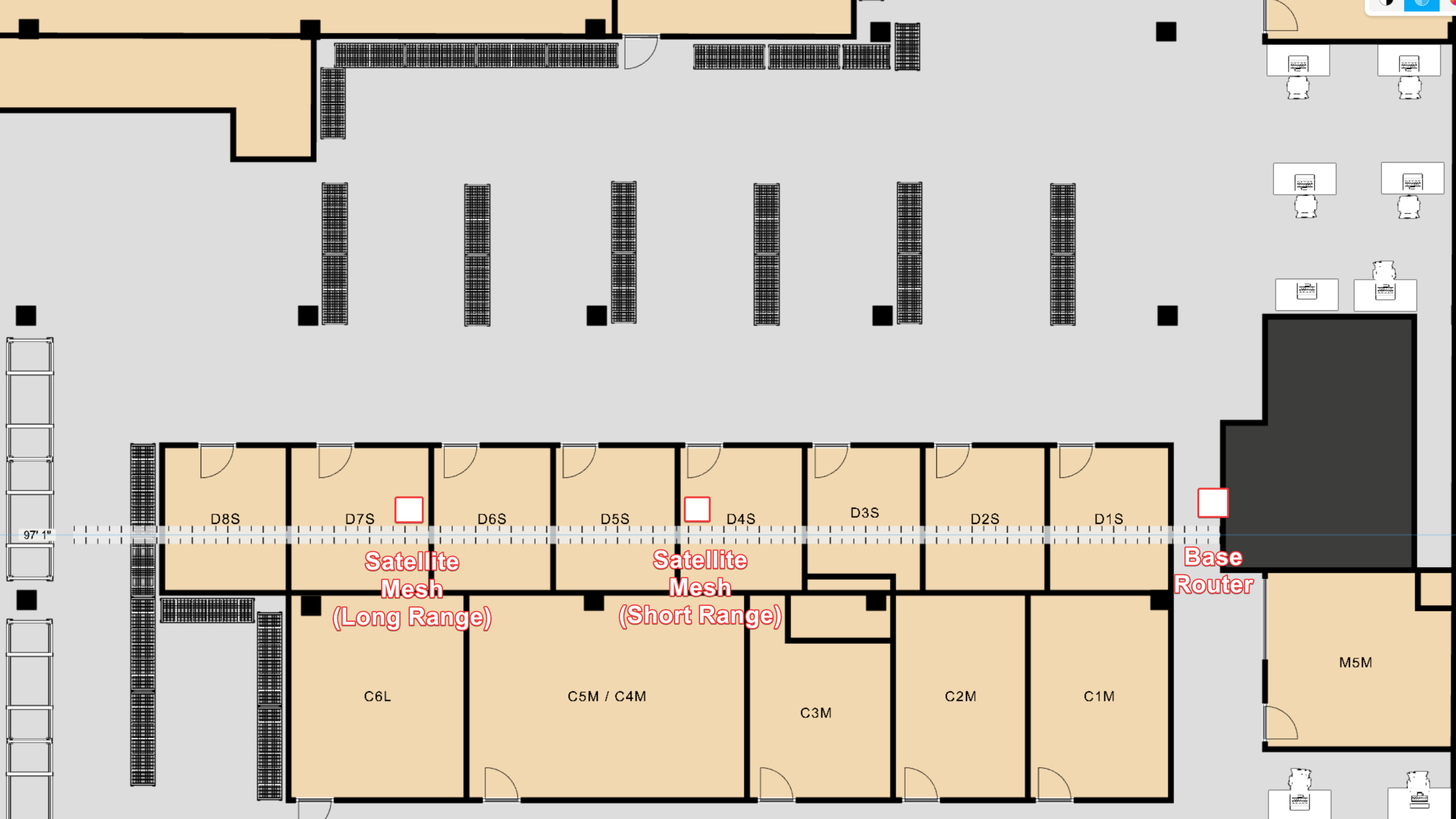
To see how the access points would perform as satellites (secondary access points), we used the UniFi Dream Router 7 (UDR7) as the main router to which we connected the access points in all configurations. As such, the 'Base Unit' results on the graphs were achieved with our testing laptop connected to the UDR7.
For the wired backhaul testing, we simply plugged the access points directly into the UDR7's 2.5Gbps PoE Ethernet port for power and networking. For wireless backhaul testing, we powered the access points using a PoE+ adapter from Ubiquiti.
Results
Unsurprisingly, using the access points in a wired backhaul configuration yields significantly better results.
UniFi U6 Pro
For our 'Interior Long Range' test, we placed the U6 Pro 67 feet away from where the UDR7 is positioned.
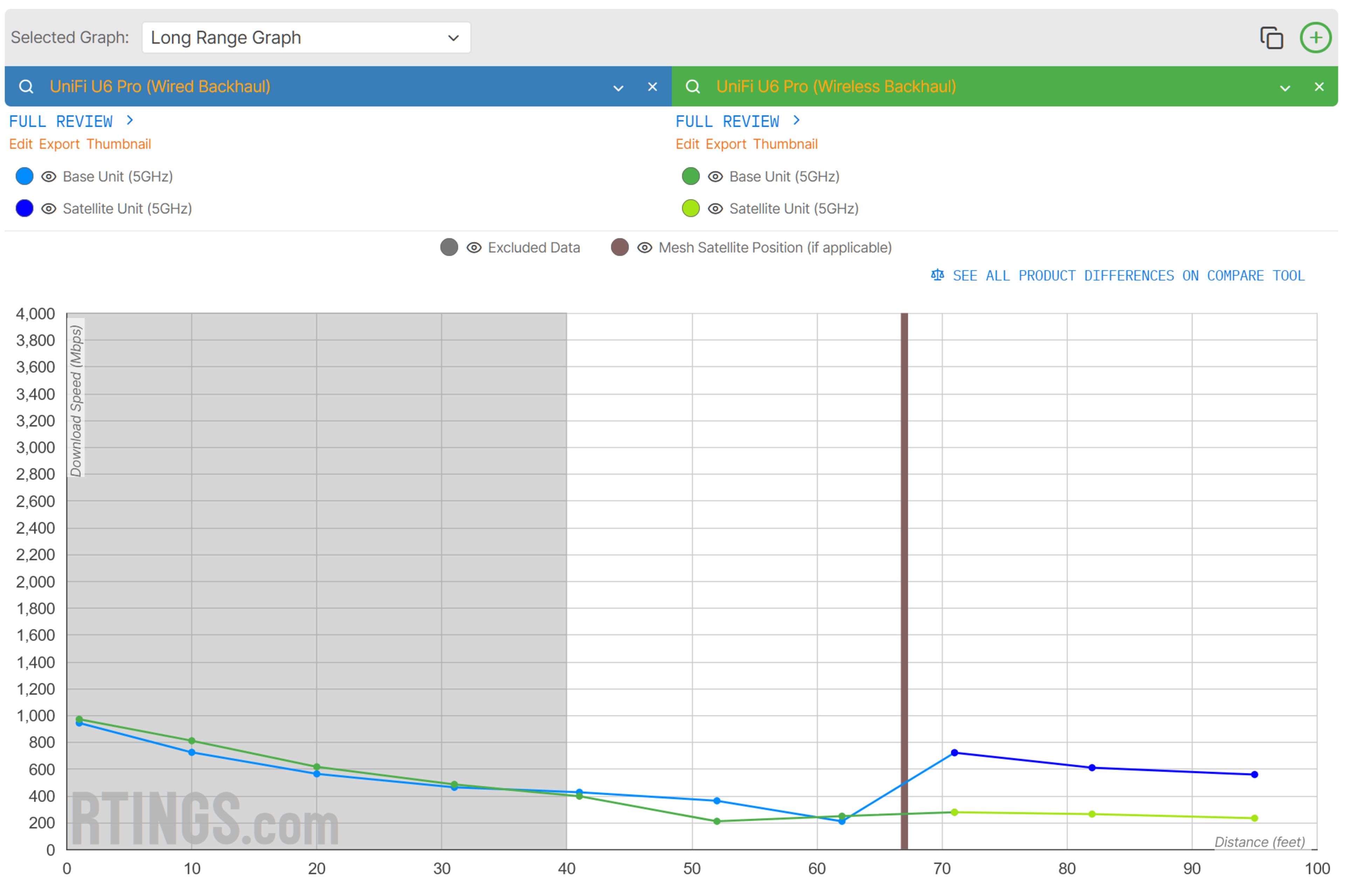
The UniFi U6 Pro in a wireless backhaul configuration delivers speeds that are fairly typical of budget to mid-range mesh systems like the eero 6: It maintains consistent, if somewhat mediocre speeds over long distances. Interestingly, our test laptop connected to the access point at 71 feet in both configurations, which is further than most mesh systems. This could be for several reasons, but it's most likely because the UDR7 maintains a signal-to-noise ratio higher than what our laptop's wireless card deems acceptable for switching at the time of testing.
The UniFi U6 Pro in a wired backhaul configuration was significantly faster when our laptop connected to it. This cleanly illustrates how much bandwidth is left on the table when using a wireless backhaul.
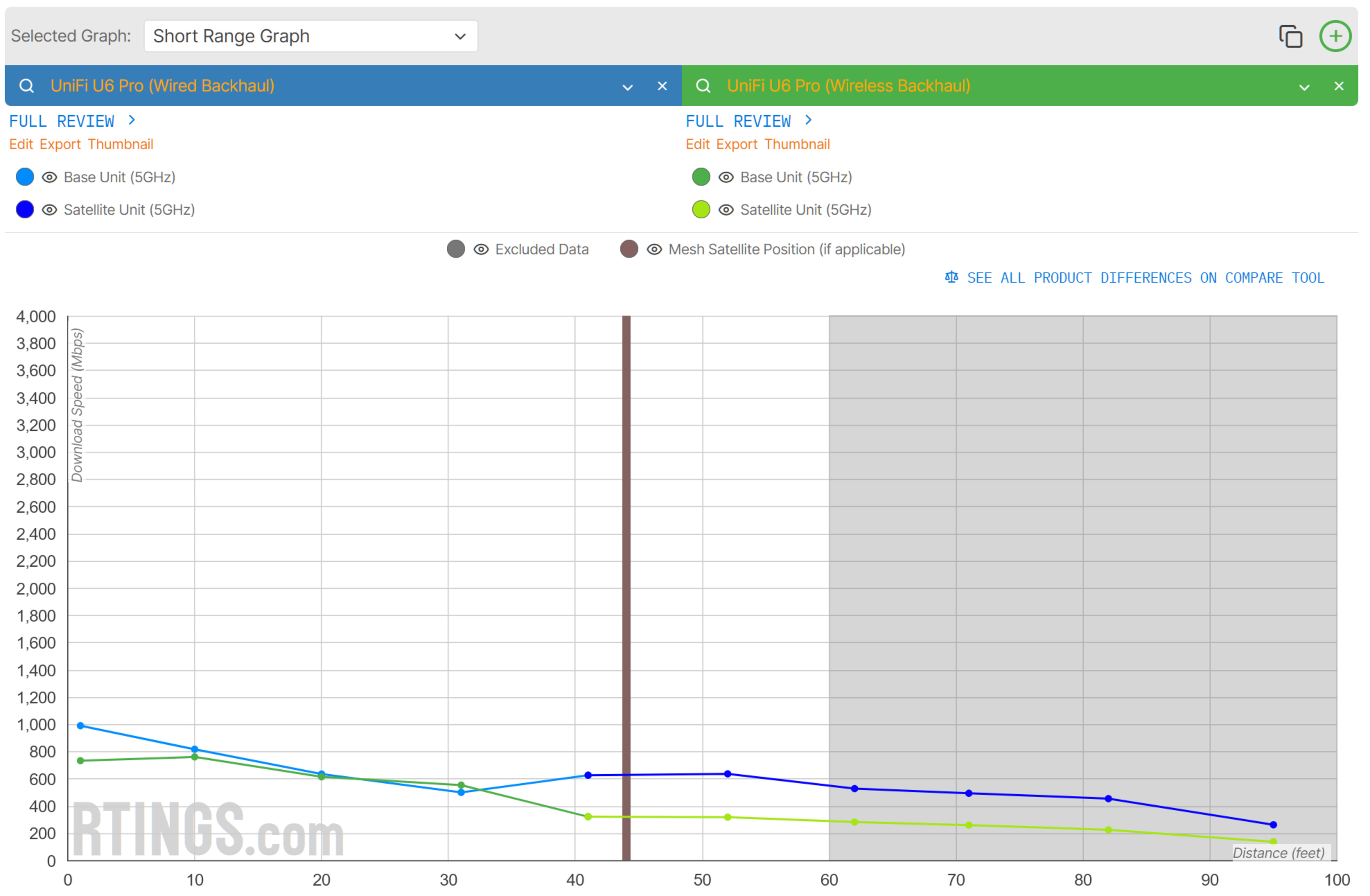
It's a similar story with the access point in the Short Range configuration at 44 feet, albeit with a slightly less dramatic difference between configurations. While the mesh penalty is still clearly observable when connected to the U6 at the shorter distance in a wireless configuration, it's smaller compared to the long-range configuration.
The wired backhaul configuration still nets a notable speed benefit.
UniFi U7 Pro
The trend continues with the UniFi U7 Pro.
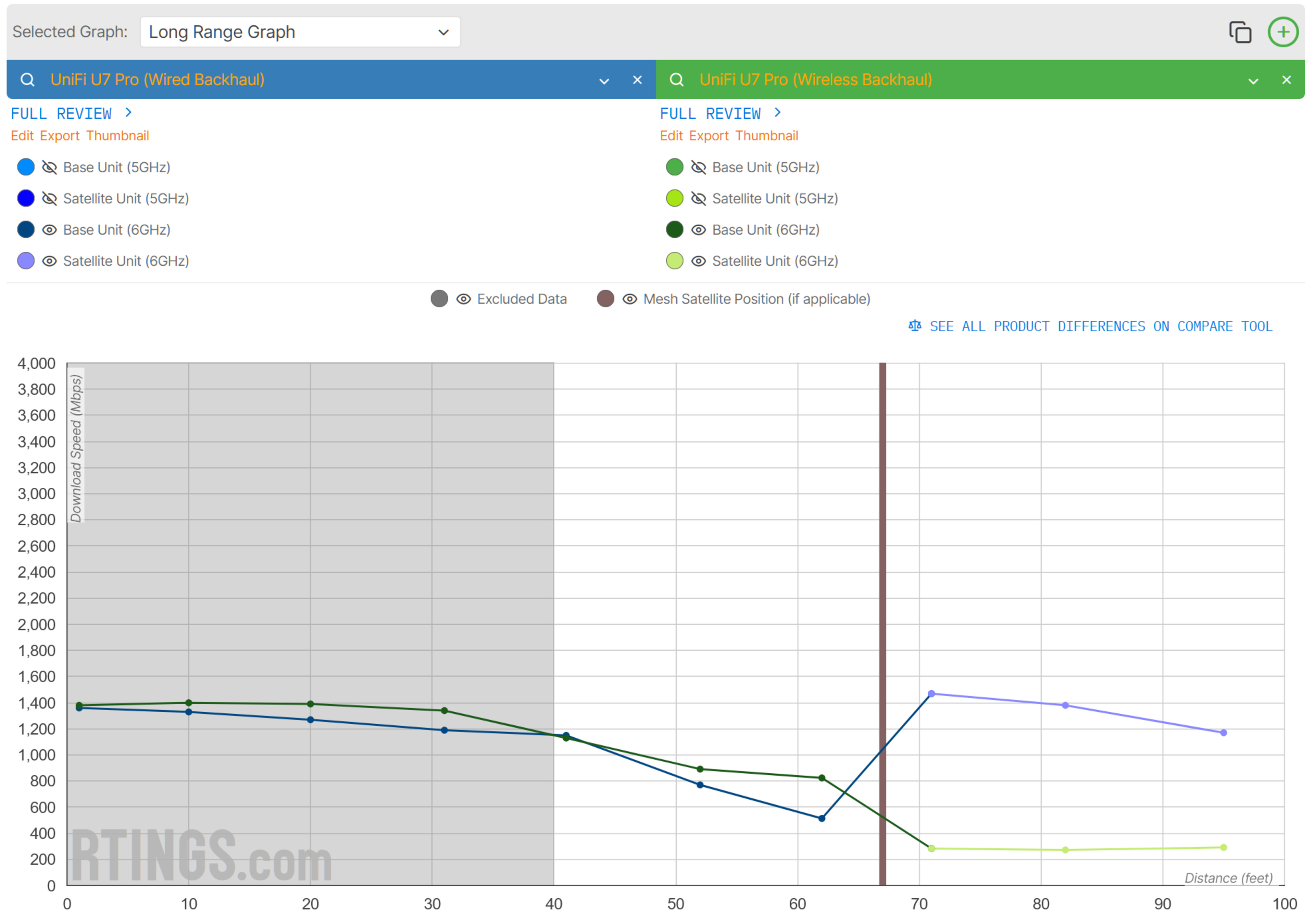
The UniFi U7 Pro in a wired backhaul configuration actually achieves an even higher top speed on the 6GHz band than the UDR7, showing that the AP is even more competent than the UDR7.
Also, the difference between configurations is incredibly wide on the 6GHz band, showing how much performance is left on the table when using the U7 Pro in a wireless backhaul configuration.
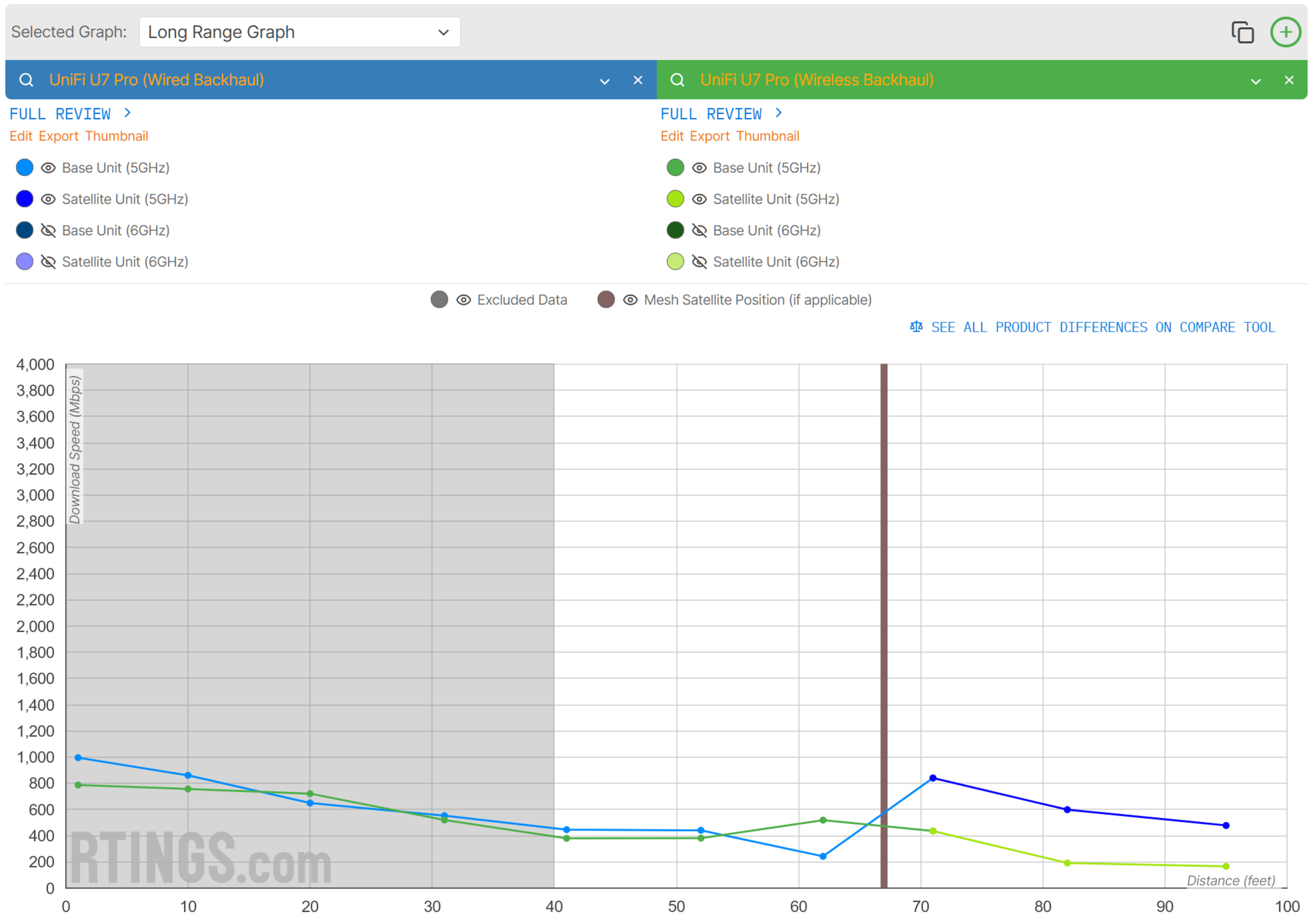
The difference between wired and wireless backhaul performance isn't as dramatic on the 5GHz band, but the U7 Pro is still about twice as fast when you plug it in compared to using it with wireless backhaul.
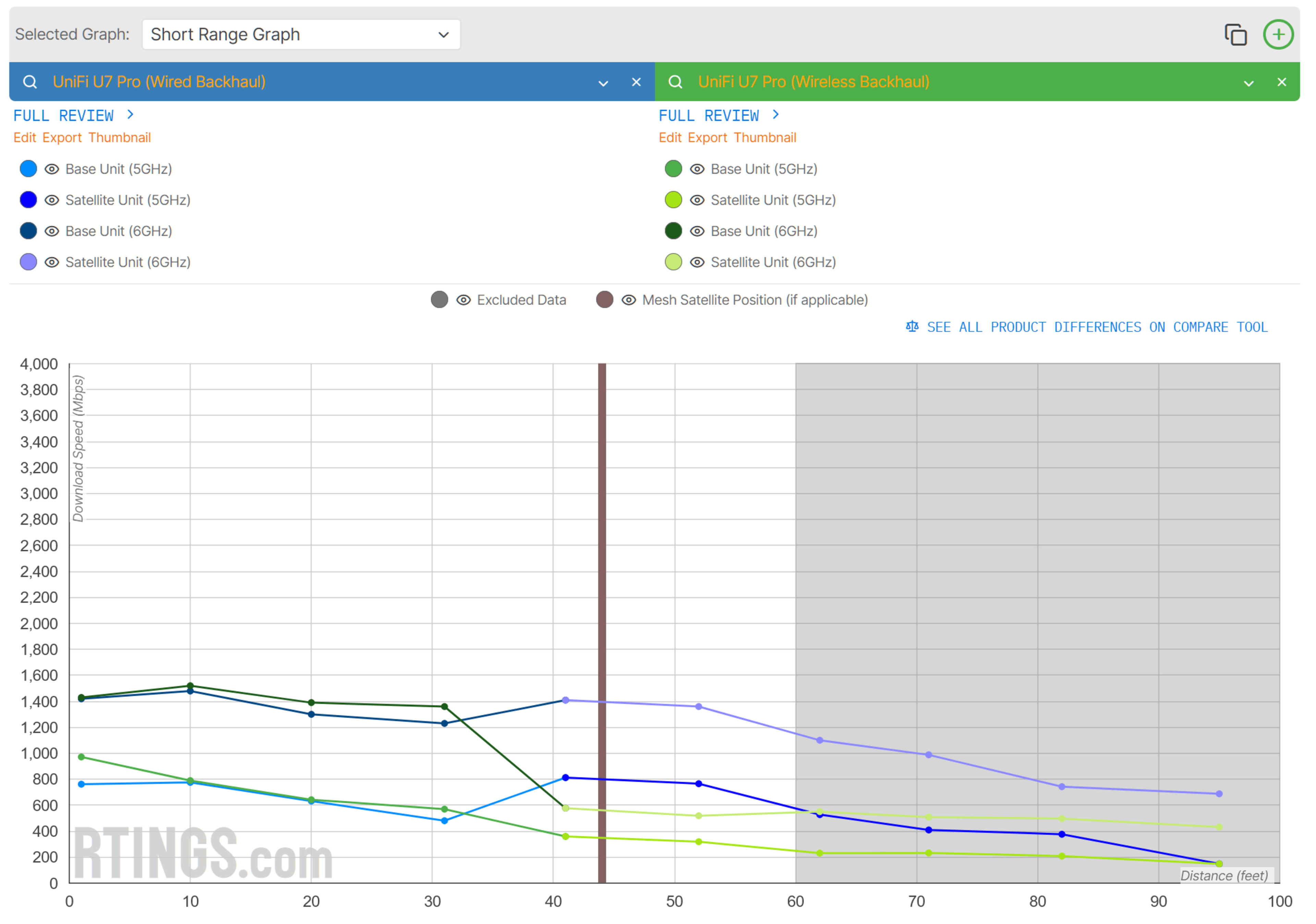
Placing the AP at the 44-foot mark for our short-range test is another clear example of how effective using a wired backhaul is. The speeds stay consistent and maintain a linear reduction in speed compared to the penalty present when switching to the U7 Pro with wireless backhaul.
Conclusion
Our testing demonstrates that using a wired backhaul configuration for your Wi-Fi network with multiple access points delivers significantly better performance in both speed and consistency compared to wireless setups. The wireless connection between access points is a persistent bottleneck that reduces speeds and adds latency with each additional connection. Using a cable between access points eliminates that bottleneck.
That said, if running cables throughout your home is not an option, consumer mesh systems like the eero Max 7 and ASUS ZenWiFi BT10 deliver exceptional speeds over long distances, even when using a wireless backhaul, and the technology continues to improve. Still, there's no replacement for a wired connection if you have walls that are difficult for wireless signals to penetrate, like brick or concrete.
If you're looking for recommendations, check out our picks for the best Wi-Fi routers, the best mesh Wi-Fi systems, and the best Wi-Fi routers for large homes.