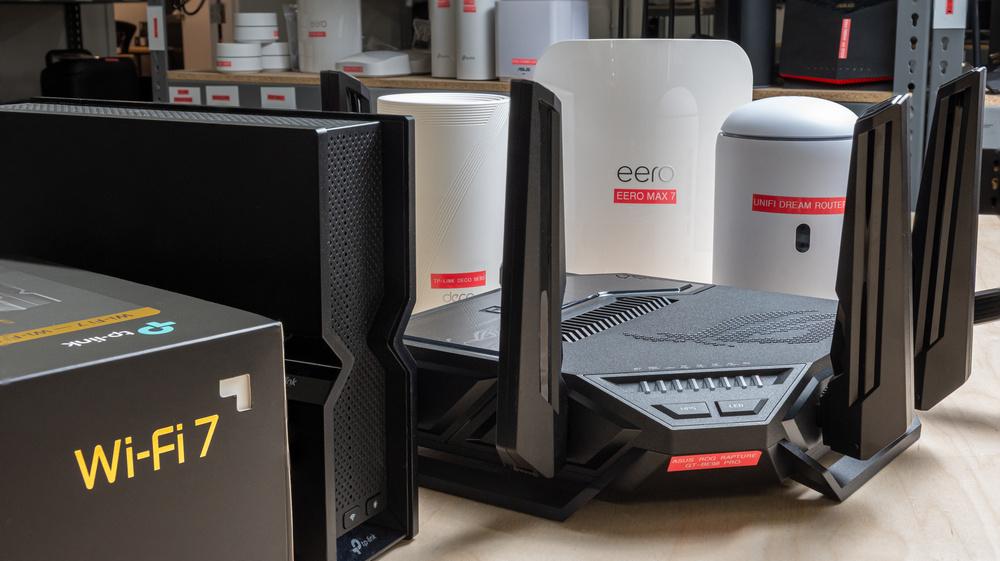
Wi-Fi 7 routers first hit the market in 2023, and while we've seen real progress since then, the experience is still all over the place. Some Wi-Fi 7 routers deliver genuinely next-gen performance, but many don't offer an experience meaningfully better than that of good Wi-Fi 6 hardware. That makes finding the right Wi-Fi 7 router tricky, especially if you rely on the marketing. That's why it's important to understand what Wi-Fi 7 actually offers before you buy. Check out our article comparing Wi-Fi 6 to Wi-Fi 7 if you want to learn what's new. Or, check out our investigation on Multi-Link Operation (MLO) to find out how one of Wi-Fi 7's main selling features isn't all that it's cracked up to be yet.
Luckily, we've done the hard work of buying and testing over 30 Wi-Fi 7 routers, and the recommendations below for the best Wi-Fi 7 routers all deliver great performance, features, and ease of use. For more recommendations, check out our articles on the best Wi-Fi routers, the best mesh Wi-Fi systems, and the best gaming routers.

Since we started reviewing them in 2024, we've tested over 60 routers. We maintain complete editorial independence and impartiality by purchasing each router ourselves, which ensures we aren't testing specially selected review units. Rather than casually assessing performance by throwing on Netflix and seeing if it works, we rigorously evaluate each router on a standardized testing platform, providing you with all the data you need to compare different models.
-
Best Wi-Fi 7 Router
 Apartment/CondoMulti-Level HouseGamingTravelSpeedRangeLatencyConfigurabilityType:MeshMulti Band:Tri-Band (2.4 / 5 / 6)See all our test resultsWi-Fi Version:Wi-Fi 7 (be)
The eero Max 7 is the best-performing Wi-Fi 7 router that we've tested. It's a tri-band mesh system with 2.4GHz, 5GHz, and 6GHz bands that delivers absolutely ballistic speeds in excess of 3Gbps at close range and well over 1Gbps at 100 feet away. That makes it suitable if you have a multi-gigabit internet connection and a huge house filled to the gills with devices downloading large files, streaming 4k HDR video, gaming, taking calls, and more. It also has a sleek all-white design that's easy to place anywhere in your home, and is equipped with two 2.5Gbps and two 10Gbps Ethernet ports.
Unfortunately, it's not all positive for this router. While the eero app you use to configure your network is straightforward and intuitive, and supports Thread, Matter, and Zigbee smart home protocols, the granularity with which it lets you configure your network is lacking. For example, it took us hours to get our test results because the router wouldn't use the 320MHz channel width, and there's no way to force it to. On top of that, eero locks many features, like Wi-Fi scheduling, content filters, and activity history, behind its "eero Plus" subscription service. While other brands are also guilty of this, it's frustrating with a flagship product. It's also quite expensive, but it goes on sale regularly. While we bought and tested a two-pack, you may want to start with a single unit to see if it's suitable for your home, and then easily add more units later if you need the extra range.
If you're okay with sacrificing some long-range performance, you should check out the TP-Link Archer BE900. It delivers similar short-range speeds to the eero and has much better wired connectivity with twice as many total ports (including an SFP+ port). It also costs about the same as a one-pack of the eero.
-
Best Upper Mid-Range Wi-Fi 7 Router
Apartment/CondoMulti-Level HouseGamingTravelSpeedRangeLatencyConfigurabilityType:Standalone RouterMulti Band:Tri-Band (2.4 / 5 / 6)See all our test resultsWi-Fi Version:Wi-Fi 7 (be)If you don't want to fork out for the eero Max 7 and don't need 10Gbps ports, the ASUS ROG Strix GS-BE18000 is the best upper mid-range Wi-Fi 7 router we've tested. It's a tri-band router with 2.4GHz, 5GHz, and 6GHz bands. It sports a gamer-like aesthetic adorned with ASUS ROG logos and addressable RGB lighting, making it much more visually assertive than our top pick. The router has eight 2.5Gbps Ethernet ports, two of which are 'gaming ports' that automatically prioritize devices plugged into them for gaming. The feature that really sets this router apart is its support for automated frequency coordination (AFC). Without getting too into the nitty-gritty, AFC can significantly improve the range of the router's 6GHz band by increasing its broadcasting power. We couldn't test this feature since, at the time of writing, ASUS's firmware doesn't allow AFC in Canada. Regardless, it's a promising feature that gives this router a serious leg up over the competition.
Performance-wise, this router delivers excellent speeds at close range and impressive, consistent range performance. It's not as fast as our top pick, but it's still red-hot, as opposed to white-hot, and absolutely delivers more than enough performance for multiple people gaming, on Discord calls, and downloading large files all at the same time. With all that in mind, it's still a very expensive router that's excessive for the majority of households, and you'll find a much better bang-for-the-buck with one of our picks below.
-
Best Mid-Range Wi-Fi 7 Router
Apartment/CondoMulti-Level HouseGamingTravelSpeedRangeLatencyConfigurabilityType:MeshMulti Band:Tri-Band (2.4 / 5 / 6)See all our test resultsWi-Fi Version:Wi-Fi 7 (be)If our picks above are too expensive, we recommend the TP-Link Deco 7 Pro BE63 as the best Wi-Fi 7 router at a mid-range price point. Like our top picks, it's a tri-band mesh system that you can easily expand by adding additional units throughout your home for better coverage. It sports a sleek design and a compact footprint, so it won't clash with your living space's decor. Performance-wise, it has a great range, and since it's designed to be easily expandable, you can buy additional units to extend it further. We recommend starting with purchasing a two-pack and adding a third unit if you still need to improve coverage. It delivers impressive speeds that can take advantage of a gigabit internet connection, no matter where you are in your home, making it a great pick if you're downloading lots of large files in an office far from where your internet cable enters your home. It also has great wired connectivity with four 2.5Gbps Ethernet ports, so you're covered if you have wired devices that can take advantage of those speeds.
TP-Link's Deco app makes it easy to set up your mesh network quickly. You can configure and monitor your network, view the number of connected devices, and access settings like the channel widths each band operates on. By default, you have access to several basic parental control features, including the ability to set profiles for specific devices and block certain sites or categories. Unfortunately, more precise parental controls, like time management, as well as additional security features, like network-wide antivirus, are available only through TP-Link's HomeShield monthly subscription service.
-
Best Lower Mid-Range Wi-Fi 7 Router
Apartment/CondoMulti-Level HouseGamingTravelSpeedRangeLatencyConfigurabilityType:Standalone RouterMulti Band:Tri-Band (2.4 / 5 / 6)See all our test resultsWi-Fi Version:Wi-Fi 7 (be)While our picks above are amazing routers, they're overkill if you don't have a very large home or a 10Gbps internet connection. That's why we recommend the TP-Link Archer BE550 as the best Wi-Fi 7 router at a lower mid-range price. It's a tri-band router that delivers excellent speeds suitable for multiple people simultaneously streaming high-resolution videos or downloading large files like game updates. It also has a great port selection, with all five of its Ethernet ports rated for 2.5Gbps, so high-bandwidth wired devices like a high-end PC or NAS can reach their full speeds. This router is also easy to set up and manage using TP-Link's Tether app, or through the web interface.
This router's biggest downside is its range performance on the 5GHz band. It still has enough range for most homes, and it's compatible with TP-Link's EasyMesh functionality, allowing you to create a mesh network with other compatible routers or range extenders for better coverage. That said, if you have a particularly large home or obstacles like concrete masonry walls that create dead zones, you should consider our mid-range pick above: the TP-Link Deco 7 Pro BE63.
-
Best Budget Wi-Fi 7 Router
Apartment/CondoMulti-Level HouseGamingSpeedRangeLatencyType:Standalone RouterMulti Band:Dual Band (2.4 / 5)See all our test resultsWi-Fi Version:Wi-Fi 7 (be)If you want a Wi-Fi 7 router and can't spring for one of our more expensive mid-range picks above, the TP-Link Archer BE230 is our budget recommendation. Unlike the other picks on this list, the BE230 is only a dual-band router with 2.4GHz and 5GHz bands. That means that if you have newer Wi-Fi 7 devices that support the 6GHz bandwidth, you can't take advantage of it with this router. That said, it still delivers great short-range performance, with top speeds approaching 1Gbps. That means it's more than suitable enough for a busy home filled with devices streaming, downloading large files, and gaming all at the same time. Its range is only decent, however, so you may find it leaves you with some dead zones depending on the size and layout of your home. Physically, it has a conventional router design with external antennae, unlike the other picks on this list, which generally sport sleeker looks. It has a 2.5Gbps WAN port and four 1Gbps LAN ports, so it's not really useful if you have multi-gigabit devices you want to connect.
Like the TP-Link Archer BE550 above, you configure and manage your network with the Tether app or through a web interface. It's also compatible with EasyMesh, so you can easily create a mesh network with other EasyMesh-compatible routers or range extenders.
If you're looking for a budget Wi-Fi 7 mesh system, check out the TP-Link Deco 7 BE25. It performs about the same as the BE230, but it's much smaller, making it easier to place, and the added flexibility of a mesh system can help improve coverage if you have a large home. That said, it's more expensive, and it has fewer Ethernet ports, so it's less functional if you have many wired devices.





Notable Mentions
-
UniFi Dream Router 7:
The UniFi Dream Router 7 is a great Wi-Fi 7 router with impressive performance and functionality. Its main selling feature is its deep integration with UniFi's suite of software features and products, offering an experience with a level of control suitable for IT professionals. That said, it delivers speed and range similar to the much cheaper TP-Link Archer BE550.
See our review -
GL.iNet Flint 3 (GL-BE9300):
If you want advanced control over your network and features like multi-WAN with options for load balancing and cell network failover, the GL.iNet Flint 3 (GL-BE9300) is a great alternative to the TP-Link Archer BE550. That said, it's not quite as user-friendly as the TP-Link and doesn't have the same level of mesh support.
See our review
Recent Updates
Aug 11, 2026:
We've reviewed our picks for accuracy and relevance, but haven't made any changes.
Jun 11, 2026:
We've validated the article and confirmed that our current recommendations remain the best Wi-Fi 7 routers available to buy.
Apr 17, 2026:
We've updated the Table Tool in this article to include new usages from the latest test bench (Gaming & Latency), and verified our recommendations are still the best available picks.
All Reviews
Our recommendations above are currently the best Wi-Fi 7 routers for most people. We factor in price (a cheaper router wins over a pricier one if the difference isn't worth it), user feedback, and availability (no routers that are difficult to find or almost out of stock everywhere).
If you'd like to choose for yourself, here's the list of all our Wi-Fi 7 router reviews. Be careful not to get too caught up in the details. While no router is perfect, nearly all of them are more than good enough for most high-bandwidth uses, like streaming 4k content and downloading large files quickly.
Looking for a portable router for your next trip? Be sure to check out our recommendations for the best travel routers.