You've probably been seeing more and more new phones, laptops, and routers advertised with Wi-Fi 7 since they started coming onto the market in 2023. While the new technology makes some big promises to improve on prior Wi-Fi generations, it's important to understand what improvements it brings to the table, how they affect the user experience, and what to expect.
The biggest new features that Wi-Fi 7 brings over Wi-Fi 6 are multi-link operation (MLO), preamble puncturing, and multiple resource units (MRUs). Optionally, manufacturers can include 320MHz channel widths and 4K-QAM modulation as well. While they might sound like technobabble, these features work to improve download and upload speeds, make Wi-Fi networks more stable and reliable, and handle congested wireless environments with lots of clients more effectively.
Read on to learn more about how these features work and what the most meaningful differences are between Wi-Fi 6 and Wi-Fi 7.
Test results
Wi-Fi 6
Wi-Fi 6, also known as IEEE 802.11ax, was officially introduced in 2018. The two biggest improvements over Wi-Fi 5 (802.11ac) it brought to the table were OFDMA (orthogonal frequency-division multiple access) and 1024-QAM modulation. The former intends to improve transmission efficiency and throughput to a large number of simultaneous clients, while the latter is a modulation scheme that can increase transfer speeds by supporting a higher maximum raw bitrate between your device and the access point. There were also several smaller changes and features:
- Target Wake Time (TWT) allows devices to wake up at a specified time rather than waiting for the AP to transmit a signal. This can help improve battery life.
- WPA3 security became mandatory.
- While not new to Wi-Fi 6, 160MHz channel widths became more widely adopted.
- Wi-Fi 6E allows for a 6GHz band
If interested, you can read about the full list of changes for Wi-Fi 6 on Wikipedia.
It's important to note that while Wi-Fi 6 routers are fully backward compatible with older devices, clients also need to be Wi-Fi 6 capable to benefit from the technology; otherwise, the protocol will revert to the lowest common denominator.
OFDMA
While Wi-Fi 4's MIMO (multiple-input and multiple-output) and Wi-Fi 6's OFDMA both increase throughput for multiple simultaneous clients, they work differently. The former uses a beamforming technique that leverages multiple antennas, while the latter partitions WLAN channels into sub-channels called resource units (RUs) for each connected client. Partitioning the WLAN channels means each device can receive data at the same time, improving performance on busy networks.
Wi-Fi 6E
Wi-Fi 6E is typically classified as a distinct protocol, but it's actually just Wi-Fi 6 extended into the 6GHz band. The advantage of all the additional spectrum means your devices are less likely to be subject to interference and noise on existing channels, and there are more contiguous channels available for 160MHz channel widths. In practice, this means your devices are more likely to connect to 160MHz channels, greatly increasing potential speeds. Importantly, Wi-Fi 6E requires dedicated hardware, so both your router/access point and client device need to support it in order to use the new spectrum.
Wi-Fi 7
Wi-Fi 7 has had a somewhat convoluted rollout. The original specification (IEEE 802.11be) was first drafted in 2021, with early routers available for sale in 2023. The Wi-Fi Alliance came out with its "Wi-Fi CERTIFIED 7" program in early 2024 to verify compliant devices. The specification introduces several new features and improvements that aim to improve throughput and stability:
- Multi-Link Operation (MLO) simultaneously sends and receives data across multiple bands or multiple channels on the same band to improve reliability and throughput.
- Flexible Channel Utilization/Preamble Puncturing is a feature that allows a portion of channel width to be blocked while the rest maintains a connection. This is useful in noisy wireless environments where there may be interference, allowing your device to use a 160MHz+ channel width non-contiguously.
- Multiple Resource Units (MRUs) is a technology that builds upon OFDMA from Wi-Fi 6 and further improves efficiency with multiple client devices. Previously, each client was limited to one RU, but Wi-Fi 7 allows each device to be assigned to multiple RUs at the same time.
- 4096-QAM (4K-QAM) is a modulation scheme that allows a higher density of data to be transmitted, resulting in higher potential throughput.
- 240MHz and 320MHz channel widths on the 6GHz band allow for significantly higher throughput.
Like Wi-Fi 6, Wi-Fi 7 routers are backward compatible with previous versions of Wi-Fi, but to fully take advantage of whichever spec, both the access point and the client need to be compatible with the same feature set.
Not All Wi-Fi 7 Devices are Equal
A critically important thing to understand about Wi-Fi 7 is that not all features listed above are mandatory for a device to be considered Wi-Fi 7. Of those features, 4K-QAM and 240/320MHz channel widths are optional, and so is the 6GHz band. This means that it's up to the device manufacturer to include these features, so it's especially important to do your research to see which features your devices support so you don't have any unpleasant surprises after purchasing.
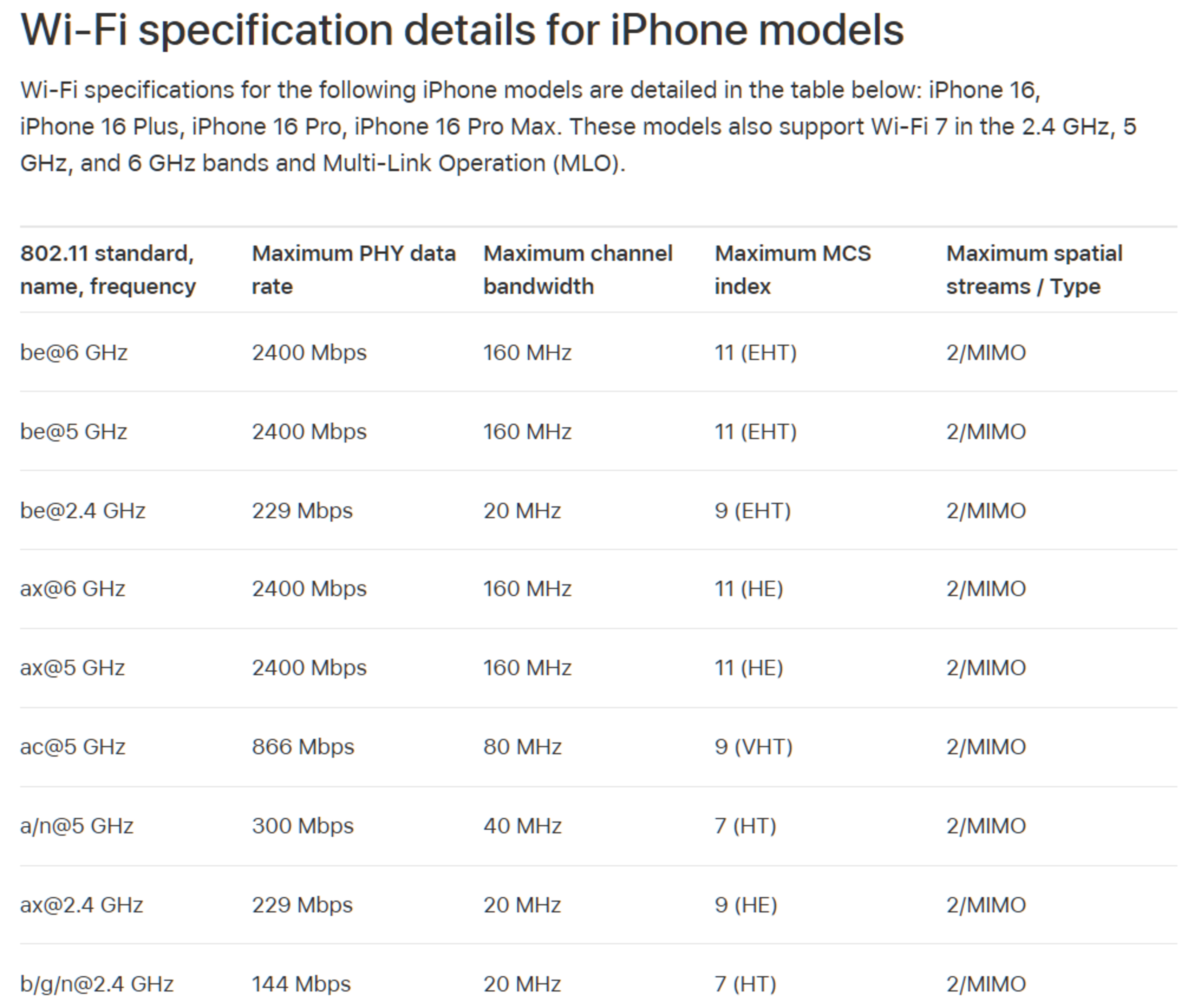
While some devices, like Apple's iPhone 16 lineup, support Wi-Fi 7, they're limited to a maximum channel width of 160MHz with 1024-QAM modulation. This means the maximum theoretical throughput is the same whether they're connected to a Wi-Fi 6 or Wi-Fi 7 router.
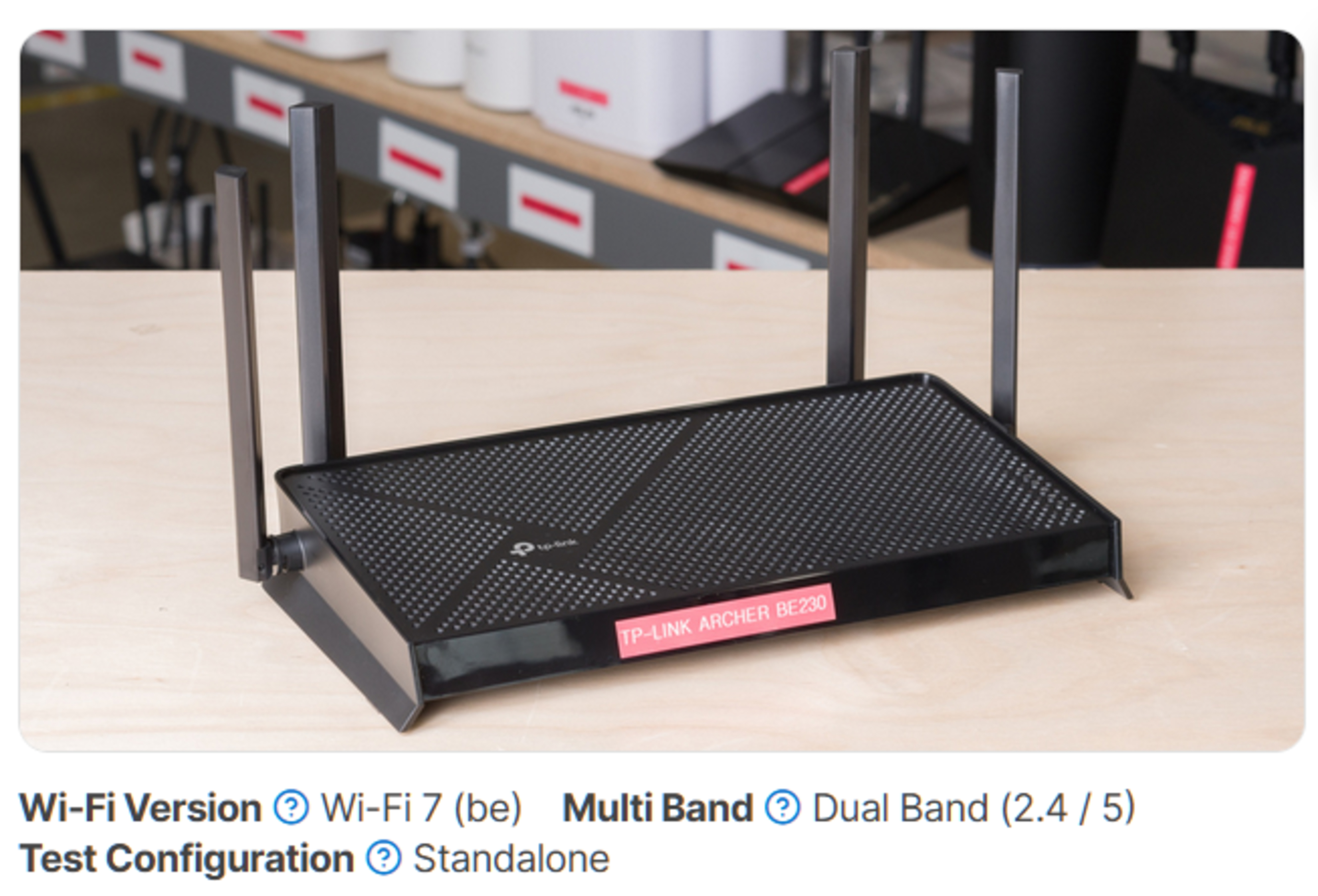
Some routers, like the TP-Link Archer BE230, lack 6GHz band support altogether. This means that it lacks the potential throughput benefits of routers supporting 6GHz and 320MHz channel widths.
A Note About Nomenclature
Until 2018, Wi-Fi protocols were referred to by their names created by the Institute of Electrical and Electronics Engineers (IEEE), beginning with 802.11 followed by a letter suffix denoting the version. The Wi-Fi Alliance, a trade association that holds the Wi-Fi trademark, decided to retroactively name each 802.11 standard in the order they were released, so 802.11ac, 802.11ax, and 802.11be are also called Wi-Fi 5, 6, and 7, respectively. It's important to note, however, that these Wi-Fi names are essentially marketing designations, so just because a device is listed as 802.11be, it doesn't necessarily mean it's Wi-Fi 7 certified.
Wi-Fi 6 vs Wi-Fi 7: Tested
In terms of performance, Wi-Fi 7 has a much higher throughput ceiling than Wi-Fi 6, but in practice, it's highly dependent on the client device and the access point. While it's true that the fastest routers we've tested are Wi-Fi 7, several Wi-Fi 6 and 6E routers have outperformed some Wi-Fi 7 routers in our range and speed tests.
| Router | ASUS RT-BE96U | GL.iNet Flint 3 (GL-BE9300) | eero 7 | ASUS ZenWiFi XT9 | eero Pro 6E |
|---|---|---|---|---|---|
| Wi-Fi Version | Wi-Fi 7 | Wi-Fi 7 | Wi-Fi 7 | Wi-Fi 6 | Wi-Fi 6E |
| Highest Speed | 3,490Mbps | 1,830Mbps | 930Mbps | 1,140Mbps | 1,250Mbps |
| Average 6GHz Speed (Short Range) | 3,082Mbps | 1,548Mbps | No 6GHz band | No 6GHz band | 879Mbps |
| Average 5GHz Speed (Short Range) | 1,360Mbps | 789Mbps | 629Mbps | 848Mbps | 891Mbps |
Even though the eero 7 is a Wi-Fi 7 router, it posted the lowest speeds out of the above group of routers. This is because it doesn't have a 6GHz band and lacks support for the 320MHz channel widths that allow for the significantly faster speeds seen on the ASUS RT-BE96U and the GL.iNet Flint 3. Similarly, while the eero Pro 6E is a Wi-Fi 6E router that also only supports up to 160MHz channel widths, it has a 6GHz band with lower interference and noise, allowing for higher speeds. Lastly, even the ASUS ZenWiFi XT9, a Wi-Fi 6 router, posted faster speeds, likely due to superior hardware and firmware design.
These results should help illustrate that just because a device conforms to a newer Wi-Fi specification doesn't mean it'll deliver better performance.
Conclusion
Even though the Wi-Fi Alliance's move to name 802.11 standards after numerical Wi-Fi increments made remembering which version is the newest easier, it unfortunately hasn't made shopping for a router any easier. While Wi-Fi 7 can offer significant improvements over Wi-Fi 6, there's a frustrating number of strings attached to that claim. The flexibility within the specification means that device manufacturers can choose not to implement several features, including 6GHz band support, 4K-QAM, and 320MHz channels, so it can be confusing to shop for a router. Fortunately, Wi-Fi 6 has matured to the point where most modern devices support it, and good Wi-Fi 6 and 6E routers have come down in price significantly, making for excellent budget and mid-range options. However, if you're willing to spend the money, there are some excellent Wi-Fi 7 routers available that push the boundaries of wireless speeds, and there are also options that provide great performance without breaking the bank.
To see which routers we recommend, check out our picks for the best Wi-Fi routers, the best routers for fiber internet, and the best mesh Wi-Fi systems. If you're after an all-in-one solution, you can also check out our picks for the best cable modem-router combos.