The TP-Link Archer AX55 is a dual-band Wi-Fi 6 router with 2.4GHz and 5GHz bands. It supports the 160MHz channel bandwidth on the 5GHz band. It also features a USB 3.0 port, four 1 Gbps LAN ports, and a 1 Gbps WAN port. It supports TP-Link's OneMesh and EasyMesh, so you can add additional access points to create a mesh network.
Our Verdict
The TP-Link Archer AX55 is good if you live in an apartment, condo, or single-story home. It delivers speeds suitable for downloading large files quickly or having multiple users streaming 4k content across a single floor. It also supports Dynamic Frequency Selection (DFS), so it can use less-congested DFS-only channels to deliver better speeds in noisy wireless environments. It's an average-sized router and has screw head slots on the bottom so you can mount it to a wall or the ceiling.
- Very fast top speeds.
- Wi-Fi 6 doesn't take full advantage of new Wi-Fi 6E or 7 devices.
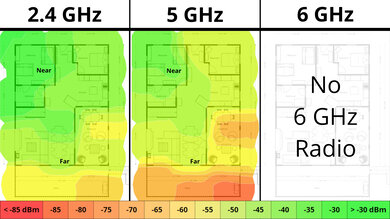
The TP-Link Archer AX55 is very good if you live in a multi-level house. It has good coverage and delivers fast speeds suitable for high-bandwidth use, such as quickly downloading and uploading large files throughout a multi-story home. Since it's a standalone router, its speed drops linearly with distance. Still, since it's compatible with TP-Link's OneMesh and EasyMesh, you can add compatible routers or range extenders to create a mesh network.
- Very good range suitable for single- or multi-level homes.
- Very fast top speeds.
- Compatible with EasyMesh and OneMesh devices to create a mesh network with better range.
- Wi-Fi 6 doesn't take full advantage of new Wi-Fi 6E or 7 devices.
- Standalone router that may have deadzones if you have a very large home.
The TP-Link Archer AX55 is decent for gaming over Wi-Fi. While its wireless latency performance is just okay, it's in line with most other routers. It delivers very good top speeds and range, contributing to consistently fast downloads throughout your home.
- Very good range suitable for single- or multi-level homes.
- Very fast top speeds.
Adequate wireless latency for web browsing and non-competitive gaming.
Unsuitable for competitive gaming over Wi-Fi.
The TP-Link Archer AX55 isn't designed to be a travel router. It's large to travel with and has tall external antennas designed for wide areas that don't fold into the body. You can configure a network-wide VPN connection, useful if you want your devices to appear as though they're in a different country or city. It unfortunately lacks cellular support, and you can't power it with a USB-C cable.
Large and cumbersome for travel.
No cellular network support.
The TP-Link AX55 delivers very good speeds suitable for an internet connection of up to ~750 Mbps. It also supports Dynamic Frequency Selection (DFS), so it can use less-congested DFS-only channels to deliver better speeds in noisy wireless environments. That said, it's only Wi-Fi 6, so it doesn't have a faster 6GHz band for your Wi-Fi 6E or 7 devices to use.
- Very fast top speeds.
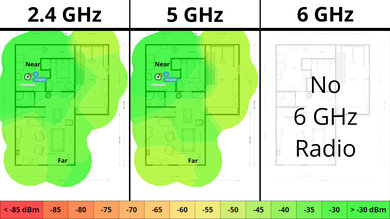
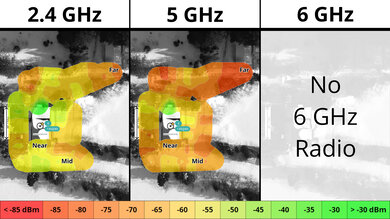
The TP-Link AX55 has a very good range for a standalone router. You can also add a compatible EasyMesh or OneMesh router or range extender to create a mesh network for better range.
- Very good range suitable for single- or multi-level homes.
- Compatible with EasyMesh and OneMesh devices to create a mesh network with better range.
- Standalone router that may have deadzones if you have a very large home.
The TP-Link Archer AX55 has reasonable wireless latency and jitter that's on par with most other routers. It's more than adequate for web browsing and casual gaming, but competitive gamers should plug their devices into the router via Ethernet for a more stable experience.
Adequate wireless latency for web browsing and non-competitive gaming.
Unsuitable for competitive gaming over Wi-Fi.
The TP-Link Archer AX55 has excellent configurability. Its web-based software is intuitive and lets you adjust all the key settings you need to optimize your Wi-Fi network. The only downside is that more advanced parental controls and security options are locked behind a paywall.
Excellent basic and advanced configuration options.
Advanced parental controls paywalled.
Performance Usages
Changelog
- Updated Sep 11, 2026: We've updated this review to Test Bench 0.10! This update adds Portability and Configurability testing to evaluate how suitable routers are for travel and to show how configurable their settings are. Read the changelog for more info.
- Updated Jun 22, 2026: We've updated this review to Test Bench 0.9.1! This is a minor change that makes the router type easier to see at the top of each review. Read the changelog for more info.
-
Updated Jun 03, 2026:
We've added a link to the newly reviewed ARRIS SURFboard G18 in the Wi-Fi Specifications section of the review.
-
Updated Apr 08, 2026:
We've added a link to the newly-reviewed NETGEAR Nighthawk RS90 in the Network Ports section of the review.
Check Price
Differences Between Sizes And Variants
There's a variant of the TP-Link Archer AX55 called the TP-Link Archer AX55 Pro, which has a 2.5 Gbps WAN/LAN port.
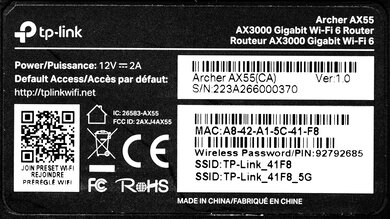
Here's a photo of our unit's label.
Popular Router Comparisons
The TP-Link Archer AX55 is a mid-range dual-band Wi-Fi 6 router. It notably supports the 160MHz channel bandwidth on the 5GHz band. Like most current TP-Link Archer routers, it's compatible with TP-Link's OneMesh technology and EasyMesh, so you can easily add more access points.
This router has very good top speeds and range, especially for a standalone router in the lower mid-range price category. It's notably faster than the ASUS RT-AX55 and the NETGEAR Nighthawk RAX30. It's a great choice if you want a solid-performing router and haven't yet upgraded many devices to a newer Wi-Fi standard like Wi-Fi 6E or 7.
The GL.iNet Flint 2 (GL-MT6000) and the TP-Link Archer AX55 are dual-band Wi-Fi 6 routers. The GL.iNet delivers higher top speeds, better range, and has multi-gigabit networking ports compared to the TP-Link. That said, the GL.iNet occupies a higher-end niche.
The TP-Link Archer AX55 and the GL.iNet Beryl AX (GL-MT3000) are dual-band Wi-Fi 6 routers. The GL.iNet is designed as a travel router, and as such, is considerably smaller. It also runs OpenWRT, an open-source firmware that's more configurable than TP-Link's. The TP-Link, on the other hand, delivers slightly faster top speeds and better range than the GL.iNet. Also, while the latter has a faster, 2.5Gbps WAN port and a 1Gbps LAN port, the former has four 1Gbps LAN ports, so you can connect more devices without buying an external switch.
The TP-Link Archer AX55 and the UniFi Dream Router are dual band Wi-Fi 6 routers. The TP-Link delivers better raw speed and range performance overall, but the UniFi has a much more robust set of features and deep integration with UniFi's ecosystem of networking products.
The TP-Link Archer AX55 is a better dual-band router than the NETGEAR Nighthawk RS90. Despite being an older Wi-Fi 6 model, the TP-Link delivers superior range, similar speeds, and EasyMesh support to expand your network's coverage. The NETGEAR is a nominally more recent Wi-Fi 7 device and holds an edge in wired connectivity with a 2.5Gbps WAN port, compared to the TP-Link's 1Gbps limit. However, the RS90's middling range and lack of mesh support make the TP-Link a more well-rounded offering for gigabit internet plans.
Test Results

for pictures & test results

for pictures & test results

If you're looking for a dual-band router with a faster 2.5Gbps WAN port, check out the NETGEAR Nighthawk RS90.
for pictures & test results

- Ethernet cable
- Power adapter
- User documentation
for pictures & test results

This router has a pair of screw head slots on the bottom, so you can easily mount it to your wall or ceiling.
The TP-Link Archer AX55 has basic parental controls for free, like device-specific filtering, family member profiles, internet pausing, content and URL filtering, bedtime controls, and basic usage insights. More advanced features, like app filtering and blocking, detailed usage history, and other expanded controls require a subscription to TP-Link's HomeShield service.
for pictures & test results

This is a standalone router, so the mesh satellite position line on this graph isn't applicable.
for pictures & test results

This is a standalone router, so the mesh satellite position line on this graph isn't applicable.
for pictures & test results

This router's wireless latency and jitter performance is adequate for general web browsing, video calling, and casual gaming over Wi-Fi.
If you're looking for a two-in-one cable modem and Wi-Fi 6 router, check out the ARRIS SURFboard G18.