
The NETGEAR Nighthawk RS300 is a tri-band Wi-Fi 7 router with 2.4GHz, 5GHz, and 6GHz bands. It has a WAN port rated for 2.5Gbps, two 2.5Gbps LAN ports, and two 1Gbps LAN ports. You can configure the router using the web user interface or with NETGEAR's Nighthawk mobile app.
Note: We've removed the Wi-Fi coverage tests, as we're exploring better ways to convey the results that'll be more helpful to users.
Our Verdict
The NETGEAR RS300 is a great router for apartments, condos, and smaller homes. It has excellent speeds and coverage across a single floor and is suitable for downloading large files quickly and handling multiple devices streaming 4k HDR content at the same time. It also has excellent wired networking with multiple 2.5Gbps ports.
Excellent top speeds.
Decent overall range.
No MLO support, despite being marketed as 'WiFi 7.'
The NETGEAR RS300 is a very good router for use in a multi-level home. It delivers excellent top speeds and decent range, making it suitable for multiple users streaming high-bandwidth 4k content simultaneously or for quickly downloading large files. While its 6GHz band has great range, the 5GHz band slows down when you're very far from the router. Unlike most similar routers, it lacks mesh expandability, so you can't add more access points to create a mesh network for better range.
Excellent top speeds.
Decent overall range.
5GHz band slows down at longer distances.
Lacks mesh expandability.
No MLO support, despite being marketed as 'WiFi 7.'
The NETGEAR Nighthawk RS300 is adequate for gaming over Wi-Fi. Its latency levels are suitable for casual online games, though competitive players will still benefit from the higher speeds and stability of a direct Ethernet connection. The router delivers excellent top speeds and decent standalone range, making it suitable for handling large downloads and updates throughout most of the home.
Excellent top speeds.
Decent overall range.
Wireless latency is acceptable for general use and non-competitive gaming.
5GHz band slows down at longer distances.
Not suitable for competitive gaming over Wi-Fi.
The NETGEAR RS300 has excellent top speeds suitable for a multi-gigabit internet connection. It also supports Dynamic Frequency Selection (DFS), so it can use less congested DFS-only channels to give you better speeds in noisy wireless environments.
Excellent top speeds.
No MLO support, despite being marketed as 'WiFi 7.'
The NETGEAR RS300 has decent range. The 6GHz band delivers excellent speeds at long distances, but the 5GHz band slows down at longer distances. Also, unlike most similar routers, it doesn't have mesh expandability, so you're unable to add more access points to create a mesh network for better range.
Decent overall range.
5GHz band slows down at longer distances.
Lacks mesh expandability.
The NETGEAR Nighthawk RS300 delivers fair wireless latency that's adequate for web browsing, video calls, and casual gaming. While the 5GHz band exhibits some occasional high-percentile latency spikes, these are unlikely to be noticeable during real-world use. Still, a wired connection is always recommended if you're after the fastest, most reliable connection.
Wireless latency is acceptable for general use and non-competitive gaming.
Not suitable for competitive gaming over Wi-Fi.
No MLO support, despite being marketed as 'WiFi 7.'
Changelog
-
Updated Jun 25, 2026:
We've added a link to the newly-reviewed TP-Link Deco 7 Pro BE67 in the Interior Long Range section of this review.
- Updated Jun 22, 2026: We've updated this review to Test Bench 0.9.1! This is a minor change that makes the router type easier to see at the top of each review. Read the changelog for more info.
-
Updated May 25, 2026:
We've updated this review and added text to interpret and contextualize our results from Test Bench 0.9.
- Updated Apr 22, 2026: We've updated this review to Test Bench 0.9! This update adds wireless latency testing to evaluate router gaming performance. Read the changelog for more info.
Check Price
Differences Between Sizes And Variants
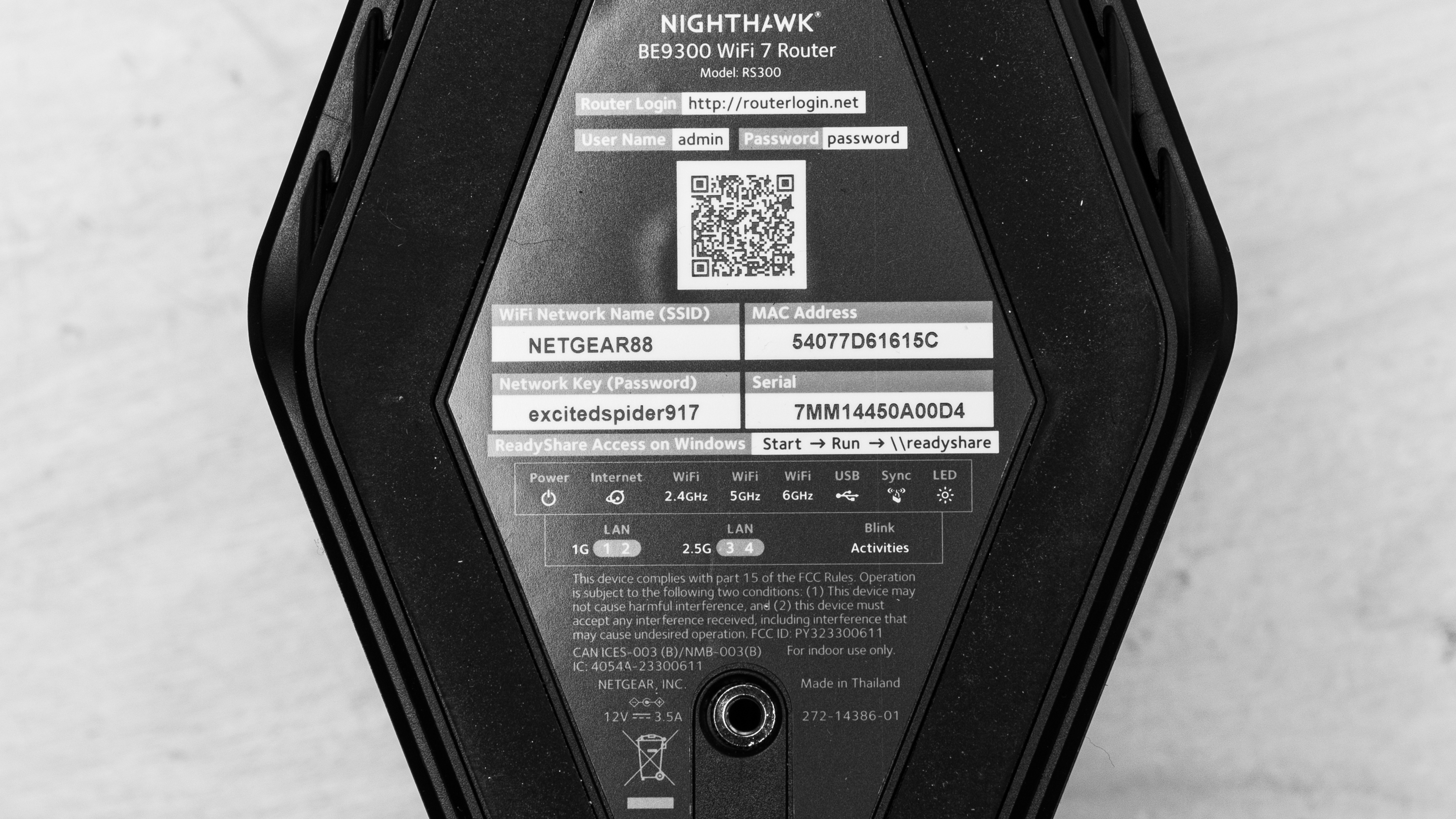
This router doesn't have any variants. See a photo of our unit's label.
Popular Router Comparisons
The NETGEAR RS300 is a mid-range Wi-Fi 7 router with 2.4GHZ, 5GHz, and 6GHz bands. It delivers excellent top speeds and decent overall range. It doesn't perform quite as well as other Wi-Fi 7 routers that we've tested like the TP-Link Archer BE550 or the ASUS RT-BE96U. It also notably lacks any sort of mesh networking or expandability, which is unusual among routers in its price range.
For more recommendations, check out the best long-range Wi-Fi routers, the best Wi-Fi routers, or the best routers for streaming.
The ARRIS SURFboard G54 is a cable modem and quad-band router combo, while the NETGEAR Nighthawk RS300 is a standalone router. The ARRIS delivers faster peak wireless speeds on its 6GHz band and sports a 10Gbps WAN port, overtaking the RS300's 2.5Gbps limit. That said, the NETGEAR offers a higher speed ceiling for wired devices with its 2.5Gbps LAN ports, outperforming the 1Gbps ports on the ARRIS. Interestingly, while both are marketed as Wi-Fi 7 devices, our testing shows that neither supports Multi-Link Operation (MLO).
The TP-Link Archer BE550 and the NETGEAR Nighthawk RS300 are standalone Wi-Fi 7 routers. They have similarly excellent top speeds, but the TP-Link has more 2.5Gbps networking ports, better range, and supports EasyMesh, which allows you to add other compatible access points to create a mesh network, making it better suited for larger homes.
The TP-Link Archer BE9500 is a better router than the Netgear Nighthawk RS300. While both are tri-band Wi-Fi 7 routers, the BE9500 delivers superior speed and range along with a higher-throughput selection of Ethernet ports. The RS300 touts a sleek tower design that makes for a lower profile than the BE9500; however, it lacks mesh expandability and basic MLO implementation. The BE9500 remains a more versatile choice with options for mesh configuration and implementation of MLO, although limited.
The NETGEAR Nighthawk RS300 is a better router than the NETGEAR Nighthawk RAX50. It's Wi-Fi 7 capable, is faster, has more networking ports, and is physically smaller. While the RAX50 has better 5GHz range, the RS300 has better 6GHz range.
Test Results
for pictures & test results

If you're looking for a smaller Wi-Fi 7 router, check out the UniFi Express 7.
for pictures & test results

The 1Gbps LAN ports (1 and 2) can be combined into a single 2Gbps link using link aggregation. If you want a Wi-Fi 7 router router with higher bandwidth network ports, check out the ASUS ROG Rapture GT-BE98 Pro or the eero Pro 7.
for pictures & test results

- Ethernet cable
- Power adapter
- User documentation
for pictures & test results

This router has two mounting points on the bottom. NETGEAR sells a first-party bracket on their website.
for pictures & test results

This is a standalone router without mesh capabilities, so the mesh satellite position line on this graph isn't applicable.
for pictures & test results

This is a standalone router without mesh capabilities, so the mesh satellite position line on this graph isn't applicable.
Check out the ASUS ZenWiFi BT10 or TP-Link Deco 7 Pro BE67 if you're looking for a Wi-Fi 7 mesh system with better range.
for pictures & test results

Although the 5GHz band exhibits some variable high-percentile lag spikes, these should have little real-world impact on common usages such as web browsing, streaming, or light gaming over Wi-Fi.
Wi-Fi 7 has faster speeds, lower latency, and support for more simultaneous connections than previous generations of Wi-Fi. However, you need devices supporting Wi-Fi 7 to benefit from these features.
If you're looking for a Wi-Fi 7 device with modem & router functionality, check out the ARRIS SURFboard G54.
This router doesn't support MLO, despite being advertised as "WiFi 7," and MLO support being a mandatory feature for Wi-Fi 7 certification from the Wi-Fi Alliance. The router is still technically IEEE 802.11be compliant, as it supports Extremely High Throughput (EHT) PHY and MAC speeds; however, the marketing is misleading.