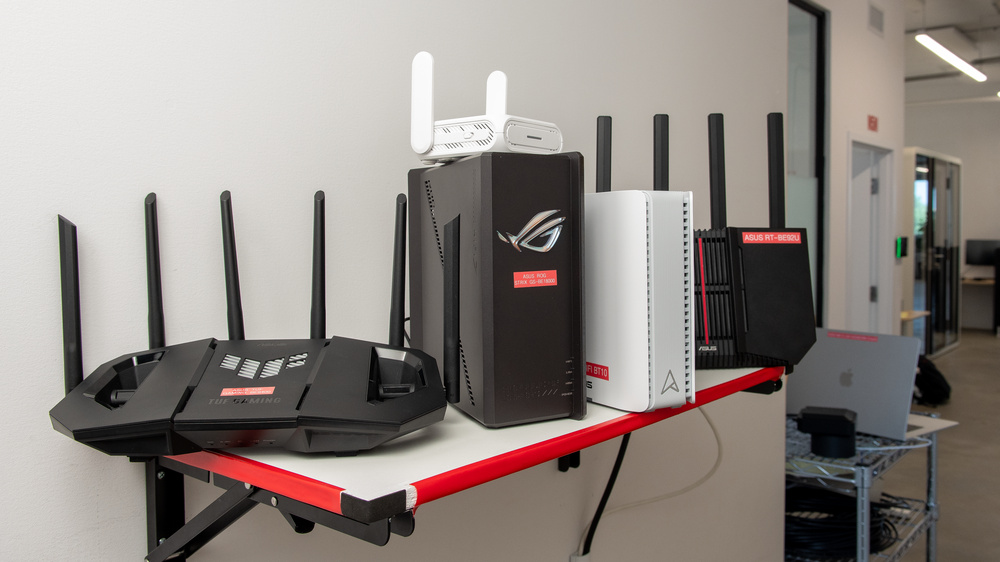
Few brands cast as wide a net in the world of Wi-Fi as ASUS. From their gamer-geared ROG and TUF lineups to the sleek ZenWiFi mesh family, the best router for you depends on what problem you're trying to solve. While this variety is a major plus for consumer choice, the sheer number of options available can certainly make finding the right one feel overwhelming.
We've tested over 80 of the most popular routers, including over 15 ASUS routers (with more on the way). Below, you'll find our breakdown of the best ASUS routers on the market, chosen for their performance, features, and overall value. For more recommendations, check out our guides to the best gaming routers, the best long-range routers, and the best VPN routers.
Updates
- 09/25/2026ASUS ZenWiFi BE5000 Pro reviewed
- 07/24/2026ASUS RT-BE90U reviewed
- 06/08/2026ASUS ZenWiFi BQ16 Pro reviewed
- 04/24/2026ASUS RT-BE82U reviewed
- 04/22/2026ASUS RT-BE58 Go reviewed

Since we started reviewing them in 2024, we've tested over 60 routers. We maintain complete editorial independence and impartiality by purchasing each router ourselves, which ensures we aren't testing specially selected review units. Rather than casually assessing performance by throwing on Netflix and seeing if it works, we rigorously evaluate each router on a standardized testing platform, providing you with all the data you need to compare different models.
-
Best ASUS Router
 Apartment/CondoMulti-Level HouseGamingSpeedRangeLatencyType:MeshMulti Band:Tri-Band (2.4 / 5 / 6)See all our test resultsWi-Fi Version:Wi-Fi 7 (be)
If you're after the absolute best ASUS router we've tested, look no further than the ASUS ZenWiFi BT10. This flagship Wi-Fi 7 mesh system is a fantastic choice if you live in a larger home, have multiple floors, or find that the coverage from a standalone router simply isn't cutting it. The two-pack variant we tested includes a companion node for added range, but the BT10 can also operate as a standalone if you don't need a multi-node mesh.
Performance takes center stage here, with this router boasting the highest speed and range scores out of any ASUS device we've tested. Power users will be pleased with its solid mix of two 10Gbps ports, one 1Gbps port, and support for multi-WAN failover; it's ideal for ultra-fast fiber and Wi-Fi 7 devices, though its port selection is ultimately lighter than the generously equipped ASUS ROG Strix GS-BE18000 (more on that below).
Specs aside, each node is sleek and low-profile, making it far easier to position around the home than some of the company's more angular designs from its 'gaming' entries. That convenience makes a difference, given that open placement is essential for achieving the best range and speed from a mesh system.
Looking for more mesh router recommendations? We've got you covered.
-
Best Upper Mid-Range ASUS Router
Apartment/CondoMulti-Level HouseGamingTravelSpeedRangeLatencyConfigurabilityType:Standalone RouterMulti Band:Tri-Band (2.4 / 5 / 6)See all our test resultsWi-Fi Version:Wi-Fi 7 (be)If you don't need a dedicated mesh or simply want a massive selection of Ethernet ports, we recommend the ASUS ROG Strix GS-BE18000 as the best ASUS router in the upper mid-range category. It's the best-performing Wi-Fi 7 standalone we've tested from the brand, making it an attractive option regardless of whether you plan to game. While its rugged styling obviously caters to gamers, the real draw comes from its combination of exceptional range, high-speed performance, and a stacked selection of multi-gigabit Ethernet ports that easily beat others in this class. Notably, this router includes Automated Frequency Coordination (AFC) support to boost its 6GHz band's power and range, though this benefit only matters if you have Wi-Fi 6E or 7 devices (and live in a region that supports it).
While this tri-band router's 2.5Gbps WAN port falls short of the ASUS ZenWiFi BT10's massive 10Gbps ceiling, it counters with a formidable array of seven 2.5Gbps LAN ports on the rear. If you're running multiple gaming consoles, PCs, or even a Network-Attached Storage (NAS) solution at home, you'd be hard-pressed to find a more cost-effective hub for a high-speed wired ecosystem (for example, the TP-Link Archer BE900 offers a similar number of high-speed ports, but costs nearly twice as much). Two of its ports are even designated "gaming ports"; in practice, this just means the router will supposedly prioritize traffic for whatever devices you connect to them.
-
Best Mid-Range ASUS Router
Apartment/CondoMulti-Level HouseGamingSpeedRangeLatencyType:Standalone RouterMulti Band:Tri-Band (2.4 / 5 / 6)See all our test resultsWi-Fi Version:Wi-Fi 7 (be)If the above options are outside your budget (or simply overpowered for your usage), we recommend the ASUS TUF Gaming BE9400 as one of the best ASUS routers at a mid-range price. Like our premium picks, this is still a tri-band Wi-Fi 7 router with 2.4GHz, 5GHz, and 6GHz bands, though it's best approached as a stellar general-use option rather than a niche gaming tool. While its tactical styling might not be to everyone's taste, it serves as a great example of what we found when looking at Wi-Fi latency and why gaming routers aren't inherently better: marketing aside, real-world performance comes down to what's under the hood. Thankfully, this router delivers exactly where it counts, all at a more competitive price.
It maintains excellent speeds, strong coverage, and a great selection of multi-gigabit ports. While its chassis isn't particularly tailored to tight spaces, six adjustable antennas offer some flexibility in its positioning. More interestingly, this TUF router delivers lower wireless latency than almost any other router we've tested. That's a meaningful advantage if you often game over Wi-Fi, though it doesn't change the bigger picture: Ethernet is king for competitive gaming. While you don't get the same seven-port selection as the ASUS ROG Strix GS-BE18000 (or the refined design of the ASUS ZenWiFi BT10), this router still offers a respectable selection of three 2.5Gbps ports, leaving little room for complaint at this price.
-
Best Lower Mid-Range ASUS Router
Apartment/CondoMulti-Level HouseGamingSpeedRangeLatencyType:Standalone RouterMulti Band:Tri-Band (2.4 / 5 / 6)See all our test resultsWi-Fi Version:Wi-Fi 7 (be)For a more budget-conscious entry into the latest wireless standard, we recommend the ASUS RT-BE92U as the best lower mid-range ASUS router. It sits on the pricier side of the lower-mid tier, but that's par for the course with ASUS's generally elevated price floor. Despite its positioning in the market, this router offers astonishingly high 6GHz peak speeds and respectable range for small to medium-sized homes. While its standalone coverage leaves something to be desired, the model includes AiMesh support as a means to extend your range with compatible devices.
An upright, angular design, coupled with four prominent antennas and a red racing stripe down the middle, gives this router a distinct "gamer" aesthetic, despite a lack of heavy marketing as such. Regardless, it's a highly capable mid-tier entry from ASUS and a cost-effective way to get your Wi-Fi 6E and 7 devices onto the 6GHz band (with unbeatable speeds for the price).
-
Best Budget ASUS Router
Apartment/CondoMulti-Level HouseGamingSpeedRangeLatencyType:Standalone RouterMulti Band:Dual Band (2.4 / 5)See all our test resultsWi-Fi Version:Wi-Fi 6 (ax)If you want a straightforward, low-cost option and don't need cutting-edge Wi-Fi 7 technology, the ASUS RT-AX1800S is our top no-frills budget pick. As a dual-band Wi-Fi 6 router, it predates support for the faster 6GHz band. Even so, its hardware packs in plenty of utility for everyday users (learn more about the differences between Wi-Fi standards in our comparison article). Its defining strength lies in its value; a standard 1Gbps WAN port paired with a surprisingly generous selection of five 1Gbps LAN ports makes this router more than sufficient for sub-gigabit internet plans. For a highly accessible price, it delivers reliable performance for basic web browsing, streaming, smart home tech, and simultaneous connections around the home.
Naturally, that lower price tag means accepting a few trade-offs: the router's wireless range is limited, making it ill-suited to sprawling layouts, and a lack of multi-gigabit support caps its utility for any higher-speed internet plans. It isn't built to deliver the low latency or raw speeds required for power users or competitive gamers, but it's more than sufficient for everyday use and 4k streaming, even across multiple devices. That said, if your home is full of modern Wi-Fi 6E or 7 hardware (or if you just need a bit more headroom in the bandwidth department), stepping up to any of the recommendations above is well worth the investment.






















Compared To Other Brands
-
Highly configurable.
ASUS routers generally offer deep customization options through the ASUSWRT web interface and ASUS Router app. A big plus if you're the type to tinker, or simply want a higher degree of control over your network security.
-
No paywall for key features.
Unlike many competing router brands, ASUS doesn't lock common features behind a monthly subscription model. Features like parental controls, security tools, QoS, and VPN support are generally available without an ongoing fee.
-
Strong flagship performance.
ASUS's higher-end routers and ZenWiFi mesh systems consistently deliver some of the strongest speed and range results we've seen from the brand.
-
Great wired connectivity on many models.
Many ASUS routers include a generous selection of multi-gigabit Ethernet ports. This is useful if you have wired devices such as a gaming PC or console, a NAS, a desktop workstation, or a home server.
-
Budget and mid-range value can be inconsistent.
ASUS routers don't always deliver the best price-to-performance ratio; some competing brands offer similar or better performance for less, especially in the budget and mid-range categories.
-
Software can feel less polished than simpler mesh systems.
ASUS gives users plenty of control, but that depth can also make its software feel less intuitive at first. If you're after a plug-and-play setup with minimal configuration, you might find alternatives from other brands more appealing.
ASUS vs TP-Link
TP-Link and ASUS both offer an extensive portfolio of routers, from budget models to powerful flagships. TP-Link is generally more competitive on performance per dollar in the mid-range space, while ASUS's deep network controls and configurability offer outstanding value to tinkerers, gamers, and enthusiasts. Crucially, the value of TP-Link's latest offerings has been undercut by subscription models that lock some security settings, QoS features, and parental controls behind a monthly subscription. This is a practice that's becoming increasingly common in the industry, but ASUS has yet to adopt it.
ASUS vs eero
ASUS and eero take vastly different approaches to home networking. Eero's specialty is simplicity, with a clean, app-based ecosystem and polished user interface for effortless operation out of the box. ASUS offers far more control over your network through its app and web interface, with the ZenWiFi lineup being the closest direct competitor to eero's whole-home mesh solutions. Much like TP-Link, eero's advanced networking tools are locked behind a monthly subscription model, while ASUS includes comparable features at no additional cost.
ASUS vs NETGEAR
ASUS and NETGEAR are both prominent brands in the home networking space, but they appeal to different user needs. ASUS routers prioritize flexibility and granular control, with AiMesh technology that lets you mix and match compatible ASUS devices to build a mesh network. NETGEAR focuses on a more streamlined setup experience, but requires a recurring subscription for full access to security tools and QoS settings, in line with competitors. Additionally, some of NETGEAR's "Wi Fi 7" routers omit core generation features like Multi-Link Operation (MLO), making it important to verify specific hardware capabilities before buying.
ASUS routers offer a mix of solid performance and flexible controls for users looking to get the most out of their internet plan. Features like mesh support, parental controls, and useful security tools are included across lineups and don't require a monthly subscription to access. While certain consumer lineups lean heavily into gaming-focused branding (such as ROG and TUF), the brand's consistent performance across a variety of price points makes ASUS a strong contender for most households, not just gamers.
Lineup
ZenWiFi: ASUS's flagship mesh series. These routers are generally sold in multi-pack systems and are designed to provide broader, more consistent whole-home coverage than a conventional standalone. Built around a simplistic app-based setup and a sleek, antenna-free aesthetic, ZenWiFi systems don't require a monthly subscription and also support AiMesh, so you can expand your network further with compatible devices.
ROG (Republic of Gamers): The ROG lineup consists of ASUS's high-end standalone routers, marketed heavily towards gamers and enthusiasts. These models typically feature aggressive styling, a strong selection of multi-gigabit ports, and gaming-focused software features like traffic prioritization and dedicated 'gaming' ports.
TUF Gaming: TUF Gaming routers are ASUS's more budget-focused gaming models, aiming to provide the same essential hardware features for power users at a more accessible price. TUF routers usually ship with a less expansive set of software tools, cutting out some extra features in favor of strong conventional performance and value.
RT Series: ASUS' traditional RT lineup covers everything from entry-level home routers to premium standalone units. These routers cater to standard households, smart homes, and general users who want ASUS' signature network flexibility without gaming-specific branding. Most RT models still include ASUS' core software features, such as AiMesh support, parental controls, and more advanced networking settings.
Conclusion
ASUS routers generally offer strong performance and a high degree of flexibility for users who want more control over their home network without paying additional fees. Most models include useful extras like mesh extendability, parental controls, QoS tools, and advanced security settings without requiring a monthly subscription. While their naming conventions aren't always the most intuitive (especially in gaming-oriented lineups), most households will have no trouble finding an ASUS router that suits their needs.
Ready for an even deeper dive into the market? Use our powerful Table Tool below to explore our results and find your perfect match.


