See the previous 0.8.1 changelog.
Our Router 0.8.2 is an update that adds tests evaluating how a router implements multi-link operation (MLO). If you want to learn more about MLO and what we found after investigating over 25 Wi-Fi 7 routers, check out our R&D article!
MLO Implementation
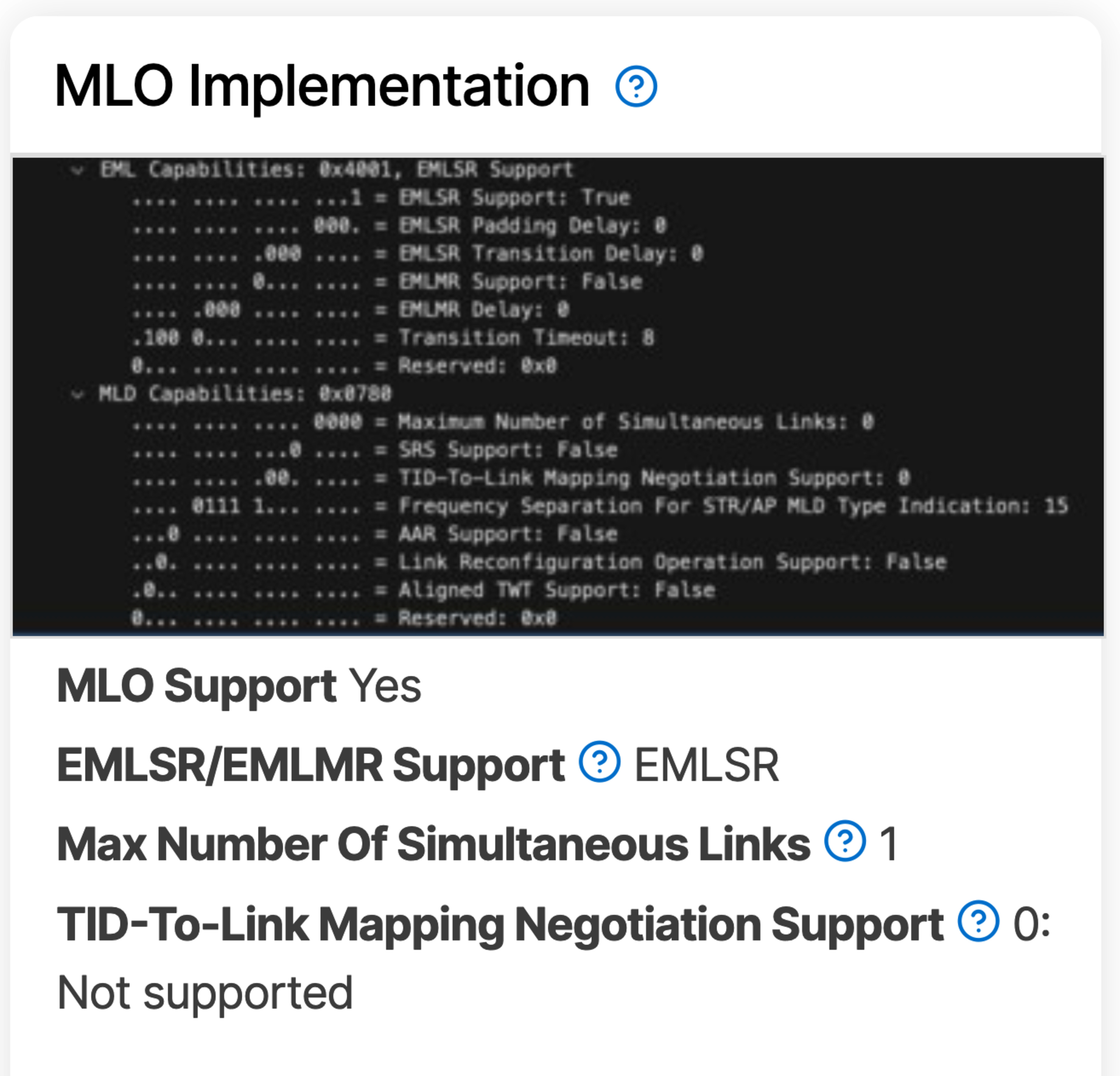
The MLO Implementation test box comprises six components:
- Beacon Frame
- MLO Support
- EMLSR/EMLMR Support
- Max Number of Simultaneous Links
- TID-to-Link Mapping Negotiation Support
Beacon Frame
Beacon Frames are signals that Wi-Fi devices send out to announce their capabilities, including how they implement MLO. To capture a router's beacon frame, we connect a Linux laptop to the router and identify the channel on which the MLO link is operating. Then, we use a MacBook running Wireshark for monitoring.
MLO Support
This test simply identifies whether the router supports MLO, regardless of whether it's EMLSR or EMLMR.
EMLSR/EMLMR Support
Enhanced multi-link single radio (EMLSR) is a type of MLO that uses a single radio to send data across multiple bands by alternating which bands it sends packets over. It's similar to band-steering and cannot transfer data using multiple bands simultaneously. Enhanced multi-link multi-radio (EMLMR), on the other hand, uses multiple radios to transmit data simultaneously across multiple bands. This is true, full-fat simultaneous MLO with the greatest theoretical benefit to speed, stability, and latency.
Max Number of Simultaneous Links
This test result simply refers to how many bands the router can use MLO on. If a router has 2.4GHz, 5GHz, and 6GHz bands and can operate MLO on all three, it would have three maximum simultaneous links. Note that the number is reported as n-1 in the beacon frame screenshot.
TID-to-Link Mapping Negotiation Support
This test identifies how the router handles Traffic Identifier (TID)-to-Link Mapping Negotiation. If it doesn't support this feature, the result is 0, and the router treats all traffic the same. If the result is 1, the router determines how to treat each type of traffic. And if the result is 3, the router and client can negotiate how each traffic type is handled. With better link-mapping negotiation, routers can better determine which band to send your more bandwidth-intensive and latency-sensitive data.
Let us Know What You Think!
Your feedback is instrumental in helping us improve our testing. If you have any comments, questions, or suggestions about this or future updates, let us know in the comments or send us an email at feedback@rtings.com!
64 Routers Updated
We have retested popular models. The test results for the following models have been converted to the new testing methodology. However, the text might be inconsistent with the new results.
- AmpliFi Alien
- ASUS ROG Rapture GT-BE98 Pro
- ASUS ROG Rapture GT6
- ASUS ROG Strix GS-BE18000
- ASUS RT-AX1800S
- ASUS RT-AX3000
- ASUS RT-AX55
- ASUS RT-AX86U Pro
- ASUS RT-AXE7800
- ASUS RT-BE92U
- ASUS RT-BE96U
- ASUS TUF Gaming BE9400
- ASUS ZenWiFi BT10
- ASUS ZenWiFi ET9
- ASUS ZenWiFi XT9
- eero 6
- eero 6+
- eero 7
- eero Max 7
- eero Pro 6
- eero Pro 6E
- eero Pro 7
- GL.iNet Beryl AX (GL-MT3000)
- GL.iNet Flint 2 (GL-MT6000)
- GL.iNet Flint 3 (GL-BE9300)
- GL.iNet Slate 7 (GL-BE3600)
- GL.iNet Slate AX (GL-AXT1800)
- Google Nest Wifi
- Google Nest Wifi Pro
- Google Wifi
- Linksys E5400
- Netduma R3
- NETGEAR Nighthawk RAX30
- NETGEAR Nighthawk RAX50
- NETGEAR Nighthawk RS300
- NETGEAR Nighthawk RS90
- NETGEAR Orbi 370
- TP-Link Archer A8
- TP-Link Archer AX10
- TP-Link Archer AX20
- TP-Link Archer AX21
- TP-Link Archer AX4400
- TP-Link Archer AX55
- TP-Link Archer AXE75
- TP-Link Archer AXE95
- TP-Link Archer BE230
- TP-Link Archer BE400
- TP-Link Archer BE550
- TP-Link Archer BE700
- TP-Link Archer BE900
- TP-Link Archer BE9500
- TP-Link Deco 7 BE25
- TP-Link Deco 7 Pro BE63
- TP-Link Deco 7 Pro BE65 Pro
- TP-Link Deco M4
- TP-Link Deco X5000
- TP-Link Deco XE5300
- UniFi Dream Router
- UniFi Dream Router 7
- UniFi Express 7
- UniFi U6 Pro (Wired Backhaul)
- UniFi U6 Pro (Wireless Backhaul)
- UniFi U7 Pro (Wired Backhaul)
- UniFi U7 Pro (Wireless Backhaul)