The TP-Link Archer AX20 is a dual-band Wi-Fi 6 router with 2.4GHz and 5GHz bands. It supports WPA3 security and OneMesh technology, allowing you to configure a mesh network with one of TP-Link's Wi-Fi extenders. It also has a USB port to connect a thumb drive and share files across your home network.
We bought and tested the Canadian version, which features a different port layout on the back and includes a USB port missing from the US version. While we expect similar performance from both models, we can't guarantee it. Please share your thoughts in the comments if you have the US version and your experience varies from our findings.
Our Verdict
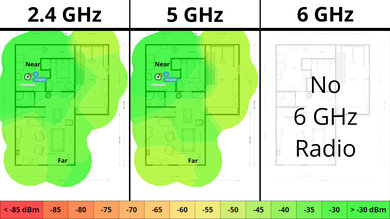
The TP-Link Archer AX20 is decent if you live in an apartment, condo, or single-story home. It has a good range and speeds across a single floor, which is suitable for fast downloads and streaming 4k content. It also has decent wired connectivity with four 1 Gbps LAN ports. It's a reasonable size that will fit into most living spaces, and it also has screw head slots on the bottom, so you have the option to mount it on the wall or ceiling. That said, it lacks Dynamic Frequency Selection (DFS) support, so it can't use the often less congested DFS-only channels, which would help if you live in a congested wireless environment like an apartment building.
- Fast top speeds.
- Wi-Fi 6 won't take full advantage of new Wi-Fi 6E or 7 devices.
- Lacks DFS support, so it can't avoid more congested channels.
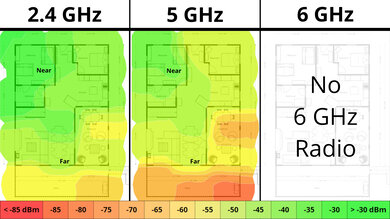
The TP-Link Archer AX20 is a good router if you live in a multi-level house. It provides good coverage throughout your home with speeds fast enough for most high-bandwidth uses, like fast downloads and multiple people streaming 4k video. That said, it's a standalone router, so its speeds drop the further you are from it, but this likely won't be an issue unless you have a very large home or if your home has concrete or masonry walls.
- Good range.
- Fast top speeds.
- Compatible with OneMesh range extenders to create a mesh network with better range.
- Standalone router that may have deadzones in very large homes.
- Wi-Fi 6 won't take full advantage of new Wi-Fi 6E or 7 devices.
- Lacks DFS support, so it can't avoid more congested channels.
- Wi-Fi 6 won't take full advantage of new Wi-Fi 6E or 7 devices.
The TP-Link Archer AX20 delivers good speeds suitable for an internet connection of up to ~700 Mbps. Unfortunately, it lacks Dynamic Frequency Selection (DFS) support, so it can't use the often less congested DFS-only channels, which would help if you live in a congested wireless environment. Also, it's only Wi-Fi 6, so it doesn't have a faster 6GHz band for your Wi-Fi 6E or 7 devices to take advantage of.
- Fast top speeds.
- Wi-Fi 6 won't take full advantage of new Wi-Fi 6E or 7 devices.
- Lacks DFS support, so it can't avoid more congested channels.
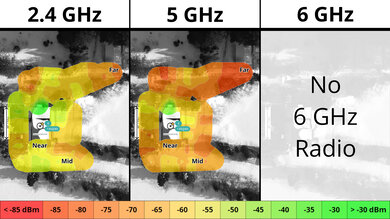
The TP-Link Archer AX20 has a good range for a standalone router. You can also add a compatible OneMesh range extender to create a mesh network for better range.
- Good range.
- Compatible with OneMesh range extenders to create a mesh network with better range.
- Standalone router that may have deadzones in very large homes.
- Wi-Fi 6 won't take full advantage of new Wi-Fi 6E or 7 devices.
- Wi-Fi 6 won't take full advantage of new Wi-Fi 6E or 7 devices.
Changelog
- Updated Jun 22, 2026: We've updated this review to Test Bench 0.9.1! This is a minor change that makes the router type easier to see at the top of each review. Read the changelog for more info.
- Updated May 08, 2026: We've updated this review to Test Bench 0.9! This update adds wireless latency testing to evaluate router gaming performance. Read the changelog for more info.
-
Updated Apr 17, 2026:
We've added links to the newly reviewed ARRIS SURFboard G34 and ARRIS SURFboard G36 cable modem/router combo units in the Network Ports section of the review.
- Updated Dec 16, 2025: We've added an MLO Implementation test for Test Bench 0.8.2! Read the changelog for more details.
Check Price
Differences Between Sizes And Variants
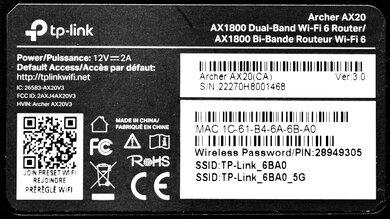
While the TP-Link Archer AX20 has no variants, we bought and tested the Canadian version, which has a different port layout on the back and a USB port that the US version lacks. We expect the two models to perform similarly, but without testing, we can't be sure. If you own the US version and your experience differs from our results, let us know in the comments.
Here's a photo of our unit's label.
Popular Router Comparisons
The TP-Link AX1800 Dual-Band Wi-Fi 6 router is a mainstream model in a competitive mid-range price bracket. This router has several features, like the newest WPA3 security standard, support for TP-Link's OneMesh technology for connecting range extenders, beamforming, OFDMA, and more.
It offers network coverage performance and features similar to those of other Wi-Fi 6 routers in its price category. Notably, it performs similarly to the lower-end TP-Link Archer AX10 and slightly better than the ASUS RT-AX1800S and the TP-Link Archer AX21. It's a good choice if you want a solid-performing router and haven't yet upgraded many of your devices to a newer Wi-Fi standard like Wi-Fi 6E or 7.
For more recommendations, check out the best Wi-Fi 6 routers, the best Wi-Fi routers, or the best routers for streaming.
The GL.iNet Beryl AX (GL-MT3000) and the TP-Link Archer AX20 are dual-band Wi-Fi 6 routers. The two deliver similar wireless performance, but the TP-Link has slightly better range. That said, the GL.iNet supports DFS-only channels, which can help your speeds in noisy wireless environments. The TP-Link has more Ethernet ports overall, but the GL.iNet has a faster, 2.5Gbps WAN port. Lastly, the GL.iNet runs OpenWRT, a much more configurable firmware than the TP-Link.
The TP-Link Archer AX20 and the Netduma R3 are dual-band Wi-Fi 6 routers. The TP-Link offers better performance overall, with better range and faster speeds. However, the Netduma can access DFS-only channels, which can help your connection in noisy wireless conditions.
The GL.iNet Slate AX (GL-AXT1800) and the TP-Link Archer AX20 are both dual-band Wi-Fi 6 routers, but they serve very different purposes. The TP-Link is a traditional standalone router designed for home networking, offering better overall range, mesh support and four 1Gbps LAN ports. Conversely, the GL.iNet is a highly compact travel router with DFS support and slightly higher speeds, but fewer ports for physical connections. While it lacks the range and mesh capabilities of the TP-Link, the GL.iNet sports highly configurable firmware and greater versatility with a programmable button and multi-purpose microSD card slot.
Test Results

for pictures & test results

If you're interested in a router with RGB lighting, check out the Netduma R3.
for pictures & test results

Check out the ARRIS SURFboard G34 or the ARRIS SURFboard G36 if you're looking for a router/DOCSIS 3.1 cable modem combo unit with a coaxial cable port.
for pictures & test results

- CAT 5E Ethernet cable
- Power adapter
- User documentation
for pictures & test results

This router has a pair of screw head slots on the bottom, so you can easily mount it to your wall or ceiling.
for pictures & test results

This is a standalone router, so the mesh satellite position line on this graph isn't applicable.
for pictures & test results

This is a standalone router, so the mesh satellite position line on this graph isn't applicable.
for pictures & test results