The TP-Link Archer AX10 is a dual-band Wi-Fi 6 router with 2.4GHz and 5GHz bands. It supports WPA3 security and OneMesh technology, allowing you to configure a mesh network with one of TP-Link's Wi-Fi extenders. You can set up and manage the router using TP-Link's Tether app or the web interface, where you can also configure parental controls.
Our Verdict
The TP-Link Archer AX10 is a decent router if you live in an apartment, condo, or single-story home. It delivers good speeds across a single floor and is suitable for most internet uses, such as video calls and 4k streaming. It also has decent wired connectivity with four 1Gbps LAN ports. It's a reasonable size that will fit into most living spaces, and it also has screw head slots on the bottom, so you have the option to mount it on the wall or ceiling.
- Good top speeds.
- Decent range.
- Wi-Fi 6 won't take full advantage of new Wi-Fi 6E or 7 devices.
- Lacks DFS support, so it can't avoid more congested channels.
The TP-Link Archer AX10 is a reasonable router if you live in a multi-level house. It provides speeds fast enough for most internet uses throughout your home, like 4k video streaming and downloading large files quickly. Still, it's a standalone unit, so you might experience dropouts depending on your home's size, layout, and construction. Thankfully, you can add one of TP-Link's OneMesh Wi-Fi extenders to create a mesh network with better range.
- Good top speeds.
- Decent range.
- Compatible with OneMesh devices to create a mesh network for better range.
- Wi-Fi 6 won't take full advantage of new Wi-Fi 6E or 7 devices.
The TP-Link Archer AX10 combines good wireless speeds with decent coverage, making it suitable for downloading large games and updates throughout most of the home. Its latency and jitter results are less impressive overall, with slightly lower stability than those of similar routers we've tested. While it's adequate for casual gaming, competitive users will see the most consistent performance with a direct connection to one of its gigabit ports.
- Good top speeds.
- Decent range.
Acceptable wireless latency for everyday browsing and some casual games.
Mediocre latency isn't suitable for competitive gaming over Wi-Fi.
The TP-Link Archer AX10 isn't designed as a travel router. Its four non-folding antennas and bulky power adapter make it awkward to pack in a bag, and it lacks essential travel features, like WISP mode for connecting to hotel Wi-Fi, cellular tethering, and USB-C power support. While you can use it as a VPN server to access your home network remotely, it doesn't include the VPN client functionality you'd need to encrypt the devices connected to it.
Bulky design with non-folding external antennas.
No LTE or VPN client support.
This router delivers good speeds suitable for an internet connection of up to ~600Mbps. However, it doesn't support DFS (Dynamic Frequency Selection), so it can't access DFS-only channels, which would help its speeds in congested wireless environments.
- Good top speeds.
- Wi-Fi 6 won't take full advantage of new Wi-Fi 6E or 7 devices.
- Lacks DFS support, so it can't avoid more congested channels.
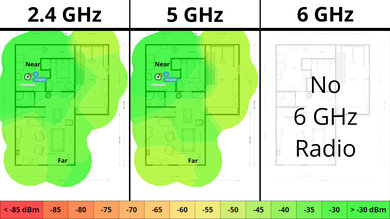
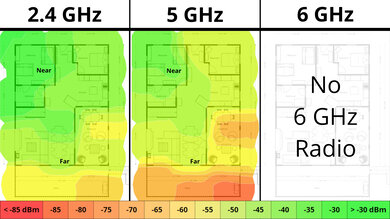
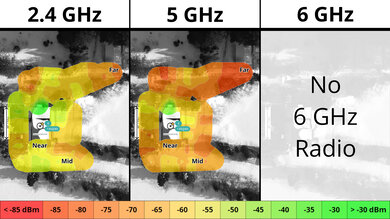
This router has decent range. It's a standalone unit, so it's slower the further away from it you are, but you can add a OneMesh-compatible range extender to improve its range.
- Decent range.
- Compatible with OneMesh devices to create a mesh network for better range.
The TP-Link Archer AX10 maintains passable wireless latency for common tasks like browsing the web, video calls, and casual gaming. However, it's prone to slightly more jitter and fluctuation than on competing routers we've tested. While everyday use remains largely unaffected, it's enough to warrant an Ethernet connection if you're after the most consistent, latency-free experience.
Acceptable wireless latency for everyday browsing and some casual games.
Mediocre latency isn't suitable for competitive gaming over Wi-Fi.
The TP-Link Archer AX10 has great configurability. Its web interface and companion app are easy to navigate, offering most of the expected settings you'd need for basic and advanced network adjustments. It doesn't support TP-Link's HomeShield subscription, so it lacks advanced parental controls like daily time limits, though you still get basic website filtering and scheduling out of the box.
Impressive basic and advanced configuration options.
Some advanced parental controls are missing.
Performance Usages
Changelog
- Updated Sep 11, 2026: We've updated this review to Test Bench 0.10! This update adds Portability and Configurability testing to evaluate how suitable routers are for travel and to show how configurable their settings are. Read the changelog for more info.
- Updated Jun 22, 2026: We've updated this review to Test Bench 0.9.1! This is a minor change that makes the router type easier to see at the top of each review. Read the changelog for more info.
-
Updated May 26, 2026:
We've updated this review with additional text to help contextualize our latest results from Test Bench 0.9.
- Updated Apr 22, 2026: We've updated this review to Test Bench 0.9! This update adds wireless latency testing to evaluate router gaming performance. Read the changelog for more info.
Check Price
Differences Between Sizes And Variants
The TP-Link Archer AX10 has a nearly identical variant, the TP-Link Archer AX1500. The main difference between the two seems to be that the AX10 is compatible with TP-Link's OneMesh, while the AX1500 isn't. If you have the TP-Link Archer AX1500 and know of any other differences or would like to share your experience, let us know in the comments.
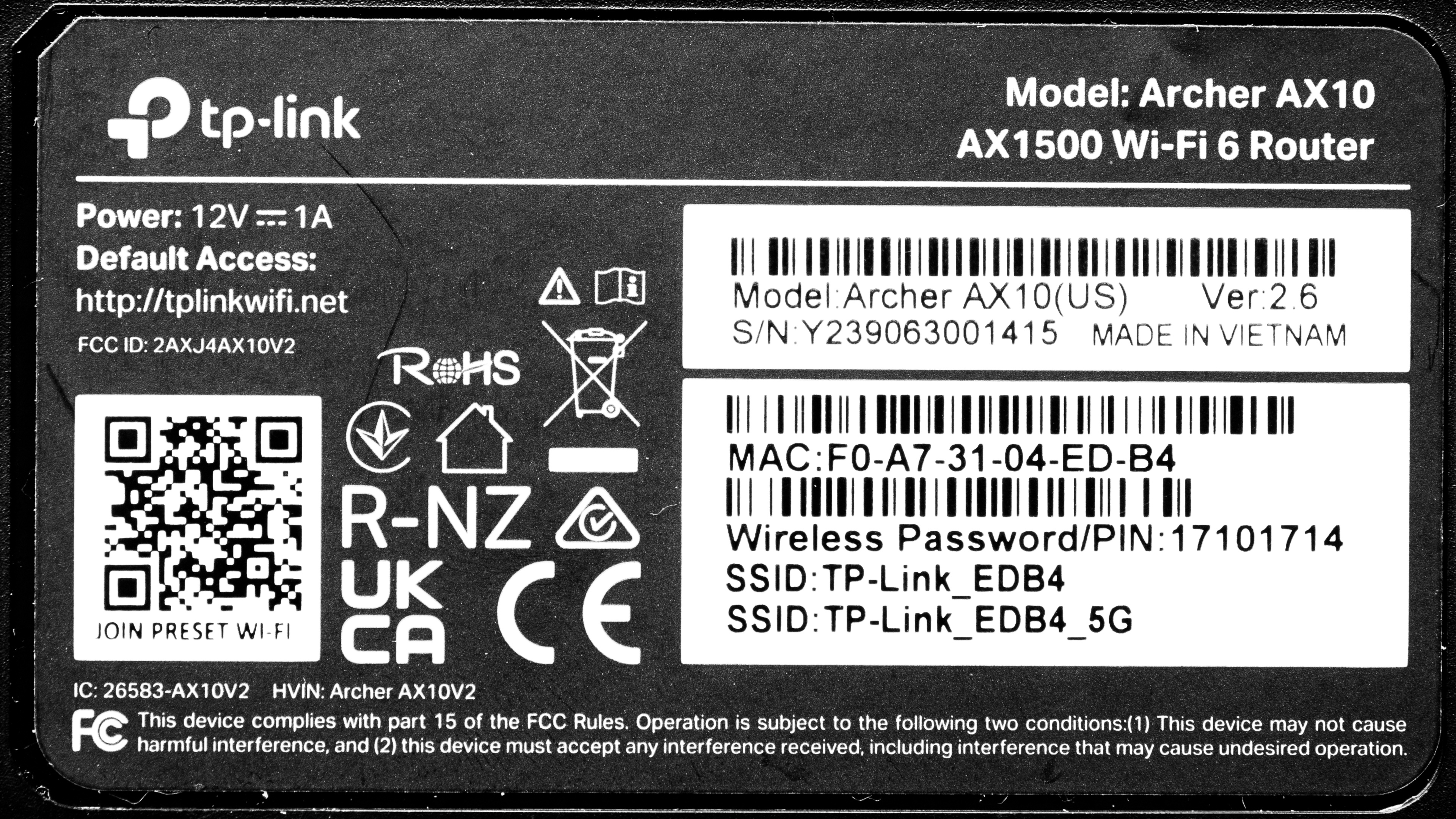
Here's a link to our unit's label.
Popular Router Comparisons
The TP-Link Archer AX10 is a mainstream Wi-Fi 6 router in a competitive lower mid-range price bracket. This router offers features like the newest WPA3 security standard, support for TP-Link's OneMesh technology for connecting range extenders, beamforming, OFDMA (Orthogonal frequency-division multiple access), and more.
It offers network coverage performance and features similar to those of other Wi-Fi 6 routers in its price category. Notably, it performs similarly to the higher-end TP-Link Archer AX20 and slightly better than the ASUS RT-AX1800S and the TP-Link Archer AX21. It's a good choice if you want a solid-performing router and haven't yet upgraded many devices to a newer Wi-Fi standard like Wi-Fi 6E or 7.
For more recommendations, check out the best Wi-Fi 6 routers, the best Wi-Fi routers, or the best routers for streaming.
The TP-Link Archer AX21 and the TP-Link Archer AX10 are standalone Wi-Fi 6 routers. The AX10 is a budget router, while the AX21 is a lower mid-range model. The two perform very similarly, but the AX10 has a slightly better range.
While the TP-Link Archer AXE75 is a tri-band Wi-Fi 6E router and the TP-Link Archer AX10 is a dual-band Wi-Fi 6 router, they deliver similar performance overall. Therefore, the main advantage of the AXE75 over the AX10 is in noisy wireless environments like apartment or condo buildings, as it has access to the less congested 6GHz band and support for DFS. Otherwise, both routers are compatible with other TP-Link models with OneMesh technology, which makes them configurable as a mesh network to improve coverage and performance in larger environments like a multi-story home.
Test Results

for pictures & test results

for pictures & test results

for pictures & test results

- CAT 5E Ethernet cable
- Power adapter
- User documentation
for pictures & test results

This router has a pair of screw head slots on the bottom, so you can easily mount it to your wall or ceiling.
This router doesn't support TP-Link's HomeShield subscription. Some more advanced parental control features, such as setting a daily usage limit, aren't available. That said, some features, like website and app filtering, are available for free without a subscription.
for pictures & test results

This is a standalone router, so the mesh satellite position line on this graph isn't applicable.
for pictures & test results

This is a standalone router, so the mesh satellite position line on this graph isn't applicable.
for pictures & test results

The TP-Link Archer AX10 maintains passable latency for general browsing and calls. However, it's prone to slightly more jitter and fluctuation than competing routers we've tested. While it's not enough to be noticeable in everyday use, we recommend an Ethernet connection if you're after the most consistent experience for gaming or other latency-sensitive tasks.
If you'd prefer a Wi-Fi 6E router that grants you access to the 6GHz band for faster speeds and less signal interference, consider the TP-Link Archer AXE75.