Here at RTINGS.com, we're always trying to figure out new ways of evaluating a TV's overall performance. We're always adding new tests when we update our testing methodology on TVs, and by doing so, we can take a more nuanced look at the different components that make up how well a TV performs. However, there's always been one aspect that has had an air of mystery surrounding it: motion. Our current test methodology looks at motion-related aspects like judder, stutter, and response time, but those three tests don't give the full picture of how well a TV handles motion, especially when it comes to low frame rate content. Well, it's time for that to change, and for the past six months, we've been hard at work investigating why motion in low frame rate content (23.976 fps–30 fps) can look so different depending on the TV.
The appearance of motion on TVs that utilize the same underlying technology can look drastically different, so it's not as easy as looking at panel technology. The same can be said for TV brands. If a certain brand has a few models that do a great job handling motion, it doesn't mean the rest of their lineup performs as well. There's also a subjective aspect at play, since no TV is perfect at handling every aspect of motion, and the way people perceive motion differs depending on the individual.
No Brand is the Best
During our research phase, we scoured forums, Reddit, and other social media platforms looking for any feedback we could find on this topic. We also asked our users to share their opinions on what TVs they think handle motion the best. The most common sentiment amongst TV enthusiasts is that Sony has, by and large, the best motion handling out of any brand. So, is that true? No, it isn't. The reason for this is simple: no single brand is the best at handling motion across the board. Motion is very complex, and no single solution works for every scene or viewer.
The Four Pillars of Motion
Even though there's a subjective aspect to how we perceive motion, we're all about objectivity here, so we needed to come up with a way to measure and evaluate different aspects of motion. Right off the bat, let's address the elephant in the room, which is motion interpolation. Although motion interpolation is a useful feature for some, using the setting tends to give the image the "soap opera effect," which really goes against the content creator's intent. Since we always target accuracy, we've chosen to leave motion interpolation to the side for now. None of our research includes black frame insertion (BFI) either, since we want to look at a TV's native motion performance without optional settings enabled.
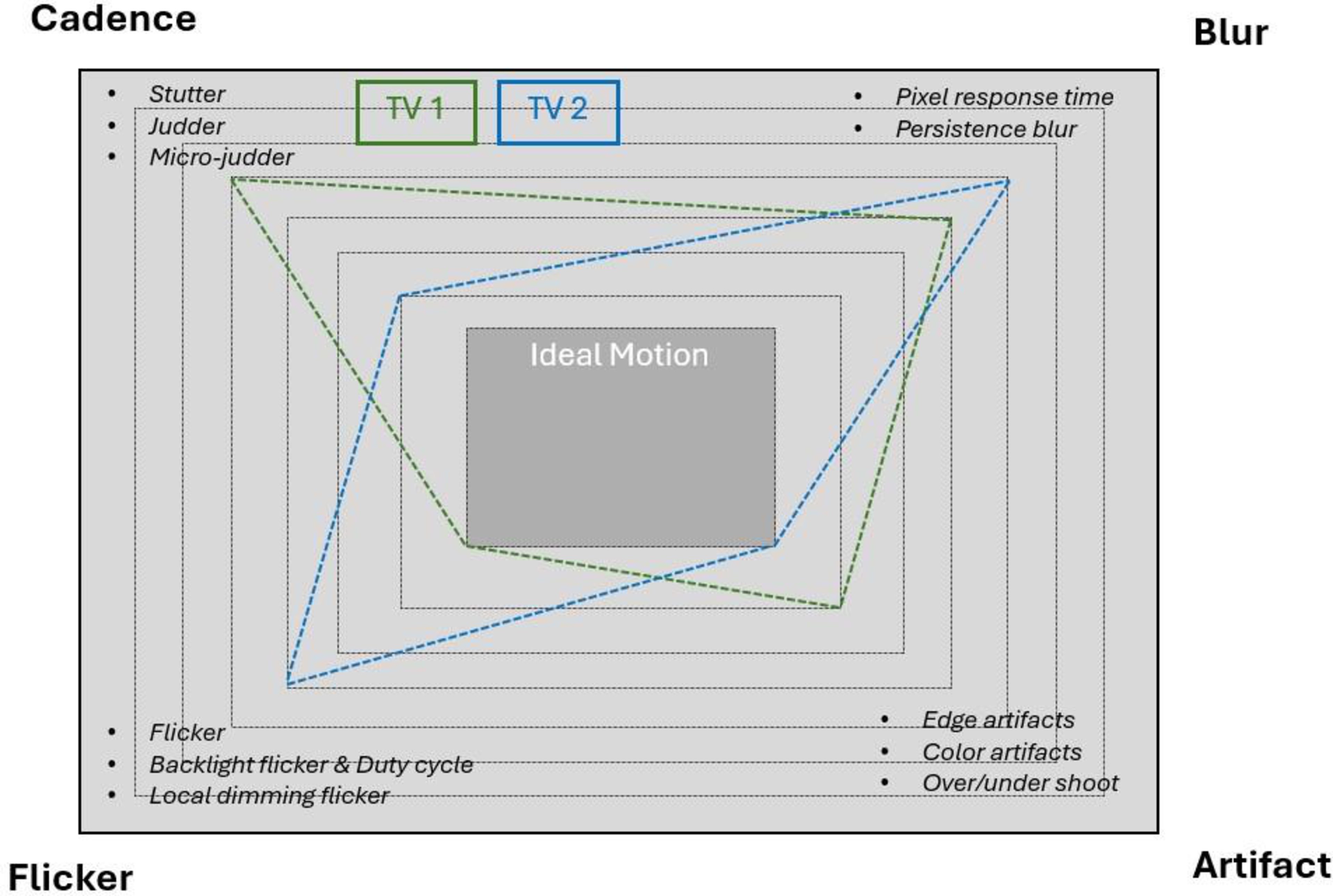
As we discovered more about motion handling during our research, we concluded that most of the different aspects that affect motion handling fall into one of four distinct categories: Cadence, Flicker, Blur, and Artifacts. We'll have more articles in the future that take a deep dive into what makes up these four pillars, but for now, let's take a quick look at each of these pillars to see exactly what goes into each one.
Cadence: The Rhythm Of Motion
Our first pillar of motion is a grouping of response time stutter, judder, and micro-judder. These three aspects make up motion cadence. When gaming in higher frame rates, motion is mostly smooth and fluid, but low frame rate content like movies is a lot more challenging for TVs. Since the vast majority of cinematic content is in 24 fps (some European content is also in 25 fps), there's a natural choppiness to motion that is made worse by the sample-and-hold process. Stutter has an inverse relationship with response time; the quicker the response time of a TV, the more apparent stutter there is. This happens because frames are held for a longer period on TVs with fast response times. Since OLEDs have nearly instantaneous response times, they have the most visible stutter. However, every modern TV has a relatively fast response time and exhibits some degree of stutter with low frame rate content, and it's most visible during slow panning shots. Some research even indicates that the stutter is more perceivable at higher levels of brightness and on larger screens.
Judder is caused by an uneven distribution of frames across a TV's refresh rate. More basic 60Hz models can exhibit judder, since 23.976, 24, and 25 don't fit evenly into 60, so some frames are held longer than others. This causes a subtle jerky motion, which can be distracting for some viewers. With that said, most 60Hz TVs nowadays can de-judder 24 fps content by lowering their refresh rate to 48Hz or raising it to 72Hz. Furthermore, many modern TVs have a 120Hz refresh rate, so every frame in a single second is displayed five times to match the TV's refresh rate, giving you a judder-free viewing experience.
Micro-judder happens when frames are dropped, meaning they're not displayed. When this happens, there's a subtle, yet distracting jump in a scene. Fortunately, micro-judder and judder can be corrected for. On the other hand, stutter can only be smoothed out using motion interpolation, which isn't an ideal solution. Check out our in-depth article on cinematic motion cadence for more detailed information.
Flicker: The Hidden Flash Behind The Screen
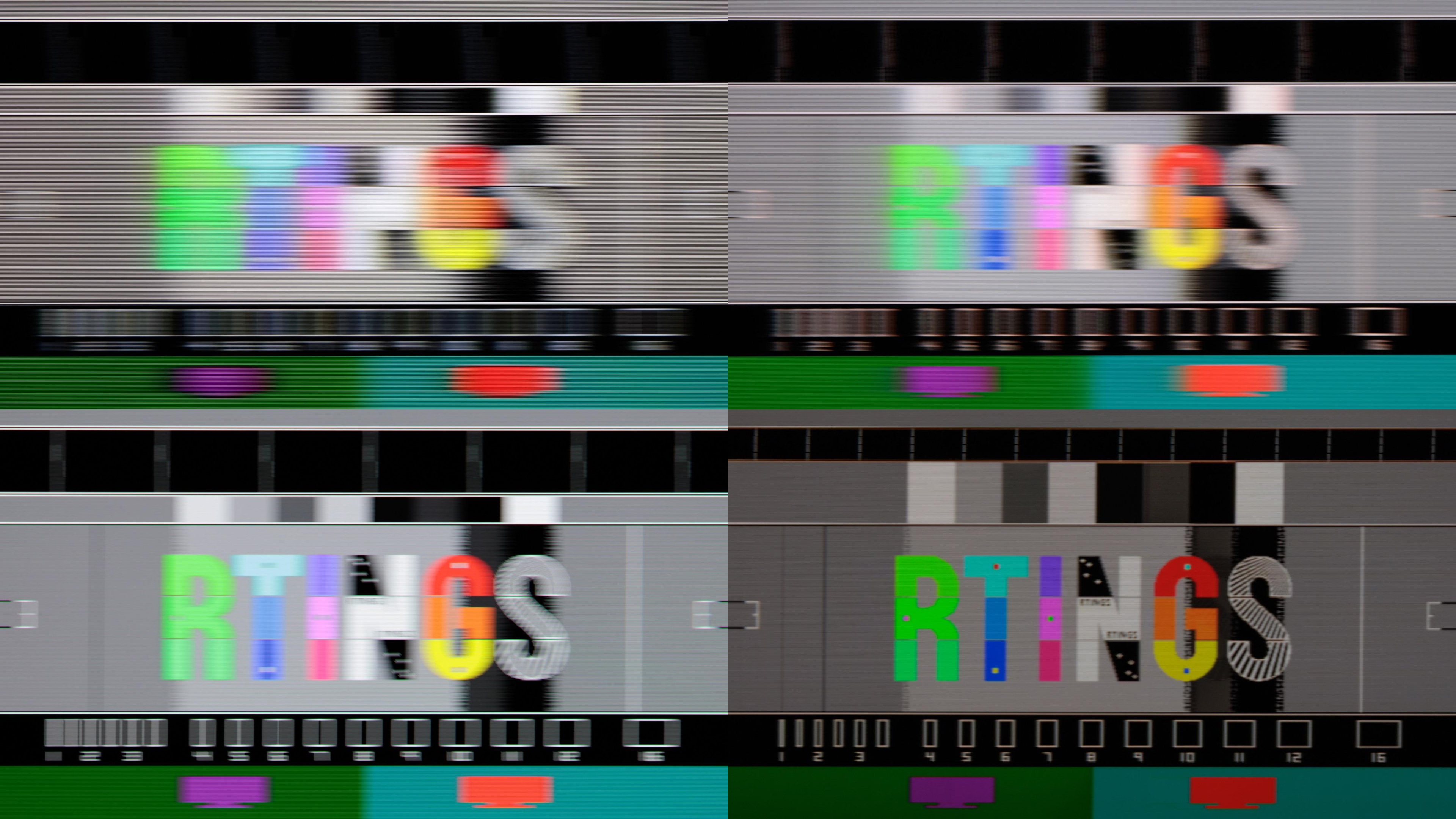
Right off the bat, it's important to note that our research into flicker is only applicable to how it affects motion, and not any potential health-related side effects for those who are sensitive to it. Whether you notice it or not, most LED TVs flicker using a method referred to as pulse width modulation (PWM). The frequency of this flicker occurs anywhere between 120 and 30,000 times per second, depending on the TV. There's also the duty-cycle, which is the amount of time the backlight (or edge lighting) is on and off. The third factor is the amplitude of the flicker, which represents the ratio between the maximum and minimum amount of light in a cycle. There's a good deal of math required to understand the correlation between frequency, duty-cycle, and amplitude, and we'll discuss this more in-depth in future articles. Flicker is complicated, but the main takeaway is that flicker plays a crucial role in how we perceive motion. For example, even though you probably don't actually notice your LED TV flickering, if the timing of the flicker is off, you might end up seeing undesired artifacts like image duplication. Flicker can also have a positive impact on how we perceive persistence blur, which is covered in the following section.
To see how flicker behavior has drastically changed throughout the years, look at the video below that shows the flicker pattern of four different TV technologies.
Unfortunately, it's not as cut and dry as TV technology when it comes to flicker. LED TVs have drastically different flicker frequencies depending on the model, and some TVs (most notably Samsung models) flicker at different frequencies depending on the picture mode being used. A TV's brightness setting can also change the frequency pattern, as many LED models don't exhibit flicker when set to maximum brightness. Furthermore, local dimming can also play a role, since the flicker perception can change across the screen.
Blur: When Motion Loses Sharpness
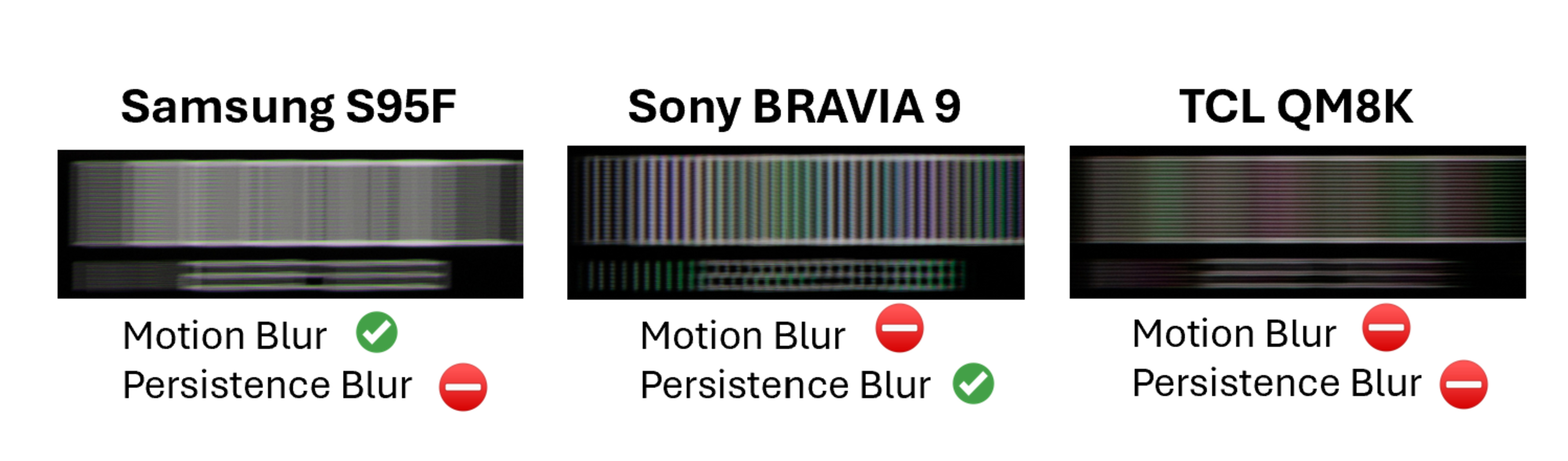
If you've ever read one of our TV reviews, you've likely seen us talking about motion blur and its correlation to response time. Motion blur is probably the easiest motion-related aspect to understand; the quicker the response time, the less motion blur there is. However, there's also persistence blur, which is caused by the sample-and-hold method every modern TV uses. LED TVs tend to have more motion blur than OLEDs, but some LED models that utilize PWM flickering have less noticeable persistence blur than OLEDs. Persistence blur can be lessened by using BFI, but for now, that feature isn't part of our investigation.
As you can see in the image below, the numbers on the Sony BRAVIA 9 are readable, since the TV has the least amount of persistence blur out of the three models. However, the BRAVIA 9 doesn't perform nearly as well when it comes to motion blur. On the other hand, the Samsung S95F is an OLED with almost no flicker at all, which leads to more apparent persistence blur, but the TV has the least amount of noticeable motion blur. The TCL QM8K doesn't perform well when it comes to motion blur and persistence blur.
Artifacts: The Strange Side Effects Of Poor Processing
Image processing also goes a long way in how well a TV handles motion. We'll have a much deeper dive into this in future articles, but simply put, the worse the image processing is on a TV, the more artifacts there are. We've discovered three primary artifacts during our investigation: edge artifacts, color ghosting, and response time asymmetry.
Edge artifacts are a limitation of a processor whose response time is slower around the edge of a high-contrast image, which results in image duplication, edge flicker, or blurry edges around a fast-moving object.
Color ghosting happens when pixels transition from one color to another. If the transition isn't handled well, you'll see remnants of the first color after the transition is complete. For example, if a pixel transitions from red to blue in a scene you're viewing, you might see a red ghost-like effect that lingers around the blue area when it shouldn't be there. However, this is incredibly difficult to see in real content, and although we can measure this, we have yet to find a correlation between our measurements and real content. We're at a bit of a standstill with our research on this, so unless we get valuable feedback, we might not pursue this.
There's also response time asymmetry, which occurs when the rise and fall of pixel transitions aren't even. This results in a spatial overshoot and undershoot, which can be perceived as a slight flickering on the screen for scenes that involve asymmetrical pixel transitions. This flicker is very subtle when watching content, and most people won't even notice it, but response time symmetry is an important piece of the motion puzzle.
We'll have articles in the future that go in-depth into all of these different types of motion artifacts, but if you want to learn more and see some examples, we have a post on AVSForum that goes into more detail.
Initial Insights: What We've Found So Far
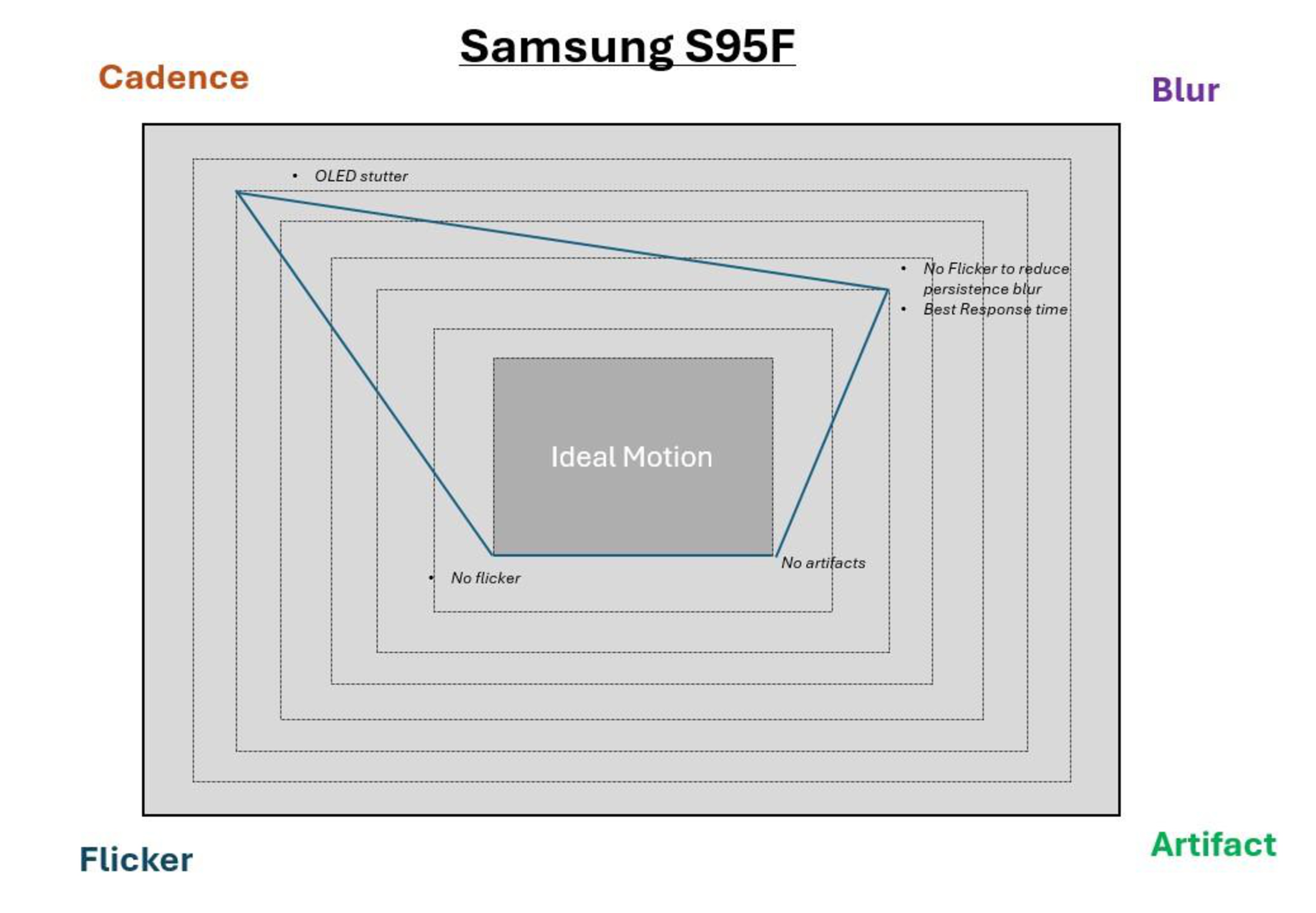
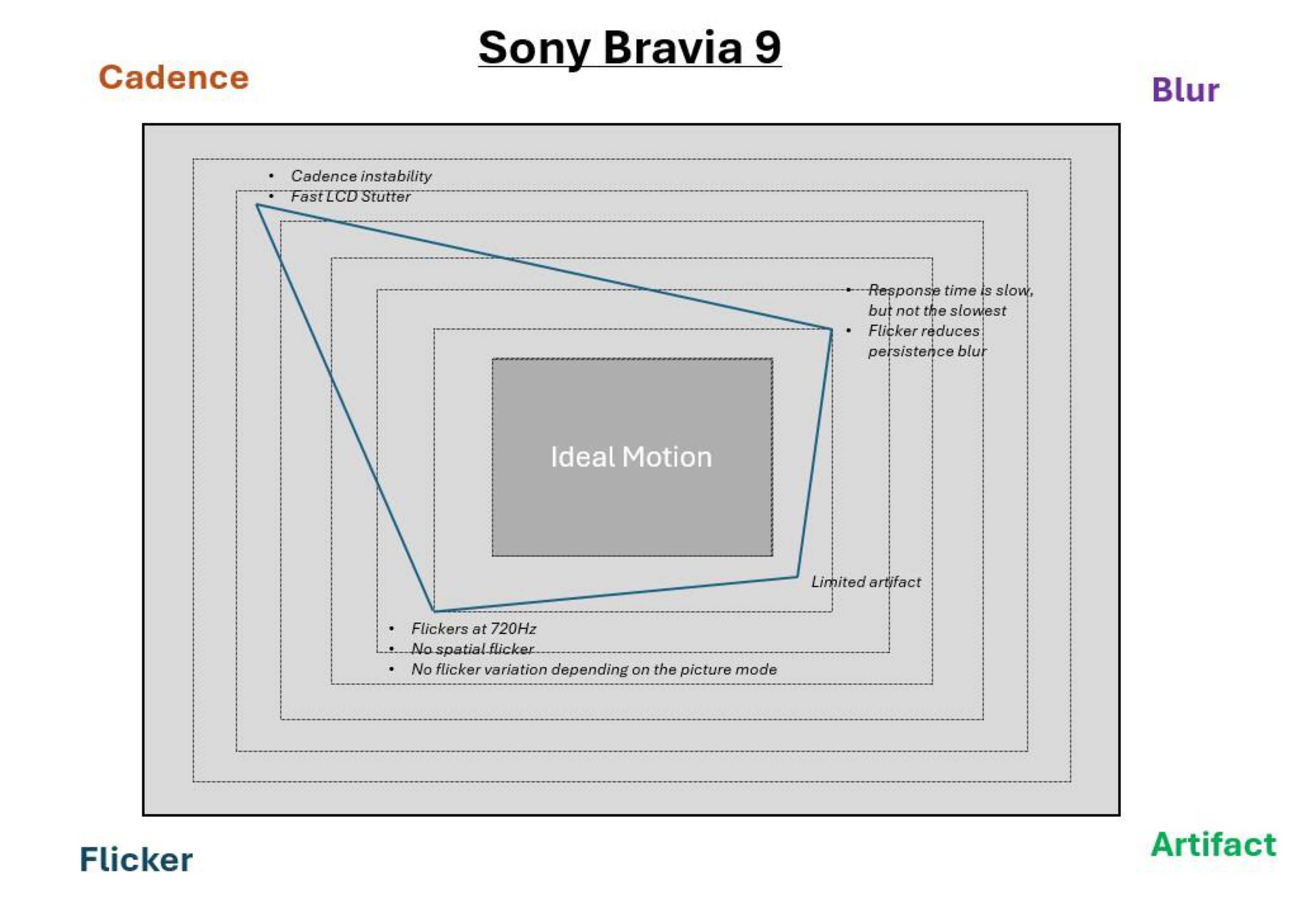
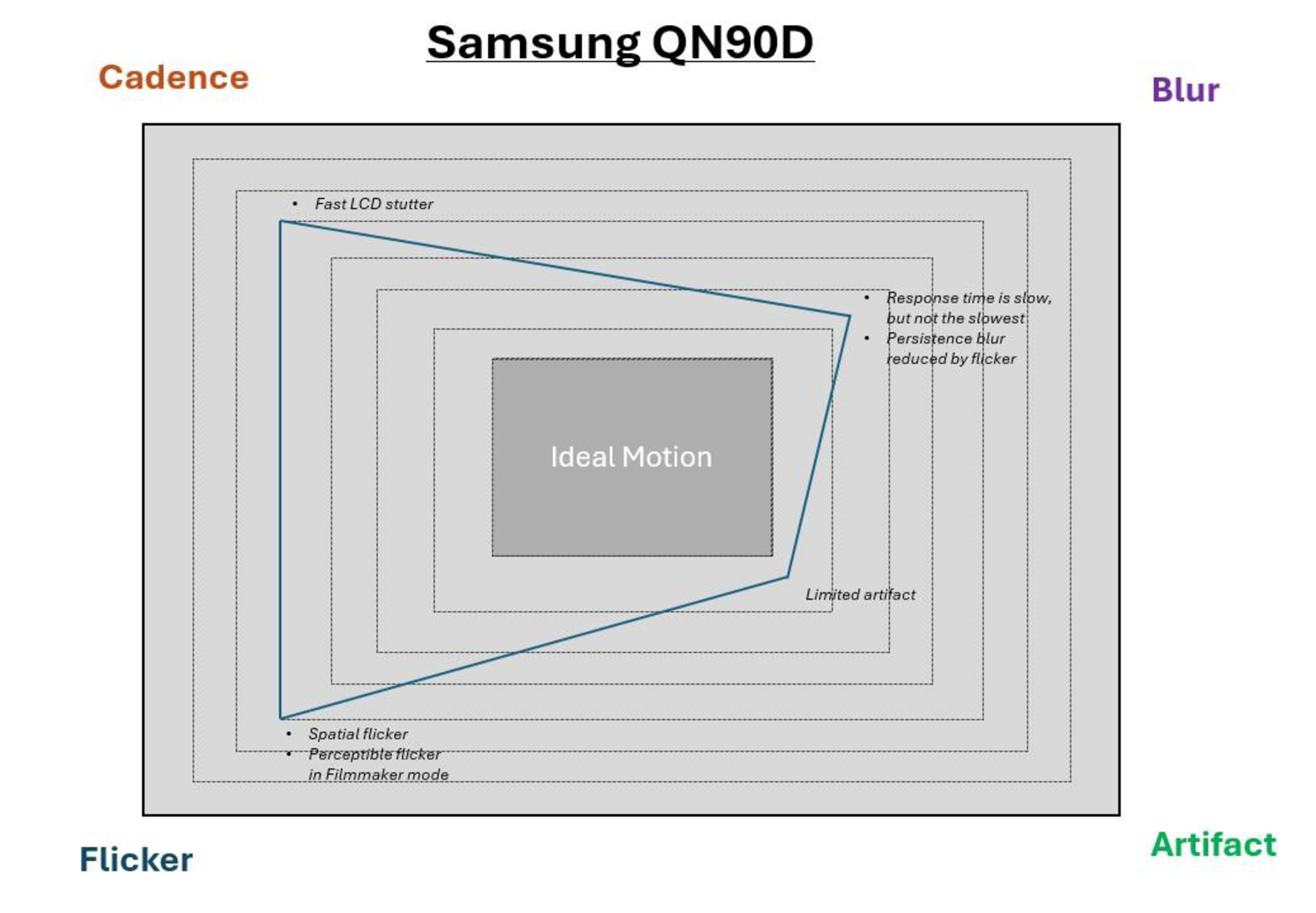
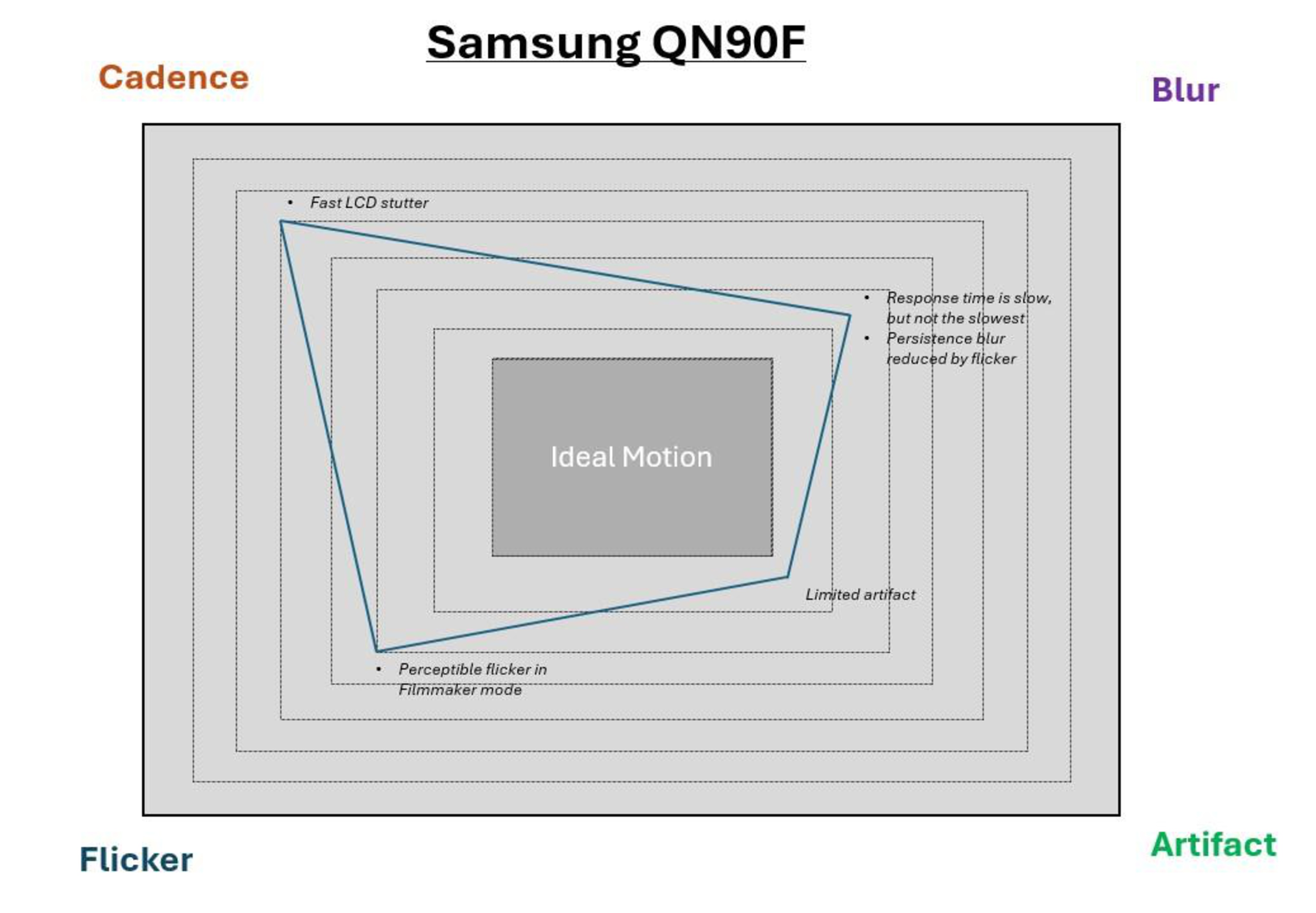
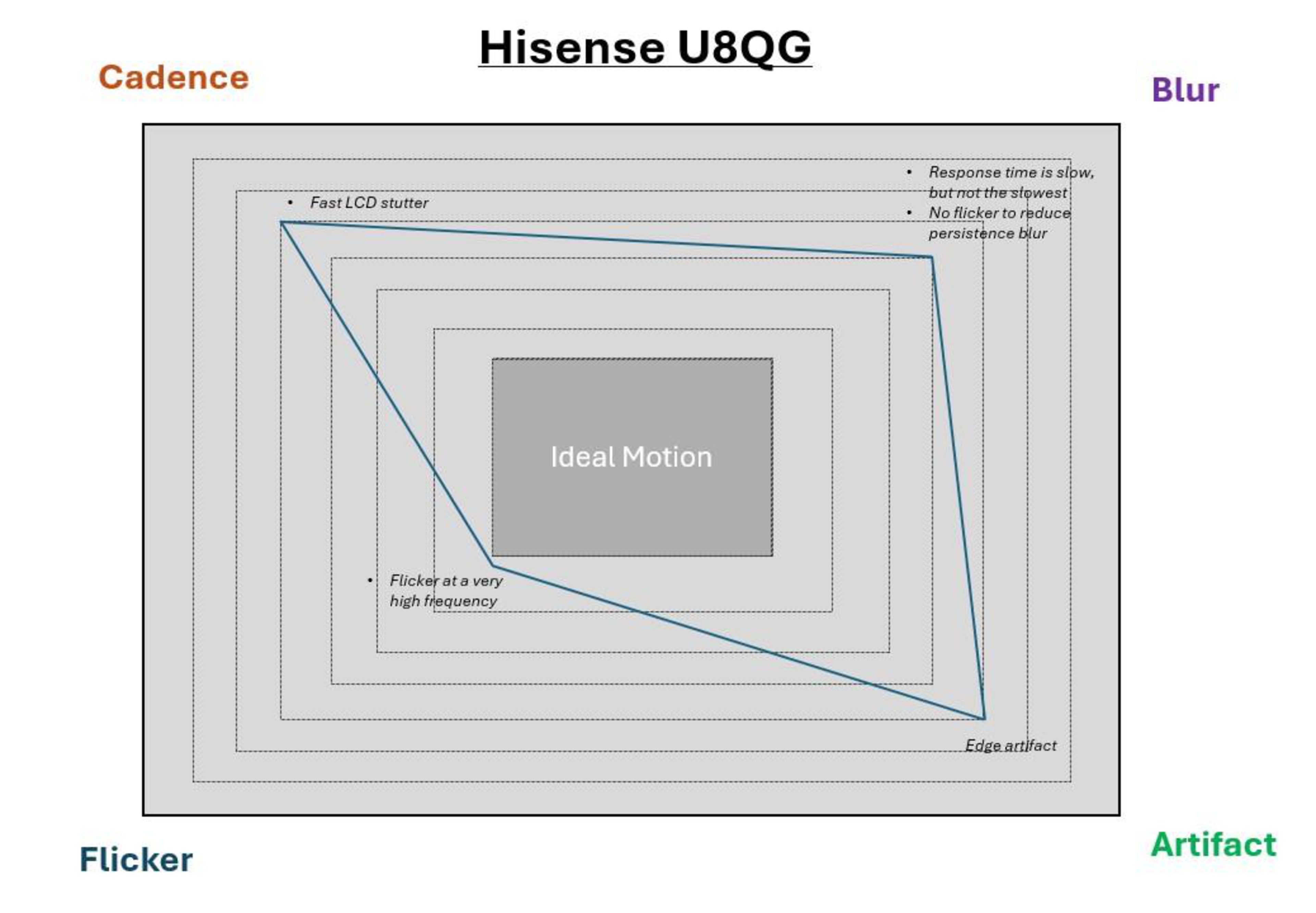
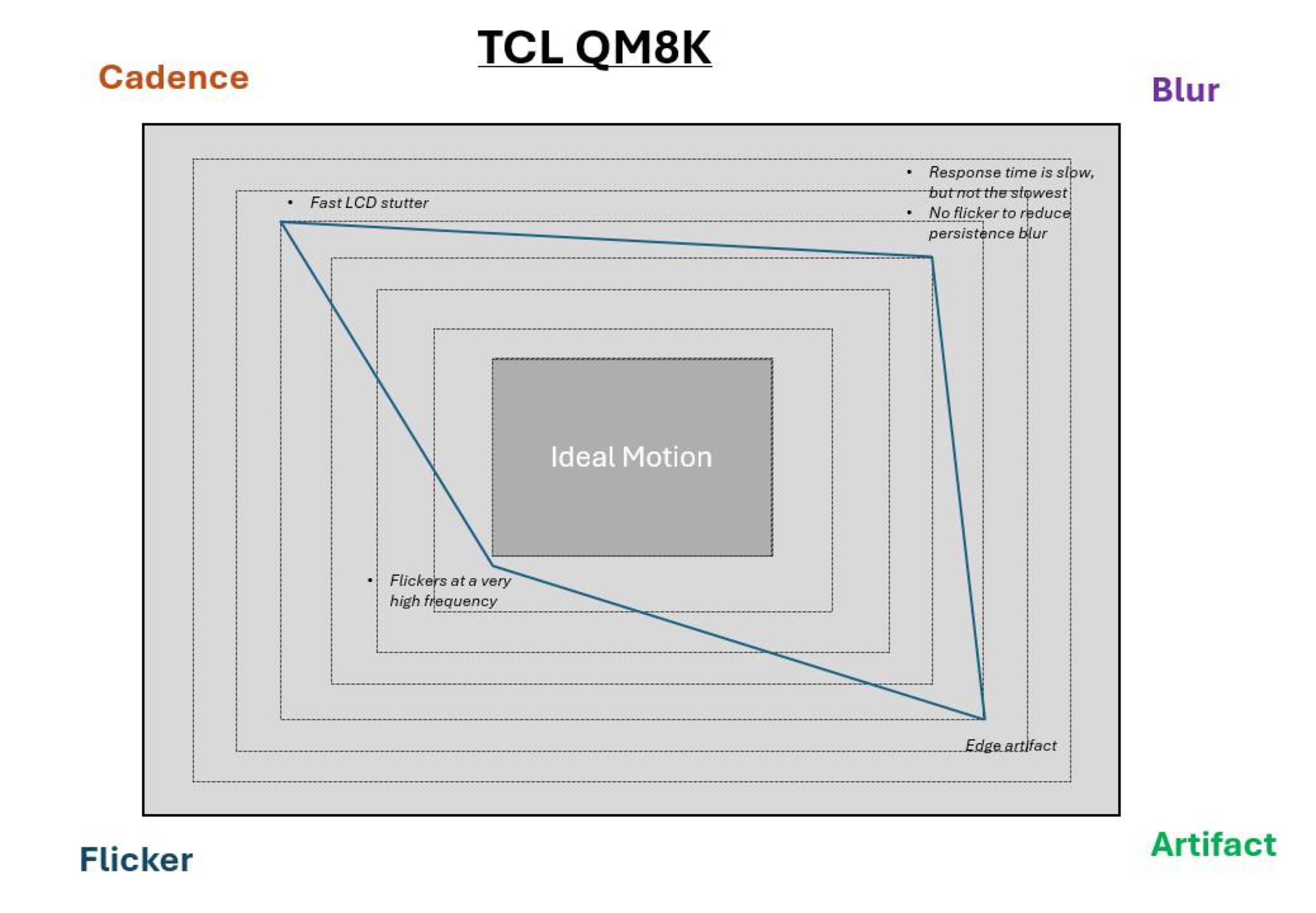
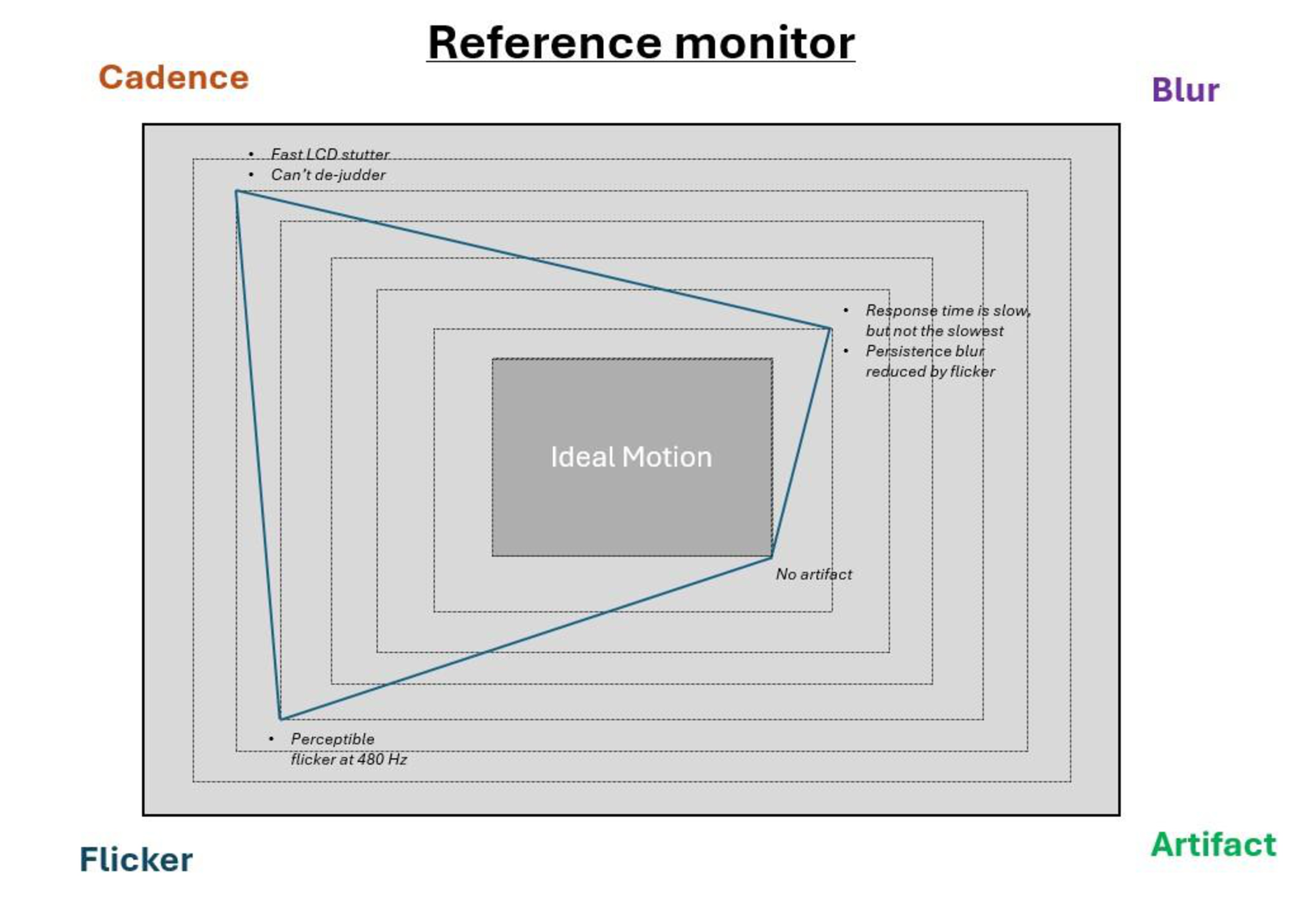
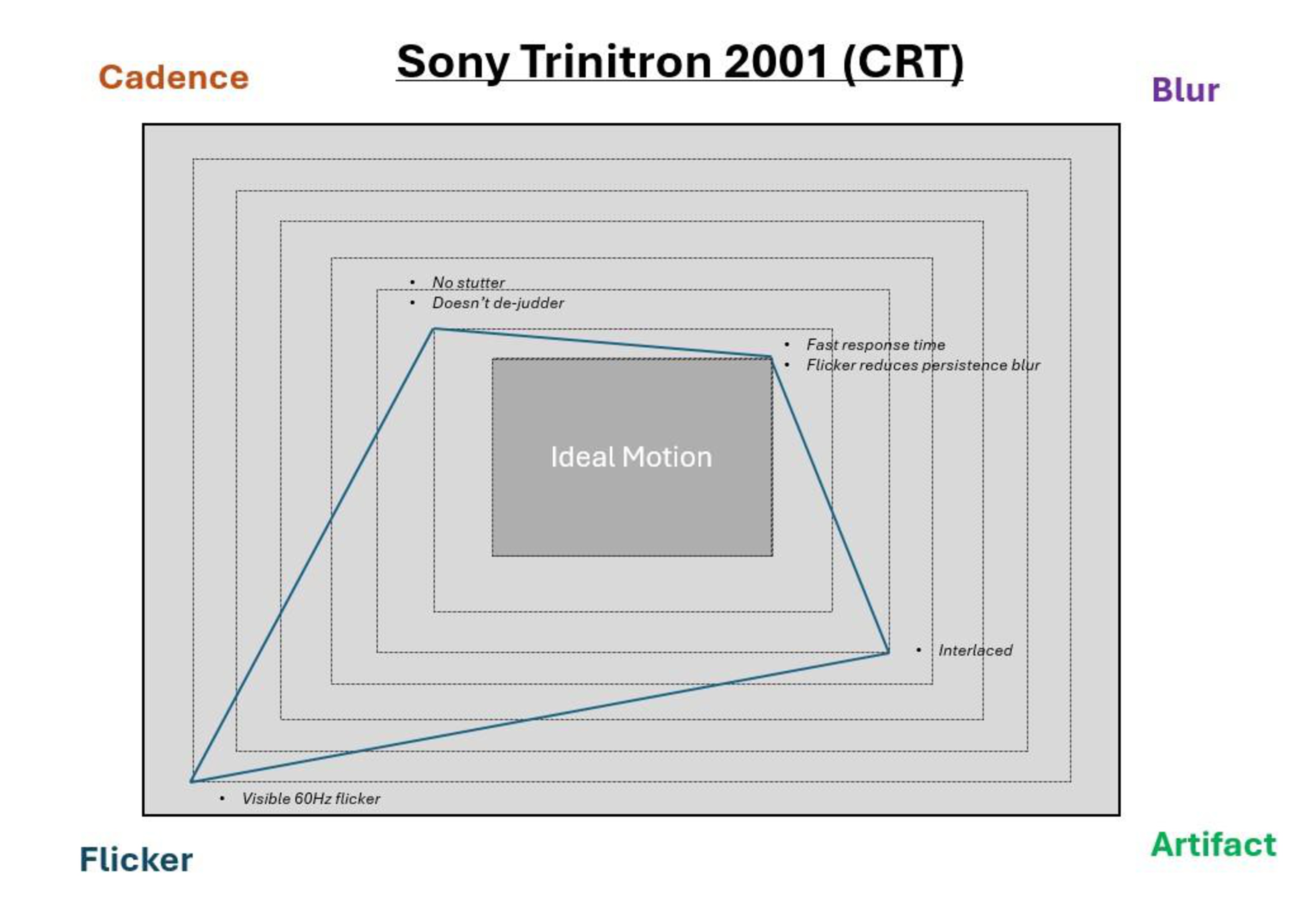
By investigating all these different factors that go into motion handling, we've been able to group these aspects into four different pillars. Although some TVs handle motion better than others overall, no TV is perfect. For example, some people will prefer living with some persistence blur if it means they get a TV with minimal flicker and vice versa. It really depends on the person, but by testing the components that make up our pillars, we can help users find the TV that displays motion based on their preferences. If you look at the graphs below, you can see how some popular models from 2024 and 2025 perform when it comes to motion, each with their own strengths and weaknesses. You can also see how these modern TVs stack up against an older CRT display, a plasma TV, and a reference monitor.
 |
 |
 |
 |
 |
 |
 |
 |
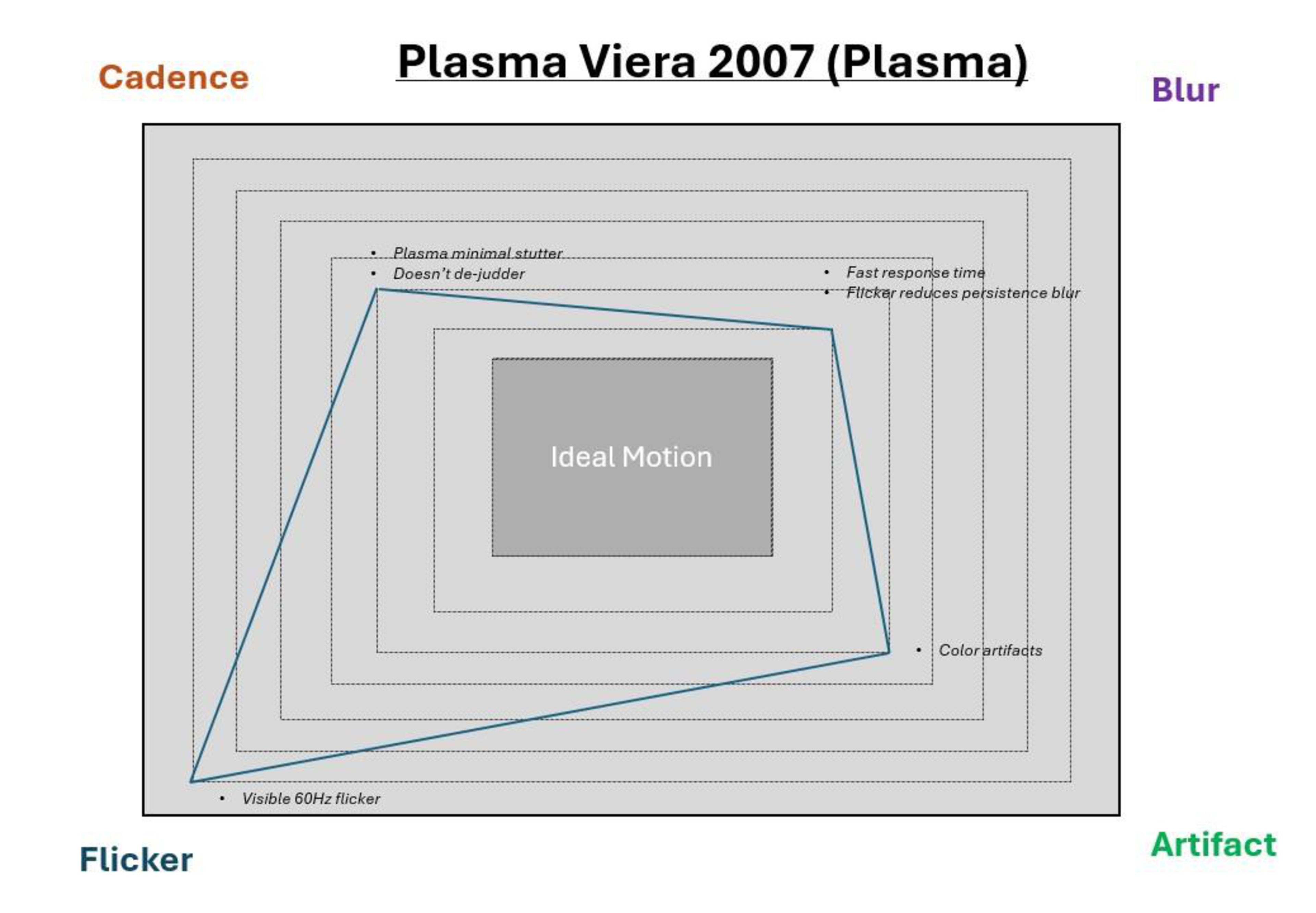 |
From the images above, you can see that no TV perfectly covers the four pillars of motion, as there's always one or more weaker pillar.
What's Next in Our Journey to Redefine Motion Testing
Motion isn't easy, and we don't want to rush anything before being completely confident in our testing. Instead of adding a giant swath of new tests in our next test bench update, we're going to slowly incorporate each of these four pillars across numerous test benches. In our test bench update (TBU) 2.1, we'll be adding cadence, TBU 2.2 will add flicker and blur, and TBU 2.3 will add edge artifacts. We'll be putting the same 10 TVs through these evolving test methodologies, with accompanying articles and videos each step of the way. The list of the 10 TVs that are going on this journey with us is listed below.
- Samsung QN90F
- TCL QM8K
- Hisense U8QG
- Sony BRAVIA 9
- Samsung S95F OLED
- Sony Bravia 8 II OLED
- LG G5 OLED
- LG UT7570
- Sony X90L
- Panasonic W95A
We chose these 10 popular TVs because it gives us a good mix of everything from entry-level LEDs to high-end OLEDs. We limited ourselves to these 10 models because we don't want to bite off more than we can chew, and we want to make sure that both us and the community are fully confident in our new motion tests before updating more models. Once we've solidified our motion tests across these three new test benches, we'll be updating a bunch more models.
Conclusion: We Need Your Help!
Although we've come a long way with our investigation in the past six months and are starting to feel confident with our findings, we still need your help. Whether you own a high-end OLED or an entry-level LED model, we want your feedback. What do you see when it comes to low-frame-rate motion on your TV? Are there any specific scenes from movies or shows that your TV struggles with? If so, we'd love to hear from you. We want to solve this motion equation with transparency, but we need your valuable feedback to make our tests the very best they can be, so feel free to leave us a comment below or email us at feedback@rtings.com!