Products
Tested using Methodology v1.4.3
Updated Jun 03, 2026 04:05 PM
SEE PRICE
Amazon
Tested using Methodology v1.4.3
Updated Mar 12, 2026 04:42 PM
SEE PRICE
Amazon

ConnectivityWireless
Size
Full-size (100%)
Switch Type
Scissor
Output Type
Non-Adjustable
Hot-Swappable Switches
No
ConnectivityWireless
Size
Compact (75%)
Switch Type
Mechanical
Output Type
Non-Adjustable
Hot-Swappable Switches
Yes
Our Verdict
Logitech MX Keys S
Lofree Flow84/Flow100
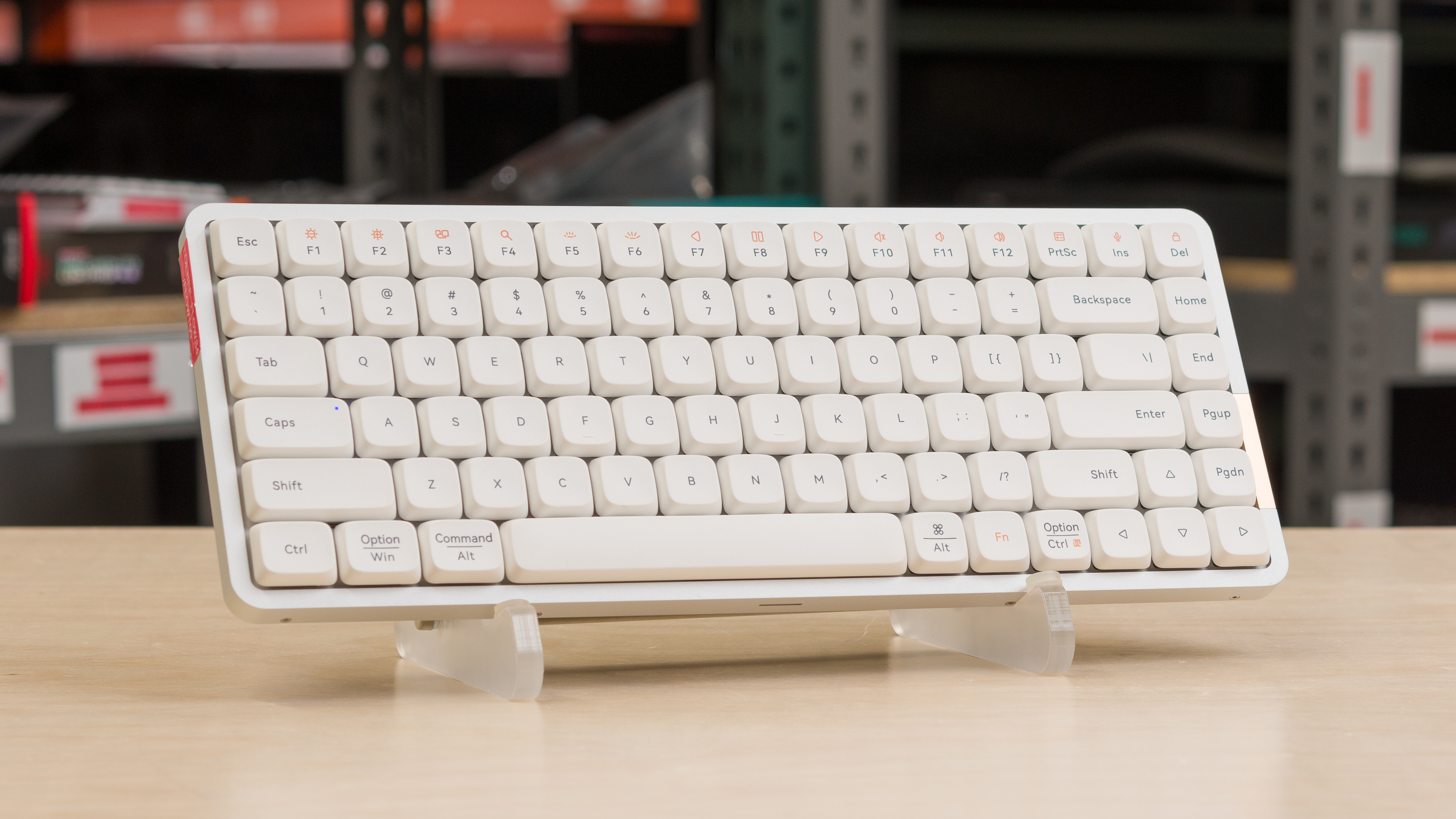
The Logitech MX Keys S and the Lofree Flow100 are low-profile keyboards, but they differ in several key ways. The Logitech is noticeably thinner, but it uses scissor switches and has a plastic case that doesn't feel as premium as the aluminum case on the Lofree. The Lofree, by contrast, uses mechanical switches and features a gasket-mount design, giving it a softer, slightly springy typing feel. That said, the Lofree also lacks configuration software, so it doesn't support custom profiles or macro recording, unlike the Logitech
Variants
- MX Keys S (Black)
- MX Keys S (Graphite)
- Flow84 (White)
- Flow100 (White)
Check Price
Black
MX Keys S
SEE PRICE
BestBuy.com
White
Flow84
SEE PRICE
Amazon
Graphite
MX Keys S
SEE PRICE
Amazon
White
Flow100
SEE PRICE
Amazon
Pale Gray
MX Keys S
SEE PRICE
Amazon
Pale Grey
MX Keys S for Mac
SEE PRICE
Amazon
Space Gray
MX Keys S for Mac
SEE PRICE
Amazon
Main Differences for
Gaming
Gaming
Threshold
Gaming
Full Comparison
Design
Dimensions
Top Picture

Size
Height
Width
Depth
Depth With Wrist Rest
Weight
Build Quality
Build Quality Close Up

Underside Picture

Keycap Material
Ergonomics
Side Picture

Curved/Angled
Split Keyboard
Key Alignment
Minimum Incline
Medium Incline
Maximum Incline
Home Row Height
Hardware Customizability
Customizability Overview

Replaceable Cherry Stabilizers
Stabilizer Fixation
Spacebar Stabilizer Size
Size Of Right Mod Keys
Hot-Swappable Switches
Switch Stem Shape
Mechanical Switch Compatibility
Magnetic Switch Compatibility
North-Facing Cherry MX Interference
Backlight Features
Backlighting Picture

Brightness Max

Backlighting
Brightness Min

RGB
Per-Key Backlighting
Effects
Software Controllable
Backlight Clarity
White Shot

Cable & Connector
Connectivity
Detachable
Length
Connector (Keyboard side)
Wireless Versatility
Bluetooth
Bluetooth Multi-Device Pairing
Proprietary Receiver
Battery Type
Macro Keys And Programming
Dedicated Macro Keys Count
Onboard Macro Programming
Macro Programming With Software
Extra Features
Extra Features

Media Keys
Trackpad / Trackball
Scroll Wheel
Control Knob
USB Passthrough
Numpad
Windows Key Lock
Lock Indicator
In The Box
Bundle Picture

Typing Experience
Typing Quality
Key Spacing
Typing Noise
Typing Sample

Average Loudness
High Pitch Clicks
Keystrokes
Key Switch Actuation Graph

Initial Force
Peak Tactile Force
Actuation Force
Bottom-Out Force
Pre-Travel Distance
Total Travel Distance
Adjustable Input Granularity
Input Linearity Graph
Analog Output Graph

Top Deadzone
Bottom Deadzone
Detection Ratio
Minimum Step Depth
Switches
Wobble Video

Switch Name
Switch Type
Feel
Output Type
Performance
Single-Key Latency
Single-Key Latency Graph

Best Connection
Best Connection Std Dev
Wired
Receiver
Bluetooth
PCB (Estimated)
Multi-Key Latency
Multi-Key Latency Graph

Connection Evaluated
Key Press
Data Transmission
Multi-Key Raw USB

Connection Evaluated
USB Polling Rate
Effective Update Rate
N-Key Rollover (NKRO)
Multiple Keys Per USB Report
Chord Split
Chord Split Graph

4 Chord Split Delay
8 Chord Split Delay
Software and Operating System
Configuration Software
Software Tour


Software Name
Software Windows Compatible
Software macOS Compatible
Onboard Memory
Profiles
Computer Compatibility
Windows
macOS
Linux
Media Key Compatibility
Wireless Mobile Compatibility
Android
iOS
iPadOS
Media Key Compatibility
Check Price
Black
MX Keys S
SEE PRICE
BestBuy.com
White
Flow84
SEE PRICE
Amazon
Graphite
MX Keys S
SEE PRICE
Amazon
White
Flow100
SEE PRICE
Amazon
Pale Gray
MX Keys S
SEE PRICE
Amazon
Pale Grey
MX Keys S for Mac
SEE PRICE
Amazon
Space Gray
MX Keys S for Mac
SEE PRICE
Amazon
Logitech MX Keys S
Lofree Flow84/Flow100
Comments
Logitech MX Keys S vs Lofree Flow84/Flow100: Main Discussion
What do you think of these products? Let us know below.
Looking for a personalized buying advice from the RTINGS.com experts? Members have direct access to buying advice on our member forum.