Lemokey P1 HE  Keyboard Review

Review updated Oct 20, 2025 at 03:02pm
Tested using Methodology v1.4.2 
Lemokey P1 HE
8.8
Gaming 
8.4
Office 
7.3
Mobile/Tablet 
8.5
Programming 
6.8
Entertainment / HTPC 
8.6
Raw Performance 
 2
  1. Recommended in:
  2. Gaming
  3. Keyboards

The Lemokey P1 HE is a gaming keyboard featuring Hall effect switches, making it the first of its kind from Lemokey—a gaming-focused sub-brand of Keychron. It supports both wired and wireless connectivity via a 2.4GHz receiver or Bluetooth and includes per-key RGB backlighting. Its specialized switches let you adjust the actuation and reset distance of individual keys for a more customizable experience. Additionally, its web-based software supports advanced features like Rapid Trigger, Snap Action, and One Key Multiple Commands, which can offer small but noticeable advantages in certain gaming scenarios, particularly for FPS and rhythm games.

Our Verdict

8.8
Gaming 

The Lemokey P1 HE is an excellent gaming keyboard with outstanding build quality and raw performance. It's well suited for gaming in all genres at any competitive level. The web-based software offers in-depth customization with accurate actuation and reset distances, as well as more advanced software features like Rapid Trigger that can give you small but noticeable advantages in games like FPS or rhythm titles.

Pros
  • Outstanding build quality.

  • Excellent raw performance.

  • Bright backlighting and clear shine-through keycaps make legends easy to read in dark rooms.

  • True 1000Hz update rate using a wired or 2.4GHz wireless connection.

Cons
  • Hot-swappable PCB only supports Gateron Double-Rail Magnetic switches.

  • True analog output doesn't work as expected.

8.4
Office 

The Lemokey P1 HE is an excellent keyboard for office use, offering outstanding build quality and wireless connectivity via a 2.4GHz receiver or Bluetooth, with pairing for up to three devices. Its typing experience is also exceptional, thanks to pre-lubed switches and stabilizers that feel smooth, stable, and consistent, with no noticeable rattling. Multiple layers of acoustic material inside the case dampen and round out the sound profile, making it extremely quiet—ideal for home or shared workspaces. However, its tall profile may be less ergonomic for extended use. For the best comfort, we recommend pairing it with a wrist rest, though note that one isn’t included.

Pros
  • Outstanding build quality.

  • Remarkably good typing quality.

Cons
  • Hot-swappable PCB only supports Gateron Double-Rail Magnetic switches.

7.3
Mobile/Tablet 

The Lemokey P1 HE is satisfactory for use with mobile devices and tablets, offering Bluetooth connectivity and multi-device pairing with up to three devices at once. However, despite its compact layout, its weight and tall chassis make it less convenient for carrying in a bag or frequently moving between hot desks or around the house.

Pros
  • Outstanding build quality.

  • Multi-device pairing with up to three devices simultaneously.

Cons
  • Heavy, bulky design.

8.5
Programming 

The Lemokey P1 HE is an excellent keyboard for programming. It has outstanding build quality, pre-lubed switches and stabilizers, and multiple layers of acoustic material that dampen sound, resulting in an exceptionally satisfying and quiet typing experience. For connectivity, it supports wireless use via 2.4Ghz receiver or Bluetooth (with pairing for up to three devices simultaneously). While it lacks dedicated macro keys, you can assign macros to any key using the web-based configuration software. Additionally, it offers full RGB backlighting and shine-through keycaps, ensuring clear visibility in low-light environments.

Pros
  • Outstanding build quality.

  • Remarkably good typing quality.

Cons
  • Hot-swappable PCB only supports Gateron Double-Rail Magnetic switches.

6.8
Entertainment / HTPC 

The Lemokey P1 HE is acceptable for use in a home theater setup. It has outstanding build quality and supports wireless connectivity via a USB receiver or Bluetooth. However, its lack of dedicated media keys and relatively heavy, bulky design make it less convenient for use while seated. On the plus side, it features full RGB backlighting with easily readable legends, making it well-suited for low-light environments.

Pros
  • Bright backlighting and clear shine-through keycaps make legends easy to read in dark rooms.

Cons
  • Heavy, bulky design.

8.6
Raw Performance 

The Lemokey P1 HE provides excellent raw performance well-suited for playing games in all genres and at a casual or competitive level. Single-key and multi-key latency is remarkably low, and regardless of whether you're using this keyboard wired or wirelessly, it has an effective update rate of 1000Hz that isn't bottlenecked by other latency elements. While the analog gamepad output is a more niche feature, it's currently inconsistent and doesn't work as expected. This can be a limitation if you're hoping to use gradual joystick-style control in genres like platformers, flight sims, or racing games. For more details, see the Adjustable Input Granularity section.

Pros
  • Excellent raw performance.

  • True 1000Hz update rate using a wired or 2.4GHz wireless connection.

Cons
  • True analog output doesn't work as expected.

  • 8.8
    Gaming
  • 8.4
    Office
  • 7.3
    Mobile/Tablet
  • 8.5
    Programming
  • 6.8
    Entertainment / HTPC
  • 8.6
    Raw Performance
  • Changelog

    1.  Updated Oct 20, 2025: 

      Added a reference to the Sony INZONE KBD-H75 as an alternative with a better polling rate in the Data Transmission test box.

    2.  Updated Oct 02, 2025: 

      Added a reference to the IQUNIX EZ80/EZ75 as an alternative with a better polling rate in the Data Transmission test box.

    3.  Updated Oct 02, 2025: Our 1.4.2 Test Bench Update makes changes to the Hardware Customizability test group. We've created a new Magnetic Switch Compatibility test and renamed our previous PCB Socket test to Mechanical Switch Compatibility. See our full changelog.
    4.  Updated Aug 26, 2025: We've converted this review to Test Bench 1.4.1. This update removes the Key Release test and a video element from the Multi-Key Latency section, resulting in minor score changes. See our full 1.4.1 changelog for details.

    Check Price

    Differences Between Sizes And Variants

    The Lemokey P1 HE is available in a black or white colorway and several different fully assembled configurations. We bought and tested the Fully Assembled Knob (shine-through) configuration in the White colorway.

    Name Configuration Color Switches
    Lemokey P1 HE Wireless  Fully Assembled Knob (Shine-Through) Black / White Gateron Double-Rail Magnetic Nebula Switch
    Lemokey P1 HE Wireless  Fully Assembled Knob Black* Gateron Double-Rail Magnetic Nebula Switch

    *The black colorway for the Fully Assembled Knob configuration has a tri-tone (dark gray, black, and mint green) keycap set that's different than the all-black keycap set on the Fully Assembled Knob (shine-through) configuration.

    Popular Keyboard Comparisons

    The Lemokey P1 HE is a wireless gaming keyboard with Hall effect switches, marking the first such release from Lemokey, a gaming-focused sub-brand of Keychron. Positioned as a mid-range option, it competes in a growing market of Hall effect gaming keyboards, including models from its parent company. In terms of build and typing quality, the P1 HE outshines the more affordable Keychron K2 HE and even surpasses the significantly pricier Keychron Q1 HE, all while matching both in raw gaming performance. This makes it the most compelling Hall effect choice within the wider Keychron lineup at the time of writing. While it falls short of the pure gaming performance of higher-end, wired-only competitive models like the Wooting 80HE or Razer Huntsman V3 Pro, it offers wireless connectivity, a more premium build, and a typing experience surprisingly close to some custom keyboards—all at a more affordable price point.

    For more recommendations, see our picks for the best wireless keyboard, the best gaming keyboard, and the best budget gaming keyboard

    Keychron Q1 HE [Q5 HE, Q6 HE, etc.]

    The Keychron Q1 HE and Lemokey P1 HE are wireless Hall effect keyboards designed primarily for gaming, offering virtually identical raw performance. Both feature solid aluminum cases and gasket-mounted designs, but the Lemokey P1 HE stands out with superior build quality overall. Its keys are a bit more stable, and its stabilizers are better tuned to eliminate the inconsistencies and rattling found on the Keychron, resulting in a noticeably higher-quality typing experience.

    Keychron K2 HE [K4 HE, K8 HE, etc.]

    The Keychron K2 HE and Lemokey P1 HE are both wireless Hall effect keyboards with virtually the same raw gaming performance. While they're both compact 75% models, the Keychron has a slightly more compact key layout, while the Lemokey has a more traditional layout and a control knob. The Lemokey also boasts a more premium build, featuring a solid aluminum case, greater key stability, and better-tuned stabilizers. Additionally, its gasket mount design provides a softer, more refined typing feel compared to the stiffer, tray-mounted structure of the Keychron.

    Wooting 80HE

    The Wooting 80HE and the Lemokey P1 HE are gaming keyboards with Hall effect switches. The Wooting is a better choice for competitive gaming with significantly better raw performance and a higher maximum polling rate of 8000Hz. It also has slightly more robust software customizability. However, it only supports a wired connection. In contrast, the Lemokey supports both wired and wireless connectivity via a 2.4GHz receiver or Bluetooth. It stands out for having superior build quality, featuring more consistent stabilizers, a slightly softer gasket mount design, and improved acoustics—resulting in a better overall typing experience.

    NuPhy Air60 HE

    Both the NuPhy Air60 HE and the Lemokey P1 HE are gaming keyboards with Hall effect switches. The NuPhy has a much slimmer and more portable low-profile design and significantly better raw gaming performance, but it only supports wired connectivity. On the other hand, the Lemokey supports wired or wireless connectivity with its 2.4Ghz receiver or Bluetooth. It also has a taller, normal profile design and more premium-feeling build quality with a solid aluminum case and softer gasket mount design.

    Show more 

    Test Results

    perceptual testing image
    Sort:
    RATINGS
    Category:
    All
    Design
    Dimensions
    Size
    Compact (75%)
    Height
    1.4" (3.5 cm)
    Width12.8" (32.4 cm)
    Depth
    5.1" (12.9 cm)
    Depth With Wrist Rest
    N/A
    Weight
    3.47 lbs (1.572 kg)

    The Lemokey P1 HE has a fairly standard compact (75%) layout. It lacks a Numpad and several keys from the navigation cluster but takes up considerably less space on your desk than a conventional full-size keyboard.

    Also note that this keyboard is quite heavy for its size due to its solid aluminum case design, and its fairly tall profile means it isn't ideal for throwing into bags or carrying with you on the go.

    9.0
    Build Quality
    Keycap MaterialPBT

    This keyboard has outstanding build quality and features a solid aluminum case with a pleasant, slightly chalky finish that doesn't show fingerprint oil.

    It has a gasket mount design that uses small silicone 'beans' inside the case to soften the overall typing feel without dramatically impacting actuation accuracy.

    The keycaps have a Cherry profile and are made of slightly textured doubleshot PBT, which tends to be more durable than ABS plastic keycaps.

    This keyboard also has several layers of sound-dampening material, including a sound-absorbing foam layer between the PCB and switch plate and a layer of EPDM foam and PET film in the bottom of the case, under the PCB.

    The keyboard's underside features an embedded weight with a patterned, mirror-finish and four rubber strips do a good job of keeping it from sliding around on your desk.

    6.0
    Ergonomics
    Curved/Angled
    No
    Split Keyboard
    No
    Key Alignment
    Staggered
    Minimum Incline
    Medium Incline
    N/A
    Maximum Incline
    N/A
    Home Row Height
    31.3 mm (1.2")

    This keyboard has a standard, high-profile design. Unfortunately, it lacks flip-out feet for providing typing angle options, but this isn't surprising given how heavy it is with its solid aluminum case.

    This keyboard doesn't come with a wrist rest, but Lemokey sells silicone or resin wrist rests to match on its website.

    7.9
    Hardware Customizability
    Replaceable Cherry Stabilizers
    Yes
    Stabilizer Fixation
    Screw-in
    Spacebar Stabilizer Size
    6.25u
    Size Of Right Mod Keys
    1u
    Hot-Swappable Switches
    Yes
    Switch Stem Shape
    Cherry MX Style
    Mechanical Switch Compatibility
    No Mechanical Switch Pinout
    Magnetic Switch Compatibility
    Horizontal
    North-Facing Cherry MX Interference
    Yes

    This keyboard has a hot-swappable PCB. However, Lemokey's product page indicates this keyboard is only compatible with Gateron Double-Rail Magnetic Switches and doesn't support other magnetic switches such as the Gateron Magnetic Jade or Gateron KS-20 Magnetic switches.

    At the time of writing, this keyboard is only available in a prebuilt configuration with Keychron Nebula switches. Lemokey does sell other Gateron Double Rail options separately, including Gateron Double Rail Aurora and Gateron Double Rail Dawn switches. See the Switches section for details on the differences between these switches.

    Just note that the right-side modifier keys are 1u-sized instead of the slightly more common 1.25u size. 

    The switches are installed north-facing out of the box. Due to this north-facing orientation, there is always a small possibility of interference with some aftermarket sets of MX style keycaps.

    We tested the switches in a south-facing orientation, and they functioned as expected overall. However, this orientation significantly reduces RGB visibility and may impact switch actuation accuracy.

    10
    Backlight Features
    BacklightingYes
    RGB
    Yes
    Per-Key Backlighting
    Yes
    Effects
    Yes
    Software Controllable
    Yes

    This keyboard has fully addressable RGB backlighting with individually backlit keys. You can customize backlighting brightness and effects directly on the keyboard with hotkey combinations or with finer control using the configuration software. 

    9.0
    Backlight Clarity

    The backlighting is bright and clear, with easy-to-read legends and minimal obstructions.

    The white-only lighting is impressively close to pure white. However, this is likely influenced by the white colorway we tested. It may appear slightly more muted on the black colorway. Also, note that some configurations of this keyboard lack shine-through keycaps.

    Cable & Connector
    ConnectivityWireless
    Detachable
    Yes (Wired Mode and Charge)
    Length4.9 ft (1.5 m)
    Connector (Keyboard side)
    USB type-C

    The Lemokey P1 HE comes with a braided USB-A to USB-C cable that retains considerable kinks from its packaging. 

    10
    Wireless Versatility
    Bluetooth
    Yes
    Bluetooth Multi-Device Pairing
    3
    Proprietary Receiver
    Yes
    Battery Type
    Rechargeable

    The Lemokey P1 HE has a 4000 mAh battery with an advertised working time (backlighting off) of up to 100 hours.

    Lemokey doesn't state the connection type used to produce this estimate, but we expect it to reflect the maximum battery life using a Bluetooth connection. The included 2.4GHz wireless receiver connection provides superior stability and performance at the cost of battery life.

    4.0
    Macro Keys And Programming
    Dedicated Macro Keys Count0
    Onboard Macro Programming
    No
    Macro Programming With Software
    Yes

    This keyboard lacks dedicated macro keys, and you can't record macros directly on the keyboard using hotkey combinations. However, you can program macros to any key using the configuration software.

    Extra Features
    Media Keys
    Non-Dedicated
    Trackpad / TrackballNo
    Scroll Wheel
    No
    Control Knob
    Yes
    USB Passthrough
    No
    NumpadNo
    Windows Key Lock
    No
    Lock IndicatorCaps Lock

    A switch on the back edge of the keyboard toggles between wired, 2.4Ghz, and Bluetooth connection types.

    There's no physical switch to toggle between operating systems, but you can configure a Mac profile in the configuration software.

    The control knob in the top right corner of the keyboard controls media volume (and mute when pressed), but you can also change these controls in the software.

    While there aren't any dedicated indicator lights, the Caps Lock key backlight is static when enabled.

    This keyboard comes with documentation that lists all available hotkey commands. See a digital version of this documentation on Lemokey's website.

    In The Box

    • USB-C to USB-A cable
    • USB-A wireless receiver
    • USB-C to USB-A Extension adapter for receiver
    • 1x White ESC keycap (orange ESC key preinstalled)
    • Screwdriver
    • Hex Key
    • Keycap/switch puller
    • User documentation
    Typing Experience
    9.0
    Typing Quality
    Key Spacing
    19.0 mm (0.748")

    The Lemokey P1 HE offers an outstanding typing experience. Its gasket mount design provides a soft, slightly springy feel without feeling overly spongey. Multiple layers of sound-absorbing material help minimize the pinging sounds typically associated with all-aluminum cases. The pre-lubed switches and stabilizers feel exceptionally smooth and consistent, with minimal wobble and virtually no rattle—a significant improvement over earlier Lemokey and Keychron models.

    Key spacing follows a standard layout, and the doubleshot PBT keycaps have a pleasant textured finish. Unlike many keyboards from its parent brand, Keychron, this model uses the more common Cherry profile, which may feel more familiar and preferable to most users.

    8.7
    Typing Noise
    Average Loudness
    46.8 dBA
    High Pitch Clicks
    No

    The Lemokey P1 HE is very quiet and unlikely to bother those around you, even in noise-sensitive environments.

    We expect all currently compatible Gateron Double-Rail Magnetic switches to produce similar typing noise. For more information on compatible switches, see the Switches section.

    Keystrokes
    See details on graph tool
    Operating Force
    40 gf
    Actuation Force
    40 gf
    Pre-Travel
    0.4 mm
    Total Travel
    3.9 mm

    We conducted all tests using the following actuation settings:

    • 0.2 mm actuation
    • 0.1 mm Rapid Trigger enabled (press and release)

    The default actuation settings are:

    • 2.0 mm actuation
    • Rapid Trigger disabled.

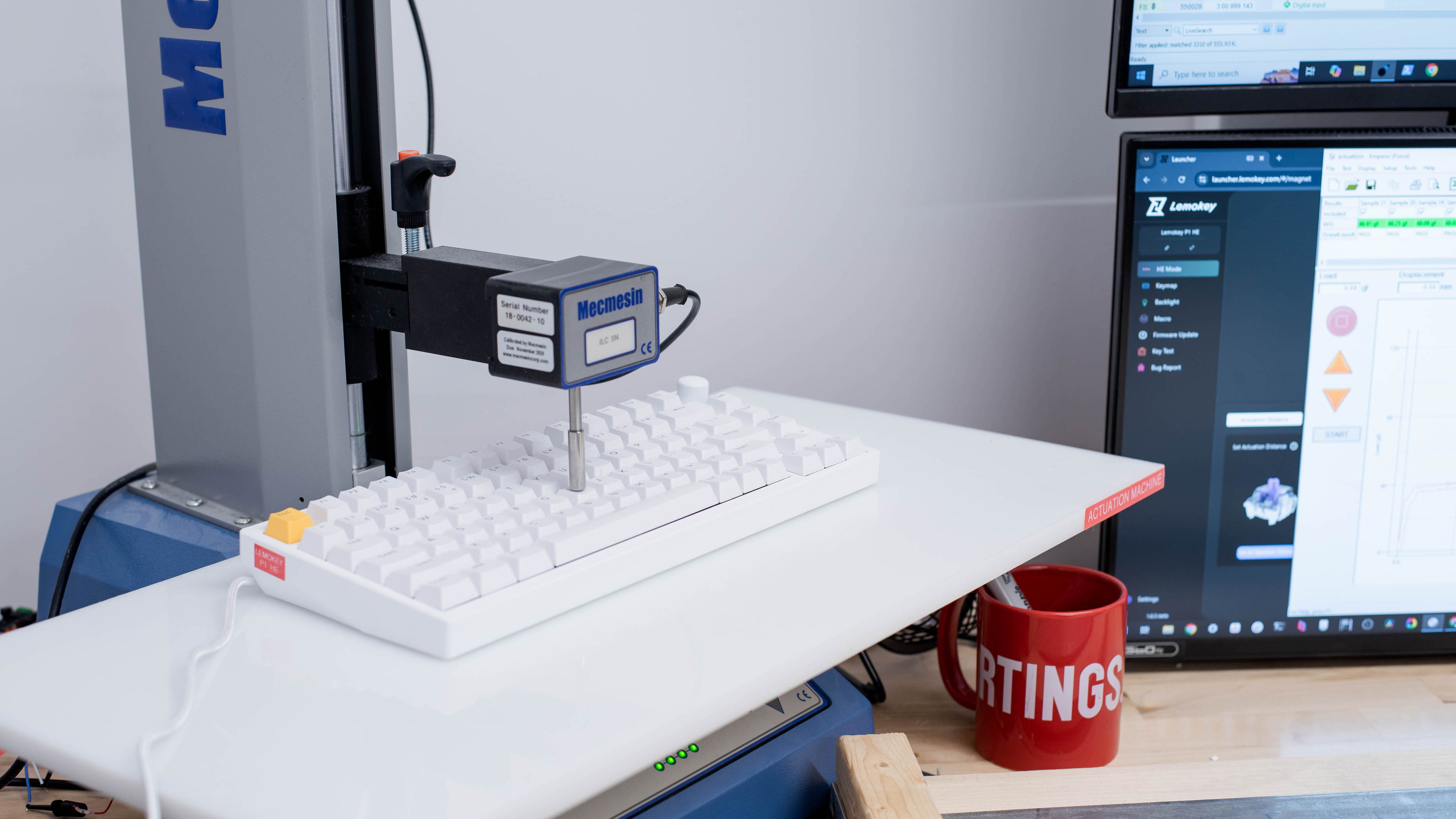
    We took additional measurements at various actuation points and confirmed settings are typically extremely accurate at lower actuation settings, often within 0.2 mm of the advertised range, which is outstanding. However, higher actuation settings are much less accurate, although this likely won't be an issue for most people as lower actuation points are generally preferred for competitive gaming.

    6.7
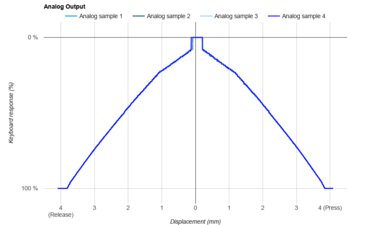
    Adjustable Input Granularity
    See details on graph tool
    See details on graph tool
    Top Deadzone
    0.51 mm
    Bottom Deadzone
    0.34 mm
    Detection Ratio
    71%
    Minimum Step Depth
    0.08 mm

    The Lemokey P1 HE offers adequate input granularity performance, with small deadzones that make it responsive for quick initial and follow-up inputs.

    It has a satisfactory detection ratio and fairly good minimum step depth, so the keyboard can detect input within most key travel with good overall precision.

    It also supports analog output, but at the time of writing, this feature is highly inconsistent and poorly implemented. Up and Down joystick bindings didn't function properly during our testing, and while we were able to assign a Right joystick output to the right arrow key, binding the left arrow key didn't work as expected. It only registered input after the right arrow had been triggered—likely due to a misfire related to the keyboard's sleep functionality. If you've experimented with this keyboard's analog features, we'd love to hear about your experience in the comments.

    Switches
    Switch Name
    Gateron Double-Rail Magnetic Nebula
    Switch Type
    Magnetic
    Feel
    Linear
    Output Type
    Analog

    This keyboard uses Gateron Double-rail Magnetic Nebula switches, which are Hall effect switches that come pre-lubed from the factory.

    At the time of writing, you can only purchase a fully assembled configuration of this keyboard with Gateron Double-Rail Magnetic Nebula switches. However, Lemokey sells two other compatible switch options: linear Gateron Double-Rail Magnetic Dawn switches, which are slightly more lightweight, and linear Gateron Double-Rail Magnetic Aurora switches, which have a slightly heavier feel. All three switch options are available directly from Lemokey.

    Performance
    9.1
    Single-Key Latency
    See details on graph tool
    Best Connection
    2.9 ms
    Best Connection Std Dev±0.8 ms
    Wired
    2.9 ms
    Receiver
    5.0 ms
    Bluetooth
    9.3 ms
    PCB (Estimated)
    N/A

    The Lemokey P1 HE maintains exceptionally low single-key latency, providing a highly responsive gaming experience across all genres and competitive levels.

    We conducted this test with the following settings:

    • 0.2 mm actuation
    • 0.1 mm Rapid Trigger enabled (press and release)
    9.0
    Multi-Key Latency
    See details on graph tool
    Connection EvaluatedWired
    Key Press
    3.1 ms

    The Lemokey P1 HE has excellent multi-key latency performance. It's well-suited for games in which you need to press additional keystrokes while already pressing and maintaining multiple keys.

    We also conducted supplementary Multi-Key Latency using a wireless receiver connection, which shows only a marginal increase in key press latency.

    • Receiver Key Press: 4.8 ms
    • Receiver Key Release 7.2 ms

    We conducted all tests with the following settings:

    • 0.2 mm actuation
    • 0.1 mm Rapid Trigger enabled (press and release)
    8.2
    Data Transmission
    Connection EvaluatedWired
    USB Polling Rate
    1,000 Hz
    Effective Update Rate
    1,000 Hz
    N-Key Rollover (NKRO)
    Yes
    Multiple Keys Per USB Report
    No

    This keyboard has a maximum polling rate of 1000Hz, with no data transmission bottlenecks from other latency components.

    When connected via Bluetooth, the polling rate is limited to 125Hz, which is standard and expected.

    By default, the keyboard supports 6-key rollover (6KRO), but you can enable full NKRO using the FN + N shortcut.

    If you're looking for a keyboard with a similar layout and a full 8000Hz polling rate, consider the IQUNIX EZ80/EZ75 or the Sony INZONE KBD-H75.

    7.4
    Chord Split
    See details on graph tool
    4 Chord Split Delay
    7.1 ms
    8 Chord Split Delay
    12.2 ms

    The Lemokey P1 HE delivers decent chord split performance, making it a viable choice for playing rhythm games or other titles that demand many simultaneous inputs.

    Software and Operating System
    Configuration Software
    Software NameLemokey Launcher
    Software Windows Compatible
    Yes
    Software macOS Compatible
    Yes
    Onboard Memory
    Yes
    Profiles
    3

    The Lemokey P1 HE uses Keychron Launcher, a web-based configurator that you can access using any Chromium-based browser. This software is well laid out and intuitive and allows you to change a range of expected settings alongside Hall effect (HE) settings, including actuation and reset distance.

    HE settings can only be adjusted when using a wired connection. However, once saved to onboard memory, they remain accessible even in wireless mode.

    This keyboard also supports several additional features related to its adjustable switches, detailed below. Many of these features are still in active development, so their behavior may change with future updates.

    • Rapid Trigger: This setting can dynamically adjust your switches' actuation and reset points based on distance rather than being fixed at a specific point along the keystroke. This allows for faster follow-up inputs, which can be especially beneficial in scenarios like counter-strafing in FPS games.
    • One Key Multiple Commands: Allows you to map up to four different actions to a single key based on actuation distance.
    • Snap Click: Actively monitors two keys, prioritizing whichever input you press further downwards.
    • Gamepad Analog: This feature mimics the gradual controls of a gamepad or joystick, which can be particularly helpful when playing platformers, racing games, or flight simulators to give you more precise control.

    Lemokey has a guide for HE mode adjustments on their website.

    Note: This software works in Windows and macOS environments by default, but if you're a Linux user, you may need to adjust udev permissions first. A member of the community has posted a helpful guide for this process in a Reddit thread.

    10
    Computer Compatibility
    Windows
    Fully Compatible
    macOS
    Fully Compatible
    Linux
    Fully Compatible
    Media Key Compatibility
    Windows, MacOS & Linux

    The web-based software is compatible with Windows and macOS by default, but Linux users may need to adjust their system permissions before using it. For more details on Linux compatibility, see the note in the Configuration Software section.

    10
    Wireless Mobile Compatibility
    Android
    Fully Compatible
    iOS
    Fully Compatible
    iPadOS
    Fully Compatible
    Media Key Compatibility
    Android, iPhone & iPad