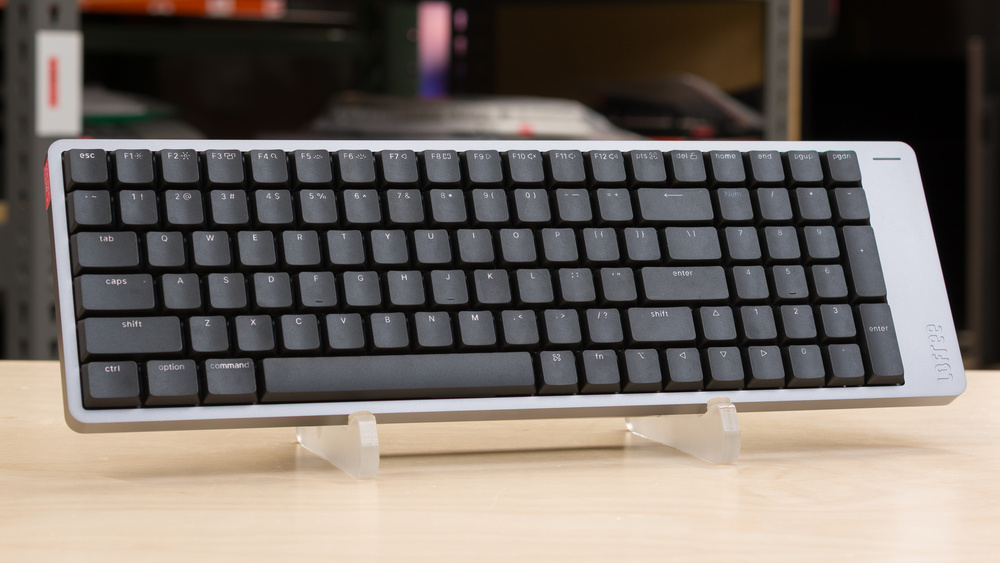
The Lofree Flow 2 keyboards are low-profile wireless mechanical keyboards with aluminum cases. They use a gasket mount with multiple layers of dampening material, which gives them a slightly softer, more cushioned typing feel than stiffer tray-mounted designs. They support wireless connectivity over a 2.4GHz receiver or Bluetooth and are compatible with VIA for key remapping and customization.
Lofree offers this keyboard in 68, 84, and 100-key sizes. We've tested the largest Flow 2 100 model. For more details, see the Differences Between Variants section.
Our Verdict
The Lofree Flow 2 boards aren't primarily designed for gaming, but they're still great options for casual or even competitive play. They offer excellent overall latency performance and support a 1000Hz polling rate over wired or 2.4GHz wireless connections. The build quality is superb, with factory-lubed mechanical switches and stabilizers, and a refined gasket-mount implementation adds a small degree of cushion when bottoming out your keys. Their low-profile design also makes them comfortable to use for long sessions without worrying about needing a wrist rest. While they feature backlighting and shine-through keycaps, the lighting is white-only, which may be a drawback if you prefer matching RGB across your setup.
Excellent single-key and very good multi-key latency.
Remarkable build quality.
Low-profile design is comfortable without a wrist rest.
Higher and less consistent latency than dedicated gaming keyboards; negligible in-game impact but may slightly limit your competitive ceiling.
Minor quality control concerns. See Build Quality for details.
The Lofree Flow 2 keyboards are well-suited for office work. They offer remarkably good build quality, with a premium-feeling anodized aluminum case, very stable factory-lubed switches and stabilizers, and a gasket mount that adds a slight cushion to typing. Their low-profile design makes them comfortable to use without a wrist rest, and they support wireless connectivity over a 2.4GHz receiver or Bluetooth. That said, the tactile switch option can be on the louder side, though quieter linear and silent linear switches are available if you work in a noise-sensitive environment.
Superb typing quality.
Remarkable build quality.
Low-profile design is comfortable without a wrist rest.
Connects with a 2.4GHz receiver or via Bluetooth for multi-device pairing.
Somewhat loud typing noise if you choose the tactile switch option.
Minor quality control concerns. See Build Quality for details.
The Lofree Flow 2 keyboards are suitable for tablet or mobile device use. They support Bluetooth pairing with up to three devices at once. While we tested the largest 96% variant, they're also available in two smaller sizes, including a compact 65% option that's easier to move around a home or office. Build and typing quality are both superb, but the solid aluminum case makes them relatively heavy for their size, and clearly designed for stationary desktop use rather than portability.
Remarkable build quality.
Connects with a 2.4GHz receiver or via Bluetooth for multi-device pairing.
Heavy and not well-suited for portability.
Minor quality control concerns. See Build Quality for details.
The Lofree Flow 2 keyboards are excellent for programming. They offer very strong build and typing quality, with a solid aluminum case, a slightly cushioned gasket mount, and factory-lubed switches and stabilizers that feel smooth and satisfying to type on. The low-profile design stays comfortable during long typing sessions without a wrist rest, and white backlighting with clear legends makes the keys easy to read in the dark. You can also record macros and adjust other expected settings using VIA.
Superb typing quality.
Remarkable build quality.
Low-profile design is comfortable without a wrist rest.
Somewhat loud typing noise if you choose the tactile switch option.
Minor quality control concerns. See Build Quality for details.
The Lofree Flow 2 keyboards are adequate for an entertainment or home theater PC setup. They offer remarkably good build quality and connect wirelessly over a 2.4GHz receiver or via multi-device Bluetooth pairing. White backlighting and shine-through keycaps make the legends easy to read in the dark. They're available in several sizes, including a compact 65% option that's more comfortable to use from the couch. However, the all-aluminum construction makes them relatively heavy for their size, and while they support media key shortcuts, they don't have dedicated media keys.
Superb typing quality.
Remarkable build quality.
Connects with a 2.4GHz receiver or via Bluetooth for multi-device pairing.
Heavy and not well-suited for portability.
Minor quality control concerns. See Build Quality for details.
These keyboards have great raw performance. They offer excellent single-key latency and very good multi-key latency with a 1000Hz polling rate over wired or 2.4GHz wireless connections. They're more than suitable for casual or competitive gaming, though they don't support advanced features like adjustable actuation or higher polling rates, which may be an important consideration for you if you play games at a high competitive level and are interested in getting any marginal performance advantage possible.
Excellent single-key and very good multi-key latency.
Higher and less consistent latency than dedicated gaming keyboards; negligible in-game impact but may slightly limit your competitive ceiling.
Check Price
Differences Between Sizes And Variants
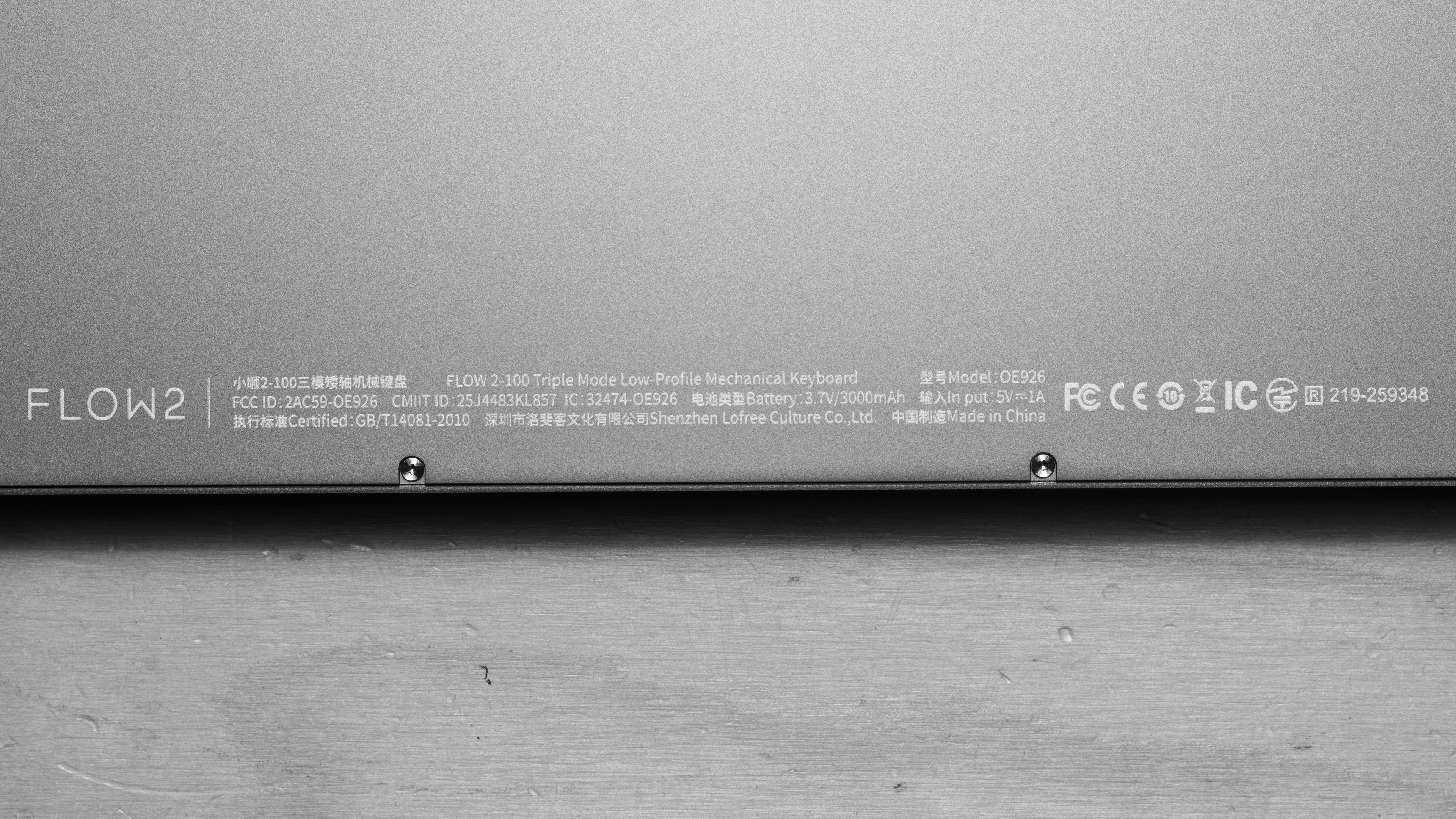
The Lofree Flow 2 keyboards (also referred to as the Lofree Flow V2 during pre-launch) are available in three different sizes. Each size is also available in three separate colorways and switch pairing choices. We bought the 100-key size version in Space Gray. You can see our unit's label here.
| Sizes | Colorway and Switch Pairings* | |
|---|---|---|
| Space Gray | Silver | |
| Lofree Flow 68 | Kailh Pulse (tactile) | Kailh Surfer (linear) or Kailh Void (silent linear) |
| Lofree Flow 84 | ||
| Lofree Flow 100 | ||
* For more details on the differences between switch options, see the Switches section.
Popular Keyboard Comparisons
The Lofree Flow 2 keyboards continue Lofree's Flow series of low-profile, wireless mechanical keyboards and introduce some meaningful changes over earlier Lofree Flow84/Flow100 and Lofree Flow Lite84/Flow Lite100 boards. These include an anodized aluminum case, new Kailh low-profile switch options, a built-in touch bar for volume and brightness, VIA support, and a new 68-key size option.
The Flow 2 boards offer a noticeably more refined typing experience than many competing low-profile keyboards, including popular scissor-switch models like the Logitech MX Keys S. They also look and feel more premium than mechanical alternatives such as the budget-focused Keychron K Max series and mid-range options like the NuPhy Air75 V3. Whether that improved typing feel and finish justify the higher price depends on your priorities. Compared to more expensive custom keyboards, they’re a compelling middle ground, delivering a high-quality out-of-the-box experience without the cost, effort, or learning curve of a custom build.
The first unit we purchased had intermittent wired connectivity issues and required replacement. We cover this in more detail in the Build Quality section, along with other reported concerns such as spring ping. These issues aren't necessarily dealbreakers, but there may be a higher risk of receiving a unit with defects that require a return or replacement.
For other options, see our recommendations for the best wireless keyboards, the best keyboards for typing, and the best low-profile keyboards.
The NuPhy Air75 V3 and the Lofree Flow 2 are wireless, low-profile mechanical keyboards. The NuPhy has a plastic case but boasts full RGB backlighting, wider aftermarket switch compatibility, and slightly better gaming performance overall. The Lofree, on the other hand, is available in three different sizes and has somewhat better and more premium-feeling build quality with a solid aluminum case design. However, it only has white backlighting and uses relatively more limited VIA configuration software.
The Lofree Flow84/Flow100 keyboards are earlier models in the Flow series, while the Lofree Flow 2 models are newer and come in 84, 100, and a new 68-key size. The Flow 2 keyboards feel more premium because they use a solid aluminum case. They also have larger batteries with longer advertised battery life, and they support VIA software, while the original Flow models don't support any configuration software.
The Keychron K5 Max and Lofree Flow 2 are both low-profile wireless mechanical keyboards. The Keychron is available in a wide range of sizes and key layout configurations. They also have better raw gaming performance, and they're available with full RGB backlighting, although the keycaps lack shine-through legends. By comparison, the Lofree keyboards are only available in three size variants, but they have noticeably better build quality and feel much more premium overall, with slightly more refined typing quality. They only have white backlighting, but the keycaps include shine-through legends, which makes them easier to read in darker rooms.
Both the Logitech MX Keys S and the Lofree Flow 2 are low-profile wireless keyboards. The Logitech has a more traditional full-size layout with all expected keys, and it uses scissor switches that provide a typing experience similar to a laptop. It's also much thinner and lighter, has significantly longer advertised battery life, and operates more quietly overall. The Lofree Flow 2 , by comparison, uses mechanical switches and delivers a more refined typing experience thanks to its pre-lubed switches and gasket-mounted design, which provides a slightly cushioned bottom-out. It also has noticeably more premium build quality with a CNC-machined aluminum case and pre-lubed switches and stabilizers.
Test Results
The Lofree Flow 2 keyboards are available in 68, 84, and 100-key size variants. We purchased the largest 100-key model, which has a fairly standard compact 96% layout. This layout includes nearly all the keys found on a standard full-size keyboard but removes spacing between key clusters.
These keyboards are fairly thin but quite heavy due to their solid aluminum cases. Despite their compact key layouts, they're also slightly wider due to the added space of the right-side "chin" portion of the case that houses the battery, as well as the touch bar along the right edge.
For size comparisons and dimensions of the two smaller variants, see Lofree's product pages for the compact 65% Lofree Flow 2 68 and the compact 75% Lofree Flow 2 84.
Note: The first unit we bought was defective. While 2.4GHz and Bluetooth connectivity worked without issue, it only connected intermittently over a wired connection. We confirmed this behavior across multiple devices and ultimately purchased a second unit, which is the one tested for this review.
The unit we tested has excellent build quality. The body is CNC-machined aluminum with a polished finish that feels smooth to the touch while resisting fingerprints and smudging during normal handling.
The flip-out feet on the underside are also made entirely of aluminum and feel very solid when extended. Their ends are capped with silicone rubber, which does an effective job of preventing the keyboard from sliding.
The switches and keycaps are very stable, and both the switches and stabilizers are factory-lubed. They feel consistent overall, without noticeable ticking or pinging. The keycaps use a PBT top layer with a slightly textured finish, while the undershot layer is transparent PC to allow backlight shine-through.
Related to overall build quality, we've encountered fairly widespread reports from some users on Reddit regarding possible acoustic issues and unintentional touch bar activation. We didn't encounter these issues during our testing, so they aren't reflected in our scores. However, we felt it was important to note that some owners have reported them, and we discuss them more at length in the Typing Quality section.
These keyboards have a low-profile design, making them quite comfortable to type on even without a wrist rest, as you don't need to angle your wrists too steeply to reach the keys. A pair of sturdy aluminum flip-out feet on the underside provides one additional incline angle.
These keyboards have a hot-swappable PCB, but to our understanding, they're only compatible with Lofree x Kailh Cloud series switches, which Lofree sells on their website.
The low-profile Cherry-style stabilizers are clip-in and plate-mounted, and you can remove them without disassembling the board.
These keyboards have white-only key backlighting. However, there's a pair of RGB underglow light strips along the bottom edges of the keyboard with limited customization options in the configuration software.
The shine-through legends are easy to read with minimal obstruction. The legends are relatively small, and the black keycaps on the Space Gray colorway we tested limit reflected bounce light, even at the maximum brightness setting. We expect the Silver colorway to appear somewhat brighter due to increased light reflection.
The Lofree Flow 2 keyboards include a braided, paracord-style cable with a right-angled connector that plugs into the right side. The cable resists kinking along most of its length, but it's prone to slight kinking near the connector where the braiding meets the right-angle housing. Our cable also began to show minor fraying at the connector after our testing period.
The Lofree Flow 2 keyboards have different battery capacities depending on the size you choose. The Flow 2 100 we tested, as well as the Flow 2 84, have 3000 mAh batteries with an advertised battery life of up to 120 hours. The smaller Flow 2 68 has a 2000 mAh battery with an advertised battery life of up to 90 hours.
The toggle for switching between connectivity modes is located under one of the feet on the underside of the keyboard.
These keyboards have a touch bar along the right edge of the keyboard that you use by sliding your finger along its length. The touch bar controls volume by default. You can also use it to adjust screen brightness while holding down the Fn key, or you can choose to lock and disable the touch bar by holding down Fn + Spacebar for three seconds. Unfortunately, you can't customize what the touch bar controls in the software.
You can also adjust the backlighting and pair multiple devices via Bluetooth using shortcut commands. You can reference a list of supported shortcuts on a web-based PDF copy of the user manual here.
While the backlighting under the switches is white-only, there are underside RGB lighting strips along the bottom edge of both sides of the keyboard, which are capable of displaying limited color options and effects using the software. Additionally, there's a small LED strip on the top right edge of the case that indicates the keyboard's battery level.
- USB-A to (90° angled) USB-C cable.
- 2.4GHz wireless receiver
- 4x alternate keycaps for Windows legends.
- Warranty card
- User documentation
The Lofree Flow 2 keyboards provide outstanding typing quality. The gasket mount implementation is on the stiffer side but provides very subtle cushioning without any aggressive rebound or excessive flex. There's no noticeable switch wobble, and the stabilizers and switches are well-lubed and highly consistent. Several layers of internal dampening material, including PET, silicone, IXPE, and PU foam, all contribute to softening the force of heavy keystrokes and round out the sound profile.
That being said, there are fairly widespread reports from owners on Reddit of potential switch-ping sounds, which many find distracting and unpleasant. The unit we tested doesn't suffer from any noticeable switch ping, but it seems to have been more common on early production units and may still be common enough that it's worth calling out.
Peter Wolinski of Tom's Guide similarly reported metallic ricochet sounds from the switches in their review. They later confirmed, following a statement from Lofree, that this sound was caused by gaps between the stabilizer wires and was amplified by the aluminum case. We should note that Lofree confidently stated in their response that this issue has been addressed and significantly reduced in current production units.
Wolinski and some owners on Reddit also report that it's relatively easy to unintentionally activate the touch bar on the right side of the keyboard, particularly if you're prone to holding your right pinky finger off the right side of the keyboard while typing. We also didn't encounter this issue during our testing. However, you can lock and disable the touch bar by pressing and holding Fn + spacebar for three seconds if needed.
We tested the Lofree Flow 2 100 with tactile Kailh Pulse switches, which are the loudest switch option among those available.
We expect the linear Kailh Surfer switches to be slightly quieter and the silent linear Kailh Void switches to be noticeably quieter. However, due to the aluminum case, some reverberation is still likely, making the keyboard louder overall than comparable plastic-case keyboards regardless of switch choice, which is typical for aluminum designs.
These keyboards use non-adjustable mechanical switches.
Lofree offers three switch options for the Lofree Flow 2 keyboards.
They describe the differences between each switch type and offer this spec comparison image on their product page.
Lofree also has a typing comparison video on their YouTube channel.
The Lofree Flow 2 keyboards have excellent single-key latency performance and are more than suitable for casual or competitive gaming in any genre. Latency is somewhat less consistent than on most dedicated gaming keyboards, but these variations are far too small to notice in gameplay and are extremely unlikely to affect performance unless you play at an exceptionally high competitive level.
The Lofree Flow 2 keyboards have reasonably good multi-key latency performance and are suitable for gaming across all genres. We achieved our results using a 2.4GHz wireless receiver connection, which we expect most users to use in most cases. We've also also ran supplementary testing using a wired connection, where latency is slightly lower and more consistent, as expected.
Overall, multi-key latency is somewhat higher and less consistent than on most dedicated gaming keyboards. This isn’t an issue for casual play, but it may limit your performance ceiling in more complex scenarios with sustained multi-key inputs if you play fast-paced titles like FPS games at a high competitive level.
Much like the Lofree Flow84/Flow100, the Lofree Flow 2 shows exceptionally strong 4-chord split results in our testing. However, this doesn't necessarily translate to strong real-world performance in rhythm games or other applications that rely on the precise timing of multiple simultaneous inputs.
We hypothesize that these unusually good results stem from how the keyboard prioritizes input reporting. Rather than transmitting key events immediately as they're registered, it likely uses a report-based system that can batch multiple inputs into a single transmission to the computer.
With report-based batching, a chord of simultaneous key presses may be delayed while the keyboard completes its scan and packages inputs into one report. Any latency introduced during this process occurs on the keyboard itself and isn't captured by our measurement method.
This typically isn't an issue in our testing, as dedicated high-performance gaming keyboards generally use event-based reporting that prioritizes the immediate transmission of individually timestamped inputs. This preserves input timing more accurately and reduces the risk of delayed or misaligned inputs in fast-paced, timing-sensitive scenarios like rhythm games, but it often results in higher and more representative chord split measurements under our methodology. The 8-chord split delay we measured aligns more closely with our expectations, as the larger number of simultaneous inputs is more likely to exceed any batching window and expose more typical reporting delays.
These keyboards use VIA, a relatively basic and widely used utility for keyboard customization. In addition to expected settings for changing keybinds or creating profiles, it also supports macro creation and limited backlight control.
Unfortunately, the keyboard locks the backlight timeout to one minute in wireless mode. Some users may appreciate the battery-saving behavior, but the short window can feel irritating. The keyboard also wakes slowly from sleep and can miss the first keystroke if you start typing immediately after inactivity, another battery-saving behavior you can't adjust in the software.
These keyboards are fully compatible with Windows, macOS, and Linux.
In Windows, with the keyboard set to Windows compatibility mode, all keys work as expected.
In macOS and Linux, with the keyboard set to Mac compatibility mode, all features work as expected, but the F1–F12 keys are set to the Fn layer.
Android: In Windows mode, most functions work as expected. Fn + F3 does nothing, while F4 opens a Google search in your browser.
iOS: In Mac mode, all functions work as expected except F4, which does nothing. All other media keys work correctly.
iPadOS: In Mac mode, all functions work as expected except F4, which does nothing. All other media keys work correctly.