Razer Huntsman V3 Pro 8KHz  Keyboard Review

Reviewed Feb 13, 2026 at 10:06am
Tested using Methodology v1.4.3 
Razer Huntsman V3 Pro 8KHz
9.1
Gaming 
6.7
Office 
2.0
Mobile/Tablet 
7.4
Programming 
3.8
Entertainment / HTPC 
9.5
Raw Performance 
 5

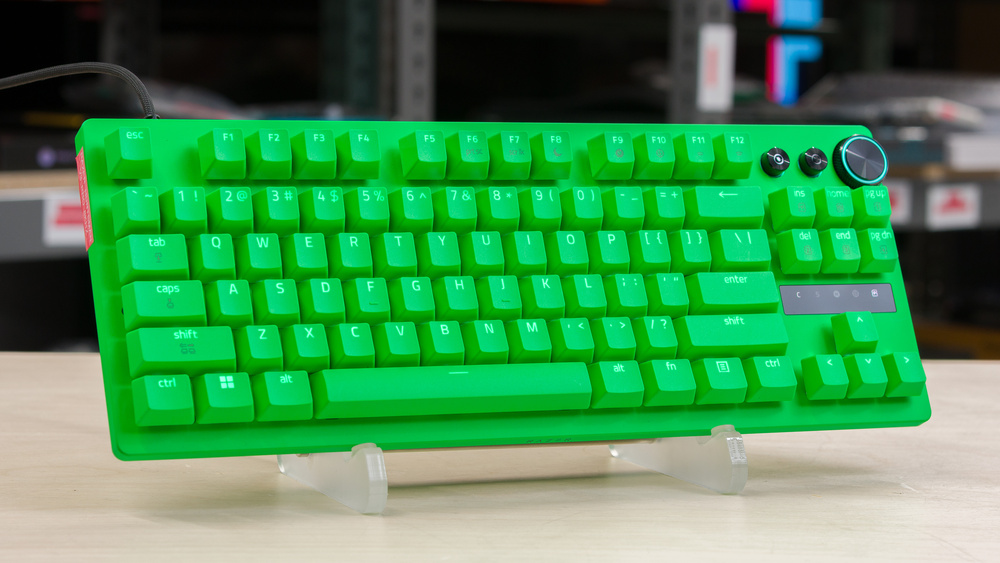
The Razer Huntsman V3 Pro 8KHz is a gaming keyboard in Razer's flagship Huntsman series. It uses Analog Optical switches, which let you customize how far you need to press before a keystroke registers. These switches also include the Rapid Trigger function, which allows you to adjust how far back the keys need to travel before you can register another keystroke, as well as other advanced features like Snap Tap and DKS. The Razer Huntsman V3 Pro 8KHz follows the Razer Huntsman V3 Pro keyboard with an upgrade to the polling rate, which can now reach 8000Hz. Razer also emphasizes improved lubrication and better dampening. Like other gaming keyboards, you can also adjust options like RGB lighting, macros, and key assignments.

The Razer Huntsman V3 Pro 8KHz is available in a full-size (100%) variant or a TenKeyLess (80%) variant in different colorways. You can find more details in the Difference Between Variants section.

Our Verdict

9.1
Gaming 

The Razer Huntsman V3 Pro 8KHz is an outstanding gaming keyboard. It delivers exceptional performance thanks to its extremely sensitive switches, with extremely low and consistent single- and multi-key latency. The actuation settings are extremely accurate, which is ideal for advanced features like Rapid Trigger and SOCD. It's also well-built, aside from some slightly rattly stabilisers, with excellent backlight clarity that's highly customizable. Razer has also released the beta for its Synapse web portal, which is a welcome addition.

Pros
  • Excellent build quality.

  • Exceptionally low and consistent latency performance.

  • Fully featured software that includes extensive actuation settings and advanced functions such as Rapid Trigger, SOCD, and DKS.

  • Excellent backlighting with shine-through keycaps.

Cons
None
6.7
Office 

The Razer Huntsman V3 Pro 8KHz is okay for office use, even if it's not designed for it. This keyboard has excellent build quality, and both the full-size and TenKeyLess sizes include a wrist rest for added support. Its keys are very stable and smooth. Unfortunately, the spacebar rattles a bit, and it's too loud to use in a noise-sensitive shared office.

Pros
  • Excellent build quality.

  • Good typing experience.

  • Excellent backlighting with shine-through keycaps.

Cons
  • Wired-only.

  • Relatively loud.

2.0
Mobile/Tablet 

The Razer Huntsman V3 Pro 8KHz is a wired keyboard that's not suitable for this use.

7.4
Programming 

The Razer Huntsman V3 Pro 8KHz is satisfactory for programming. It's very well-built, and the backlighting is excellent. Unfortunately, it's on the louder side when you're typing, and there aren't any dedicated macro keys, although you can record macros to any key using the configuration software. The included wrist rest is also a nice plus for added comfort.

Pros
  • Excellent build quality.

  • Good typing experience.

  • Excellent backlighting with shine-through keycaps.

Cons
  • Relatively loud.

3.8
Entertainment / HTPC 

The Razer Huntsman V3 Pro 8KHz is a bad choice for an entertainment or home theater PC. On the bright side, it has excellent backlighting with clear shine-through legends that are easy to read in the dark, and includes a multi-function media-key for playback control and a dial for volume control. However, it's a wired keyboard that's relatively heavy, which makes it a lot less suited for this use.

Pros
  • Excellent backlighting with shine-through keycaps.

Cons
  • Wired-only.

9.5
Raw Performance 

The Razer Huntsman V3 Pro 8KHz has incredible performance. Its latency is extremely low and consistent in single-key and complex multi-key scenarios. While this keyboard does reach its advertised 8000Hz polling rate, the effective update rate is capped at 4000Hz. This is a minor gripe you won't notice whatsoever while gaming. It delivers very stable, reliable performance suitable even for the most competitive scenarios, and its performance is on par with other keyboards we've tested that do achieve an effective 8000Hz update rate.

Pros
  • Exceptionally low and consistent latency performance.

Cons
None
  • 9.1
    Gaming
  • 6.7
    Office
  • 2.0
    Mobile/Tablet
  • 7.4
    Programming
  • 3.8
    Entertainment / HTPC
  • 9.5
    Raw Performance
  • Changelog

    1.  Updated Feb 13, 2026: Review published.
    2.  Updated Jan 26, 2026: Early access published.
    3.  Updated Dec 18, 2025: Our testers have started testing this product.
    4.  Updated Nov 27, 2025: The product has arrived in our lab, and our testers will start evaluating it soon.

    Check Price

    BlackHuntsman V3 Pro 8KHz
    SEE PRICE
    Amazon.com
    BlackHuntsman V3 Pro 8KHz
    SEE PRICE
    Razer
    BlackHuntsman V3 Pro 8KHz
    B&H
    BlackHuntsman V3 Pro 8KHz
    BestBuy.com
    BlackHuntsman V3 Pro 8KHz
    Walmart.com

    Differences Between Sizes And Variants

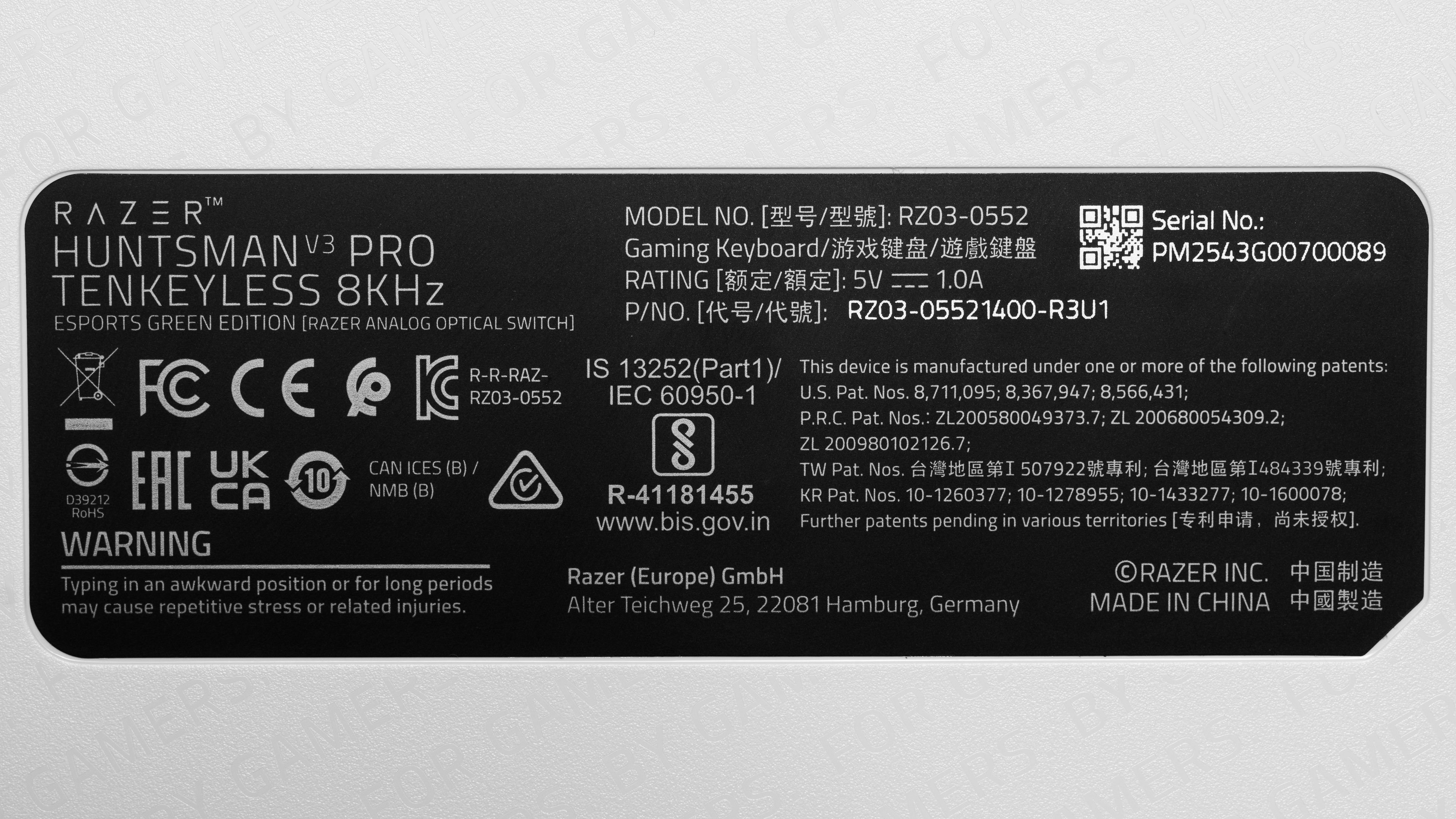
    The Razer Huntsman V3 Pro 8KHz comes in either a full-size or TenKeyLess (TKL) variant. The TKL version comes in three color variants, while the full-size is only available in black. We bought the TKL version in the Esports Green Edition. Here's the label of our test unit. You can see the different versions in the table below.

    Model Form Factor Color Options
    Razer Huntsman V3 Pro 8KHz Full-size (100%) Black
    Razer Huntsman V3 Pro Tenkeyless 8KHz Tenkeyless (TKL)  Black
     White
    Esports Green Edition

    Popular Keyboard Comparisons

    The Razer Huntsman V3 Pro 8KHz is the follow-up to the Razer Huntsman V3 Pro. Its main addition is the upgrade from a 1000Hz to an 8000Hz polling rate. While you can measure the uplift in testing, its real-world impact is almost negligible, and you're unlikely to notice it in-game. Razer has also slightly improved the dampening, and the overall sound signature has been refined. Overall, while this new 8KHz model makes some slight adjustments, it remains very similar to its predecessor.

    Compared to other high-end analog gaming keyboards, the Razer Huntsman V3 Pro 8KHz is an exceptional performer. Its latency performance is as good as heavy-hitters like the Wooting 60HE v2 and the Qwertykeys Hex80, and its switches can achieve virtually instantaneous initial and follow-up inputs, which is ideal for precise movement techniques like tap-strafing in FPS games. That said, you won't be able to change the switches, like the models mentioned above. The Huntsman V3 Pro 8KHz is also not as good for typing, especially compared to the Qwertykeys or the IQUNIX EZ80, which have more satisfying sound signatures and a less hollow typing feel. Also note that the raw performance in cheaper options like the MonsGeek FUN60 Ultra and the MCHOSE Ace 60 Pro is also very good and can now match the more expensive models like the 8KHz.

    With all this in mind, if you're used to the Razer ecosystem and you like the feeling of the stock switches, the Razer Huntsman V3 Pro 8KHz is a very good choice. For more recommendations, see our picks for the best keyboards, the best gaming keyboards, and the best mechanical keyboards.

    Wooting 80HE

    The Razer Huntsman V3 Pro 8KHz and the Wooting 80HE are high-end gaming keyboards with top-of-the-line performance. Both keyboards achieve some of the best latency we've seen and outstanding input granularity. The main difference is that the Wooting's hardware is much more customizable. It has hot-swappable switches, allowing you to upgrade them over time as your preferences change. It also comes with a four-year warranty compared to Razer's two-year support, and Wooting's provides a better software experience overall with more in-depth options and both a web-based and downloadable client.

    Wooting 60HE v2

    The Razer Huntsman V3 Pro 8KHz and the Wooting 60HE v2 have exceptional performance. Both models deliver exceptional latency performance and very precise switches. The Wooting is a smaller 60% layout that omits the numpad, arrow keys, and function row, while the Razer is available in both a full-size and a TKL variant. That said, while the Wooting is a hot-swappable keyboard that's very easy to open and customize, the Razer keyboards are pretty locked down, and you won't be able to change the switches.

    Razer BlackWidow V4 Pro

    The Razer Huntsman V3 Pro 8KHz and the Razer BlackWidow V4 Pro are high-end gaming keyboards. Both keyboards deliver outstanding latency performance, but the Huntsman does have the edge. It uses Razer's optical analog switches, which offer useful features like adjustable actuation that enable Rapid Trigger and other advanced features, while the BlackWidow uses regular mechanical switches. This is the main difference between those two otherwise very comparable keyboards.

    Razer Huntsman V3 Pro [Mini, TKL]

    The Razer Huntsman V3 Pro 8KHz is the follow-up to the Razer Huntsman V3 Pro. It delivers even better latency performance in our testing, partly thanks to the improved 8000Hz polling rate. We should note, however, that this difference is very unlikely to be noticeable in-game. It also has somewhat smoother switches and slightly improved dampening. 

    Test Results

    perceptual testing image
    Sort:
    RATINGS
    Category:
    All
    Design
    Dimensions
    Size
    TenKeyLess (75%)
    Height
    1.5" (3.9 cm)
    Width14.3" (36.3 cm)
    Depth
    5.5" (13.9 cm)
    Depth With Wrist Rest
    8.8" (22.4 cm)
    Weight
    1.63 lbs (0.740 kg)

    The Razer Huntsman V3 Pro 8KHz is available in both a full-size and TKL version. Our unit is a TKL version that omits the numpad, freeing up some precious space for your mouse.

    If you're curious about the dimensions of the full-size variant, check out our Razer Huntsman V3 Pro review, where we tested the 100% variant, which has the same dimensions.

    8.5
    Build Quality
    Keycap MaterialPBT

    The Razer Huntsman V3 Pro 8KHz has excellent build quality despite its plastic build. It has very little flex, partly thanks to the aluminum top plate, which adds much-needed rigidity. The doubleshot PBT keycaps have a nice, slightly textured finish that feels great under your fingers. The keyboard feels very stable thanks to the rubber feet along the bottom of the board. The incline feet also feature rubber that helps keep the keyboard just as stable. The included wrist rest is also color-matched, which is a nice touch. While the wrist rest is a bit lacking in padding, it still feels well-made. The stabilizers work very well, and the keys feel very stable.

    Razer opted for a 'floating keycap' design with keycaps and switches that sit raised above the keyboard's top plate rather than inset keycaps and switches inside a closed case. This makes the keyboard more exposed to dust and debris but also easier to clean without disassembly, compared to a typical closed-case design.

    6.0
    Ergonomics
    Curved/Angled
    No
    Split Keyboard
    No
    Key Alignment
    Staggered
    Minimum Incline
    Medium Incline
    Maximum Incline
    Home Row Height
    31.1 mm (1.2")

    This keyboard delivers acceptable ergonomics overall. It sticks to a straightforward, flat profile with OEM profile keycaps. The flip-out feet underneath let you choose between two angled positions for your comfort.

    Whether you choose the full-size or TKL version, both include a wrist rest that snaps on magnetically. It feels sturdy and has a leatherette finish. It supports your wrists well, but it’s firmer and less padded than plush rests.

    3.7
    Hardware Customizability
    Replaceable Cherry Stabilizers
    No
    Stabilizer Fixation
    Non-Customizable Design
    Spacebar Stabilizer Size
    6.25u
    Size Of Right Mod Keys
    1.25u
    Hot-Swappable Switches
    No
    Switch Stem Shape
    Cherry MX Style
    Mechanical Switch Compatibility
    Non-Cherry Pinout
    Magnetic Switch Compatibility
    No Magnetic Switch Support
    North-Facing Cherry MX Interference
    Yes

    This keyboard offers very little hardware customization. The stabilizers use a non-standard design that clips in from the back of the PCB instead of the front, which is pretty uncommon and makes swapping them out a chore.

    While the switches technically aren't soldered in, removing them takes a lot of effort. They clearly aren't meant to be swapped. Razer also doesn't sell replacement switches, and there aren't any compatible aftermarket options either.

    10
    Backlight Features
    BacklightingYes
    RGB
    Yes
    Per-Key Backlighting
    Yes
    Effects
    Yes
    Software Controllable
    Yes

    This keyboard features full per-key RGB lighting. You can tweak the lighting directly on the board with hotkeys or fine-tune it through the configuration software. You can also customize the backlighting on a per-key basis.

    8.0
    Backlight Clarity

    The backlighting is very clear, and the shine-through letters are very easy to see with minimal obstructions. On our Esports Green Edition variant, the white backlighting has a very green tint, but this won't be the case if you choose one of the other colorways.

    Cable & Connector
    ConnectivityWired
    Detachable
    Yes (Wired Only Keyboard)
    Length6.6 ft (2.0 m)
    Connector (Keyboard side)
    USB type-C

    This keyboard includes a braided USB-A to USB-C cable. It feels solid but retains some kinks from its packaging.

    0.0
    Wireless Versatility
    Bluetooth
    No
    Bluetooth Multi-Device Pairing
    No
    Proprietary Receiver
    No
    Battery Type
    No Batteries

    This is a wired-only keyboard.

    5.5
    Macro Keys And Programming
    Dedicated Macro Keys Count0
    Onboard Macro Programming
    Yes
    Macro Programming With Software
    Yes

    This keyboard lacks dedicated macro keys, but you can program macros to any key using hotkeys or the configuration software.

    Extra Features
    Media Keys
    Dedicated
    Trackpad / TrackballNo
    Scroll Wheel
    No
    Control Knob
    Yes
    USB Passthrough
    No
    NumpadNo
    Windows Key Lock
    Yes
    Lock IndicatorCaps & Scroll Lock

    Out of the box, this keyboard supports a selection of hotkeys for things like enabling Game Mode, accessing the Xbox Game Bar, and recording macros directly on the board. You can find a full breakdown of these and other functions in Razer's digital user guide on their website.

    Alongside those shortcuts, this keyboard includes gaming-focused function keys, like an on-the-fly macro recorder and a pre-programmed Xbox Game Bar shortcut. It also features a programmable multi-function dial that you can customize via the configuration software. The keyboard also includes shortcuts and LED indicators above the arrow keys to adjust actuation and rapid trigger settings directly from the keyboard.

    The full-sized version includes a third customizable key next to the dial.

    In The Box

    • USB-A to USB-C cable
    • Wrist rest
    • Stickers
    • User documentation
    Typing Experience
    7.5
    Typing Quality
    Key Spacing
    19.0 mm (0.748")

    The Razer Huntsman V3 Pro 8KHz offers good typing quality. The doubleshot PBT keycaps feature a pleasant, lightly textured finish that provides good grip, though users who prefer smoother surfaces might find them less appealing. Key spacing is standard, and individual keys feel stable with virtually no wobble.

    The factory-lubricated switches operate smoothly without scratchiness. The stabilizers work well on larger keys, though they're slightly noisy, and the spacebar rattles.

    The default 2.0 mm actuation point feels comfortable. Lowering it for gaming responsiveness makes everyday typing trickier, as you'll likely trigger accidental keystrokes, but this is pretty much part of the deal with analog keyboards. Thankfully, the onboard adjustment feature lets you switch between gaming and typing profiles easily without software.

    Extended sessions may cause fatigue from the high-profile keycaps, elevated stance, and the relatively long travel distance. While Razer advertises dense foam dampening for muted acoustics, the sound remains typical of open-design gaming keyboards. It doesn't sound bad by any means, but it falls short of the thocky signatures found on custom builds or other high-end analog keyboards. It does sound better and less pingy than the standard Razer Huntsman V3 Pro.

    7.2
    Typing Noise
    Average Loudness
    54.0 dBA
    High Pitch Clicks
    No

    This keyboard is fairly loud, even though it has linear switches, which are typically quieter than tactile or clicky options. Its floating-key design and all-plastic case also don't do much to dampen sound, making this keyboard too loud for a quiet environment or shared workspace.

    Keystrokes
    Initial Force
    26 gf
    Peak Tactile Force
    N/A
    Actuation Force
    40 gf
    Bottom-Out Force
    63 gf
    Pre-Travel Distance
    0.9 mm
    Total Travel Distance
    4.4 mm

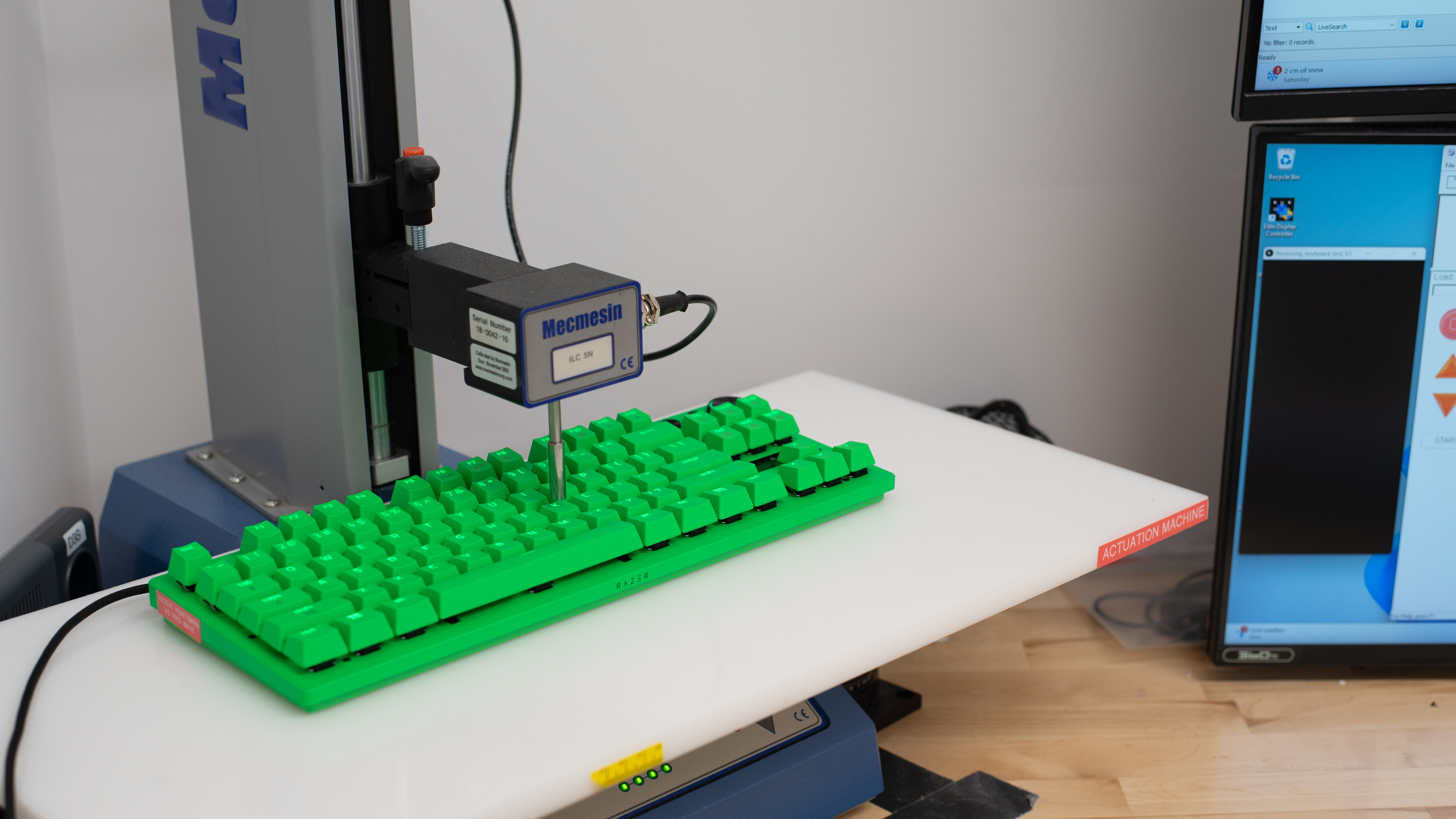
    The Razer Huntsman V3 Pro 8KHz keyboard uses Razer's Analog Optical Gen-2 switches. Razer lists the total travel at 4.0 mm, but we measured closer to 4.4 mm, so these switches have a noticeably longer total travel distance than most switches. Therefore, they require a more deliberate keypress to bottom out.

    9.8
    Adjustable Input Granularity
    Top Deadzone
    0.11 mm
    Bottom Deadzone
    0.00 mm
    Detection Ratio
    98%
    Minimum Step Depth
    0.00 mm

    The Razer Huntsman V3 Pro 8KHz delivers incredible input granularity. The switches are extremely sensitive; they can detect the slightest movement, with a minimum step depth even below the 0.01 mm precision threshold of our test bench, which is why the test result shows 0.00 mm. Deadzones are similarly impressive, with the bottom deadzone almost nonexistent, allowing follow-up inputs to be registered nearly instantly. It also has an extremely high detection ratio, offering virtually full-travel control with very high precision.

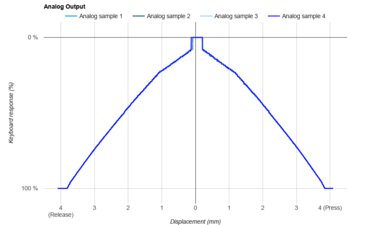
    The Razer Huntsman V3 Pro 8KHz also offers full analog control with its optical switches, featuring a smooth, consistent actuation curve that closely tracks each key's physical movement. This allows you to map keys to behave like gamepad joysticks, giving you gradual, precise control that's ideal for games that rely on gradual control, including racing sims, flight sims, and platformers.

    Switches
    Switch Name
    Razer Analog Optical Gen-2
    Switch Type
    Optical
    Feel
    Linear
    Output Type
    Analog
    Performance
    9.8
    Single-Key Latency
    Best Connection
    0.6 ms
    Best Connection Std Dev±0.1 ms
    Wired
    0.6 ms
    Receiver
    N/A
    Bluetooth
    N/A
    PCB (Estimated)
    N/A

    This keyboard delivers outstanding single-key latency, resulting in a highly consistent and responsive feel across all game genres, whether you play casually or competitively.

    We ran this test using the following settings:

    • Actuation point set to the lowest value at 0.1 mm
    • Rapid Trigger set to its most sensitive setting at 0.1 mm

    We also closed the Synapse 4 software during testing. We measured that leaving the software open adds roughly 0.5 ms of latency, so we shut it down to achieve the best possible result. This wouldn't be noticeable during regular use.

    9.7
    Multi-Key Latency
    Connection EvaluatedWired
    Key Press
    0.7 ms

    This keyboard delivers excellent multi-key latency performance, which makes it a great fit for games that require new inputs while several keys are already pressed and held.

    We ran this test with the following settings:

    • Actuation point set to the lowest value at 0.1 mm
    • Rapid Trigger set to its most sensitive setting at 0.1 mm

    We also kept the Synapse 4 software closed during testing. Leaving the software open increases latency by about 0.5 ms, so we closed it to ensure the best possible results. This wouldn't be noticeable during regular use.

    9.3
    Data Transmission
    Connection EvaluatedWired
    USB Polling Rate
    8,000 Hz
    Effective Update Rate
    4,000 Hz
    N-Key Rollover (NKRO)
    Yes
    Multiple Keys Per USB Report
    Yes

    Data transmission performance on this keyboard is outstanding, but not as straightforward as we'd expect. Our testing confirms that the 8000Hz polling rate is working as advertised, meaning the PC polls the keyboard every 0.125 ms. However, it's worth noting that the minimum interval we measured in our raw USB output above is 0.250 ms, suggesting the keyboard itself is only updating at 4000Hz. That said, this doesn't represent a meaningful shortcoming. While some other leading gaming keyboards do show higher effective device-side update rates, this difference doesn't translate into a meaningful real-world limitation, as the board performs exceptionally well in our testing regardless.

    8.7
    Chord Split
    4 Chord Split Delay
    3.7 ms
    8 Chord Split Delay
    8.7 ms

    This keyboard delivers excellent and highly consistent 4- and 8-key chord performance. It excels at rhythm games, fighting games, and other titles that require you to accurately register many simultaneous inputs.

    Software and Operating System
    Configuration Software
    Software NameRazer Synapse 4
    Software Windows Compatible
    Yes
    Software macOS Compatible
    Yes
    Onboard Memory
    Yes
    Profiles
    6+

    This keyboard uses Razer Synapse 4. It gives you access to a broad set of customization options. The interface is clean and easy to navigate, letting you tweak RGB lighting, create macros, manage profiles, and set Game Mode behavior. It also allows per-key actuation adjustments and supports true analog input, so you can map keys to gradual, gamepad-style controls. Your computer will also prompt you to download the program as soon as you plug in your keyboard.

    Not every key supports adjustable actuation, though. The Windows key, the Fn key, and the navigation cluster, including Home, Insert, Page Up, Delete, End, and Page Down, don't allow actuation changes.

    Beyond standard customization, the keyboards support HyperShift, which lets you assign a key that switches to a secondary layer of programmable inputs.

    Despite its feature set, Synapse 4 has drawn criticism similar to that of other major gaming software suites. It requires frequent updates and can consume noticeable system resources, which may be annoying if you prefer lightweight software or none at all.

    Thankfully, Razer has launched its Razer Synapse Web Beta, and the Razer Huntsman V3 Pro is among the short list of supported devices. In its current form, this web hub has some clear limitations for now, as we weren't able to save our actuation settings when we tried it. You can see this in this test video.

    The current version only shows the last-used Synapse profile in the web hub, with adjustments to backlight, actuation, and rapid trigger settings. You can take a look at the current beta build in our quick video tour.

    10
    Computer Compatibility
    Windows
    Fully Compatible
    macOS
    Fully Compatible
    Linux
    Fully Compatible
    Media Key Compatibility
    Windows, MacOS & Linux

    This keyboard works fully with Windows, macOS, and Linux.

    On macOS, there's no supported software, and the Pause and Print Screen keys don't work. Linux also lacks dedicated software support, but all keys and hotkeys operate normally.

    0.0
    Wireless Mobile Compatibility
    Android
    Not Compatible
    iOS
    Not Compatible
    iPadOS
    Not Compatible
    Media Key Compatibility
    Not Compatible

    This is a wired-only keyboard that isn't compatible with mobile devices.