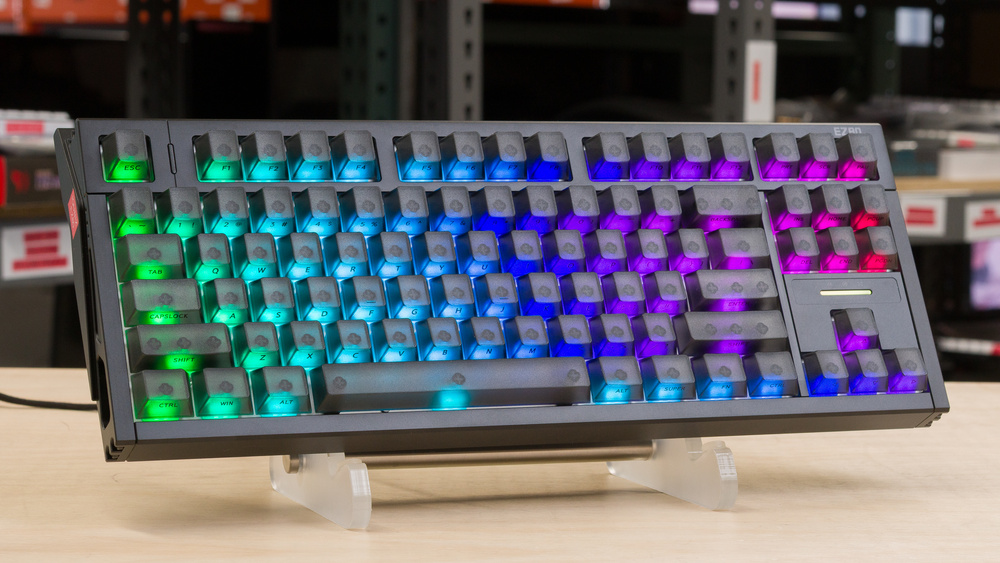
The IQUNIX EZ80/EZ75 are compact gaming keyboards with Hall effect switches. They stand out with their solid CNC aluminum build, multiple layers of foam, and a gasket mount that provides a slightly cushioned typing experience. They support an 8000Hz polling rate and advanced features like Rapid Trigger, SOCD, and dynamic keystrokes. You can access these settings using the web-based configuration software.
Looking for a new keyboard for Black Friday? Check out our summary of all the best Black Friday deals that we've found this year!
Our Verdict
The IQUNIX EZ80 and EZ75 are outstanding gaming keyboards that deliver exceptional latency performance. These keyboards feature superb build quality with solid all-aluminum cases and factory-lubed switches and stabilizers that feel smooth and refined. While the web-based configuration software isn't the most polished, it's feature-rich. It supports per-switch customization of actuation and reset points, as well as all advanced features, including multi-action key bindings and Rapid Trigger. These capabilities enhance input speed and consistency, making them especially valuable for fast-paced gaming scenarios.
Outstanding build quality.
Feature-rich web-based software.
Amazing latency performance.
Excellent backlighting with translucent keycaps on the Dark Side RS variants.
Up to 8000Hz polling rate.
Non-adjustable incline.
The IQUNIX EZ80 and EZ75 work decently well for office use, even though they weren't designed with that setting as a priority. Their build quality is remarkable, and the pre-lubed switches and stabilizers make typing feel smooth and satisfying. On the downside, the lack of incline adjustment can cause discomfort during long sessions; however, a wrist rest can help alleviate the strain. They also don't include wireless connectivity or a numpad, which may limit their usefulness for certain workflows.
Outstanding build quality.
Excellent typing quality.
Fairly quiet.
Non-adjustable incline.
The IQUNIX EZ80 and EZ75 are wired-only keyboards that aren't suitable for use with mobile devices or tablets.
The IQUNIX EZ80 and EZ75 are very good for programming. They have outstanding build quality and smooth, consistent factory-lubed switches and stabilizers that offer an excellent typing experience. They're also quiet and offer great backlighting enhanced by the transparent shine-through keycaps included on the Dark Side RS version we tested.. However, the lack of incline adjustment and a relatively high profile may make it uncomfortable to use over extended periods.
Outstanding build quality.
Excellent backlighting with translucent keycaps on the Dark Side RS variants.
Excellent typing quality.
Fairly quiet.
Non-adjustable incline.
The IQUNIX EZ80 and EZ75 aren't the best choice for entertainment or home theater setups because they are wired-only. Their weight adds to the inconvenience, and the absence of dedicated media keys further limits their usefulness in that context. However, the Dark Side RS variants feature translucent keycaps, which make them more practical for use in low-light environments.
Outstanding build quality.
Excellent backlighting with translucent keycaps on the Dark Side RS variants.
Wired-only.
No dedicated media keys.
The IQUNIX EZ80 and EZ75 offer outstanding raw performance, which makes them well-suited for competitive gaming. They achieve very low and consistent latency in both single-key and multi-key inputs, while also supporting a maximum polling rate of 8000Hz. Their chord split performance is equally strong, allowing them to handle fast or simultaneous inputs with ease.
Amazing latency performance.
Up to 8000Hz polling rate.
Changelog
-
Updated Oct 20, 2025:
Added a reference to the Sony INZONE KBD-H75 as an alternative with a similar performance which has a shorter profile in the Ergonomics test box.
- Updated Oct 01, 2025: Review published.
- Updated Sep 24, 2025: Early access published.
- Updated Aug 19, 2025: Our testers have started testing this product.
Check Price
Differences Between Sizes And Variants
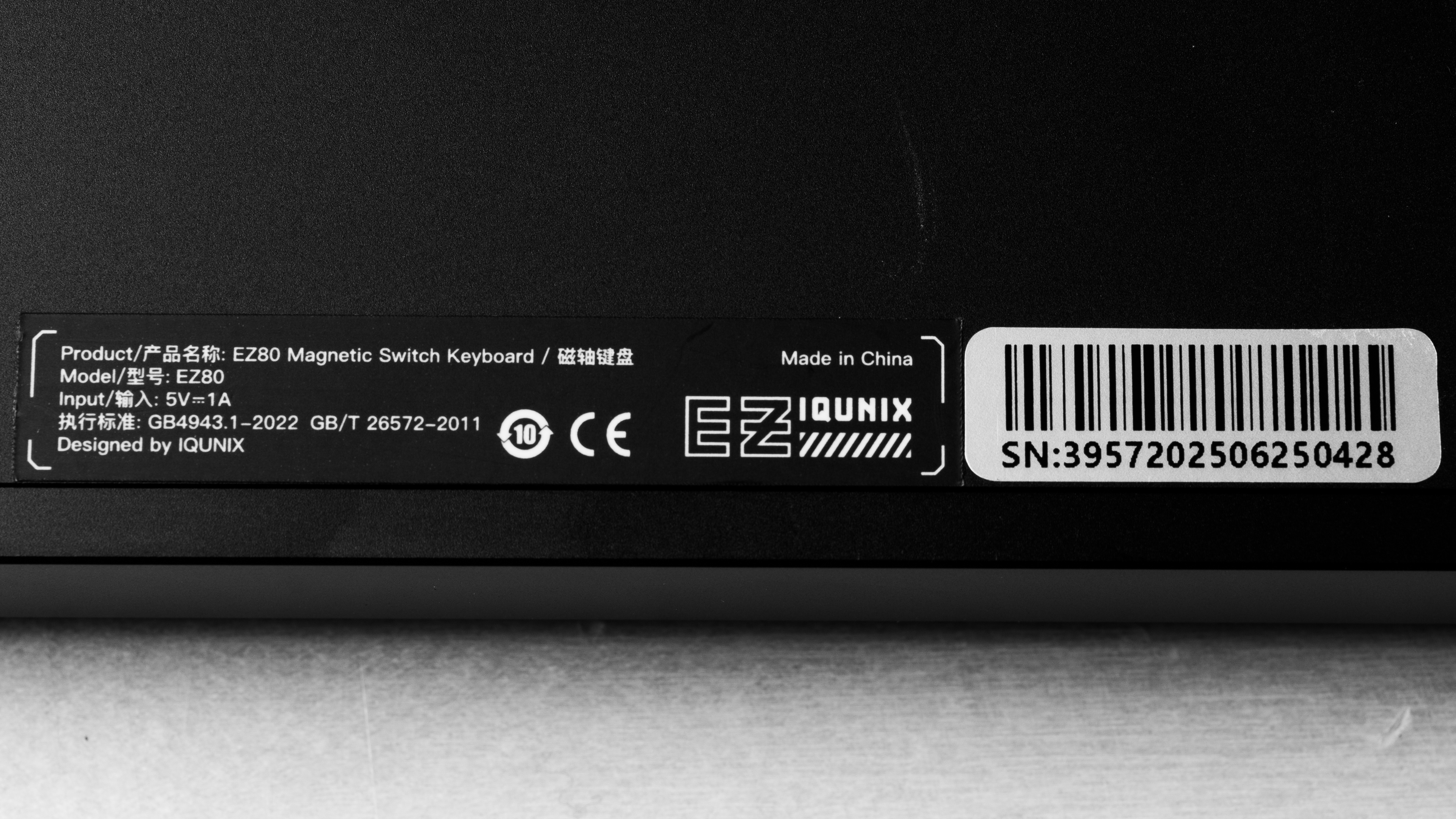
The IQUNIX EZ80 and IQUNIX EZ75 are available in two switch options and two different colorways. We bought and tested the EZ80 model in the Dark Side RS edition. You can see our unit's label here. Here's a table summarizing the different variants:
| Name | Size | Switch Options | Color Options |
|---|---|---|---|
| EZ80 | 80% (TKL) | Magnetic X Ultra, Magnetic Jade Pro | Unnamed default (black, dark gray, blue), double-shot PBT keycaps |
| EZ80 Dark Side RS | 80% (TKL) | Magnetic X Ultra, Magnetic Jade Pro | Dark Side RS (black with side-printed translucent legends), frosted translucent polycarbonate (PC) keycaps* |
| EZ75 | 75% | Magnetic X Ultra | Unnamed default (black, dark gray, blue) double-shot PBT keycaps |
| EZ75 Dark Side RS | 75% | Magnetic X Ultra | Dark Side RS (black with side-printed translucent legends), frosted translucent polycarbonate (PC) keycaps * |
*Keycap material isn't indicated on IQUNIX's website for the Dark Side RS edition, but we have confirmed with the company that they are made of frosted translucent polycarbonate (PC).
Popular Keyboard Comparisons
The IQUNIX EZ80 and EZ75 continue the distinctive design language of their predecessors, the IQUNIX EZ60/EZ63, with the same premium full-aluminum build. They deliver a slight performance upgrade, offering outstanding latency results. While the software's UI is somewhat finicky to interact with compared to what's offered by competitors like NuPhy or Wooting, it still provides a full range of features, including Rapid Trigger and SOCD. The EZ80 and EZ75 compete directly with models like the Wooting 80HE and NuPhy Field75 HE. The Wooting distinguishes itself with a class-leading four-year warranty and excellent software support, while the NuPhy offers strong performance at a more accessible price. Even so, the IQUNIX models make a compelling case with their durable and unique build, enjoyable typing experience, and outstanding overall performance.
For more recommendations, see our picks for the best keyboards, the best gaming keyboards, and the best mechanical keyboards.
The Wooting 80HE and the IQUNIX EZ80 are high-end Hall effect gaming keyboards with 8000Hz polling rates, outstanding latency performance, and outstanding build quality. While the Wooting still manages to edge out these competitors when it comes to the software experience and its industry-leading four-year warranty, the IQUNIX EZ80 provides a slightly better typing experience.
The IQUNIX EZ80/EZ75 and the Keychron K2 HE are gaming keyboards that use Hall effect switches. The IQUNIX models are wired-only and deliver much stronger raw performance, including an 8000Hz maximum polling rate compared to the Keychron's 1000Hz polling. They also use a gasket mount design that gives typing a slightly springier feel, and their cases are built entirely from metal. The Keychron takes a different approach with wireless connectivity for more flexibility. It has a stiffer tray mount design and a case made with a thin aluminum frame and a plastic bottom. The Keychron also offers several size variants, including a 65%, a 75%, a TKL, and a full-size model, while the IQUNIX is available in either a 75% or a TKL size.
The IQUNIX EZ80/EZ75 and the Razer Huntsman V3 Pro are adjustable actuation keyboard gaming keyboards with fantastic latency performance, but they differ in several ways. The Razer uses analog optical switches and is available in three sizes, including a TKL option, and each model comes with a wrist rest. The IQUNIX models, on the other hand, are only available in a TKL and a 75% layout. They don't include a wrist rest but offer a full metal case, unlike the Razer. In terms of performance, the IQUNIX deliver stronger results and support a higher maximum polling rate of 8000Hz. They also use a gasket mount design that gives typing a softer feel and helps reduce noise compared to the Razer. Note that the Razer also requires you to use its on-device Synapse configuration software to configure your keyboard, while the IQUNIX is used with a web-based interface.
The NuPhy Field75 HE and the IQUNIX EZ75 are gaming keyboards that use Hall effect switches, support an 8000Hz polling rate, and feature gasket-mount designs. The NuPhy offers dedicated macro keys along with extra physical controls such as dials and a programmable rotary knob. The EZ75 offers similarly exceptional latency performance, packaged in a more substantial all-aluminum build.
Test Results
The IQUNIX EZ80 has a standard TKL layout, with a full arrow cluster and a 6-key navigation cluster. If you want a bit more desk space, the EZ75 could prove to be a slightly better option. This variant opts for a compact 75% layout with a 4-key navigation column. This allows it to be approximately 5 cm narrower than the EZ80. Here are the dimensions of the EZ75 provided by IQUNIX. These keyboards are also quite heavy, which contributes to their stability.
The IQUNIX EZ80 and EZ75 have superb build quality. They're made of eight individually machined aluminum alloy pieces. Deck flex is minimal, and the fit and finish of all parts are precise with no visible gaps or imperfections. The overall weight and the small feet on all four corners of the case also help the keyboards stay firmly in place. One drawback is that the metallic finish on the case tends to show fingerprints easily.
Note that the material used for the keycaps differs depending on the keyboard variant you choose. Where the default colorway includes double-shot PBT keycaps, the keycaps on the Dark Side RS variant are made of frosted translucent polycarbonate (PC). While IQUNIX doesn't specify the material used for these translucent keycaps on its website, we have managed to confirm this information directly with them. The double-shot PBT on the standard version may be more durable in the long term, but these PC keycaps seem very solid and have a pleasant, textured finish.
These key switches feel very stable, with only some minimal wobble common in Hall effect keyboards. The stabilizers are equally solid, and the keyboard produces a consistent, dampened sound profile thanks to multiple layers of Poron foam. Only the space bar exhibits some slight rattling.
If the keyboard is wobbly on your desk, you can also adjust its level and stability by tightening the screws in the side legs with the included hex wrench.
The IQUNIX EZ80 and IQUNIX EZ75 come with a fixed incline and a somewhat tall profile, which means you need to angle your wrists slightly to reach the keys. The angle itself isn't uncomfortable, but you may want to pair the keyboard with a wrist rest if you plan to type or game for extended periods.
If you're looking for a slightly shorter keyboard with a similar performance that also includes multiple incline settings take a look at the Sony INZONE KBD-H75.
The IQUNIX EZ80 and the IQUNIX EZ75 feature a hot-swappable PCB and support magnetic switches.
IQUNIX's software allows you to choose from a list of supported aftermarket switches, which you can select through its web interface. Here's the list of the switches that are currently offered. Some unlisted magnetic Hall effect switches may still work, but they can have slightly less accurate actuation since they aren't part of the calibrated set.
For people who want to customize the keyboard even further, it's very easy to open it up with easily accessible screws. You can also access and replace the stabilizers without fully disassembling the keyboard or removing the plate.
We tested the Dark Side RS variant of these keyboards, which uses translucent keycaps with side-printed legends. They are very legible, but may require some getting used to as this placement is pretty unusual. The 'standard' non Dark Side RS colorway, on the other hand, comes with doubleshot PBT keycaps that lack shine-through legends, so the readability of legends will be much worse on that variant in low-light environments.
The included braided cable retains some kinks from its packaging but is relatively easy to straighten out.
This keyboard includes macro programming on the web interface with up to 15 slots that can be saved.
The IQUNIX EZ80 and EZ75 have a light bar above the arrow keys, similar in looks to the one on the Wooting 80HE. However, it doesn't do anything. It's white and isn't customizable in any way through the software. The manual IQUNIX provides is very barebones and doesn't even mention it. It may get some use with a future software update. The manual does, however, give a quick list of some of the supported hotkeys.
These keyboards feature metal struts on each side secured with a pair of bolts. Using the included hex wrench, you can loosen or tighten the bolts while pressing down on the keyboard to help it sit evenly on your desk. An illustrated guide showing how to do this is provided in the box, and a digital version is also available on IQUNIX's website.
These keyboards offer an excellent typing experience overall, thanks to textured keycaps that feel smooth yet grippy and stable switches. Larger keys, such as the spacebar, show only minor issues, including a very slight rattle and subtle wobble, but nothing concerning. The gasket mount provides a bit of cushioning, but it's also designed to feel firmer than most standard gasket-mounted mechanical keyboards to provide more feedback while gaming.
Typing speed is easy to maintain after a short adjustment period, though side-printed legends may initially cause some typos if you can't touch-type. Fatigue isn't an issue during prolonged use; however, the tall profile, lack of angle adjustment, and absence of a wrist rest may be uncomfortable when typing for long stretches. The key spacing and travel are standard and comfortable. Sound and feedback are excellent, with well-lubed switches that are extremely smooth and produce a satisfying typing feel.
The IQUNIX EZ80 and EZ75 are quiet and shouldn't disturb people nearby, unless you're in a very noise-sensitive environment.
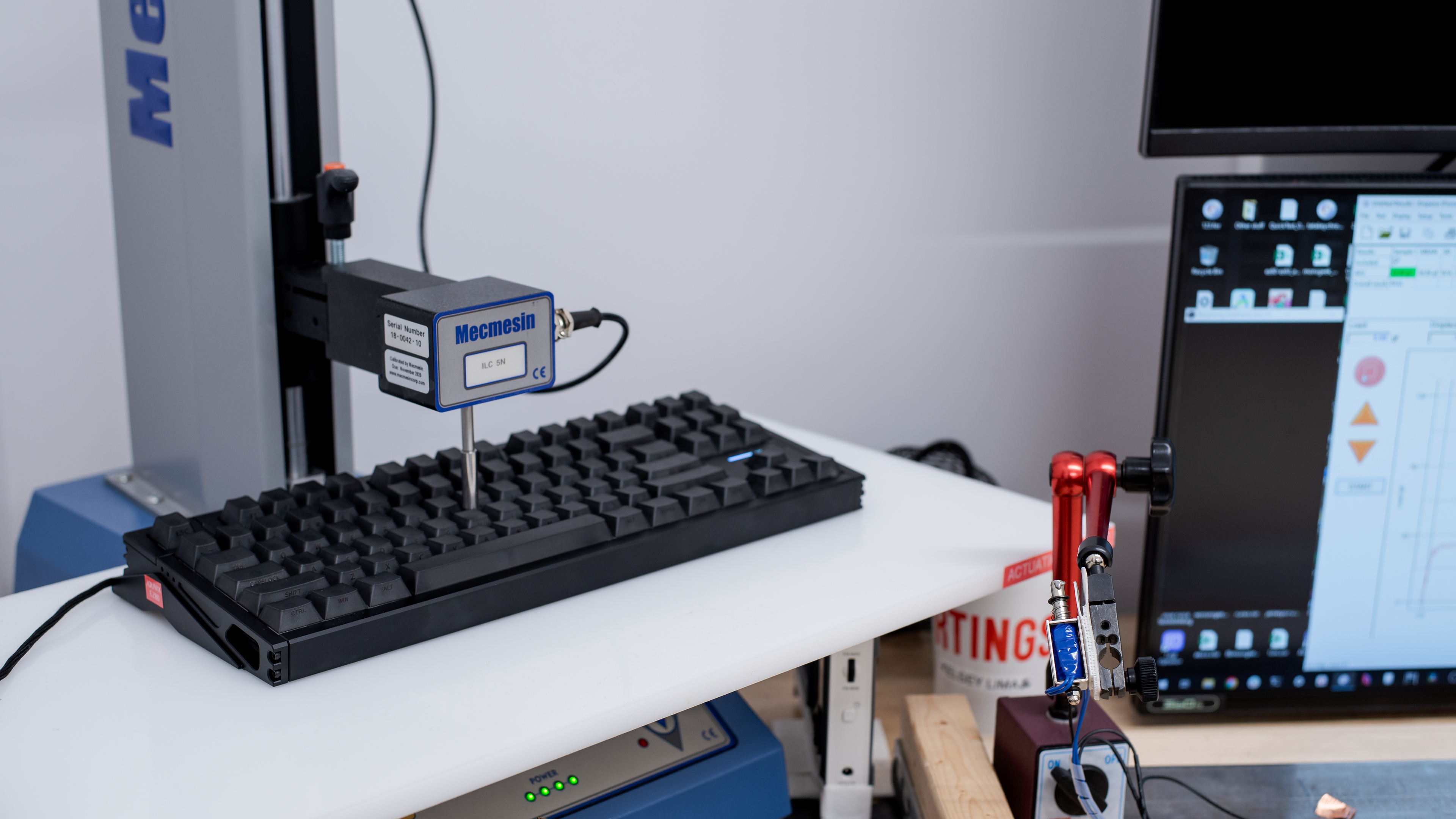
For this test, we obtained measurements using the default Office profile actuation point setting of 1.5 mm and a rapid trigger setting turned off. While this profile indicates a setpoint of 1.5 mm in the software, the keys actuate at 1.1 mm. This was confirmed after multiple runs.
We also tested at optimal settings (0.01 actuation and Rapid Trigger Enabled set to 0.05 with no bottom safety zone). This is the graph from that test.
The IQUNIX EZ80/EZ75 provide outstanding input granularity. The keyboard can detect the switch's actuation with very minimal top and bottom dead zones. IQUNIX's 3rd-gen Hall sensor seems to be working as advertised and demonstrates a marked improvement over the IQUNIX EZ60/EZ63.
This makes this keyboard ideal for very quick initial and follow-up inputs, which are particularly important for competitive gaming scenarios, such as FPS that benefit from techniques like tap-strafing or rhythm titles that require near-instant response.
That said, these keyboards don't support true analog input, a feature that can be useful if you want to replace a gamepad or joystick in racing games or flying sims that can benefit from such input.
We bought this keyboard with Magnetic X Ultra switches, but it's also available with Magnetic Jade switches. Both switches should feel very similar overall. Jades have slightly tighter tolerances and a marginally higher end-force measurement, along with a transparent housing that allows more RGB light transfer. Here are the specifications of both switches provided by IQUNIX.
The IQUNIX EZ80 and EZ75 provide exceptional single-key performance, delivering a highly responsive and consistent experience ideal for all types of games, including high-level competitive play.
We conducted this test using the following settings:
- Actuation point: 0.1 mm
- Rapid trigger: 0.005 mm (Infinite Mode enabled)
- Polling rate: 8000Hz
These keyboards' multi-key latency is superb. They handle multiple simultaneous key presses exceptionally well, with minimal delay when pressing keys. This makes them ideal for gaming scenarios where you need to press additional keys while holding down others.
We conducted this test using the following settings:
- Actuation point: 0.1 mm
- Rapid trigger: 0.005 mm (Infinite Mode enabled)
- Polling rate: 8000Hz
The IQUNIX EZ80/EZ75 keyboards are good at registering four and eight simultaneous key presses, making them well-suited for rhythm games and other titles that require multiple inputs at once.
These keyboards use a web-based client for configuration, which is compatible with Chromium-based browsers.
While the IQUNIX interface feels more clunky and less responsive compared to what's offered by competitors like Wooting or NuPhy, it still provides pretty much all the functions you may want from a high-end gaming keyboard. The recent inclusion of macro recording is a welcome addition that brings it up to par with the competition.
The software allows you to set only one custom profile. This can be limiting if you want to set up multiple profiles depending on the game that you want to play. It's a strange limitation. That said, there are separate Office and Esports profiles that are pre-configured with non-customizable actuation settings. Under the Professional Presets tab, you can also choose from a list of presets related to specific esports professionals if you're looking for inspiration.
This keyboard also supports several advanced features related to adjustable actuation input, detailed below:
Rapid Trigger: This feature allows you to adjust the actuation and reset points of your switches dynamically based on travel distance instead of locking them to a fixed point. The result is faster follow-up inputs, which are particularly useful in situations like counter-strafing in FPS games.
- The 'infinite' mode setting allows you to lower the Rapid Trigger distance to a minimum of 0.005 mm. That said, when activating this mode, there's a pop-up window telling you that it's just to showcase the capabilities of the board, but that it won't enhance your gaming experience.
DKS (Dynamic Keystrokes): This lets you assign up to four different actions to a single key, triggered at different actuation depths.
MT (Mod Tap): This gives you the ability to set two different actions to a single key based on whether you tap or hold down the key.
SOCD (Simultaneous Opposing Cardinal Directions): This monitors a pair of keys to activate based on custom trigger parameters. For example:
- Last input priority: the most recent key pressed takes precedence if both pass the actuation point.
- Absolute priority: one designated key always overrides the other once both pass the actuation point.
This is designed to be used with the A and D keys. In FPS games, pressing both opposing directional keys would no longer cause the character to stop moving. Instead, directional changes can now be made immediately without releasing the previous key.
The IQUNIX EZ80 and EZ75 are broadly compatible across operating systems, though there are a few platform-specific differences. On Windows, everything works as expected without any issues, and the driver is fully compatible.
On macOS, the keyboards also work well, but screen brightness cannot be adjusted through the IQUNIX software. The only brightness setting available is for the keyboard's own backlighting. That said, the software does allow you to set up a key to turn your Mac on or off.
On Linux, all core functions work properly, but volume controls require the use of the Super key instead of the Fn key, unlike on Windows and macOS. The EZ.iqunix software itself doesn't appear to function on Linux. While the website can detect the device through Chrome, no further actions are possible.
You may still be able to adjust your udev permissions to get this working. If you have this keyboard and use Linux, we'd love to hear about your experience in the comments.